Windows 11 Pro x64 24H2 26100.1882 Running Explorer Patcher
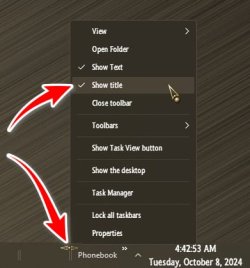
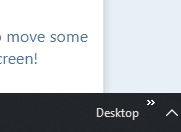
22621.3880.66.6. Is there any way to remove the word "Desktop"
while maintaining the little two arrows/the toolbar itself?
As always, thanks for reading!
-R
My Computer
At a glance
Windows 11 Pro x64 25H2 26200.9445Intel Core i5 9400 @ 2.90GHzDDR4 16384 MBytesIntel UHD Graphics 630
- OS
- Windows 11 Pro x64 25H2 26200.9445
- Computer type
- PC/Desktop
- Manufacturer/Model
- HP
- CPU
- Intel Core i5 9400 @ 2.90GHz
- Motherboard
- HP 8653 (U3E1) A (SMVB)
- Memory
- DDR4 16384 MBytes
- Graphics Card(s)
- Intel UHD Graphics 630