Anyone know how to add Quick Launch to the taskbar in Windows 11?


Here's my taskbar with the address bar positioned above a taskbar toolbar:

View attachment 12106

I am running Windows 11, and, if you still can't figure it out, then look inside my address bar. :ROFLMAO:
How did you make the address bar so small? Here it takes no less than 2 rows.
 

My Computer My Computer

At a glance

Windows 11
OS
Windows 11
How did you make the address bar so small? Here it takes no less than 2 rows.
In ExplorerPatcher settings, you can change the Taskbar icons size to 'Small' (default = 'Large'). In Windows settings I have also changed the scaling for my 4k TV to 200%. As for the horizontal size, there is an empty toolbar to the right side of my address bar. Without it, the refresh button of my address bar was almost touching my system tray icons. I can't remember what else I had to change, but you may have to futz around with the taskbar height by changing it to 3 rows before you change the display scaling to 200% and then change it back to 2 rows again after that. And basically that's it (I think).
 

My Computers My Computers

  • At a glance

    11 Homei7 13650HX16GB DDR5GeForce RTX 4060 Mobile
    OS
    11 Home
    Computer type
    Laptop
    Manufacturer/Model
    Asus TUF Gaming F16 (2024)
    CPU
    i7 13650HX
    Memory
    16GB DDR5
    Graphics Card(s)
    GeForce RTX 4060 Mobile
    Sound Card
    Eastern Electric MiniMax DAC Supreme; Emotiva UMC-200; Astell & Kern AK240
    Monitor(s) Displays
    Sony Bravia XR-55X90J
    Screen Resolution
    3840×2160
    Hard Drives
    512GB SSD internal
    37TB external
    PSU
    Li-ion
    Cooling
    2× Arc Flow Fans, 4× exhaust vents, 5× heatpipes
    Keyboard
    Logitech K800
    Mouse
    Logitech G402
    Internet Speed
    30Mbit/s up, 500Mbit/s down
    Browser
    FF
    Antivirus
    What's an antivirus?
  • At a glance

    11 Homei5 1135G716GB DDR4Intel Iris Xe
    Operating System
    11 Home
    Computer type
    Laptop
    Manufacturer/Model
    Medion S15450
    CPU
    i5 1135G7
    Memory
    16GB DDR4
    Graphics card(s)
    Intel Iris Xe
    Sound Card
    Eastern Electric MiniMax DAC Supreme; Emotiva UMC-200; Astell & Kern AK240
    Monitor(s) Displays
    Sony Bravia XR-55X90J
    Screen Resolution
    3840×2160
    Hard Drives
    2TB SSD internal
    37TB external
    PSU
    Li-ion
    Keyboard
    Logitech K800
    Mouse
    Logitech G402
    Internet Speed
    30Mbit/s up, 500Mbit/s down
    Browser
    FF
On a German forum they said yesterday that Microsoft will bring back the possibilty to "drag and drop" to the taskbar after Christmas. ... ... ... ...
For insiders !
But nevertheless. ... We won !
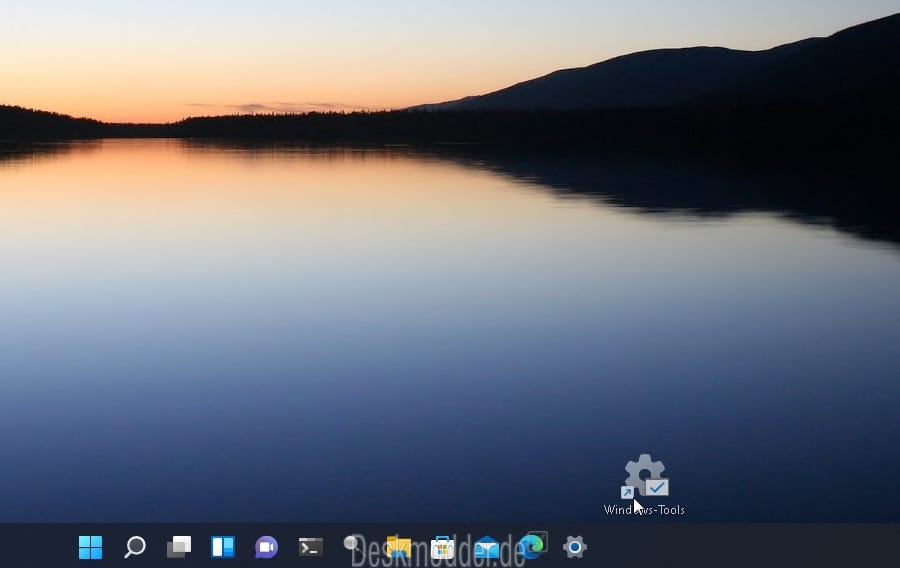
If ifs and buts were feng shui toolbars and shortcuts, then we'd all have a Merry Christmas! 😂
 

My Computers My Computers

  • At a glance

    11 Homei7 13650HX16GB DDR5GeForce RTX 4060 Mobile
    OS
    11 Home
    Computer type
    Laptop
    Manufacturer/Model
    Asus TUF Gaming F16 (2024)
    CPU
    i7 13650HX
    Memory
    16GB DDR5
    Graphics Card(s)
    GeForce RTX 4060 Mobile
    Sound Card
    Eastern Electric MiniMax DAC Supreme; Emotiva UMC-200; Astell & Kern AK240
    Monitor(s) Displays
    Sony Bravia XR-55X90J
    Screen Resolution
    3840×2160
    Hard Drives
    512GB SSD internal
    37TB external
    PSU
    Li-ion
    Cooling
    2× Arc Flow Fans, 4× exhaust vents, 5× heatpipes
    Keyboard
    Logitech K800
    Mouse
    Logitech G402
    Internet Speed
    30Mbit/s up, 500Mbit/s down
    Browser
    FF
    Antivirus
    What's an antivirus?
  • At a glance

    11 Homei5 1135G716GB DDR4Intel Iris Xe
    Operating System
    11 Home
    Computer type
    Laptop
    Manufacturer/Model
    Medion S15450
    CPU
    i5 1135G7
    Memory
    16GB DDR4
    Graphics card(s)
    Intel Iris Xe
    Sound Card
    Eastern Electric MiniMax DAC Supreme; Emotiva UMC-200; Astell & Kern AK240
    Monitor(s) Displays
    Sony Bravia XR-55X90J
    Screen Resolution
    3840×2160
    Hard Drives
    2TB SSD internal
    37TB external
    PSU
    Li-ion
    Keyboard
    Logitech K800
    Mouse
    Logitech G402
    Internet Speed
    30Mbit/s up, 500Mbit/s down
    Browser
    FF
Does anyone know how to add Quick Launch to the taskbar in Windows 11
please?

1 Yes. Here is a snip of QuickLaunch on my Windows 11 Taskbar.
TaskbarToolbar-QuickLaunch-D11m.png


2 I used the UndockingDisabled method to restore Taskbar Toolbar capabilities.
EnableUndockedTaskBar.reg
Code:
Windows Registry Editor Version 5.00
;This creates the UndockingDisabled entry to enable the Taskbar to show Taskbar Toolbars again
; Windows must be restarted for the change to take effect
[HKEY_LOCAL_MACHINE\SOFTWARE\Microsoft\Windows\CurrentVersion\Shell\Update\Packages]
"UndockingDisabled"=dword:00000001
I had found this method in Change Taskbar to old form [#4, 20-21] - ElevenForum

One side-effect of the UndockingDisabled method is that the Start button no longer does anything. It just sits there like a lemon. So you can either use an alternative method of enabling Taskbar Toolbars or you can, like me, use a Taskbar Toolbar to do that job [see para 4 below].


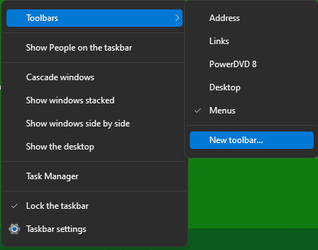
3 QuickLaunch is no longer offered in the list of ready-made Taskbar Toolbars
TaskbarToolbar, selection menu-D11m.png
so I clicked on New toolbar then browsed to
Code:
%UserProfile%\AppData\Roaming\Microsoft\Internet Explorer\Quick Launch
and selected it.


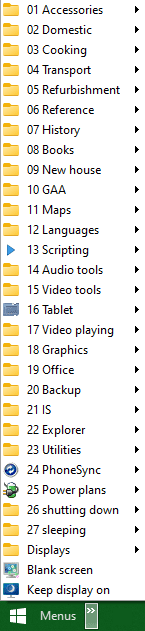
4 You can add, edit, remove Taskbar Toolbar shortcuts. I started off with a clean slate for my main one and built it up to hold all I need.
TaskbarToolbar-Menus-D11m.png
Taskbar Toolbars - Creating and naming, customising, moving - TenForums


5 I also did some other Taskbar-related changes. See My Taskbar setup [post #6] - ElevenForum
Hollywood post #19 has warned that the next Cumulative update will affect Taskbar/SysTray icons under these conditions.


All the best,
Denis
 

My Computer My Computer

At a glance

Windows 11 Home x64 Version 25H2 Build 26200....
OS
Windows 11 Home x64 Version 25H2 Build 26200.8037
Here's my taskbar with the address bar positioned above a taskbar toolbar:
So I must be dense this morning. First, are you running an Insider version of W11?

How did you get the Taskbar to double height (with a 3 line calendar/clock)? Mine appears to be "Locked" but there is no option to unlock it.

When I right click on the Taskbar, my only option is "Taskbar settings" and there is no option in there to add toolbars. So how did you get the Address bar in there?
 

My Computer My Computer

At a glance

W10 Pro
OS
W10 Pro
In ExplorerPatcher settings, you can change the Taskbar icons size to 'Small'
Of course, it is set to small.
I see this:
1635835970932.png
The Address bar is huge and always occupies the whole vertical space of the taskbar. It also makes the taskbar 2-row even if it was 1-row before adding the address bar. I cannot make the address bar smaller.
 

My Computer My Computer

At a glance

Windows 11
OS
Windows 11
Of course, it is set to small.
I see this:
View attachment 12244
The Address bar is huge and always occupies the whole vertical space of the taskbar. It also makes the taskbar 2-row even if it was 1-row before adding the address bar. I cannot make the address bar smaller.
Maybe I'm just too smart... :p Try resizing the taskbar height to 3 rows before dragging the toolbar to the bottom row and then finally resize the taskbar height to 2 rows.
 

My Computers My Computers

  • At a glance

    11 Homei7 13650HX16GB DDR5GeForce RTX 4060 Mobile
    OS
    11 Home
    Computer type
    Laptop
    Manufacturer/Model
    Asus TUF Gaming F16 (2024)
    CPU
    i7 13650HX
    Memory
    16GB DDR5
    Graphics Card(s)
    GeForce RTX 4060 Mobile
    Sound Card
    Eastern Electric MiniMax DAC Supreme; Emotiva UMC-200; Astell & Kern AK240
    Monitor(s) Displays
    Sony Bravia XR-55X90J
    Screen Resolution
    3840×2160
    Hard Drives
    512GB SSD internal
    37TB external
    PSU
    Li-ion
    Cooling
    2× Arc Flow Fans, 4× exhaust vents, 5× heatpipes
    Keyboard
    Logitech K800
    Mouse
    Logitech G402
    Internet Speed
    30Mbit/s up, 500Mbit/s down
    Browser
    FF
    Antivirus
    What's an antivirus?
  • At a glance

    11 Homei5 1135G716GB DDR4Intel Iris Xe
    Operating System
    11 Home
    Computer type
    Laptop
    Manufacturer/Model
    Medion S15450
    CPU
    i5 1135G7
    Memory
    16GB DDR4
    Graphics card(s)
    Intel Iris Xe
    Sound Card
    Eastern Electric MiniMax DAC Supreme; Emotiva UMC-200; Astell & Kern AK240
    Monitor(s) Displays
    Sony Bravia XR-55X90J
    Screen Resolution
    3840×2160
    Hard Drives
    2TB SSD internal
    37TB external
    PSU
    Li-ion
    Keyboard
    Logitech K800
    Mouse
    Logitech G402
    Internet Speed
    30Mbit/s up, 500Mbit/s down
    Browser
    FF
So I must be dense this morning. First, are you running an Insider version of W11?
No.
How did you get the Taskbar to double height (with a 3 line calendar/clock)? Mine appears to be "Locked" but there is no option to unlock it.
I can't remember exactly. See my previous reply to this thread.
When I right click on the Taskbar, my only option is "Taskbar settings" and there is no option in there to add toolbars. So how did you get the Address bar in there?
Download and install ExplorerPatcher from a guy named Valentin-Gabriel Radu (valinet) on GitHub. Be sure to consult the README page first.
 

My Computers My Computers

  • At a glance

    11 Homei7 13650HX16GB DDR5GeForce RTX 4060 Mobile
    OS
    11 Home
    Computer type
    Laptop
    Manufacturer/Model
    Asus TUF Gaming F16 (2024)
    CPU
    i7 13650HX
    Memory
    16GB DDR5
    Graphics Card(s)
    GeForce RTX 4060 Mobile
    Sound Card
    Eastern Electric MiniMax DAC Supreme; Emotiva UMC-200; Astell & Kern AK240
    Monitor(s) Displays
    Sony Bravia XR-55X90J
    Screen Resolution
    3840×2160
    Hard Drives
    512GB SSD internal
    37TB external
    PSU
    Li-ion
    Cooling
    2× Arc Flow Fans, 4× exhaust vents, 5× heatpipes
    Keyboard
    Logitech K800
    Mouse
    Logitech G402
    Internet Speed
    30Mbit/s up, 500Mbit/s down
    Browser
    FF
    Antivirus
    What's an antivirus?
  • At a glance

    11 Homei5 1135G716GB DDR4Intel Iris Xe
    Operating System
    11 Home
    Computer type
    Laptop
    Manufacturer/Model
    Medion S15450
    CPU
    i5 1135G7
    Memory
    16GB DDR4
    Graphics card(s)
    Intel Iris Xe
    Sound Card
    Eastern Electric MiniMax DAC Supreme; Emotiva UMC-200; Astell & Kern AK240
    Monitor(s) Displays
    Sony Bravia XR-55X90J
    Screen Resolution
    3840×2160
    Hard Drives
    2TB SSD internal
    37TB external
    PSU
    Li-ion
    Keyboard
    Logitech K800
    Mouse
    Logitech G402
    Internet Speed
    30Mbit/s up, 500Mbit/s down
    Browser
    FF
Maybe I'm just too smart... :p Try resizing the taskbar height to 3 rows before dragging the toolbar to the bottom row and then finally resize the taskbar height to 2 rows.
That's the first thing I tried and it does not work. It is simple with W10, just like resizing an open window. But W11, nothing happens when I try to grab the top edge. I will check out ExplorerPatcher and see if that helps.
 

My Computer My Computer

At a glance

W10 Pro
OS
W10 Pro
My theorie:

The whole "Quick Launch"-thing ("Taskbar") is linked to Internet Explorer. See the link given above by:
Code:
%UserProfile%\AppData\Roaming\Microsoft\Internet Explorer\Quick Launch

And Internet Explorer was deeply rooted into the (Windows) system (at least) since Windows 98.

Now Microsoft would like to get rid of Internet Explorer. ...

But they can't !

I am not 100% sure (don't know enough about coding), but I believe that's it.
feng shui
Yes ;) !
 
Last edited:

My Computer My Computer

At a glance

WIN 11 / WIN 10 dual bootIntel Pentium G 4400 (Skylake)DDR4 12 GBinternal (Intel HD 510)
OS
WIN 11 / WIN 10 dual boot
Computer type
PC/Desktop
Manufacturer/Model
No clue (x64 based) from 2016
CPU
Intel Pentium G 4400 (Skylake)
Motherboard
MS 7971, Bios: American Megatrend C.E0 (2018)
Memory
DDR4 12 GB
Graphics Card(s)
internal (Intel HD 510)
Hard Drives
2x Western Digital (no SSD)
My theorie:

The whole "Quick Launch"-thing ("Taskbar") is linked to Internet Explorer. See the link given above by:

Roger,

Whilst the Quick launch folder is at
Code:
%UserProfile%\AppData\Roaming\Microsoft\Internet Explorer\Quick Launch
it does not mean that Taskbar Toolbars are linked to IE.
The Quick launch Taskbar Toolbar is merely one example of a pre-built Taskbar Toolbar. It has no particular significance other than that it was what the OP asked about.
- MS might or might not keep that folder if it eventually removes all references to IE but the shortcuts exist independently of that anyway.
- The only one of its shortcuts that is at all difficult to track down elsewhere is the Windows switcher / Switch between windows one [the WinKey-Tab shortcut] so I've attached a zipped copy.

You can make a Taskbar Toolbar out of any folder you want. My main one is a folder on my data HDD.

All the best,
Denis
 

Attachments

Last edited:

My Computer My Computer

At a glance

Windows 11 Home x64 Version 25H2 Build 26200....
OS
Windows 11 Home x64 Version 25H2 Build 26200.8037
1 Yes. Here is a snip of QuickLaunch on my Windows 11 Taskbar.
View attachment 12121


2 I used the UndockingDisabled method to restore Taskbar Toolbar capabilities.
EnableUndockedTaskBar.reg
Code:
Windows Registry Editor Version 5.00
;This creates the UndockingDisabled entry to enable the Taskbar to show Taskbar Toolbars again
; Windows must be restarted for the change to take effect
[HKEY_LOCAL_MACHINE\SOFTWARE\Microsoft\Windows\CurrentVersion\Shell\Update\Packages]
"UndockingDisabled"=dword:00000001
I had found this method in Change Taskbar to old form [#4, 20-21] - ElevenForum

One side-effect of the UndockingDisabled method is that the Start button no longer does anything. It just sits there like a lemon. So you can either use an alternative method of enabling Taskbar Toolbars or you can, like me, use a Taskbar Toolbar to do that job [see para 4 below].


3 QuickLaunch is no longer offered in the list of ready-made Taskbar Toolbars
View attachment 12122
so I clicked on New toolbar then browsed to
Code:
%UserProfile%\AppData\Roaming\Microsoft\Internet Explorer\Quick Launch
and selected it.


4 You can add, edit, remove Taskbar Toolbar shortcuts. I started off with a clean slate for my main one and built it up to hold all I need.
View attachment 12124
Taskbar Toolbars - Creating and naming, customising, moving - TenForums


5 I also did some other Taskbar-related changes. See My Taskbar setup [post #6] - ElevenForum
Hollywood post #19 has warned that the next Cumulative update will affect Taskbar/SysTray icons under these conditions.


All the best,
Denis

Thanks for replying. :)

Yeah I got the Quick Launch toolbar running... I did the other day too but it mysteriously disappeared since then. But how did you get it to sit over to the left next to the Start button please? :unsure:

I unlocked the toolbars and tried to drag the Quick Launch toolbar double vertical lines over like that way I have in previous versions of Windows but it will only go as far as halfway in my Windows 11!! :cry:

Tips please!!

Thanks. :)
 

My Computer My Computer

At a glance

Windows 10 Insider Preview 21390
OS
Windows 10 Insider Preview 21390

My Computer My Computer

At a glance

Windows 11 Home x64 Version 25H2 Build 26200....
OS
Windows 11 Home x64 Version 25H2 Build 26200.8037

My Computer My Computer

At a glance

Windows 11Ryzen 932GbGeForce 1070 GTX
OS
Windows 11
Computer type
PC/Desktop
CPU
Ryzen 9
Motherboard
ASUS ROG Strix X570-E Gaming
Memory
32Gb
Graphics Card(s)
GeForce 1070 GTX
Sound Card
Sound Blaster Z
Monitor(s) Displays
ASUS ROG PG279
Screen Resolution
2560 x 1440

My Computer My Computer

At a glance

Windows 11Ryzen 932GbGeForce 1070 GTX
OS
Windows 11
Computer type
PC/Desktop
CPU
Ryzen 9
Motherboard
ASUS ROG Strix X570-E Gaming
Memory
32Gb
Graphics Card(s)
GeForce 1070 GTX
Sound Card
Sound Blaster Z
Monitor(s) Displays
ASUS ROG PG279
Screen Resolution
2560 x 1440
I was being lazy and found a freeware solution to quick launch my applications. The "Portable Start Menu" was just what I was looking for.


Take Care,
Scott
 

My Computer My Computer

At a glance

Windows 11
OS
Windows 11
Create a folder and name it QUICK LAUNCH

Follow these steps to pin it to the taskbar.


My Computer My Computer

At a glance

windows 11 ,Ubuntu Cinnamon - for tinkering onlyIntel i51140016 GB0
OS
windows 11 ,Ubuntu Cinnamon - for tinkering only
Computer type
PC/Desktop
Manufacturer/Model
No Name - Assembled by a Compute shop in a Strip Mall.
CPU
Intel i511400
Motherboard
ASUS PRIME B560-PLUS motherboard
Memory
16 GB
Graphics Card(s)
0
Sound Card
0
Monitor(s) Displays
25 in BenQ
Screen Resolution
1920 x 1080
Hard Drives
9 SSDs 4 Nvme, 2 in M.2 slot and 2 in PCIE with adapter + 5 Sata. DVD drive
PSU
600w
Case
Antec- VSK4000E-U3 Mid Tower
Internet Speed
Bell pure fibre optic. 3 GB package. 6E Wireless adapter 750/500
Browser
Firefox, Microsoft Edge
Antivirus
Defender
And a little late to the party! However, I just stumbled across adding the Quick Launch Bar to my Taskbar via Explorer Patcher here:


If you've added the QL Bar to Windows 10, 8, 7, etc., once you have Explorer Patcher installed, it's a piece of cake to get your QL Bar going again.

Before I found this, I was pinning things to the Taskbar, but it's not ideal, since they take up too much space for my liking.
 

My Computers My Computers

  • At a glance

    Windows 11 23H2 22631.2861Intel(R) Core(TM) i7-10700 CPU @ 2.90GHz 2.90...16384 MBytesIntel UHD Graphics 630
    OS
    Windows 11 23H2 22631.2861
    Computer type
    PC/Desktop
    Manufacturer/Model
    HP Envy TE01-1xxx
    CPU
    Intel(R) Core(TM) i7-10700 CPU @ 2.90GHz 2.90 GHz
    Motherboard
    16.0GB Dual-Channel Unknown @ 1463MHz (21-21-21-47)
    Memory
    16384 MBytes
    Graphics Card(s)
    Intel UHD Graphics 630
    Sound Card
    Realtek High Definition Audio
    Monitor(s) Displays
    Monitor 1 - Acer 27" Monitor 2 - Acer 27"
    Screen Resolution
    1920 x 1080
    Hard Drives
    WDC PC SN530 SDBPNPZ-512G-1006 (SSD)
    Seagate ST1000DM003-1SB102
    Seagate BUP Slim SCSI Disk Device (SSD)
    PSU
    HP
    Case
    HP
    Cooling
    Standard
    Keyboard
    Logitech Wave K350
    Mouse
    Logitech M705
    Internet Speed
    500 mbps
    Browser
    Firefox
    Antivirus
    Windows Defender
    Other Info
    That's all Folks!
  • At a glance

    Windows 11Intel Core i7 (10th gen) 1070016 GBIntel UHD Graphics 630
    Operating System
    Windows 11
    Computer type
    PC/Desktop
    Manufacturer/Model
    HP
    CPU
    Intel Core i7 (10th gen) 10700
    Motherboard
    Intel
    Memory
    16 GB
    Graphics card(s)
    Intel UHD Graphics 630
    Sound Card
    Built-in
    Monitor(s) Displays
    Acer 27" & Samsung 24"
    Screen Resolution
    1920 x
    Hard Drives
    SSD (512 GB)
    HDD (1 TB)
    Seagate
    PSU
    Intel i7 10th Generation
    Case
    HP
    Cooling
    HP/Intel?
    Keyboard
    Logitech Wave K350
    Mouse
    Logitech M705
    Internet Speed
    50 mbps
    Browser
    Firefox 90.2
    Antivirus
    Windows Defender
    Other Info
    Headphone/Microphone Combo
    SuperSpeed USB Type-A (4 on front)
    HP 3-in-One Card Readr
    SuperSpeed USB Type-C
    DVD Writer

Latest Support Threads

Back
Top Bottom