
ASUS ROG Strix Z790-A Gaming LGA 1700 - BIOS 1801 - Update problems ?


Make note of the 2nd paragraph in post #3.


It could be...

Bad USB stick.
Bad format.
Bad download.
Glitch in the rename.


You seem to know what you're doing. just start from the beginning again.
This time, have some pizza rolls handy. :-)
Try a new download, format and rename first.
If you're still having problems... try a new USB stick, altogether.
As Ghot says here, two of the most common reasons for a solid green light appearing is the USB drive is not formatted correctly or you have the wrong BIOS downloaded. To solve the first, use diskpart to format the USB drive with MBR, not GPT. To solve the second problem, look very carefully at the motherboard BIOS you are downloading; Asus has a bad habit of naming too many motherboards with very similar names. For example, I have the Asus ROG Strix Z590-A Gaming WIFI motherboard, but there is also an Asus ROG Strix Z590-A Gaming WIFI II motherboard.
 

My Computers My Computers

  • At a glance

    Windows 11 Pro 25H2Core i7 10700K 3.8 GHzCorsair Vengeance LPX DDR4 128 GB 3000MHzAsus ProArt GeForce RTX 4070 Ti Super 16 GB
    OS
    Windows 11 Pro 25H2
    Computer type
    PC/Desktop
    Manufacturer/Model
    Wordsworth 10000
    CPU
    Core i7 10700K 3.8 GHz
    Motherboard
    Asus ROG Strix Z590-A Gaming Wifi
    Memory
    Corsair Vengeance LPX DDR4 128 GB 3000MHz
    Graphics Card(s)
    Asus ProArt GeForce RTX 4070 Ti Super 16 GB
    Sound Card
    Asus Xonar DSX
    Monitor(s) Displays
    HP 2709m
    Screen Resolution
    1920x1080
    Hard Drives
    Samsung 990 Pro M.2 SSD 2 TB; Samsung 990 Pro M.2 SSD 4 TB
    PSU
    Thermaltake Toughpower GF3 1350W
    Case
    Fractal Design Meshify 2
    Cooling
    CPU-Noctua NH D15 Chromax, GPU-Stock, Case-Noctua Chromax 3x140
    Keyboard
    Microsoft Natural Ergo 4000
    Mouse
    HP X500
    Internet Speed
    Cable
    Browser
    Vivaldi, MS Edge
    Antivirus
    Malwarebytes 5.2.4, Windows Defender
    Other Info
    Klipsch Promedia 5.1 THX
    Asus External Blu-Ray 16D1X-USB 3.0
  • At a glance

    Windows 11 Pro 25H2Core i7 6700K 4.0 GHzCorsair Vengeance LPX DDR4 32 GB 3000MHzAsus GeForce GTX 1050 Ti
    Operating System
    Windows 11 Pro 25H2
    Computer type
    PC/Desktop
    Manufacturer/Model
    Wordsworth 6000
    CPU
    Core i7 6700K 4.0 GHz
    Motherboard
    Asus Z170 Pro
    Memory
    Corsair Vengeance LPX DDR4 32 GB 3000MHz
    Graphics card(s)
    Asus GeForce GTX 1050 Ti
    Sound Card
    Asus Xonar SE
    Monitor(s) Displays
    HP X24ih
    Screen Resolution
    1920x1080
    Hard Drives
    Intel 760p M.2 SSD 500 GB; Intel 540 SSD 480 GB; Intel 335 SSD 240 GB
    PSU
    Thermaltake Toughpower GF1 750W
    Case
    Lian Li PC-B70
    Cooling
    CPU- Noctua NH-D15; GPU-Stock; Case-Noctua Chromax 2x140, 2x120
    Keyboard
    Microsoft Wireless Comfort 5050
    Mouse
    Microsoft Wireless Comfort 5050
    Internet Speed
    Cable
    Browser
    Vivaldi, MS Edge
    Antivirus
    Malwarebytes 4.4.3, Windows Defender
    Other Info
    HP bd 340
    HP bd 240
    Denon DRA-800H
    Klipsch RP-600M
    Klipsch R-100SW (2)

    System 3 Specs
    Windows 11 Pro 25H2
    Core i7 10700K 3.8 GHz
    Asus ROG Strix Z590-A Gaming Wifi
    Corsair Vengeance LPX DDR4 32 GB 3200MHz
    Asus Radeon RX560 Dual 4 GB
    Xonar SE
    Samsung 980 Pro M.2 SSD 1 TB (2)
    Thermaltake Toughpower GF3 850W
    Fractal Design Meshify 2
    CPU-Noctua NH D15 Chromax, GPU-Stock, Case-Noctua Chromax 2x140,1x120
or you have the wrong BIOS downloaded


It may be the right BIOS, but like any download... the internet may have burped during the download.
A bit or byte missing here or there, may not affect a lot of downloads. But it will DEFINITELY affect a BIOS download.
 

My Computers My Computers

  • At a glance

    Win 11 Home ♦♦♦26200.8655 ♦♦♦♦♦♦♦25H2AMD Ryzen 7 3700XG.Skill (F4-3200C14D-16GTZKW)EVGA RTX 2070 (08G-P4-2171-KR)
    OS
    Win 11 Home ♦♦♦26200.8655 ♦♦♦♦♦♦♦25H2
    Computer type
    PC/Desktop
    Manufacturer/Model
    Built by Ghot® [May 2020]
    CPU
    AMD Ryzen 7 3700X
    Motherboard
    Asus Pro WS X570-ACE (BIOS 5302)
    Memory
    G.Skill (F4-3200C14D-16GTZKW)
    Graphics Card(s)
    EVGA RTX 2070 (08G-P4-2171-KR)
    Sound Card
    Realtek ALC1220P / ALC S1220A
    Monitor(s) Displays
    Dell U3011 30"
    Screen Resolution
    2560 x 1600
    Hard Drives
    2x Samsung 860 EVO 500GB,
    WD 4TB Black FZBX - SATA III,
    WD 8TB Black FZBX - SATA III,
    DRW-24B1ST CD/DVD Burner
    PSU
    PC Power & Cooling 750W Quad EPS12V
    Case
    Cooler Master ATCS 840 Tower
    Cooling
    CM Hyper 212 EVO (push/pull)
    Keyboard
    Ducky DK9008 Shine II Blue LED
    Mouse
    Logitech Optical M-100
    Internet Speed
    300/300
    Browser
    Firefox (latest)
    Antivirus
    Bitdefender Total Security
    Other Info
    Speakers: Klipsch Pro Media 2.1
  • At a glance

    Windows XP Pro 32bit w/SP3AMD Athlon 64 X2 5000+ (OC'd @ 3.2Ghz)TWIN2X2048-6400C4DHX (2 x 1GB, DDR2 800)EVGA 256-P2-N758-TR GeForce 8600GT SSC
    Operating System
    Windows XP Pro 32bit w/SP3
    Computer type
    PC/Desktop
    Manufacturer/Model
    Built by Ghot® (not in use)
    CPU
    AMD Athlon 64 X2 5000+ (OC'd @ 3.2Ghz)
    Motherboard
    ASUS M2N32-SLI Deluxe Wireless Edition
    Memory
    TWIN2X2048-6400C4DHX (2 x 1GB, DDR2 800)
    Graphics card(s)
    EVGA 256-P2-N758-TR GeForce 8600GT SSC
    Sound Card
    Onboard
    Monitor(s) Displays
    ViewSonic G90FB Black 19" Professional (CRT)
    Screen Resolution
    up to 2048 x 1536
    Hard Drives
    WD 36GB 10,000rpm Raptor SATA
    Seagate 80GB 7200rpm SATA
    Lite-On LTR-52246S CD/RW
    Lite-On LH-18A1P CD/DVD Burner
    PSU
    PC Power & Cooling Silencer 750 Quad EPS12V
    Case
    Generic Beige case, 80mm fans
    Cooling
    ZALMAN 9500A 92mm CPU Cooler
    Keyboard
    Logitech Classic Keybooard 200
    Mouse
    Logitech Optical M-BT96a
    Internet Speed
    300/300
    Browser
    Firefox 3.x ??
    Antivirus
    Symantec (Norton)
    Other Info
    Still assembled, still runs. Haven't turned it on for 15 years?
I suspect the problem will be solved by starting over with formatting the USB drive in MBR then dropping the downloaded BIOS update on it again.
 

My Computers My Computers

  • At a glance

    Windows 11 Pro 25H2Core i7 10700K 3.8 GHzCorsair Vengeance LPX DDR4 128 GB 3000MHzAsus ProArt GeForce RTX 4070 Ti Super 16 GB
    OS
    Windows 11 Pro 25H2
    Computer type
    PC/Desktop
    Manufacturer/Model
    Wordsworth 10000
    CPU
    Core i7 10700K 3.8 GHz
    Motherboard
    Asus ROG Strix Z590-A Gaming Wifi
    Memory
    Corsair Vengeance LPX DDR4 128 GB 3000MHz
    Graphics Card(s)
    Asus ProArt GeForce RTX 4070 Ti Super 16 GB
    Sound Card
    Asus Xonar DSX
    Monitor(s) Displays
    HP 2709m
    Screen Resolution
    1920x1080
    Hard Drives
    Samsung 990 Pro M.2 SSD 2 TB; Samsung 990 Pro M.2 SSD 4 TB
    PSU
    Thermaltake Toughpower GF3 1350W
    Case
    Fractal Design Meshify 2
    Cooling
    CPU-Noctua NH D15 Chromax, GPU-Stock, Case-Noctua Chromax 3x140
    Keyboard
    Microsoft Natural Ergo 4000
    Mouse
    HP X500
    Internet Speed
    Cable
    Browser
    Vivaldi, MS Edge
    Antivirus
    Malwarebytes 5.2.4, Windows Defender
    Other Info
    Klipsch Promedia 5.1 THX
    Asus External Blu-Ray 16D1X-USB 3.0
  • At a glance

    Windows 11 Pro 25H2Core i7 6700K 4.0 GHzCorsair Vengeance LPX DDR4 32 GB 3000MHzAsus GeForce GTX 1050 Ti
    Operating System
    Windows 11 Pro 25H2
    Computer type
    PC/Desktop
    Manufacturer/Model
    Wordsworth 6000
    CPU
    Core i7 6700K 4.0 GHz
    Motherboard
    Asus Z170 Pro
    Memory
    Corsair Vengeance LPX DDR4 32 GB 3000MHz
    Graphics card(s)
    Asus GeForce GTX 1050 Ti
    Sound Card
    Asus Xonar SE
    Monitor(s) Displays
    HP X24ih
    Screen Resolution
    1920x1080
    Hard Drives
    Intel 760p M.2 SSD 500 GB; Intel 540 SSD 480 GB; Intel 335 SSD 240 GB
    PSU
    Thermaltake Toughpower GF1 750W
    Case
    Lian Li PC-B70
    Cooling
    CPU- Noctua NH-D15; GPU-Stock; Case-Noctua Chromax 2x140, 2x120
    Keyboard
    Microsoft Wireless Comfort 5050
    Mouse
    Microsoft Wireless Comfort 5050
    Internet Speed
    Cable
    Browser
    Vivaldi, MS Edge
    Antivirus
    Malwarebytes 4.4.3, Windows Defender
    Other Info
    HP bd 340
    HP bd 240
    Denon DRA-800H
    Klipsch RP-600M
    Klipsch R-100SW (2)

    System 3 Specs
    Windows 11 Pro 25H2
    Core i7 10700K 3.8 GHz
    Asus ROG Strix Z590-A Gaming Wifi
    Corsair Vengeance LPX DDR4 32 GB 3200MHz
    Asus Radeon RX560 Dual 4 GB
    Xonar SE
    Samsung 980 Pro M.2 SSD 1 TB (2)
    Thermaltake Toughpower GF3 850W
    Fractal Design Meshify 2
    CPU-Noctua NH D15 Chromax, GPU-Stock, Case-Noctua Chromax 2x140,1x120
It may be the right BIOS, but like any download... the internet may have burped during the download.
A bit or byte missing here or there, may not affect a lot of downloads. But it will DEFINITELY affect a BIOS download.
The download is a ZIP file. I've never downloaded a ZIP that was corrupted but still expanded.

I had a similar issue with a Gigabyte board. It turned out that I made a typo when I manually renamed the file. If the OP used the included renamer tool, that wouldn't have happened.

I just checked. The USB drive that worked is MBR.
 

My Computers My Computers

  • At a glance

    Windows 11 26200.8728Amd Threadripper 7970X128GB (4 X 32) G.Skill DDR5 6400 (RDIMM)Gigabyte RTX 4090 OC
    OS
    Windows 11 26200.8728
    Computer type
    PC/Desktop
    Manufacturer/Model
    homebuilt
    CPU
    Amd Threadripper 7970X
    Motherboard
    Gigabyte TRX50 Aero D Rev. 1.0
    Memory
    128GB (4 X 32) G.Skill DDR5 6400 (RDIMM)
    Graphics Card(s)
    Gigabyte RTX 4090 OC
    Sound Card
    none (USB to speakers), Realtek
    Monitor(s) Displays
    Innocn 32" OLED
    Screen Resolution
    3840 X 2160 @ 60Hz
    Hard Drives
    Crucial T700 2TB M.2 NVME SSD
    WD 4TB Blue SATA SSD
    Seagate 18TB IronWolf Pro
    PSU
    BeQuiet! Straight Power 12 1500W
    Case
    Lian Li 011 Dynamic Evo XL
    Cooling
    SilverStone Technology XE360-TR5, with 3 Phanteks T30 fans
    Keyboard
    Cherry KC 500 MX LP (mechanical)
    Mouse
    Logitech M500s (wired)
    Internet Speed
    2000/250 Mbps (down/up)
    Other Info
    xFinity gateway
  • At a glance

    windows 11 26200.8728Intel I9-13900K64GB G.Skill DDR5-6000Gigabyte RTX 3090 ti
    Operating System
    windows 11 26200.8728
    Computer type
    PC/Desktop
    Manufacturer/Model
    homebuilt
    CPU
    Intel I9-13900K
    Motherboard
    Asus RoG Strix Z690-E
    Memory
    64GB G.Skill DDR5-6000
    Graphics card(s)
    Gigabyte RTX 3090 ti
    Sound Card
    built in Realtek
    Monitor(s) Displays
    Philips 27E1N8900 27" OLED
    Screen Resolution
    3840 X 2160 @60Hz
    Hard Drives
    WDC SN850 1TB
    8TB Seagate Ironwolf
    4TB Seagate Ironwolf
    PSU
    eVGA SuperNOVA 1300 GT
    Case
    Lian Li 011 Dynamic Evo
    Cooling
    Corsair iCUE H150i ELITE CAPELLIX Liquid CPU Cooler
    Keyboard
    Cherry Streaming (wired)
    Mouse
    Logitech M500s (wired)
I think the usb stick has to be fat32 format. Easiest way is right click on the device/format/file system. Can set allocation unit size to auto as well. I would also leave the original and the renamed bios on the stick while running bios falshback but that is just me. gl


My Computers My Computers

  • At a glance

    11-25h2amd 9850x3d64gb g.skill @6000cl26pny 5090 oc
    OS
    11-25h2
    CPU
    amd 9850x3d
    Motherboard
    asus x870e apex
    Memory
    64gb g.skill @6000cl26
    Graphics Card(s)
    pny 5090 oc
    Sound Card
    creative x5
    Monitor(s) Displays
    dell aw3225qf
    Screen Resolution
    4k@240
    Hard Drives
    4tb samsung 9100 pro
    4tb samsung 990 pro
    4tb wd black sn850x
    2tb samsung 980 pro (usb)
    PSU
    phanteks 1600w
    Case
    antec flux pro
    Cooling
    phanteks 420x2
  • At a glance

    11-25h2intel 14900ks (dd)48gb g.skill @8200cl38gigabyte 3080ti
    Operating System
    11-25h2
    CPU
    intel 14900ks (dd)
    Motherboard
    asus z790 apex
    Memory
    48gb g.skill @8200cl38
    Graphics card(s)
    gigabyte 3080ti
    Sound Card
    creative ae-7
    Hard Drives
    (2) 2tb 980 pro
    PSU
    bequiet dp12 1000w
    Case
    nzxt h7 flow
    Cooling
    ek cr360 (dd)
I think the usb stick has to be fat32 format. Easiest way is right click on the device/format/file system. Can set allocation unit size to auto as well. I would also leave the original and the renamed bios on the stick while running bios falshback but that is just me. gl

(snip)
The renamer doesn't leave a copy of the original file. Not that it matters.
 

My Computers My Computers

  • At a glance

    Windows 11 26200.8728Amd Threadripper 7970X128GB (4 X 32) G.Skill DDR5 6400 (RDIMM)Gigabyte RTX 4090 OC
    OS
    Windows 11 26200.8728
    Computer type
    PC/Desktop
    Manufacturer/Model
    homebuilt
    CPU
    Amd Threadripper 7970X
    Motherboard
    Gigabyte TRX50 Aero D Rev. 1.0
    Memory
    128GB (4 X 32) G.Skill DDR5 6400 (RDIMM)
    Graphics Card(s)
    Gigabyte RTX 4090 OC
    Sound Card
    none (USB to speakers), Realtek
    Monitor(s) Displays
    Innocn 32" OLED
    Screen Resolution
    3840 X 2160 @ 60Hz
    Hard Drives
    Crucial T700 2TB M.2 NVME SSD
    WD 4TB Blue SATA SSD
    Seagate 18TB IronWolf Pro
    PSU
    BeQuiet! Straight Power 12 1500W
    Case
    Lian Li 011 Dynamic Evo XL
    Cooling
    SilverStone Technology XE360-TR5, with 3 Phanteks T30 fans
    Keyboard
    Cherry KC 500 MX LP (mechanical)
    Mouse
    Logitech M500s (wired)
    Internet Speed
    2000/250 Mbps (down/up)
    Other Info
    xFinity gateway
  • At a glance

    windows 11 26200.8728Intel I9-13900K64GB G.Skill DDR5-6000Gigabyte RTX 3090 ti
    Operating System
    windows 11 26200.8728
    Computer type
    PC/Desktop
    Manufacturer/Model
    homebuilt
    CPU
    Intel I9-13900K
    Motherboard
    Asus RoG Strix Z690-E
    Memory
    64GB G.Skill DDR5-6000
    Graphics card(s)
    Gigabyte RTX 3090 ti
    Sound Card
    built in Realtek
    Monitor(s) Displays
    Philips 27E1N8900 27" OLED
    Screen Resolution
    3840 X 2160 @60Hz
    Hard Drives
    WDC SN850 1TB
    8TB Seagate Ironwolf
    4TB Seagate Ironwolf
    PSU
    eVGA SuperNOVA 1300 GT
    Case
    Lian Li 011 Dynamic Evo
    Cooling
    Corsair iCUE H150i ELITE CAPELLIX Liquid CPU Cooler
    Keyboard
    Cherry Streaming (wired)
    Mouse
    Logitech M500s (wired)
I think the usb stick has to be fat32 format.
Yes, the file system must be fat32, and the partition style MBR not GPT.
 

My Computers My Computers

  • At a glance

    Windows 11 Pro 25H2Core i7 10700K 3.8 GHzCorsair Vengeance LPX DDR4 128 GB 3000MHzAsus ProArt GeForce RTX 4070 Ti Super 16 GB
    OS
    Windows 11 Pro 25H2
    Computer type
    PC/Desktop
    Manufacturer/Model
    Wordsworth 10000
    CPU
    Core i7 10700K 3.8 GHz
    Motherboard
    Asus ROG Strix Z590-A Gaming Wifi
    Memory
    Corsair Vengeance LPX DDR4 128 GB 3000MHz
    Graphics Card(s)
    Asus ProArt GeForce RTX 4070 Ti Super 16 GB
    Sound Card
    Asus Xonar DSX
    Monitor(s) Displays
    HP 2709m
    Screen Resolution
    1920x1080
    Hard Drives
    Samsung 990 Pro M.2 SSD 2 TB; Samsung 990 Pro M.2 SSD 4 TB
    PSU
    Thermaltake Toughpower GF3 1350W
    Case
    Fractal Design Meshify 2
    Cooling
    CPU-Noctua NH D15 Chromax, GPU-Stock, Case-Noctua Chromax 3x140
    Keyboard
    Microsoft Natural Ergo 4000
    Mouse
    HP X500
    Internet Speed
    Cable
    Browser
    Vivaldi, MS Edge
    Antivirus
    Malwarebytes 5.2.4, Windows Defender
    Other Info
    Klipsch Promedia 5.1 THX
    Asus External Blu-Ray 16D1X-USB 3.0
  • At a glance

    Windows 11 Pro 25H2Core i7 6700K 4.0 GHzCorsair Vengeance LPX DDR4 32 GB 3000MHzAsus GeForce GTX 1050 Ti
    Operating System
    Windows 11 Pro 25H2
    Computer type
    PC/Desktop
    Manufacturer/Model
    Wordsworth 6000
    CPU
    Core i7 6700K 4.0 GHz
    Motherboard
    Asus Z170 Pro
    Memory
    Corsair Vengeance LPX DDR4 32 GB 3000MHz
    Graphics card(s)
    Asus GeForce GTX 1050 Ti
    Sound Card
    Asus Xonar SE
    Monitor(s) Displays
    HP X24ih
    Screen Resolution
    1920x1080
    Hard Drives
    Intel 760p M.2 SSD 500 GB; Intel 540 SSD 480 GB; Intel 335 SSD 240 GB
    PSU
    Thermaltake Toughpower GF1 750W
    Case
    Lian Li PC-B70
    Cooling
    CPU- Noctua NH-D15; GPU-Stock; Case-Noctua Chromax 2x140, 2x120
    Keyboard
    Microsoft Wireless Comfort 5050
    Mouse
    Microsoft Wireless Comfort 5050
    Internet Speed
    Cable
    Browser
    Vivaldi, MS Edge
    Antivirus
    Malwarebytes 4.4.3, Windows Defender
    Other Info
    HP bd 340
    HP bd 240
    Denon DRA-800H
    Klipsch RP-600M
    Klipsch R-100SW (2)

    System 3 Specs
    Windows 11 Pro 25H2
    Core i7 10700K 3.8 GHz
    Asus ROG Strix Z590-A Gaming Wifi
    Corsair Vengeance LPX DDR4 32 GB 3200MHz
    Asus Radeon RX560 Dual 4 GB
    Xonar SE
    Samsung 980 Pro M.2 SSD 1 TB (2)
    Thermaltake Toughpower GF3 850W
    Fractal Design Meshify 2
    CPU-Noctua NH D15 Chromax, GPU-Stock, Case-Noctua Chromax 2x140,1x120
Try updating to the 1402 bios first. That is the earliest one supporting 14th gen.

The ME firmware must be updated to recognize the 14th gen processors. According to your MB bios update page, 1402 contains this ME as part of the Bios upgrade. 1801 does not update the ME firmware so expects ME firmware that supports 14th gen to be present, which it is not.

If this isn't your current hurdle, expect it will be we next.

OK. I am pretty much positive this is your issue. You need to update the ME firmware first (it won't boot or enter the BIOS if the ME doesn't support your processor). This ME is firmware that resides in your Z790 chipset. BIOS 1402 includes an ME firmware update. When you boot after you finish flashing 1402 , It will first load the firmware into the chipset then update the BIOS.

Later you can update to 1801 once you have access to windows. There is even newer ME firmware that is supposed to be loaded manually from Windows before updating to 1801.

Cheers and good luck.
 

My Computers My Computers

  • At a glance

    Windows 11 Pro x64i9 14900K P/E 5.8/4.5 GHz, cache 5.0 GHz96GB (2x48) G.skill Ripjaws 6800 MT/sAsus ROG Strix 4070 Ti OC
    OS
    Windows 11 Pro x64
    Computer type
    PC/Desktop
    Manufacturer/Model
    📷🔈🎧 🪛 DIY Photoshop/Audio/Game/tinker
    CPU
    i9 14900K P/E 5.8/4.5 GHz, cache 5.0 GHz
    Motherboard
    Asus ROG Maximus Z790 Dark Hero
    Memory
    🐏 96GB (2x48) G.skill Ripjaws 6800 MT/s
    Graphics Card(s)
    Asus ROG Strix 4070 Ti OC
    Sound Card
    🔊Bowers & Wilkins 606 S3 speakers; Audiolabs 7000a integrated amp; RSL 10S Mk2 sub; Creative Pebble Pro Minimilist
    Monitor(s) Displays
    🖥️🖥️ Eizo CG2730 ColorEdge, ViewSonic VP2768
    Screen Resolution
    🖥️🖥️ 2560 x 1440p x 2
    Hard Drives
    💾 WDC SN850X 4TB nvme, SN850 1TB nvme, SK-Hynix 2 TB P41 nvme,. Sabrent USB-C DS-SC5B 5-bay docking station: 6TB WDC Black, 6TB Ironwolf Pro; 2x 2TB WDC Black HDD
    PSU
    ⚡️ 850W Seasonic Vertex PX-850 ATX 3.0/PCI-E 5.0
    Case
    Fractal Design North XL Mesh, Black Walnut
    Cooling
    ❄️ EK Nucleus black 360 AIO w/Phanteks T30-120 fans, 2 Noctua NF-A14 Chromax case fan, 1 T30-120 fan cooling memory
    Keyboard
    ⌨️ Keychron Q3 Max TKL with custom GMK Redsuns Red Samuri keycaps, TX Stabs
    Mouse
    🖱️ Logitech G305 wireless gaming
    Internet Speed
    ⬇️ 500 Mb/s ⬆️ 12 Mb/s
    Browser
    🔥🦊 Firefox
    Antivirus
    🦺 Defender, Macrium Reflect X 🏆
    Other Info
    Phangkey Amaterasu V2 Desk Mat
  • At a glance

    Apple M1
    Computer type
    Laptop
    Manufacturer/Model
    💻 Apple 13" Macbook Pro 2020 (m1)
    CPU
    Apple M1
    Screen Resolution
    2560x1600
    Browser
    Firefox
Try updating to the 1402 bios first. That is the earliest one supporting 14th gen.

The ME firmware must be updated to recognize the 14th gen processors. According to your MB bios update page, 1402 contains this ME as part of the Bios upgrade. 1801 does not update the ME firmware so expects ME firmware that supports 14th gen to be present, which it is not.

If this isn't your current hurdle, expect it will be we next.
Could you tell me where to find BIOS 1402 ? I don't see other bios on ASUS page other than 1801 ??

Thank you sir.
 

My Computer My Computer

At a glance

Win 11Intel Core i7-14700K64 GB DDR5-7000 SDRAMASUS TUF Gaming GeForce RTX 4080 OC Edition
OS
Win 11
Computer type
PC/Desktop
Manufacturer/Model
HYTE Y70 Dual Chamber Mid-Tower ATX Case
CPU
Intel Core i7-14700K
Motherboard
ASUS ROG STRIX Z790-A GAMING WIFI
Memory
64 GB DDR5-7000 SDRAM
Graphics Card(s)
ASUS TUF Gaming GeForce RTX 4080 OC Edition
Sound Card
Intel Raptor Lake-S PCH - cAVS
Monitor(s) Displays
BenQ GW2780 x ( 3 )
Screen Resolution
1920 x 1080
Hard Drives
WD_BLACK 2TB SN850X NVMe Gen4 PCIe, M.2 2280 x ( 2 )
PSU
Thermaltake Toughpower GF3 1350W
Case
HYTE Y70 Dual Chamber Mid-Tower ATX Case
Cooling
Corsair iCUE H170i Elite LCD XT
Keyboard
K95 RGB PLATINUM SE Mechanical Gaming Keyboard
Mouse
LOGi MX 3S
Internet Speed
1.5 GB
Could you tell me where to find BIOS 1402 ? I don't see other bios on ASUS page other than 1801 ??

Thank you sir.


They always have a button called "See All Downloads" under the latest BIOS version.

The site is back up.
 

My Computers My Computers

  • At a glance

    Win 11 Home ♦♦♦26200.8655 ♦♦♦♦♦♦♦25H2AMD Ryzen 7 3700XG.Skill (F4-3200C14D-16GTZKW)EVGA RTX 2070 (08G-P4-2171-KR)
    OS
    Win 11 Home ♦♦♦26200.8655 ♦♦♦♦♦♦♦25H2
    Computer type
    PC/Desktop
    Manufacturer/Model
    Built by Ghot® [May 2020]
    CPU
    AMD Ryzen 7 3700X
    Motherboard
    Asus Pro WS X570-ACE (BIOS 5302)
    Memory
    G.Skill (F4-3200C14D-16GTZKW)
    Graphics Card(s)
    EVGA RTX 2070 (08G-P4-2171-KR)
    Sound Card
    Realtek ALC1220P / ALC S1220A
    Monitor(s) Displays
    Dell U3011 30"
    Screen Resolution
    2560 x 1600
    Hard Drives
    2x Samsung 860 EVO 500GB,
    WD 4TB Black FZBX - SATA III,
    WD 8TB Black FZBX - SATA III,
    DRW-24B1ST CD/DVD Burner
    PSU
    PC Power & Cooling 750W Quad EPS12V
    Case
    Cooler Master ATCS 840 Tower
    Cooling
    CM Hyper 212 EVO (push/pull)
    Keyboard
    Ducky DK9008 Shine II Blue LED
    Mouse
    Logitech Optical M-100
    Internet Speed
    300/300
    Browser
    Firefox (latest)
    Antivirus
    Bitdefender Total Security
    Other Info
    Speakers: Klipsch Pro Media 2.1
  • At a glance

    Windows XP Pro 32bit w/SP3AMD Athlon 64 X2 5000+ (OC'd @ 3.2Ghz)TWIN2X2048-6400C4DHX (2 x 1GB, DDR2 800)EVGA 256-P2-N758-TR GeForce 8600GT SSC
    Operating System
    Windows XP Pro 32bit w/SP3
    Computer type
    PC/Desktop
    Manufacturer/Model
    Built by Ghot® (not in use)
    CPU
    AMD Athlon 64 X2 5000+ (OC'd @ 3.2Ghz)
    Motherboard
    ASUS M2N32-SLI Deluxe Wireless Edition
    Memory
    TWIN2X2048-6400C4DHX (2 x 1GB, DDR2 800)
    Graphics card(s)
    EVGA 256-P2-N758-TR GeForce 8600GT SSC
    Sound Card
    Onboard
    Monitor(s) Displays
    ViewSonic G90FB Black 19" Professional (CRT)
    Screen Resolution
    up to 2048 x 1536
    Hard Drives
    WD 36GB 10,000rpm Raptor SATA
    Seagate 80GB 7200rpm SATA
    Lite-On LTR-52246S CD/RW
    Lite-On LH-18A1P CD/DVD Burner
    PSU
    PC Power & Cooling Silencer 750 Quad EPS12V
    Case
    Generic Beige case, 80mm fans
    Cooling
    ZALMAN 9500A 92mm CPU Cooler
    Keyboard
    Logitech Classic Keybooard 200
    Mouse
    Logitech Optical M-BT96a
    Internet Speed
    300/300
    Browser
    Firefox 3.x ??
    Antivirus
    Symantec (Norton)
    Other Info
    Still assembled, still runs. Haven't turned it on for 15 years?
You need to update the ME firmware first (it won't boot or enter the BIOS if the ME doesn't support your processor). This ME is firmware that resides in your Z790 chipset. BIOS 1402 includes an ME firmware update. When you boot after you finish flashing 1402 , It will first load the firmware into the chipset then update the BIOS.


Cheers and good luck.
FYI but it appears newer Intel chipset Bioses also simultaneously update the ME as well. At least with Asus motherboards.

"Updating this BIOS will simultaneously update the corresponding intel ME to version 16.1.30.2307. Please note after you update this BIOS, the ME version remains the updated one even if you roll back to an older BIOS later."
 

My Computer My Computer

At a glance

Win 7/10/11
OS
Win 7/10/11
Computer type
PC/Desktop
Other Info
I'm a computer enthusiast so have quite a few systems that I run. More like an advanced hobby.
FYI but it appears newer Intel chipset Bioses also simultaneously update the ME as well. At least with Asus motherboards.

"Updating this BIOS will simultaneously update the corresponding intel ME to version 16.1.30.2307. Please note after you update this BIOS, the ME version remains the updated one even if you roll back to an older BIOS later."

Well you may be right in this case mate, Intel chipset (ME) firmware is interdependent of BIOS firmware - sometimes Asus asks you to update ME firmware, if needed, manually before a BIOS update, sometimes it is included. If 1402 flash doesn't work it still may be that the processor has to be taken out before the flash. I would do that as a last resort though, as it is a PITA to take a processor out and put it back in. I remember going through this chicken or egg first pain in the 4th gen. Then it was necessary to have the newer chip out if the required BIOS and ME were not already flashed.
 
Last edited:

My Computers My Computers

  • At a glance

    Windows 11 Pro x64i9 14900K P/E 5.8/4.5 GHz, cache 5.0 GHz96GB (2x48) G.skill Ripjaws 6800 MT/sAsus ROG Strix 4070 Ti OC
    OS
    Windows 11 Pro x64
    Computer type
    PC/Desktop
    Manufacturer/Model
    📷🔈🎧 🪛 DIY Photoshop/Audio/Game/tinker
    CPU
    i9 14900K P/E 5.8/4.5 GHz, cache 5.0 GHz
    Motherboard
    Asus ROG Maximus Z790 Dark Hero
    Memory
    🐏 96GB (2x48) G.skill Ripjaws 6800 MT/s
    Graphics Card(s)
    Asus ROG Strix 4070 Ti OC
    Sound Card
    🔊Bowers & Wilkins 606 S3 speakers; Audiolabs 7000a integrated amp; RSL 10S Mk2 sub; Creative Pebble Pro Minimilist
    Monitor(s) Displays
    🖥️🖥️ Eizo CG2730 ColorEdge, ViewSonic VP2768
    Screen Resolution
    🖥️🖥️ 2560 x 1440p x 2
    Hard Drives
    💾 WDC SN850X 4TB nvme, SN850 1TB nvme, SK-Hynix 2 TB P41 nvme,. Sabrent USB-C DS-SC5B 5-bay docking station: 6TB WDC Black, 6TB Ironwolf Pro; 2x 2TB WDC Black HDD
    PSU
    ⚡️ 850W Seasonic Vertex PX-850 ATX 3.0/PCI-E 5.0
    Case
    Fractal Design North XL Mesh, Black Walnut
    Cooling
    ❄️ EK Nucleus black 360 AIO w/Phanteks T30-120 fans, 2 Noctua NF-A14 Chromax case fan, 1 T30-120 fan cooling memory
    Keyboard
    ⌨️ Keychron Q3 Max TKL with custom GMK Redsuns Red Samuri keycaps, TX Stabs
    Mouse
    🖱️ Logitech G305 wireless gaming
    Internet Speed
    ⬇️ 500 Mb/s ⬆️ 12 Mb/s
    Browser
    🔥🦊 Firefox
    Antivirus
    🦺 Defender, Macrium Reflect X 🏆
    Other Info
    Phangkey Amaterasu V2 Desk Mat
  • At a glance

    Apple M1
    Computer type
    Laptop
    Manufacturer/Model
    💻 Apple 13" Macbook Pro 2020 (m1)
    CPU
    Apple M1
    Screen Resolution
    2560x1600
    Browser
    Firefox
Well you may be right in this case mate, Intel chipset (ME) firmware is interdependent of BIOS firmware - sometimes Asus asks you to update ME firmware, if needed, manually before a BIOS update, sometimes it is included. If 1402 flash doesn't work it still may be that the processor has to be taken out before the flash. I would do that as a last resort though, as it is a PITA to take a processor out and put it back in. I remember going through this chicken or egg first pain in the 4th gen. Then it was necessary to have the newer chip out if the required BIOS and ME were not already flashed.
Arghh still having issues. I flashed successfully I believe because the green lights turned off like they should. That was on the 1801. But it will not post. I turned on the PC and it said BIOS IS UPDATING LED FIRMWARE. DONT TURN OFF. So I left it alone for 10 minutes and restarted. The BIOS LED on the MB is solid green next to the cpu and gpu leds

I dont know what to do now :( should I try to reflash 14 bios then 18 again ? Please aadvise me before my wife kills me LOL.
Thank you
 

My Computer My Computer

At a glance

Win 11Intel Core i7-14700K64 GB DDR5-7000 SDRAMASUS TUF Gaming GeForce RTX 4080 OC Edition
OS
Win 11
Computer type
PC/Desktop
Manufacturer/Model
HYTE Y70 Dual Chamber Mid-Tower ATX Case
CPU
Intel Core i7-14700K
Motherboard
ASUS ROG STRIX Z790-A GAMING WIFI
Memory
64 GB DDR5-7000 SDRAM
Graphics Card(s)
ASUS TUF Gaming GeForce RTX 4080 OC Edition
Sound Card
Intel Raptor Lake-S PCH - cAVS
Monitor(s) Displays
BenQ GW2780 x ( 3 )
Screen Resolution
1920 x 1080
Hard Drives
WD_BLACK 2TB SN850X NVMe Gen4 PCIe, M.2 2280 x ( 2 )
PSU
Thermaltake Toughpower GF3 1350W
Case
HYTE Y70 Dual Chamber Mid-Tower ATX Case
Cooling
Corsair iCUE H170i Elite LCD XT
Keyboard
K95 RGB PLATINUM SE Mechanical Gaming Keyboard
Mouse
LOGi MX 3S
Internet Speed
1.5 GB
should I try to reflash 14 bios then 18 again ? Please aadvise me before my wife kills me LOL.


Try setting the BIOS to Optimized defaults. That option should be on the last tab in the BIOS.
If you don't see the tabs, hit the F7 key first.
 

My Computers My Computers

  • At a glance

    Win 11 Home ♦♦♦26200.8655 ♦♦♦♦♦♦♦25H2AMD Ryzen 7 3700XG.Skill (F4-3200C14D-16GTZKW)EVGA RTX 2070 (08G-P4-2171-KR)
    OS
    Win 11 Home ♦♦♦26200.8655 ♦♦♦♦♦♦♦25H2
    Computer type
    PC/Desktop
    Manufacturer/Model
    Built by Ghot® [May 2020]
    CPU
    AMD Ryzen 7 3700X
    Motherboard
    Asus Pro WS X570-ACE (BIOS 5302)
    Memory
    G.Skill (F4-3200C14D-16GTZKW)
    Graphics Card(s)
    EVGA RTX 2070 (08G-P4-2171-KR)
    Sound Card
    Realtek ALC1220P / ALC S1220A
    Monitor(s) Displays
    Dell U3011 30"
    Screen Resolution
    2560 x 1600
    Hard Drives
    2x Samsung 860 EVO 500GB,
    WD 4TB Black FZBX - SATA III,
    WD 8TB Black FZBX - SATA III,
    DRW-24B1ST CD/DVD Burner
    PSU
    PC Power & Cooling 750W Quad EPS12V
    Case
    Cooler Master ATCS 840 Tower
    Cooling
    CM Hyper 212 EVO (push/pull)
    Keyboard
    Ducky DK9008 Shine II Blue LED
    Mouse
    Logitech Optical M-100
    Internet Speed
    300/300
    Browser
    Firefox (latest)
    Antivirus
    Bitdefender Total Security
    Other Info
    Speakers: Klipsch Pro Media 2.1
  • At a glance

    Windows XP Pro 32bit w/SP3AMD Athlon 64 X2 5000+ (OC'd @ 3.2Ghz)TWIN2X2048-6400C4DHX (2 x 1GB, DDR2 800)EVGA 256-P2-N758-TR GeForce 8600GT SSC
    Operating System
    Windows XP Pro 32bit w/SP3
    Computer type
    PC/Desktop
    Manufacturer/Model
    Built by Ghot® (not in use)
    CPU
    AMD Athlon 64 X2 5000+ (OC'd @ 3.2Ghz)
    Motherboard
    ASUS M2N32-SLI Deluxe Wireless Edition
    Memory
    TWIN2X2048-6400C4DHX (2 x 1GB, DDR2 800)
    Graphics card(s)
    EVGA 256-P2-N758-TR GeForce 8600GT SSC
    Sound Card
    Onboard
    Monitor(s) Displays
    ViewSonic G90FB Black 19" Professional (CRT)
    Screen Resolution
    up to 2048 x 1536
    Hard Drives
    WD 36GB 10,000rpm Raptor SATA
    Seagate 80GB 7200rpm SATA
    Lite-On LTR-52246S CD/RW
    Lite-On LH-18A1P CD/DVD Burner
    PSU
    PC Power & Cooling Silencer 750 Quad EPS12V
    Case
    Generic Beige case, 80mm fans
    Cooling
    ZALMAN 9500A 92mm CPU Cooler
    Keyboard
    Logitech Classic Keybooard 200
    Mouse
    Logitech Optical M-BT96a
    Internet Speed
    300/300
    Browser
    Firefox 3.x ??
    Antivirus
    Symantec (Norton)
    Other Info
    Still assembled, still runs. Haven't turned it on for 15 years?
Try setting the BIOS to Optimized defaults. That option should be on the last tab in the BIOS.
If you don't see the tabs, hit the F7 key first.

Ummm How ? I have a blank screen. Just black. I tried DEL to bios and nothing
 

My Computer My Computer

At a glance

Win 11Intel Core i7-14700K64 GB DDR5-7000 SDRAMASUS TUF Gaming GeForce RTX 4080 OC Edition
OS
Win 11
Computer type
PC/Desktop
Manufacturer/Model
HYTE Y70 Dual Chamber Mid-Tower ATX Case
CPU
Intel Core i7-14700K
Motherboard
ASUS ROG STRIX Z790-A GAMING WIFI
Memory
64 GB DDR5-7000 SDRAM
Graphics Card(s)
ASUS TUF Gaming GeForce RTX 4080 OC Edition
Sound Card
Intel Raptor Lake-S PCH - cAVS
Monitor(s) Displays
BenQ GW2780 x ( 3 )
Screen Resolution
1920 x 1080
Hard Drives
WD_BLACK 2TB SN850X NVMe Gen4 PCIe, M.2 2280 x ( 2 )
PSU
Thermaltake Toughpower GF3 1350W
Case
HYTE Y70 Dual Chamber Mid-Tower ATX Case
Cooling
Corsair iCUE H170i Elite LCD XT
Keyboard
K95 RGB PLATINUM SE Mechanical Gaming Keyboard
Mouse
LOGi MX 3S
Internet Speed
1.5 GB
Ummm How ? I have a blank screen. Just black. I tried DEL to bios and nothing
You can reset the bios manually on the motherboard itself. Either by using the Clear CMOS button on the Backplane or via motherboard jumper and/or removing the CMOS battery.
 

My Computer My Computer

At a glance

Win 7/10/11
OS
Win 7/10/11
Computer type
PC/Desktop
Other Info
I'm a computer enthusiast so have quite a few systems that I run. More like an advanced hobby.
You can reset the bios manually on the motherboard itself. Either by using the Clear CMOS button on the Backplane or via motherboard jumper and/or removing the CMOS battery.
Oh yes I have a clear all button on back ... then just reboot ?? but wont it still just hang on black screen ? trying to get into bios .. ? let me try .. brb
 

My Computer My Computer

At a glance

Win 11Intel Core i7-14700K64 GB DDR5-7000 SDRAMASUS TUF Gaming GeForce RTX 4080 OC Edition
OS
Win 11
Computer type
PC/Desktop
Manufacturer/Model
HYTE Y70 Dual Chamber Mid-Tower ATX Case
CPU
Intel Core i7-14700K
Motherboard
ASUS ROG STRIX Z790-A GAMING WIFI
Memory
64 GB DDR5-7000 SDRAM
Graphics Card(s)
ASUS TUF Gaming GeForce RTX 4080 OC Edition
Sound Card
Intel Raptor Lake-S PCH - cAVS
Monitor(s) Displays
BenQ GW2780 x ( 3 )
Screen Resolution
1920 x 1080
Hard Drives
WD_BLACK 2TB SN850X NVMe Gen4 PCIe, M.2 2280 x ( 2 )
PSU
Thermaltake Toughpower GF3 1350W
Case
HYTE Y70 Dual Chamber Mid-Tower ATX Case
Cooling
Corsair iCUE H170i Elite LCD XT
Keyboard
K95 RGB PLATINUM SE Mechanical Gaming Keyboard
Mouse
LOGi MX 3S
Internet Speed
1.5 GB
Oh yes I have a clear all button on back ... then just reboot ?? but wont it still just hang on black screen ? trying to get into bios .. ? let me try .. brb


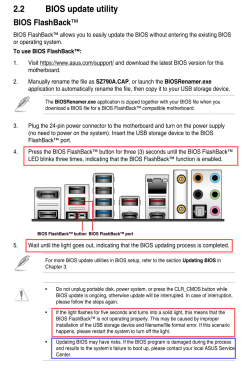
If you still get the black screen... try flashing the 1801 BIOS again, and follow ALL the directions in the pic...


Image1.png


If absolutely nothing works, here is the number for ASUS motherboard tech support in the USA...


image2.png
 

My Computers My Computers

  • At a glance

    Win 11 Home ♦♦♦26200.8655 ♦♦♦♦♦♦♦25H2AMD Ryzen 7 3700XG.Skill (F4-3200C14D-16GTZKW)EVGA RTX 2070 (08G-P4-2171-KR)
    OS
    Win 11 Home ♦♦♦26200.8655 ♦♦♦♦♦♦♦25H2
    Computer type
    PC/Desktop
    Manufacturer/Model
    Built by Ghot® [May 2020]
    CPU
    AMD Ryzen 7 3700X
    Motherboard
    Asus Pro WS X570-ACE (BIOS 5302)
    Memory
    G.Skill (F4-3200C14D-16GTZKW)
    Graphics Card(s)
    EVGA RTX 2070 (08G-P4-2171-KR)
    Sound Card
    Realtek ALC1220P / ALC S1220A
    Monitor(s) Displays
    Dell U3011 30"
    Screen Resolution
    2560 x 1600
    Hard Drives
    2x Samsung 860 EVO 500GB,
    WD 4TB Black FZBX - SATA III,
    WD 8TB Black FZBX - SATA III,
    DRW-24B1ST CD/DVD Burner
    PSU
    PC Power & Cooling 750W Quad EPS12V
    Case
    Cooler Master ATCS 840 Tower
    Cooling
    CM Hyper 212 EVO (push/pull)
    Keyboard
    Ducky DK9008 Shine II Blue LED
    Mouse
    Logitech Optical M-100
    Internet Speed
    300/300
    Browser
    Firefox (latest)
    Antivirus
    Bitdefender Total Security
    Other Info
    Speakers: Klipsch Pro Media 2.1
  • At a glance

    Windows XP Pro 32bit w/SP3AMD Athlon 64 X2 5000+ (OC'd @ 3.2Ghz)TWIN2X2048-6400C4DHX (2 x 1GB, DDR2 800)EVGA 256-P2-N758-TR GeForce 8600GT SSC
    Operating System
    Windows XP Pro 32bit w/SP3
    Computer type
    PC/Desktop
    Manufacturer/Model
    Built by Ghot® (not in use)
    CPU
    AMD Athlon 64 X2 5000+ (OC'd @ 3.2Ghz)
    Motherboard
    ASUS M2N32-SLI Deluxe Wireless Edition
    Memory
    TWIN2X2048-6400C4DHX (2 x 1GB, DDR2 800)
    Graphics card(s)
    EVGA 256-P2-N758-TR GeForce 8600GT SSC
    Sound Card
    Onboard
    Monitor(s) Displays
    ViewSonic G90FB Black 19" Professional (CRT)
    Screen Resolution
    up to 2048 x 1536
    Hard Drives
    WD 36GB 10,000rpm Raptor SATA
    Seagate 80GB 7200rpm SATA
    Lite-On LTR-52246S CD/RW
    Lite-On LH-18A1P CD/DVD Burner
    PSU
    PC Power & Cooling Silencer 750 Quad EPS12V
    Case
    Generic Beige case, 80mm fans
    Cooling
    ZALMAN 9500A 92mm CPU Cooler
    Keyboard
    Logitech Classic Keybooard 200
    Mouse
    Logitech Optical M-BT96a
    Internet Speed
    300/300
    Browser
    Firefox 3.x ??
    Antivirus
    Symantec (Norton)
    Other Info
    Still assembled, still runs. Haven't turned it on for 15 years?
Oh yes I have a clear all button on back ... then just reboot ?? but wont it still just hang on black screen ? trying to get into bios .. ? let me try .. brb

Ok looks better... It reinstalled BIOS and ME. Now I am in BIOS Screen !! says BIOS 1801 and see's my i7-14700K. It all looks ok. Except my memory is showing 4800MHz and should be 7000Mhz. Any thoughts ? :) Oh Think I need to turn ON X.M.P. ill try..
 

My Computer My Computer

At a glance

Win 11Intel Core i7-14700K64 GB DDR5-7000 SDRAMASUS TUF Gaming GeForce RTX 4080 OC Edition
OS
Win 11
Computer type
PC/Desktop
Manufacturer/Model
HYTE Y70 Dual Chamber Mid-Tower ATX Case
CPU
Intel Core i7-14700K
Motherboard
ASUS ROG STRIX Z790-A GAMING WIFI
Memory
64 GB DDR5-7000 SDRAM
Graphics Card(s)
ASUS TUF Gaming GeForce RTX 4080 OC Edition
Sound Card
Intel Raptor Lake-S PCH - cAVS
Monitor(s) Displays
BenQ GW2780 x ( 3 )
Screen Resolution
1920 x 1080
Hard Drives
WD_BLACK 2TB SN850X NVMe Gen4 PCIe, M.2 2280 x ( 2 )
PSU
Thermaltake Toughpower GF3 1350W
Case
HYTE Y70 Dual Chamber Mid-Tower ATX Case
Cooling
Corsair iCUE H170i Elite LCD XT
Keyboard
K95 RGB PLATINUM SE Mechanical Gaming Keyboard
Mouse
LOGi MX 3S
Internet Speed
1.5 GB
Ok looks better... It reinstalled BIOS and ME. Now I am in BIOS Screen !! says BIOS 1801 and see's my i7-14700K. It all looks ok. Except my memory is showing 4800MHz and should be 7000Mhz. Any thoughts ? :) Oh Think I need to turn ON X.M.P. ill try..

XMP should do it (y)
 

My Computers My Computers

  • At a glance

    Windows 11 Pro x64i9 14900K P/E 5.8/4.5 GHz, cache 5.0 GHz96GB (2x48) G.skill Ripjaws 6800 MT/sAsus ROG Strix 4070 Ti OC
    OS
    Windows 11 Pro x64
    Computer type
    PC/Desktop
    Manufacturer/Model
    📷🔈🎧 🪛 DIY Photoshop/Audio/Game/tinker
    CPU
    i9 14900K P/E 5.8/4.5 GHz, cache 5.0 GHz
    Motherboard
    Asus ROG Maximus Z790 Dark Hero
    Memory
    🐏 96GB (2x48) G.skill Ripjaws 6800 MT/s
    Graphics Card(s)
    Asus ROG Strix 4070 Ti OC
    Sound Card
    🔊Bowers & Wilkins 606 S3 speakers; Audiolabs 7000a integrated amp; RSL 10S Mk2 sub; Creative Pebble Pro Minimilist
    Monitor(s) Displays
    🖥️🖥️ Eizo CG2730 ColorEdge, ViewSonic VP2768
    Screen Resolution
    🖥️🖥️ 2560 x 1440p x 2
    Hard Drives
    💾 WDC SN850X 4TB nvme, SN850 1TB nvme, SK-Hynix 2 TB P41 nvme,. Sabrent USB-C DS-SC5B 5-bay docking station: 6TB WDC Black, 6TB Ironwolf Pro; 2x 2TB WDC Black HDD
    PSU
    ⚡️ 850W Seasonic Vertex PX-850 ATX 3.0/PCI-E 5.0
    Case
    Fractal Design North XL Mesh, Black Walnut
    Cooling
    ❄️ EK Nucleus black 360 AIO w/Phanteks T30-120 fans, 2 Noctua NF-A14 Chromax case fan, 1 T30-120 fan cooling memory
    Keyboard
    ⌨️ Keychron Q3 Max TKL with custom GMK Redsuns Red Samuri keycaps, TX Stabs
    Mouse
    🖱️ Logitech G305 wireless gaming
    Internet Speed
    ⬇️ 500 Mb/s ⬆️ 12 Mb/s
    Browser
    🔥🦊 Firefox
    Antivirus
    🦺 Defender, Macrium Reflect X 🏆
    Other Info
    Phangkey Amaterasu V2 Desk Mat
  • At a glance

    Apple M1
    Computer type
    Laptop
    Manufacturer/Model
    💻 Apple 13" Macbook Pro 2020 (m1)
    CPU
    Apple M1
    Screen Resolution
    2560x1600
    Browser
    Firefox

Latest Support Threads

Back
Top Bottom




