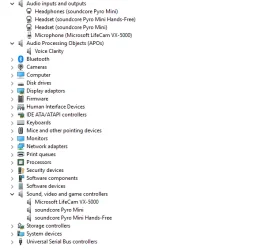
Strange. Everything look OK now. Now looking at your Device management; One thing is standing out: Under Audio Input and Output there should be 2 devices there; Speakers and Microphone. Speakers are missing now. It must be there otherwise no sound. In the attachment my audio device. (ignore Language, NVIDIA (RTX Videocard) and Steelseries, Sonar. (Keyboard) Stage V2 is my Creative Stage V2 2.1 speakers device, connected with USB)
What kind of speakers are connected to your system? (Defective cable? Sound/No Sound/Sound at random etc.) Can you see any speaker device using mmsys.cpl? Inside Settings - System - Sound No speakers? (There is also a setting where you allow apps to use your sound device) Try to add one. You should examine the logbooks and look for warnings or errors. There might be a conflict with a piece of software you have installed that is causing this issue.
At what build level are you sitting on? 26200.8117? Is so try de-install KB5086672. It's giving some people a real headache. There seems to be something fishy with this "patch" for 8816.
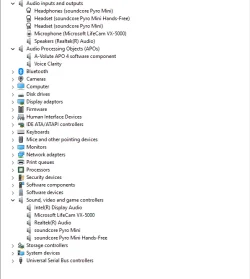
The drivers disappear from this list when the sound stops working and reappear when working.
This is when the speaker is active. Otherwise speakers/drivers disappear. No issue with the cable.
I've also noticed PotPlayer failing to play media and showing an error when the speaker suddenly malfunctions (Probably due to driver not being available).
Updates installed:
The problem was there before installing KB5086672.
Attachments
My Computer
At a glance
Windows 11Intel Core i3 10105HyperX Predator 8GBIntel built-in
- OS
- Windows 11
- Computer type
- PC/Desktop
- CPU
- Intel Core i3 10105
- Motherboard
- Asrock B560M Pro4
- Memory
- HyperX Predator 8GB
- Graphics Card(s)
- Intel built-in
- Sound Card
- Built-in (Realtek)