- Local time
- 6:59 PM
- Posts
- 2,225
- Location
- Central West NSW Australia
- OS
- Windows 11 Pro 25H2 (OS Build 26200.9168)
I have an old Ivy Bridge build that I run both Windows 10 Pro and Windows 11Pro on -two separate SSD's that I just swap over the data plugs to whatever OS I need. Now I turned on the machine this morning and it just kept on constantly recycling through the boot process.
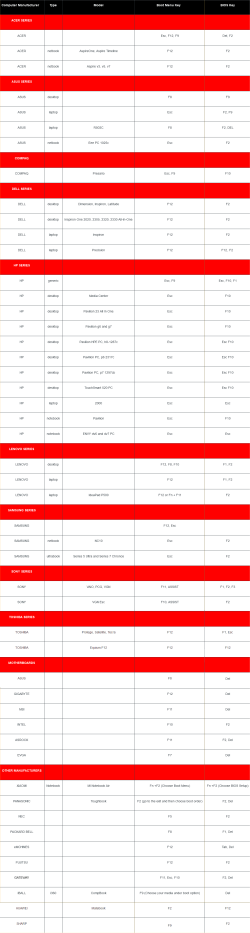
I did try pressing the F2 for the BIOS on powering up and no luck getting in.
However, I was able to get the BIOS if I turned off the power and held down the machine's power button to drain the board of all power then try the power on and F2. I found each time that I did this that the SSD in the SATA setup was disabled and changed it to enabled. I also set the boot option to that drive and reset the boot order - I usually have it set to the Windows boot manager option for this machine and saved the new settings.
But this happened again and so I tried the drive for Windows 10 but the same thing is happening.
After that, a power on goes to an Asus message to hit F1 to reset the BIOS - I did all the changes all over again but with the same results and the latest is now all I am getting is the Asus message to hit F1 which is just not doing anything.
I have a sneaky suspicion that the BIOS chip might be failing.
Any thoughts please as I really like this build and cannot afford a new one just yet.
I did try pressing the F2 for the BIOS on powering up and no luck getting in.
However, I was able to get the BIOS if I turned off the power and held down the machine's power button to drain the board of all power then try the power on and F2. I found each time that I did this that the SSD in the SATA setup was disabled and changed it to enabled. I also set the boot option to that drive and reset the boot order - I usually have it set to the Windows boot manager option for this machine and saved the new settings.
But this happened again and so I tried the drive for Windows 10 but the same thing is happening.
After that, a power on goes to an Asus message to hit F1 to reset the BIOS - I did all the changes all over again but with the same results and the latest is now all I am getting is the Asus message to hit F1 which is just not doing anything.
I have a sneaky suspicion that the BIOS chip might be failing.
Any thoughts please as I really like this build and cannot afford a new one just yet.
- Windows Build/Version
- Windows 11 pro 23H2(Build 22631.3593)
My Computers
-
At a glance
Windows 11 Pro 25H2 (OS Build 26200.9168)i7 -10510U / Intel i5 3750KSamsung 16GB DDR4 2666 MHz & G-Skill 16GB DDR...On board Intel CPU graphics & Nvidia GeForce ...- OS
- Windows 11 Pro 25H2 (OS Build 26200.9168)
- Computer type
- Laptop
- Manufacturer/Model
- Asus Vivo notebook X712FA or Desktop Ivy Bridge build
- CPU
- i7 -10510U / Intel i5 3750K
- Motherboard
- Asus generic & Asus P8Z77-V
- Memory
- Samsung 16GB DDR4 2666 MHz & G-Skill 16GB DDR3 2134MHz
- Graphics Card(s)
- On board Intel CPU graphics & Nvidia GeForce GTX 1050Ti
- Sound Card
- Laptop onboard & Xonar DSX Card
- Monitor(s) Displays
- Generic & Samsung 27" SAM0C4C
- Hard Drives
- Samsung 970 Pro NMe & Samsung 870 EVO 500GB
- PSU
- N/A
- Case
- N/A
- Cooling
- Asus in built
- Keyboard
- Generic
- Mouse
- TP_Link AX55 Wireless
- Internet Speed
- 50Mbs max allowance - occasionally up to 75Mbs
- Browser
- Chrome
- Antivirus
- ESET Ultimate Security on both
- Other Info
- Desktop running Windows11 Pro with unsupported hardware fix
-
At a glance
Windows 11 Pro OS build 22000.376i53750K16GB DDR3 @ 2133MHzAsus GTX 650TI- Operating System
- Windows 11 Pro OS build 22000.376
- Computer type
- PC/Desktop
- Manufacturer/Model
- Home build
- CPU
- i53750K
- Motherboard
- Asus P8Z77-V
- Memory
- 16GB DDR3 @ 2133MHz
- Graphics card(s)
- Asus GTX 650TI
- Sound Card
- Asus Xonar DSX
- Monitor(s) Displays
- Samsung 4K
- Screen Resolution
- 3840x2160
- Hard Drives
- Samsung EVO 970
- PSU
- Corsair HX1100
- Case
- Coolermaster HAF -M
- Cooling
- Liquid
- Keyboard
- Microsoft Sidewinder 6
- Mouse
- Logitec
- Internet Speed
- 50Mbs
- Browser
- Edge
- Antivirus
- Only Windows at the moment