Solved BitLocker key?


Alexey2912

Well-known member
Member
VIP
Local time
8:41 AM
Posts
2,144
Location
Aiea, Honolulu HI
OS
Windows 11 Pro 25H2 (26200.8457).
Hello every one,

I got the 3 new updates a few days back, which I installed. One displayed insert Bitlocker key to optimize/repair windows. I skipped it since I didn't have or know where it is located.

My question is can it be installed now, or it doesn't matter. If it can be or should be, where is it located and how do I insert it now?

Hoping to hear from you the experts.

Thanks.
 
Windows Build/Version
25H2 (26200.8457)

My Computers

System One System Two

  • OS
    Windows 11 Pro 25H2 (26200.8457).
    Computer type
    Laptop
    Manufacturer/Model
    Dell Inspiron i5 5510
    CPU
    core i7 11th gen
    Memory
    16 GB DDR4 @3200 MHz
    Hard Drives
    1 TB SSD M.2 NVMe
    Keyboard
    Dell Premier Multi-Device Wireless Keyboard and Mouse – KM7321W
    Browser
    Brave.
    Other Info
    Edifier speakers. (Thanks to @Edwin).
  • Operating System
    W11 25H2 (26200.7840)
    Computer type
    PC/Desktop
    Manufacturer/Model
    XPS Special Edition
    CPU
    11th Gen Intel® Core i7-11700 processor
    Memory
    32 GB, 2 x 16 GB, DDR4, 2933 MHz, dual channel
    Graphics card(s)
    NVIDIA GeForce RTX 3060 12GB GDDR6
    Hard Drives
    2TB M.2 PCIe NVMe SSD

My Computers

System One System Two

  • OS
    Windows 11 Pro Version:25H2 OS Build: 26200.8524
    Computer type
    PC/Desktop
    Manufacturer/Model
    Beelink Mini PC Model: SEi12
    CPU
    12th Gen Intel core i5-1235U(Alder
    Motherboard
    SEi (manufactured by AZW)
    Memory
    16*2 (32 GB) DDR 4-3200(1600MHz) Crucial Technology
    Graphics Card(s)
    Intel Iris Xe Graphics (Internal)
    Sound Card
    Internal
    Monitor(s) Displays
    BenQ GW2283
    Screen Resolution
    1920*1080
    Hard Drives
    500GB NVME (Kingston SNV2S500G)
    1TB (Crucial CT1000BX500SSD1)
    PSU
    Power Brick 19V-6.32A , 120.08W
    Keyboard
    Dell KB3322Wi (Wireless)
    Mouse
    Dell WM118t (Wireless)
    Internet Speed
    4G/5G
    Browser
    MS Edge, Chrome
    Antivirus
    Malwarebytes Premium - Subscription
  • Operating System
    Windows 11 Home Version 25H2 Build 26200.8524
    Computer type
    PC/Desktop
    Manufacturer/Model
    Dell Inspiron 3280 AIO 22"
    CPU
    Intel Core i3 8145U
    Motherboard
    Dell inc. 027W48
    Memory
    Intel Optane 16GB module + DDR 4 16GB (Optane disabled.)
    Graphics card(s)
    Intel UHD Graphics 620
    Sound Card
    Internal
    Monitor(s) Displays
    Dell Monitor 22"
    Screen Resolution
    1920x1080
    Hard Drives
    Crucial CT1000BX500SSD1 ; 1000,2 GB
    PSU
    Power Brick
    Case
    All-in one
    Keyboard
    Dell Wireless KM636
    Mouse
    Dell Wireless KM 636
    Internet Speed
    4G
    Browser
    Edge, Chrome
    Antivirus
    Malwarebytes
    Other Info
    Upgraded from Windows 10 Home to Windows 11 Home on 28 Oct 2023

My Computers

System One System Two

  • OS
    Windows 11 Pro 25H2 (26200.8457).
    Computer type
    Laptop
    Manufacturer/Model
    Dell Inspiron i5 5510
    CPU
    core i7 11th gen
    Memory
    16 GB DDR4 @3200 MHz
    Hard Drives
    1 TB SSD M.2 NVMe
    Keyboard
    Dell Premier Multi-Device Wireless Keyboard and Mouse – KM7321W
    Browser
    Brave.
    Other Info
    Edifier speakers. (Thanks to @Edwin).
  • Operating System
    W11 25H2 (26200.7840)
    Computer type
    PC/Desktop
    Manufacturer/Model
    XPS Special Edition
    CPU
    11th Gen Intel® Core i7-11700 processor
    Memory
    32 GB, 2 x 16 GB, DDR4, 2933 MHz, dual channel
    Graphics card(s)
    NVIDIA GeForce RTX 3060 12GB GDDR6
    Hard Drives
    2TB M.2 PCIe NVMe SSD
 

My Computer

System One

  • OS
    Windows 11 & Zorin Pro
    Computer type
    Laptop
    Manufacturer/Model
    Asus Rog Strix G16
    CPU
    Intel® Core™ Ultra 9 Processor 275HX 2.7 GHz
    Motherboard
    AsusteK Computer
    Memory
    32 gb
    Graphics Card(s)
    NVIDIA® GeForce RTX™ 5060 Laptop GPU
    Sound Card
    Realtek High Definition Audio
    Monitor(s) Displays
    Laptop 16 inch
    Screen Resolution
    2560 X 1600
    Hard Drives
    Boot: Samsung 9100 NVME 2 TB Microsoft Storage Controller: Standard NVM Express Driver: Microsoft 6/21/2006. No SATA/AHCI on my motherboard or in bios
    Mouse
    Pad
    Browser
    Google Chrome
    Antivirus
    Microsoft
    Other Info
    Printer: HP Color LaserJet MFP M477dw

Thanks @Asus272 , for sharing the link. My laptop came with Windows Home, which I later upgraded to Pro probably in 2022, could that be the reason of the Key updated not showing in MS account....just a thought.
 

My Computers

System One System Two

  • OS
    Windows 11 Pro 25H2 (26200.8457).
    Computer type
    Laptop
    Manufacturer/Model
    Dell Inspiron i5 5510
    CPU
    core i7 11th gen
    Memory
    16 GB DDR4 @3200 MHz
    Hard Drives
    1 TB SSD M.2 NVMe
    Keyboard
    Dell Premier Multi-Device Wireless Keyboard and Mouse – KM7321W
    Browser
    Brave.
    Other Info
    Edifier speakers. (Thanks to @Edwin).
  • Operating System
    W11 25H2 (26200.7840)
    Computer type
    PC/Desktop
    Manufacturer/Model
    XPS Special Edition
    CPU
    11th Gen Intel® Core i7-11700 processor
    Memory
    32 GB, 2 x 16 GB, DDR4, 2933 MHz, dual channel
    Graphics card(s)
    NVIDIA GeForce RTX 3060 12GB GDDR6
    Hard Drives
    2TB M.2 PCIe NVMe SSD
Another thought, should I delete the the list of old Keys updated, maybe only than would a new be created?
 

My Computers

System One System Two

  • OS
    Windows 11 Pro 25H2 (26200.8457).
    Computer type
    Laptop
    Manufacturer/Model
    Dell Inspiron i5 5510
    CPU
    core i7 11th gen
    Memory
    16 GB DDR4 @3200 MHz
    Hard Drives
    1 TB SSD M.2 NVMe
    Keyboard
    Dell Premier Multi-Device Wireless Keyboard and Mouse – KM7321W
    Browser
    Brave.
    Other Info
    Edifier speakers. (Thanks to @Edwin).
  • Operating System
    W11 25H2 (26200.7840)
    Computer type
    PC/Desktop
    Manufacturer/Model
    XPS Special Edition
    CPU
    11th Gen Intel® Core i7-11700 processor
    Memory
    32 GB, 2 x 16 GB, DDR4, 2933 MHz, dual channel
    Graphics card(s)
    NVIDIA GeForce RTX 3060 12GB GDDR6
    Hard Drives
    2TB M.2 PCIe NVMe SSD
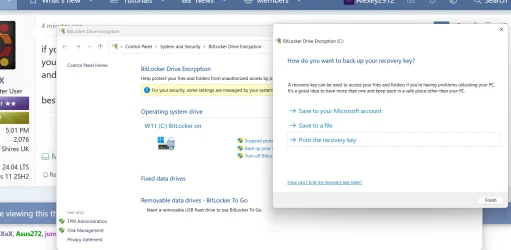
if you open the control panel then > bitlocker encryption
you will have the option of saving the current key to your online account
and be able to save a file copy of the key to disk if you wish.

best of luck Steve ..
 

My Computers

System One System Two

  • OS
    Windows 11 Home
    Computer type
    PC/Desktop
    Manufacturer/Model
    HP 24" AiO
    CPU
    Ryzen 7 5825u
    Motherboard
    HP
    Memory
    64GB DDR4 3200
    Graphics Card(s)
    Ryzen 7 5825u
    Sound Card
    RealTek
    Monitor(s) Displays
    24" HP AiO
    Screen Resolution
    1920 x 1080 @60 Hz
    Hard Drives
    1TB WD Blue SN580 M2 SSD Partitioned.
    2x 1TB USB HDD External Backup/Storage.
    PSU
    90W external power brick
    Case
    24" All in One
    Cooling
    Default Air Cooling
    Keyboard
    HP WiFi UK extended
    Mouse
    HP WiFi 3 Button
    Internet Speed
    1GB full fibre
    Browser
    Edge & Firefox
    Antivirus
    AVG Internet Security/Windows Defender
    Other Info
    Mainly Open Source Software
  • Operating System
    Ubuntu 22.04.5 LTS
    Computer type
    Laptop
    Manufacturer/Model
    Dell 13" Latitude 2017
    CPU
    i5 7200u
    Motherboard
    Dell
    Memory
    16GB DDR4
    Graphics card(s)
    Intel
    Sound Card
    Intel
    Monitor(s) Displays
    13" Dell Laptop
    Hard Drives
    250GB Crucial 2.5" SSD
    Mouse
    Generic WiFi 3 button
    Internet Speed
    WiFi only
    Browser
    Firefox
    Antivirus
    ClamAV TK
    Other Info
    Mainly Open Source Software
if you open the control panel then > bitlocker encryption
you will have the option of saving the current key to your online account
and be able to save a file copy of the key to disk if you wish.

best of luck Steve ..

Thanks @XxXxX , your expert advice highly apprecaited.


Bit locker 1.webp
Best regards!
 

My Computers

System One System Two

  • OS
    Windows 11 Pro 25H2 (26200.8457).
    Computer type
    Laptop
    Manufacturer/Model
    Dell Inspiron i5 5510
    CPU
    core i7 11th gen
    Memory
    16 GB DDR4 @3200 MHz
    Hard Drives
    1 TB SSD M.2 NVMe
    Keyboard
    Dell Premier Multi-Device Wireless Keyboard and Mouse – KM7321W
    Browser
    Brave.
    Other Info
    Edifier speakers. (Thanks to @Edwin).
  • Operating System
    W11 25H2 (26200.7840)
    Computer type
    PC/Desktop
    Manufacturer/Model
    XPS Special Edition
    CPU
    11th Gen Intel® Core i7-11700 processor
    Memory
    32 GB, 2 x 16 GB, DDR4, 2933 MHz, dual channel
    Graphics card(s)
    NVIDIA GeForce RTX 3060 12GB GDDR6
    Hard Drives
    2TB M.2 PCIe NVMe SSD
Why isn't it showing on MS account, should I delete all previous keys?

Thanks.
 

My Computers

System One System Two

  • OS
    Windows 11 Pro 25H2 (26200.8457).
    Computer type
    Laptop
    Manufacturer/Model
    Dell Inspiron i5 5510
    CPU
    core i7 11th gen
    Memory
    16 GB DDR4 @3200 MHz
    Hard Drives
    1 TB SSD M.2 NVMe
    Keyboard
    Dell Premier Multi-Device Wireless Keyboard and Mouse – KM7321W
    Browser
    Brave.
    Other Info
    Edifier speakers. (Thanks to @Edwin).
  • Operating System
    W11 25H2 (26200.7840)
    Computer type
    PC/Desktop
    Manufacturer/Model
    XPS Special Edition
    CPU
    11th Gen Intel® Core i7-11700 processor
    Memory
    32 GB, 2 x 16 GB, DDR4, 2933 MHz, dual channel
    Graphics card(s)
    NVIDIA GeForce RTX 3060 12GB GDDR6
    Hard Drives
    2TB M.2 PCIe NVMe SSD
I found it thanks. But the last Key upload date is of 2022....
My laptop came with Windows Home, which I later upgraded to Pro probably in 2022, could that be the reason of the Key updated not showing in MS account....just a thought.

Why do you assume that key is not your current recovery key? (I have current recovery keys in my Microsoft account from 2018/2024.)

Another thought, should I delete the the list of old Keys updated, maybe only than would a new be created?

No, deleting old recovery keys will not cause a new one to be saved or displayed.
 

My Computer

System One

  • OS
    Windows 11
    Computer type
    Laptop
Why do you assume that key is not your current recovery key? (I have current recovery keys in my Microsoft account from 2018/2024.)


No, deleting old recovery keys will not cause a new one to be saved or displayed.

Thanks @BruceR , I wont delete the old keys but why the new sent to the account doesn't show with date time etc.?
 

My Computers

System One System Two

  • OS
    Windows 11 Pro 25H2 (26200.8457).
    Computer type
    Laptop
    Manufacturer/Model
    Dell Inspiron i5 5510
    CPU
    core i7 11th gen
    Memory
    16 GB DDR4 @3200 MHz
    Hard Drives
    1 TB SSD M.2 NVMe
    Keyboard
    Dell Premier Multi-Device Wireless Keyboard and Mouse – KM7321W
    Browser
    Brave.
    Other Info
    Edifier speakers. (Thanks to @Edwin).
  • Operating System
    W11 25H2 (26200.7840)
    Computer type
    PC/Desktop
    Manufacturer/Model
    XPS Special Edition
    CPU
    11th Gen Intel® Core i7-11700 processor
    Memory
    32 GB, 2 x 16 GB, DDR4, 2933 MHz, dual channel
    Graphics card(s)
    NVIDIA GeForce RTX 3060 12GB GDDR6
    Hard Drives
    2TB M.2 PCIe NVMe SSD
If you click "Save to your Microsoft account" and refresh the page at https://aka.ms/myrecoverykey it should appear with today's date.

I just tested this with mine and a current recovery key got added for a second time with the new date.
 

My Computer

System One

  • OS
    Windows 11
    Computer type
    Laptop
If you click "Save to your Microsoft account" and refresh the page at https://aka.ms/myrecoverykey it should appear with today's date.

I just tested this with mine and a current recovery key got added for a second time with the new date.

Thanks again @BruceR , appreciate all your expert assistance.

My very best!!
 

My Computers

System One System Two

  • OS
    Windows 11 Pro 25H2 (26200.8457).
    Computer type
    Laptop
    Manufacturer/Model
    Dell Inspiron i5 5510
    CPU
    core i7 11th gen
    Memory
    16 GB DDR4 @3200 MHz
    Hard Drives
    1 TB SSD M.2 NVMe
    Keyboard
    Dell Premier Multi-Device Wireless Keyboard and Mouse – KM7321W
    Browser
    Brave.
    Other Info
    Edifier speakers. (Thanks to @Edwin).
  • Operating System
    W11 25H2 (26200.7840)
    Computer type
    PC/Desktop
    Manufacturer/Model
    XPS Special Edition
    CPU
    11th Gen Intel® Core i7-11700 processor
    Memory
    32 GB, 2 x 16 GB, DDR4, 2933 MHz, dual channel
    Graphics card(s)
    NVIDIA GeForce RTX 3060 12GB GDDR6
    Hard Drives
    2TB M.2 PCIe NVMe SSD
Why isn't it showing on MS account, should I delete all previous keys?

Thanks.
if you have a copy of the key saved to file or printed out
then you can delete the old keys that are stored online

then you go back to the control panel > bitlocker encryption
and save a new version of the current key online
you then should have only one current key saved for that system

but that choice it up to you.
best of luck Steve ..
 

My Computers

System One System Two

  • OS
    Windows 11 Home
    Computer type
    PC/Desktop
    Manufacturer/Model
    HP 24" AiO
    CPU
    Ryzen 7 5825u
    Motherboard
    HP
    Memory
    64GB DDR4 3200
    Graphics Card(s)
    Ryzen 7 5825u
    Sound Card
    RealTek
    Monitor(s) Displays
    24" HP AiO
    Screen Resolution
    1920 x 1080 @60 Hz
    Hard Drives
    1TB WD Blue SN580 M2 SSD Partitioned.
    2x 1TB USB HDD External Backup/Storage.
    PSU
    90W external power brick
    Case
    24" All in One
    Cooling
    Default Air Cooling
    Keyboard
    HP WiFi UK extended
    Mouse
    HP WiFi 3 Button
    Internet Speed
    1GB full fibre
    Browser
    Edge & Firefox
    Antivirus
    AVG Internet Security/Windows Defender
    Other Info
    Mainly Open Source Software
  • Operating System
    Ubuntu 22.04.5 LTS
    Computer type
    Laptop
    Manufacturer/Model
    Dell 13" Latitude 2017
    CPU
    i5 7200u
    Motherboard
    Dell
    Memory
    16GB DDR4
    Graphics card(s)
    Intel
    Sound Card
    Intel
    Monitor(s) Displays
    13" Dell Laptop
    Hard Drives
    250GB Crucial 2.5" SSD
    Mouse
    Generic WiFi 3 button
    Internet Speed
    WiFi only
    Browser
    Firefox
    Antivirus
    ClamAV TK
    Other Info
    Mainly Open Source Software
if you have a copy of the key saved to file or printed out
then you can delete the old keys that are stored online

then you go back to the control panel > bitlocker encryption
and save a new version of the current key online
you then should have only one current key saved for that system

but that choice it up to you.
best of luck Steve ..

@XxXxX , thanks for the recommendation, highly appreciated. I saved the key in my MS account but it didn't show up. Next I copied to a thumb drive. The Identifier and Recovery key digits don't match.? Probably the reason could be I asked Dell to change the drive? Anyways I contacted MS support lets see what they come up with, I feel it would be a waste.

Any expert thoughts why they are different, and why they don't show up in my MS account immediately as @BruceR mentioned?

Thanks again. Enjoy the weekend. (while I do the rounds...:()

Off topic: Earlier curing covid and now Hanta, Ebola is far simpler vs Windows issues gives me headaches, thanks to @Brink (Shawn) for running these forums.
 
Last edited:

My Computers

System One System Two

  • OS
    Windows 11 Pro 25H2 (26200.8457).
    Computer type
    Laptop
    Manufacturer/Model
    Dell Inspiron i5 5510
    CPU
    core i7 11th gen
    Memory
    16 GB DDR4 @3200 MHz
    Hard Drives
    1 TB SSD M.2 NVMe
    Keyboard
    Dell Premier Multi-Device Wireless Keyboard and Mouse – KM7321W
    Browser
    Brave.
    Other Info
    Edifier speakers. (Thanks to @Edwin).
  • Operating System
    W11 25H2 (26200.7840)
    Computer type
    PC/Desktop
    Manufacturer/Model
    XPS Special Edition
    CPU
    11th Gen Intel® Core i7-11700 processor
    Memory
    32 GB, 2 x 16 GB, DDR4, 2933 MHz, dual channel
    Graphics card(s)
    NVIDIA GeForce RTX 3060 12GB GDDR6
    Hard Drives
    2TB M.2 PCIe NVMe SSD
the bitlocker recovery key is 48 numbers in 8 banks of 6 numbers
the identifier code is the code for that drive that the bitlocker key is for.

the identifier code will be different from the bitlocker key code
each drive will have is own identifier code and bitlocker key code.

best of luck Steve ..
 

My Computers

System One System Two

  • OS
    Windows 11 Home
    Computer type
    PC/Desktop
    Manufacturer/Model
    HP 24" AiO
    CPU
    Ryzen 7 5825u
    Motherboard
    HP
    Memory
    64GB DDR4 3200
    Graphics Card(s)
    Ryzen 7 5825u
    Sound Card
    RealTek
    Monitor(s) Displays
    24" HP AiO
    Screen Resolution
    1920 x 1080 @60 Hz
    Hard Drives
    1TB WD Blue SN580 M2 SSD Partitioned.
    2x 1TB USB HDD External Backup/Storage.
    PSU
    90W external power brick
    Case
    24" All in One
    Cooling
    Default Air Cooling
    Keyboard
    HP WiFi UK extended
    Mouse
    HP WiFi 3 Button
    Internet Speed
    1GB full fibre
    Browser
    Edge & Firefox
    Antivirus
    AVG Internet Security/Windows Defender
    Other Info
    Mainly Open Source Software
  • Operating System
    Ubuntu 22.04.5 LTS
    Computer type
    Laptop
    Manufacturer/Model
    Dell 13" Latitude 2017
    CPU
    i5 7200u
    Motherboard
    Dell
    Memory
    16GB DDR4
    Graphics card(s)
    Intel
    Sound Card
    Intel
    Monitor(s) Displays
    13" Dell Laptop
    Hard Drives
    250GB Crucial 2.5" SSD
    Mouse
    Generic WiFi 3 button
    Internet Speed
    WiFi only
    Browser
    Firefox
    Antivirus
    ClamAV TK
    Other Info
    Mainly Open Source Software
the bitlocker recovery key is 48 numbers in 8 banks of 6 numbers
the identifier code is the code for that drive that the bitlocker key is for.

the identifier code will be different from the bitlocker key code
each drive will have is own identifier code and bitlocker key code.

best of luck Steve ..

#1. Correct.
#2. Where is the identifier code located on the laptop?
#3. Correct.
#4. I have only 1 drive on this laptop.

The last updated keys in 2022, are different and so is the this new one saved on the thumb drive too.

2 questions:
#1: Why doesn't it gets updated on my MS account?
#2: Can I post the 2 old and the latest saved 48 digits keys here for your view?

Thanks again @XxXxX appreciate all your expert assistance.


PS: Till 2022 all monthly keys were updated automatically, not manually and all have different 48 digits.

(Back for round):confused:
 

My Computers

System One System Two

  • OS
    Windows 11 Pro 25H2 (26200.8457).
    Computer type
    Laptop
    Manufacturer/Model
    Dell Inspiron i5 5510
    CPU
    core i7 11th gen
    Memory
    16 GB DDR4 @3200 MHz
    Hard Drives
    1 TB SSD M.2 NVMe
    Keyboard
    Dell Premier Multi-Device Wireless Keyboard and Mouse – KM7321W
    Browser
    Brave.
    Other Info
    Edifier speakers. (Thanks to @Edwin).
  • Operating System
    W11 25H2 (26200.7840)
    Computer type
    PC/Desktop
    Manufacturer/Model
    XPS Special Edition
    CPU
    11th Gen Intel® Core i7-11700 processor
    Memory
    32 GB, 2 x 16 GB, DDR4, 2933 MHz, dual channel
    Graphics card(s)
    NVIDIA GeForce RTX 3060 12GB GDDR6
    Hard Drives
    2TB M.2 PCIe NVMe SSD
@Alexey2912
i cant give you an answer because i have no idea what MS are up to
especially in regard to saving encryption keys online.

all i can suggest is try saving the encryption key online via the control panel
and then check to see if the new key is actually saved to your account.

MS move in mysterious ways
best of luck Steve ..
 

My Computers

System One System Two

  • OS
    Windows 11 Home
    Computer type
    PC/Desktop
    Manufacturer/Model
    HP 24" AiO
    CPU
    Ryzen 7 5825u
    Motherboard
    HP
    Memory
    64GB DDR4 3200
    Graphics Card(s)
    Ryzen 7 5825u
    Sound Card
    RealTek
    Monitor(s) Displays
    24" HP AiO
    Screen Resolution
    1920 x 1080 @60 Hz
    Hard Drives
    1TB WD Blue SN580 M2 SSD Partitioned.
    2x 1TB USB HDD External Backup/Storage.
    PSU
    90W external power brick
    Case
    24" All in One
    Cooling
    Default Air Cooling
    Keyboard
    HP WiFi UK extended
    Mouse
    HP WiFi 3 Button
    Internet Speed
    1GB full fibre
    Browser
    Edge & Firefox
    Antivirus
    AVG Internet Security/Windows Defender
    Other Info
    Mainly Open Source Software
  • Operating System
    Ubuntu 22.04.5 LTS
    Computer type
    Laptop
    Manufacturer/Model
    Dell 13" Latitude 2017
    CPU
    i5 7200u
    Motherboard
    Dell
    Memory
    16GB DDR4
    Graphics card(s)
    Intel
    Sound Card
    Intel
    Monitor(s) Displays
    13" Dell Laptop
    Hard Drives
    250GB Crucial 2.5" SSD
    Mouse
    Generic WiFi 3 button
    Internet Speed
    WiFi only
    Browser
    Firefox
    Antivirus
    ClamAV TK
    Other Info
    Mainly Open Source Software
@Alexey2912
i cant give you an answer because i have no idea what MS are up to
especially in regard to saving encryption keys online.

all i can suggest is try saving the encryption key online via the control panel
and then check to see if the new key is actually saved to your account.

MS move in mysterious ways
best of luck Steve ..

@XxXxX ,

I did experiment saving online using the control panel, displays saving but doesn't show in my MS account.
Anyways who cares as long as the laptop is working, why waste time since I'm bothering you a lot and this thread is getting lengthier without any outcome.

Once again thanks for all your expert recommndation and stay safe.

Have a great day and best regards.
 

My Computers

System One System Two

  • OS
    Windows 11 Pro 25H2 (26200.8457).
    Computer type
    Laptop
    Manufacturer/Model
    Dell Inspiron i5 5510
    CPU
    core i7 11th gen
    Memory
    16 GB DDR4 @3200 MHz
    Hard Drives
    1 TB SSD M.2 NVMe
    Keyboard
    Dell Premier Multi-Device Wireless Keyboard and Mouse – KM7321W
    Browser
    Brave.
    Other Info
    Edifier speakers. (Thanks to @Edwin).
  • Operating System
    W11 25H2 (26200.7840)
    Computer type
    PC/Desktop
    Manufacturer/Model
    XPS Special Edition
    CPU
    11th Gen Intel® Core i7-11700 processor
    Memory
    32 GB, 2 x 16 GB, DDR4, 2933 MHz, dual channel
    Graphics card(s)
    NVIDIA GeForce RTX 3060 12GB GDDR6
    Hard Drives
    2TB M.2 PCIe NVMe SSD

Latest Support Threads

Back
Top Bottom