
Hello every one,
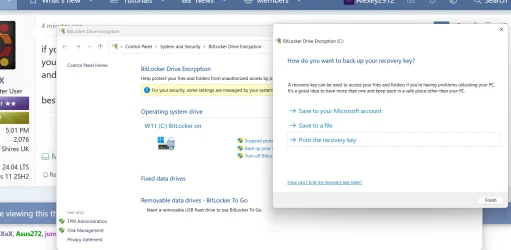
I got the 3 new updates a few days back, which I installed. One displayed insert Bitlocker key to optimize/repair windows. I skipped it since I didn't have or know where it is located.
My question is can it be installed now, or it doesn't matter. If it can be or should be, where is it located and how do I insert it now?
Hoping to hear from you the experts.
Thanks.
I got the 3 new updates a few days back, which I installed. One displayed insert Bitlocker key to optimize/repair windows. I skipped it since I didn't have or know where it is located.
My question is can it be installed now, or it doesn't matter. If it can be or should be, where is it located and how do I insert it now?
Hoping to hear from you the experts.
Thanks.
- Windows Build/Version
- 25H2 (26200.8457)
My Computers
-
At a glance
Windows 11 Pro 25H2 (26200.8457).core i7 11th gen16 GB DDR4 @3200 MHz- OS
- Windows 11 Pro 25H2 (26200.8457).
- Computer type
- Laptop
- Manufacturer/Model
- Dell Inspiron i5 5510
- CPU
- core i7 11th gen
- Memory
- 16 GB DDR4 @3200 MHz
- Hard Drives
- 1 TB SSD M.2 NVMe
- Keyboard
- Dell Premier Multi-Device Wireless Keyboard and Mouse – KM7321W
- Browser
- Brave.
- Other Info
- Edifier speakers. (Thanks to @Edwin).
-
At a glance
W11 25H2 (26200.7840)11th Gen Intel® Core i7-11700 processor32 GB, 2 x 16 GB, DDR4, 2933 MHz, dual channelNVIDIA GeForce RTX 3060 12GB GDDR6- Operating System
- W11 25H2 (26200.7840)
- Computer type
- PC/Desktop
- Manufacturer/Model
- XPS Special Edition
- CPU
- 11th Gen Intel® Core i7-11700 processor
- Memory
- 32 GB, 2 x 16 GB, DDR4, 2933 MHz, dual channel
- Graphics card(s)
- NVIDIA GeForce RTX 3060 12GB GDDR6
- Hard Drives
- 2TB M.2 PCIe NVMe SSD




 )
)






