
Black boxes around folders.


Kol12

Well-known member
Member
VIP
Local time
10:52 AM
Posts
342
OS
Windows 11 - Release Preview channel
I'm constantly getting black boxes around folders in file explorer. Deleting the thumbnail cache in disk cleanup cures the black boxes but only temporarily. They return again almost immediately.

What else can I can try to fix this permanently? I run DISM and SFC health checks weekly.
 

Attachments
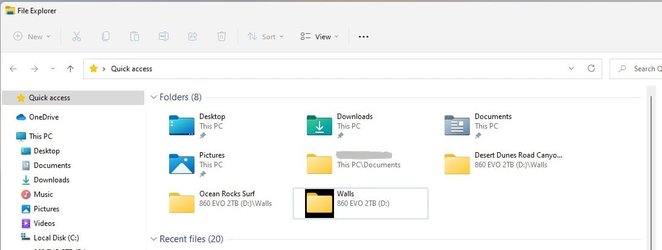
  • Folders black box.jpg
    Folders black box.jpg
    31.9 KB · Views: 4

My Computer My Computer

At a glance

Windows 11 - Release Preview channelIntel 13900KCorsair Dominator Platinum RGB 32GB DDR5 6000MHzGigabyte 4090 Gaming OC
OS
Windows 11 - Release Preview channel
Computer type
PC/Desktop
Manufacturer/Model
Kol's custom ROG
CPU
Intel 13900K
Motherboard
Asus ROG Maximus Hero Z790
Memory
Corsair Dominator Platinum RGB 32GB DDR5 6000MHz
Graphics Card(s)
Gigabyte 4090 Gaming OC
Sound Card
SoundBlaster X-AE5
Monitor(s) Displays
Dell Alienware AW3821DW
Screen Resolution
3840x1600 144hz
Hard Drives
Samsung 980 Pro 500GB
860 EVO's
Samsung 990 Pro 2TB
External RAID enclosure - 2x Seagate 3TB HDD
PSU
Seasonic Prime Ultra 1300W Platinum
Case
Phanteks Eclipse P600S
Cooling
Custom water cooling. EK Velocity (CPU), EK Quantum Vector2 (GPU), EK Quantum D5 Pump, 360mm radiator in case + 560mm external radiator
Keyboard
Corsair K100
Mouse
Logitech G502X
Antivirus
Windows Defender, VBS
Last edited:

My Computers My Computers

  • At a glance

    Windows 11 ProAMD Ryzen 9 8945HS32GB DDR5 SO-DIMMIntegrated AMD Radeon 780M (4.00 GHz)
    OS
    Windows 11 Pro
    Computer type
    PC/Desktop
    Manufacturer/Model
    GMKtec K11
    CPU
    AMD Ryzen 9 8945HS
    Memory
    32GB DDR5 SO-DIMM
    Graphics Card(s)
    Integrated AMD Radeon 780M (4.00 GHz)
    Monitor(s) Displays
    Benq 2250HM
    Screen Resolution
    1920 x 1080
    Hard Drives
    1 TB PCIe 4.0 NVMe M.2 SSD
  • At a glance

    Windows 11 HomeIntel® Core™ Ultra 7 - 255H processor16 GB LPDDR5 SDRAMIntel Arc 140T onboard graphics
    Operating System
    Windows 11 Home
    Computer type
    Laptop
    Manufacturer/Model
    ASUS Zenbook 14 OLED 14" Laptop - UX3405CA-QL192W
    CPU
    Intel® Core™ Ultra 7 - 255H processor
    Memory
    16 GB LPDDR5 SDRAM
    Graphics card(s)
    Intel Arc 140T onboard graphics
    Screen Resolution
    1920 x 1200 (16:10 WUXGA resolution) OLED Touchscreen
    Hard Drives
    1TB SSD
@wiganken I haven't tried the thumbnail cache reset so will try that. Thanks.
 

My Computer My Computer

At a glance

Windows 11 - Release Preview channelIntel 13900KCorsair Dominator Platinum RGB 32GB DDR5 6000MHzGigabyte 4090 Gaming OC
OS
Windows 11 - Release Preview channel
Computer type
PC/Desktop
Manufacturer/Model
Kol's custom ROG
CPU
Intel 13900K
Motherboard
Asus ROG Maximus Hero Z790
Memory
Corsair Dominator Platinum RGB 32GB DDR5 6000MHz
Graphics Card(s)
Gigabyte 4090 Gaming OC
Sound Card
SoundBlaster X-AE5
Monitor(s) Displays
Dell Alienware AW3821DW
Screen Resolution
3840x1600 144hz
Hard Drives
Samsung 980 Pro 500GB
860 EVO's
Samsung 990 Pro 2TB
External RAID enclosure - 2x Seagate 3TB HDD
PSU
Seasonic Prime Ultra 1300W Platinum
Case
Phanteks Eclipse P600S
Cooling
Custom water cooling. EK Velocity (CPU), EK Quantum Vector2 (GPU), EK Quantum D5 Pump, 360mm radiator in case + 560mm external radiator
Keyboard
Corsair K100
Mouse
Logitech G502X
Antivirus
Windows Defender, VBS
Change the Windows theme to see it will help.
 

My Computer My Computer

At a glance

Windows 11AMD Ryzen 7 5700GMicron Technology DDR4-3200 16GBNVIDIA GeForce RTX 3060
OS
Windows 11
Computer type
PC/Desktop
Manufacturer/Model
HP Pavilion
CPU
AMD Ryzen 7 5700G
Motherboard
Erica6
Memory
Micron Technology DDR4-3200 16GB
Graphics Card(s)
NVIDIA GeForce RTX 3060
Sound Card
Realtek ALC671
Monitor(s) Displays
Samsung SyncMaster U28E590
Screen Resolution
3840 x 2160
Hard Drives
SAMSUNG MZVLQ1T0HALB-000H1

Latest Support Threads

Back
Top Bottom




