
Black boxes around folders.


Kol12

Well-known member
Member
VIP
Local time
8:16 AM
Posts
342
OS
Windows 11 - Release Preview channel
I'm constantly getting black boxes around folders in file explorer. Deleting the thumbnail cache in disk cleanup cures the black boxes but only temporarily. They return again almost immediately.

What else can I can try to fix this permanently? I run DISM and SFC health checks weekly.
 

Attachments
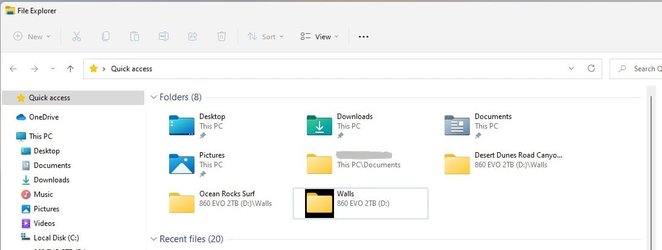
  • Folders black box.jpg
    Folders black box.jpg
    31.9 KB · Views: 4

My Computer

System One

  • OS
    Windows 11 - Release Preview channel
    Computer type
    PC/Desktop
    Manufacturer/Model
    Kol's custom ROG
    CPU
    Intel 13900K
    Motherboard
    Asus ROG Maximus Hero Z790
    Memory
    Corsair Dominator Platinum RGB 32GB DDR5 6000MHz
    Graphics Card(s)
    Gigabyte 4090 Gaming OC
    Sound Card
    SoundBlaster X-AE5
    Monitor(s) Displays
    Dell Alienware AW3821DW
    Screen Resolution
    3840x1600 144hz
    Hard Drives
    Samsung 980 Pro 500GB
    860 EVO's
    Samsung 990 Pro 2TB
    External RAID enclosure - 2x Seagate 3TB HDD
    PSU
    Seasonic Prime Ultra 1300W Platinum
    Case
    Phanteks Eclipse P600S
    Cooling
    Custom water cooling. EK Velocity (CPU), EK Quantum Vector2 (GPU), EK Quantum D5 Pump, 360mm radiator in case + 560mm external radiator
    Keyboard
    Corsair K100
    Mouse
    Logitech G502X
    Antivirus
    Windows Defender, VBS
Last edited:

My Computers

System One System Two

  • OS
    Windows 11 Pro
    Computer type
    PC/Desktop
    Manufacturer/Model
    GMKtec K11
    CPU
    AMD Ryzen 9 8945HS
    Memory
    32GB DDR5 SO-DIMM
    Graphics Card(s)
    Integrated AMD Radeon 780M (4.00 GHz)
    Monitor(s) Displays
    Benq 2250HM
    Screen Resolution
    1920 x 1080
    Hard Drives
    1 TB PCIe 4.0 NVMe M.2 SSD
  • Operating System
    Windows 11 Home
    Computer type
    Laptop
    Manufacturer/Model
    ASUS Zenbook 14 OLED 14" Laptop - UX3405CA-QL192W
    CPU
    Intel® Core™ Ultra 7 - 255H processor
    Memory
    16 GB LPDDR5 SDRAM
    Graphics card(s)
    Intel Arc 140T onboard graphics
    Screen Resolution
    1920 x 1200 (16:10 WUXGA resolution) OLED Touchscreen
    Hard Drives
    1TB SSD
@wiganken I haven't tried the thumbnail cache reset so will try that. Thanks.
 

My Computer

System One

  • OS
    Windows 11 - Release Preview channel
    Computer type
    PC/Desktop
    Manufacturer/Model
    Kol's custom ROG
    CPU
    Intel 13900K
    Motherboard
    Asus ROG Maximus Hero Z790
    Memory
    Corsair Dominator Platinum RGB 32GB DDR5 6000MHz
    Graphics Card(s)
    Gigabyte 4090 Gaming OC
    Sound Card
    SoundBlaster X-AE5
    Monitor(s) Displays
    Dell Alienware AW3821DW
    Screen Resolution
    3840x1600 144hz
    Hard Drives
    Samsung 980 Pro 500GB
    860 EVO's
    Samsung 990 Pro 2TB
    External RAID enclosure - 2x Seagate 3TB HDD
    PSU
    Seasonic Prime Ultra 1300W Platinum
    Case
    Phanteks Eclipse P600S
    Cooling
    Custom water cooling. EK Velocity (CPU), EK Quantum Vector2 (GPU), EK Quantum D5 Pump, 360mm radiator in case + 560mm external radiator
    Keyboard
    Corsair K100
    Mouse
    Logitech G502X
    Antivirus
    Windows Defender, VBS
Change the Windows theme to see it will help.
 

My Computer

System One

  • OS
    Windows 11
    Computer type
    PC/Desktop
    Manufacturer/Model
    HP Pavilion
    CPU
    AMD Ryzen 7 5700G
    Motherboard
    Erica6
    Memory
    Micron Technology DDR4-3200 16GB
    Graphics Card(s)
    NVIDIA GeForce RTX 3060
    Sound Card
    Realtek ALC671
    Monitor(s) Displays
    Samsung SyncMaster U28E590
    Screen Resolution
    3840 x 2160
    Hard Drives
    SAMSUNG MZVLQ1T0HALB-000H1

Latest Support Threads

Back
Top Bottom




