Bluestacks with Hyper-V wont run


AdamE

Well-known member
VIP
Local time
9:13 PM
Posts
99
OS
W11 Pro
Wondering if anyone else is having this issue?

I am on build 22526, and I have Bluestacks 5 installed (the Hyper-V version). I've enabled all required Hyper-V stuff as said in the Bluestacks docs, yet when I start it I am told I have to enable Hyper-V!! Can't figure what to do next. I've made sure I am an administrator for the Hyper-V group etc.

Fingers crossed someone else has found the issue!? Thanks
 

My Computer My Computer

At a glance

W11 ProIntel(R) Core(TM) i7-477016GBIntel HD 4600 & GeForce GT 750M
OS
W11 Pro
Computer type
PC/Desktop
Manufacturer/Model
Dell XPS One 2720
CPU
Intel(R) Core(TM) i7-4770
Motherboard
Dell
Memory
16GB
Graphics Card(s)
Intel HD 4600 & GeForce GT 750M
Sound Card
Realtek HD Audio
Monitor(s) Displays
27"
Screen Resolution
2560*1440
Hard Drives
512GB SSD boot drive connected via mSATA card
2TB SSD Data Drive
Case
AIO
Internet Speed
1GB Fibre
Antivirus
Microsoft
Is it enabled in BIOS or EUFI?
 

My Computers My Computers

  • At a glance

    Windows 11 Pro13th Gen Core i9 13900HX32GB DDR5 @4800MHz 2x16GBGeforce RTX 4090HX 16GB
    OS
    Windows 11 Pro
    Computer type
    Laptop
    Manufacturer/Model
    Alienware M18 R1
    CPU
    13th Gen Core i9 13900HX
    Memory
    32GB DDR5 @4800MHz 2x16GB
    Graphics Card(s)
    Geforce RTX 4090HX 16GB
    Sound Card
    Nvidia HD / Realtek ALC3254
    Monitor(s) Displays
    18" QHD+
    Screen Resolution
    25660 X 1600
    Hard Drives
    C: KIOXIA (Toshiba) 2TB KXG80ZNV2T04 NVMe PCIe M.2 SSD
    D: KIOXIA (Toshiba) 2TB KXG80ZNV2T04 NVMe PCIe M.2 SSD
    Case
    Dark Metallic Moon
    Keyboard
    Alienware M Series per-key AlienFX RGB
    Mouse
    Alienware AW610M
    Browser
    Chrome and Firefox
    Antivirus
    Norton
    Other Info
    Killer E3000 Ethernet Controller
    Killer Killer AX1690 Wi-Fi Network Adaptor Wi-Fi 6E
    Bluetooth 5.2
    Alienware Z01G Graphic Amplifier
  • At a glance

    Windows 11 Pro10th Gen i-9 10900 K32Gb Dual Channel DDR4 @ 8843MHzNvidia RTX 2080 Super
    Operating System
    Windows 11 Pro
    Computer type
    Laptop
    Manufacturer/Model
    Alienware Area 51m R2
    CPU
    10th Gen i-9 10900 K
    Memory
    32Gb Dual Channel DDR4 @ 8843MHz
    Graphics card(s)
    Nvidia RTX 2080 Super
    Sound Card
    Nvidia
    Screen Resolution
    1920 x 1080
    Hard Drives
    Hard Drive C: Samsung 2TB SSD PM981a NVMe
    Hard Drive D:Samsung 2TB SSD 970 EVO Plus
    Mouse
    Alienware 610M
    Browser
    Chrome
    Antivirus
    Norton
Wondering if anyone else is having this issue?

I am on build 22526, and I have Bluestacks 5 installed (the Hyper-V version). I've enabled all required Hyper-V stuff as said in the Bluestacks docs, yet when I start it I am told I have to enable Hyper-V!! Can't figure what to do next. I've made sure I am an administrator for the Hyper-V group etc.

Fingers crossed someone else has found the issue!? Thanks
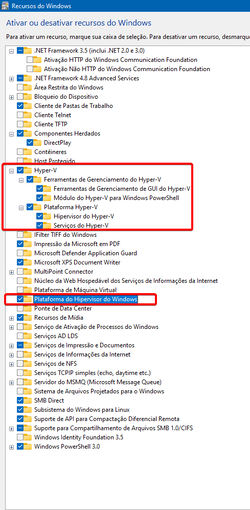
try this.
dism /online /enable-feature /featurename:"VirtualMachinePlatform" /all
View attachment 185151642081805260.png
 

My Computer My Computer

At a glance

Windows 11, Pro for Workstations, 22631.2861 ...Amd Ryzen 5 5500 ("Zen 3") (3.6GHz,45-65W,L3:...DDR4 OLOy Owl Black, 8GB, 3200MHZ, (x2)Colorful GeForce GTX 1650 Super
OS
Windows 11, Pro for Workstations, 22631.2861 (23H2)
Computer type
PC/Desktop
Manufacturer/Model
Custom
CPU
Amd Ryzen 5 5500 ("Zen 3") (3.6GHz,45-65W,L3:16M,6/12)
Motherboard
Asus Prime B450M Gaming/BR Chipset B450 AMD AM4 mATX DDR4 - BIOS 4002
Memory
DDR4 OLOy Owl Black, 8GB, 3200MHZ, (x2)
Graphics Card(s)
Colorful GeForce GTX 1650 Super
Sound Card
-
Monitor(s) Displays
Philips TV 43PFG5102/78
Screen Resolution
1920x1080
Hard Drives
SSD: 120GB, Sata III, Leitura 560MBs e Gravação 540MBs
HD: Seagate Barracuda 1TB, Sata III, 7200RPM, 64MB
PSU
Corsair ATX CV550 550W, 80 Plus Bronze, PFC Ativo
Case
Wheel Jack, Mid Tower, Vidro Temperado, Black
Cooling
default
Keyboard
common
Mouse
commom
Internet Speed
600mb
Browser
Opera
Antivirus
Windows Defender
Wondering if anyone else is having this issue?

I am on build 22526, and I have Bluestacks 5 installed (the Hyper-V version). I've enabled all required Hyper-V stuff as said in the Bluestacks docs, yet when I start it I am told I have to enable Hyper-V!! Can't figure what to do next. I've made sure I am an administrator for the Hyper-V group etc.

Fingers crossed someone else has found the issue!? Thanks
These so called hyper-v versions are very flakey, and very slow.

I would uninstall it, an install the normal bluestacks version and follow this post i.e. create a dual boot entry where the hypervisor is not running. The guide here talks about virtualbox, but the solution works for bluestack as well. It works for W10 and W11 as well.


My Computer My Computer

At a glance

Windows 11 Pro + Win11 Canary VM.I9 13th gen i9-13900H 2.60 GHZ16 GB solderedIntegrated Intel Iris XE
OS
Windows 11 Pro + Win11 Canary VM.
Computer type
Laptop
Manufacturer/Model
ASUS Zenbook 14
CPU
I9 13th gen i9-13900H 2.60 GHZ
Motherboard
Yep, Laptop has one.
Memory
16 GB soldered
Graphics Card(s)
Integrated Intel Iris XE
Sound Card
Realtek built in
Monitor(s) Displays
laptop OLED screen
Screen Resolution
2880x1800 touchscreen
Hard Drives
1 TB NVME SSD (only weakness is only one slot)
PSU
Internal + 65W thunderbolt USB4 charger
Case
Yep, got one
Cooling
Stella Artois (UK pint cans - 568 ml) - extra cost.
Keyboard
Built in UK keybd
Mouse
Bluetooth , wireless dongled, wired
Internet Speed
900 mbs (ethernet), wifi 6 typical 350-450 mb/s both up and down
Browser
Edge
Antivirus
Defender
Other Info
TPM 2.0, 2xUSB4 thunderbolt, 1xUsb3 (usb a), 1xUsb-c, hdmi out, 3.5 mm audio out/in combo, ASUS backlit trackpad (inc. switchable number pad)

Macrium Reflect Home V8
Office 365 Family (6 users each 1TB onedrive space)
Hyper-V (a vm runs almost as fast as my older laptop)

My Computer My Computer

At a glance

W11 ProIntel(R) Core(TM) i7-477016GBIntel HD 4600 & GeForce GT 750M
OS
W11 Pro
Computer type
PC/Desktop
Manufacturer/Model
Dell XPS One 2720
CPU
Intel(R) Core(TM) i7-4770
Motherboard
Dell
Memory
16GB
Graphics Card(s)
Intel HD 4600 & GeForce GT 750M
Sound Card
Realtek HD Audio
Monitor(s) Displays
27"
Screen Resolution
2560*1440
Hard Drives
512GB SSD boot drive connected via mSATA card
2TB SSD Data Drive
Case
AIO
Internet Speed
1GB Fibre
Antivirus
Microsoft
That is the best starting point, because you said you had all the right things enabled in Windows
 

My Computers My Computers

  • At a glance

    Windows 11 Pro13th Gen Core i9 13900HX32GB DDR5 @4800MHz 2x16GBGeforce RTX 4090HX 16GB
    OS
    Windows 11 Pro
    Computer type
    Laptop
    Manufacturer/Model
    Alienware M18 R1
    CPU
    13th Gen Core i9 13900HX
    Memory
    32GB DDR5 @4800MHz 2x16GB
    Graphics Card(s)
    Geforce RTX 4090HX 16GB
    Sound Card
    Nvidia HD / Realtek ALC3254
    Monitor(s) Displays
    18" QHD+
    Screen Resolution
    25660 X 1600
    Hard Drives
    C: KIOXIA (Toshiba) 2TB KXG80ZNV2T04 NVMe PCIe M.2 SSD
    D: KIOXIA (Toshiba) 2TB KXG80ZNV2T04 NVMe PCIe M.2 SSD
    Case
    Dark Metallic Moon
    Keyboard
    Alienware M Series per-key AlienFX RGB
    Mouse
    Alienware AW610M
    Browser
    Chrome and Firefox
    Antivirus
    Norton
    Other Info
    Killer E3000 Ethernet Controller
    Killer Killer AX1690 Wi-Fi Network Adaptor Wi-Fi 6E
    Bluetooth 5.2
    Alienware Z01G Graphic Amplifier
  • At a glance

    Windows 11 Pro10th Gen i-9 10900 K32Gb Dual Channel DDR4 @ 8843MHzNvidia RTX 2080 Super
    Operating System
    Windows 11 Pro
    Computer type
    Laptop
    Manufacturer/Model
    Alienware Area 51m R2
    CPU
    10th Gen i-9 10900 K
    Memory
    32Gb Dual Channel DDR4 @ 8843MHz
    Graphics card(s)
    Nvidia RTX 2080 Super
    Sound Card
    Nvidia
    Screen Resolution
    1920 x 1080
    Hard Drives
    Hard Drive C: Samsung 2TB SSD PM981a NVMe
    Hard Drive D:Samsung 2TB SSD 970 EVO Plus
    Mouse
    Alienware 610M
    Browser
    Chrome
    Antivirus
    Norton
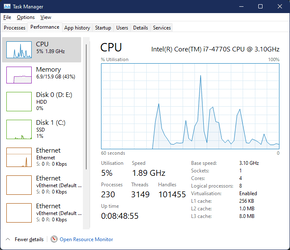
only virtualization needs to be enabled in the bios right?
you can check it on task manager.
1642083044114.png
 

My Computer My Computer

At a glance

Windows 11, Pro for Workstations, 22631.2861 ...Amd Ryzen 5 5500 ("Zen 3") (3.6GHz,45-65W,L3:...DDR4 OLOy Owl Black, 8GB, 3200MHZ, (x2)Colorful GeForce GTX 1650 Super
OS
Windows 11, Pro for Workstations, 22631.2861 (23H2)
Computer type
PC/Desktop
Manufacturer/Model
Custom
CPU
Amd Ryzen 5 5500 ("Zen 3") (3.6GHz,45-65W,L3:16M,6/12)
Motherboard
Asus Prime B450M Gaming/BR Chipset B450 AMD AM4 mATX DDR4 - BIOS 4002
Memory
DDR4 OLOy Owl Black, 8GB, 3200MHZ, (x2)
Graphics Card(s)
Colorful GeForce GTX 1650 Super
Sound Card
-
Monitor(s) Displays
Philips TV 43PFG5102/78
Screen Resolution
1920x1080
Hard Drives
SSD: 120GB, Sata III, Leitura 560MBs e Gravação 540MBs
HD: Seagate Barracuda 1TB, Sata III, 7200RPM, 64MB
PSU
Corsair ATX CV550 550W, 80 Plus Bronze, PFC Ativo
Case
Wheel Jack, Mid Tower, Vidro Temperado, Black
Cooling
default
Keyboard
common
Mouse
commom
Internet Speed
600mb
Browser
Opera
Antivirus
Windows Defender
Well I am at a total loss now as it says it's enabled - yet BlueStacks says no LOL

1642118372771.png
 

My Computer My Computer

At a glance

W11 ProIntel(R) Core(TM) i7-477016GBIntel HD 4600 & GeForce GT 750M
OS
W11 Pro
Computer type
PC/Desktop
Manufacturer/Model
Dell XPS One 2720
CPU
Intel(R) Core(TM) i7-4770
Motherboard
Dell
Memory
16GB
Graphics Card(s)
Intel HD 4600 & GeForce GT 750M
Sound Card
Realtek HD Audio
Monitor(s) Displays
27"
Screen Resolution
2560*1440
Hard Drives
512GB SSD boot drive connected via mSATA card
2TB SSD Data Drive
Case
AIO
Internet Speed
1GB Fibre
Antivirus
Microsoft
Hi there. I'm facing the same problem. I'm now in build 22598. Does anyone have any solution?
 

My Computer My Computer

At a glance

Windows 11
OS
Windows 11
Hi there. I'm facing the same problem. I'm now in build 22598. Does anyone have any solution?
I gave the answer in post #4.
 

My Computer My Computer

At a glance

Windows 11 Pro + Win11 Canary VM.I9 13th gen i9-13900H 2.60 GHZ16 GB solderedIntegrated Intel Iris XE
OS
Windows 11 Pro + Win11 Canary VM.
Computer type
Laptop
Manufacturer/Model
ASUS Zenbook 14
CPU
I9 13th gen i9-13900H 2.60 GHZ
Motherboard
Yep, Laptop has one.
Memory
16 GB soldered
Graphics Card(s)
Integrated Intel Iris XE
Sound Card
Realtek built in
Monitor(s) Displays
laptop OLED screen
Screen Resolution
2880x1800 touchscreen
Hard Drives
1 TB NVME SSD (only weakness is only one slot)
PSU
Internal + 65W thunderbolt USB4 charger
Case
Yep, got one
Cooling
Stella Artois (UK pint cans - 568 ml) - extra cost.
Keyboard
Built in UK keybd
Mouse
Bluetooth , wireless dongled, wired
Internet Speed
900 mbs (ethernet), wifi 6 typical 350-450 mb/s both up and down
Browser
Edge
Antivirus
Defender
Other Info
TPM 2.0, 2xUSB4 thunderbolt, 1xUsb3 (usb a), 1xUsb-c, hdmi out, 3.5 mm audio out/in combo, ASUS backlit trackpad (inc. switchable number pad)

Macrium Reflect Home V8
Office 365 Family (6 users each 1TB onedrive space)
Hyper-V (a vm runs almost as fast as my older laptop)
Mine was fixed by Running it as administrator.
 

My Computer My Computer

At a glance

Windows 11
OS
Windows 11
Back
Top Bottom