Bluetooth Blues


Wow wow -- I will give it all a try. Thank you Kanenas.
Issues:
1. do not know how to do
2. ok
3. did
4. ??
5.ok
6. will do
I did all steps except 1 and 4. Without those, probably doomed to failure. And it and I did. I'm growing fearful that this is a lost cause. Perhaps I need to purchase a new adapter. If you look at the post below this one, you may see what I mean. Thanks again.
Sorry for the delay in responding.

1. A treasure trove of info right here: Turn On or Off Fast Startup in Windows 11
Basically you have to disable hibernation. The link describes it much better than I could.

4. Settings -> select Bluetooth & devices (on its left panel).
It will open a panel on the right with all BT devices that ever connected to it.
One of them must refer to the buds (no idea what its name is). Click on the 3 dots (top-right of its image box) and select 'remove device'.
Now you can really NOT connect :)
You have to connect and pair the buds again. Same panel, add device (big + sign), etc with whatever procedure you follow with the buds..
 

My Computer My Computer

At a glance

Windows 11 Pro for Workstations 25H2 26200.95506C+4c Intel 13th Gen Intel(R) Core(TM) i5-134...64 GBNVIDIA GeForce RTX 4060, Intel UHD Graphics 730
OS
Windows 11 Pro for Workstations 25H2 26200.9550
Computer type
PC/Desktop
Manufacturer/Model
ASRock
CPU
6C+4c Intel 13th Gen Intel(R) Core(TM) i5-13400, 4100 M
Motherboard
ASRock B660M-HDV
Memory
64 GB
Graphics Card(s)
NVIDIA GeForce RTX 4060, Intel UHD Graphics 730
Sound Card
Realtek
Monitor(s) Displays
AOC 24V2W1G5
Screen Resolution
1920x1080
Hard Drives
Samsung SSD 990 Pro with Heatsink
Keyboard
Logitech
Mouse
Logitech
Internet Speed
1GB
Antivirus
Windows Defender
Edwin - I know I have seen that screen before but when I follow the input, that screen doesn't show up. Here are a couple of images that may be part of the problem -- although Barrot has shown that message before - i.e. cannot load drivers for this device. and it has worked in spite of that.
View attachment 184360View attachment 184361
If that BARROT came with the buds, you'll have to see why it's not loaded.
If it's unrelated, right-click it and disable it. See what happens to the buds signal then. You have a Realtek the buds can probably use.
 

My Computer My Computer

At a glance

Windows 11 Pro for Workstations 25H2 26200.95506C+4c Intel 13th Gen Intel(R) Core(TM) i5-134...64 GBNVIDIA GeForce RTX 4060, Intel UHD Graphics 730
OS
Windows 11 Pro for Workstations 25H2 26200.9550
Computer type
PC/Desktop
Manufacturer/Model
ASRock
CPU
6C+4c Intel 13th Gen Intel(R) Core(TM) i5-13400, 4100 M
Motherboard
ASRock B660M-HDV
Memory
64 GB
Graphics Card(s)
NVIDIA GeForce RTX 4060, Intel UHD Graphics 730
Sound Card
Realtek
Monitor(s) Displays
AOC 24V2W1G5
Screen Resolution
1920x1080
Hard Drives
Samsung SSD 990 Pro with Heatsink
Keyboard
Logitech
Mouse
Logitech
Internet Speed
1GB
Antivirus
Windows Defender
The Barrot was separate. I don't see Realtek on my system. Is an adapter absolutely necessary? I have a friend who uses ear buds on her pc without -- don't know why I have so much trouble. I am just tired of trying to get them to work.

If it's unrelated, right-click it and disable it. again, how?
Thanks.
 

My Computer My Computer

At a glance

1113th Gen Intel(R) Core(TM) i5-1335U 1.30 GHz8 gb
OS
11
Computer type
Laptop
Manufacturer/Model
Lenovo Ideapad
CPU
13th Gen Intel(R) Core(TM) i5-1335U 1.30 GHz
Memory
8 gb
Screen Resolution
1900x1200
Hard Drives
500 gb ssd
The Barrot was separate. I don't see Realtek on my system. Is an adapter absolutely necessary? I have a friend who uses ear buds on her pc without -- don't know why I have so much trouble. I am just tired of trying to get them to work.

If it's unrelated, right-click it and disable it. again, how?
Thanks.
In Device Manager, right-click the device with the yellow flag and click 'disable device'

You don't see Realtek? Isn't the image on post #40 from your computer?
Bluetooth Blues
 

My Computer My Computer

At a glance

Windows 11 Pro for Workstations 25H2 26200.95506C+4c Intel 13th Gen Intel(R) Core(TM) i5-134...64 GBNVIDIA GeForce RTX 4060, Intel UHD Graphics 730
OS
Windows 11 Pro for Workstations 25H2 26200.9550
Computer type
PC/Desktop
Manufacturer/Model
ASRock
CPU
6C+4c Intel 13th Gen Intel(R) Core(TM) i5-13400, 4100 M
Motherboard
ASRock B660M-HDV
Memory
64 GB
Graphics Card(s)
NVIDIA GeForce RTX 4060, Intel UHD Graphics 730
Sound Card
Realtek
Monitor(s) Displays
AOC 24V2W1G5
Screen Resolution
1920x1080
Hard Drives
Samsung SSD 990 Pro with Heatsink
Keyboard
Logitech
Mouse
Logitech
Internet Speed
1GB
Antivirus
Windows Defender
oh brother. I looked for Realtek on my System files and did not see it. So you're saying that Realtek should work with these buds? No need for adapter? Will disable although I think I have done that. Thanks.
 

My Computer My Computer

At a glance

1113th Gen Intel(R) Core(TM) i5-1335U 1.30 GHz8 gb
OS
11
Computer type
Laptop
Manufacturer/Model
Lenovo Ideapad
CPU
13th Gen Intel(R) Core(TM) i5-1335U 1.30 GHz
Memory
8 gb
Screen Resolution
1900x1200
Hard Drives
500 gb ssd
oh brother. I looked for Realtek on my System files and did not see it. So you're saying that Realtek should work with these buds? No need for adapter? Will disable although I think I have done that. Thanks.
I don't know about the buds' requirements or what drivers (if any) they were provided with.
I have a TP-Link Bluetooth 5.3 USB Adapter in my system and my headphones work fine. The TP-Link is recent and replaced whatever I had before (don't remember now). I have the headphones for 4-5 years. It shouldn't make a difference which BT adapter is used.

Try and see. Just reboot and check the buds status. Everything is done in the panel at point (4) above.
If the buds are not shown, add them and pair them. If shown, remove them and add/pair them again.
If you've been through the suggestions, switching on or off the buds, should be reflected in the panel at point 4.
 

My Computer My Computer

At a glance

Windows 11 Pro for Workstations 25H2 26200.95506C+4c Intel 13th Gen Intel(R) Core(TM) i5-134...64 GBNVIDIA GeForce RTX 4060, Intel UHD Graphics 730
OS
Windows 11 Pro for Workstations 25H2 26200.9550
Computer type
PC/Desktop
Manufacturer/Model
ASRock
CPU
6C+4c Intel 13th Gen Intel(R) Core(TM) i5-13400, 4100 M
Motherboard
ASRock B660M-HDV
Memory
64 GB
Graphics Card(s)
NVIDIA GeForce RTX 4060, Intel UHD Graphics 730
Sound Card
Realtek
Monitor(s) Displays
AOC 24V2W1G5
Screen Resolution
1920x1080
Hard Drives
Samsung SSD 990 Pro with Heatsink
Keyboard
Logitech
Mouse
Logitech
Internet Speed
1GB
Antivirus
Windows Defender
The hibernate not hibernate -- huge process. Never did before and bt buds were fine. Can I avoid? Also, the buds do not show up anywhere. I cannot add them try as I may...if I can't see them, I can't add them. I might try friend's buds. I don't know if these devices come with their own software...I looked but cannot see anything. Thank you so much --
 

My Computer My Computer

At a glance

1113th Gen Intel(R) Core(TM) i5-1335U 1.30 GHz8 gb
OS
11
Computer type
Laptop
Manufacturer/Model
Lenovo Ideapad
CPU
13th Gen Intel(R) Core(TM) i5-1335U 1.30 GHz
Memory
8 gb
Screen Resolution
1900x1200
Hard Drives
500 gb ssd
The hibernate not hibernate -- huge process. Never did before and bt buds were fine. Can I avoid? Also, the buds do not show up anywhere. I cannot add them try as I may...if I can't see them, I can't add them. I might try friend's buds. I don't know if these devices come with their own software...I looked but cannot see anything. Thank you so much --
So you went to the panel in (4) and the buds are missing...
Did you switch the buds on and then tried to add a new BT device? Were they discovered or not?

The buds have an indicator (light) that flashes when they are switched on? If yes, they should be discoverable.
If no buds light flashes, maybe their battery in empty (load level will show in (4) but after they are connected).
Or the switch is broken. Easy to verify if something on it lights up when you switch it off and on.

If you use the buds with your cellphone or another computer, the switch is fine.
In this case, disconnect the buds from those other devices and just try it only with windows. Sometimes they can't connect with multiple devices in parallel (though there might be some setting to allow that...)

Could you post a recent pic of all the Bluetooth devices please. I don't see the Generic Bluetooth Radio. It comes with Win 11 and it's installed along with the others. If it shows up and is yellow-flagged, disable it.
 

My Computer My Computer

At a glance

Windows 11 Pro for Workstations 25H2 26200.95506C+4c Intel 13th Gen Intel(R) Core(TM) i5-134...64 GBNVIDIA GeForce RTX 4060, Intel UHD Graphics 730
OS
Windows 11 Pro for Workstations 25H2 26200.9550
Computer type
PC/Desktop
Manufacturer/Model
ASRock
CPU
6C+4c Intel 13th Gen Intel(R) Core(TM) i5-13400, 4100 M
Motherboard
ASRock B660M-HDV
Memory
64 GB
Graphics Card(s)
NVIDIA GeForce RTX 4060, Intel UHD Graphics 730
Sound Card
Realtek
Monitor(s) Displays
AOC 24V2W1G5
Screen Resolution
1920x1080
Hard Drives
Samsung SSD 990 Pro with Heatsink
Keyboard
Logitech
Mouse
Logitech
Internet Speed
1GB
Antivirus
Windows Defender
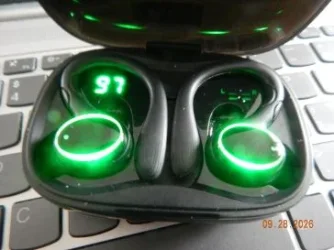
1. went to "connect a new device" --- comes up with "unknown device" 3 times -- yes. they were turned on. Here is pict: They blink initially and then stop.
buds.webp I have never seen that radio item you mention. I do not use the buds on any other device. Thank you again.
 

My Computer My Computer

At a glance

1113th Gen Intel(R) Core(TM) i5-1335U 1.30 GHz8 gb
OS
11
Computer type
Laptop
Manufacturer/Model
Lenovo Ideapad
CPU
13th Gen Intel(R) Core(TM) i5-1335U 1.30 GHz
Memory
8 gb
Screen Resolution
1900x1200
Hard Drives
500 gb ssd
So -- do you think I should purchase another dongle...I think we've exhausted all possible solutions.

Amazon Basics Bluetooth 5.4 USB Adapter Dongle for PC, USB Receiver for Bluetooth Mouse, Keyboard, Laptop, Works with Windows 11/10/8.1​

This one doesn't look like it needs an adapter like the one I have. Let me know what you think. I did read that dongles can become damaged -- maybe that's what's going on.
 

My Computer My Computer

At a glance

1113th Gen Intel(R) Core(TM) i5-1335U 1.30 GHz8 gb
OS
11
Computer type
Laptop
Manufacturer/Model
Lenovo Ideapad
CPU
13th Gen Intel(R) Core(TM) i5-1335U 1.30 GHz
Memory
8 gb
Screen Resolution
1900x1200
Hard Drives
500 gb ssd
So -- do you think I should purchase another dongle...I think we've exhausted all possible solutions.

Amazon Basics Bluetooth 5.4 USB Adapter Dongle for PC, USB Receiver for Bluetooth Mouse, Keyboard, Laptop, Works with Windows 11/10/8.1​

This one doesn't look like it needs an adapter like the one I have. Let me know what you think. I did read that dongles can become damaged -- maybe that's what's going on.
I can't tell if it's broken yet. You said it was working before (but it could have broken down later).

From what I read, it could even be the BT cache that's corrupted and this can be reset.
Read the full thread: unknown device bluetooth - Microsoft Q&A

As it says in the lower half of the page, check the registry key it mentions in the top part:
HKEY_CURRENT_USER\Software\Microsoft\Windows\CurrentVersion\Bluetooth\Devices
If not found, the TB cache is NOT corrupted so no need for repairing it. (I don't have the Bluetooth\Devices part of the key so I'm fine).

In part 2 of the link, it has 3 ways to try.
Start with Device Manager, click 'View' tab and check the "show hidden devices" item.
In the Bluetooth section you'll get a full list of BT items. Screen capture this section and post it please. There are many more people here who are familiar with this type of hardware and could advise better than I could ever do.

I'd first try method 3 that's easier.
The "airplane mode" he mentions is in Settings->select "Network & internet" on the left panel, and in the right panel turn on the "airplane mode".
Wait the 10 seconds or a bit more and then turn off the "airplane mode'.
Back to the Bluetooth section try to add and pair the device again. I don't know why he says do it immediately, so just keep the Bluetooth section open and ready.

If needed, continue with Method 2 and later with Method 1 if the problem persists.
 

My Computer My Computer

At a glance

Windows 11 Pro for Workstations 25H2 26200.95506C+4c Intel 13th Gen Intel(R) Core(TM) i5-134...64 GBNVIDIA GeForce RTX 4060, Intel UHD Graphics 730
OS
Windows 11 Pro for Workstations 25H2 26200.9550
Computer type
PC/Desktop
Manufacturer/Model
ASRock
CPU
6C+4c Intel 13th Gen Intel(R) Core(TM) i5-13400, 4100 M
Motherboard
ASRock B660M-HDV
Memory
64 GB
Graphics Card(s)
NVIDIA GeForce RTX 4060, Intel UHD Graphics 730
Sound Card
Realtek
Monitor(s) Displays
AOC 24V2W1G5
Screen Resolution
1920x1080
Hard Drives
Samsung SSD 990 Pro with Heatsink
Keyboard
Logitech
Mouse
Logitech
Internet Speed
1GB
Antivirus
Windows Defender
Will give it a whirllll-- I can't imagine the problem won't persist. I have installed, uninstalled, disabled, re enabled, paired, turned off-turned on. I know -- big whine.ok ill be bak...
 

My Computer My Computer

At a glance

1113th Gen Intel(R) Core(TM) i5-1335U 1.30 GHz8 gb
OS
11
Computer type
Laptop
Manufacturer/Model
Lenovo Ideapad
CPU
13th Gen Intel(R) Core(TM) i5-1335U 1.30 GHz
Memory
8 gb
Screen Resolution
1900x1200
Hard Drives
500 gb ssd
ok - did #1. Item you mention did not show up. So no repair needed. I see 3 bt items to delete. Problem - one is my mouse. If I delete that cannot do anything. I tried to enable the touchpad using instructions but it doesn't show up -- in other words, without mouse can't do a proper shutdown. Just hitting the off button not good right? Also, airplane mode -- no deal. Did not engage BT earbuds. Thanks again. Let me know about shutdown.
Here is SS of BT device manager-
bt22.webp
 

My Computer My Computer

At a glance

1113th Gen Intel(R) Core(TM) i5-1335U 1.30 GHz8 gb
OS
11
Computer type
Laptop
Manufacturer/Model
Lenovo Ideapad
CPU
13th Gen Intel(R) Core(TM) i5-1335U 1.30 GHz
Memory
8 gb
Screen Resolution
1900x1200
Hard Drives
500 gb ssd
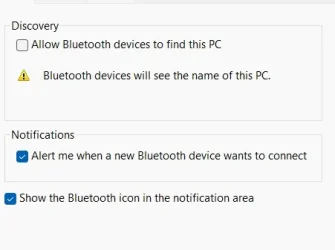
Also - what is this -- Allow blah blah
bt34.webp
 

My Computer My Computer

At a glance

1113th Gen Intel(R) Core(TM) i5-1335U 1.30 GHz8 gb
OS
11
Computer type
Laptop
Manufacturer/Model
Lenovo Ideapad
CPU
13th Gen Intel(R) Core(TM) i5-1335U 1.30 GHz
Memory
8 gb
Screen Resolution
1900x1200
Hard Drives
500 gb ssd

My Computer My Computer

At a glance

Windows 11 Pro for Workstations 25H2 26200.95506C+4c Intel 13th Gen Intel(R) Core(TM) i5-134...64 GBNVIDIA GeForce RTX 4060, Intel UHD Graphics 730
OS
Windows 11 Pro for Workstations 25H2 26200.9550
Computer type
PC/Desktop
Manufacturer/Model
ASRock
CPU
6C+4c Intel 13th Gen Intel(R) Core(TM) i5-13400, 4100 M
Motherboard
ASRock B660M-HDV
Memory
64 GB
Graphics Card(s)
NVIDIA GeForce RTX 4060, Intel UHD Graphics 730
Sound Card
Realtek
Monitor(s) Displays
AOC 24V2W1G5
Screen Resolution
1920x1080
Hard Drives
Samsung SSD 990 Pro with Heatsink
Keyboard
Logitech
Mouse
Logitech
Internet Speed
1GB
Antivirus
Windows Defender
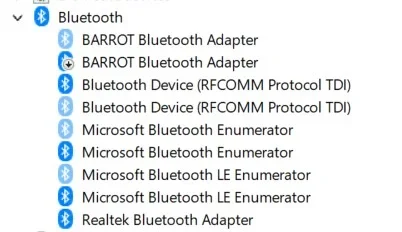
ok - did #1. Item you mention did not show up. So no repair needed. I see 3 bt items to delete. Problem - one is my mouse. If I delete that cannot do anything. I tried to enable the touchpad using instructions but it doesn't show up -- in other words, without mouse can't do a proper shutdown. Just hitting the off button not good right? Also, airplane mode -- no deal. Did not engage BT earbuds. Thanks again. Let me know about shutdown.
Here is SS of BT device manager-
View attachment 184540
This BARROT thing is there twice. One grayed out and one flagged.
Check the flagged one's properties. If "enable device" shows, then it's disabled already. Leave it as is.
All the other devices that show grayed, I guess are the 'ghosts' the link above refers to. Uninstall all of the gray ones.
Uninstall also the Realtek adapter.
I don't know about the two Enumerators that remain but they are Microsoft's and should be regenerated too. It's safe enough but do it on another try if the problem persists.
Lastly, restart the computer (it should reload the Realtek adapter and any required Microsoft stuff).

If still a problem, find that BARROT thing and unplug it. Do another reboot and see what happens.

EDIT:
For curiosity's sake and not only, right-click the BARROT Adapter and select the "Details" tab.
You can change to entries in the "properties" dropdown and see if anything useful shows there that might identify the company.
If it does, you can check with that company and see if they have any drivers for Win 11.
 

My Computer My Computer

At a glance

Windows 11 Pro for Workstations 25H2 26200.95506C+4c Intel 13th Gen Intel(R) Core(TM) i5-134...64 GBNVIDIA GeForce RTX 4060, Intel UHD Graphics 730
OS
Windows 11 Pro for Workstations 25H2 26200.9550
Computer type
PC/Desktop
Manufacturer/Model
ASRock
CPU
6C+4c Intel 13th Gen Intel(R) Core(TM) i5-13400, 4100 M
Motherboard
ASRock B660M-HDV
Memory
64 GB
Graphics Card(s)
NVIDIA GeForce RTX 4060, Intel UHD Graphics 730
Sound Card
Realtek
Monitor(s) Displays
AOC 24V2W1G5
Screen Resolution
1920x1080
Hard Drives
Samsung SSD 990 Pro with Heatsink
Keyboard
Logitech
Mouse
Logitech
Internet Speed
1GB
Antivirus
Windows Defender
The flagged one says - disable device --
all reloaded after restart as you indicated.
tried add bt again-- no deal.
If still a problem, find that BARROT thing and unplug it. you mean the physical little box that the dongle connects to? I've unplugged and replugged many times.
That is the company -- Barrot. Chinese. The drivers are listed on their page - same as I have used to install it.
The mouse is very flaky as well. I have to plug it in about every 2 days or it stops working.
Time to go shopping?? I don't know what else to do and you would probably rather be sailing or playing golf.
That dongle (new one) will plug into the little the adapter black box?? -- The Amazon page shows it plugging directly into pc...
Thanks again for all of your help.
 

My Computer My Computer

At a glance

1113th Gen Intel(R) Core(TM) i5-1335U 1.30 GHz8 gb
OS
11
Computer type
Laptop
Manufacturer/Model
Lenovo Ideapad
CPU
13th Gen Intel(R) Core(TM) i5-1335U 1.30 GHz
Memory
8 gb
Screen Resolution
1900x1200
Hard Drives
500 gb ssd
Back
Top Bottom