- Local time
- 12:03 AM
- Posts
- 120
- OS
- Windows 11 Pro for Workstations 25H2 26200.9550
Wow wow -- I will give it all a try. Thank you Kanenas.
1. A treasure trove of info right here: Turn On or Off Fast Startup in Windows 11
Basically you have to disable hibernation. The link describes it much better than I could.
4. Settings -> select Bluetooth & devices (on its left panel).
It will open a panel on the right with all BT devices that ever connected to it.
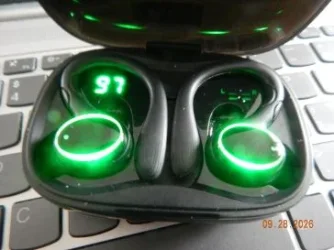
One of them must refer to the buds (no idea what its name is). Click on the 3 dots (top-right of its image box) and select 'remove device'.
Now you can really NOT connect :)
You have to connect and pair the buds again. Same panel, add device (big + sign), etc with whatever procedure you follow with the buds..
Sorry for the delay in responding.Issues:
1. do not know how to do
2. ok
3. did
4. ??
5.ok
6. will do
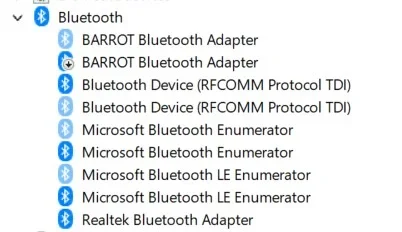
I did all steps except 1 and 4. Without those, probably doomed to failure. And it and I did. I'm growing fearful that this is a lost cause. Perhaps I need to purchase a new adapter. If you look at the post below this one, you may see what I mean. Thanks again.
1. A treasure trove of info right here: Turn On or Off Fast Startup in Windows 11
Basically you have to disable hibernation. The link describes it much better than I could.
4. Settings -> select Bluetooth & devices (on its left panel).
It will open a panel on the right with all BT devices that ever connected to it.
One of them must refer to the buds (no idea what its name is). Click on the 3 dots (top-right of its image box) and select 'remove device'.
Now you can really NOT connect :)
You have to connect and pair the buds again. Same panel, add device (big + sign), etc with whatever procedure you follow with the buds..
My Computer
At a glance
Windows 11 Pro for Workstations 25H2 26200.95506C+4c Intel 13th Gen Intel(R) Core(TM) i5-134...64 GBNVIDIA GeForce RTX 4060, Intel UHD Graphics 730
- OS
- Windows 11 Pro for Workstations 25H2 26200.9550
- Computer type
- PC/Desktop
- Manufacturer/Model
- ASRock
- CPU
- 6C+4c Intel 13th Gen Intel(R) Core(TM) i5-13400, 4100 M
- Motherboard
- ASRock B660M-HDV
- Memory
- 64 GB
- Graphics Card(s)
- NVIDIA GeForce RTX 4060, Intel UHD Graphics 730
- Sound Card
- Realtek
- Monitor(s) Displays
- AOC 24V2W1G5
- Screen Resolution
- 1920x1080
- Hard Drives
- Samsung SSD 990 Pro with Heatsink
- Keyboard
- Logitech
- Mouse
- Logitech
- Internet Speed
- 1GB
- Antivirus
- Windows Defender