Bluetooth Blues


Windows will have re-detected it & reinstalled it.
You should have just disabled it.

Your post reads as though it is a follow-on to other posts that I have not seen.


Denis
I did disable it - then I uninstalled it.
 

My Computer My Computer

At a glance

1113th Gen Intel(R) Core(TM) i5-1335U 1.30 GHz8 gb
OS
11
Computer type
Laptop
Manufacturer/Model
Lenovo Ideapad
CPU
13th Gen Intel(R) Core(TM) i5-1335U 1.30 GHz
Memory
8 gb
Screen Resolution
1900x1200
Hard Drives
500 gb ssd
Denis -It looks like I just need to do one command - the unpair. I will give it a go.
 

My Computer My Computer

At a glance

1113th Gen Intel(R) Core(TM) i5-1335U 1.30 GHz8 gb
OS
11
Computer type
Laptop
Manufacturer/Model
Lenovo Ideapad
CPU
13th Gen Intel(R) Core(TM) i5-1335U 1.30 GHz
Memory
8 gb
Screen Resolution
1900x1200
Hard Drives
500 gb ssd
C:\Program Files (x86)\Bluetooth Command Line Tools\bin>btpair -u
This is what was needed, right?. I am assuming it is now unpaired. I only have that one dongle and bt device.
 

My Computer My Computer

At a glance

1113th Gen Intel(R) Core(TM) i5-1335U 1.30 GHz8 gb
OS
11
Computer type
Laptop
Manufacturer/Model
Lenovo Ideapad
CPU
13th Gen Intel(R) Core(TM) i5-1335U 1.30 GHz
Memory
8 gb
Screen Resolution
1900x1200
Hard Drives
500 gb ssd
please check in Windows Services
there are at least 3 booth tooth services
make sure they are enabled and set to 'auto'

View attachment 184870

best of luck Steve ..
Checked these out - all three say they are running. All 3 on Auto...Thanks.
 

My Computer My Computer

At a glance

1113th Gen Intel(R) Core(TM) i5-1335U 1.30 GHz8 gb
OS
11
Computer type
Laptop
Manufacturer/Model
Lenovo Ideapad
CPU
13th Gen Intel(R) Core(TM) i5-1335U 1.30 GHz
Memory
8 gb
Screen Resolution
1900x1200
Hard Drives
500 gb ssd
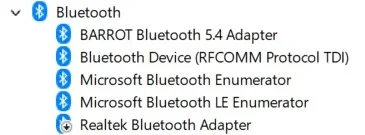
Here is how bt looks on device mgr. I uninstalled new dongle, disabled in house adapter. Restarted.

bt101.webpI unpaired using BTLC. Opened bt buds - paired. Add device -- nothing.
 

My Computer My Computer

At a glance

1113th Gen Intel(R) Core(TM) i5-1335U 1.30 GHz8 gb
OS
11
Computer type
Laptop
Manufacturer/Model
Lenovo Ideapad
CPU
13th Gen Intel(R) Core(TM) i5-1335U 1.30 GHz
Memory
8 gb
Screen Resolution
1900x1200
Hard Drives
500 gb ssd
"Opened bt buds - paired. Add device -- nothing"

Pairing them is part of the Add device procedure so I do not know what you are saying.

Denis
 

My Computer My Computer

At a glance

Windows 11 Home x64 Version 26H2 Build 26300....
OS
Windows 11 Home x64 Version 26H2 Build 26300.9457

My Computer My Computer

At a glance

Windows 11 Home x64 Version 26H2 Build 26300....
OS
Windows 11 Home x64 Version 26H2 Build 26300.9457
I did a Product Support on Amazon -- tried all of their suggestions. Oddly, the solution to not connecting calls out Amazon Basics Bluetooth 5.4 USB Adapter I should see that and I do not see that when dongle is installed. The new dongle on device manager is called: Barrot!! The previous dongle was a Barrot -- how and why is that still showing up. That may be the problem. It is overriding somehow the Amazon Basics Bluetooth 5.4 USB Adapter
Product support: "Locate Bluetooth: Look for a category called "Bluetooth" — click the arrow to expand it and you'll see your Amazon Basics Bluetooth 5.4 USB Adapter listed."

I think this is the conflict. Any thoughts?
 

My Computer My Computer

At a glance

1113th Gen Intel(R) Core(TM) i5-1335U 1.30 GHz8 gb
OS
11
Computer type
Laptop
Manufacturer/Model
Lenovo Ideapad
CPU
13th Gen Intel(R) Core(TM) i5-1335U 1.30 GHz
Memory
8 gb
Screen Resolution
1900x1200
Hard Drives
500 gb ssd
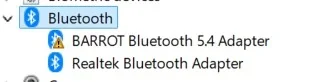
Here is how bt looks on device mgr. I uninstalled new dongle, disabled in house adapter. Restarted.

View attachment 184908I unpaired using BTLC. Opened bt buds - paired. Add device -- nothing.

I do not follow you.
Is Barrot the name of the new dongle? - You have since said that it is.
If so it was not uninstalled when you made that diagram.

Test 1 - The original Realtek BT adapter
1.1 Turn off the earbuds.
1.2 Physically remove all the Barrot dongles.
1.3 In Device mgr, Bluetooth section enable the original Realtek adapter.
1.4 In Device mgr, Bluetooth section disable all Barrot, Amazon and any other USB BT adapters.
1.5 Check in Settings, Devices to make sure BT is on.
1.6.1 Run the btdiscovery -s command to see what devices are already paired.
1.6.2 Run the unpair -u command.
1.6.3 Run the btdiscovery -s command to check for any changes.
1.7 Turn on the earbuds then use Settings, Devices, Add a device to attempt to pair them.


Denis
 
Last edited:

My Computer My Computer

At a glance

Windows 11 Home x64 Version 26H2 Build 26300....
OS
Windows 11 Home x64 Version 26H2 Build 26300.9457

My Computer My Computer

At a glance

Windows 11 Home x64 Version 26H2 Build 26300....
OS
Windows 11 Home x64 Version 26H2 Build 26300.9457
No - Barrot is listed for some reason - the newly purchased is: Amazon Basics Bluetooth 5.4 USB Adapter. Does not show up. Only the Barrot.
In Device mgr, Bluetooth section disable all Barrot adapters. They are gone as I uninstalled the Barrot. Should I reinstall and then disable. Yikes. Sounds dumb I'm sure but maybe they are needed as part of the solution. Guess so but will await your answer.
 

My Computer My Computer

At a glance

1113th Gen Intel(R) Core(TM) i5-1335U 1.30 GHz8 gb
OS
11
Computer type
Laptop
Manufacturer/Model
Lenovo Ideapad
CPU
13th Gen Intel(R) Core(TM) i5-1335U 1.30 GHz
Memory
8 gb
Screen Resolution
1900x1200
Hard Drives
500 gb ssd
They showed up again -- I disabled and did the steps. Just comes up with unknown devices when I say add device. Something somehow is overriding that Amazon adapter.
 

My Computer My Computer

At a glance

1113th Gen Intel(R) Core(TM) i5-1335U 1.30 GHz8 gb
OS
11
Computer type
Laptop
Manufacturer/Model
Lenovo Ideapad
CPU
13th Gen Intel(R) Core(TM) i5-1335U 1.30 GHz
Memory
8 gb
Screen Resolution
1900x1200
Hard Drives
500 gb ssd
Did you do all the steps I said in my post #89?
[I've numbered them now to make it easier to refer to individual steps.]


Denis
 

My Computer My Computer

At a glance

Windows 11 Home x64 Version 26H2 Build 26300....
OS
Windows 11 Home x64 Version 26H2 Build 26300.9457
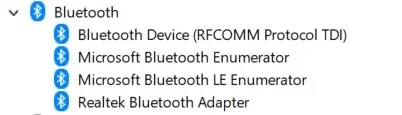
I did . I did a search on pc. Found a Barrot folder. Deleted it. Looked in add/remove programs. Not there. It is not on this system
here is latest look at BT on device mgr.
bt102.webp


Should I do this?

Reinstalling the Bluetooth driver can help fix connection, pairing, or detection issues. Windows 11 can automatically reinstall the driver after you remove it.
  1. Select Start, type Device Manager, and select it from the results.
  2. Expand the Bluetooth section to view your Bluetooth devices and adapters.
  3. Right‑click your Bluetooth adapter and select Uninstall device.
  4. Confirm the uninstall if prompted, then close Device Manager.
  5. Restart your PC to let Windows automatically reinstall the Bluetooth driver.
  6. After restart, open Settings > Bluetooth & devices to verify Bluetooth is working.
  7. If the driver is not reinstalled, visit your PC manufacturer’s support website, search for your device model, and download the latest Bluetooth driver for Windows 11.
 

My Computer My Computer

At a glance

1113th Gen Intel(R) Core(TM) i5-1335U 1.30 GHz8 gb
OS
11
Computer type
Laptop
Manufacturer/Model
Lenovo Ideapad
CPU
13th Gen Intel(R) Core(TM) i5-1335U 1.30 GHz
Memory
8 gb
Screen Resolution
1900x1200
Hard Drives
500 gb ssd
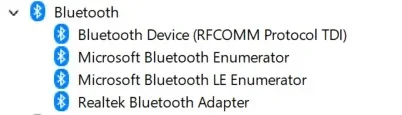
Something weird going on. I took the first one at 12:37
Took the 2nd one at 12:49
I did nothing in between -- the Barrot showed up again. Do I need to go into the Registry?
bt102.webpbt1034.webp
 

My Computer My Computer

At a glance

1113th Gen Intel(R) Core(TM) i5-1335U 1.30 GHz8 gb
OS
11
Computer type
Laptop
Manufacturer/Model
Lenovo Ideapad
CPU
13th Gen Intel(R) Core(TM) i5-1335U 1.30 GHz
Memory
8 gb
Screen Resolution
1900x1200
Hard Drives
500 gb ssd
Should I do this?
No.

Your multiple Device mgr diagrams indicate that you have been doing something else - e.g. connecting that Barrot device.
I cannot see over your shoulder to know what you are doing at any stage.

What I need to know is - at the stage of my suggested step 1.7, what exactly was done and seen?


Denis
 

My Computer My Computer

At a glance

Windows 11 Home x64 Version 26H2 Build 26300....
OS
Windows 11 Home x64 Version 26H2 Build 26300.9457
If you were looking over my shoulder you would see that I am not installing that Barrot. Why would I do that? I told you I deleted everything I could find called Barrot. I do not know where it is coming from.
I did the steps you kindly offer - I will do them again - Do know that there is no physical Barrot dongle plugged in however.
Regarding the unpair command, when I enter that in command, there is no response on the line that follows. Should there be?

test 1 - The original Realtek BT adapter
1.1 Turn off the earbuds.
1.2 Physically remove all the Barrot dongles.
1.3 In Device mgr, Bluetooth section enable the original Realtek adapter.
1.4 In Device mgr, Bluetooth section disable all Barrot adapters.
1.5 Check in Settings, Devices to make sure BT is on.
1.6 Run the unpair command.
1.7 Turn on the earbuds then use Settings, Devices, Add a device to attempt to pair them.
 

My Computer My Computer

At a glance

1113th Gen Intel(R) Core(TM) i5-1335U 1.30 GHz8 gb
OS
11
Computer type
Laptop
Manufacturer/Model
Lenovo Ideapad
CPU
13th Gen Intel(R) Core(TM) i5-1335U 1.30 GHz
Memory
8 gb
Screen Resolution
1900x1200
Hard Drives
500 gb ssd
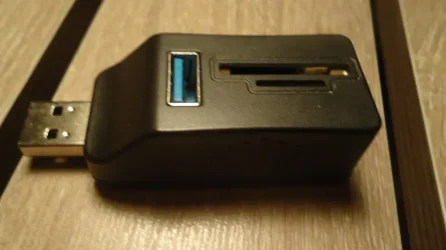
1790877159089.webp this black box was part of the original Barrot pkg. I used it earlier today which is probably what's messing things up???. It's convenient as it has 3 slots. I will unplug and not use. It must have Barrot technology in it.
 

My Computer My Computer

At a glance

1113th Gen Intel(R) Core(TM) i5-1335U 1.30 GHz8 gb
OS
11
Computer type
Laptop
Manufacturer/Model
Lenovo Ideapad
CPU
13th Gen Intel(R) Core(TM) i5-1335U 1.30 GHz
Memory
8 gb
Screen Resolution
1900x1200
Hard Drives
500 gb ssd
I am not installing that Barrot
I thought you must have physically connected it for that entry to appear.
you have been doing something else - e.g. connecting that Barrot device

I really do not know what your unexpected actions will have done:-
I deleted everything I could find called Barrot

Found a Barrot folder
but they will not have caused that entry to appear.

I see you have just posted again -
I do not know what that black thing is.

I cannot remember what response the unpair command generates.
I've looked through my notes - no responses ever noted.
I do know that the command [in the same folder]
btdiscovery -s
will show you a list of paired devices. I run it both before & after that unpair command to check what happened.

I still do not know when/how you saw
Just comes up with unknown devices when I say add device

And do please note that I do not want to discuss that Amazon device yet either. I want to complete assessing the test of the original Realtek device before moving on.


Denis
 

My Computer My Computer

At a glance

Windows 11 Home x64 Version 26H2 Build 26300....
OS
Windows 11 Home x64 Version 26H2 Build 26300.9457

Latest Support Threads

Back
Top Bottom