Bluetooth error


yousaf465

Well-known member
Local time
5:46 PM
Posts
98
OS
Windows 11
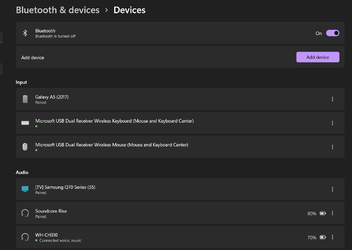
Although my Bluetooth headset is connected Bluetooth & devices shows bluetooth turned off.1641706613139.png
 

My Computer My Computer

At a glance

Windows 11i7-9750H16GBGTX 1650
OS
Windows 11
Computer type
Laptop
Manufacturer/Model
Dell/XPS 7590
CPU
i7-9750H
Memory
16GB
Graphics Card(s)
GTX 1650
If your Bluetooth is disabled then do the following to enable it.
Uninstall the device from device manager and restart Bluetooth service.
Start > services.msc
Right-click "Bluetooth Support Service."
Choose Automatic.
Go to device manager and right-click on your computer name and click "Scan for hardware changes"
Install the Bluetooth device drivers from the manufacturer's website, if any.

If the device isn’t showing under device manager or under show hidden devices then shutdown the pc, unplug the power cable & then reconnect, then go to device manager & see if there’s any unknown devices showing, if so uninstall this & then scan for hardware changes & hopefully Bluetooth will reappear.

I hope this helps.
 

My Computers My Computers

  • At a glance

    Windows 11 Pro 64bit6th Gen Intel Core i7-6700HQ Quad Core proces...16GB HyperX IMPACT 1600MHz SODIMM DDR3 (2 x 8GB)NVIDIA® GeForce® GTX 960M - 2.0GB DDR5 Video ...
    OS
    Windows 11 Pro 64bit
    Computer type
    Laptop
    Manufacturer/Model
    PC Specialist Optimus VII V17-960 Gaming Laptop.
    CPU
    6th Gen Intel Core i7-6700HQ Quad Core processor.
    Memory
    16GB HyperX IMPACT 1600MHz SODIMM DDR3 (2 x 8GB)
    Graphics Card(s)
    NVIDIA® GeForce® GTX 960M - 2.0GB DDR5 Video RAM - DirectX® 12
    Sound Card
    Intel 2 Channel High Def. Audio + SoundBlaster™ Cinema 2 & Realtek
    Monitor(s) Displays
    Optimus Series: 17.3" Matte Full HD IPS LED Widescreen (1920x1080)
    Screen Resolution
    Full HD IPS display (1920 x 1080).
    Hard Drives
    4TB SSD (internal).
    1x 1TB & 1x 5TB external HDDs.
    Cooling
    STANDARD THERMAL PASTE FOR SUFFICIENT COOLING
    Keyboard
    Logitech K800 wireless keyboard
    Mouse
    Logitech M705 wireless mouse
    Internet Speed
    Upto 100Mbps
    Browser
    Edge.
    Antivirus
    Windows Defender & MalwareBytes pro.
  • At a glance

    IOS 14.6
    Operating System
    IOS 14.6
    Computer type
    Tablet
    Manufacturer/Model
    Apple
If your Bluetooth is disabled then do the following to enable it.
Uninstall the device from device manager and restart Bluetooth service.
Start > services.msc
Right-click "Bluetooth Support Service."
Choose Automatic.
Go to device manager and right-click on your computer name and click "Scan for hardware changes"
Install the Bluetooth device drivers from the manufacturer's website, if any.

If the device isn’t showing under device manager or under show hidden devices then shutdown the pc, unplug the power cable & then reconnect, then go to device manager & see if there’s any unknown devices showing, if so uninstall this & then scan for hardware changes & hopefully Bluetooth will reappear.

I hope this helps.
No, it's disabled or anything it is just mentioned as disabled as shown in the app.
The only issue after updating from windows 10, I have manually going into this menu and connect my headphone instead of simply doing it from the taskbar.
 

My Computer My Computer

At a glance

Windows 11i7-9750H16GBGTX 1650
OS
Windows 11
Computer type
Laptop
Manufacturer/Model
Dell/XPS 7590
CPU
i7-9750H
Memory
16GB
Graphics Card(s)
GTX 1650
Does the setting under Services say automatic?
If you disable then enable BT does the message disappear?
Are you running any third party software for Bluetooth or which may affect wifi & Bluetooth?
Addendum: Check to see if Bluetooth is enabled within the BIOS.
 
Last edited:

My Computers My Computers

  • At a glance

    Windows 11 Pro 64bit6th Gen Intel Core i7-6700HQ Quad Core proces...16GB HyperX IMPACT 1600MHz SODIMM DDR3 (2 x 8GB)NVIDIA® GeForce® GTX 960M - 2.0GB DDR5 Video ...
    OS
    Windows 11 Pro 64bit
    Computer type
    Laptop
    Manufacturer/Model
    PC Specialist Optimus VII V17-960 Gaming Laptop.
    CPU
    6th Gen Intel Core i7-6700HQ Quad Core processor.
    Memory
    16GB HyperX IMPACT 1600MHz SODIMM DDR3 (2 x 8GB)
    Graphics Card(s)
    NVIDIA® GeForce® GTX 960M - 2.0GB DDR5 Video RAM - DirectX® 12
    Sound Card
    Intel 2 Channel High Def. Audio + SoundBlaster™ Cinema 2 & Realtek
    Monitor(s) Displays
    Optimus Series: 17.3" Matte Full HD IPS LED Widescreen (1920x1080)
    Screen Resolution
    Full HD IPS display (1920 x 1080).
    Hard Drives
    4TB SSD (internal).
    1x 1TB & 1x 5TB external HDDs.
    Cooling
    STANDARD THERMAL PASTE FOR SUFFICIENT COOLING
    Keyboard
    Logitech K800 wireless keyboard
    Mouse
    Logitech M705 wireless mouse
    Internet Speed
    Upto 100Mbps
    Browser
    Edge.
    Antivirus
    Windows Defender & MalwareBytes pro.
  • At a glance

    IOS 14.6
    Operating System
    IOS 14.6
    Computer type
    Tablet
    Manufacturer/Model
    Apple

My Computers My Computers

  • At a glance

    Windows11intel 8250 I58gbintel uhd 620
    OS
    Windows11
    Computer type
    Laptop
    Manufacturer/Model
    Huawei Matebook X Pro
    CPU
    intel 8250 I5
    Memory
    8gb
    Graphics Card(s)
    intel uhd 620
    Monitor(s) Displays
    built in laptop display
    Screen Resolution
    1920x1280
    Hard Drives
    Samsung 970 Evo 500gb M2
    Browser
    Edge
    Antivirus
    Defender
  • At a glance

    Windows 10AMD Ryzen 7300U16 GB DDR4AMD Raedon RX Vega graphics onboard
    Operating System
    Windows 10
    Computer type
    Laptop
    Manufacturer/Model
    Acer A515-43-R6DE
    CPU
    AMD Ryzen 7300U
    Memory
    16 GB DDR4
    Graphics card(s)
    AMD Raedon RX Vega graphics onboard
    Monitor(s) Displays
    15"6 FHD IPS Slim Bezel
    Hard Drives
    512cb PCie NVME SSD
    Case
    Pure Silver
    Keyboard
    Inbuilt
    Mouse
    Touchpad and Logitech external mouse
    Browser
    Edge
    Antivirus
    Defender
Does the setting under Services say automatic?
If you disable then enable BT does the message disappear?
Are you running any third party software for Bluetooth or which may affect wifi & Bluetooth?
Addendum: Check to see if Bluetooth is enabled within the BIOS.
In services
1641740958543.png

@humbird No I only use bluetooth headphone or my builtin speakers.
 

My Computer My Computer

At a glance

Windows 11i7-9750H16GBGTX 1650
OS
Windows 11
Computer type
Laptop
Manufacturer/Model
Dell/XPS 7590
CPU
i7-9750H
Memory
16GB
Graphics Card(s)
GTX 1650
Manual (Trigger Start) means that it is started by some events. Most often it came from a task in Task Scheduler, also may happen after connection a device which requires this service (when plug-and-play service has detected this device). It should be connected directly to PC, inactive Bluetooth service cannot detect switching on the paired device because it should be already active.

You can check it this way: boot OS and immediately look at BT services: are they already running or waiting for something. To determine where the trigger event came from, you can use Process Explorer (run it as administrator): find a service in the list of active processes, right-click, Properties, Image (first tab), Autostart Location. If this field is not empty, it may be either Registry key or a task in Task Scheduler.

 

My Computer My Computer

At a glance

Windows 11 Pro 25H2AMD Rysen 5 4600H32 GB (2 x 16 GB Samsung SO-DIMM DDR4-3200)GeForce GTX 1650 Ti, 4 GB GDDR6
OS
Windows 11 Pro 25H2
Computer type
Laptop
Manufacturer/Model
Lenovo Legion 5-15ARH05
CPU
AMD Rysen 5 4600H
Memory
32 GB (2 x 16 GB Samsung SO-DIMM DDR4-3200)
Graphics Card(s)
GeForce GTX 1650 Ti, 4 GB GDDR6
Screen Resolution
1920x1080
Hard Drives
SSD M.2 512 GB SAMSUNG MZALQ512; SSD M.2 1 TB Seagate FireCuda 530
Mouse
Logitech M650L in Bluetooth mode

My Computers My Computers

  • At a glance

    Windows 11 Pro 64bit6th Gen Intel Core i7-6700HQ Quad Core proces...16GB HyperX IMPACT 1600MHz SODIMM DDR3 (2 x 8GB)NVIDIA® GeForce® GTX 960M - 2.0GB DDR5 Video ...
    OS
    Windows 11 Pro 64bit
    Computer type
    Laptop
    Manufacturer/Model
    PC Specialist Optimus VII V17-960 Gaming Laptop.
    CPU
    6th Gen Intel Core i7-6700HQ Quad Core processor.
    Memory
    16GB HyperX IMPACT 1600MHz SODIMM DDR3 (2 x 8GB)
    Graphics Card(s)
    NVIDIA® GeForce® GTX 960M - 2.0GB DDR5 Video RAM - DirectX® 12
    Sound Card
    Intel 2 Channel High Def. Audio + SoundBlaster™ Cinema 2 & Realtek
    Monitor(s) Displays
    Optimus Series: 17.3" Matte Full HD IPS LED Widescreen (1920x1080)
    Screen Resolution
    Full HD IPS display (1920 x 1080).
    Hard Drives
    4TB SSD (internal).
    1x 1TB & 1x 5TB external HDDs.
    Cooling
    STANDARD THERMAL PASTE FOR SUFFICIENT COOLING
    Keyboard
    Logitech K800 wireless keyboard
    Mouse
    Logitech M705 wireless mouse
    Internet Speed
    Upto 100Mbps
    Browser
    Edge.
    Antivirus
    Windows Defender & MalwareBytes pro.
  • At a glance

    IOS 14.6
    Operating System
    IOS 14.6
    Computer type
    Tablet
    Manufacturer/Model
    Apple
Manual (Trigger Start) means that it is started by some events. Most often it came from a task in Task Scheduler, also may happen after connection a device which requires this service (when plug-and-play service has detected this device). It should be connected directly to PC, inactive Bluetooth service cannot detect switching on the paired device because it should be already active.

You can check it this way: boot OS and immediately look at BT services: are they already running or waiting for something. To determine where the trigger event came from, you can use Process Explorer (run it as administrator): find a service in the list of active processes, right-click, Properties, Image (first tab), Autostart Location. If this field is not empty, it may be either Registry key or a task in Task Scheduler.
This is how itis currently still I have to manually connect my heapdones.
1644740611359.png

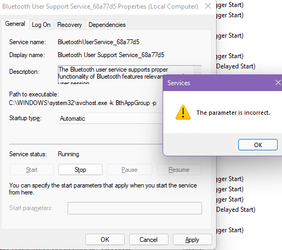
If I try to change the Bluetooth user support service to automatic this happens
1644740876918.png

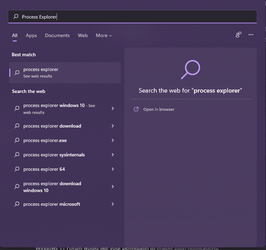
Can't find process explorer either. 1644741016565.png
 

My Computer My Computer

At a glance

Windows 11i7-9750H16GBGTX 1650
OS
Windows 11
Computer type
Laptop
Manufacturer/Model
Dell/XPS 7590
CPU
i7-9750H
Memory
16GB
Graphics Card(s)
GTX 1650
It shows one headset as connected.
WH-CH510 Wireless Headphones | Sony UK
 

My Computers My Computers

  • At a glance

    Win 11 ProAMD Ryzen™ 7 7730U24GB Dual-Channel DDR4 @ 1596MHz (22-22-22-52)512MB ATI AMD Radeon Graphics (ASUStek Comput...
    OS
    Win 11 Pro
    Computer type
    Laptop
    Manufacturer/Model
    ASUS Vivobook
    CPU
    AMD Ryzen™ 7 7730U
    Motherboard
    M1605YA
    Memory
    24GB Dual-Channel DDR4 @ 1596MHz (22-22-22-52)
    Graphics Card(s)
    512MB ATI AMD Radeon Graphics (ASUStek Computer Inc)
    Monitor(s) Displays
    Generic PnP Monitor (1920x1200@60Hz) - P1 PLUS (1920x1080@59Hz)
    Screen Resolution
    1920 X 1200
    Hard Drives
    953GB Western Digital WD
    PSU
    45 Watts
    Mouse
    Lenovo Bluetooth.
    Internet Speed
    500 Mbps
    Browser
    Edge
    Antivirus
    Defender
  • At a glance

    Windows 11AMD Ryzen 7 5800H / 3.2 GHz32 GB DDR4 SDRAM 3200 MHzNVIDIA GeForce RTX 3060 6 GB GDDR6 SDRAM
    Operating System
    Windows 11
    Computer type
    Laptop
    Manufacturer/Model
    ACER NITRO
    CPU
    AMD Ryzen 7 5800H / 3.2 GHz
    Motherboard
    CZ Scala_CAS (FP6)
    Memory
    32 GB DDR4 SDRAM 3200 MHz
    Graphics card(s)
    NVIDIA GeForce RTX 3060 6 GB GDDR6 SDRAM
    Sound Card
    Realtek Audio. NVIDIA High Definition Audio
    Monitor(s) Displays
    15.6" LED backlight 1920 x 1080 (Full HD) 144 Hz
    Screen Resolution
    1920 x 1080 (Full HD)
    Hard Drives
    Samsung 970 Evo Plus 2TB NVMe M.2
    PSU
    180 Watt, 19.5 V
    Mouse
    Lenovo Bluetooth
    Internet Speed
    500 Mbps
    Browser
    Edge
    Antivirus
    Defender
It shows one headset as connected.
WH-CH510 Wireless Headphones | Sony UK
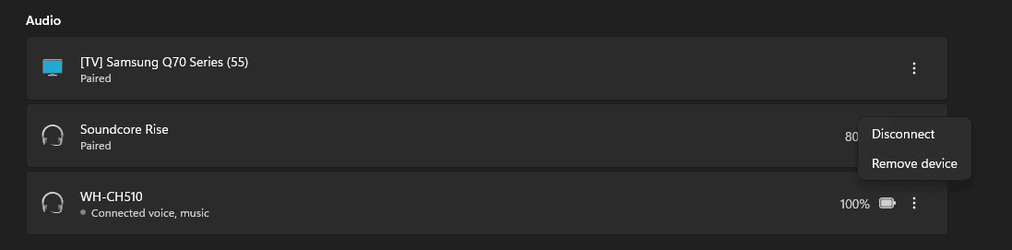
yes, it was connected, but I have to do it manually, by going to the Bluetooth menu and selecting connect.
1644765090180.png

and after
1644765181338.png
 

My Computer My Computer

At a glance

Windows 11i7-9750H16GBGTX 1650
OS
Windows 11
Computer type
Laptop
Manufacturer/Model
Dell/XPS 7590
CPU
i7-9750H
Memory
16GB
Graphics Card(s)
GTX 1650
Happens to me on a new boot. Once connected I can disconnect and connect any time again until I shutdown and boot again.
 

My Computers My Computers

  • At a glance

    Win 11 ProAMD Ryzen™ 7 7730U24GB Dual-Channel DDR4 @ 1596MHz (22-22-22-52)512MB ATI AMD Radeon Graphics (ASUStek Comput...
    OS
    Win 11 Pro
    Computer type
    Laptop
    Manufacturer/Model
    ASUS Vivobook
    CPU
    AMD Ryzen™ 7 7730U
    Motherboard
    M1605YA
    Memory
    24GB Dual-Channel DDR4 @ 1596MHz (22-22-22-52)
    Graphics Card(s)
    512MB ATI AMD Radeon Graphics (ASUStek Computer Inc)
    Monitor(s) Displays
    Generic PnP Monitor (1920x1200@60Hz) - P1 PLUS (1920x1080@59Hz)
    Screen Resolution
    1920 X 1200
    Hard Drives
    953GB Western Digital WD
    PSU
    45 Watts
    Mouse
    Lenovo Bluetooth.
    Internet Speed
    500 Mbps
    Browser
    Edge
    Antivirus
    Defender
  • At a glance

    Windows 11AMD Ryzen 7 5800H / 3.2 GHz32 GB DDR4 SDRAM 3200 MHzNVIDIA GeForce RTX 3060 6 GB GDDR6 SDRAM
    Operating System
    Windows 11
    Computer type
    Laptop
    Manufacturer/Model
    ACER NITRO
    CPU
    AMD Ryzen 7 5800H / 3.2 GHz
    Motherboard
    CZ Scala_CAS (FP6)
    Memory
    32 GB DDR4 SDRAM 3200 MHz
    Graphics card(s)
    NVIDIA GeForce RTX 3060 6 GB GDDR6 SDRAM
    Sound Card
    Realtek Audio. NVIDIA High Definition Audio
    Monitor(s) Displays
    15.6" LED backlight 1920 x 1080 (Full HD) 144 Hz
    Screen Resolution
    1920 x 1080 (Full HD)
    Hard Drives
    Samsung 970 Evo Plus 2TB NVMe M.2
    PSU
    180 Watt, 19.5 V
    Mouse
    Lenovo Bluetooth
    Internet Speed
    500 Mbps
    Browser
    Edge
    Antivirus
    Defender
Happens to me on a new boot. Once connected I can disconnect and connect any time again until I shutdown and boot again.
In windows 10 it was auto-pairing/connection. Just turn on the headphone and it will just connect on its own.
 

My Computer My Computer

At a glance

Windows 11i7-9750H16GBGTX 1650
OS
Windows 11
Computer type
Laptop
Manufacturer/Model
Dell/XPS 7590
CPU
i7-9750H
Memory
16GB
Graphics Card(s)
GTX 1650
Back
Top Bottom