BSOD with screen corruption


tony359

Well-known member
Local time
11:38 PM
Posts
116
OS
Windows 10
Hello all,

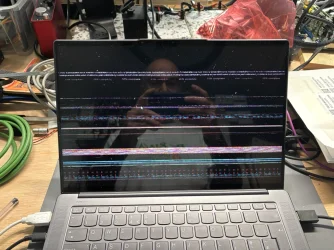
I've seen my Lenovo Yoga Slim 7 Pro X crashing with a corrupted screen a few times recently and I'd like to try to find out what the problem is.
System is AMD Ryzen 6800HS, 32GB RAM, 512GB SSD, AMD iGPU plus RTX 3050 which is disabled in the BIOS as it's pointless with only 4GB of VRAM and just causes all sort of issues with Windows' bad implementation of dual GPUs. Plus, it eats battery and I don't need it. (well, I would, if it had 8GB of VRAM!). nVidia drivers are probably still installed though.

Last event was today around 16:30 UK time. I reached out to Task Manager to close an app (nothing wrong with Windows, it's a badly made app and it hangs for like 2 minutes when it cannot connect to a device so I close it from task manager) and the screen got all messed up but I could read "there was a problem and your system needs to be restarted" - though that didn't happen.

I had two audio applications open, a FocusRite 18i20 connected via USB, a USB ethernet dongle and a USB mouse connected to an Anker USB splitter.

Logs can be found here: Microsoft OneDrive

Today I updated the chipset drivers and the Adrenalin software. I am NOT using the manufacturer CPU/iGPU drivers because they're stuck in the past.

The laptop is mostly stable, this doesn't happen constantly and I don't remember what I was doing the other times it happened.

Thanks for your help!
 

Attachments
  • IMG_0017 Large.webp
    IMG_0017 Large.webp
    226.4 KB · Views: 2

My Computers

System One System Two

  • OS
    Windows 10
    Computer type
    PC/Desktop
    CPU
    Ryzen 5800X
    Motherboard
    MSI B550 Tomahawk
    Memory
    32GB
    Graphics Card(s)
    RTX 3070
  • Operating System
    Windows 11 24H1
    Computer type
    Laptop
    Manufacturer/Model
    Lenovo
    CPU
    Ryzen 6800HS
    Memory
    32GB
Something, something... graphics driver. :-)


It's always a good idea to DISABLE, drivers included with Windows Updates.


Many times one of them will corrupt the already installed drivers.
Even when disabled, they will still show as Optional in Windows Updates, if your ever need one.

I've never needed a driver from Microsoft.
 

My Computers

System One System Two

  • OS
    Win 11 Home ♦♦♦26200.8655 ♦♦♦♦♦♦♦25H2
    Computer type
    PC/Desktop
    Manufacturer/Model
    Built by Ghot® [May 2020]
    CPU
    AMD Ryzen 7 3700X
    Motherboard
    Asus Pro WS X570-ACE (BIOS 5302)
    Memory
    G.Skill (F4-3200C14D-16GTZKW)
    Graphics Card(s)
    EVGA RTX 2070 (08G-P4-2171-KR)
    Sound Card
    Realtek ALC1220P / ALC S1220A
    Monitor(s) Displays
    Dell U3011 30"
    Screen Resolution
    2560 x 1600
    Hard Drives
    2x Samsung 860 EVO 500GB,
    WD 4TB Black FZBX - SATA III,
    WD 8TB Black FZBX - SATA III,
    DRW-24B1ST CD/DVD Burner
    PSU
    PC Power & Cooling 750W Quad EPS12V
    Case
    Cooler Master ATCS 840 Tower
    Cooling
    CM Hyper 212 EVO (push/pull)
    Keyboard
    Ducky DK9008 Shine II Blue LED
    Mouse
    Logitech Optical M-100
    Internet Speed
    300/300
    Browser
    Firefox (latest)
    Antivirus
    Bitdefender Total Security
    Other Info
    Speakers: Klipsch Pro Media 2.1
  • Operating System
    Windows XP Pro 32bit w/SP3
    Computer type
    PC/Desktop
    Manufacturer/Model
    Built by Ghot® (not in use)
    CPU
    AMD Athlon 64 X2 5000+ (OC'd @ 3.2Ghz)
    Motherboard
    ASUS M2N32-SLI Deluxe Wireless Edition
    Memory
    TWIN2X2048-6400C4DHX (2 x 1GB, DDR2 800)
    Graphics card(s)
    EVGA 256-P2-N758-TR GeForce 8600GT SSC
    Sound Card
    Onboard
    Monitor(s) Displays
    ViewSonic G90FB Black 19" Professional (CRT)
    Screen Resolution
    up to 2048 x 1536
    Hard Drives
    WD 36GB 10,000rpm Raptor SATA
    Seagate 80GB 7200rpm SATA
    Lite-On LTR-52246S CD/RW
    Lite-On LH-18A1P CD/DVD Burner
    PSU
    PC Power & Cooling Silencer 750 Quad EPS12V
    Case
    Generic Beige case, 80mm fans
    Cooling
    ZALMAN 9500A 92mm CPU Cooler
    Keyboard
    Logitech Classic Keybooard 200
    Mouse
    Logitech Optical M-BT96a
    Internet Speed
    300/300
    Browser
    Firefox 3.x ??
    Antivirus
    Symantec (Norton)
    Other Info
    Still assembled, still runs. Haven't turned it on for 15 years?
Does WinKey/Ctrl/Shift/B do anything?
 

My Computers

System One System Two

  • OS
    Windows 11 Pro
    Computer type
    PC/Desktop
    Manufacturer/Model
    ASUS ROG Strix
  • Operating System
    Windows 11 Pro
    Computer type
    Laptop
    Manufacturer/Model
    ASUS VivoBook
@Ghot
Thanks - is that a general recommendation or something related to my logs? Yes, I'm aware of the habit of windows to £uc% up drivers by installing random ones. I wasn't aware this could be disabled, thanks.

@Edwin
you mean while the system has crashed with that corrupted screen? The mouse didn't move despite the pointer still visible. I think I tried the window key but nothing happened.
 

My Computers

System One System Two

  • OS
    Windows 10
    Computer type
    PC/Desktop
    CPU
    Ryzen 5800X
    Motherboard
    MSI B550 Tomahawk
    Memory
    32GB
    Graphics Card(s)
    RTX 3070
  • Operating System
    Windows 11 24H1
    Computer type
    Laptop
    Manufacturer/Model
    Lenovo
    CPU
    Ryzen 6800HS
    Memory
    32GB
Please list all products that are attached by USB.


Please perform the following steps:


1) Add WMIC:

DISM /Online /Add-Capability /CapabilityName:WMIC~~~~


2) Run Tuneup plus > post a share link


3) Run gather_additional_dump_files.bat > post a share link


4) Download and install: bootable_uefi_x64.zip


5) Run the Lenovo bootable UEFI hardware diagnostics overnight while sleeping > take pictures > post images or share links displaying the tests performed with results


6) Enable regback:


7) Create a new restore point:


8) More steps pending above results
 

My Computer

System One

  • OS
    Windows 10
    Computer type
    Laptop
    Manufacturer/Model
    HP
    CPU
    Intel(R) Core(TM) i7-4800MQ CPU @ 2.70GHz
    Motherboard
    Product : 190A Version : KBC Version 94.56
    Memory
    16 GB Total: Manufacturer : Samsung MemoryType : DDR3 FormFactor : SODIMM Capacity : 8GB Speed : 1600
    Graphics Card(s)
    NVIDIA Quadro K3100M; Intel(R) HD Graphics 4600
    Sound Card
    IDT High Definition Audio CODEC; PNP Device ID HDAUDIO\FUNC_01&VEN_111D&DEV_76E0
    Hard Drives
    Model Hitachi HTS727575A9E364
    Antivirus
    Microsoft Defender
    Other Info
    Mobile Workstation
1) Read this link on Windows Driver Verifier (WDV):

Enable and Disable Driver Verifier in Windows 10


2) Create a new restore point:


3) Learn the methods to recover from BSOD caused by WDV by booting into safe mode and running one or more of these commands:

verifier /reset

verifier /bootmode resetonbootfail


(option nine and seven)


4) Plan to run the tool with various customized test settings.

a) Test all non-Microsoft drivers

b) Test no Microsoft drivers

c) For the first run of WDV select the 3 customized tests displayed in the TF tutorial


5) Whenever the WDV tool is started if there is no immediate BSOD then open administrative command prompt and copy and paste:

verifier /querysettings

Post a share link.


Customized tests will then be posted for the next run of WDV.


WDV can run continuously during the testing.


For any BSOD post a new V2 share link into the newest post.
 

My Computer

System One

  • OS
    Windows 10
    Computer type
    Laptop
    Manufacturer/Model
    HP
    CPU
    Intel(R) Core(TM) i7-4800MQ CPU @ 2.70GHz
    Motherboard
    Product : 190A Version : KBC Version 94.56
    Memory
    16 GB Total: Manufacturer : Samsung MemoryType : DDR3 FormFactor : SODIMM Capacity : 8GB Speed : 1600
    Graphics Card(s)
    NVIDIA Quadro K3100M; Intel(R) HD Graphics 4600
    Sound Card
    IDT High Definition Audio CODEC; PNP Device ID HDAUDIO\FUNC_01&VEN_111D&DEV_76E0
    Hard Drives
    Model Hitachi HTS727575A9E364
    Antivirus
    Microsoft Defender
    Other Info
    Mobile Workstation
@tony359

Yeah, that was just a general... guess.
Do the tutorial before you go on to fix the drivers.

@zbook is our troubleshooting LOGS guy.
 

My Computers

System One System Two

  • OS
    Win 11 Home ♦♦♦26200.8655 ♦♦♦♦♦♦♦25H2
    Computer type
    PC/Desktop
    Manufacturer/Model
    Built by Ghot® [May 2020]
    CPU
    AMD Ryzen 7 3700X
    Motherboard
    Asus Pro WS X570-ACE (BIOS 5302)
    Memory
    G.Skill (F4-3200C14D-16GTZKW)
    Graphics Card(s)
    EVGA RTX 2070 (08G-P4-2171-KR)
    Sound Card
    Realtek ALC1220P / ALC S1220A
    Monitor(s) Displays
    Dell U3011 30"
    Screen Resolution
    2560 x 1600
    Hard Drives
    2x Samsung 860 EVO 500GB,
    WD 4TB Black FZBX - SATA III,
    WD 8TB Black FZBX - SATA III,
    DRW-24B1ST CD/DVD Burner
    PSU
    PC Power & Cooling 750W Quad EPS12V
    Case
    Cooler Master ATCS 840 Tower
    Cooling
    CM Hyper 212 EVO (push/pull)
    Keyboard
    Ducky DK9008 Shine II Blue LED
    Mouse
    Logitech Optical M-100
    Internet Speed
    300/300
    Browser
    Firefox (latest)
    Antivirus
    Bitdefender Total Security
    Other Info
    Speakers: Klipsch Pro Media 2.1
  • Operating System
    Windows XP Pro 32bit w/SP3
    Computer type
    PC/Desktop
    Manufacturer/Model
    Built by Ghot® (not in use)
    CPU
    AMD Athlon 64 X2 5000+ (OC'd @ 3.2Ghz)
    Motherboard
    ASUS M2N32-SLI Deluxe Wireless Edition
    Memory
    TWIN2X2048-6400C4DHX (2 x 1GB, DDR2 800)
    Graphics card(s)
    EVGA 256-P2-N758-TR GeForce 8600GT SSC
    Sound Card
    Onboard
    Monitor(s) Displays
    ViewSonic G90FB Black 19" Professional (CRT)
    Screen Resolution
    up to 2048 x 1536
    Hard Drives
    WD 36GB 10,000rpm Raptor SATA
    Seagate 80GB 7200rpm SATA
    Lite-On LTR-52246S CD/RW
    Lite-On LH-18A1P CD/DVD Burner
    PSU
    PC Power & Cooling Silencer 750 Quad EPS12V
    Case
    Generic Beige case, 80mm fans
    Cooling
    ZALMAN 9500A 92mm CPU Cooler
    Keyboard
    Logitech Classic Keybooard 200
    Mouse
    Logitech Optical M-BT96a
    Internet Speed
    300/300
    Browser
    Firefox 3.x ??
    Antivirus
    Symantec (Norton)
    Other Info
    Still assembled, still runs. Haven't turned it on for 15 years?
wow, that's quite a lot of work. Thanks for now.

I'll do my best. This laptop is constantly requiring help, there is always something (mostly software) going on.

For now I have uninstalled both graphic drivers (including nvidia since I don't use it anymore) in safe mode (took time, had to find the bitlocker key etc) and only reinstalled AMD one.

Now running lenovo diagnostics overnight, I think it's a good idea to have a solid HW baseline, also considering I am still under warranty.
 
Last edited:

My Computers

System One System Two

  • OS
    Windows 10
    Computer type
    PC/Desktop
    CPU
    Ryzen 5800X
    Motherboard
    MSI B550 Tomahawk
    Memory
    32GB
    Graphics Card(s)
    RTX 3070
  • Operating System
    Windows 11 24H1
    Computer type
    Laptop
    Manufacturer/Model
    Lenovo
    CPU
    Ryzen 6800HS
    Memory
    32GB
Right, I've got some of the requested data.

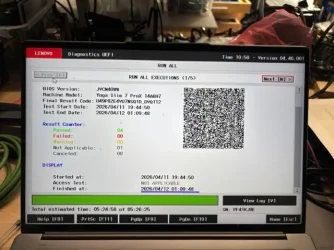
I've run 5 sets of Lenovo diagnostics for about 24 hours and there were no issues reported. Picture below. All 5 tests show the same "4 passed"

TuneUp logs can be found here: Microsoft OneDrive
Additional files here: Microsoft OneDrive

WDF looks like a cool tool but I want to take a full backup of the drive before running it so that will take a little while to do.

You also asked about USB devices: I had a FocusRite 18i20 sound interface, an Amazon Ethernet dongle and a mouse. Mouse and dongle wired via an Anker splitter.

Thanks for now!
 

Attachments

  • IMG_0046 Medium.webp
    IMG_0046 Medium.webp
    44.7 KB · Views: 2

My Computers

System One System Two

  • OS
    Windows 10
    Computer type
    PC/Desktop
    CPU
    Ryzen 5800X
    Motherboard
    MSI B550 Tomahawk
    Memory
    32GB
    Graphics Card(s)
    RTX 3070
  • Operating System
    Windows 11 24H1
    Computer type
    Laptop
    Manufacturer/Model
    Lenovo
    CPU
    Ryzen 6800HS
    Memory
    32GB
You also asked about USB devices: I had a FocusRite 18i20 sound interface, an Amazon Ethernet dongle and a mouse. Mouse and dongle wired via an Anker splitter.

Please look for a Display Link device.
 
Last edited:

My Computer

System One

  • OS
    Windows 10
    Computer type
    Laptop
    Manufacturer/Model
    HP
    CPU
    Intel(R) Core(TM) i7-4800MQ CPU @ 2.70GHz
    Motherboard
    Product : 190A Version : KBC Version 94.56
    Memory
    16 GB Total: Manufacturer : Samsung MemoryType : DDR3 FormFactor : SODIMM Capacity : 8GB Speed : 1600
    Graphics Card(s)
    NVIDIA Quadro K3100M; Intel(R) HD Graphics 4600
    Sound Card
    IDT High Definition Audio CODEC; PNP Device ID HDAUDIO\FUNC_01&VEN_111D&DEV_76E0
    Hard Drives
    Model Hitachi HTS727575A9E364
    Antivirus
    Microsoft Defender
    Other Info
    Mobile Workstation
I do have a display link hub but it wasn’t connected last time the laptop crashed.

Don’t tell me it’s the culprit? I feel it managed to crash my Mac mini too on more than one occasions.
I have definitely forgot to update that.

Shall I try to stress the current driver before updating?
 

My Computers

System One System Two

  • OS
    Windows 10
    Computer type
    PC/Desktop
    CPU
    Ryzen 5800X
    Motherboard
    MSI B550 Tomahawk
    Memory
    32GB
    Graphics Card(s)
    RTX 3070
  • Operating System
    Windows 11 24H1
    Computer type
    Laptop
    Manufacturer/Model
    Lenovo
    CPU
    Ryzen 6800HS
    Memory
    32GB
So far it is causing a separate problem:


Code:
Event[20796]
  Log Name: System
  Source: Microsoft-Windows-USB-USBHUB3
  Date: 2026-04-10T12:07:20.3070000Z
  Event ID: 196
  Task: Surprise Removal
  Level: Warning
  Opcode: Warning
  Keyword: N/A
  User: S-1-5-18
  User Name: NT AUTHORITY\SYSTEM
  Computer: Yoga
  Description:
USB device draining system power when system is idle.           
          
USB Device: VID: 0x17E9 PID: 0x6028 REV: 0x3104           
Removal action failed: SkippedAsRecentIoObservered


Code:
Event[20774]
  Log Name: System
  Source: Microsoft-Windows-USB-USBHUB3
  Date: 2026-04-10T11:40:18.2580000Z
  Event ID: 196
  Task: Surprise Removal
  Level: Warning
  Opcode: Warning
  Keyword: N/A
  User: S-1-5-18
  User Name: NT AUTHORITY\SYSTEM
  Computer: Yoga
  Description:
USB device draining system power when system is idle.           
          
USB Device: VID: 0x17E9 PID: 0x6028 REV: 0x3104           
Removal action failed: SkippedAsPersistentIoObserved


Code:
Event[0]
  Log Name: System
  Source: Microsoft-Windows-USB-USBHUB3
  Date: 2026-03-12T15:38:26.4780000Z
  Event ID: 196
  Task: Surprise Removal
  Level: Warning
  Opcode: Warning
  Keyword: N/A
  User: S-1-5-18
  User Name: NT AUTHORITY\SYSTEM
  Computer: Yoga
  Description:
USB device draining system power when system is idle.            
           
USB Device: VID: 0x17E9 PID: 0x6028 REV: 0x3104            
Removal action failed: SkippedAsRecentIoObservered

Event[1]
  Log Name: System
  Source: Microsoft-Windows-USB-USBHUB3
  Date: 2026-03-12T15:39:01.4950000Z
  Event ID: 196
  Task: Surprise Removal
  Level: Warning
  Opcode: Warning
  Keyword: N/A
  User: S-1-5-18
  User Name: NT AUTHORITY\SYSTEM
  Computer: Yoga
  Description:
USB device draining system power when system is idle.            
           
USB Device: VID: 0x17E9 PID: 0x6028 REV: 0x3104            
Removal action failed: SkippedAsPersistentIoObserved

Event[2]
  Log Name: System
  Source: Microsoft-Windows-USB-USBHUB3
  Date: 2026-03-12T15:39:36.5230000Z
  Event ID: 196
  Task: Surprise Removal
  Level: Warning
  Opcode: Warning
  Keyword: N/A
  User: S-1-5-18
  User Name: NT AUTHORITY\SYSTEM
  Computer: Yoga
  Description:
USB device draining system power when system is idle.            
           
USB Device: VID: 0x17E9 PID: 0x6028 REV: 0x3104            
Removal action failed: SkippedAsPersistentIoObserved


Code:
Event[18636]
  Log Name: System
  Source: Microsoft-Windows-USB-USBHUB3
  Date: 2026-04-08T22:14:10.2050000Z
  Event ID: 196
  Task: Surprise Removal
  Level: Warning
  Opcode: Warning 
  Keyword: N/A
  User: S-1-5-18
  User Name: NT AUTHORITY\SYSTEM
  Computer: Yoga
  Description:
USB device draining system power when system is idle.             
            
USB Device: VID: 0x17E9 PID: 0x6028 REV: 0x3104             
Removal action failed: SkippedAsRecentIoObservered

Event[18637]
  Log Name: System
  Source: Microsoft-Windows-USB-USBHUB3
  Date: 2026-04-08T22:14:45.3320000Z
  Event ID: 196
  Task: Surprise Removal
  Level: Warning
  Opcode: Warning 
  Keyword: N/A
  User: S-1-5-18
  User Name: NT AUTHORITY\SYSTEM
  Computer: Yoga
  Description:
USB device draining system power when system is idle.             
            
USB Device: VID: 0x17E9 PID: 0x6028 REV: 0x3104             
Removal action failed: SkippedAsPersistentIoObserved

Event[18638]
  Log Name: System
  Source: Microsoft-Windows-USB-USBHUB3
  Date: 2026-04-08T22:15:20.4590000Z
  Event ID: 196
  Task: Surprise Removal
  Level: Warning
  Opcode: Warning 
  Keyword: N/A
  User: S-1-5-18
  User Name: NT AUTHORITY\SYSTEM
  Computer: Yoga
  Description:
USB device draining system power when system is idle.             
            
USB Device: VID: 0x17E9 PID: 0x6028 REV: 0x3104             
Removal action failed: SkippedAsPersistentIoObserved

Event[18639]
  Log Name: System
  Source: Microsoft-Windows-USB-USBHUB3
  Date: 2026-04-08T22:22:12.3050000Z
  Event ID: 196
  Task: Surprise Removal
  Level: Warning
  Opcode: Warning 
  Keyword: N/A
  User: S-1-5-18
  User Name: NT AUTHORITY\SYSTEM
  Computer: Yoga
  Description:
USB device draining system power when system is idle.             
            
USB Device: VID: 0x17E9 PID: 0x6028 REV: 0x3104             
Removal action failed: SkippedAsRecentIoObservered

Event[18640]
  Log Name: System
  Source: Microsoft-Windows-USB-USBHUB3
  Date: 2026-04-08T22:22:47.3880000Z
  Event ID: 196
  Task: Surprise Removal
  Level: Warning
  Opcode: Warning 
  Keyword: N/A
  User: S-1-5-18
  User Name: NT AUTHORITY\SYSTEM
  Computer: Yoga
  Description:
USB device draining system power when system is idle.             
            
USB Device: VID: 0x17E9 PID: 0x6028 REV: 0x3104             
Removal action failed: SkippedAsPersistentIoObserved

Event[18641]
  Log Name: System
  Source: Microsoft-Windows-USB-USBHUB3
  Date: 2026-04-08T22:23:22.4170000Z
  Event ID: 196
  Task: Surprise Removal
  Level: Warning
  Opcode: Warning 
  Keyword: N/A
  User: S-1-5-18
  User Name: NT AUTHORITY\SYSTEM
  Computer: Yoga
  Description:
USB device draining system power when system is idle.             
            
USB Device: VID: 0x17E9 PID: 0x6028 REV: 0x3104             
Removal action failed: SkippedAsPersistentIoObserved
 

My Computer

System One

  • OS
    Windows 10
    Computer type
    Laptop
    Manufacturer/Model
    HP
    CPU
    Intel(R) Core(TM) i7-4800MQ CPU @ 2.70GHz
    Motherboard
    Product : 190A Version : KBC Version 94.56
    Memory
    16 GB Total: Manufacturer : Samsung MemoryType : DDR3 FormFactor : SODIMM Capacity : 8GB Speed : 1600
    Graphics Card(s)
    NVIDIA Quadro K3100M; Intel(R) HD Graphics 4600
    Sound Card
    IDT High Definition Audio CODEC; PNP Device ID HDAUDIO\FUNC_01&VEN_111D&DEV_76E0
    Hard Drives
    Model Hitachi HTS727575A9E364
    Antivirus
    Microsoft Defender
    Other Info
    Mobile Workstation
You're saying the DRIVER is still draining system power after the actual USB device was removed or that the DisplayLink HUB is draining system power when it's connected to the laptop and the laptop is idle?

The DisplayLink device is also providing charging so that's not the end of the world though that would explain why I often find the Lenovo "hot" when close.
 

My Computers

System One System Two

  • OS
    Windows 10
    Computer type
    PC/Desktop
    CPU
    Ryzen 5800X
    Motherboard
    MSI B550 Tomahawk
    Memory
    32GB
    Graphics Card(s)
    RTX 3070
  • Operating System
    Windows 11 24H1
    Computer type
    Laptop
    Manufacturer/Model
    Lenovo
    CPU
    Ryzen 6800HS
    Memory
    32GB
@zbook

How long should I run each WDV pass if I don't get a BSOD?
 

My Computers

System One System Two

  • OS
    Windows 10
    Computer type
    PC/Desktop
    CPU
    Ryzen 5800X
    Motherboard
    MSI B550 Tomahawk
    Memory
    32GB
    Graphics Card(s)
    RTX 3070
  • Operating System
    Windows 11 24H1
    Computer type
    Laptop
    Manufacturer/Model
    Lenovo
    CPU
    Ryzen 6800HS
    Memory
    32GB
@zbook

How long should I run each WDV pass if I don't get a BSOD?


5) Whenever the WDV tool is started if there is no immediate BSOD then open administrative command prompt and copy and paste:

verifier /querysettings

Post a share link.


Customized tests will then be posted for the next run of WDV.


WDV can run continuously during the testing.


For any BSOD post a new V2 share link into the newest post.


My Computer

System One

  • OS
    Windows 10
    Computer type
    Laptop
    Manufacturer/Model
    HP
    CPU
    Intel(R) Core(TM) i7-4800MQ CPU @ 2.70GHz
    Motherboard
    Product : 190A Version : KBC Version 94.56
    Memory
    16 GB Total: Manufacturer : Samsung MemoryType : DDR3 FormFactor : SODIMM Capacity : 8GB Speed : 1600
    Graphics Card(s)
    NVIDIA Quadro K3100M; Intel(R) HD Graphics 4600
    Sound Card
    IDT High Definition Audio CODEC; PNP Device ID HDAUDIO\FUNC_01&VEN_111D&DEV_76E0
    Hard Drives
    Model Hitachi HTS727575A9E364
    Antivirus
    Microsoft Defender
    Other Info
    Mobile Workstation
Yes I did read your message multiple times, hence my question: for how long shall I run the test before I share the output of the command you mentioned?

Also I am not sure what you mean with a "share link"? You just need the settings of the verifier, right?

This is what I am getting, laptop has been on for about 30m since WDV started running.

Code:
Microsoft Windows [Version 10.0.26200.8246]
(c) Microsoft Corporation. All rights reserved.

C:\Users\anton>verifier /querysetting
An unsupported command line parameter was specified.
Run "verifier /?" for command line assistance.

C:\Users\anton>verifier /querysettings

Verifier Flags: 0x00100610

  Standard Flags:

    [ ] 0x00000001 Special pool.
    [ ] 0x00000002 Force IRQL checking.
    [ ] 0x00000008 Pool tracking.
    [X] 0x00000010 I/O verification.
    [ ] 0x00000020 Deadlock detection.
    [ ] 0x00000080 DMA checking.
    [ ] 0x00000100 Security checks.
    [ ] 0x00000800 Miscellaneous checks.
    [ ] 0x00020000 DDI compliance checking.

  Additional Flags:

    [ ] 0x00000004 Randomized low resources simulation.
    [X] 0x00000200 Force pending I/O requests.
    [X] 0x00000400 IRP logging.
    [ ] 0x00002000 Invariant MDL checking for stack.
    [ ] 0x00004000 Invariant MDL checking for driver.
    [ ] 0x00008000 Power framework delay fuzzing.
    [ ] 0x00010000 Port/miniport interface checking.
    [ ] 0x00040000 Systematic low resources simulation.
    [ ] 0x00080000 DDI compliance checking (additional).
    [ ] 0x00200000 NDIS/WIFI verification.
    [ ] 0x00800000 Kernel synchronization delay fuzzing.
    [ ] 0x01000000 VM switch verification.
    [ ] 0x02000000 Code integrity checks.

  Internal Flags:

    [X] 0x00100000 Extended Verifier flags (internal).

    [X] Indicates flag is enabled.

  Active Rule Classes:

    5  - I/O verification.
    10 - Force pending I/O requests.
    11 - IRP logging.
    21 - Extended Verifier flags (internal).
    34 - WDF verfication.
    37 - File system filter verification.

  Boot Mode:

    Persistent

  Rules:

    All rules are using default settings

  Verified Drivers:

    mcupdate_authenticamd.dll
    globmerger.sys
    amdmicropep.sys
    vsock.sys
    vmci.sys
    amdpsp.sys
    pwdrvio.sys
    windrvr6.sys
    amdxe.sys
    amdfendr.sys
    vmnetadapter.sys
    vmnet.sys
    amdsafd.sys
    el_display_vhidbus.sys
    netwtw14.sys
    amdkmdag.sys
    amdacpbus.sys
    acpivpc.sys
    amdgpio2.sys
    amdppkg.sys
    amdi2c.sys
    motubus64.sys
    focusriteusbswroot.sys
    focusritepcieswroot.sys
    amdfendrmgr.sys
    atihdwt6.sys
    amdacpafd.sys
    ibtusb.sys
    dump_dumpstorport.sys
    dump_stornvme.sys
    dump_dumpfve.sys
    vmnetbridge.sys
    vmnetuserif.sys
    vmx86.sys
    amdryzenmasterdriver.sys

C:\Users\anton>

Thanks
 

My Computers

System One System Two

  • OS
    Windows 10
    Computer type
    PC/Desktop
    CPU
    Ryzen 5800X
    Motherboard
    MSI B550 Tomahawk
    Memory
    32GB
    Graphics Card(s)
    RTX 3070
  • Operating System
    Windows 11 24H1
    Computer type
    Laptop
    Manufacturer/Model
    Lenovo
    CPU
    Ryzen 6800HS
    Memory
    32GB
Yes I did read your message multiple times, hence my question: for how long shall I run the test before I share the output of the command you mentioned?

WDV is turned on by:

a) using the GUI menu (checking boxes) for customized tests and drivers

or

b) running commands


Microsoft had decided to deprecate the GUI and at some time it will be only command.


The tests that you're scheduled for are immediate.

As soon as the tool is turned on there will be no BSOD or there will be a BSOD.

If no immediate BSOD > run the query command > post a share link (drop box, google drive, GoFile.io)

If immediate BSOD > run V2 > post a share link (drop box, google drive, GoFile.io)


After viewing the results other customized tests will be posted.


Create a new restore point.

Open administrative command prompt and copy and paste each of these commands to run separate tests > rebooting allows the command to run > then post either a verifier /querysettings or V2 share link:


Group a:
verifier /flags 0x00046631 /driver *!microsoft*

Group b:
verifier /flags 0x00318081 /driver *!microsoft*

Group c:
verifier /flags 0x0380090A /driver *!microsoft*
 
Last edited:

My Computer

System One

  • OS
    Windows 10
    Computer type
    Laptop
    Manufacturer/Model
    HP
    CPU
    Intel(R) Core(TM) i7-4800MQ CPU @ 2.70GHz
    Motherboard
    Product : 190A Version : KBC Version 94.56
    Memory
    16 GB Total: Manufacturer : Samsung MemoryType : DDR3 FormFactor : SODIMM Capacity : 8GB Speed : 1600
    Graphics Card(s)
    NVIDIA Quadro K3100M; Intel(R) HD Graphics 4600
    Sound Card
    IDT High Definition Audio CODEC; PNP Device ID HDAUDIO\FUNC_01&VEN_111D&DEV_76E0
    Hard Drives
    Model Hitachi HTS727575A9E364
    Antivirus
    Microsoft Defender
    Other Info
    Mobile Workstation
I forgot to run the "only microsoft" test earlier on - based on the MDV link you posted.
That didn't cause a BSOD and the settings are below

Code:
C:\Windows\System32>verifier /querysettings

Verifier Flags: 0x00100610

  Standard Flags:

    [ ] 0x00000001 Special pool.
    [ ] 0x00000002 Force IRQL checking.
    [ ] 0x00000008 Pool tracking.
    [X] 0x00000010 I/O verification.
    [ ] 0x00000020 Deadlock detection.
    [ ] 0x00000080 DMA checking.
    [ ] 0x00000100 Security checks.
    [ ] 0x00000800 Miscellaneous checks.
    [ ] 0x00020000 DDI compliance checking.

  Additional Flags:

    [ ] 0x00000004 Randomized low resources simulation.
    [X] 0x00000200 Force pending I/O requests.
    [X] 0x00000400 IRP logging.
    [ ] 0x00002000 Invariant MDL checking for stack.
    [ ] 0x00004000 Invariant MDL checking for driver.
    [ ] 0x00008000 Power framework delay fuzzing.
    [ ] 0x00010000 Port/miniport interface checking.
    [ ] 0x00040000 Systematic low resources simulation.
    [ ] 0x00080000 DDI compliance checking (additional).
    [ ] 0x00200000 NDIS/WIFI verification.
    [ ] 0x00800000 Kernel synchronization delay fuzzing.
    [ ] 0x01000000 VM switch verification.
    [ ] 0x02000000 Code integrity checks.

  Internal Flags:

    [X] 0x00100000 Extended Verifier flags (internal).

    [X] Indicates flag is enabled.

  Active Rule Classes:

    5  - I/O verification.
    10 - Force pending I/O requests.
    11 - IRP logging.
    21 - Extended Verifier flags (internal).
    34 - WDF verfication.
    37 - File system filter verification.

  Boot Mode:

    Persistent

  Rules:

    All rules are using default settings

  Verified Drivers:

    ntoskrnl.exe
    hal.dll
    kd.dll
    symcryptk.dll
    cng.sys
    clfs.sys
    tm.sys
    winaccel.sys
    pshed.dll
    bootvid.dll
    fltmgr.sys
    msrpc.sys
    ksecdd.sys
    clipsp.sys
    cmimcext.sys
    werkernel.sys
    ntosext.sys
    watchdog.sys
    wmilib.sys
    dxgkrnl.sys
    win32k.sys
    ci.dll
    wdf01000.sys
    wpprecorder.sys
    wdfldr.sys
    prm.sys
    acpiex.sys
    msseccore.sys
    acpi.sys
    msisadrv.sys
    pci.sys
    tpm.sys
    amdwps.sys
    windowstrustedrt.sys
    intelpep.sys
    windowstrustedrtproxy.sys
    intelpmt.sys
    pcw.sys
    vdrvroot.sys
    pdc.sys
    cea.sys
    partmgr.sys
    spaceport.sys
    volmgr.sys
    volmgrx.sys
    mountmgr.sys
    stornvme.sys
    storport.sys
    ehstorclass.sys
    fileinfo.sys
    wof.sys
    wdfilter.sys
    ntfs.sys
    fs_rec.sys
    ndis.sys
    netio.sys
    ksecpkg.sys
    kerb3961kernel.sys
    tcpip.sys
    fwpkclnt.sys
    wfplwfs.sys
    fvevol.sys
    volume.sys
    volsnap.sys
    rdyboost.sys
    nvmedisk.sys
    mup.sys
    iorate.sys
    disk.sys
    classpnp.sys
    crashdmp.sys
    cdrom.sys
    filecrypt.sys
    tbs.sys
    ucpd.sys
    null.sys
    beep.sys
    uiomap.sys
    basicdisplay.sys
    basicrender.sys
    npfs.sys
    msfs.sys
    cimfs.sys
    tdx.sys
    tdi.sys
    netbt.sys
    afunix.sys
    afd.sys
    vfilter.sys
    npcap.sys
    vwififlt.sys
    pacer.sys
    ndiscap.sys
    netbios.sys
    vid.sys
    winhvr.sys
    rdbss.sys
    csc.sys
    vigembus.sys
    nsiproxy.sys
    npsvctrig.sys
    mssmbios.sys
    dfsc.sys
    dam.sys
    kmpdc.sys
    bam.sys
    ahcache.sys
    usbd.sys
    neo6_x64_vpn.sys
    compositebus.sys
    kdnic.sys
    portcls.sys
    drmk.sys
    ks.sys
    ksthunk.sys
    motivmixvad.sys
    umbus.sys
    cad.sys
    amdppm.sys
    wdiwifi.sys
    vwifibus.sys
    hdaudbus.sys
    usbxhci.sys
    ucx01000.sys
    i8042prt.sys
    kbdclass.sys
    cmbatt.sys
    battc.sys
    wmiacpi.sys
    msgpioclx.sys
    spbcx.sys
    ucmucsiacpiclient.sys
    ucmucsicx.sys
    ucmcx.sys
    uefi.sys
    ndisvirtualbus.sys
    swenum.sys
    ssdevfactory.sys
    rdpbus.sys
    hidusb.sys
    hidclass.sys
    hidparse.sys
    fastfat.sys
    hidi2c.sys
    mshidkmdf.sys
    acpitime.sys
    usbhub3.sys
    kbdhid.sys
    mouhid.sys
    mouclass.sys
    mtconfig.sys
    rtkvhd64.sys
    bthusb.sys
    bthport.sys
    usbccgp.sys
    usbvideo.sys
    winusb.sys
    win32kbase.sys
    win32kfull.sys
    win32kbase_rs.sys
    rfcomm.sys
    bthenum.sys
    bthpan.sys
    microsoft.bluetooth.legacy.leenumerator.sys
    btha2dp.sys
    btampm.sys
    microsoft.bluetooth.avrcptransport.sys
    bthhfenum.sys
    bthhfaud.sys
    dxgmms2.sys
    monitor.sys
    cdd.dll
    wudfrd.sys
    indirectkmd.sys
    bfs.sys
    luafv.sys
    wcifs.sys
    mmcss.sys
    rdpdr.sys
    cldflt.sys
    unionfs.sys
    storqosflt.sys
    bindflt.sys
    condrv.sys
    bowser.sys
    mrxsmb.sys
    mrxsmb20.sys
    tsusbhub.sys
    lltdio.sys
    mslldp.sys
    rspndr.sys
    wanarp.sys
    nwifi.sys
    ndisuio.sys
    http.sys
    mpsdrv.sys
    dokan.sys
    hcmon.sys
    srvnet.sys
    ndu.sys
    peauth.sys
    tcpipreg.sys
    wtd.sys
    mskssrv.sys
    srv2.sys
    vwifimp.sys
    ksld.sys
    wdnisdrv.sys
    msquic.sys

C:\Windows\System32>

All three tests you asked me to run caused a BSOD while loading.

Logs were taken and can be found below. There are three files, which group they refer to is in the file name.


Thank you!
 

My Computers

System One System Two

  • OS
    Windows 10
    Computer type
    PC/Desktop
    CPU
    Ryzen 5800X
    Motherboard
    MSI B550 Tomahawk
    Memory
    32GB
    Graphics Card(s)
    RTX 3070
  • Operating System
    Windows 11 24H1
    Computer type
    Laptop
    Manufacturer/Model
    Lenovo
    CPU
    Ryzen 6800HS
    Memory
    32GB
When running WDV it can run using GUI or command line.

All tests will be for non-Microsoft drivers.


Create a new restore point.


Open administrative command prompt and copy and paste each of these commands to run separate tests > rebooting allows the command to run > then post either a verifier /querysettings or V2 share link:


Group a:
verifier /flags 0x00006610 /driver *!microsoft*


Group b:
verifier /flags 0x00018001 /driver *!microsoft*


Group c:
verifier /flags 0x00000902 /driver *!microsoft*


Group d:
verifier /flags 0x00800008 /driver *!microsoft*


Group e:
verifier /flags 0x000A0000 /driver *!microsoft*


Group f:
verifier /flags 0x00200080 /driver *!microsoft*


Group g:
verifier /flags 0x03000000 /driver *!microsoft*


Group h:
verifier /flags 0x00040020 /driver *!microsoft*
 

My Computer

System One

  • OS
    Windows 10
    Computer type
    Laptop
    Manufacturer/Model
    HP
    CPU
    Intel(R) Core(TM) i7-4800MQ CPU @ 2.70GHz
    Motherboard
    Product : 190A Version : KBC Version 94.56
    Memory
    16 GB Total: Manufacturer : Samsung MemoryType : DDR3 FormFactor : SODIMM Capacity : 8GB Speed : 1600
    Graphics Card(s)
    NVIDIA Quadro K3100M; Intel(R) HD Graphics 4600
    Sound Card
    IDT High Definition Audio CODEC; PNP Device ID HDAUDIO\FUNC_01&VEN_111D&DEV_76E0
    Hard Drives
    Model Hitachi HTS727575A9E364
    Antivirus
    Microsoft Defender
    Other Info
    Mobile Workstation
Hi - thanks. Can I have some intermediate feedback before I proceed with 8 more tests?
Because of bitlocker and the weird way of how the recovery screen shows up, that’s many hours of work.

Thanks.
 

My Computers

System One System Two

  • OS
    Windows 10
    Computer type
    PC/Desktop
    CPU
    Ryzen 5800X
    Motherboard
    MSI B550 Tomahawk
    Memory
    32GB
    Graphics Card(s)
    RTX 3070
  • Operating System
    Windows 11 24H1
    Computer type
    Laptop
    Manufacturer/Model
    Lenovo
    CPU
    Ryzen 6800HS
    Memory
    32GB

Latest Support Threads

Back
Top Bottom