Bug in todays windows11 installation


Samun

Member
Member
Local time
4:10 AM
Posts
37
OS
Windows 11
Version: I have a windows-setup here, but I dont know how to find out the version. I downloaded it around July 25. I tried to repair this bug yesterday by a complete reset and removing ALL files, and Microsoft gave me repair-files that were not able to remove the bug. It was a german setup.

Description:
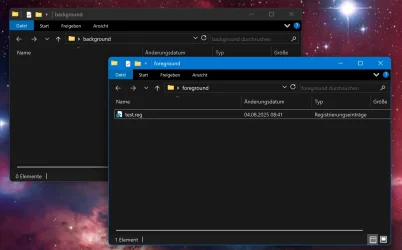
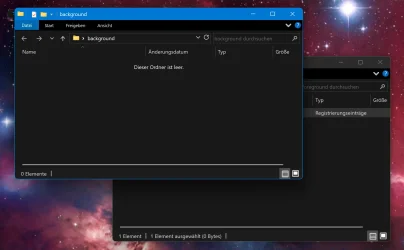
If you have at least two open windows of any sort (explorer or any programs), and one window is behind the window in focus, this bug happens: If you execute a file from the window in the foreground which opens the UAC, means: "Do you want to allow this app to make changes to your device?", the window in focus will be moved one layer back, behind the window in the background. Please see the screenshot.

It is not important how you answer the UAC and it seems to happen with any file that activates the UAC, but it has to be executed in the window in focus. A file executed on the desktop will not rearrange any other windows. A third window on the screen, or any minimized windows will be ignored. This can be very annoying when it happens during installing software, because the install windows will be moved into the background.

Solution: Nothing known to me yet

-

There is another bug I found. I BELIEVE it came with the base setup as well.

Description: If you open a zip-file (I guess it happens with other files or windows as well, but I did not test it) and you dragdrop files from that zip-file onto the desktop, they should stick on the position, where you put them. Instead, they are rearranged to the left side of the screen. You need to refresh the screen (F5) to fix that. I have not seen the Desktop doing that itself. I have two monitors in 2560x1440. I also use the Explorer-Patcher right now, but I believe the bug occured even after a complete fresh setup without the EP. Deactivating "Auto arrange icons" and "Align icons to grid" did not fix this, nor a complete reset.

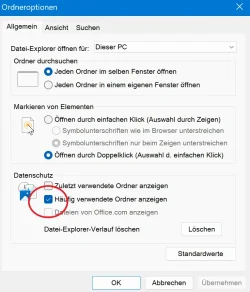
Solution: Open the Options of the Explorer and activate "show frequently used folders". (I use the german version, so I don't know the exact english terms). See Screenshot 3 for that. I can reproduce this. If I deactivate this setting, the bug will occur again.

For more details, please read this very spammy, long thread :)
 

Attachments

  • 1.webp
    1.webp
    65 KB · Views: 3
  • 2.webp
    2.webp
    62.3 KB · Views: 3
  • 3.webp
    3.webp
    62.9 KB · Views: 4
Last edited:

My Computer

System One

  • OS
    Windows 11
    Computer type
    PC/Desktop
    CPU
    Ryzen 5 2600x
    Motherboard
    X470 Gaming Plus
    Memory
    32GB DDR4
    Graphics Card(s)
    RTX 3060
    Sound Card
    My last one was Soundblaster 16
    Monitor(s) Displays
    2
    Screen Resolution
    2560x1440 both; 120Hz and 75Hz
    Hard Drives
    SSD M.2 2TB with System, and a HDD 8TB for stuff
Version: I have a windows-setup here
Open Search or Run — Win key + S or Win key + R
Type: winver and press enter
It will list of OS and version/build. Give us the whole number, like: OS Windows 11 Pro 23H2 Build 22631.5624
 
Last edited:

My Computers

System One System Two

  • OS
    Windows 11 Pro 25H2 Build 26200.8524
    Computer type
    PC/Desktop
    Manufacturer/Model
    Sin-built 2013
    CPU
    Intel(R) Core(TM) i7-4770K CPU @ 3.50GHz
    Motherboard
    ASUS ROG Maximus VI Formula
    Memory
    32.0 GB of I forget and the box is in storage.
    Graphics Card(s)
    Gigabyte nVidia GeForce GTX 1660 Super OC 6GB
    Sound Card
    Onboard thingy
    Monitor(s) Displays
    5 x LG 25MS500-B - 1 x 24MK430H-B - 1 x Wacom Pro 22" Touch Screen Tablet
    Screen Resolution
    All over the place
    Hard Drives
    Too many to list.
    OS on Samsung 1TB 870 QVO SATA
    PSU
    Silverstone 1500
    Case
    NZXT Phantom 820 Full-Tower Case
    Cooling
    Noctua NH-D15 Elite Class Dual Tower CPU Cooler / 6 x EziDIY 120mm / 2 x Corsair 140mm somethings / 1 x 140mm Thermaltake something / 2 x 200mm Corsair.
    Keyboard
    Corsair K95 / Logitech diNovo Edge Wireless
    Mouse
    Logitech: G402 / G502 / Mx Masters / Mx Air Cordless
    Internet Speed
    2000/500Mbps
    Browser
    All sorts
    Antivirus
    Kaspersky Premium
    Other Info
    ㅤㅤㅤㅤㅤㅤㅤㅤㅤㅤㅤㅤㅤㅤㅤㅤㅤㅤㅤㅤㅤㅤㅤㅤㅤㅤㅤㅤㅤㅤㅤㅤㅤㅤㅤㅤㅤㅤㅤㅤ⠀⠀⠀⠀⠀⠀⠀⠀⠀⠀
    TP-Link BE9300 WiFi 7 Bluetooth 5.4 (Archer TBE550E)
    TP-Link TX201 V1 2.5GB Lan

    Grandstream HT812 - VoIP
    ASUS DSL-AX82U - Mesh
    ASUS RT-AC68U - Mesh
    ASUS RT-BE88U Router

    Brother MFC-L2880DW Printer

    I’m on a horse.
  • Operating System
    Windows 11 Pro 25H2 Build 26200.8524
    Computer type
    Laptop
    Manufacturer/Model
    LENOVO Yoga 7 14IRL8 - 7i EVO OLED 14" Touchscreen i5 12 Core 16GB/512GB
    CPU
    Intel Core 12th Gen i5-1240P Processor (1.7 - 4.4GHz)
    Memory
    16GB LPDDR5 RAM
    Graphics card(s)
    Intel Iris Xe Graphics Processor
    Sound Card
    Optimized with Dolby Atmos®
    Screen Resolution
    QHD 2880 x 1800 OLED
    Hard Drives
    M.2 512GB
    Antivirus
    Defender / Malwarebytes
    Other Info
    …still on a horse.
I have right now: 24H2 26100.4770

The bug still occurs, but it came first with my windows base setup and I do not know the version of that windows, because I cannot read the files on my usb stick.
 

My Computer

System One

  • OS
    Windows 11
    Computer type
    PC/Desktop
    CPU
    Ryzen 5 2600x
    Motherboard
    X470 Gaming Plus
    Memory
    32GB DDR4
    Graphics Card(s)
    RTX 3060
    Sound Card
    My last one was Soundblaster 16
    Monitor(s) Displays
    2
    Screen Resolution
    2560x1440 both; 120Hz and 75Hz
    Hard Drives
    SSD M.2 2TB with System, and a HDD 8TB for stuff
Unexpected or unwanted behaviour is not necessarily a "bug".
 

My Computers

System One System Two

  • OS
    Windows 11 2xH2 (latest update ... forever anal)
    Computer type
    PC/Desktop
    Manufacturer/Model
    HP Slim S01
    CPU
    Intel i5-12400
    Memory
    8GB
    Graphics Card(s)
    NVIDIA GeForce GT730
    Sound Card
    OOBE
    Monitor(s) Displays
    Acer 32"
    Screen Resolution
    1920x1080
    Hard Drives
    512GB KIOXIA NVMe
    1TB SATA SSD
    PSU
    OOBE
    Case
    OOBE
    Cooling
    OOBE
    Keyboard
    BT
    Mouse
    BT
    Browser
    Brave FFox Chrome Opera
    Antivirus
    KIS
  • Operating System
    Windows 11 Pro 2xH2 (latest update ... 4ever anal)
    Computer type
    Laptop
    Manufacturer/Model
    HP Pavillion 15
    CPU
    i7-1165G7 @ 2.80GHz
    Graphics card(s)
    Intel Iris Xe Graphics
    Hard Drives
    Samsung NVMe 512GB
    + numerous/multiple SSD Type C USB enclosures
    Internet Speed
    NBN FTTN 50
    Browser
    Brave
    Antivirus
    KIS
I am on the same build. I just tried to reproduce the "bugs" you noted on 3 different machines running the same build but have not seen that problem on any of those machines.

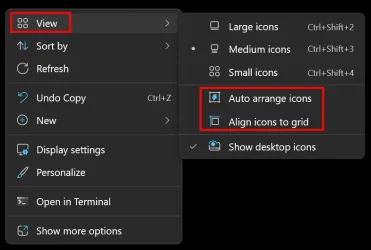
As for the second issue, how do you have your desktop setting configured?

Following screenshot is result of right-click on desktop.

Image1.webp

While I am not saying that this may not be a real bug, if it is, then it is related to something specific in your configuration. It could be some 3rd party app, a faulty driver (possibly display driver), etc. but something unique to your environment since this is not happening on all systems.
 

My Computers

System One System Two

  • OS
    Win11 Pro 25H2 (RTM+)
    Computer type
    PC/Desktop
    Manufacturer/Model
    Acemagic
    CPU
    Intel i7-14650HX
    Memory
    32 GB
    Graphics Card(s)
    No GPU - Built-in Intel Graphics
    Sound Card
    Integrated
    Monitor(s) Displays
    Varies as machine will often be moved to locations with different monitors
    Screen Resolution
    Varies
    Hard Drives
    1 x 1TB Gen 4 NVMe SSD
    PSU
    120W Power Brick
    Keyboard
    Corsair K70 Max RGB Magnetic Keyboard
    Mouse
    Logitech MX Master 3
    Internet Speed
    1Gb Up / 1 Gb Down
    Browser
    Edge
    Antivirus
    Windows Defender
  • Operating System
    Win11 Pro 25H2 (RTM+)
    Computer type
    Laptop
    Manufacturer/Model
    Lenovo ThinkBook 13x Gen 2
    CPU
    Intel i7-1255U
    Memory
    16 GB
    Graphics card(s)
    Intel Iris Xe Graphics
    Sound Card
    Realtek® ALC3306-CG codec
    Monitor(s) Displays
    13.3-inch IPS Display
    Screen Resolution
    WQXGA (2560 x 1600)
    Hard Drives
    2 TB 4 x 4 NVMe SSD
    PSU
    USB-C / Thunderbolt 4 Power / Charging
    Keyboard
    Backlit, spill resistant keyboard
    Mouse
    Buttonless Glass Precision Touchpad
    Internet Speed
    1Gb Up / 1Gb Down
    Browser
    Edge
    Antivirus
    Windows Defender
    Other Info
    WiFi 6e / Bluetooth 5.1 / Facial Recognition / Fingerprint Sensor / ToF (Time of Flight) Human Presence Sensor
While I am not saying that this may not be a real bug, if it is, then it is related to something specific in your configuration. It could be some 3rd party app, a faulty driver (possibly display driver), etc. but something unique to your environment since this is not happening on all systems.

Well, it happend here on my system, but afterwards I made a complete fresh install to test it. WIthout installing anything else, just pure windows11. Of course I have a certain hardware configuration and I guess MS installed some different drivers for it than you have. I have no idea about possible conflicts.

What do you mean by display driver? Graphic driver? I completely erased it a while ago in safe mode and made a fresh install. Nvidea RTX3060, Game Ready Driver 577.00. But with that graphics driver and with just the one installed by windows setup the problem occurs.

But yes, it could be something unique in my configuration. But whatever that is, Windows installed itself onto my naked drive without any prior data (on the system partition, there was an existing partion on the other part of the SSD) and the bug came into existence. That is the true statement I can make. This was the base installation without anything else added from me.

Anyway, interesting to know that you did not see this bug. Wouldn't it be funny if silly old me is the only one having it? ;)

As for the second issue, how do you have your desktop setting configured?

It happens in either configuration, here on my finished system and on the fresh and unmodified install (I firmly believe I tested it). It happens with several packed files (.rar,.zip) and several unpackers (winrar,7z), but not normal windows. Those icons are NOT rearranged, they just look like it.

I know that lots of people have a problem that is the same or similar to this. At least regarding the result. Icons rearrange themselves, they wander through the desktop when people copying files. The settings on your screenshot cannot fix their problem. Might be a different cause, but who knows. Anyway, I found a solution to MY problem and I did not read this solution anywhere. Maybe it helps someone.
 

My Computer

System One

  • OS
    Windows 11
    Computer type
    PC/Desktop
    CPU
    Ryzen 5 2600x
    Motherboard
    X470 Gaming Plus
    Memory
    32GB DDR4
    Graphics Card(s)
    RTX 3060
    Sound Card
    My last one was Soundblaster 16
    Monitor(s) Displays
    2
    Screen Resolution
    2560x1440 both; 120Hz and 75Hz
    Hard Drives
    SSD M.2 2TB with System, and a HDD 8TB for stuff
As you just did a complete reset, open Device Manager. Is there any yellow alerts of missing drivers?
 

My Computers

System One System Two

  • OS
    Windows 11 Pro - Windows 7 HP 64 - Lubuntu
    Computer type
    PC/Desktop
    Manufacturer/Model
    custom build
    CPU
    i5 6600K - 800MHz to 4400MHz
    Motherboard
    GA-Z170-HD3P
    Memory
    4+4G GSkill DDR4 3000
    Graphics Card(s)
    IG - Intel 530
    Monitor(s) Displays
    Samsung 226BW
    Screen Resolution
    1680x1050
    Hard Drives
    (1) -1 SM951 – 128GB M.2 AHCI PCIe SSD drive for Win 11
    (2) -1 WD SATA 3 - 1T for Data
    (3) -1 WD SATA 3 - 1T for backup
    (4) -1 BX500 SSD - 256G for Windows 7 and Lubuntu
    PSU
    Thermaltake 450W TR2 gold
    Keyboard
    Old and good Chicony mechanical keyboard
    Mouse
    Logitech mX performance - 9 buttons (had to disable some)
    Internet Speed
    500 Mb/s
    Browser
    Firefox 64
  • Operating System
    Windows 11 Pro
    Computer type
    Laptop
    Manufacturer/Model
    Asus Q550LF
    CPU
    i7-4500U 800- 3000MHz
    Motherboard
    Asus Q550LF
    Memory
    (4+4)G DDR3 1600
    Graphics card(s)
    IG intel 4400 + NVIDIA GeForce GT 745M
    Sound Card
    Realtek
    Monitor(s) Displays
    LG Display LP156WF4-SPH1
    Screen Resolution
    1920 x 1080
    Hard Drives
    BX500 120G SSD for Windows and programs
    & 1T HDD for data
    Internet Speed
    500 Mb/s
    Browser
    Firefox 64

My Computers

System One System Two

  • OS
    11 Home
    Computer type
    Laptop
    Manufacturer/Model
    Asus TUF Gaming F16 (2024)
    CPU
    i7 13650HX
    Memory
    16GB DDR5
    Graphics Card(s)
    GeForce RTX 4060 Mobile
    Sound Card
    Eastern Electric MiniMax DAC Supreme; Emotiva UMC-200; Astell & Kern AK240
    Monitor(s) Displays
    Sony Bravia XR-55X90J
    Screen Resolution
    3840×2160
    Hard Drives
    512GB SSD internal
    37TB external
    PSU
    Li-ion
    Cooling
    2× Arc Flow Fans, 4× exhaust vents, 5× heatpipes
    Keyboard
    Logitech K800
    Mouse
    Logitech G402
    Internet Speed
    30Mbit/s up, 500Mbit/s down
    Browser
    FF
    Antivirus
    What's an antivirus?
  • Operating System
    11 Home
    Computer type
    Laptop
    Manufacturer/Model
    Medion S15450
    CPU
    i5 1135G7
    Memory
    16GB DDR4
    Graphics card(s)
    Intel Iris Xe
    Sound Card
    Eastern Electric MiniMax DAC Supreme; Emotiva UMC-200; Astell & Kern AK240
    Monitor(s) Displays
    Sony Bravia XR-55X90J
    Screen Resolution
    3840×2160
    Hard Drives
    2TB SSD internal
    37TB external
    PSU
    Li-ion
    Keyboard
    Logitech K800
    Mouse
    Logitech G402
    Internet Speed
    30Mbit/s up, 500Mbit/s down
    Browser
    FF
This is a known bug, at least since '4652. The UAC prompt is minimized.

I confirmed it on my A320 build in the other room.
 

My Computers

System One System Two

  • OS
    Windows 11 Pro x64 24H2
    Computer type
    PC/Desktop
    CPU
    Ryzen 9 5900X
    Motherboard
    ASRock B550 PG Velocita (UEFI-BIOS 3.90)
    Memory
    64 GB G.Skill RipJaws V F4-3200C16D-64GVK
    Graphics Card(s)
    ASRock Steel Legend Arc B580 12 GB
    Monitor(s) Displays
    Alienware AW3423DWF OLED ultrawide
    Hard Drives
    Samsung 990 Pro 1 TB NVMe SSD
    PSU
    eVGA Supernova 750 G3
    Case
    Corsair 275R
    Internet Speed
    VTel FTTH 1 Gb down and 1 Gb up
  • Computer type
    PC/Desktop
    CPU
    Ryzen 7 5800X3D
    Motherboard
    Asus ROG Strix B550-F Gaming (UEFI-BIOS version 3607)
    Memory
    32 GB (2x16 GB G.Skill TridentZ Neo)
    Graphics card(s)
    Sapphire Nitro+ Radeon RX 6750 XT
    Hard Drives
    Samsung 970 Pro 512 GB NVMe SSD
    PSU
    Corsair RM850x
    Case
    Fractal Focus G
Sorry for slowly replying. I needed time for myself (just spend a week installing Win11).

No, I don't have any problems in the device manager.

This is a known bug, at least since '4652. The UAC prompt is minimized.

Interesting. Do we have some sort of workaround for that? Do we expect it to be fixed? But good to know I am not the only one.
 

My Computer

System One

  • OS
    Windows 11
    Computer type
    PC/Desktop
    CPU
    Ryzen 5 2600x
    Motherboard
    X470 Gaming Plus
    Memory
    32GB DDR4
    Graphics Card(s)
    RTX 3060
    Sound Card
    My last one was Soundblaster 16
    Monitor(s) Displays
    2
    Screen Resolution
    2560x1440 both; 120Hz and 75Hz
    Hard Drives
    SSD M.2 2TB with System, and a HDD 8TB for stuff
But, I noticed this: The odds of this happening, is lower on my daily-driver. (System One)
 

My Computers

System One System Two

  • OS
    Windows 11 Pro x64 24H2
    Computer type
    PC/Desktop
    CPU
    Ryzen 9 5900X
    Motherboard
    ASRock B550 PG Velocita (UEFI-BIOS 3.90)
    Memory
    64 GB G.Skill RipJaws V F4-3200C16D-64GVK
    Graphics Card(s)
    ASRock Steel Legend Arc B580 12 GB
    Monitor(s) Displays
    Alienware AW3423DWF OLED ultrawide
    Hard Drives
    Samsung 990 Pro 1 TB NVMe SSD
    PSU
    eVGA Supernova 750 G3
    Case
    Corsair 275R
    Internet Speed
    VTel FTTH 1 Gb down and 1 Gb up
  • Computer type
    PC/Desktop
    CPU
    Ryzen 7 5800X3D
    Motherboard
    Asus ROG Strix B550-F Gaming (UEFI-BIOS version 3607)
    Memory
    32 GB (2x16 GB G.Skill TridentZ Neo)
    Graphics card(s)
    Sapphire Nitro+ Radeon RX 6750 XT
    Hard Drives
    Samsung 970 Pro 512 GB NVMe SSD
    PSU
    Corsair RM850x
    Case
    Fractal Focus G
Back
Top Bottom