- Local time
- 1:15 PM
- Posts
- 37
- OS
- Windows 11
Version: I have a windows-setup here, but I dont know how to find out the version. I downloaded it around July 25. I tried to repair this bug yesterday by a complete reset and removing ALL files, and Microsoft gave me repair-files that were not able to remove the bug. It was a german setup.
Description:
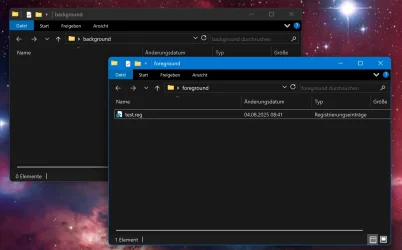
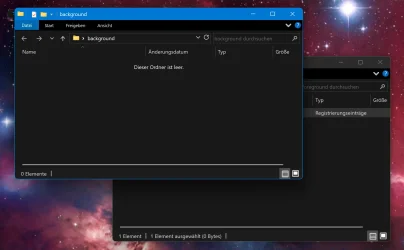
If you have at least two open windows of any sort (explorer or any programs), and one window is behind the window in focus, this bug happens: If you execute a file from the window in the foreground which opens the UAC, means: "Do you want to allow this app to make changes to your device?", the window in focus will be moved one layer back, behind the window in the background. Please see the screenshot.
It is not important how you answer the UAC and it seems to happen with any file that activates the UAC, but it has to be executed in the window in focus. A file executed on the desktop will not rearrange any other windows. A third window on the screen, or any minimized windows will be ignored. This can be very annoying when it happens during installing software, because the install windows will be moved into the background.
Solution: Nothing known to me yet
-
There is another bug I found. I BELIEVE it came with the base setup as well.
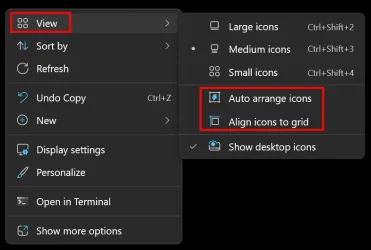
Description: If you open a zip-file (I guess it happens with other files or windows as well, but I did not test it) and you dragdrop files from that zip-file onto the desktop, they should stick on the position, where you put them. Instead, they are rearranged to the left side of the screen. You need to refresh the screen (F5) to fix that. I have not seen the Desktop doing that itself. I have two monitors in 2560x1440. I also use the Explorer-Patcher right now, but I believe the bug occured even after a complete fresh setup without the EP. Deactivating "Auto arrange icons" and "Align icons to grid" did not fix this, nor a complete reset.
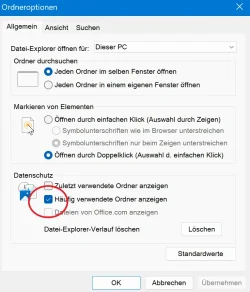
Solution: Open the Options of the Explorer and activate "show frequently used folders". (I use the german version, so I don't know the exact english terms). See Screenshot 3 for that. I can reproduce this. If I deactivate this setting, the bug will occur again.
For more details, please read this very spammy, long thread :)
 www.elevenforum.com
Description:
If you have at least two open windows of any sort (explorer or any programs), and one window is behind the window in focus, this bug happens: If you execute a file from the window in the foreground which opens the UAC, means: "Do you want to allow this app to make changes to your device?", the window in focus will be moved one layer back, behind the window in the background. Please see the screenshot.
It is not important how you answer the UAC and it seems to happen with any file that activates the UAC, but it has to be executed in the window in focus. A file executed on the desktop will not rearrange any other windows. A third window on the screen, or any minimized windows will be ignored. This can be very annoying when it happens during installing software, because the install windows will be moved into the background.
Solution: Nothing known to me yet
-
There is another bug I found. I BELIEVE it came with the base setup as well.
Description: If you open a zip-file (I guess it happens with other files or windows as well, but I did not test it) and you dragdrop files from that zip-file onto the desktop, they should stick on the position, where you put them. Instead, they are rearranged to the left side of the screen. You need to refresh the screen (F5) to fix that. I have not seen the Desktop doing that itself. I have two monitors in 2560x1440. I also use the Explorer-Patcher right now, but I believe the bug occured even after a complete fresh setup without the EP. Deactivating "Auto arrange icons" and "Align icons to grid" did not fix this, nor a complete reset.
Solution: Open the Options of the Explorer and activate "show frequently used folders". (I use the german version, so I don't know the exact english terms). See Screenshot 3 for that. I can reproduce this. If I deactivate this setting, the bug will occur again.
For more details, please read this very spammy, long thread :)
Bug: Windows go from the back to the foreground when System asks "Do you want to allow this app to make changes to your device?"
Hey guys, didnt find anything via google, sfc scannow didnt solve it, tried to change all possible settings. Do you have an idea? It's reproducable. I have two testwindows, one of those has a reg-file in it. Can be an empty reg-file, it's only important that you get the windows-question "Do...
www.elevenforum.com
Attachments
Last edited:
My Computer
At a glance
Windows 11Ryzen 5 2600x32GB DDR4RTX 3060
- OS
- Windows 11
- Computer type
- PC/Desktop
- CPU
- Ryzen 5 2600x
- Motherboard
- X470 Gaming Plus
- Memory
- 32GB DDR4
- Graphics Card(s)
- RTX 3060
- Sound Card
- My last one was Soundblaster 16
- Monitor(s) Displays
- 2
- Screen Resolution
- 2560x1440 both; 120Hz and 75Hz
- Hard Drives
- SSD M.2 2TB with System, and a HDD 8TB for stuff