Solved Cable [pc to monitor]


Maranna

Well-known member
Member
VIP
Local time
1:36 AM
Posts
305
OS
Windows 11 pro
Can you tell what type of connection I have from the pc to the monitor.
is it HDMI to HDMI

or VGA to DVD-I and which end is which?
 

Attachments

  • 1.jpg
    1.jpg
    31.4 KB · Views: 1
  • 2.jpg
    2.jpg
    28 KB · Views: 1

My Computer

System One

  • OS
    Windows 11 pro
    Computer type
    PC/Desktop
    Manufacturer/Model
    ASUS built by Micro center
    CPU
    Intel Core i9- 12900K Alder Lake 3.2 GHz LGA1700
    Motherboard
    Asus prime Z790-v WI FI Intel LGA1700 ATX
    Memory
    G-Skill Ripjaws S5 32GB
    Graphics Card(s)
    NVIDIA GEForce GTX1616 Super dual fan
    Hard Drives
    Samsung 500GB 860 EVO
    PSU
    Thermalake 500 Watt
    Case
    V 100ATX
    Antivirus
    Defender primary with MBAM free secondary
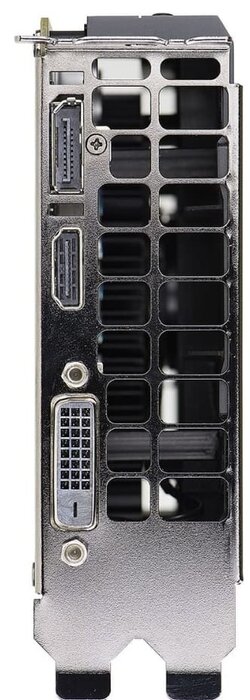
I believe that there are the output ports of your graphics card.
1050ti.jpg
The top port is a full-sized DisplayPort.

The usual cable is the same at both ends.

The port below it (which you're not using) is HDMI.

The lowest port (also not in use) is DVI-D. D means digital (only).
 

My Computers

System One System Two

  • OS
    Windows 11 26200.8116
    Computer type
    PC/Desktop
    Manufacturer/Model
    homebuilt
    CPU
    Amd Threadripper 7970X
    Motherboard
    Gigabyte TRX50 Aero D Rev. 1.0
    Memory
    128GB (4 X 32) G.Skill DDR5 6400 (RDIMM)
    Graphics Card(s)
    Gigabyte RTX 4090 OC
    Sound Card
    none (USB to speakers), Realtek
    Monitor(s) Displays
    Innocn 32" OLED
    Screen Resolution
    3840 X 2160 @ 60Hz
    Hard Drives
    Crucial T700 2TB M.2 NVME SSD
    WD 4TB Blue SATA SSD
    Seagate 18TB IronWolf Pro
    PSU
    BeQuiet! Straight Power 12 1500W
    Case
    Lian Li 011 Dynamic Evo XL
    Cooling
    SilverStone Technology XE360-TR5, with 3 Phanteks T30 fans
    Keyboard
    Cherry KC 500 MX LP (mechanical)
    Mouse
    Logitech M500s (wired)
    Internet Speed
    2000/250 Mbps (down/up)
    Other Info
    xFinity gateway
  • Operating System
    windows 11 26200.8116
    Computer type
    PC/Desktop
    Manufacturer/Model
    homebuilt
    CPU
    Intel I9-13900K
    Motherboard
    Asus RoG Strix Z690-E
    Memory
    64GB G.Skill DDR5-6000
    Graphics card(s)
    Gigabyte RTX 3090 ti
    Sound Card
    built in Realtek
    Monitor(s) Displays
    Philips 27E1N8900 27" OLED
    Screen Resolution
    3840 X 2160 @60Hz
    Hard Drives
    WDC SN850 1TB
    8TB Seagate Ironwolf
    4TB Seagate Ironwolf
    PSU
    eVGA SuperNOVA 1300 GT
    Case
    Lian Li 011 Dynamic Evo
    Cooling
    Corsair iCUE H150i ELITE CAPELLIX Liquid CPU Cooler
    Keyboard
    Cherry Streaming (wired)
    Mouse
    Logitech M500s (wired)
Can you tell what type of connection I have from the pc to the monitor.
is it HDMI to HDMI

or VGA to DVD-I and which end is which?

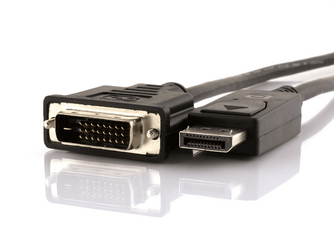
You're using a Display Port (computer) to DVI-D (monitor) cable.

1680640779120.png
 

My Computers

System One System Two

  • OS
    Win 11 Pro 25H2 26200.8524
    Computer type
    PC/Desktop
    Manufacturer/Model
    Self Built
    CPU
    Intel® Core™ i7-14700K
    Motherboard
    ASUS TUF Z690-PLUS WIFI BIOS 4505 11/29/25
    Memory
    G.SKILL Ripjaws S5 Series 64GB (2 x 32GB) DDR5
    Graphics Card(s)
    ASUS GeForce RTX 4070 Super 12GB
    Sound Card
    Sound Blaster AE-5 Plus
    Monitor(s) Displays
    ASUS TUF Gaming 27" 2K HDR Gaming
    Screen Resolution
    2560 x 1440
    Hard Drives
    Samsung 990 Pro 1TB NVMe (Win 11 25H2)
    SK hynix P41 500GB NVMe 25H2 DEV/Games
    SK hynix P41 2TB NVMe (x3)
    Crucial P3 Plus 4TB
    PSU
    Corsair RM850x Shift
    Case
    Antec Dark Phantom DP502 FLUX
    Cooling
    Corsair Nautilus 360 RS AIO
    Keyboard
    Logitech MK 320
    Mouse
    Razer Basilisk V3
    Internet Speed
    350Mbs
    Browser
    Firefox
    Antivirus
    Winows Security
    Other Info
    MR 8.1 Home

    System 3 Specs
    Win 11 Pro 25H2 26200.8524
    ASUS PRIME Z370-P II BIOS 3004 7/12/21
    Intel Core i7-8700 CPU @ 3.20GHz
    32GB DDR4 RAM (4x8)
    iGPU Intel UHD Graphics 630
  • Operating System
    Win 11 Pro 25H2 26200.8524
    Computer type
    PC/Desktop
    Manufacturer/Model
    Self Built
    CPU
    Intel Core i7-11700F
    Motherboard
    Asus TUF Gaming Z590 Plus WiFi (BIOS 2803)
    Memory
    64 GB DDR4
    Graphics card(s)
    MSI GeForce RTX 3060 Ventus 2X 12GB
    Sound Card
    SoundBlaster Audigy Fx V2
    Monitor(s) Displays
    Samsung F27T350
    Screen Resolution
    1920x1080
    Hard Drives
    Samsung 980 Pro 1TB
    Samsung 970 EVO Plus 2TB
    Samsung 870 EVO 500GB SSD
    PSU
    Corsair HX750
    Case
    Cougar MX330-G Window
    Cooling
    Thermalright Frozen Edge 240 Black AIO
    Internet Speed
    350Mbps
    Browser
    Firefox
    Antivirus
    Windows Security
You're using a Display Port (computer) to DVI-D (monitor) cable.

View attachment 57188
I agree.

Now that I think of it, I've never seen hold-down screws on a DP cable.

I wonder why the cable isn't a straight DVI to DVI one?
 

My Computers

System One System Two

  • OS
    Windows 11 26200.8116
    Computer type
    PC/Desktop
    Manufacturer/Model
    homebuilt
    CPU
    Amd Threadripper 7970X
    Motherboard
    Gigabyte TRX50 Aero D Rev. 1.0
    Memory
    128GB (4 X 32) G.Skill DDR5 6400 (RDIMM)
    Graphics Card(s)
    Gigabyte RTX 4090 OC
    Sound Card
    none (USB to speakers), Realtek
    Monitor(s) Displays
    Innocn 32" OLED
    Screen Resolution
    3840 X 2160 @ 60Hz
    Hard Drives
    Crucial T700 2TB M.2 NVME SSD
    WD 4TB Blue SATA SSD
    Seagate 18TB IronWolf Pro
    PSU
    BeQuiet! Straight Power 12 1500W
    Case
    Lian Li 011 Dynamic Evo XL
    Cooling
    SilverStone Technology XE360-TR5, with 3 Phanteks T30 fans
    Keyboard
    Cherry KC 500 MX LP (mechanical)
    Mouse
    Logitech M500s (wired)
    Internet Speed
    2000/250 Mbps (down/up)
    Other Info
    xFinity gateway
  • Operating System
    windows 11 26200.8116
    Computer type
    PC/Desktop
    Manufacturer/Model
    homebuilt
    CPU
    Intel I9-13900K
    Motherboard
    Asus RoG Strix Z690-E
    Memory
    64GB G.Skill DDR5-6000
    Graphics card(s)
    Gigabyte RTX 3090 ti
    Sound Card
    built in Realtek
    Monitor(s) Displays
    Philips 27E1N8900 27" OLED
    Screen Resolution
    3840 X 2160 @60Hz
    Hard Drives
    WDC SN850 1TB
    8TB Seagate Ironwolf
    4TB Seagate Ironwolf
    PSU
    eVGA SuperNOVA 1300 GT
    Case
    Lian Li 011 Dynamic Evo
    Cooling
    Corsair iCUE H150i ELITE CAPELLIX Liquid CPU Cooler
    Keyboard
    Cherry Streaming (wired)
    Mouse
    Logitech M500s (wired)
I wonder why the cable isn't a straight DVI to DVI one?

It could be, but they make combo cables for just about any config now.

What the OP needs is a new, more modern monitor. The one he/she has only DVI and VGA inputs.
 
Last edited:

My Computers

System One System Two

  • OS
    Win 11 Pro 25H2 26200.8524
    Computer type
    PC/Desktop
    Manufacturer/Model
    Self Built
    CPU
    Intel® Core™ i7-14700K
    Motherboard
    ASUS TUF Z690-PLUS WIFI BIOS 4505 11/29/25
    Memory
    G.SKILL Ripjaws S5 Series 64GB (2 x 32GB) DDR5
    Graphics Card(s)
    ASUS GeForce RTX 4070 Super 12GB
    Sound Card
    Sound Blaster AE-5 Plus
    Monitor(s) Displays
    ASUS TUF Gaming 27" 2K HDR Gaming
    Screen Resolution
    2560 x 1440
    Hard Drives
    Samsung 990 Pro 1TB NVMe (Win 11 25H2)
    SK hynix P41 500GB NVMe 25H2 DEV/Games
    SK hynix P41 2TB NVMe (x3)
    Crucial P3 Plus 4TB
    PSU
    Corsair RM850x Shift
    Case
    Antec Dark Phantom DP502 FLUX
    Cooling
    Corsair Nautilus 360 RS AIO
    Keyboard
    Logitech MK 320
    Mouse
    Razer Basilisk V3
    Internet Speed
    350Mbs
    Browser
    Firefox
    Antivirus
    Winows Security
    Other Info
    MR 8.1 Home

    System 3 Specs
    Win 11 Pro 25H2 26200.8524
    ASUS PRIME Z370-P II BIOS 3004 7/12/21
    Intel Core i7-8700 CPU @ 3.20GHz
    32GB DDR4 RAM (4x8)
    iGPU Intel UHD Graphics 630
  • Operating System
    Win 11 Pro 25H2 26200.8524
    Computer type
    PC/Desktop
    Manufacturer/Model
    Self Built
    CPU
    Intel Core i7-11700F
    Motherboard
    Asus TUF Gaming Z590 Plus WiFi (BIOS 2803)
    Memory
    64 GB DDR4
    Graphics card(s)
    MSI GeForce RTX 3060 Ventus 2X 12GB
    Sound Card
    SoundBlaster Audigy Fx V2
    Monitor(s) Displays
    Samsung F27T350
    Screen Resolution
    1920x1080
    Hard Drives
    Samsung 980 Pro 1TB
    Samsung 970 EVO Plus 2TB
    Samsung 870 EVO 500GB SSD
    PSU
    Corsair HX750
    Case
    Cougar MX330-G Window
    Cooling
    Thermalright Frozen Edge 240 Black AIO
    Internet Speed
    350Mbps
    Browser
    Firefox
    Antivirus
    Windows Security
If I get a new monitor, what ends of the NEW cable should I get. Is HDMI current?
I am using the old cable from the other pc now which I would dispose of with this monitor.
What port is at the pc? I ask b/c now I know the monitor is DVI-I. You say it is a display port but I thought it had to be letters.
I would get ? at the pc and ? at the monitor?

PS - I was browsing and could get display port at the pc to HDMI at the monitor-right?
 

My Computer

System One

  • OS
    Windows 11 pro
    Computer type
    PC/Desktop
    Manufacturer/Model
    ASUS built by Micro center
    CPU
    Intel Core i9- 12900K Alder Lake 3.2 GHz LGA1700
    Motherboard
    Asus prime Z790-v WI FI Intel LGA1700 ATX
    Memory
    G-Skill Ripjaws S5 32GB
    Graphics Card(s)
    NVIDIA GEForce GTX1616 Super dual fan
    Hard Drives
    Samsung 500GB 860 EVO
    PSU
    Thermalake 500 Watt
    Case
    V 100ATX
    Antivirus
    Defender primary with MBAM free secondary
If I get a new monitor, what ends of the NEW cable should I get. Is HDMI current?
I am using the old cable from the other pc now which I would dispose of with this monitor.
What port is at the pc? I ask b/c now I know the monitor is DVI-I. You say it is a display port but I thought it had to be letters.
I would get ? at the pc and ? at the monitor?
If it were me, I'd get one with an HDMI port. I don't think I've ever had a monitor/computer that supported a Display Port, although it's a bit newer than HDMI, but also proprietary. I know that DVI is older technology because I have a monitor that only supports vga and/or DVI and it's been retired since my newer desktops don't support DVI. Then there's good ole VGA, which is "almost" obsolete, although it seems to be included in all three of my desktops.

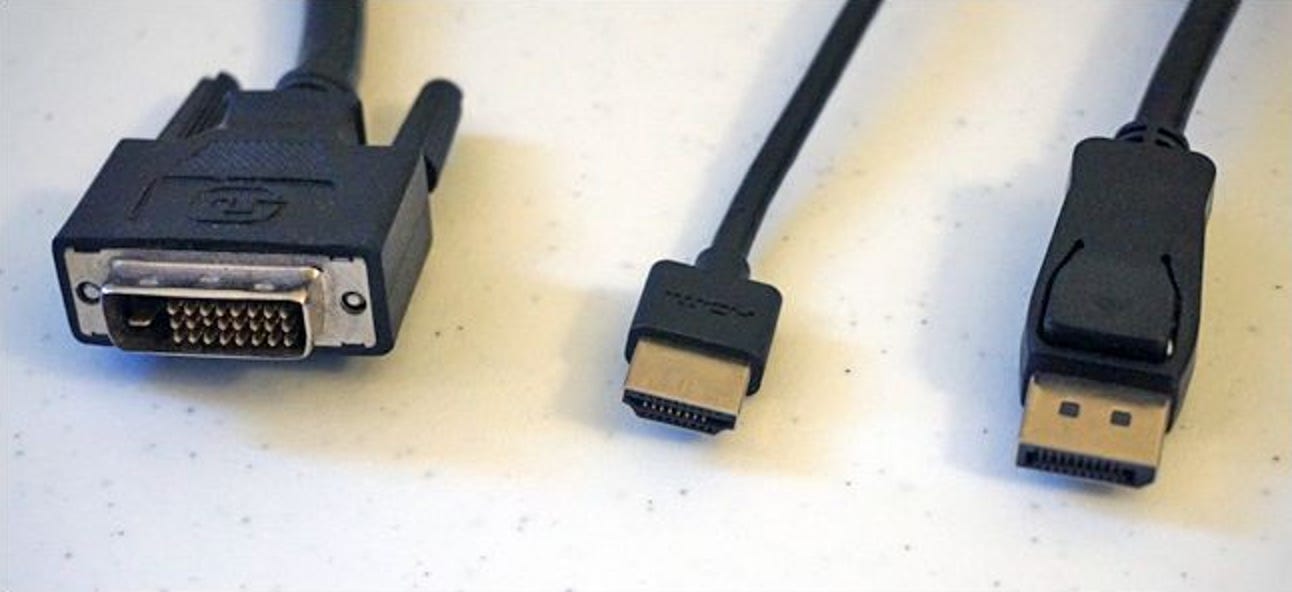
Here's an informative article on the options:


My Computers

System One System Two

  • OS
    Windows 11 23H2 22631.2861
    Computer type
    PC/Desktop
    Manufacturer/Model
    HP Envy TE01-1xxx
    CPU
    Intel(R) Core(TM) i7-10700 CPU @ 2.90GHz 2.90 GHz
    Motherboard
    16.0GB Dual-Channel Unknown @ 1463MHz (21-21-21-47)
    Memory
    16384 MBytes
    Graphics Card(s)
    Intel UHD Graphics 630
    Sound Card
    Realtek High Definition Audio
    Monitor(s) Displays
    Monitor 1 - Acer 27" Monitor 2 - Acer 27"
    Screen Resolution
    1920 x 1080
    Hard Drives
    WDC PC SN530 SDBPNPZ-512G-1006 (SSD)
    Seagate ST1000DM003-1SB102
    Seagate BUP Slim SCSI Disk Device (SSD)
    PSU
    HP
    Case
    HP
    Cooling
    Standard
    Keyboard
    Logitech Wave K350
    Mouse
    Logitech M705
    Internet Speed
    500 mbps
    Browser
    Firefox
    Antivirus
    Windows Defender
    Other Info
    That's all Folks!
  • Operating System
    Windows 11
    Computer type
    PC/Desktop
    Manufacturer/Model
    HP
    CPU
    Intel Core i7 (10th gen) 10700
    Motherboard
    Intel
    Memory
    16 GB
    Graphics card(s)
    Intel UHD Graphics 630
    Sound Card
    Built-in
    Monitor(s) Displays
    Acer 27" & Samsung 24"
    Screen Resolution
    1920 x
    Hard Drives
    SSD (512 GB)
    HDD (1 TB)
    Seagate
    PSU
    Intel i7 10th Generation
    Case
    HP
    Cooling
    HP/Intel?
    Keyboard
    Logitech Wave K350
    Mouse
    Logitech M705
    Internet Speed
    50 mbps
    Browser
    Firefox 90.2
    Antivirus
    Windows Defender
    Other Info
    Headphone/Microphone Combo
    SuperSpeed USB Type-A (4 on front)
    HP 3-in-One Card Readr
    SuperSpeed USB Type-C
    DVD Writer
Thanks for the link. Can you tell by my pix what type is at the pc? If I knew that I could get a compatible cable for the new monitor.
 

My Computer

System One

  • OS
    Windows 11 pro
    Computer type
    PC/Desktop
    Manufacturer/Model
    ASUS built by Micro center
    CPU
    Intel Core i9- 12900K Alder Lake 3.2 GHz LGA1700
    Motherboard
    Asus prime Z790-v WI FI Intel LGA1700 ATX
    Memory
    G-Skill Ripjaws S5 32GB
    Graphics Card(s)
    NVIDIA GEForce GTX1616 Super dual fan
    Hard Drives
    Samsung 500GB 860 EVO
    PSU
    Thermalake 500 Watt
    Case
    V 100ATX
    Antivirus
    Defender primary with MBAM free secondary
It's Display Port on your GPU and then to DVI on your monitor. If you get a new monitor, most modern monitors now have HDMI and DP standard. HDMI is very ubiquitous these days. And you can get decent HDMI Cables from just about anywhere. For ease of connection and simplicity HDMI to HDMI would be your best bet.
 

My Computers

System One System Two

  • OS
    Win 11 Home
    Computer type
    PC/Desktop
    Manufacturer/Model
    Samsung Galaxy Book Flex2
    CPU
    Intel Core i7-1165G7
    Motherboard
    Samsung
    Memory
    16GB
    Graphics Card(s)
    Intel UHD
    Sound Card
    Realtek
    Monitor(s) Displays
    Samsung 4K TV and Built-in Laptop Screen
    Screen Resolution
    4K
    Hard Drives
    N/A
    PSU
    Samsung
    Case
    Samsung Laptop
    Cooling
    OEM
    Keyboard
    Laptop
    Mouse
    Trackpad
    Internet Speed
    800 mbps +
    Browser
    Brave, Chrome, Edge
    Antivirus
    Windows
  • Operating System
    Windows 11 Pro
    Computer type
    PC/Desktop
    Manufacturer/Model
    Custom
    CPU
    i7-13700KF 3.4Ghz
    Motherboard
    ASUS Prime Z790-A
    Memory
    Corsair Dominator Platinum 32GB DDR5
    Graphics card(s)
    MSI RTX 5070 Ti
    Sound Card
    Denon AVR-X3500H
    Monitor(s) Displays
    TCL 65R635, Viewsonic Elite UW 34" 1440P
    Screen Resolution
    4K, 1440P
    Hard Drives
    Solidigm P44 Pro 2TB, SKHynix P41 1TB, SKHynix P31 2TB, WDSN750 2TB, Intel 320 600GBx2, Sandisk Professional G-Drive 12TB
    PSU
    Seasonic 850W
    Case
    Open Chassis
    Cooling
    Nocuta CPU Heatsink/Fan
    Keyboard
    Logitech G915TKL(wireless)
    Mouse
    Razer Deathadder V3 wireless, Razer Deathadder V2 wired
    Internet Speed
    1200Mbps +
    Browser
    Brave, Edge
    Antivirus
    Windows Defender
    Other Info
    Kali IN-5 Powered Studio Multimedia Monitor Speakers, B&W 603 S2 Anniversary Edition Tower Speakers, PSA Sub, Panasonic UB9000 Bluray Player, Xbox One X, Ipad 11 Pro, 2018 Mac Mini i5
Thanks for the link. Can you tell by my pix what type is at the pc? If I knew that I could get a compatible cable for the new monitor.
Assuming the PC is 1.jpg, the one that's hooked to a cable is almost certainly a Display Port, since it looks nothing like a VGA cable.
The next one is an HDMI Port, and the third one is a DVI Port.

As the article I sent states, HDMI is the most popular and works best.
 

My Computers

System One System Two

  • OS
    Windows 11 23H2 22631.2861
    Computer type
    PC/Desktop
    Manufacturer/Model
    HP Envy TE01-1xxx
    CPU
    Intel(R) Core(TM) i7-10700 CPU @ 2.90GHz 2.90 GHz
    Motherboard
    16.0GB Dual-Channel Unknown @ 1463MHz (21-21-21-47)
    Memory
    16384 MBytes
    Graphics Card(s)
    Intel UHD Graphics 630
    Sound Card
    Realtek High Definition Audio
    Monitor(s) Displays
    Monitor 1 - Acer 27" Monitor 2 - Acer 27"
    Screen Resolution
    1920 x 1080
    Hard Drives
    WDC PC SN530 SDBPNPZ-512G-1006 (SSD)
    Seagate ST1000DM003-1SB102
    Seagate BUP Slim SCSI Disk Device (SSD)
    PSU
    HP
    Case
    HP
    Cooling
    Standard
    Keyboard
    Logitech Wave K350
    Mouse
    Logitech M705
    Internet Speed
    500 mbps
    Browser
    Firefox
    Antivirus
    Windows Defender
    Other Info
    That's all Folks!
  • Operating System
    Windows 11
    Computer type
    PC/Desktop
    Manufacturer/Model
    HP
    CPU
    Intel Core i7 (10th gen) 10700
    Motherboard
    Intel
    Memory
    16 GB
    Graphics card(s)
    Intel UHD Graphics 630
    Sound Card
    Built-in
    Monitor(s) Displays
    Acer 27" & Samsung 24"
    Screen Resolution
    1920 x
    Hard Drives
    SSD (512 GB)
    HDD (1 TB)
    Seagate
    PSU
    Intel i7 10th Generation
    Case
    HP
    Cooling
    HP/Intel?
    Keyboard
    Logitech Wave K350
    Mouse
    Logitech M705
    Internet Speed
    50 mbps
    Browser
    Firefox 90.2
    Antivirus
    Windows Defender
    Other Info
    Headphone/Microphone Combo
    SuperSpeed USB Type-A (4 on front)
    HP 3-in-One Card Readr
    SuperSpeed USB Type-C
    DVD Writer
@Maranna

If you are going to buy a new monitor, check out Best Buy. Be sure to use a sales person, and ask them for a monitor that supports HDMI. Also, ask for an HDMI cable for the monitor.

I have two Acer 27" monitors that cost around $110 each. They're just as good as anything else, unless you're into high-end graphics or gaming.

Here's one that looks good to me, and if I needed another one, I'd jump on it!


If you're going to the brick and mortar store, call ahead to see if they have the monitor in stock and if it costs the same as online. If not, you can order online.
 

My Computers

System One System Two

  • OS
    Windows 11 23H2 22631.2861
    Computer type
    PC/Desktop
    Manufacturer/Model
    HP Envy TE01-1xxx
    CPU
    Intel(R) Core(TM) i7-10700 CPU @ 2.90GHz 2.90 GHz
    Motherboard
    16.0GB Dual-Channel Unknown @ 1463MHz (21-21-21-47)
    Memory
    16384 MBytes
    Graphics Card(s)
    Intel UHD Graphics 630
    Sound Card
    Realtek High Definition Audio
    Monitor(s) Displays
    Monitor 1 - Acer 27" Monitor 2 - Acer 27"
    Screen Resolution
    1920 x 1080
    Hard Drives
    WDC PC SN530 SDBPNPZ-512G-1006 (SSD)
    Seagate ST1000DM003-1SB102
    Seagate BUP Slim SCSI Disk Device (SSD)
    PSU
    HP
    Case
    HP
    Cooling
    Standard
    Keyboard
    Logitech Wave K350
    Mouse
    Logitech M705
    Internet Speed
    500 mbps
    Browser
    Firefox
    Antivirus
    Windows Defender
    Other Info
    That's all Folks!
  • Operating System
    Windows 11
    Computer type
    PC/Desktop
    Manufacturer/Model
    HP
    CPU
    Intel Core i7 (10th gen) 10700
    Motherboard
    Intel
    Memory
    16 GB
    Graphics card(s)
    Intel UHD Graphics 630
    Sound Card
    Built-in
    Monitor(s) Displays
    Acer 27" & Samsung 24"
    Screen Resolution
    1920 x
    Hard Drives
    SSD (512 GB)
    HDD (1 TB)
    Seagate
    PSU
    Intel i7 10th Generation
    Case
    HP
    Cooling
    HP/Intel?
    Keyboard
    Logitech Wave K350
    Mouse
    Logitech M705
    Internet Speed
    50 mbps
    Browser
    Firefox 90.2
    Antivirus
    Windows Defender
    Other Info
    Headphone/Microphone Combo
    SuperSpeed USB Type-A (4 on front)
    HP 3-in-One Card Readr
    SuperSpeed USB Type-C
    DVD Writer
On a new Monitor, it should be DisplayPort and HDMI, which you have on your Graphics Card.

So you can use DisplayPort to DisplayPort, or HDMI to HDMI leads.

It is as simple as that.

DVI-D/DVI-I, VGA are legacy ports so no point in those on a new monitor.
 

My Computer

System One

  • OS
    Windows 11
Your graphics card has DisplayPort, HDMI, and DVI-D ports. (See post #2.) Its specs: https://www.evga.com/products/specs/gpu.aspx?pn=7e5bfb9f-c13b-4800-a855-bea3724a5f8e

You can use any of those ports with a new monitor. DisplayPort and HDMI are still current. DVI is an older interface.

The graphics card's HDMI port is version 2.0b, which supports UHD (3840 X 2160) at 60Hz. The DisplayPort is version 1.4, which ought to go higher in resolution and/or frequency.
 

My Computers

System One System Two

  • OS
    Windows 11 26200.8116
    Computer type
    PC/Desktop
    Manufacturer/Model
    homebuilt
    CPU
    Amd Threadripper 7970X
    Motherboard
    Gigabyte TRX50 Aero D Rev. 1.0
    Memory
    128GB (4 X 32) G.Skill DDR5 6400 (RDIMM)
    Graphics Card(s)
    Gigabyte RTX 4090 OC
    Sound Card
    none (USB to speakers), Realtek
    Monitor(s) Displays
    Innocn 32" OLED
    Screen Resolution
    3840 X 2160 @ 60Hz
    Hard Drives
    Crucial T700 2TB M.2 NVME SSD
    WD 4TB Blue SATA SSD
    Seagate 18TB IronWolf Pro
    PSU
    BeQuiet! Straight Power 12 1500W
    Case
    Lian Li 011 Dynamic Evo XL
    Cooling
    SilverStone Technology XE360-TR5, with 3 Phanteks T30 fans
    Keyboard
    Cherry KC 500 MX LP (mechanical)
    Mouse
    Logitech M500s (wired)
    Internet Speed
    2000/250 Mbps (down/up)
    Other Info
    xFinity gateway
  • Operating System
    windows 11 26200.8116
    Computer type
    PC/Desktop
    Manufacturer/Model
    homebuilt
    CPU
    Intel I9-13900K
    Motherboard
    Asus RoG Strix Z690-E
    Memory
    64GB G.Skill DDR5-6000
    Graphics card(s)
    Gigabyte RTX 3090 ti
    Sound Card
    built in Realtek
    Monitor(s) Displays
    Philips 27E1N8900 27" OLED
    Screen Resolution
    3840 X 2160 @60Hz
    Hard Drives
    WDC SN850 1TB
    8TB Seagate Ironwolf
    4TB Seagate Ironwolf
    PSU
    eVGA SuperNOVA 1300 GT
    Case
    Lian Li 011 Dynamic Evo
    Cooling
    Corsair iCUE H150i ELITE CAPELLIX Liquid CPU Cooler
    Keyboard
    Cherry Streaming (wired)
    Mouse
    Logitech M500s (wired)
Thanx all I understand, and you have been a great help.
 

My Computer

System One

  • OS
    Windows 11 pro
    Computer type
    PC/Desktop
    Manufacturer/Model
    ASUS built by Micro center
    CPU
    Intel Core i9- 12900K Alder Lake 3.2 GHz LGA1700
    Motherboard
    Asus prime Z790-v WI FI Intel LGA1700 ATX
    Memory
    G-Skill Ripjaws S5 32GB
    Graphics Card(s)
    NVIDIA GEForce GTX1616 Super dual fan
    Hard Drives
    Samsung 500GB 860 EVO
    PSU
    Thermalake 500 Watt
    Case
    V 100ATX
    Antivirus
    Defender primary with MBAM free secondary
Thanx all I understand, and you have been a great help.
You're welcome.

If you're comfortable with the info we've given you, please mark the thread as solved.
 

My Computers

System One System Two

  • OS
    Windows 11 23H2 22631.2861
    Computer type
    PC/Desktop
    Manufacturer/Model
    HP Envy TE01-1xxx
    CPU
    Intel(R) Core(TM) i7-10700 CPU @ 2.90GHz 2.90 GHz
    Motherboard
    16.0GB Dual-Channel Unknown @ 1463MHz (21-21-21-47)
    Memory
    16384 MBytes
    Graphics Card(s)
    Intel UHD Graphics 630
    Sound Card
    Realtek High Definition Audio
    Monitor(s) Displays
    Monitor 1 - Acer 27" Monitor 2 - Acer 27"
    Screen Resolution
    1920 x 1080
    Hard Drives
    WDC PC SN530 SDBPNPZ-512G-1006 (SSD)
    Seagate ST1000DM003-1SB102
    Seagate BUP Slim SCSI Disk Device (SSD)
    PSU
    HP
    Case
    HP
    Cooling
    Standard
    Keyboard
    Logitech Wave K350
    Mouse
    Logitech M705
    Internet Speed
    500 mbps
    Browser
    Firefox
    Antivirus
    Windows Defender
    Other Info
    That's all Folks!
  • Operating System
    Windows 11
    Computer type
    PC/Desktop
    Manufacturer/Model
    HP
    CPU
    Intel Core i7 (10th gen) 10700
    Motherboard
    Intel
    Memory
    16 GB
    Graphics card(s)
    Intel UHD Graphics 630
    Sound Card
    Built-in
    Monitor(s) Displays
    Acer 27" & Samsung 24"
    Screen Resolution
    1920 x
    Hard Drives
    SSD (512 GB)
    HDD (1 TB)
    Seagate
    PSU
    Intel i7 10th Generation
    Case
    HP
    Cooling
    HP/Intel?
    Keyboard
    Logitech Wave K350
    Mouse
    Logitech M705
    Internet Speed
    50 mbps
    Browser
    Firefox 90.2
    Antivirus
    Windows Defender
    Other Info
    Headphone/Microphone Combo
    SuperSpeed USB Type-A (4 on front)
    HP 3-in-One Card Readr
    SuperSpeed USB Type-C
    DVD Writer
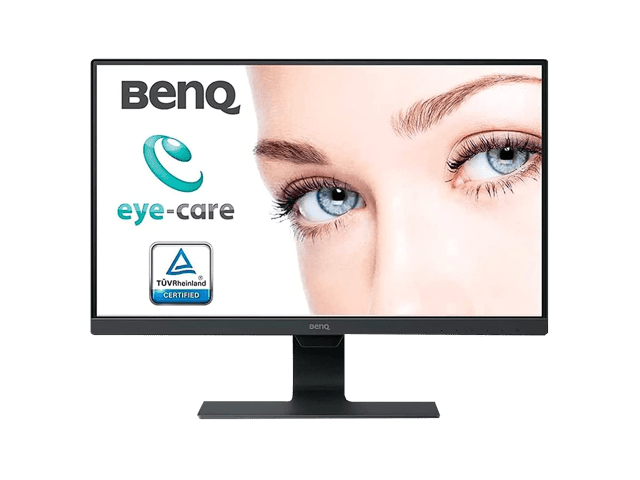
One of the monitors I have is benq gw2480. I am surprised how little power it draws 9.5 watts.
Pretty good all round with low blue light though not specifically a gaming monitor if that is your thing.
 

My Computers

System One System Two

  • OS
    Win7,Win11
    Computer type
    PC/Desktop
    CPU
    i7-9700
    Motherboard
    gigabyte b365m ds3h
    Memory
    2x16gb 3600mhz
    Monitor(s) Displays
    benq gw2480
    PSU
    bequiet pure power 11 400CM
    Cooling
    cryorig m9i
  • Operating System
    win7,win11
    Computer type
    PC/Desktop
    CPU
    i5-8400
    Motherboard
    gigabyte b365m ds3h
    Memory
    2x8gb 3200
    PSU
    xfx pro 450

Latest Support Threads

Back
Top Bottom