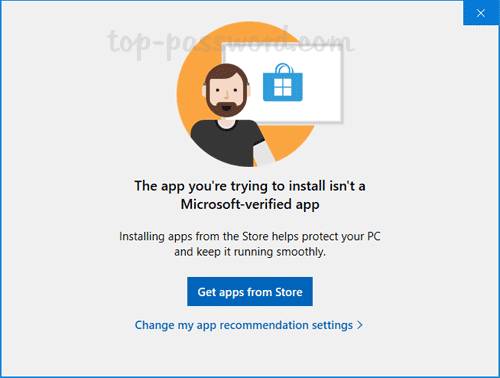
Can no longer bypass App Store Installation Warning


Smithee

Member
Local time
2:11 AM
Posts
16
OS
Windows 11 Home
Been using Win 11 Home for about a month, now on build 22000.376, and suddenly have this odd issue starting today. When I try to run/install an app or utility which I did not obtain from the Microsoft App Store, the usual warning comes up with the option to "install anyway" or go to the App Store. But clicking on the the "install anyway" choice does nothing and does not allow me to proceed as it normally does. Clicking on the other options on the warning screen (for going to the app store, learn more, etc.) also does nothing. I'm logged in as an administrator, on a local account. It doesn't matter whether I try running the programs normally, or specifically choosing "run as administrator," same result. Rebooting also did not fix the problem.

To gain access to run these programs again, I changed the Windows apps setting to allow me to get apps from anywhere without a warning, and that seems to at least allow me to run/install these programs again. But I'd rather have the "warning" feature in place, and I'm wondering if this is a sign of other problems. I could not find a similar issue through google searches. Any ideas? FWIW, this is using a local account, not logged in to MS (but I've been running that way for most of this time without this issue). My internet connection seems to be working fine, if that's a factor.
 
Windows Build/Version
22000.376

My Computer My Computer

At a glance

Windows 11 HomeAMD Ryzen 7-5700G16 GB DDR4-3200Nvidia RTX3060
OS
Windows 11 Home
Computer type
PC/Desktop
Manufacturer/Model
Lenovo Legion
CPU
AMD Ryzen 7-5700G
Motherboard
Lenovo OEM
Memory
16 GB DDR4-3200
Graphics Card(s)
Nvidia RTX3060
Sound Card
Realtek onboard
Screen Resolution
1080p
Hard Drives
Samsung SSD, WD Blue HD
PSU
650W Gold
Case
Lenovo Legion T5
Antivirus
Windows Security
Other Info
Nothing is overclocked

You have to unblock the file you have downloaded from file properties.
 

My Computer My Computer

At a glance

Windows 11AMD Ryzen 7 5700GMicron Technology DDR4-3200 16GBNVIDIA GeForce RTX 3060
OS
Windows 11
Computer type
PC/Desktop
Manufacturer/Model
HP Pavilion
CPU
AMD Ryzen 7 5700G
Motherboard
Erica6
Memory
Micron Technology DDR4-3200 16GB
Graphics Card(s)
NVIDIA GeForce RTX 3060
Sound Card
Realtek ALC671
Monitor(s) Displays
Samsung SyncMaster U28E590
Screen Resolution
3840 x 2160
Hard Drives
SAMSUNG MZVLQ1T0HALB-000H1

My Computers My Computers

  • At a glance

    Linux LiteIntel(R) Core(TM) i5-7300U CPU @ 2.60GHz 2.71...8.00 GB (7.87 GB usable)
    OS
    Linux Lite
    Computer type
    PC/Desktop
    Manufacturer/Model
    PRO904059
    CPU
    Intel(R) Core(TM) i5-7300U CPU @ 2.60GHz 2.71 GHz
    Memory
    8.00 GB (7.87 GB usable)
    Hard Drives
    250 GB solid state drive
    Browser
    Firefox ESR
    Antivirus
    ESET Smart Security Premium
  • At a glance

    Windows 10 Pro 21H2Intel(R) Core(TM) i5-4590 CPU @ 3.30GHz8 GBNvidia Quadro K620
    Operating System
    Windows 10 Pro 21H2
    Computer type
    PC/Desktop
    Manufacturer/Model
    Dell OptiPlex 9020
    CPU
    Intel(R) Core(TM) i5-4590 CPU @ 3.30GHz
    Memory
    8 GB
    Graphics card(s)
    Nvidia Quadro K620
    Browser
    Firefox ESR
Thanks, but I checked the file properties for the apps in question, and there's no "unblock" option present in the file properties for their executables. At least if there was one, it's not showing now. The only attributes showing are Read Only and Hidden (both unchecked).

Just to be clear, these are not recently-downloaded files that I'm just now trying to install. These are programs that were downloaded and installed some time ago, and have been run many times before without this problem, until today.
 

My Computer My Computer

At a glance

Windows 11 HomeAMD Ryzen 7-5700G16 GB DDR4-3200Nvidia RTX3060
OS
Windows 11 Home
Computer type
PC/Desktop
Manufacturer/Model
Lenovo Legion
CPU
AMD Ryzen 7-5700G
Motherboard
Lenovo OEM
Memory
16 GB DDR4-3200
Graphics Card(s)
Nvidia RTX3060
Sound Card
Realtek onboard
Screen Resolution
1080p
Hard Drives
Samsung SSD, WD Blue HD
PSU
650W Gold
Case
Lenovo Legion T5
Antivirus
Windows Security
Other Info
Nothing is overclocked

If you are seen below message, then you need to unblock the file before executing the file.


unblock_file_in_windows_defender_smartscreen-2-png.6668
 

My Computer My Computer

At a glance

Windows 11AMD Ryzen 7 5700GMicron Technology DDR4-3200 16GBNVIDIA GeForce RTX 3060
OS
Windows 11
Computer type
PC/Desktop
Manufacturer/Model
HP Pavilion
CPU
AMD Ryzen 7 5700G
Motherboard
Erica6
Memory
Micron Technology DDR4-3200 16GB
Graphics Card(s)
NVIDIA GeForce RTX 3060
Sound Card
Realtek ALC671
Monitor(s) Displays
Samsung SyncMaster U28E590
Screen Resolution
3840 x 2160
Hard Drives
SAMSUNG MZVLQ1T0HALB-000H1
Thanks, but that's not quite the warning message I was getting. The warning was much like the one below, but with the an option to "Install anyway." However, clicking on the "Install anyway" choice had no effect--the programs would not run and the warning screen would not go away.

the-app-install-not-microsoft-verified.png


As I said in my original post, going to my apps settings and disabling this feature (to check if apps came from the Windows Apps Store) solves this problem, but I was just wondering why it quit working as it had been. I have not bothered to try re-enabling to see if it begins working again.
 

My Computer My Computer

At a glance

Windows 11 HomeAMD Ryzen 7-5700G16 GB DDR4-3200Nvidia RTX3060
OS
Windows 11 Home
Computer type
PC/Desktop
Manufacturer/Model
Lenovo Legion
CPU
AMD Ryzen 7-5700G
Motherboard
Lenovo OEM
Memory
16 GB DDR4-3200
Graphics Card(s)
Nvidia RTX3060
Sound Card
Realtek onboard
Screen Resolution
1080p
Hard Drives
Samsung SSD, WD Blue HD
PSU
650W Gold
Case
Lenovo Legion T5
Antivirus
Windows Security
Other Info
Nothing is overclocked
Thanks, but that's not quite the warning message I was getting. The warning was much like the one below, but with the an option to "Install anyway." However, clicking on the "Install anyway" choice had no effect--the programs would not run and the warning screen would not go away.

the-app-install-not-microsoft-verified.png


As I said in my original post, going to my apps settings and disabling this feature (to check if apps came from the Windows Apps Store) solves this problem, but I was just wondering why it quit working as it had been. I have not bothered to try re-enabling to see if it begins working again.
Go in Settings>Apps>Apps & Features

Where you see "Choose Where To Get Apps" Change it to "Everywhere" and see if that helps
 

My Computers My Computers

  • At a glance

    Windows 11 Pro x64 24H2 v26200.5074AMD Ryzen 9 3600X 12-Core @ 3.80GHzCorsair 32GB DDR4EVGA GeForce gtx 1660 Super
    OS
    Windows 11 Pro x64 24H2 v26200.5074
    Computer type
    PC/Desktop
    Manufacturer/Model
    Built Myself in 2025
    CPU
    AMD Ryzen 9 3600X 12-Core @ 3.80GHz
    Motherboard
    MSI X570 Gaming Plus
    Memory
    Corsair 32GB DDR4
    Graphics Card(s)
    EVGA GeForce gtx 1660 Super
    Sound Card
    On Board
    Monitor(s) Displays
    2 X AOC 27" , Dell 27"
    Screen Resolution
    1920 X 1080
    Hard Drives
    ~~~~~~~~~~~~~~~~~~~~~~~~~~
    ~ P34A60 512GB NVMe PCIe Gen3x4 M.2
    ~ 6TB Toshiba HDD
    ~ 6TB HDD (Backup)
    ~ SanDisk 250GB SSD
    ~ 2 X 1TB HDD
    ~~~~~~~~~~
    PSU
    eVGA 750w G+
    Case
    GAMDIAS White ATX Mid Tower Gaming Computer PC Case w/Tempered Glass
    Cooling
    AMD Wraith Prism
    Keyboard
    Nulea RT05 Wireless Ergonomic
    Mouse
    Nulea MD280 Wireless Vertical Mouse
    Internet Speed
    761Mbps (Download) / 692Mbps (Upload)
    Browser
    Firefox
    Antivirus
    Malwarebytes
    Other Info
    *This is my Main Computer That I use*
  • At a glance

    Windows 11 Pro x64 24H2 v26100.2894AMD Ryzen 7 1800X @ 3.60Ghz16GBAMD RX580
    Operating System
    Windows 11 Pro x64 24H2 v26100.2894
    Computer type
    PC/Desktop
    CPU
    AMD Ryzen 7 1800X @ 3.60Ghz
    Motherboard
    Asus Crosshair VI Hero
    Memory
    16GB
    Graphics card(s)
    AMD RX580
    Sound Card
    onBoard
    Monitor(s) Displays
    LG 27UK650-W 27", eMachine 22"
    Screen Resolution
    1920 X 1080
    Hard Drives
    250GB SSD
    PSU
    CORSAIR RM850
    Case
    GAMDIAS Black ATX Mid Tower Gaming Computer PC Case w/Tempered Glass
    Cooling
    Liquid
    Keyboard
    Nulea RT05 Wireless Ergonomic
    Mouse
    Nulea MD280 Wireless Vertical Mouse
    Internet Speed
    752Mbps (Download) / 537Mbps (Upload)
    Browser
    Firefox
    Antivirus
    Malwarebytes
    Other Info
    I use this computer for photo/video editing and to track severe weather
As I said in my original post, going to my apps settings and disabling this feature (to check if apps came from the Windows Apps Store) solves this problem, but…

“Where you see "Choose Where To Get Apps" Change it to "Everywhere" and see if that helpsWhere you see "Choose Where To Get Apps" Change it to "Everywhere" and see if that helps
That’s not what they’re asking.
OP, have you made any changes to the Zone security in Internet Options lately? Making it more strict can cause this — which might be why you weren’t required to “unblock” the downloads under more relaxed (default?) settings.
 

My Computer My Computer

At a glance

Windows 115700x3D32gb 3200 DDR44070 Super
OS
Windows 11
Computer type
PC/Desktop
Manufacturer/Model
Asus x570
CPU
5700x3D
Motherboard
x570
Memory
32gb 3200 DDR4
Graphics Card(s)
4070 Super
Monitor(s) Displays
4KTV
Screen Resolution
3840 x 2160

My Computers My Computers

  • At a glance

    Windows 11 Pro x64 24H2 v26200.5074AMD Ryzen 9 3600X 12-Core @ 3.80GHzCorsair 32GB DDR4EVGA GeForce gtx 1660 Super
    OS
    Windows 11 Pro x64 24H2 v26200.5074
    Computer type
    PC/Desktop
    Manufacturer/Model
    Built Myself in 2025
    CPU
    AMD Ryzen 9 3600X 12-Core @ 3.80GHz
    Motherboard
    MSI X570 Gaming Plus
    Memory
    Corsair 32GB DDR4
    Graphics Card(s)
    EVGA GeForce gtx 1660 Super
    Sound Card
    On Board
    Monitor(s) Displays
    2 X AOC 27" , Dell 27"
    Screen Resolution
    1920 X 1080
    Hard Drives
    ~~~~~~~~~~~~~~~~~~~~~~~~~~
    ~ P34A60 512GB NVMe PCIe Gen3x4 M.2
    ~ 6TB Toshiba HDD
    ~ 6TB HDD (Backup)
    ~ SanDisk 250GB SSD
    ~ 2 X 1TB HDD
    ~~~~~~~~~~
    PSU
    eVGA 750w G+
    Case
    GAMDIAS White ATX Mid Tower Gaming Computer PC Case w/Tempered Glass
    Cooling
    AMD Wraith Prism
    Keyboard
    Nulea RT05 Wireless Ergonomic
    Mouse
    Nulea MD280 Wireless Vertical Mouse
    Internet Speed
    761Mbps (Download) / 692Mbps (Upload)
    Browser
    Firefox
    Antivirus
    Malwarebytes
    Other Info
    *This is my Main Computer That I use*
  • At a glance

    Windows 11 Pro x64 24H2 v26100.2894AMD Ryzen 7 1800X @ 3.60Ghz16GBAMD RX580
    Operating System
    Windows 11 Pro x64 24H2 v26100.2894
    Computer type
    PC/Desktop
    CPU
    AMD Ryzen 7 1800X @ 3.60Ghz
    Motherboard
    Asus Crosshair VI Hero
    Memory
    16GB
    Graphics card(s)
    AMD RX580
    Sound Card
    onBoard
    Monitor(s) Displays
    LG 27UK650-W 27", eMachine 22"
    Screen Resolution
    1920 X 1080
    Hard Drives
    250GB SSD
    PSU
    CORSAIR RM850
    Case
    GAMDIAS Black ATX Mid Tower Gaming Computer PC Case w/Tempered Glass
    Cooling
    Liquid
    Keyboard
    Nulea RT05 Wireless Ergonomic
    Mouse
    Nulea MD280 Wireless Vertical Mouse
    Internet Speed
    752Mbps (Download) / 537Mbps (Upload)
    Browser
    Firefox
    Antivirus
    Malwarebytes
    Other Info
    I use this computer for photo/video editing and to track severe weather
You say you can install apps without a warning try this setting 3rd n option down. In Settings > Apps > Apps and Features
Screenshot 2021-12-20 135146.jpg
 

My Computers My Computers

  • At a glance

    Windows 11 Pro13th Gen Core i9 13900HX32GB DDR5 @4800MHz 2x16GBGeforce RTX 4090HX 16GB
    OS
    Windows 11 Pro
    Computer type
    Laptop
    Manufacturer/Model
    Alienware M18 R1
    CPU
    13th Gen Core i9 13900HX
    Memory
    32GB DDR5 @4800MHz 2x16GB
    Graphics Card(s)
    Geforce RTX 4090HX 16GB
    Sound Card
    Nvidia HD / Realtek ALC3254
    Monitor(s) Displays
    18" QHD+
    Screen Resolution
    25660 X 1600
    Hard Drives
    C: KIOXIA (Toshiba) 2TB KXG80ZNV2T04 NVMe PCIe M.2 SSD
    D: KIOXIA (Toshiba) 2TB KXG80ZNV2T04 NVMe PCIe M.2 SSD
    Case
    Dark Metallic Moon
    Keyboard
    Alienware M Series per-key AlienFX RGB
    Mouse
    Alienware AW610M
    Browser
    Chrome and Firefox
    Antivirus
    Norton
    Other Info
    Killer E3000 Ethernet Controller
    Killer Killer AX1690 Wi-Fi Network Adaptor Wi-Fi 6E
    Bluetooth 5.2
    Alienware Z01G Graphic Amplifier
  • At a glance

    Windows 11 Pro10th Gen i-9 10900 K32Gb Dual Channel DDR4 @ 8843MHzNvidia RTX 2080 Super
    Operating System
    Windows 11 Pro
    Computer type
    Laptop
    Manufacturer/Model
    Alienware Area 51m R2
    CPU
    10th Gen i-9 10900 K
    Memory
    32Gb Dual Channel DDR4 @ 8843MHz
    Graphics card(s)
    Nvidia RTX 2080 Super
    Sound Card
    Nvidia
    Screen Resolution
    1920 x 1080
    Hard Drives
    Hard Drive C: Samsung 2TB SSD PM981a NVMe
    Hard Drive D:Samsung 2TB SSD 970 EVO Plus
    Mouse
    Alienware 610M
    Browser
    Chrome
    Antivirus
    Norton

Latest Support Threads

Back
Top Bottom