Can not print


theoldwizard1

Well-known member
Member
Local time
3:43 AM
Posts
41
OS
windows 11
Version 25H2, Build 26200.8457

Suddenly, after many months of working fine, I can no longer print. (HP 7855) I CAN print from other Windows 10 machines ! The printer is connected directly/wired to my router.

My web browser (Chrome) can log into the printer No errors are listed
Stop and started the print spooler in Services (the printer "cycles" like it is going to print, but that is all)
I CAN NOT manually clear the spool directory (%WINDIR%\system32\spool\printers), even when running as Administrator (Access is denied)
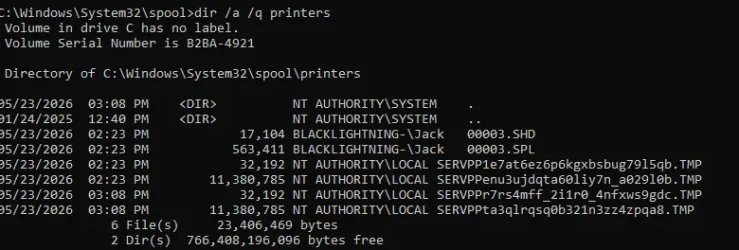
Screenshot 2026-05-23 151858.webp
 

My Computer

System One

  • OS
    windows 11
    Computer type
    PC/Desktop
    Manufacturer/Model
    Self built
    CPU
    AMD 8700G
    Motherboard
    ASRock B650I Lightning
    Memory
    2 - DDR5-6000 8GB Kinston KF560C35-8
    Graphics Card(s)
    none
    Sound Card
    none
    Monitor(s) Displays
    SAMSUNG SyncMaster 220WM
    Screen Resolution
    1680 x 1050
    Hard Drives
    Samsung SSD 990 Pro 1TB
    PSU
    PicoPSU-160-XT
    Case
    MITXPC MX500-USB3 Compact Mini-ITX Case
    Cooling
    Noctua NH-L9a-AM5, Chromax.Black, Low-Profile
    Browser
    Chrome
More info

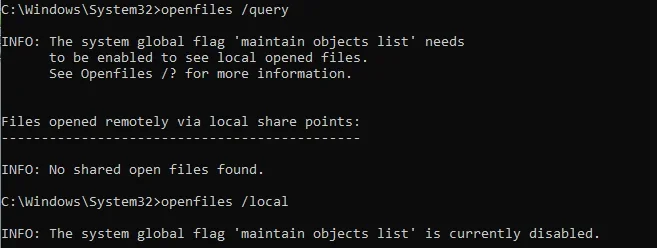
Print spooler is stopped

Screenshot 2026-05-23 154413.webp

From an Administrator Command Window

Screenshot 2026-05-23 154516.webp

What other process ?????
 

My Computer

System One

  • OS
    windows 11
    Computer type
    PC/Desktop
    Manufacturer/Model
    Self built
    CPU
    AMD 8700G
    Motherboard
    ASRock B650I Lightning
    Memory
    2 - DDR5-6000 8GB Kinston KF560C35-8
    Graphics Card(s)
    none
    Sound Card
    none
    Monitor(s) Displays
    SAMSUNG SyncMaster 220WM
    Screen Resolution
    1680 x 1050
    Hard Drives
    Samsung SSD 990 Pro 1TB
    PSU
    PicoPSU-160-XT
    Case
    MITXPC MX500-USB3 Compact Mini-ITX Case
    Cooling
    Noctua NH-L9a-AM5, Chromax.Black, Low-Profile
    Browser
    Chrome
More

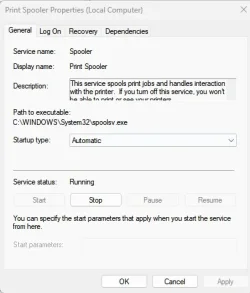
Screenshot 2026-05-23 155248.webp
 

My Computer

System One

  • OS
    windows 11
    Computer type
    PC/Desktop
    Manufacturer/Model
    Self built
    CPU
    AMD 8700G
    Motherboard
    ASRock B650I Lightning
    Memory
    2 - DDR5-6000 8GB Kinston KF560C35-8
    Graphics Card(s)
    none
    Sound Card
    none
    Monitor(s) Displays
    SAMSUNG SyncMaster 220WM
    Screen Resolution
    1680 x 1050
    Hard Drives
    Samsung SSD 990 Pro 1TB
    PSU
    PicoPSU-160-XT
    Case
    MITXPC MX500-USB3 Compact Mini-ITX Case
    Cooling
    Noctua NH-L9a-AM5, Chromax.Black, Low-Profile
    Browser
    Chrome
Actually it is showing disabled.
Should be set to automatic.
IT WAS !!!

I set it this way to try and delete file in the print spooler folder.
 

My Computer

System One

  • OS
    windows 11
    Computer type
    PC/Desktop
    Manufacturer/Model
    Self built
    CPU
    AMD 8700G
    Motherboard
    ASRock B650I Lightning
    Memory
    2 - DDR5-6000 8GB Kinston KF560C35-8
    Graphics Card(s)
    none
    Sound Card
    none
    Monitor(s) Displays
    SAMSUNG SyncMaster 220WM
    Screen Resolution
    1680 x 1050
    Hard Drives
    Samsung SSD 990 Pro 1TB
    PSU
    PicoPSU-160-XT
    Case
    MITXPC MX500-USB3 Compact Mini-ITX Case
    Cooling
    Noctua NH-L9a-AM5, Chromax.Black, Low-Profile
    Browser
    Chrome
What, if any, print error do you get.
Other than Chrome, can you print fom any other app, like notepad or Word.?
Does your printer show up in settings>bluetooth & devices>printers & scanners?

There are 2 ways to clear spooler.

  • Open Services: Press Windows Key + R, type services.msc, and press Enter.
  • Stop the Spooler: Scroll down to Print Spooler, right-click it, and select Stop.
  • Delete Pending Jobs: Press Windows Key + R again, type spool and hit Enter. Open the PRINTERS folder, highlight all items inside, and delete them.
  • Restart the Spooler: Go back to the Services window, right-click Print Spooler, and select Start
OR
Right-click the Start Menu and select Command Prompt (Admin) or Terminal (Admin).
  • Type net stop spooler and press Enter.
  • Type del %systemroot%\System32\spool\printers\* /Q and press Enter.
  • Type net start spooler and press Enter.
 

My Computers

System One System Two

  • OS
    Windows 11 Pro 25H2
    Computer type
    PC/Desktop
    Manufacturer/Model
    Dell Optiplex 7080
    CPU
    i9-10900 10 core 20 threads
    Motherboard
    DELL 0J37VM
    Memory
    32 gb
    Graphics Card(s)
    none-Intel UHD Graphics 630
    Sound Card
    Integrated Realtek
    Monitor(s) Displays
    Benq 27
    Screen Resolution
    2560x1440
    Hard Drives
    2x1tb Solidigm m.2 nvme /External drives 512gb Samsung m.2 sata+2tb Kingston m2.nvme
    PSU
    500w
    Case
    MT
    Cooling
    Dell Premium
    Keyboard
    Logitech wired
    Mouse
    Logitech wireless
    Internet Speed
    so slow I'm too embarrassed to tell
    Browser
    #1 Edge #2 Firefox
    Antivirus
    Defender+MWB Premium
  • Operating System
    Windows 11 Pro 24H2 26200.8457
    Computer type
    PC/Desktop
    Manufacturer/Model
    Beelink Mini PC SER5
    CPU
    AMD Ryzen 7 6800U
    Memory
    32 gb
    Graphics card(s)
    integrated
    Sound Card
    integrated
    Monitor(s) Displays
    Benq 27
    Screen Resolution
    2560x1440
    Hard Drives
    1TB Crucial nvme
    Keyboard
    Logitech wired
    Mouse
    Logitech wireless
    Internet Speed
    still too embarrassed to tell
    Browser
    Firefox
    Antivirus
    Defender
    Other Info
    System 3 is non compliant Dell 9020 i7-4770/24gb ram Win11 PRO 26200.8457
What, if any, print error do you get.
None that I have seen !
Other than Chrome, can you print fom any other app, like notepad or Word.?
App does not matter (Not PRINTING from Chrome. The browser actually LOGS INTO the printer)
Screenshot 2026-05-23 193136.webp

Does your printer show up in settings>bluetooth & devices>printers & scanners?
Yes
There are 2 ways to clear spooler.
Perhaps you should read the entire thread before giving advice that has already been tried.
 

My Computer

System One

  • OS
    windows 11
    Computer type
    PC/Desktop
    Manufacturer/Model
    Self built
    CPU
    AMD 8700G
    Motherboard
    ASRock B650I Lightning
    Memory
    2 - DDR5-6000 8GB Kinston KF560C35-8
    Graphics Card(s)
    none
    Sound Card
    none
    Monitor(s) Displays
    SAMSUNG SyncMaster 220WM
    Screen Resolution
    1680 x 1050
    Hard Drives
    Samsung SSD 990 Pro 1TB
    PSU
    PicoPSU-160-XT
    Case
    MITXPC MX500-USB3 Compact Mini-ITX Case
    Cooling
    Noctua NH-L9a-AM5, Chromax.Black, Low-Profile
    Browser
    Chrome
You could take the heavy-handed approach. From from Settings > Bluetooth & devices >Printers & scanner do an Add device > Add a new device manually > Add a printer using an IP address. Device type = TCP/IP Device. This will prevent it using the horrible Windows IPP device driver. This will add a second printer, likely named HP 7855 (2). If it works then delete the original, and finally rename HP 7855 (2).

I just used this process yesterday with my Canon printer that somehow started using the IPP device.
 

My Computer

System One

  • OS
    Windows 11 Pro
    Computer type
    Laptop
    Manufacturer/Model
    ASUS Zenbook 14 OLED
    CPU
    Intel Core Ultra
    Memory
    16GB
    Graphics Card(s)
    Intel(R) Arc Graphics
    Sound Card
    Realtek High Definition Audio(SST)
    Screen Resolution
    2880 x 1800
    Hard Drives
    500 GB NVMe SSD
    Internet Speed
    1,500Mbps
    Browser
    Firefox, Edge
    Antivirus
    Windows Defender
Perhaps you should read the entire thread before giving advice that has already been tried.
I did indeed read the thread. While it may or may not be correct, the command you used differed slightly from the one I gave. I also offered an optional method.
Perhaps you should not be so critical of someone who was trying to help.
Best of luck in solving your issue.
 

My Computers

System One System Two

  • OS
    Windows 11 Pro 25H2
    Computer type
    PC/Desktop
    Manufacturer/Model
    Dell Optiplex 7080
    CPU
    i9-10900 10 core 20 threads
    Motherboard
    DELL 0J37VM
    Memory
    32 gb
    Graphics Card(s)
    none-Intel UHD Graphics 630
    Sound Card
    Integrated Realtek
    Monitor(s) Displays
    Benq 27
    Screen Resolution
    2560x1440
    Hard Drives
    2x1tb Solidigm m.2 nvme /External drives 512gb Samsung m.2 sata+2tb Kingston m2.nvme
    PSU
    500w
    Case
    MT
    Cooling
    Dell Premium
    Keyboard
    Logitech wired
    Mouse
    Logitech wireless
    Internet Speed
    so slow I'm too embarrassed to tell
    Browser
    #1 Edge #2 Firefox
    Antivirus
    Defender+MWB Premium
  • Operating System
    Windows 11 Pro 24H2 26200.8457
    Computer type
    PC/Desktop
    Manufacturer/Model
    Beelink Mini PC SER5
    CPU
    AMD Ryzen 7 6800U
    Memory
    32 gb
    Graphics card(s)
    integrated
    Sound Card
    integrated
    Monitor(s) Displays
    Benq 27
    Screen Resolution
    2560x1440
    Hard Drives
    1TB Crucial nvme
    Keyboard
    Logitech wired
    Mouse
    Logitech wireless
    Internet Speed
    still too embarrassed to tell
    Browser
    Firefox
    Antivirus
    Defender
    Other Info
    System 3 is non compliant Dell 9020 i7-4770/24gb ram Win11 PRO 26200.8457
If nothing else works you might try connecting the printer to your router using WiFi.

I have an HP OfficeJet Pro 6975 All-in-One printer. It works with all my computers connected this way.

BTW, I don't know why you messing with the Print Spooler. I have never even done that. The HP Printer Assistant handles all that for me.
 

My Computers

System One System Two

  • OS
    Windows 11 Pro 25H2 (26200.6901)
    Computer type
    Laptop
    Manufacturer/Model
    ASUS TUF Gaming A15 (2022)
    CPU
    AMD Ryzen 7 6800H with Radeon 680M GPU (486MB RAM)
    Memory
    Crucial DDR5-4800 (2400MHz) 32GB (2 x 16GB)
    Graphics Card(s)
    NVIDIA RTX 3060 Laptop (6GB RAM)
    Sound Card
    n/a
    Monitor(s) Displays
    15.6-inch
    Screen Resolution
    1920x1080 300Hz
    Hard Drives
    2 x Samsung 990 Evo Plus (2TB M.2 NVME SSD)
    PSU
    n/a
    Mouse
    Wireless Mouse M510
    Internet Speed
    2100Mbps/300Mbps
    Browser
    Firefox
    Antivirus
    Malwarebytes
  • Operating System
    Windows 11 Pro 25H2 (26200.8246)
    Computer type
    PC/Desktop
    Manufacturer/Model
    Custom build
    CPU
    AMD Ryzen 7 5700X3D
    Motherboard
    ASUS ROG Strix B550-F Gaming WiFi II
    Memory
    G.SKILL Flare X 32GB (2x16GB) DDR4
    Graphics card(s)
    ASUS ROG-STRIX-RTX3060TI-08G-V2-GAMING (RTX 3060-Ti, 8GB RAM)
    Monitor(s) Displays
    Samsung G50D IPS 27"
    Screen Resolution
    1440p/180Hz
    Hard Drives
    SAMSUNG 990 EVO Plus (2TB] M.2 NVME SSD
    SAMSUNG 990 EVO Plus (4TB) M.2 NVME SSD
    PSU
    Corsair RM750x (750 watts)
    Case
    Cooler Master MasterCase 5
    Cooling
    Scythe Mugen 6
    Keyboard
    Logitech K520 (MK540 keyboard/mouse combo)
    Mouse
    Logitech M310 (MK540 keyboard/mouse combo)
    Internet Speed
    2100 Mbps down / 300 Mbps up
    Browser
    Firefox, Edge, Chrome
    Antivirus
    Malwarebytes (Premium)
    Other Info
    ASUS Blu-ray Burner BW-16D1HT (SATA) || Western Digital Easystore 20TB USB 3.0 external hard drive used with Acronis True Image 2025 backup software || HP OfficeJet Pro 6975 Printer/Scanner
If you directly connect the printer to the computer by cable,does the problem still exist?
 

My Computer

System One

  • OS
    win 10
    Computer type
    PC/Desktop
    Manufacturer/Model
    home built
    CPU
    amd ryzen 5-2600
    Motherboard
    gigabyte b450m-ds3h
    Memory
    ng skill sniper x 16gb
    Graphics Card(s)
    nvidea gtx 1050
    Monitor(s) Displays
    benq fp 92
    Hard Drives
    samsung 860 evo 500gb m2 ssd
    PSU
    antec ea550g
    Case
    nzxt noctis 450
    Browser
    edge

My Computer

System One

  • OS
    windows 11
    Computer type
    PC/Desktop
    Manufacturer/Model
    Self built
    CPU
    AMD 8700G
    Motherboard
    ASRock B650I Lightning
    Memory
    2 - DDR5-6000 8GB Kinston KF560C35-8
    Graphics Card(s)
    none
    Sound Card
    none
    Monitor(s) Displays
    SAMSUNG SyncMaster 220WM
    Screen Resolution
    1680 x 1050
    Hard Drives
    Samsung SSD 990 Pro 1TB
    PSU
    PicoPSU-160-XT
    Case
    MITXPC MX500-USB3 Compact Mini-ITX Case
    Cooling
    Noctua NH-L9a-AM5, Chromax.Black, Low-Profile
    Browser
    Chrome

My Computer

System One

  • OS
    windows 11
    Computer type
    PC/Desktop
    Manufacturer/Model
    Self built
    CPU
    AMD 8700G
    Motherboard
    ASRock B650I Lightning
    Memory
    2 - DDR5-6000 8GB Kinston KF560C35-8
    Graphics Card(s)
    none
    Sound Card
    none
    Monitor(s) Displays
    SAMSUNG SyncMaster 220WM
    Screen Resolution
    1680 x 1050
    Hard Drives
    Samsung SSD 990 Pro 1TB
    PSU
    PicoPSU-160-XT
    Case
    MITXPC MX500-USB3 Compact Mini-ITX Case
    Cooling
    Noctua NH-L9a-AM5, Chromax.Black, Low-Profile
    Browser
    Chrome
FWIW, I had a Brother HL-3170CDW that suddenly was no longer able to print. It was connected to my network with a known-good Ethernet cable and on a known good switch port. This happened out of the blue with no warning. I tried removing all the Brother software/drivers, even removed any generic printer drivers, still no dice. I tried the USB connection to the local computer, that didn't work either.

Oddly, I tried the WiFi connection and it woke up and started printing just fine! About a month later, I went back to the Ethernet cable, using the same cable and switch port, and it was back to printing normally. It's worked fine ever since! :unsure:
 

My Computers

System One System Two

  • OS
    Win 11 Pro 25H2, Build 26200.8524
    Computer type
    PC/Desktop
    Manufacturer/Model
    Home Brew
    CPU
    Intel Core i5 14500
    Motherboard
    Gigabyte B760M G P WIFI
    Memory
    64GB DDR4
    Graphics Card(s)
    GeForce RTX 4060
    Sound Card
    Chipset Realtek
    Monitor(s) Displays
    LG 45" Ultragear, Acer 24" 1080p
    Screen Resolution
    5120x1440, 1920x1080
    Hard Drives
    Crucial P310 2TB 2280 PCIe Gen4 3D NAND NVMe M.2 SSD (O/S)
    Silicon Power 2TB US75 NVMe PCIe Gen4 M.2 2280 SSD (backup)
    Crucial BX500 2TB 3D NAND (2nd backup)
    Seagate 4TB Ironwolf, rotating HDD archive files
    External off-line backup Drives: 2 NVMe 4TB drives in external enclosures
    PSU
    Thermaltake Toughpower GF3 750W
    Case
    LIAN LI LANCOOL 216 E-ATX PC Case
    Cooling
    Lots of fans!
    Keyboard
    Microsoft Comfort Curve 2000
    Mouse
    Logitech G305
    Internet Speed
    Verizon FiOS 1GB
    Browser
    Firefox
    Antivirus
    Malware Bytes & Windows Defender Security
  • Operating System
    Win 11 Pro 25H2, Build 26200.8524
    Computer type
    PC/Desktop
    Manufacturer/Model
    Home Brew
    CPU
    Intel Core i5 14400
    Motherboard
    Gigabyte B760M DS3H AX
    Memory
    32GB DDR5
    Graphics card(s)
    Intel 700 Embedded GPU
    Sound Card
    Realtek Embedded
    Monitor(s) Displays
    27" HP 1080p
    Screen Resolution
    1920x1080
    Hard Drives
    Crucial P310 2TB 2280 PCIe Gen4 eD NAND PCIe SSD
    Samsung EVO 990 2TB NVMe Gen4 SSD
    Samsung 2TB SATA SSD
    PSU
    Thermaltake Smart BM3 650W
    Case
    Okinos Micro ATX Case
    Cooling
    Fans
    Keyboard
    Microsoft Comfort Curve 2000
    Mouse
    Logitech G305
    Internet Speed
    Verizon FiOS 1GB
    Browser
    Firefox
    Antivirus
    Malware Bytes & Windows Defender Security
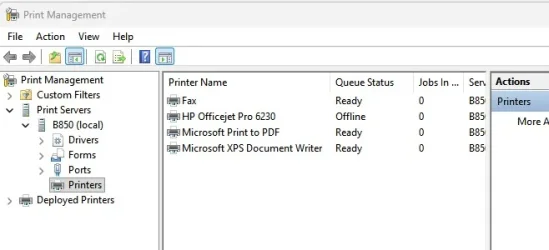
There is another area to manage printers.

Start a search in start menu for printer and what you want is print management.
Here you can check out drivers, ports and printers.
Perhaps you have a ghost device listed in there that is conflicting with your printer.

Screenshot 2026-05-24 105133.webp

Screenshot 2026-05-24 105449.webp
 

My Computer

System One

  • OS
    Windows 11 Pro
Reference Posts 11 and 13.
My Computer and Router are two separate machines.The printer has never been connected to the Router.
Could you improve my knowledge and explain how to do it ?
 

My Computer

System One

  • OS
    win 10
    Computer type
    PC/Desktop
    Manufacturer/Model
    home built
    CPU
    amd ryzen 5-2600
    Motherboard
    gigabyte b450m-ds3h
    Memory
    ng skill sniper x 16gb
    Graphics Card(s)
    nvidea gtx 1050
    Monitor(s) Displays
    benq fp 92
    Hard Drives
    samsung 860 evo 500gb m2 ssd
    PSU
    antec ea550g
    Case
    nzxt noctis 450
    Browser
    edge
Reference Posts 11 and 13.
My Computer and Router are two separate machines.
Same here
The printer has never been connected to the Router.
Could you improve my knowledge and explain how to do it ?
My Router (with WiFi Access Point - WAP) is a Netgear AX3000 WiFi 6 RAX36

There are 1 upstream (to the modem) and 4 downstream Ethernet ports on the back. One of the 4 is hardwired to the printer. (I have manually configured the printer to have a FIXED address of 192.168.1.14). One port is hardwired to my desktop.
 

My Computer

System One

  • OS
    windows 11
    Computer type
    PC/Desktop
    Manufacturer/Model
    Self built
    CPU
    AMD 8700G
    Motherboard
    ASRock B650I Lightning
    Memory
    2 - DDR5-6000 8GB Kinston KF560C35-8
    Graphics Card(s)
    none
    Sound Card
    none
    Monitor(s) Displays
    SAMSUNG SyncMaster 220WM
    Screen Resolution
    1680 x 1050
    Hard Drives
    Samsung SSD 990 Pro 1TB
    PSU
    PicoPSU-160-XT
    Case
    MITXPC MX500-USB3 Compact Mini-ITX Case
    Cooling
    Noctua NH-L9a-AM5, Chromax.Black, Low-Profile
    Browser
    Chrome
Thank you.
My printer,Canon MG3560,is used between 3 computers.One permanently connected to the Internet the other two permanently disconnected,XP and Win 10.
Cable connections only are used,no Wi-fi.
I('m still unable to understand why you connect a printer via the router and not directly to the computer.
 

My Computer

System One

  • OS
    win 10
    Computer type
    PC/Desktop
    Manufacturer/Model
    home built
    CPU
    amd ryzen 5-2600
    Motherboard
    gigabyte b450m-ds3h
    Memory
    ng skill sniper x 16gb
    Graphics Card(s)
    nvidea gtx 1050
    Monitor(s) Displays
    benq fp 92
    Hard Drives
    samsung 860 evo 500gb m2 ssd
    PSU
    antec ea550g
    Case
    nzxt noctis 450
    Browser
    edge
Thank you.
My printer,Canon MG3560,is used between 3 computers.One permanently connected to the Internet the other two permanently disconnected,XP and Win 10.
Cable connections only are used,no Wi-fi.
I('m still unable to understand why you connect a printer via the router and not directly to the computer.
It would need to be a network printer, connected by an ethernet cable to your router, then all computers on your local network would be able to see it and print to it once that printer was installed on each computer. Note, some routers also allow connection via usb cable.
 

My Computer

System One

  • OS
    Windows 11

My Computers

System One System Two

  • OS
    Windows 11 2xH2 (latest update ... forever anal)
    Computer type
    PC/Desktop
    Manufacturer/Model
    HP Slim S01
    CPU
    Intel i5-12400
    Memory
    8GB
    Graphics Card(s)
    NVIDIA GeForce GT730
    Sound Card
    OOBE
    Monitor(s) Displays
    Acer 32"
    Screen Resolution
    1920x1080
    Hard Drives
    512GB KIOXIA NVMe
    1TB SATA SSD
    PSU
    OOBE
    Case
    OOBE
    Cooling
    OOBE
    Keyboard
    BT
    Mouse
    BT
    Browser
    Brave FFox Chrome Opera
    Antivirus
    KIS
  • Operating System
    Windows 11 Pro 2xH2 (latest update ... 4ever anal)
    Computer type
    Laptop
    Manufacturer/Model
    HP Pavillion 15
    CPU
    i7-1165G7 @ 2.80GHz
    Graphics card(s)
    Intel Iris Xe Graphics
    Hard Drives
    Samsung NVMe 512GB
    + numerous/multiple SSD Type C USB enclosures
    Internet Speed
    NBN FTTN 50
    Browser
    Brave
    Antivirus
    KIS
Back
Top Bottom