- Local time
- 1:55 AM
- Posts
- 41
- OS
- windows 11
Version 25H2, Build 26200.8457
Suddenly, after many months of working fine, I can no longer print. (HP 7855) I CAN print from other Windows 10 machines ! The printer is connected directly/wired to my router.
My web browser (Chrome) can log into the printer No errors are listed
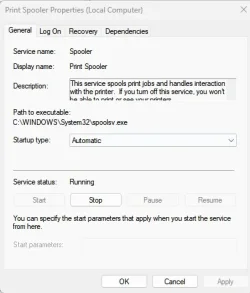
Stop and started the print spooler in Services (the printer "cycles" like it is going to print, but that is all)
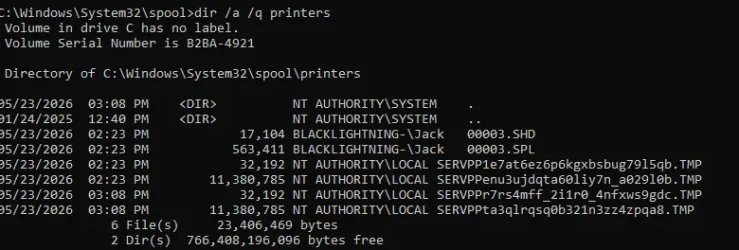
I CAN NOT manually clear the spool directory (%WINDIR%\system32\spool\printers), even when running as Administrator (Access is denied)
Suddenly, after many months of working fine, I can no longer print. (HP 7855) I CAN print from other Windows 10 machines ! The printer is connected directly/wired to my router.
My web browser (Chrome) can log into the printer No errors are listed
Stop and started the print spooler in Services (the printer "cycles" like it is going to print, but that is all)
I CAN NOT manually clear the spool directory (%WINDIR%\system32\spool\printers), even when running as Administrator (Access is denied)
My Computer
At a glance
windows 11AMD 8700G2 - DDR5-6000 8GB Kinston KF560C35-8none
- OS
- windows 11
- Computer type
- PC/Desktop
- Manufacturer/Model
- Self built
- CPU
- AMD 8700G
- Motherboard
- ASRock B650I Lightning
- Memory
- 2 - DDR5-6000 8GB Kinston KF560C35-8
- Graphics Card(s)
- none
- Sound Card
- none
- Monitor(s) Displays
- SAMSUNG SyncMaster 220WM
- Screen Resolution
- 1680 x 1050
- Hard Drives
- Samsung SSD 990 Pro 1TB
- PSU
- PicoPSU-160-XT
- Case
- MITXPC MX500-USB3 Compact Mini-ITX Case
- Cooling
- Noctua NH-L9a-AM5, Chromax.Black, Low-Profile
- Browser
- Chrome