Cannot Disable Windows Hypervisor - Stuck on "A Hypervisor has been detected"


Ev5

Member
Member
Local time
9:02 PM
Posts
18
OS
Windows 11
The Issue:
I am trying to disable Hyper-V, but Windows refuses to unload its own Hypervisor.
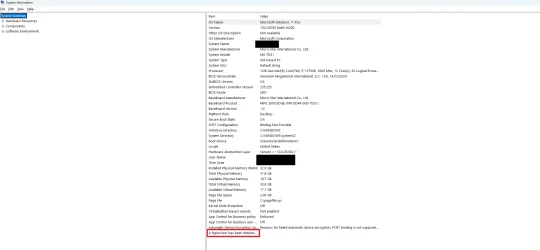
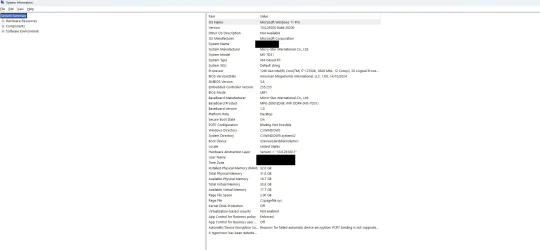
In `msinfo32`, it persistently shows:
A hypervisor has been detected. Features required for Hyper-V will not be displayed.

My Hardware:
* **CPU:** i7-12700K
* **Motherboard:** MSI MPG Z690 EDGE WIFI DDR4
* **OS:** Windows 11 25H2
* **BIOS Settings:**
* VT-x (Virtualization): **Enabled**
* VT-d (IOMMU): **Disabled**
* Kernel DMA Protection: **Disabled**

What I have already tried:
  • Group Policy & Windows Features
    GPEDIT: `Local Computer Policy > System > Device Guard` -> **Turn On Virtualization Based Security** set to **Disabled**.
    Disabled Features: Virtual Machine Platform, Windows Hypervisor Platform, Hyper-V, and WSL.
  • BCD / Boot Configuration (Ran as Admin)
    bcdedit /set vsmlaunchtype Off
    bcdedit /set hypervisorlaunchtype off
    bcdedit /deletevalue {current} vsmlaunchtype
  • Deep Clean Tools: (I wanted to disable VBS, and now Virtualization-based security is not enabled, just as I planned)
    - Ran `DG_Readiness_Tool_v3.6.ps1 -Disable -AutoReboot`.
    - Confirmed the UEFI black screen prompt to disable Device Guard/Credential Guard upon reboot.
  • Registry
    `HKLM\SYSTEM\CurrentControlSet\Control\DeviceGuard` -> Set `EnableVirtualizationBasedSecurity` to **0**.
  • DISM Feature Removal (Ran as Admin)
    Code:
    dism /online /disable-feature /featurename:Microsoft-Hyper-V-All
    dism /online /disable-feature /featurename:VirtualMachinePlatform
    dism /online /disable-feature /featurename:HypervisorPlatform
  • Software Context (VMware)
    - I have VMware Workstation installed, but I have **disabled all VMware services** (set to Manual/Stopped) to ensure they aren't triggering the hypervisor.
Current Status:
Despite all of the above, `msinfo32` still says a hypervisor is detected.
 
Windows Build/Version
Version 25H2 (OS Build 26200.7623)

Attachments
  • system info.webp
    system info.webp
    74.6 KB · Views: 5

My Computer My Computer

At a glance

Windows 11i7-12700KG.Skill Trident Z 32 GB (2 x 16 GB) DDR4-3600...RTX 3080 TI
OS
Windows 11
Computer type
PC/Desktop
CPU
i7-12700K
Motherboard
MPG Z690 EDGE WIFI DDR4
Memory
G.Skill Trident Z 32 GB (2 x 16 GB) DDR4-3600 CL16
Graphics Card(s)
RTX 3080 TI
Browser
Firefox Nightly
Antivirus
Windows Security

The Issue:
I am trying to disable Hyper-V, but Windows refuses to unload its own Hypervisor.
In `msinfo32`, it persistently shows:
Despite all of the above, `msinfo32` still says a hypervisor is detected.
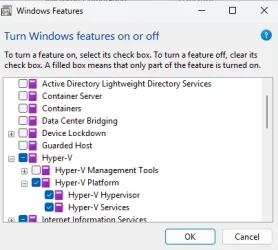
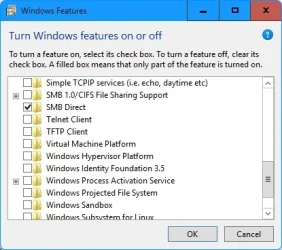
What about in Windows features? Are the ones on screenshot below still checked?
You would think that they would be off with the DISM commands you used but double check anyway.
But I see you did not use the powershell command:

Code:
Disable-WindowsOptionalFeature -Online -FeatureName Microsoft-Hyper-V-All

Again, you would think that was covered with what you did, but it will not hurt to run that one and it will ask for a restart.

Screenshot 2026-01-18 214241.webp


May I ask why you want to disable the Windows Hypervisor?
 

My Computers My Computers

  • At a glance

    All Branches but ReleaseAMD Ryzen 7 7735HS 3200-4500 Mhz 8 cores x 232 GB DDR5Radeon Graphic / NVIDIA GeForce RTX 4060 8 GB...
    OS
    All Branches but Release
    Computer type
    Laptop
    Manufacturer/Model
    Acer Nitro ANV15-51
    CPU
    AMD Ryzen 7 7735HS 3200-4500 Mhz 8 cores x 2
    Motherboard
    Sportage_RBH
    Memory
    32 GB DDR5
    Graphics Card(s)
    Radeon Graphic / NVIDIA GeForce RTX 4060 8 GB GDDR6
    Sound Card
    AMD/Realtek(R) Audio
    Monitor(s) Displays
    Integrated Monitor (15.3"vis)
    Screen Resolution
    FHD 1920X1080 16:9 144Hz
    Hard Drives
    KINGSTON OM8SEP4512Q-AA 1TB
    Western Digital 256GB
    PSU
    19V DC 6.32 A 120 W
    Cooling
    Dual Fans
    Mouse
    MS Bluetooth
    Internet Speed
    Fiber 1GB Cox -us & 1GB Orange-fr
    Browser
    Edge Canary- Firefox Nightly-Chrome Dev-Chrome Dev
    Antivirus
    Windows Defender
  • At a glance

    Windows 11 BetaAMD A9-94208 GB of DDR4AMD Radeon R5
    Operating System
    Windows 11 Beta
    Computer type
    Laptop
    Manufacturer/Model
    Asus X751BP
    CPU
    AMD A9-9420
    Memory
    8 GB of DDR4
    Graphics card(s)
    AMD Radeon R5
    Screen Resolution
    1600x900
    Hard Drives
    Seagate 1 TB
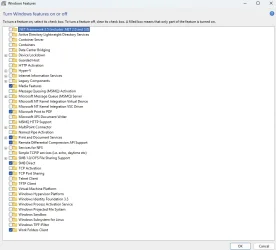
Already Turned off.
 

Attachments

  • features.webp
    features.webp
    61.4 KB · Views: 4

My Computer My Computer

At a glance

Windows 11i7-12700KG.Skill Trident Z 32 GB (2 x 16 GB) DDR4-3600...RTX 3080 TI
OS
Windows 11
Computer type
PC/Desktop
CPU
i7-12700K
Motherboard
MPG Z690 EDGE WIFI DDR4
Memory
G.Skill Trident Z 32 GB (2 x 16 GB) DDR4-3600 CL16
Graphics Card(s)
RTX 3080 TI
Browser
Firefox Nightly
Antivirus
Windows Security

Already Turned off.
Please refresh the page as I have posted additional content.
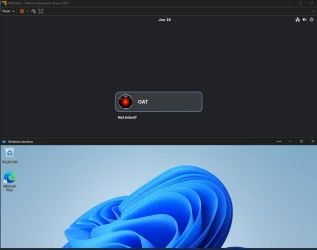
I also wanted to add that Hypervisor & Broadcom VMWare can run together as the screenshot below shows.
I never disable the hypervisor as I use Sandbox.
I run 2 Windows VMs & 1 Linux VM without any performance penalty.

Screenshot 2026-01-18 215942.webp
 
Last edited:

My Computers My Computers

  • At a glance

    All Branches but ReleaseAMD Ryzen 7 7735HS 3200-4500 Mhz 8 cores x 232 GB DDR5Radeon Graphic / NVIDIA GeForce RTX 4060 8 GB...
    OS
    All Branches but Release
    Computer type
    Laptop
    Manufacturer/Model
    Acer Nitro ANV15-51
    CPU
    AMD Ryzen 7 7735HS 3200-4500 Mhz 8 cores x 2
    Motherboard
    Sportage_RBH
    Memory
    32 GB DDR5
    Graphics Card(s)
    Radeon Graphic / NVIDIA GeForce RTX 4060 8 GB GDDR6
    Sound Card
    AMD/Realtek(R) Audio
    Monitor(s) Displays
    Integrated Monitor (15.3"vis)
    Screen Resolution
    FHD 1920X1080 16:9 144Hz
    Hard Drives
    KINGSTON OM8SEP4512Q-AA 1TB
    Western Digital 256GB
    PSU
    19V DC 6.32 A 120 W
    Cooling
    Dual Fans
    Mouse
    MS Bluetooth
    Internet Speed
    Fiber 1GB Cox -us & 1GB Orange-fr
    Browser
    Edge Canary- Firefox Nightly-Chrome Dev-Chrome Dev
    Antivirus
    Windows Defender
  • At a glance

    Windows 11 BetaAMD A9-94208 GB of DDR4AMD Radeon R5
    Operating System
    Windows 11 Beta
    Computer type
    Laptop
    Manufacturer/Model
    Asus X751BP
    CPU
    AMD A9-9420
    Memory
    8 GB of DDR4
    Graphics card(s)
    AMD Radeon R5
    Screen Resolution
    1600x900
    Hard Drives
    Seagate 1 TB
May I ask why you want to disable the Windows Hypervisor?
I need VMware Workstation to run using native VT‑x, and I also want to improve overall system performance.
Code:
Disable-WindowsOptionalFeature -Online -FeatureName Microsoft-Hyper-V-All
I believe I already ran that command earlier, but I’ll run this specific PowerShell command again now just to be absolutely sure.
 

My Computer My Computer

At a glance

Windows 11i7-12700KG.Skill Trident Z 32 GB (2 x 16 GB) DDR4-3600...RTX 3080 TI
OS
Windows 11
Computer type
PC/Desktop
CPU
i7-12700K
Motherboard
MPG Z690 EDGE WIFI DDR4
Memory
G.Skill Trident Z 32 GB (2 x 16 GB) DDR4-3600 CL16
Graphics Card(s)
RTX 3080 TI
Browser
Firefox Nightly
Antivirus
Windows Security
Code:
Disable-WindowsOptionalFeature -Online -FeatureName Microsoft-Hyper-V-All

Disable-WindowsOptionalFeature -Online -FeatureName Microsoft-Hyper-V-All

Path :
Online : True
RestartNeeded : False

"A hypervisor has been detected. Features required for Hyper-V will not be displayed."
It's still there even after restarting my PC
 

My Computer My Computer

At a glance

Windows 11i7-12700KG.Skill Trident Z 32 GB (2 x 16 GB) DDR4-3600...RTX 3080 TI
OS
Windows 11
Computer type
PC/Desktop
CPU
i7-12700K
Motherboard
MPG Z690 EDGE WIFI DDR4
Memory
G.Skill Trident Z 32 GB (2 x 16 GB) DDR4-3600 CL16
Graphics Card(s)
RTX 3080 TI
Browser
Firefox Nightly
Antivirus
Windows Security
bcdedit /enum {current}
Returns this

Code:
-------------------
Windows Boot Loader
identifier              {current}

device                  partition=C:

path                    \WINDOWS\system32\winload.efi

description             Windows 11

locale                  en-US

inherit                 {bootloadersettings}

recoverysequence        {0e488f09-2290-11f0-b782-93ab5d0521e2}

displaymessageoverride  Recovery

recoveryenabled         Yes

isolatedcontext         No

allowedinmemorysettings 0x15000075

osdevice                partition=C:

systemroot              \WINDOWS

resumeobject            {0e488f07-2290-11f0-b782-93ab5d0521e2}

nx                      OptIn

bootmenupolicy          Standard

hypervisorlaunchtype    Off
 

My Computer My Computer

At a glance

Windows 11i7-12700KG.Skill Trident Z 32 GB (2 x 16 GB) DDR4-3600...RTX 3080 TI
OS
Windows 11
Computer type
PC/Desktop
CPU
i7-12700K
Motherboard
MPG Z690 EDGE WIFI DDR4
Memory
G.Skill Trident Z 32 GB (2 x 16 GB) DDR4-3600 CL16
Graphics Card(s)
RTX 3080 TI
Browser
Firefox Nightly
Antivirus
Windows Security
Here is the latest update. I have completely stripped the Secure Boot keys and checked for any lingering drivers.

BIOS Status:
Secure Boot Mode: Custom
Action Taken: Delete All Secure Boot Keys.

Driver Filter Check (fltmc):
I checked for rogue drivers (like VMware) but the list looks clean.

fltmc in CMD Admin
Code:
Filter Name                     Num Instances    Altitude    Frame

[HR][/HR]
bindflt                                 1       409800         0
UCPD                                   10       385250.5       0
WdFilter                               10       328010         0
storqosflt                              0       244000         0
wcifs                                   0       189900         0
CldFlt                                  3       180451         0
bfs                                    12       150000         0
FileCrypt                               0       141100         0
luafv                                   1       135000         0
UnionFS                                 0       130850         0
npsvctrig                               1        46000         0
Wof                                     8        40700         0
FileInfo                               10        40500         0

System Guard Check:
I also checked if System Guard (SgrmBroker) was forcing it, but the service doesn't even exist.

sc query SgrmBroker in CMD Admin

Code:
[SC] EnumQueryServicesStatus:OpenService FAILED 1060:

The specified service does not exist as an installed service.

Current Situation:
Despite deleting winsipolicy.p7b from the EFI partition, deleting all Secure Boot keys in BIOS, and having no active virtualization drivers... msinfo32 still shows "A hypervisor has been detected".
 

My Computer My Computer

At a glance

Windows 11i7-12700KG.Skill Trident Z 32 GB (2 x 16 GB) DDR4-3600...RTX 3080 TI
OS
Windows 11
Computer type
PC/Desktop
CPU
i7-12700K
Motherboard
MPG Z690 EDGE WIFI DDR4
Memory
G.Skill Trident Z 32 GB (2 x 16 GB) DDR4-3600 CL16
Graphics Card(s)
RTX 3080 TI
Browser
Firefox Nightly
Antivirus
Windows Security
Turn off hardware virtualisation from the bios.
 

My Computer My Computer

At a glance

Windows 11 Pro + Win11 Canary VM.I9 13th gen i9-13900H 2.60 GHZ16 GB solderedIntegrated Intel Iris XE
OS
Windows 11 Pro + Win11 Canary VM.
Computer type
Laptop
Manufacturer/Model
ASUS Zenbook 14
CPU
I9 13th gen i9-13900H 2.60 GHZ
Motherboard
Yep, Laptop has one.
Memory
16 GB soldered
Graphics Card(s)
Integrated Intel Iris XE
Sound Card
Realtek built in
Monitor(s) Displays
laptop OLED screen
Screen Resolution
2880x1800 touchscreen
Hard Drives
1 TB NVME SSD (only weakness is only one slot)
PSU
Internal + 65W thunderbolt USB4 charger
Case
Yep, got one
Cooling
Stella Artois (UK pint cans - 568 ml) - extra cost.
Keyboard
Built in UK keybd
Mouse
Bluetooth , wireless dongled, wired
Internet Speed
900 mbs (ethernet), wifi 6 typical 350-450 mb/s both up and down
Browser
Edge
Antivirus
Defender
Other Info
TPM 2.0, 2xUSB4 thunderbolt, 1xUsb3 (usb a), 1xUsb-c, hdmi out, 3.5 mm audio out/in combo, ASUS backlit trackpad (inc. switchable number pad)

Macrium Reflect Home V8
Office 365 Family (6 users each 1TB onedrive space)
Hyper-V (a vm runs almost as fast as my older laptop)
Turn off hardware virtualisation from the bios.
Do you mean disabling VT-x (Intel Virtualization Technology)?

If I do that, it will prevent VMware Workstation from running (since VMware requires VT-x to function).

My specific goal is to have Hardware Virtualization (VT-x) ENABLED, but the Windows Hypervisor/VBS software layer DISABLED, so that VMware can use the hardware directly.
 

My Computer My Computer

At a glance

Windows 11i7-12700KG.Skill Trident Z 32 GB (2 x 16 GB) DDR4-3600...RTX 3080 TI
OS
Windows 11
Computer type
PC/Desktop
CPU
i7-12700K
Motherboard
MPG Z690 EDGE WIFI DDR4
Memory
G.Skill Trident Z 32 GB (2 x 16 GB) DDR4-3600 CL16
Graphics Card(s)
RTX 3080 TI
Browser
Firefox Nightly
Antivirus
Windows Security
Turn off hardware virtualisation from the bios.
I just disabled VT-x in BIOS to test, and msinfo32 showed:

Code:
Hyper-V - VM Monitor Mode Extensions    Yes
Hyper-V - Second Level Address Translation Extensions    Yes
Hyper-V - Virtualization Enabled in Firmware    No
Hyper-V - Data Execution Protection    Yes

This confirms the Windows Hypervisor was gone, but "Virtualization Enabled in Firmware" was No, which breaks VMware.

However, the moment I re-enabled VT-x in BIOS and restarted, msinfo32 immediately reverted to:
Code:
A hypervisor has been detected. Features required for Hyper-V will not be displayed.

This confirms that enabling Hardware Virtualization (VT-x) is instantly triggering the Windows Hypervisor to load, ignoring my BCD "off" settings.
 

My Computer My Computer

At a glance

Windows 11i7-12700KG.Skill Trident Z 32 GB (2 x 16 GB) DDR4-3600...RTX 3080 TI
OS
Windows 11
Computer type
PC/Desktop
CPU
i7-12700K
Motherboard
MPG Z690 EDGE WIFI DDR4
Memory
G.Skill Trident Z 32 GB (2 x 16 GB) DDR4-3600 CL16
Graphics Card(s)
RTX 3080 TI
Browser
Firefox Nightly
Antivirus
Windows Security
Is there any way to see exactly what hypervisor or feature is being detected? I've checked fltmc for drivers and Event Viewer for Code Integrity policies, and both are clean. What is the next step to trace this?
 

My Computer My Computer

At a glance

Windows 11i7-12700KG.Skill Trident Z 32 GB (2 x 16 GB) DDR4-3600...RTX 3080 TI
OS
Windows 11
Computer type
PC/Desktop
CPU
i7-12700K
Motherboard
MPG Z690 EDGE WIFI DDR4
Memory
G.Skill Trident Z 32 GB (2 x 16 GB) DDR4-3600 CL16
Graphics Card(s)
RTX 3080 TI
Browser
Firefox Nightly
Antivirus
Windows Security
@Ev5

Did you check to see if virtualization is enabled in the BIOS?
I don't know what it's called on an MSI Intel board.
On my ASUS AMD board it's called SVM
 

My Computers My Computers

  • At a glance

    Win 11 Home ♦♦♦26200.8875 ♦♦♦♦♦♦♦25H2AMD Ryzen 7 3700XG.Skill (F4-3200C14D-16GTZKW)EVGA RTX 2070 (08G-P4-2171-KR)
    OS
    Win 11 Home ♦♦♦26200.8875 ♦♦♦♦♦♦♦25H2
    Computer type
    PC/Desktop
    Manufacturer/Model
    Built by Ghot® [May 2020]
    CPU
    AMD Ryzen 7 3700X
    Motherboard
    Asus Pro WS X570-ACE (BIOS 5302)
    Memory
    G.Skill (F4-3200C14D-16GTZKW)
    Graphics Card(s)
    EVGA RTX 2070 (08G-P4-2171-KR)
    Sound Card
    Realtek ALC1220P / ALC S1220A
    Monitor(s) Displays
    Dell U3011 30"
    Screen Resolution
    2560 x 1600
    Hard Drives
    2x Samsung 860 EVO 500GB,
    WD 4TB Black FZBX - SATA III,
    WD 8TB Black FZBX - SATA III,
    DRW-24B1ST CD/DVD Burner
    PSU
    PC Power & Cooling 750W Quad EPS12V
    Case
    Cooler Master ATCS 840 Tower
    Cooling
    CM Hyper 212 EVO (push/pull)
    Keyboard
    Ducky DK9008 Shine II Blue LED
    Mouse
    Logitech Optical M-100
    Internet Speed
    300/300
    Browser
    Firefox (latest)
    Antivirus
    Bitdefender Total Security
    Other Info
    Speakers: Klipsch Pro Media 2.1
  • At a glance

    Windows XP Pro 32bit w/SP3AMD Athlon 64 X2 5000+ (OC'd @ 3.2Ghz)TWIN2X2048-6400C4DHX (2 x 1GB, DDR2 800)EVGA 256-P2-N758-TR GeForce 8600GT SSC
    Operating System
    Windows XP Pro 32bit w/SP3
    Computer type
    PC/Desktop
    Manufacturer/Model
    Built by Ghot® (not in use)
    CPU
    AMD Athlon 64 X2 5000+ (OC'd @ 3.2Ghz)
    Motherboard
    ASUS M2N32-SLI Deluxe Wireless Edition
    Memory
    TWIN2X2048-6400C4DHX (2 x 1GB, DDR2 800)
    Graphics card(s)
    EVGA 256-P2-N758-TR GeForce 8600GT SSC
    Sound Card
    Onboard
    Monitor(s) Displays
    ViewSonic G90FB Black 19" Professional (CRT)
    Screen Resolution
    up to 2048 x 1536
    Hard Drives
    WD 36GB 10,000rpm Raptor SATA
    Seagate 80GB 7200rpm SATA
    Lite-On LTR-52246S CD/RW
    Lite-On LH-18A1P CD/DVD Burner
    PSU
    PC Power & Cooling Silencer 750 Quad EPS12V
    Case
    Generic Beige case, 80mm fans
    Cooling
    ZALMAN 9500A 92mm CPU Cooler
    Keyboard
    Logitech Classic Keybooard 200
    Mouse
    Logitech Optical M-BT96a
    Internet Speed
    300/300
    Browser
    Firefox 3.x ??
    Antivirus
    Symantec (Norton)
    Other Info
    Still assembled, still runs. Haven't turned it on for 15 years?
@Ev5

Did you check to see if virtualization is enabled in the BIOS?
I don't know what it's called on an MSI Intel board.
On my ASUS AMD board it's called SVM
Yes, Virtualization (VT-x) is definitely Enabled in my BIOS.

That is actually the problem. When I enable it, Windows sees it and immediately loads its own hidden Hypervisor, which locks out VMware from using the hardware directly.

I am trying to achieve this specific state in msinfo32:

Code:
Hyper-V - VM Monitor Mode Extensions    Yes
Hyper-V - Second Level Address Translation Extensions    Yes
Hyper-V - Virtualization Enabled in Firmware    Yes   <-- I need this YES
Hyper-V - Data Execution Protection    Yes

Currently, I get "A hypervisor has been detected," which means the Windows software layer is active and blocking me from that raw hardware access.1768932411849.webp
 

My Computer My Computer

At a glance

Windows 11i7-12700KG.Skill Trident Z 32 GB (2 x 16 GB) DDR4-3600...RTX 3080 TI
OS
Windows 11
Computer type
PC/Desktop
CPU
i7-12700K
Motherboard
MPG Z690 EDGE WIFI DDR4
Memory
G.Skill Trident Z 32 GB (2 x 16 GB) DDR4-3600 CL16
Graphics Card(s)
RTX 3080 TI
Browser
Firefox Nightly
Antivirus
Windows Security
@Ev5

As a test... go into the BIOS and DISABLE Virtualization, then save and boot into Windows and see if that affected the hypervisor problem.

If it doesn't help, then go back to the BIOS and re-enable it.


And here's ten points, just for filling out "most" of your computer specs. :-)
 

My Computers My Computers

  • At a glance

    Win 11 Home ♦♦♦26200.8875 ♦♦♦♦♦♦♦25H2AMD Ryzen 7 3700XG.Skill (F4-3200C14D-16GTZKW)EVGA RTX 2070 (08G-P4-2171-KR)
    OS
    Win 11 Home ♦♦♦26200.8875 ♦♦♦♦♦♦♦25H2
    Computer type
    PC/Desktop
    Manufacturer/Model
    Built by Ghot® [May 2020]
    CPU
    AMD Ryzen 7 3700X
    Motherboard
    Asus Pro WS X570-ACE (BIOS 5302)
    Memory
    G.Skill (F4-3200C14D-16GTZKW)
    Graphics Card(s)
    EVGA RTX 2070 (08G-P4-2171-KR)
    Sound Card
    Realtek ALC1220P / ALC S1220A
    Monitor(s) Displays
    Dell U3011 30"
    Screen Resolution
    2560 x 1600
    Hard Drives
    2x Samsung 860 EVO 500GB,
    WD 4TB Black FZBX - SATA III,
    WD 8TB Black FZBX - SATA III,
    DRW-24B1ST CD/DVD Burner
    PSU
    PC Power & Cooling 750W Quad EPS12V
    Case
    Cooler Master ATCS 840 Tower
    Cooling
    CM Hyper 212 EVO (push/pull)
    Keyboard
    Ducky DK9008 Shine II Blue LED
    Mouse
    Logitech Optical M-100
    Internet Speed
    300/300
    Browser
    Firefox (latest)
    Antivirus
    Bitdefender Total Security
    Other Info
    Speakers: Klipsch Pro Media 2.1
  • At a glance

    Windows XP Pro 32bit w/SP3AMD Athlon 64 X2 5000+ (OC'd @ 3.2Ghz)TWIN2X2048-6400C4DHX (2 x 1GB, DDR2 800)EVGA 256-P2-N758-TR GeForce 8600GT SSC
    Operating System
    Windows XP Pro 32bit w/SP3
    Computer type
    PC/Desktop
    Manufacturer/Model
    Built by Ghot® (not in use)
    CPU
    AMD Athlon 64 X2 5000+ (OC'd @ 3.2Ghz)
    Motherboard
    ASUS M2N32-SLI Deluxe Wireless Edition
    Memory
    TWIN2X2048-6400C4DHX (2 x 1GB, DDR2 800)
    Graphics card(s)
    EVGA 256-P2-N758-TR GeForce 8600GT SSC
    Sound Card
    Onboard
    Monitor(s) Displays
    ViewSonic G90FB Black 19" Professional (CRT)
    Screen Resolution
    up to 2048 x 1536
    Hard Drives
    WD 36GB 10,000rpm Raptor SATA
    Seagate 80GB 7200rpm SATA
    Lite-On LTR-52246S CD/RW
    Lite-On LH-18A1P CD/DVD Burner
    PSU
    PC Power & Cooling Silencer 750 Quad EPS12V
    Case
    Generic Beige case, 80mm fans
    Cooling
    ZALMAN 9500A 92mm CPU Cooler
    Keyboard
    Logitech Classic Keybooard 200
    Mouse
    Logitech Optical M-BT96a
    Internet Speed
    300/300
    Browser
    Firefox 3.x ??
    Antivirus
    Symantec (Norton)
    Other Info
    Still assembled, still runs. Haven't turned it on for 15 years?
@Ghot
Thanks! I actually tried exactly that earlier in the troubleshooting process.

When I DISABLE Virtualization (VT-x) in the BIOS, the "A hypervisor has been detected" message disappears, and msinfo32 shows this:

Code:
Hyper-V - VM Monitor Mode Extensions    Yes
Hyper-V - Second Level Address Translation Extensions    Yes
Hyper-V - Virtualization Enabled in Firmware    No
Hyper-V - Data Execution Protection    Yes

However, as soon as I go back to BIOS and RE-ENABLE it (which I need for VMware), the message "A hypervisor has been detected" comes back immediately.

This confirms that the Windows Hypervisor is launching specifically because it detects the hardware capability, effectively hijacking it before VMware can get to it.
 

My Computer My Computer

At a glance

Windows 11i7-12700KG.Skill Trident Z 32 GB (2 x 16 GB) DDR4-3600...RTX 3080 TI
OS
Windows 11
Computer type
PC/Desktop
CPU
i7-12700K
Motherboard
MPG Z690 EDGE WIFI DDR4
Memory
G.Skill Trident Z 32 GB (2 x 16 GB) DDR4-3600 CL16
Graphics Card(s)
RTX 3080 TI
Browser
Firefox Nightly
Antivirus
Windows Security
Okay, I think I've figured out what's happening. Windows seems to be "healing" itself and forcing these settings back on after every reboot.

I was following Step 6 from this Broadcom guide (https://community.broadcom.com/vmwa...ion/how-to-disable-hyper-v-in-windows-11-24h2) using the official Device Guard and Credential Guard hardware readiness tool.

Here is the pattern I found:

1. I ran the readiness tool script and rebooted. VBS turned "Not Enabled", but the Hypervisor message was still there.
2. I ran the script again immediately after. This time it actually worked! The "Hypervisor detected" message disappeared and everything looked correct.
Like this
Code:
Hyper-V - VM Monitor Mode Extensions    Yes
Hyper-V - Second Level Address Translation Extensions    Yes
Hyper-V - Virtualization Enabled in Firmware    Yes
Hyper-V - Data Execution Protection    Yes
3. But then I did a normal restart (without using the tool), and it completely reverted. Both VBS and the Hypervisor are active again.

This is what msinfo32 shows now after that normal restart:
Code:
Virtualization-based security    Running
Virtualization-based security Required Security Properties   
Virtualization-based security Available Security Properties    Base Virtualization Support, Secure Boot, UEFI Code Readonly, SMM Security Mitigations 1.0, Mode Based Execution Control, APIC Virtualization
Virtualization-based security Services Configured   
Virtualization-based security Services Running   
A hypervisor has been detected. Features required for Hyper-V will not be displayed.

Btw, VT-x was enabled in BIOS throughout all these steps.
 

My Computer My Computer

At a glance

Windows 11i7-12700KG.Skill Trident Z 32 GB (2 x 16 GB) DDR4-3600...RTX 3080 TI
OS
Windows 11
Computer type
PC/Desktop
CPU
i7-12700K
Motherboard
MPG Z690 EDGE WIFI DDR4
Memory
G.Skill Trident Z 32 GB (2 x 16 GB) DDR4-3600 CL16
Graphics Card(s)
RTX 3080 TI
Browser
Firefox Nightly
Antivirus
Windows Security
Nothing more frustrating than trying to hack into your own computer to regain control of it. Have you tried booting into safe mode and removing the hyper-v services?
 

My Computer My Computer

At a glance

Windows 11 22H2 Pro (X-lite Micro 11 version)i7 13850HX (20 cores, 28 threads)32GB DDR5Intel UHD/ RTX 1000 ADA
OS
Windows 11 22H2 Pro (X-lite Micro 11 version)
Computer type
Laptop
Manufacturer/Model
Dell/ Precision 7680
CPU
i7 13850HX (20 cores, 28 threads)
Motherboard
Dell
Memory
32GB DDR5
Graphics Card(s)
Intel UHD/ RTX 1000 ADA
Sound Card
Realtek
Monitor(s) Displays
4K UHD Touchscreen
Screen Resolution
3840 x 2400
Hard Drives
Samsung 512GB system drive
WD Blue 1TB game drive
PSU
240W AC adapter, 1800W when docked
Internet Speed
1 gigabit symmetrical
Browser
Firefox, Librewolf
Antivirus
None. Manully configured so nobody except me can change any critical system files. (Don't ask how, it's probably against some rule somewhere)
That msinfo32 line isn't very specific so not sure what to make of it in the end. What hypervisor is detected if all features are disabled...
More important is a stable system and that VMs run fine without hiccups.
After trying all those steps, does VMware Workstation actually work normally or do you get slowdowns and mentions of Hyper-V mode?
 

My Computers My Computers

  • At a glance

    Windows 11 Proi3 8109U16GB DDR4 @2400Intel Iris Plus Graphics 655
    OS
    Windows 11 Pro
    Computer type
    PC/Desktop
    Manufacturer/Model
    Intel NUC
    CPU
    i3 8109U
    Motherboard
    Intel
    Memory
    16GB DDR4 @2400
    Graphics Card(s)
    Intel Iris Plus Graphics 655
    Sound Card
    Intel / Realtek HD Audio
    Monitor(s) Displays
    LG-32ML600M
    Screen Resolution
    1920x1080
    Hard Drives
    Intel SSD 250GB + Samsung QVO SSD 1TB
    PSU
    Adapter
    Cooling
    The usual NUC airflow
    Keyboard
    Logitech Orion G610
    Mouse
    SteelSeries Rival 100 Red
    Internet Speed
    Good enough
    Browser
    Chromium, Edge, Firefox
    Antivirus
    Windows Defender
  • At a glance

    CentOS 9 Stream / Alma / Rocky / FedoraIntel i7 4800MQ32GB DDR3 @1600NVIDIA Quadro K2100M
    Operating System
    CentOS 9 Stream / Alma / Rocky / Fedora
    Computer type
    Laptop
    Manufacturer/Model
    TOSHIBA
    CPU
    Intel i7 4800MQ
    Motherboard
    TOSHIBA
    Memory
    32GB DDR3 @1600
    Graphics card(s)
    NVIDIA Quadro K2100M
    Sound Card
    Realtek HD Audio
    Monitor(s) Displays
    Built-in
    Screen Resolution
    1920x1080
Open traditional Control Panel, switch from group to large icons top right, open Add/Remove Programs and then click to open Turn Windows Features On or Off. Scroll down, there is not only Hyper-V, but also Windows Supervisor Platform and Virtual Machine Platform. Make sure you also disable these two:


Turn Windows Features on or off.webp
 

My Computers My Computers

  • At a glance

    Windows 11 Pro 23H2 (5699), 25H2 (8875)Mobile DualCore Intel Core 2 Duo T7250, 2000 MHz4GBMobile Intel(R) GMA 4500M (Mobile 4 series)
    OS
    Windows 11 Pro 23H2 (5699), 25H2 (8875)
    Computer type
    Laptop
    Manufacturer/Model
    Acer Extensa 5630EZ
    CPU
    Mobile DualCore Intel Core 2 Duo T7250, 2000 MHz
    Motherboard
    Acer Extensa 5630
    Memory
    4GB
    Graphics Card(s)
    Mobile Intel(R) GMA 4500M (Mobile 4 series)
    Sound Card
    Realtek ALC268 @ Intel 82801IB ICH9 - High Definition Audio Controller
    Monitor(s) Displays
    1
    Screen Resolution
    1280x800
    Hard Drives
    Samsung SSD 850 EVO 250GB SATA Device (250 GB, SATA-III)
    Internet Speed
    VDSL 50 Mbps
    Browser
    MICROSOFT EDGE
    Antivirus
    WINDOWS DEFENDER
    Other Info
    Legacy MBR installation, no TPM, no Secure Boot, no WDDM 2.0 graphics drivers, no SSE4.2, cannot get more unsupported ;) This is only my test laptop. I had installed Windows 11 here before upgrading my main PC. For my main PC I use everyday see my 2nd system specs.
  • At a glance

    Windows 11 Pro v25H2 (build 26200.8875)Intel Core-i7 3770 3.40GHz s1155 (3rd generat...2x Kingston Hyper-X Blu 8GB DDR3-1600GIGABYTE GeForce RTX 3050 WINDFORCE OC V2 6GB...
    Operating System
    Windows 11 Pro v25H2 (build 26200.8875)
    Computer type
    PC/Desktop
    Manufacturer/Model
    Custom-built PC
    CPU
    Intel Core-i7 3770 3.40GHz s1155 (3rd generation)
    Motherboard
    Asus P8H61 s1155 ATX
    Memory
    2x Kingston Hyper-X Blu 8GB DDR3-1600
    Graphics card(s)
    GIGABYTE GeForce RTX 3050 WINDFORCE OC V2 6GB (GV-N3050WF2OCV2-6GD)
    Sound Card
    Realtek HD audio (ALC887)
    Monitor(s) Displays
    Sony Bravia KDL-19L4000 19" LCD TV via VGA
    Screen Resolution
    1440x900 32-bit 60Hz
    Hard Drives
    WD Blue SA510 2.5 1000GB SSD as system disk, Western Digital Caviar Purple 4TB SATA III (WD40PURZ) as second
    PSU
    Thermaltake Litepower RGB 550W Full Wired
    Case
    SUPERCASE MIDI-TOWER
    Cooling
    Deepcool Gamma Archer CPU cooler, 1x 8cm fan at the back
    Keyboard
    Mitsumi 101-key PS/2
    Mouse
    Sunnyline OptiEye PS/2
    Internet Speed
    100Mbps
    Browser
    Microsoft Edge, Mozilla Firefox
    Antivirus
    Microsoft Windows Defender
    Other Info
    Legacy BIOS (MBR) installation, no TPM, no Secure Boot, WDDM 3.0 graphics drivers, WEI score 7.4
Back
Top Bottom