Cannot Safely Eject Thumb Drive With Task Manager Open


samm

Member
Local time
6:44 PM
Posts
3
OS
Windows 11 Home
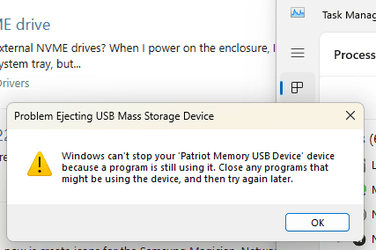
Ever since I got a unit with Windows 11, I noticed a problem with safely ejecting a USB thumb drive when Task Manager is open. It gives the error "Problem Ejecting USB Mass Storage Device" (see attached pic). Every time I use the safely eject icon in the system tray when Task Manager is open, it gives the error. I have to exit Task Manager for it to work right. I don't ever remember seeing this problem before with earlier Windows versions. Is this a known issue, and will it ever be fixed?
 
Windows Build/Version
w11 22h2/22621.2070

Attachments

  • Screenshot (12).png
    Screenshot (12).png
    10.8 KB · Views: 4

My Computer My Computer

At a glance

Windows 11 Home12th Gen Intel(R) Core(TM) i5-12400 2.50 GHz8GB DDR4Intel UHD 730
OS
Windows 11 Home
Computer type
PC/Desktop
Manufacturer/Model
ASUS S500TD
CPU
12th Gen Intel(R) Core(TM) i5-12400 2.50 GHz
Motherboard
D500TD
Memory
8GB DDR4
Graphics Card(s)
Intel UHD 730
Sound Card
RealTek onboard
Monitor(s) Displays
LG 27"
Screen Resolution
1920X1080
Hard Drives
500GB SSD Micron MTFDHBA512QFD
PSU
GPS-300JB
Keyboard
logitech wireless
Mouse
logitech wireless
Internet Speed
50Gb ATT vdsl
Browser
Edge
Antivirus
Defender
Other Info
External USB DVD, BD
AS far as I can tell, it is because there is still an entry in Task Manager for the USB drive.
I too had that until I closed the task Manager and then I could disengage the USB from
the PC. Don't know if it's a bug or not. Maybe Brink can tell us more.
 

My Computers My Computers

  • At a glance

    windows 11 22631.5039Core i9 12th gen 12900HK 2.9 MHz (overcloked:...32 Gigs DDR5-4800nVidia RTX 3070 Ti / 8 Gigs DDR6
    OS
    windows 11 22631.5039
    Computer type
    Laptop
    Manufacturer/Model
    MSI Raider GE76
    CPU
    Core i9 12th gen 12900HK 2.9 MHz (overcloked: 3890.48)
    Motherboard
    MSI
    Memory
    32 Gigs DDR5-4800
    Graphics Card(s)
    nVidia RTX 3070 Ti / 8 Gigs DDR6
    Sound Card
    DYNAUDIO - Steelsries Arena 7- Sound Effects by Nahimic 3
    Monitor(s) Displays
    17.3" 1920 x 1080 360 Hz 3 ms, IPS / Connected to MSI 32 inch curved @ 165 Hz
    Screen Resolution
    1920 x 1080 / Both
    Hard Drives
    Samsung 990 Pro 2TB (OS) - Solidigm P41 2TB (Storage)
    PSU
    280 watts
    Case
    MSI GE series
    Cooling
    internal
    Keyboard
    Steelseries
    Mouse
    G903 Lightspeed
    Internet Speed
    1000 Mbps
    Browser
    Firefox / Opera GX- Do not like Edge
    Antivirus
    Malwarebytes'
    Other Info
    just ask.
  • At a glance

    Windows 10 22H2Intel Core i7 7820HK 2.9 Ghz16 Gigs DDR4 2400 MhznVidia 1070 8GB RAM
    Operating System
    Windows 10 22H2
    Computer type
    Laptop
    Manufacturer/Model
    MSI GT73 7RE VR Titan
    CPU
    Intel Core i7 7820HK 2.9 Ghz
    Motherboard
    MSI
    Memory
    16 Gigs DDR4 2400 Mhz
    Graphics card(s)
    nVidia 1070 8GB RAM
    Sound Card
    DYNAUDIO / Nahimic 2
    Monitor(s) Displays
    IPS / 120HZ
    Screen Resolution
    1920x1080P
    Hard Drives
    Samsung NVME EVO 970 1TB / Samsung SSD (SATA) 1TB
    PSU
    240 watts
    Case
    MSI
    Cooling
    Internal
    Keyboard
    Steelseries
    Mouse
    Logitech G903 Lightspeed
    Internet Speed
    1 Gb/s
    Browser
    Firefox / Vivaldi
    Antivirus
    MalwareBytes'
    Other Info
    none.
Back
Top Bottom