Can't find device on network


budeone

Well-known member
Member
Local time
10:20 AM
Posts
78
Location
Chicago burbs
OS
windows 11
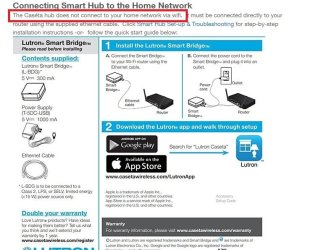
I have a device called lutron and it's on the network. It's connected right to the router and it works. It controls all my light.. If I unplug from router it stops working. The problem is I can find it. I can't find it in wireless or connected.

The asus ax 3000 finds every address plus a list that used to be connected. This is not on there.. Besides from the name I am looking for the Mac address. The arp command shows everything just not that device.

If you want to know if it's working so why do I need to see it.. My phone can control it with the big remote. The program searches and finds nothing just like everything else.

I used the Mobil app for asus and the router shows three options... Connected... Unplugged and that says notice in orange.. It's plugged into one that says notice so the router knows it's there..

I figured I would ask to see if anybody has any ideas.

Thanks
 

My Computer My Computer

At a glance

windows 11AMD Ryzen 9 Granite Ridge 4nm Technology32.0GB Dual-Channel @ 2999MHz (36-44-44-96)VX2753 SERIES (1920x1080@60Hz) 4095MB NVIDIA ...
OS
windows 11
Computer type
PC/Desktop
Manufacturer/Model
home
CPU
AMD Ryzen 9 Granite Ridge 4nm Technology
Motherboard
ASUSTeK COMPUTER INC. ROG STRIX X870E-E GAMING WIFI Rev 1.xx
Memory
32.0GB Dual-Channel @ 2999MHz (36-44-44-96)
Graphics Card(s)
VX2753 SERIES (1920x1080@60Hz) 4095MB NVIDIA GeForce GTX 970 (EVGA)
Sound Card
NVIDIA High Definition Audio
Monitor(s) Displays
AOC u2879g6
Screen Resolution
Current Resolution 3840x2160
Hard Drives
7452GB Western Digital WDC WD80EFZX-68UW8N0 (SATA ) 31 °C
7452GB Seagate ST8000VN004-3CP101 (SATA ) 29 °C
223GB INTEL SSDSC2CW240A3 (SATA (SSD))
223GB INTEL SSDSC2CW240A (SATA (SSD))
476GB Samsung SSD 950 PRO 512GB (Unknown (SSD))
1863GB Western Digital WDC WD20EARS-00MVWB0 (SATA ) 25 °C
931GB Seagate ST31000528AS (SATA ) 27 °C
11176GB Seagate ST12000VN0007-2GS116 (SATA ) 30 °C
PSU
850
Internet Speed
1100

My Computers My Computers

  • At a glance

    Windows 11 Home 25H2 26200.8875AMD Ryzen 3 5300G8gbRadeon Graphics 4.00GHZ
    OS
    Windows 11 Home 25H2 26200.8875
    Computer type
    PC/Desktop
    Manufacturer/Model
    HP Pavilion TP01-2xxx
    CPU
    AMD Ryzen 3 5300G
    Memory
    8gb
    Graphics Card(s)
    Radeon Graphics 4.00GHZ
    Monitor(s) Displays
    ViewSonic
    Keyboard
    HP
    Mouse
    wireless Microsoft
    Browser
    FireFox
    Antivirus
    Avira
  • At a glance

    Updated Windows 10 to 11 25H2 26200.8875Intel Core i3 8100 @3.60 GHz8.GBIntel UHD 360 (HP)
    Operating System
    Updated Windows 10 to 11 25H2 26200.8875
    Computer type
    PC/Desktop
    Manufacturer/Model
    HP
    CPU
    Intel Core i3 8100 @3.60 GHz
    Motherboard
    HP 8653 (U3E1)
    Memory
    8.GB
    Graphics card(s)
    Intel UHD 360 (HP)
    Sound Card
    Realtek High Def
    Monitor(s) Displays
    ViewSonic
    Other Info
    #3 System: HP laptop Windows 25H2 11Pro 26200.8524
  • HP Omni laptop Windows 11 home
    11 25H2 26200.8737
    Intel Core 5 120U
If this is your device
It says cannot be connected to network via wifi, should be cabled
 

Attachments

  • Screenshot 2024-10-20 081045.jpg
    Screenshot 2024-10-20 081045.jpg
    70.8 KB · Views: 1

My Computer My Computer

At a glance

WIN 11i58 GBGT 710
OS
WIN 11
Computer type
PC/Desktop
Manufacturer/Model
HP
CPU
i5
Motherboard
HP
Memory
8 GB
Graphics Card(s)
GT 710
Sound Card
Realtek
Monitor(s) Displays
LG
Screen Resolution
1366*768
Hard Drives
Samsung 870EVO
Internet Speed
100MB
Browser
Firefox, Chrome, Edge
Antivirus
Malwarebytes Premium

My Computer My Computer

At a glance

windows 11AMD Ryzen 9 Granite Ridge 4nm Technology32.0GB Dual-Channel @ 2999MHz (36-44-44-96)VX2753 SERIES (1920x1080@60Hz) 4095MB NVIDIA ...
OS
windows 11
Computer type
PC/Desktop
Manufacturer/Model
home
CPU
AMD Ryzen 9 Granite Ridge 4nm Technology
Motherboard
ASUSTeK COMPUTER INC. ROG STRIX X870E-E GAMING WIFI Rev 1.xx
Memory
32.0GB Dual-Channel @ 2999MHz (36-44-44-96)
Graphics Card(s)
VX2753 SERIES (1920x1080@60Hz) 4095MB NVIDIA GeForce GTX 970 (EVGA)
Sound Card
NVIDIA High Definition Audio
Monitor(s) Displays
AOC u2879g6
Screen Resolution
Current Resolution 3840x2160
Hard Drives
7452GB Western Digital WDC WD80EFZX-68UW8N0 (SATA ) 31 °C
7452GB Seagate ST8000VN004-3CP101 (SATA ) 29 °C
223GB INTEL SSDSC2CW240A3 (SATA (SSD))
223GB INTEL SSDSC2CW240A (SATA (SSD))
476GB Samsung SSD 950 PRO 512GB (Unknown (SSD))
1863GB Western Digital WDC WD20EARS-00MVWB0 (SATA ) 25 °C
931GB Seagate ST31000528AS (SATA ) 27 °C
11176GB Seagate ST12000VN0007-2GS116 (SATA ) 30 °C
PSU
850
Internet Speed
1100
The installer and I went through that .. It's getting through because it's working..my pc that it connected should be able to see it?
I am confused by this statement. You simultaneously state that it is working but that you cannot see it.

When you say that you cannot see it, do you mean that you do not see when browsing from File Explorer? If so, I would suspect this to be normal. Home automation devices typically don't participate in Windows browsing - there is no reason to do so. It's not like these devices have network shares that you can connect to. They are designed to be accessible just via their app.

If I am misunderstanding your concern, please do let me know.
 

My Computers My Computers

  • At a glance

    Win11 Pro 25H2 (RTM+)Intel i7-14650HX32 GBNo GPU - Built-in Intel Graphics
    OS
    Win11 Pro 25H2 (RTM+)
    Computer type
    PC/Desktop
    Manufacturer/Model
    Acemagic
    CPU
    Intel i7-14650HX
    Memory
    32 GB
    Graphics Card(s)
    No GPU - Built-in Intel Graphics
    Sound Card
    Integrated
    Monitor(s) Displays
    Varies as machine will often be moved to locations with different monitors
    Screen Resolution
    Varies
    Hard Drives
    1 x 1TB Gen 4 NVMe SSD
    PSU
    120W Power Brick
    Keyboard
    Corsair K70 Max RGB Magnetic Keyboard
    Mouse
    Logitech MX Master 3
    Internet Speed
    1Gb Up / 1 Gb Down
    Browser
    Edge
    Antivirus
    Windows Defender
  • At a glance

    Win11 Pro 25H2 (RTM+)Intel i7-1255U16 GBIntel Iris Xe Graphics
    Operating System
    Win11 Pro 25H2 (RTM+)
    Computer type
    Laptop
    Manufacturer/Model
    Lenovo ThinkBook 13x Gen 2
    CPU
    Intel i7-1255U
    Memory
    16 GB
    Graphics card(s)
    Intel Iris Xe Graphics
    Sound Card
    Realtek® ALC3306-CG codec
    Monitor(s) Displays
    13.3-inch IPS Display
    Screen Resolution
    WQXGA (2560 x 1600)
    Hard Drives
    2 TB 4 x 4 NVMe SSD
    PSU
    USB-C / Thunderbolt 4 Power / Charging
    Keyboard
    Backlit, spill resistant keyboard
    Mouse
    Buttonless Glass Precision Touchpad
    Internet Speed
    1Gb Up / 1Gb Down
    Browser
    Edge
    Antivirus
    Windows Defender
    Other Info
    WiFi 6e / Bluetooth 5.1 / Facial Recognition / Fingerprint Sensor / ToF (Time of Flight) Human Presence Sensor
I am confused by this statement. You simultaneously state that it is working but that you cannot see it.

When you say that you cannot see it, do you mean that you do not see when browsing from File Explorer? If so, I would suspect this to be normal. Home automation devices typically don't participate in Windows browsing - there is no reason to do so. It's not like these devices have network shares that you can connect to. They are designed to be accessible just via their app.

If I am misunderstanding your concern, please do let me know.


It Controls the lights with two different options.. The old way is my remote that I don't need to use becuse things are on my phone or tablet.. That still works fine.. If we unplug from router it stops working just like it should.

The phone has an App that allows me to download the programing to a phone or tablet. You need to be able to find it for downloading and function. We can't connect to the device plugged right in. Every other thing shows up like always.. I have no ip but I do have a Mac that nothing can find either... Tried different ports... The asus knows it there because it works.. All ports open.. Firewall not blocking anything.. All my other devices show up in router and windows commad. I have looked around a bit but cant find anything... Our last resort is completely resetting the device... The problem here go es anerther 1200 bucks
 

My Computer My Computer

At a glance

windows 11AMD Ryzen 9 Granite Ridge 4nm Technology32.0GB Dual-Channel @ 2999MHz (36-44-44-96)VX2753 SERIES (1920x1080@60Hz) 4095MB NVIDIA ...
OS
windows 11
Computer type
PC/Desktop
Manufacturer/Model
home
CPU
AMD Ryzen 9 Granite Ridge 4nm Technology
Motherboard
ASUSTeK COMPUTER INC. ROG STRIX X870E-E GAMING WIFI Rev 1.xx
Memory
32.0GB Dual-Channel @ 2999MHz (36-44-44-96)
Graphics Card(s)
VX2753 SERIES (1920x1080@60Hz) 4095MB NVIDIA GeForce GTX 970 (EVGA)
Sound Card
NVIDIA High Definition Audio
Monitor(s) Displays
AOC u2879g6
Screen Resolution
Current Resolution 3840x2160
Hard Drives
7452GB Western Digital WDC WD80EFZX-68UW8N0 (SATA ) 31 °C
7452GB Seagate ST8000VN004-3CP101 (SATA ) 29 °C
223GB INTEL SSDSC2CW240A3 (SATA (SSD))
223GB INTEL SSDSC2CW240A (SATA (SSD))
476GB Samsung SSD 950 PRO 512GB (Unknown (SSD))
1863GB Western Digital WDC WD20EARS-00MVWB0 (SATA ) 25 °C
931GB Seagate ST31000528AS (SATA ) 27 °C
11176GB Seagate ST12000VN0007-2GS116 (SATA ) 30 °C
PSU
850
Internet Speed
1100

Latest Support Threads

Back
Top Bottom