Can't use local account. Don't have MS account


Kingofchimps

New member
Local time
2:39 PM
Posts
8
OS
Windows 11
Previously running Windows 10 using local accounts. I did have a Microsoft account on the machine, but it was my company's email and I am no longer employed there. (so no access)

I did an in-place upgrade and that went fine. But it only gives me option for MS login.

I can login to Safe Mode using my old local login and also the Administrator account. When I go to Settings/Accounts/Other accounts, there is no option to allow local accounts.

Any ideas?
 

My Computer

System One

  • OS
    Windows 11
    Computer type
    Laptop
    Manufacturer/Model
    Dell
Previously running Windows 10 using local accounts. I did have a Microsoft account on the machine, but it was my company's email and I am no longer employed there. (so no access)

I did an in-place upgrade and that went fine. But it only gives me option for MS login.

I can login to Safe Mode using my old local login and also the Administrator account. When I go to Settings/Accounts/Other accounts, there is no option to allow local accounts.

Any ideas?
Watch this, and see if these work for you.

Pay close attention from 4:33 and on


My Computers

System One System Two

  • OS
    Windows 11 Pro 25H2 (OS Build 26200.8246)
    Computer type
    Laptop
    Manufacturer/Model
    Dell Precision Mobile Workstation
    CPU
    Intel(R) Xeon(R) CPU E3-1535M v5 @ 2.90 Max Turbo 3.80
    Motherboard
    00V5FJ
    Memory
    64GB DDR4 ECC (Error-Correcting Code memory)
    Graphics Card(s)
    NVIDIA Quadro M2000M 4GB GDDR5 & Intel(R) HD Graphics P530
    Sound Card
    Realtek Audio
    Monitor(s) Displays
    15.6" 4K UltraHD
    Screen Resolution
    4K UHD 3840x2160
    Hard Drives
    2TB Crucial NVMe & 2TB Seagate SATA
    PSU
    Dell 180W 19.5V-9.23A
    Keyboard
    Backlit
    Mouse
    Logitech G703 & Logitech G305
    Internet Speed
    WIFI: Intel(R) Wi-Fi 6E AX210NGW(Gig+) 160MHz Bands 2.4GHz(574Mbps), 5GHz 2.4Gbps, 6 GHz (160MHz) 2.4Gbps
    Browser
    Mozilla Firefox
    Antivirus
    Windows Defender/Microsoft Security + additional Anti Spyware, Anti Malware, etc.
    Other Info
    Thunderbolt 3
  • Operating System
    Windows 11 Pro 24H2 (OS Build 26100.6725)
    Computer type
    PC/Desktop
    Manufacturer/Model
    Dell Precision Workstation T5610
    CPU
    Dual (X2) Intel(R) Xeon(R) CPU E5-2690 0 @ 2.90GHz Max Turbo 3.80
    Motherboard
    0WN7Y6
    Memory
    64GB DDR3 ECC (Error-Correcting Code memory)
    Graphics card(s)
    NVIDIA GeForce GTX 970 4GB of GDDR5
    Sound Card
    Realtek Audio & NVIDIA High Definition Audio
    Monitor(s) Displays
    3 Acer Monitors
    Screen Resolution
    1920x1080
    Hard Drives
    2 Seagate Barracuda ST2000DM008-2UB102 (RAID)
    Mouse
    Logitech G305
Not knowing the legitimacy of your request, I don't feel comfortable giving you full instructions. I will only say there are available methods readily available to you on the web how to create user accounts using the command line offline.
 

My Computers

System One System Two

  • OS
    Windows 11 Pro 25H2
    Computer type
    PC/Desktop
    Manufacturer/Model
    Dell Optiplex 7080
    CPU
    i9-10900 10 core 20 threads
    Motherboard
    DELL 0J37VM
    Memory
    32 gb
    Graphics Card(s)
    none-Intel UHD Graphics 630
    Sound Card
    Integrated Realtek
    Monitor(s) Displays
    Benq 27
    Screen Resolution
    2560x1440
    Hard Drives
    2x1tb Solidigm m.2 nvme /External drives 512gb Samsung m.2 sata+2tb Kingston m2.nvme
    PSU
    500w
    Case
    MT
    Cooling
    Dell Premium
    Keyboard
    Logitech wired
    Mouse
    Logitech wireless
    Internet Speed
    so slow I'm too embarrassed to tell
    Browser
    #1 Edge #2 Firefox
    Antivirus
    Defender+MWB Premium
  • Operating System
    Windows 11 Pro 24H2 26200.8457
    Computer type
    PC/Desktop
    Manufacturer/Model
    Beelink Mini PC SER5
    CPU
    AMD Ryzen 7 6800U
    Memory
    32 gb
    Graphics card(s)
    integrated
    Sound Card
    integrated
    Monitor(s) Displays
    Benq 27
    Screen Resolution
    2560x1440
    Hard Drives
    1TB Crucial nvme
    Keyboard
    Logitech wired
    Mouse
    Logitech wireless
    Internet Speed
    still too embarrassed to tell
    Browser
    Firefox
    Antivirus
    Defender
    Other Info
    System 3 is non compliant Dell 9020 i7-4770/24gb ram Win11 PRO 26200.8457
The video did not help. As I said, I did inplace upgrade. So I'm at the normal login prompt, except no option to login using local account.

And that being said, how is this not legit? I don't want to hack the box, just dont want to use MS account and use my local account which works fine in Safe Mode. I already have the account so creating a new one doesn't apply.
 

My Computer

System One

  • OS
    Windows 11
    Computer type
    Laptop
    Manufacturer/Model
    Dell
Also, when you logging into Safe mode, then going to Settings /Accounts /Your info, all I see is Adjust Your Photo and Related Settings. Even logged in as Administrator.

Also created a new local account, but it still just prompts for MS account.
 

My Computer

System One

  • OS
    Windows 11
    Computer type
    Laptop
    Manufacturer/Model
    Dell
Its free to sign up with for a Microsoft account with a fake name but you may need an alternate email for verification or as phone number for 2fa which people use a burner phone again with a fake name.
 

My Computer

System One

  • OS
    Win11
    Computer type
    PC/Desktop
    Manufacturer/Model
    Mine 1.5
    CPU
    7800X3D
    Motherboard
    ASUS B650 Tuf with wifi.
    Memory
    32gb G.Skill
    Graphics Card(s)
    4070 Ti Super
    Monitor(s) Displays
    1x Nixeus NX_EDG27, 2x Dell S2440L (16:9)
    Screen Resolution
    1440p
    Hard Drives
    C:\NVME (500GB), D:\Seagate (2TB), E:\ & F:\ SSD 990EVO (1TB)
    PSU
    Corsair HX1000i
    Case
    Phanteks Enthoo Primo w/10 140mm SP Fans
    Cooling
    Artic TF2 420
    Keyboard
    Corsair 1000
    Mouse
    Steel Series Prime Wireless
    Internet Speed
    20 MB/s
    Browser
    Firefox 64
    Antivirus
    not telling!
    Other Info
    https://i.imgur.com/aoz3vWY.jpg?2
Correction on original post

When at login prompt, it does state Other User, but prompt in top field says Email address or phone number. Local account does not work. And new MS account I created doesn't either since machine doesn't know about it (I guess)
 

My Computer

System One

  • OS
    Windows 11
    Computer type
    Laptop
    Manufacturer/Model
    Dell
Was this PC originally a personally owned system, or provided for your work?

The reason is it may be locked (by policy) to logon into your old company's work domain. If your e-mail account did not include the domains @hotmail.com,@msn.com, @live.com or @outlook.com in the address, then your account was a work domain account and not an actual MS Account.

A work domain may require wiping the system clean, and reinstalling Windows. In some cases, a PC may be enrolled in Autopilot and it will insist on a specific work domain account even after a clean install.
 

My Computer

System One

  • OS
    Windows 7
Was this PC originally a personally owned system, or provided for your work?

The reason is it may be locked (by policy) to logon into your old company's work domain.
Yep, my thoughts as well

A wipe and clean install should be an appropriate course of action, as it would be totally inappropriate to advise on how to bypass settings preventing access to a company device.
 

My Computers

System One System Two

  • OS
    Windows 11 2xH2 (latest update ... forever anal)
    Computer type
    PC/Desktop
    Manufacturer/Model
    HP Slim S01
    CPU
    Intel i5-12400
    Memory
    8GB
    Graphics Card(s)
    NVIDIA GeForce GT730
    Sound Card
    OOBE
    Monitor(s) Displays
    Acer 32"
    Screen Resolution
    1920x1080
    Hard Drives
    512GB KIOXIA NVMe
    1TB SATA SSD
    PSU
    OOBE
    Case
    OOBE
    Cooling
    OOBE
    Keyboard
    BT
    Mouse
    BT
    Browser
    Brave FFox Chrome Opera
    Antivirus
    KIS
  • Operating System
    Windows 11 Pro 2xH2 (latest update ... 4ever anal)
    Computer type
    Laptop
    Manufacturer/Model
    HP Pavillion 15
    CPU
    i7-1165G7 @ 2.80GHz
    Graphics card(s)
    Intel Iris Xe Graphics
    Hard Drives
    Samsung NVMe 512GB
    + numerous/multiple SSD Type C USB enclosures
    Internet Speed
    NBN FTTN 50
    Browser
    Brave
    Antivirus
    KIS

Step 15 tell how to create a local account
 

My Computers

System One System Two

  • OS
    Windows 11 Pro - Windows 7 HP 64 - Lubuntu
    Computer type
    PC/Desktop
    Manufacturer/Model
    custom build
    CPU
    i5 6600K - 800MHz to 4400MHz
    Motherboard
    GA-Z170-HD3P
    Memory
    4+4G GSkill DDR4 3000
    Graphics Card(s)
    IG - Intel 530
    Monitor(s) Displays
    Samsung 226BW
    Screen Resolution
    1680x1050
    Hard Drives
    (1) -1 SM951 – 128GB M.2 AHCI PCIe SSD drive for Win 11
    (2) -1 WD SATA 3 - 1T for Data
    (3) -1 WD SATA 3 - 1T for backup
    (4) -1 BX500 SSD - 256G for Windows 7 and Lubuntu
    PSU
    Thermaltake 450W TR2 gold
    Keyboard
    Old and good Chicony mechanical keyboard
    Mouse
    Logitech mX performance - 9 buttons (had to disable some)
    Internet Speed
    500 Mb/s
    Browser
    Firefox 64
  • Operating System
    Windows 11 Pro
    Computer type
    Laptop
    Manufacturer/Model
    Asus Q550LF
    CPU
    i7-4500U 800- 3000MHz
    Motherboard
    Asus Q550LF
    Memory
    (4+4)G DDR3 1600
    Graphics card(s)
    IG intel 4400 + NVIDIA GeForce GT 745M
    Sound Card
    Realtek
    Monitor(s) Displays
    LG Display LP156WF4-SPH1
    Screen Resolution
    1920 x 1080
    Hard Drives
    BX500 120G SSD for Windows and programs
    & 1T HDD for data
    Internet Speed
    500 Mb/s
    Browser
    Firefox 64
Yes. This is my old work laptop. They allowed me to keep when I retired.

Soooo... A clean install seems to be the only way. I'm assuming all data gets wiped, correct?

Seeing how it seems to be inevitable that local accounts will go away, is there a way I can just add a MS account to my laptop in it's current state?

Appreciate the help BTW. I realize this is not a common setup.
 

My Computer

System One

  • OS
    Windows 11
    Computer type
    Laptop
    Manufacturer/Model
    Dell
it seems to be inevitable that local accounts will go away
Despite how much MS push online-linked user accounts, I've never seen any indication that local user accounts will disappear.

is there a way I can just add a MS account to my laptop in it's current state?
Yes, but there's no telling if the current login problem will persist.
Add Microsoft Account - ElevenForumTutorials
Add Local Account - ElevenForumTutorials
For both, Change account type [Std / Admin user account] - ElevenForumTutorials


Denis
 

My Computer

System One

  • OS
    Windows 11 Home x64 Version 25H2 Build 26200.8037
Yes. This is my old work laptop. They allowed me to keep when I retired.

Soooo... A clean install seems to be the only way. I'm assuming all data gets wiped, correct?

Seeing how it seems to be inevitable that local accounts will go away, is there a way I can just add a MS account to my laptop in it's current state?

Appreciate the help BTW. I realize this is not a common setup.
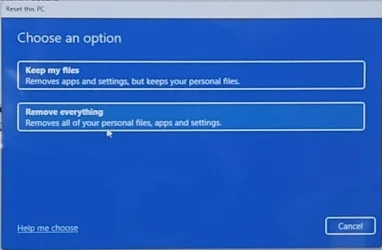
If you back up all your files, you could just do a reset rather than a clean install from usb. It keeps everything from the Windows upgrade, and most Windows updates already installed, but you start again with the out of box experience and can set up with a local account instead by doing this:

When you get to the point where it asks you to connect to the internet, do Shift F10. Click on the command window that opens to enable typing, then type

start ms-cxh:localonly

A window opens enabling you to set up as a local account, and proceed from there.

It will remove programs and files and any settings, so you'll need to do those again, and re-add programs and files, just as if it was a clean install. But it will keep your windows 11 upgrade and basically be a new install of Windows 11.
 

My Computers

System One System Two

  • OS
    Windows 11 Home 25H2
    Computer type
    Laptop
    Manufacturer/Model
    HP Pavilion 14-ce3606sa
    CPU
    Core i5-1035G1
    Memory
    32gb
    Hard Drives
    Samsung 870 evo sata ssd
    Cooling
    Could be better
    Internet Speed
    50 mbps Starlink
    Browser
    Firefox
    Other Info
    Originally came installed with a 500gb H10 Optane ssd
  • Operating System
    Windows 11 Home
    Computer type
    Laptop
    Manufacturer/Model
    HP Pavilion ce3606sa
    CPU
    Intel Core i5-1035G1
    Memory
    16gb
    Hard Drives
    Hynix Gold P31 2TB
    Internet Speed
    200mbps Starlink
    Browser
    Firefox
    Antivirus
    Defender

My Computer

System One

  • OS
    Windows 11 Home x64 Version 25H2 Build 26200.8037
True. And my experience of selecting keep my files. is that it's completely unreliable! So yes, select remove everything! And ensure you have file backups first.
 

My Computers

System One System Two

  • OS
    Windows 11 Home 25H2
    Computer type
    Laptop
    Manufacturer/Model
    HP Pavilion 14-ce3606sa
    CPU
    Core i5-1035G1
    Memory
    32gb
    Hard Drives
    Samsung 870 evo sata ssd
    Cooling
    Could be better
    Internet Speed
    50 mbps Starlink
    Browser
    Firefox
    Other Info
    Originally came installed with a 500gb H10 Optane ssd
  • Operating System
    Windows 11 Home
    Computer type
    Laptop
    Manufacturer/Model
    HP Pavilion ce3606sa
    CPU
    Intel Core i5-1035G1
    Memory
    16gb
    Hard Drives
    Hynix Gold P31 2TB
    Internet Speed
    200mbps Starlink
    Browser
    Firefox
    Antivirus
    Defender
Yes. This is my old work laptop. They allowed me to keep when I retired.
And grossly irresponsible of an organisation to release a device without them doing a factory restoration/reset and/or a clean install ... both for your safety, and for their security

Absolutely no other option and/or advice other than a wipe and clean install
 

My Computers

System One System Two

  • OS
    Windows 11 2xH2 (latest update ... forever anal)
    Computer type
    PC/Desktop
    Manufacturer/Model
    HP Slim S01
    CPU
    Intel i5-12400
    Memory
    8GB
    Graphics Card(s)
    NVIDIA GeForce GT730
    Sound Card
    OOBE
    Monitor(s) Displays
    Acer 32"
    Screen Resolution
    1920x1080
    Hard Drives
    512GB KIOXIA NVMe
    1TB SATA SSD
    PSU
    OOBE
    Case
    OOBE
    Cooling
    OOBE
    Keyboard
    BT
    Mouse
    BT
    Browser
    Brave FFox Chrome Opera
    Antivirus
    KIS
  • Operating System
    Windows 11 Pro 2xH2 (latest update ... 4ever anal)
    Computer type
    Laptop
    Manufacturer/Model
    HP Pavillion 15
    CPU
    i7-1165G7 @ 2.80GHz
    Graphics card(s)
    Intel Iris Xe Graphics
    Hard Drives
    Samsung NVMe 512GB
    + numerous/multiple SSD Type C USB enclosures
    Internet Speed
    NBN FTTN 50
    Browser
    Brave
    Antivirus
    KIS
And grossly irresponsible of an organisation to release a device without them doing a factory restoration/reset and/or a clean install ... both for your safety, and for their security

Settle down sport. I removed all data and apps before I left.

Community of self-righteous chodes... 🙄
 

My Computer

System One

  • OS
    Windows 11
    Computer type
    Laptop
    Manufacturer/Model
    Dell
Settle down sport. I removed all data and apps before I left.
Absolutely no guarantee of your safety. The more I think about this the more I'm concerned about your liability. Seriously, if it were me, I'd be removing the company installed drive, handing it back to them and using a new blank drive to do a clean install (the Windows license is "embedded" with the device so a clean install is feasible)**

**EDIT
Unless of course it's a corporate license tied to a MS account ... this is getting more and more messy every time I think about it

With all due respect, and no offence intended, the fact that you're having difficulties (re)configuring this device suggests a level of inexperience that doesn't support any guarantee all relevant software was removed.

Down to you, eh?
 
Last edited:

My Computers

System One System Two

  • OS
    Windows 11 2xH2 (latest update ... forever anal)
    Computer type
    PC/Desktop
    Manufacturer/Model
    HP Slim S01
    CPU
    Intel i5-12400
    Memory
    8GB
    Graphics Card(s)
    NVIDIA GeForce GT730
    Sound Card
    OOBE
    Monitor(s) Displays
    Acer 32"
    Screen Resolution
    1920x1080
    Hard Drives
    512GB KIOXIA NVMe
    1TB SATA SSD
    PSU
    OOBE
    Case
    OOBE
    Cooling
    OOBE
    Keyboard
    BT
    Mouse
    BT
    Browser
    Brave FFox Chrome Opera
    Antivirus
    KIS
  • Operating System
    Windows 11 Pro 2xH2 (latest update ... 4ever anal)
    Computer type
    Laptop
    Manufacturer/Model
    HP Pavillion 15
    CPU
    i7-1165G7 @ 2.80GHz
    Graphics card(s)
    Intel Iris Xe Graphics
    Hard Drives
    Samsung NVMe 512GB
    + numerous/multiple SSD Type C USB enclosures
    Internet Speed
    NBN FTTN 50
    Browser
    Brave
    Antivirus
    KIS
Back
Top Bottom