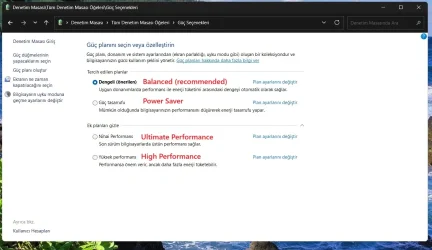
Solved Challenges Adding High-Performance Power Plan on HP OmniDesk Tower


Stupsi

Well-known member
Member
Local time
11:19 AM
Posts
117
OS
Windows 11 Pro 64 Bit 25H2 26200 8246
Challenges Adding High-Performance Power Plan on HP OmniDesk Tower

https://www.costco.com/p/-/hp-omnid...home-32gb-memory-1tb-ssd/4000370757?langId=-1

Background​

Our neighbor recently purchased the HP OmniDesk Tower featuring an AMD Ryzen 7 8700G processor, Windows 11 Home, 32GB of memory, and a 1TB SSD at Costco, motivated by a price reduction. The initial setup proceeded smoothly, with all updates successfully installed through Windows Update, as well as HP and AMD utilities.

Issue with Power Options​

Despite the seamless setup, the neighbor encountered an issue with the system’s power options. Specifically, the high-performance plan was missing from the available power options. Attempts were made to add this plan, but these efforts were not successful.

Interaction with HP Support​

Seeking assistance, HP support was contacted, who then remotely accessed the computer. However, when further diagnosis required second-level support, HP requested an additional fees—even though the system was only one day old. Unhappy with this response, the neighbor declined to proceed with paid support.

Attempted Solutions​

Acting on technical advice, the neighbor opened the Command Prompt as an administrator and entered the command: powercfg -duplicatescheme 8c5e7fda-e8bf-4a96-9a85-a6e23a8c635c to add the High-Performance Plan. The command completed successfully according to the prompt. However, after restarting the computer, the high-performance plan was still not visible in the power options menu or under advanced settings. The only available plan remained the Balanced option.

Persistence of the Issue and Outcome​

This issue was not unique to a single unit; the neighbor had purchased two identical systems and experienced the same problem on both. After unsuccessful attempts to resolve the issue and being dissatisfied with support, the neighbor decided to return both systems two days after purchase. What else could have been done to add the high-performance plan to this system??
 

My Computer

System One

  • OS
    Windows 11 Pro 64 Bit 25H2 26200 8246
    Computer type
    Laptop
    Manufacturer/Model
    Asus X510UAR
    CPU
    Intel Core I5-8250U 1.80 GHZ
    Memory
    16 GB
    Graphics Card(s)
    Intel UHD Graphics 620
    Sound Card
    Conexant
    Monitor(s) Displays
    Dell 24" ST2420
    Screen Resolution
    1920x1080
    Hard Drives
    ADATA SU635 DDS
    Keyboard
    Logitech
    Mouse
    Logitech
    Internet Speed
    465
    Browser
    Google Chrome, MS Edge
    Antivirus
    Norton 360
    Other Info
    Windows Feature Experience Pack 1000.26100.297
Hello mate, :alien:

Just to confirm, did you try the full method like in option two with the POW file?


My Computers

System One System Two

  • OS
    Windows 11 Pro for Workstations
    Computer type
    PC/Desktop
    Manufacturer/Model
    Custom self build
    CPU
    Intel i7-8700K 5 GHz
    Motherboard
    ASUS ROG Maximus XI Formula Z390
    Memory
    64 GB (4x16GB) G.SKILL TridentZ RGB DDR4 3600 MHz (F4-3600C18D-32GTZR)
    Graphics Card(s)
    ASUS ROG-STRIX-GTX1080TI-O11G-GAMING (11GB GDDR5X)
    Sound Card
    Integrated Digital Audio (S/PDIF)
    Monitor(s) Displays
    2 x Samsung Odyssey G75 27"
    Screen Resolution
    2560x1440
    Hard Drives
    1TB Samsung 990 PRO M.2,
    4TB Samsung 990 PRO M.2,
    TerraMaster F8 SSD Plus NAS
    PSU
    Seasonic Prime Titanium 850W
    Case
    Thermaltake Core P3 wall mounted
    Cooling
    Corsair Hydro H115i
    Keyboard
    Amazon Basics Wired Full Keyboard MD005
    Mouse
    Logitech MX Master 4
    Internet Speed
    2 Gbps Download and 100 Mbps Upload
    Browser
    Chrome and Edge
    Antivirus
    Microsoft Defender
    Other Info
    Logitech Z625 speaker system,
    Logitech BRIO 4K Pro webcam,
    HP Color LaserJet Pro MFP M477fdn,
    CyberPower CP1500PFCLCD
    Galaxy S23 Plus phone
  • Operating System
    Windows 11 Pro
    Computer type
    Laptop
    Manufacturer/Model
    Surface Laptop 7 Copilot+ PC
    CPU
    Snapdragon X Elite (12 core) 3.42 GHz
    Memory
    16 GB LPDDR5x-7467 MHz
    Monitor(s) Displays
    15" HDR
    Screen Resolution
    2496 x 1664
    Hard Drives
    1 TB SSD
    Internet Speed
    Wi-Fi 7 and Bluetooth 5.4
    Browser
    Chrome and Edge
    Antivirus
    Microsoft Defender
yes, that was tried but was unsuccessful
 

My Computer

System One

  • OS
    Windows 11 Pro 64 Bit 25H2 26200 8246
    Computer type
    Laptop
    Manufacturer/Model
    Asus X510UAR
    CPU
    Intel Core I5-8250U 1.80 GHZ
    Memory
    16 GB
    Graphics Card(s)
    Intel UHD Graphics 620
    Sound Card
    Conexant
    Monitor(s) Displays
    Dell 24" ST2420
    Screen Resolution
    1920x1080
    Hard Drives
    ADATA SU635 DDS
    Keyboard
    Logitech
    Mouse
    Logitech
    Internet Speed
    465
    Browser
    Google Chrome, MS Edge
    Antivirus
    Norton 360
    Other Info
    Windows Feature Experience Pack 1000.26100.297
For now, your neighbor can set to use the "Best Performance" power mode level to help.


My Computers

System One System Two

  • OS
    Windows 11 Pro for Workstations
    Computer type
    PC/Desktop
    Manufacturer/Model
    Custom self build
    CPU
    Intel i7-8700K 5 GHz
    Motherboard
    ASUS ROG Maximus XI Formula Z390
    Memory
    64 GB (4x16GB) G.SKILL TridentZ RGB DDR4 3600 MHz (F4-3600C18D-32GTZR)
    Graphics Card(s)
    ASUS ROG-STRIX-GTX1080TI-O11G-GAMING (11GB GDDR5X)
    Sound Card
    Integrated Digital Audio (S/PDIF)
    Monitor(s) Displays
    2 x Samsung Odyssey G75 27"
    Screen Resolution
    2560x1440
    Hard Drives
    1TB Samsung 990 PRO M.2,
    4TB Samsung 990 PRO M.2,
    TerraMaster F8 SSD Plus NAS
    PSU
    Seasonic Prime Titanium 850W
    Case
    Thermaltake Core P3 wall mounted
    Cooling
    Corsair Hydro H115i
    Keyboard
    Amazon Basics Wired Full Keyboard MD005
    Mouse
    Logitech MX Master 4
    Internet Speed
    2 Gbps Download and 100 Mbps Upload
    Browser
    Chrome and Edge
    Antivirus
    Microsoft Defender
    Other Info
    Logitech Z625 speaker system,
    Logitech BRIO 4K Pro webcam,
    HP Color LaserJet Pro MFP M477fdn,
    CyberPower CP1500PFCLCD
    Galaxy S23 Plus phone
  • Operating System
    Windows 11 Pro
    Computer type
    Laptop
    Manufacturer/Model
    Surface Laptop 7 Copilot+ PC
    CPU
    Snapdragon X Elite (12 core) 3.42 GHz
    Memory
    16 GB LPDDR5x-7467 MHz
    Monitor(s) Displays
    15" HDR
    Screen Resolution
    2496 x 1664
    Hard Drives
    1 TB SSD
    Internet Speed
    Wi-Fi 7 and Bluetooth 5.4
    Browser
    Chrome and Edge
    Antivirus
    Microsoft Defender
the funny part was that the same unsuccessful result occurred on both systems. HP stated that the system didn't really need the high performance plan but even so, nice to have that option available I would think
 

My Computer

System One

  • OS
    Windows 11 Pro 64 Bit 25H2 26200 8246
    Computer type
    Laptop
    Manufacturer/Model
    Asus X510UAR
    CPU
    Intel Core I5-8250U 1.80 GHZ
    Memory
    16 GB
    Graphics Card(s)
    Intel UHD Graphics 620
    Sound Card
    Conexant
    Monitor(s) Displays
    Dell 24" ST2420
    Screen Resolution
    1920x1080
    Hard Drives
    ADATA SU635 DDS
    Keyboard
    Logitech
    Mouse
    Logitech
    Internet Speed
    465
    Browser
    Google Chrome, MS Edge
    Antivirus
    Norton 360
    Other Info
    Windows Feature Experience Pack 1000.26100.297
He had done that, but was not happy that comprises were having to be made on a system just two days old. When I looked at the member reviews for this system it even made me even wonder . But dead issue now as he returned both systems and got a complete refund.. As I had assisted him in the setups , I just wanted to make sure I didn't miss anything--Thanks much Shawn
 

My Computer

System One

  • OS
    Windows 11 Pro 64 Bit 25H2 26200 8246
    Computer type
    Laptop
    Manufacturer/Model
    Asus X510UAR
    CPU
    Intel Core I5-8250U 1.80 GHZ
    Memory
    16 GB
    Graphics Card(s)
    Intel UHD Graphics 620
    Sound Card
    Conexant
    Monitor(s) Displays
    Dell 24" ST2420
    Screen Resolution
    1920x1080
    Hard Drives
    ADATA SU635 DDS
    Keyboard
    Logitech
    Mouse
    Logitech
    Internet Speed
    465
    Browser
    Google Chrome, MS Edge
    Antivirus
    Norton 360
    Other Info
    Windows Feature Experience Pack 1000.26100.297
I can only assume it may have been caused by some HP OEM power management bloatware installed.

Usually, you'll only have "Balanced" available when it's a modern standby device. Desktop PCs are not.
 

My Computers

System One System Two

  • OS
    Windows 11 Pro for Workstations
    Computer type
    PC/Desktop
    Manufacturer/Model
    Custom self build
    CPU
    Intel i7-8700K 5 GHz
    Motherboard
    ASUS ROG Maximus XI Formula Z390
    Memory
    64 GB (4x16GB) G.SKILL TridentZ RGB DDR4 3600 MHz (F4-3600C18D-32GTZR)
    Graphics Card(s)
    ASUS ROG-STRIX-GTX1080TI-O11G-GAMING (11GB GDDR5X)
    Sound Card
    Integrated Digital Audio (S/PDIF)
    Monitor(s) Displays
    2 x Samsung Odyssey G75 27"
    Screen Resolution
    2560x1440
    Hard Drives
    1TB Samsung 990 PRO M.2,
    4TB Samsung 990 PRO M.2,
    TerraMaster F8 SSD Plus NAS
    PSU
    Seasonic Prime Titanium 850W
    Case
    Thermaltake Core P3 wall mounted
    Cooling
    Corsair Hydro H115i
    Keyboard
    Amazon Basics Wired Full Keyboard MD005
    Mouse
    Logitech MX Master 4
    Internet Speed
    2 Gbps Download and 100 Mbps Upload
    Browser
    Chrome and Edge
    Antivirus
    Microsoft Defender
    Other Info
    Logitech Z625 speaker system,
    Logitech BRIO 4K Pro webcam,
    HP Color LaserJet Pro MFP M477fdn,
    CyberPower CP1500PFCLCD
    Galaxy S23 Plus phone
  • Operating System
    Windows 11 Pro
    Computer type
    Laptop
    Manufacturer/Model
    Surface Laptop 7 Copilot+ PC
    CPU
    Snapdragon X Elite (12 core) 3.42 GHz
    Memory
    16 GB LPDDR5x-7467 MHz
    Monitor(s) Displays
    15" HDR
    Screen Resolution
    2496 x 1664
    Hard Drives
    1 TB SSD
    Internet Speed
    Wi-Fi 7 and Bluetooth 5.4
    Browser
    Chrome and Edge
    Antivirus
    Microsoft Defender
You are probably right, Thanks for the input.
 

My Computer

System One

  • OS
    Windows 11 Pro 64 Bit 25H2 26200 8246
    Computer type
    Laptop
    Manufacturer/Model
    Asus X510UAR
    CPU
    Intel Core I5-8250U 1.80 GHZ
    Memory
    16 GB
    Graphics Card(s)
    Intel UHD Graphics 620
    Sound Card
    Conexant
    Monitor(s) Displays
    Dell 24" ST2420
    Screen Resolution
    1920x1080
    Hard Drives
    ADATA SU635 DDS
    Keyboard
    Logitech
    Mouse
    Logitech
    Internet Speed
    465
    Browser
    Google Chrome, MS Edge
    Antivirus
    Norton 360
    Other Info
    Windows Feature Experience Pack 1000.26100.297

If you want to enable the hidden Ultimate Performance Plan settings, open the Command Prompt as administrator and input this code:

powercfg -duplicatescheme e9a42b02-d5df-448d-aa00-03f14749eb61

Hit enter.

Close it and navigate to Power Plans in the Control Panel. Click Choose Additional Plans and select the Ultimate Performance bubble.

Microsoft doesn't have it enabled because Balanced works well for most PCs. But if you have a high end PC, you might want it as an option.
 

My Computers

System One System Two

  • OS
    Windows 11 Education For 25H2
    Computer type
    Laptop
    Manufacturer/Model
    HP ZBook G2
    CPU
    Intel® Core i7 5500u
    Motherboard
    HP
    Memory
    8 GB
    Graphics Card(s)
    Intel HD Family Graphics 5500 AMD Firepro 4150M
    Sound Card
    Realtek High Audio
    Hard Drives
    1 TB SSD
    Mouse
    HP USB Mouse
    Antivirus
    Windows Defender
  • Operating System
    Windows 11 Pro For Workstations 25H2
    Computer type
    Laptop
    Manufacturer/Model
    HP Zbook G4
    CPU
    Xeon 1535m v6
    Motherboard
    HP
    Memory
    32 GB
    Graphics card(s)
    AMD Quadro Pro 4100
    Sound Card
    Bang and Olufson Audio
    Hard Drives
    1TB SSD
    Mouse
    HP USB Mouse
    Antivirus
    Windows Defender
If you want to enable the hidden Ultimate Performance Plan settings, open the Command Prompt as administrator and input this code:

powercfg -duplicatescheme e9a42b02-d5df-448d-aa00-03f14749eb61

Hit enter.

Close it and navigate to Power Plans in the Control Panel. Click Choose Additional Plans and select the Ultimate Performance bubble.

Microsoft doesn't have it enabled because Balanced works well for most PCs. But if you have a high end PC, you might want it as an option.
The O.P. also used a similar command to install High-Permormance plan mode. Your command (Ultimate-Performance) and the O.P.'s command (High-Performance) are different from each other. The O.P. must have installed a plan that was already existent in the system. So the O.P. could not see the High-Power plan or Ultimate-Performance Plan, which the O.P. did not install. The command did not run somehow.
 
Last edited:

My Computers

System One System Two

  • OS
    Windows 11 Pro build 26200.8524
    Computer type
    PC/Desktop
    Manufacturer/Model
    Home Built
    CPU
    Intel i7-4790
    Motherboard
    Asus H97 Pro Gamer with add-on TPM1.2 module
    Memory
    Teams DDR3-1600 4x4 GB
    Graphics Card(s)
    MSI Nvidia GeForce GTX 1050Ti
    Sound Card
    Realtek ALC1150
    Monitor(s) Displays
    Dell P2425D
    Screen Resolution
    2560 by 1440 pixels
    Hard Drives
    Corsair NVMe M.2 Core XT 1000 GB (Windows 11 v.25H2); Samsung SATA Evo 870 500 GB (Windows 11 v.25H2);
    PSU
    Corsair HX850
    Case
    Gigabyte Solo 210
    Cooling
    Zalman CNPS7X Tower
    Keyboard
    Microsoft AIO Wireless (includes touchpad)
    Mouse
    HP S1000 Plus Wireless
    Internet Speed
    500 Mb fiber optic
    Browser
    Chrome; MS Edge
    Antivirus
    Windows Defender
  • Operating System
    MacOS 12 Monterey
    Computer type
    Laptop
    Manufacturer/Model
    Apple Macbook Air
    CPU
    Intel Core i5
    Memory
    8 GB
    Graphics card(s)
    Intel integrated
    Screen Resolution
    1440 by 900 pixels
    Hard Drives
    128 GB
    Keyboard
    Built-in
    Mouse
    Microsoft Wireless
    Internet Speed
    802.11 ac
    Browser
    Chrome; Safari
    Antivirus
    N/A
I just tested the commands in my 12 years old PC (Asus H97 Pro Gamer motherboard from late 2014)

POWER SAVER:

powercfg -duplicatescheme a1841308-3541-4fab-bc81-f71556f20b4a

BALANCED:

powercfg -duplicatescheme 381b4222-f694-41f0-9685-ff5bb260df2e

HIGH-PERFORMANCE:

powercfg -duplicatescheme 8c5e7fda-e8bf-4a96-9a85-a6e23a8c635c

ULTIMATE-PERFORMANCE:

powercfg -duplicatescheme e9a42b02-d5df-448d-aa00-03f14749eb61

Here are the results (Balanced and Power saver were alraedy there):

powe-plans.webp
 

My Computers

System One System Two

  • OS
    Windows 11 Pro build 26200.8524
    Computer type
    PC/Desktop
    Manufacturer/Model
    Home Built
    CPU
    Intel i7-4790
    Motherboard
    Asus H97 Pro Gamer with add-on TPM1.2 module
    Memory
    Teams DDR3-1600 4x4 GB
    Graphics Card(s)
    MSI Nvidia GeForce GTX 1050Ti
    Sound Card
    Realtek ALC1150
    Monitor(s) Displays
    Dell P2425D
    Screen Resolution
    2560 by 1440 pixels
    Hard Drives
    Corsair NVMe M.2 Core XT 1000 GB (Windows 11 v.25H2); Samsung SATA Evo 870 500 GB (Windows 11 v.25H2);
    PSU
    Corsair HX850
    Case
    Gigabyte Solo 210
    Cooling
    Zalman CNPS7X Tower
    Keyboard
    Microsoft AIO Wireless (includes touchpad)
    Mouse
    HP S1000 Plus Wireless
    Internet Speed
    500 Mb fiber optic
    Browser
    Chrome; MS Edge
    Antivirus
    Windows Defender
  • Operating System
    MacOS 12 Monterey
    Computer type
    Laptop
    Manufacturer/Model
    Apple Macbook Air
    CPU
    Intel Core i5
    Memory
    8 GB
    Graphics card(s)
    Intel integrated
    Screen Resolution
    1440 by 900 pixels
    Hard Drives
    128 GB
    Keyboard
    Built-in
    Mouse
    Microsoft Wireless
    Internet Speed
    802.11 ac
    Browser
    Chrome; Safari
    Antivirus
    N/A
The only way I could get to these older plans was first to disable modern standby then use the tutorial to enable S3. Note the caveat "If you disabled Modern Standby and your PC crashes when entering S3, you can press and hold the power button to force a hard shut down, press the power button again to turn on, and enable Modern Standby below again."


My Computers

System One System Two

  • OS
    Win 11 Pro
    Computer type
    Laptop
    Manufacturer/Model
    ASUS Vivobook
    CPU
    AMD Ryzen™ 7 7730U
    Motherboard
    M1605YA
    Memory
    24GB Dual-Channel DDR4 @ 1596MHz (22-22-22-52)
    Graphics Card(s)
    512MB ATI AMD Radeon Graphics (ASUStek Computer Inc)
    Monitor(s) Displays
    Generic PnP Monitor (1920x1200@60Hz) - P1 PLUS (1920x1080@59Hz)
    Screen Resolution
    1920 X 1200
    Hard Drives
    953GB Western Digital WD
    PSU
    45 Watts
    Mouse
    Lenovo Bluetooth.
    Internet Speed
    500 Mbps
    Browser
    Edge
    Antivirus
    Defender
  • Operating System
    Windows 11
    Computer type
    Laptop
    Manufacturer/Model
    ACER NITRO
    CPU
    AMD Ryzen 7 5800H / 3.2 GHz
    Motherboard
    CZ Scala_CAS (FP6)
    Memory
    32 GB DDR4 SDRAM 3200 MHz
    Graphics card(s)
    NVIDIA GeForce RTX 3060 6 GB GDDR6 SDRAM
    Sound Card
    Realtek Audio. NVIDIA High Definition Audio
    Monitor(s) Displays
    15.6" LED backlight 1920 x 1080 (Full HD) 144 Hz
    Screen Resolution
    1920 x 1080 (Full HD)
    Hard Drives
    Samsung 970 Evo Plus 2TB NVMe M.2
    PSU
    180 Watt, 19.5 V
    Mouse
    Lenovo Bluetooth
    Internet Speed
    500 Mbps
    Browser
    Edge
    Antivirus
    Defender
The only way I could get to these older plans was first to disable modern standby then use the tutorial to enable S3. Note the caveat "If you disabled Modern Standby and your PC crashes when entering S3, you can press and hold the power button to force a hard shut down, press the power button again to turn on, and enable Modern Standby below again."
I do not have modern standby. I only have S3. My M/B is old.

But your post gave me an idea to try. Thanks for that. For some time I could not put my PC into sleep mode using Sleep button on my keyboard. As soon as my PC enters into sleep mode, it wakes back up in less than a second. Maybe this is due to my installing High-Performance mode. I installed Ultimate Performance mode today long after I had Sleep issue. I will remove the add-on power plans and see if Sleep mode returns and my PC remains in Sleep until I wake it up.
 

My Computers

System One System Two

  • OS
    Windows 11 Pro build 26200.8524
    Computer type
    PC/Desktop
    Manufacturer/Model
    Home Built
    CPU
    Intel i7-4790
    Motherboard
    Asus H97 Pro Gamer with add-on TPM1.2 module
    Memory
    Teams DDR3-1600 4x4 GB
    Graphics Card(s)
    MSI Nvidia GeForce GTX 1050Ti
    Sound Card
    Realtek ALC1150
    Monitor(s) Displays
    Dell P2425D
    Screen Resolution
    2560 by 1440 pixels
    Hard Drives
    Corsair NVMe M.2 Core XT 1000 GB (Windows 11 v.25H2); Samsung SATA Evo 870 500 GB (Windows 11 v.25H2);
    PSU
    Corsair HX850
    Case
    Gigabyte Solo 210
    Cooling
    Zalman CNPS7X Tower
    Keyboard
    Microsoft AIO Wireless (includes touchpad)
    Mouse
    HP S1000 Plus Wireless
    Internet Speed
    500 Mb fiber optic
    Browser
    Chrome; MS Edge
    Antivirus
    Windows Defender
  • Operating System
    MacOS 12 Monterey
    Computer type
    Laptop
    Manufacturer/Model
    Apple Macbook Air
    CPU
    Intel Core i5
    Memory
    8 GB
    Graphics card(s)
    Intel integrated
    Screen Resolution
    1440 by 900 pixels
    Hard Drives
    128 GB
    Keyboard
    Built-in
    Mouse
    Microsoft Wireless
    Internet Speed
    802.11 ac
    Browser
    Chrome; Safari
    Antivirus
    N/A

Latest Support Threads

Back
Top Bottom