Change Windows 11 Notification Panel Position


roshanvarma96

Active member
Local time
5:19 PM
Posts
5
OS
Windows 11
Hello everyone! Microsoft has been known to put their notification panel at bottom right corner which could not be changed easily as per my knowledge. I was wondering if there is any way to move the notification panel up to the top right corner. The panel at the bottom corner really obstructs my work. Any help is appreciated.
 
Windows Build/Version
22H2 (OS Build 22593.1)

My Computer My Computer

At a glance

Windows 11Intel Core i5-10300H16GBNVIDIA GeForce GTX 1650 Ti
OS
Windows 11
Computer type
Laptop
Manufacturer/Model
ASUS
CPU
Intel Core i5-10300H
Motherboard
FX506LI
Memory
16GB
Graphics Card(s)
NVIDIA GeForce GTX 1650 Ti
Sound Card
Realtek High Definition Audio
Screen Resolution
1920 x 1080
Hard Drives
500GB SSD
Internet Speed
40 Mbps
Browser
Brave Browser
Antivirus
Windows Security
It's part of Taskbar, so wherever Taskbar is.
 

My Computer My Computer

At a glance

W11 Pro and Insider DevAMD Ryzen 9 7900x2x16GB Kingston 6000MHz, Cl 32 @ 6200MHz Cl30Gigabyte Rx 6600XT Gaming OC 8G Pro
OS
W11 Pro and Insider Dev
Computer type
PC/Desktop
Manufacturer/Model
Home brewed
CPU
AMD Ryzen 9 7900x
Motherboard
ASROCK b650 PRO RS
Memory
2x16GB Kingston 6000MHz, Cl 32 @ 6200MHz Cl30
Graphics Card(s)
Gigabyte Rx 6600XT Gaming OC 8G Pro
Sound Card
MB, Realtek Ac1220p
Monitor(s) Displays
3 x 27"
Screen Resolution
1080p
Hard Drives
Kingston KC3000. 1TBSamsung 970 evo Plus 500GB, Crucial P1 NVMe 1TB, Lexar NVMe 2 TB, Silicon Power M.2 SATA 500GB
PSU
Seasonic 750W
Case
Custom Raidmax
Cooling
Arctic Liquid Freezer III 360mm
Internet Speed
20/19 mbps
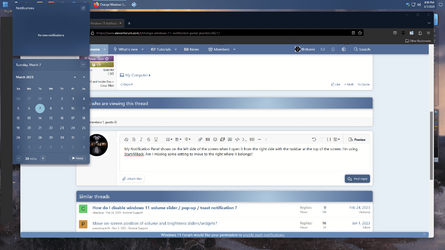
My Notification Panel shows on the left side of the screen when I open it from the right side with the taskbar at the top of the screen. I'm using StartAllBack. Am I missing some setting to move to the right where it belongs?

1678226084429.png
 

My Computer My Computer

At a glance

Windows 11 Pro 23H2Intel(R) Core(TM) i9-12900HK32gbIntel(R) Iris(R) Xe Graphics
OS
Windows 11 Pro 23H2
Computer type
PC/Desktop
Manufacturer/Model
MinisForum
CPU
Intel(R) Core(TM) i9-12900HK
Memory
32gb
Graphics Card(s)
Intel(R) Iris(R) Xe Graphics
Sound Card
Realtek 888
Monitor(s) Displays
Acer
Screen Resolution
1920x1080
Hard Drives
1TB SSD
Keyboard
Logitech
Mouse
Logitech MX Master 2X
Internet Speed
1GB
Browser
Firefox
Antivirus
Windows Defender
Well...since posting #3 (above) my notification area returned to the right side of the desktop. However, today, it's back on the left! What the heck is up with this? :)
 

My Computer My Computer

At a glance

Windows 11 Pro 23H2Intel(R) Core(TM) i9-12900HK32gbIntel(R) Iris(R) Xe Graphics
OS
Windows 11 Pro 23H2
Computer type
PC/Desktop
Manufacturer/Model
MinisForum
CPU
Intel(R) Core(TM) i9-12900HK
Memory
32gb
Graphics Card(s)
Intel(R) Iris(R) Xe Graphics
Sound Card
Realtek 888
Monitor(s) Displays
Acer
Screen Resolution
1920x1080
Hard Drives
1TB SSD
Keyboard
Logitech
Mouse
Logitech MX Master 2X
Internet Speed
1GB
Browser
Firefox
Antivirus
Windows Defender
Well...since posting #3 (above) my notification area returned to the right side of the desktop. However, today, it's back on the left! What the heck is up with this? :)
I have found - On boot using StartAllBack V3.6.2, I have the notifications on the LEFT. If I wait about a minute AFTER boot the panel appears on the right as it should. If I get in a hurry and mess it then I can open settings for StarAllBack turn off the taskbar, restart SAB, open the notifications, now in the lower right corner, then turn SAB taskbar back on and all is back to normal. This occurs on PCs that are approved for Win 11 as well as those not. Bug in SAB???
 

My Computer My Computer

At a glance

Windows 11 Pro 23H2Intel(R) Core(TM) i9-12900HK32gbIntel(R) Iris(R) Xe Graphics
OS
Windows 11 Pro 23H2
Computer type
PC/Desktop
Manufacturer/Model
MinisForum
CPU
Intel(R) Core(TM) i9-12900HK
Memory
32gb
Graphics Card(s)
Intel(R) Iris(R) Xe Graphics
Sound Card
Realtek 888
Monitor(s) Displays
Acer
Screen Resolution
1920x1080
Hard Drives
1TB SSD
Keyboard
Logitech
Mouse
Logitech MX Master 2X
Internet Speed
1GB
Browser
Firefox
Antivirus
Windows Defender

Latest Support Threads

Back
Top Bottom