Changing the start menu button


You mean you actually want it?!
 

My Computers My Computers

  • At a glance

    Windows 11 Home 25H2Core i5-1035G132gb
    OS
    Windows 11 Home 25H2
    Computer type
    Laptop
    Manufacturer/Model
    HP Pavilion 14-ce3606sa
    CPU
    Core i5-1035G1
    Memory
    32gb
    Hard Drives
    Samsung 870 evo sata ssd
    Cooling
    Could be better
    Internet Speed
    50 mbps Starlink
    Browser
    Firefox
    Other Info
    Originally came installed with a 500gb H10 Optane ssd
  • At a glance

    Windows 11 HomeIntel Core i5-1035G116gb
    Operating System
    Windows 11 Home
    Computer type
    Laptop
    Manufacturer/Model
    HP Pavilion ce3606sa
    CPU
    Intel Core i5-1035G1
    Memory
    16gb
    Hard Drives
    Hynix Gold P31 2TB
    Internet Speed
    200mbps Starlink
    Browser
    Firefox
    Antivirus
    Defender
Something wrong with that?
 

My Computer My Computer

At a glance

win 11Ryzen 5600G32 GB DDR4on board
OS
win 11
Computer type
PC/Desktop
Manufacturer/Model
Home build
CPU
Ryzen 5600G
Motherboard
B450 Tomahawk Max
Memory
32 GB DDR4
Graphics Card(s)
on board
Monitor(s) Displays
LG 27MR400
Screen Resolution
1280 x 1024
Hard Drives
SSD
Internet Speed
3MB/s
Browser
Opera
Antivirus
Windows
Well no but I thought you were querying it having appeared.
 

My Computers My Computers

  • At a glance

    Windows 11 Home 25H2Core i5-1035G132gb
    OS
    Windows 11 Home 25H2
    Computer type
    Laptop
    Manufacturer/Model
    HP Pavilion 14-ce3606sa
    CPU
    Core i5-1035G1
    Memory
    32gb
    Hard Drives
    Samsung 870 evo sata ssd
    Cooling
    Could be better
    Internet Speed
    50 mbps Starlink
    Browser
    Firefox
    Other Info
    Originally came installed with a 500gb H10 Optane ssd
  • At a glance

    Windows 11 HomeIntel Core i5-1035G116gb
    Operating System
    Windows 11 Home
    Computer type
    Laptop
    Manufacturer/Model
    HP Pavilion ce3606sa
    CPU
    Intel Core i5-1035G1
    Memory
    16gb
    Hard Drives
    Hynix Gold P31 2TB
    Internet Speed
    200mbps Starlink
    Browser
    Firefox
    Antivirus
    Defender

My Computers My Computers

  • At a glance

    Windows 11 Pro
    OS
    Windows 11 Pro
    Computer type
    PC/Desktop
    Manufacturer/Model
    ASUS ROG Strix
  • At a glance

    Windows 11 Pro
    Operating System
    Windows 11 Pro
    Computer type
    Laptop
    Manufacturer/Model
    ASUS VivoBook
  • ASUS VivoBook 'Lite' ~ Windows 11 Home
But that's not the one I want. I'd rather have the "regular" windows logo or any other decent win logo, like the one that win 11 is using.
 

My Computer My Computer

At a glance

win 11Ryzen 5600G32 GB DDR4on board
OS
win 11
Computer type
PC/Desktop
Manufacturer/Model
Home build
CPU
Ryzen 5600G
Motherboard
B450 Tomahawk Max
Memory
32 GB DDR4
Graphics Card(s)
on board
Monitor(s) Displays
LG 27MR400
Screen Resolution
1280 x 1024
Hard Drives
SSD
Internet Speed
3MB/s
Browser
Opera
Antivirus
Windows
But that's not the one I want. I'd rather have the "regular" windows logo or any other decent win logo, like the one that win 11 is using.
Then you'll have to find, (Google's your friend), and load a custom one yourself...

0003895.png

(This one looks stupid cuz it's laying on top of my existing one!)
 

My Computers My Computers

  • At a glance

    Windows 11 Pro
    OS
    Windows 11 Pro
    Computer type
    PC/Desktop
    Manufacturer/Model
    ASUS ROG Strix
  • At a glance

    Windows 11 Pro
    Operating System
    Windows 11 Pro
    Computer type
    Laptop
    Manufacturer/Model
    ASUS VivoBook
  • ASUS VivoBook 'Lite' ~ Windows 11 Home
But that's not the one I want. I'd rather have the "regular" windows logo or any other decent win logo, like the one that win 11 is using.

There are several options to be found by searching, that may result in what you're hoping for. There are even several YouTube videos pertaining to the subject. If you are willing to venture the time, you can likely find a solution.

Here is something that may be of interest to you... Taskbar Icons Missing on Windows 11

And of course, there is always the option to phone Microsoft Tech Support... Global Customer Service phone numbers

Good luck.
 

My Computer My Computer

At a glance

Windows 10 Pro 64-bit 22H2 19045.4046Intel i7-3770 @ 3.40GHz8 GBAMD 7500 Radeon HD Series
OS
Windows 10 Pro 64-bit 22H2 19045.4046
Computer type
PC/Desktop
Manufacturer/Model
Dell/Vostro 470 (Year 2012)
CPU
Intel i7-3770 @ 3.40GHz
Memory
8 GB
Graphics Card(s)
AMD 7500 Radeon HD Series
Sound Card
Realtek Hi-Def Audio
Monitor(s) Displays
Dell U2412M
Hard Drives
1 TB 7200 HDD
Keyboard
Dell/USB
Mouse
Dell/USB
Internet Speed
100/10
Browser
Edge
Antivirus
Windows Security/MalwareBytes Premium
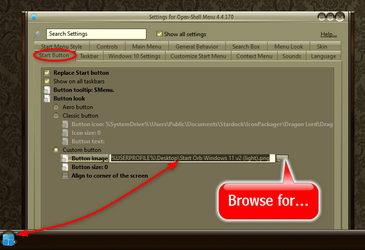
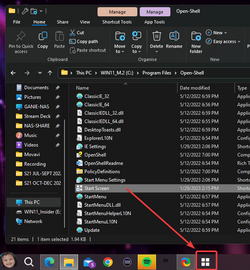
Again, I don't want to replace the Open shell orb, I want to replace that button that opens the start menu window.
 

My Computer My Computer

At a glance

win 11Ryzen 5600G32 GB DDR4on board
OS
win 11
Computer type
PC/Desktop
Manufacturer/Model
Home build
CPU
Ryzen 5600G
Motherboard
B450 Tomahawk Max
Memory
32 GB DDR4
Graphics Card(s)
on board
Monitor(s) Displays
LG 27MR400
Screen Resolution
1280 x 1024
Hard Drives
SSD
Internet Speed
3MB/s
Browser
Opera
Antivirus
Windows
Again, I don't want to replace the Open shell orb, I want to replace that button that opens the start menu window.
Okay..., lemme get this straight!!!...

0003898.png

Am I right???
 

My Computers My Computers

  • At a glance

    Windows 11 Pro
    OS
    Windows 11 Pro
    Computer type
    PC/Desktop
    Manufacturer/Model
    ASUS ROG Strix
  • At a glance

    Windows 11 Pro
    Operating System
    Windows 11 Pro
    Computer type
    Laptop
    Manufacturer/Model
    ASUS VivoBook
  • ASUS VivoBook 'Lite' ~ Windows 11 Home
Correct!
 

My Computer My Computer

At a glance

win 11Ryzen 5600G32 GB DDR4on board
OS
win 11
Computer type
PC/Desktop
Manufacturer/Model
Home build
CPU
Ryzen 5600G
Motherboard
B450 Tomahawk Max
Memory
32 GB DDR4
Graphics Card(s)
on board
Monitor(s) Displays
LG 27MR400
Screen Resolution
1280 x 1024
Hard Drives
SSD
Internet Speed
3MB/s
Browser
Opera
Antivirus
Windows
Okay...,
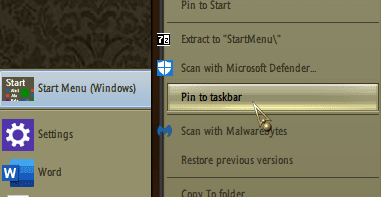
Again, you'll need to find a suitable icon, (.ico file), from the internet, save it to a folder which will not get changed or moved.
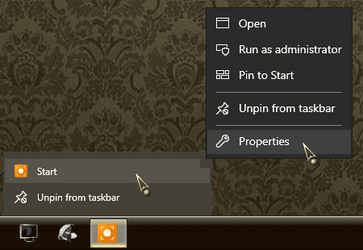
Right click on the Start shortcut, when it's pinned to the Taskbar, right click again on it's title in the list, choose Properties/Change Icon/Browse..., browse to the folder you put the custom icon in and choose it, click OK/Apply/OK..., restart Explorer.
 

My Computers My Computers

  • At a glance

    Windows 11 Pro
    OS
    Windows 11 Pro
    Computer type
    PC/Desktop
    Manufacturer/Model
    ASUS ROG Strix
  • At a glance

    Windows 11 Pro
    Operating System
    Windows 11 Pro
    Computer type
    Laptop
    Manufacturer/Model
    ASUS VivoBook
  • ASUS VivoBook 'Lite' ~ Windows 11 Home
There is one workaround.

1. Unpin the original icon that you want to change from Taskbar.
2. From the original folder where that icon is saved, right-click on it>>>Create Shortcut (within the same folder or wherever you are allowed to place it).
3. Right-click the newly created shortcut>>>Properties>>>Change icon (and point it to any icon that you want to change it to).
4. Right-click on that same new shortcut>>>Pin to Taskbar

It is just a cosmetic changes, but it should work.
 
Last edited:

My Computers My Computers

  • At a glance

    Windows 11 ProAMD Ryzen 7 9800X3D32GB DDR5 CL30 Kingston FuryASUS Prime Radeon RX 9060 XT OC Edition 16GB
    OS
    Windows 11 Pro
    Computer type
    PC/Desktop
    CPU
    AMD Ryzen 7 9800X3D
    Motherboard
    MSI PRO B850-P Wifi
    Memory
    32GB DDR5 CL30 Kingston Fury
    Graphics Card(s)
    ASUS Prime Radeon RX 9060 XT OC Edition 16GB
    Monitor(s) Displays
    LG Ultrawide 34" 1440p+ MSI 27" 4K UHD
    Screen Resolution
    3440x1440
    Hard Drives
    Main Boot Drive : 512GB Adata XPG RGB Gen3x4 NVMe M.2 SSD
    PSU
    EVGA 750 Watts 80+ Gold
    Case
    Deepcool Genome II
    Cooling
    Thermalright Burst Assassin 120
    Internet Speed
    FTTH 3Gbps
    Browser
    Chrome
    Antivirus
    "Moderna"
  • At a glance

    Windows 11 Proi7-4790K16GB Corsair Vengeance ProMSI R9 290
    Operating System
    Windows 11 Pro
    Computer type
    PC/Desktop
    CPU
    i7-4790K
    Motherboard
    ASRock Xtreme6 Z97
    Memory
    16GB Corsair Vengeance Pro
    Graphics card(s)
    MSI R9 290
    Monitor(s) Displays
    LG Ultrawide 34"
    Screen Resolution
    3440x1440
    Hard Drives
    500GB Adata SSD (OS Only)
    PSU
    Thermaltake 475 Watts 80 Bronze
    Case
    Thermaltake Commander I Snow Edition
    Cooling
    Deep Cool Archer Air Cooler
    Keyboard
    Armageddon MKA-5R RGB-Hornet
    Mouse
    Logitech G402
    Internet Speed
    1Gbps
    Browser
    Chrome
    Antivirus
    Moderna :)
2. From the original folder where that icon is saved, right-click on it>>>Create Shortcut (within the same folder).
If they can find it!
It's a special shortcut created by OpenShell..., it's probably buried deep in the bowels of the OpenShell appdata folder!
 

My Computers My Computers

  • At a glance

    Windows 11 Pro
    OS
    Windows 11 Pro
    Computer type
    PC/Desktop
    Manufacturer/Model
    ASUS ROG Strix
  • At a glance

    Windows 11 Pro
    Operating System
    Windows 11 Pro
    Computer type
    Laptop
    Manufacturer/Model
    ASUS VivoBook
  • ASUS VivoBook 'Lite' ~ Windows 11 Home
If they can find it!
It's a special shortcut created by OpenShell..., it's probably buried deep in the bowels of the OpenShell appdata folder!
There is no way you can change a 3rd party icon directly from Taskbar. You have to modify the original icon and that is what the OP needs help with. He needs to find where that original icon is. I can't help with that anymore. Haha...
 

My Computers My Computers

  • At a glance

    Windows 11 ProAMD Ryzen 7 9800X3D32GB DDR5 CL30 Kingston FuryASUS Prime Radeon RX 9060 XT OC Edition 16GB
    OS
    Windows 11 Pro
    Computer type
    PC/Desktop
    CPU
    AMD Ryzen 7 9800X3D
    Motherboard
    MSI PRO B850-P Wifi
    Memory
    32GB DDR5 CL30 Kingston Fury
    Graphics Card(s)
    ASUS Prime Radeon RX 9060 XT OC Edition 16GB
    Monitor(s) Displays
    LG Ultrawide 34" 1440p+ MSI 27" 4K UHD
    Screen Resolution
    3440x1440
    Hard Drives
    Main Boot Drive : 512GB Adata XPG RGB Gen3x4 NVMe M.2 SSD
    PSU
    EVGA 750 Watts 80+ Gold
    Case
    Deepcool Genome II
    Cooling
    Thermalright Burst Assassin 120
    Internet Speed
    FTTH 3Gbps
    Browser
    Chrome
    Antivirus
    "Moderna"
  • At a glance

    Windows 11 Proi7-4790K16GB Corsair Vengeance ProMSI R9 290
    Operating System
    Windows 11 Pro
    Computer type
    PC/Desktop
    CPU
    i7-4790K
    Motherboard
    ASRock Xtreme6 Z97
    Memory
    16GB Corsair Vengeance Pro
    Graphics card(s)
    MSI R9 290
    Monitor(s) Displays
    LG Ultrawide 34"
    Screen Resolution
    3440x1440
    Hard Drives
    500GB Adata SSD (OS Only)
    PSU
    Thermaltake 475 Watts 80 Bronze
    Case
    Thermaltake Commander I Snow Edition
    Cooling
    Deep Cool Archer Air Cooler
    Keyboard
    Armageddon MKA-5R RGB-Hornet
    Mouse
    Logitech G402
    Internet Speed
    1Gbps
    Browser
    Chrome
    Antivirus
    Moderna :)
Of course, you could use Start11 instead, but it'll cost you ~$5.00.
 

My Computers My Computers

  • At a glance

    Windows 11 (25H2)Core(TM) i5-12400T12.0 GB (11.7 GB usable)Intel(R) UHD Graphics 730
    OS
    Windows 11 (25H2)
    Computer type
    PC/Desktop
    Manufacturer/Model
    HP Pavilion 577B5AA#ABA
    CPU
    Core(TM) i5-12400T
    Motherboard
    HP 89E9
    Memory
    12.0 GB (11.7 GB usable)
    Graphics Card(s)
    Intel(R) UHD Graphics 730
    Sound Card
    DFX Audio
    Monitor(s) Displays
    HO Generic PnP Monitor
    Screen Resolution
    1920 x 1080
    Hard Drives
    SAMSUNG MZVLQ10HBLB00BH1 SSD 1TB
    PSU
    HP Std. for this product
    Case
    All-in-One
    Cooling
    Fan
    Keyboard
    HP Wireless / Bluetooth
    Mouse
    HP Wireless / Bluetooth
    Internet Speed
    Link speed (Receive/Transmit): 1000/1000 (Mbps)
    Browser
    Firefox
    Antivirus
    Malwarebytes Pro / Windows Security
    Other Info
    Retired IT professional.
  • At a glance

    Windows 11 (25H2)Intel I-7-1165G78 GB DDR4-3200 SDRAMIntel Iris Xe Graphics
    Operating System
    Windows 11 (25H2)
    Computer type
    Laptop
    Manufacturer/Model
    HP 15tegooo [HP Pavilion Laptop Intel I-7]
    CPU
    Intel I-7-1165G7
    Motherboard
    HP
    Memory
    8 GB DDR4-3200 SDRAM
    Graphics card(s)
    Intel Iris Xe Graphics
    Sound Card
    Realtek
    Monitor(s) Displays
    HP HD micro edge, Bright View, 250 nits
    Screen Resolution
    1366 x768
    Hard Drives
    256 GB DD4-3200 SDRAM
    PSU
    HP
    Case
    Std HP Laptop
    Cooling
    Fan
    Keyboard
    std
    Mouse
    Logi M585
    Browser
    Edge
    Antivirus
    Windows Security
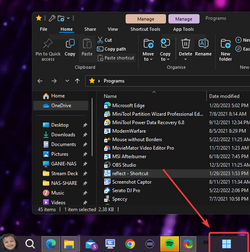
Here is an example I created with a Macrium Reflect shortcut. I changed the icon to a "Windows" icon.

1675018625708.png
 

My Computers My Computers

  • At a glance

    Windows 11 ProAMD Ryzen 7 9800X3D32GB DDR5 CL30 Kingston FuryASUS Prime Radeon RX 9060 XT OC Edition 16GB
    OS
    Windows 11 Pro
    Computer type
    PC/Desktop
    CPU
    AMD Ryzen 7 9800X3D
    Motherboard
    MSI PRO B850-P Wifi
    Memory
    32GB DDR5 CL30 Kingston Fury
    Graphics Card(s)
    ASUS Prime Radeon RX 9060 XT OC Edition 16GB
    Monitor(s) Displays
    LG Ultrawide 34" 1440p+ MSI 27" 4K UHD
    Screen Resolution
    3440x1440
    Hard Drives
    Main Boot Drive : 512GB Adata XPG RGB Gen3x4 NVMe M.2 SSD
    PSU
    EVGA 750 Watts 80+ Gold
    Case
    Deepcool Genome II
    Cooling
    Thermalright Burst Assassin 120
    Internet Speed
    FTTH 3Gbps
    Browser
    Chrome
    Antivirus
    "Moderna"
  • At a glance

    Windows 11 Proi7-4790K16GB Corsair Vengeance ProMSI R9 290
    Operating System
    Windows 11 Pro
    Computer type
    PC/Desktop
    CPU
    i7-4790K
    Motherboard
    ASRock Xtreme6 Z97
    Memory
    16GB Corsair Vengeance Pro
    Graphics card(s)
    MSI R9 290
    Monitor(s) Displays
    LG Ultrawide 34"
    Screen Resolution
    3440x1440
    Hard Drives
    500GB Adata SSD (OS Only)
    PSU
    Thermaltake 475 Watts 80 Bronze
    Case
    Thermaltake Commander I Snow Edition
    Cooling
    Deep Cool Archer Air Cooler
    Keyboard
    Armageddon MKA-5R RGB-Hornet
    Mouse
    Logitech G402
    Internet Speed
    1Gbps
    Browser
    Chrome
    Antivirus
    Moderna :)
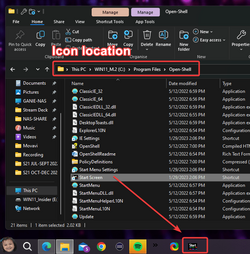
Well, the original icon is already a shortcut and the icon can be changed directly from it's source folder. The location of the original icon is in C:\Program Files\Open-Shell

1675019569224.png


1675019786490.png

Now I need to restore back and remove Open Shell.
I already have a StartAllBack.
 

My Computers My Computers

  • At a glance

    Windows 11 ProAMD Ryzen 7 9800X3D32GB DDR5 CL30 Kingston FuryASUS Prime Radeon RX 9060 XT OC Edition 16GB
    OS
    Windows 11 Pro
    Computer type
    PC/Desktop
    CPU
    AMD Ryzen 7 9800X3D
    Motherboard
    MSI PRO B850-P Wifi
    Memory
    32GB DDR5 CL30 Kingston Fury
    Graphics Card(s)
    ASUS Prime Radeon RX 9060 XT OC Edition 16GB
    Monitor(s) Displays
    LG Ultrawide 34" 1440p+ MSI 27" 4K UHD
    Screen Resolution
    3440x1440
    Hard Drives
    Main Boot Drive : 512GB Adata XPG RGB Gen3x4 NVMe M.2 SSD
    PSU
    EVGA 750 Watts 80+ Gold
    Case
    Deepcool Genome II
    Cooling
    Thermalright Burst Assassin 120
    Internet Speed
    FTTH 3Gbps
    Browser
    Chrome
    Antivirus
    "Moderna"
  • At a glance

    Windows 11 Proi7-4790K16GB Corsair Vengeance ProMSI R9 290
    Operating System
    Windows 11 Pro
    Computer type
    PC/Desktop
    CPU
    i7-4790K
    Motherboard
    ASRock Xtreme6 Z97
    Memory
    16GB Corsair Vengeance Pro
    Graphics card(s)
    MSI R9 290
    Monitor(s) Displays
    LG Ultrawide 34"
    Screen Resolution
    3440x1440
    Hard Drives
    500GB Adata SSD (OS Only)
    PSU
    Thermaltake 475 Watts 80 Bronze
    Case
    Thermaltake Commander I Snow Edition
    Cooling
    Deep Cool Archer Air Cooler
    Keyboard
    Armageddon MKA-5R RGB-Hornet
    Mouse
    Logitech G402
    Internet Speed
    1Gbps
    Browser
    Chrome
    Antivirus
    Moderna :)

My Computers My Computers

  • At a glance

    Windows 11 Pro
    OS
    Windows 11 Pro
    Computer type
    PC/Desktop
    Manufacturer/Model
    ASUS ROG Strix
  • At a glance

    Windows 11 Pro
    Operating System
    Windows 11 Pro
    Computer type
    Laptop
    Manufacturer/Model
    ASUS VivoBook
  • ASUS VivoBook 'Lite' ~ Windows 11 Home

My Computers My Computers

  • At a glance

    Windows 11 ProAMD Ryzen 7 9800X3D32GB DDR5 CL30 Kingston FuryASUS Prime Radeon RX 9060 XT OC Edition 16GB
    OS
    Windows 11 Pro
    Computer type
    PC/Desktop
    CPU
    AMD Ryzen 7 9800X3D
    Motherboard
    MSI PRO B850-P Wifi
    Memory
    32GB DDR5 CL30 Kingston Fury
    Graphics Card(s)
    ASUS Prime Radeon RX 9060 XT OC Edition 16GB
    Monitor(s) Displays
    LG Ultrawide 34" 1440p+ MSI 27" 4K UHD
    Screen Resolution
    3440x1440
    Hard Drives
    Main Boot Drive : 512GB Adata XPG RGB Gen3x4 NVMe M.2 SSD
    PSU
    EVGA 750 Watts 80+ Gold
    Case
    Deepcool Genome II
    Cooling
    Thermalright Burst Assassin 120
    Internet Speed
    FTTH 3Gbps
    Browser
    Chrome
    Antivirus
    "Moderna"
  • At a glance

    Windows 11 Proi7-4790K16GB Corsair Vengeance ProMSI R9 290
    Operating System
    Windows 11 Pro
    Computer type
    PC/Desktop
    CPU
    i7-4790K
    Motherboard
    ASRock Xtreme6 Z97
    Memory
    16GB Corsair Vengeance Pro
    Graphics card(s)
    MSI R9 290
    Monitor(s) Displays
    LG Ultrawide 34"
    Screen Resolution
    3440x1440
    Hard Drives
    500GB Adata SSD (OS Only)
    PSU
    Thermaltake 475 Watts 80 Bronze
    Case
    Thermaltake Commander I Snow Edition
    Cooling
    Deep Cool Archer Air Cooler
    Keyboard
    Armageddon MKA-5R RGB-Hornet
    Mouse
    Logitech G402
    Internet Speed
    1Gbps
    Browser
    Chrome
    Antivirus
    Moderna :)

Latest Support Threads

Back
Top Bottom