Solved Classic Alt Tab (Reincarnation)


i can no longer replicate the issue.
It seems to come and go--working for the last half hour for me. I will try to find the trigger for that, or a way to reproduce. The only pattern I've noticed so far, anecdotally, is the problem when many windows are open and switching from something to old Excel, but I'll try to narrow it down more.

Still, thanks for your work so far, the main thing solved is it gets the tasks in the right order to you can alternate again! A solution with a quirk is much better than no solution.
 

My Computer

System One

  • OS
    Win11 Pro
It seems to come and go--working for the last half hour for me. I will try to find the trigger for that, or a way to reproduce...
FYI, I found a situation that it seemed to happen many times in a row (not quite the same as reproducible). Switching FROM Adobe Reader, TO an older version of Excel, resulted in the Excel "File" menu being highlighted on arrival every time - it seems to have received the phantom ALT character. I'm embarrassed to say how old the versions in question were in this case: Reader XI and 2000 respectively. Still trying to find a reproduceable case, preferably using something from this century.
 

My Computer

System One

  • OS
    Win11 Pro
Sorry! Repost of test Alt Tab with 'some' UWP Application icons support (prior one installed some icons which were not necessary for the compiled script).

Alt-Tab3.zip contains the ready to run exe file, and Alt-Tab3-Code.zip contains the AHK script code with icons for users of AHK 1 which allows additional config for the size of all icons inc. UWP icons.

E&OE
 

Attachments

My Computer

System One

  • OS
    Win 11 25H2
    Computer type
    PC/Desktop
    Manufacturer/Model
    custom
    CPU
    intel i7-8700
    Motherboard
    Asus Z370 TUF Gaming
    Memory
    32Gb
    Graphics Card(s)
    Intel iGPU
    Sound Card
    Realtek
    Hard Drives
    Samsung
    PSU
    Corsair
    Cooling
    Fans
In case anyone is interested, there is a build project on Github, for making Classic Window Switcher (based on Valinet's Simple Window Switcher) at:

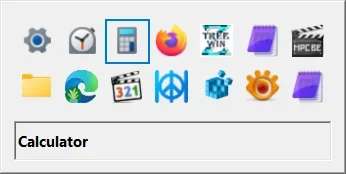
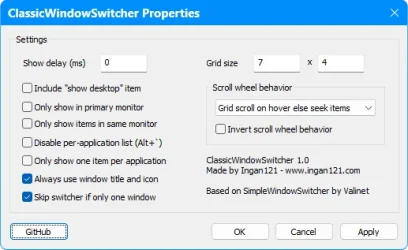
The GUI has the default grey color (I don't know if one can change that), and various options.

Classic Window Switcher.webpClassic Window Switcher Options.webp

ref: Classic Alt+Tab Reimplemented for modern Windows | WinClassic
 
Last edited:

My Computer

System One

  • OS
    Win 11 25H2
    Computer type
    PC/Desktop
    Manufacturer/Model
    custom
    CPU
    intel i7-8700
    Motherboard
    Asus Z370 TUF Gaming
    Memory
    32Gb
    Graphics Card(s)
    Intel iGPU
    Sound Card
    Realtek
    Hard Drives
    Samsung
    PSU
    Corsair
    Cooling
    Fans
Back
Top Bottom