Classic Context Menu via StartAllBack - How to customize it?


Jose Hidalgo

Active member
Member
Local time
10:49 PM
Posts
150
Location
France
OS
Windows 11
Hi everybody 😀 My customized Win 11 config is as this:
  • Start Menu: via Open Shell (I like their menu look & feel, I'm used to it since Win 7)
  • Explorer : via StartAllBack (Classic Win 7 style)
  • Context menu: via StartAllBack (Classic Win 7 style)
  • Taskbar : via StartAllBack and TranslucentTB
It all works great. Now I'd just like to customize my context menu contents, and by that I mean the following:
  1. Delete unwanted items. For example I have installed Git (it was required by another app), and now I have two context menu items (Open Git GUI here and Open Git BASH here) which I don't want at all. Same could be said of mp3Tag, which somehow added an uneeded context menu item.
  2. Reorganize items (up/down, separators...), since currently they're not in an order that suits me.
To achieve those two objectives as easily as possible, I'd like to find a dedicated app with a nice GUI. I don't want to resort directly to regedit if that can be avoided.

What app would you suggest, please? Thanks in advance. :-)
 

My Computer My Computer

At a glance

Windows 11AMD Ryzen 7700DDR5 = 32 GB = 2x16 GB (Corsair Dominator - D...Not yet
OS
Windows 11
Computer type
PC/Desktop
Manufacturer/Model
Personal build
CPU
AMD Ryzen 7700
Motherboard
Asus TUF Gaming B650M-Plus WiFi
Memory
DDR5 = 32 GB = 2x16 GB (Corsair Dominator - DDR5 RGB - 6000 MT/s)
Graphics Card(s)
Not yet
Sound Card
No
Monitor(s) Displays
Philips BDM3270QP2
Screen Resolution
2560x1440
Hard Drives
M.2 = 2 TB (Samsung 990 Pro)
SATA = 12 TB (Western Digital Red - WD120EFAX - 5400 rpm)
PSU
Corsair RM850e (850W - ATX 3.0)
Case
Corsair Crystal 280X TG (White, RGB)
Cooling
Intake = 2x120mm fans (Corsair LL120 RGB) / Exhaust = 2x120mm AIO (Aerocool Mirage L240)
Keyboard
Corsair K55 RGB
Mouse
Vertical mouse from AliExpress, very good for the price and a lifesaver for my wrist :)
Internet Speed
Fiber
Browser
Firefox, Brave, Tor
Antivirus
Windows Defender
Other Info
UPS = 1000VA (Nitram PB1000 LCD), protecting PC + Monitor + Speakers
Openshell has it's own settings menu.
 

My Computers My Computers

  • At a glance

    Windows 11 Enterprise 25H2 26200 7462Intel XEON E5-2699 v364GB Teamgroup UD4-3600NVIDIA GeForce GTX 1080 Ti
    OS
    Windows 11 Enterprise 25H2 26200 7462
    Computer type
    PC/Desktop
    Manufacturer/Model
    Custom Build
    CPU
    Intel XEON E5-2699 v3
    Motherboard
    ASUS X99-A
    Memory
    64GB Teamgroup UD4-3600
    Graphics Card(s)
    NVIDIA GeForce GTX 1080 Ti
    Sound Card
    Integrated
    Monitor(s) Displays
    ACER X34 Predator
    Screen Resolution
    3440 x 1440
    Hard Drives
    Crucial CT1000P 3P SSD8 1TB
    Crucial CT1000 BX500 SSD 1TB
    PSU
    GameMax Pro
    Case
    Fractal Design
    Cooling
    Corsair H110iGT + 6 140mm Fans
    Keyboard
    Corsair K4
    Mouse
    G-Skill G502
    Internet Speed
    300MBs
    Browser
    Chrome
    Antivirus
    OEM
    Other Info
    ASUS RT-AC87U Router
  • At a glance

    25H2 26200.50748GB
    Operating System
    25H2 26200.5074
    Computer type
    Laptop
    Manufacturer/Model
    ASUS X555LA
    Memory
    8GB
    Browser
    Chrome
    Antivirus
    OEM
... and it doesn't seem to be what I'm looking for, is it?

2024.02.08 - 04.34.51.png
 

My Computer My Computer

At a glance

Windows 11AMD Ryzen 7700DDR5 = 32 GB = 2x16 GB (Corsair Dominator - D...Not yet
OS
Windows 11
Computer type
PC/Desktop
Manufacturer/Model
Personal build
CPU
AMD Ryzen 7700
Motherboard
Asus TUF Gaming B650M-Plus WiFi
Memory
DDR5 = 32 GB = 2x16 GB (Corsair Dominator - DDR5 RGB - 6000 MT/s)
Graphics Card(s)
Not yet
Sound Card
No
Monitor(s) Displays
Philips BDM3270QP2
Screen Resolution
2560x1440
Hard Drives
M.2 = 2 TB (Samsung 990 Pro)
SATA = 12 TB (Western Digital Red - WD120EFAX - 5400 rpm)
PSU
Corsair RM850e (850W - ATX 3.0)
Case
Corsair Crystal 280X TG (White, RGB)
Cooling
Intake = 2x120mm fans (Corsair LL120 RGB) / Exhaust = 2x120mm AIO (Aerocool Mirage L240)
Keyboard
Corsair K55 RGB
Mouse
Vertical mouse from AliExpress, very good for the price and a lifesaver for my wrist :)
Internet Speed
Fiber
Browser
Firefox, Brave, Tor
Antivirus
Windows Defender
Other Info
UPS = 1000VA (Nitram PB1000 LCD), protecting PC + Monitor + Speakers
Delete unwanted items. For example I have installed Git (it was required by another app), and now I have two context menu items (Open Git GUI here and Open Git BASH here) which I don't want at all. Same could be said of mp3Tag, which somehow added an uneeded context menu item.
I disabled many unwanted items from the context menu by registry tweaks.
Starting with windows 7 until now I collected such tweaks for:
- Share with
- Share
- Scan with Windows Defender
- Add to Library
- Pin to Quick Access
- Pin to Start Menu
- Pin to taskbar
- Restore previous versions
- Burn disk image file
- Fix compatibility issues
- Add to favorites
- Copy as path
- Open in terminal
Those registry tweaks all are to be found by searching the Internet and maybe they are listed as well in one or more ElevenForum tutorials (did not look at that now).

I have made a registry file in which all entries for the disabled items are listed, so that after installing Windows I can just change everything in just one go!

Other context entries that I did not like, for instance for specific programs, I disabled by the freeware programs ShellExView and/or ShellMenuView.
Entries in the context menu 'New' can be disabled by (freeware) ShellMenuNew (although it's not possible to disable the three entries that come with Google Drive, they keep coming).

That's how I made the context menus more or less to my wishes.

As far as I know the order of the context menus cannot be altered!
 

My Computer My Computer

At a glance

Windows 11 Pro 25H2AMD Ryzen 7 5700GKingston FURY Beast 2x16GB DIMM DDR4 2666 CL16MSI GeForce GT 730 2GB LP V1
OS
Windows 11 Pro 25H2
Computer type
PC/Desktop
Manufacturer/Model
Build by vendor to my specs
CPU
AMD Ryzen 7 5700G
Motherboard
MSI PRO B550M-P Gen3
Memory
Kingston FURY Beast 2x16GB DIMM DDR4 2666 CL16
Graphics Card(s)
MSI GeForce GT 730 2GB LP V1
Sound Card
Creative Sound Blaster Audigy FX
Monitor(s) Displays
Samsung S24E450F 24"
Screen Resolution
1920 x 1080
Hard Drives
1. SSD Crucial P5 Plus 500GB PCIe M.2
2. SSD-SATA Crucial MX500-2TB
PSU
Corsair CV650W
Case
Cooler Master Silencio S400
Cooling
Cooler Master Hyper H412R with Be Quiet Pure Wings 2 PWM BL038 fan
Keyboard
Cherry Stream (wired, scissor keys)
Mouse
Asus WT465 (wireless)
Internet Speed
70 Mbps down / 80 Mbps up
Browser
Firefox 130.0
Antivirus
F-Secure (Internetprovider version)
Other Info
Router: FRITZBox 7490
Oracle VirtualBox 7 for testing software on Win 10 or 11

My Computers My Computers

  • At a glance

    Windows 11 Enterprise 25H2 26200 7462Intel XEON E5-2699 v364GB Teamgroup UD4-3600NVIDIA GeForce GTX 1080 Ti
    OS
    Windows 11 Enterprise 25H2 26200 7462
    Computer type
    PC/Desktop
    Manufacturer/Model
    Custom Build
    CPU
    Intel XEON E5-2699 v3
    Motherboard
    ASUS X99-A
    Memory
    64GB Teamgroup UD4-3600
    Graphics Card(s)
    NVIDIA GeForce GTX 1080 Ti
    Sound Card
    Integrated
    Monitor(s) Displays
    ACER X34 Predator
    Screen Resolution
    3440 x 1440
    Hard Drives
    Crucial CT1000P 3P SSD8 1TB
    Crucial CT1000 BX500 SSD 1TB
    PSU
    GameMax Pro
    Case
    Fractal Design
    Cooling
    Corsair H110iGT + 6 140mm Fans
    Keyboard
    Corsair K4
    Mouse
    G-Skill G502
    Internet Speed
    300MBs
    Browser
    Chrome
    Antivirus
    OEM
    Other Info
    ASUS RT-AC87U Router
  • At a glance

    25H2 26200.50748GB
    Operating System
    25H2 26200.5074
    Computer type
    Laptop
    Manufacturer/Model
    ASUS X555LA
    Memory
    8GB
    Browser
    Chrome
    Antivirus
    OEM
Sure. Here's an example (right-click on my desktop, but of course the Context Menu changes with the context):

2024.02.09 - 17.14.11 copy.jpg

All the marked options are completely unnecessary to me, and I don't want them in my Context Menu.
 

My Computer My Computer

At a glance

Windows 11AMD Ryzen 7700DDR5 = 32 GB = 2x16 GB (Corsair Dominator - D...Not yet
OS
Windows 11
Computer type
PC/Desktop
Manufacturer/Model
Personal build
CPU
AMD Ryzen 7700
Motherboard
Asus TUF Gaming B650M-Plus WiFi
Memory
DDR5 = 32 GB = 2x16 GB (Corsair Dominator - DDR5 RGB - 6000 MT/s)
Graphics Card(s)
Not yet
Sound Card
No
Monitor(s) Displays
Philips BDM3270QP2
Screen Resolution
2560x1440
Hard Drives
M.2 = 2 TB (Samsung 990 Pro)
SATA = 12 TB (Western Digital Red - WD120EFAX - 5400 rpm)
PSU
Corsair RM850e (850W - ATX 3.0)
Case
Corsair Crystal 280X TG (White, RGB)
Cooling
Intake = 2x120mm fans (Corsair LL120 RGB) / Exhaust = 2x120mm AIO (Aerocool Mirage L240)
Keyboard
Corsair K55 RGB
Mouse
Vertical mouse from AliExpress, very good for the price and a lifesaver for my wrist :)
Internet Speed
Fiber
Browser
Firefox, Brave, Tor
Antivirus
Windows Defender
Other Info
UPS = 1000VA (Nitram PB1000 LCD), protecting PC + Monitor + Speakers
@Jose Hidalgo

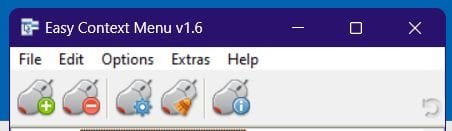
I've found EasyContextMenu from German software firm Sordum to be effective at removing unwanted software shortcuts from the desktop context menu. Sordum says,
How to Clean the Right Click Menu
The context menu is often abused by software vendors who add useless entries without asking permission. You can use ECM’s new context menu cleaner feature to remove all unwanted entries.


There's no installer. It just runs from the executable.

Clipboard_01.jpg
The fourth button from the left, with the yellow broom icon on the mouse, activates the Cleaner and scans your computer for added software entries.
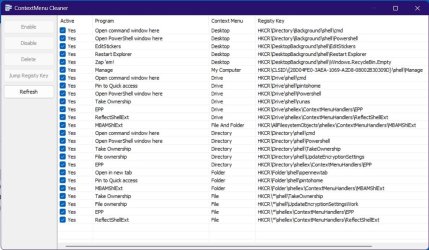
In this shot, the entries "Zap 'em" and "Restart Explorer" were added by me, and can be easily removed by this small program.
Clipboard_02.jpg
 

My Computers My Computers

  • At a glance

    11 Pro 24H2 26100.2454i7-9700 @ 3.00GHz32GBDDR4 @ 2666MHzIntel HD 630 Graphics onboard
    OS
    11 Pro 24H2 26100.2454
    Computer type
    PC/Desktop
    Manufacturer/Model
    Lenovo ThinkCentre M920S SFF
    CPU
    i7-9700 @ 3.00GHz
    Motherboard
    Lenovo 3132
    Memory
    32GBDDR4 @ 2666MHz
    Graphics Card(s)
    Intel HD 630 Graphics onboard
    Sound Card
    Realtek HD Audio
    Monitor(s) Displays
    LG E2442
    Screen Resolution
    1920x1080
    Hard Drives
    1 x Samsung 970 EVO PLUS 500GB NVMe SSD, 1 x WD_BLACK SN770
    250GB NVMe SSD (OS and programs), 1 x WD_BLACK SN770
    500GB NVMe SSD (Data)
    Case
    Lenovo SFF
    Keyboard
    Cherry Stream TKL JK-8600US-2 Wired
    Mouse
    LogiTech M510 wireless
    Internet Speed
    Fast (for fixed wireless!)
    Browser
    Chrome, sometimes Firefox
    Antivirus
    Malwarebytes Premium & Defender (working together beautifully!)
  • At a glance

    11 Pro 24H2 26100.2454i5-8400 @ 2.80GHz32GB DDR4 @ 2600MHzIntel HD 630 Graphics onboard
    Operating System
    11 Pro 24H2 26100.2454
    Computer type
    PC/Desktop
    Manufacturer/Model
    Lenovo ThinkCentre M920S SFF
    CPU
    i5-8400 @ 2.80GHz
    Motherboard
    Lenovo 3132
    Memory
    32GB DDR4 @ 2600MHz
    Graphics card(s)
    Intel HD 630 Graphics onboard
    Sound Card
    Realtek High Definition Audio onboard
    Monitor(s) Displays
    LG FULL HD (1920x1080@59Hz)
    Screen Resolution
    1920 x 1080
    Hard Drives
    1 x Samsung 970 EVO PLUS NVMe; 1 x Samsung 980 NVMe SSD
    Case
    Lenovo Think Centre SFF
    Keyboard
    Cherry Stream TKL JK-8600US-2 Wired
    Mouse
    LogiTech M510 wireless
    Internet Speed
    Fast (for fixed wireless!)
    Browser
    Chrome
    Antivirus
    Malwarebytes Premium and MS Defender, beautiful together
Also, for (occasional, repeated) removal of New > Bitmap and New > Text, see these bat files:


My Computers My Computers

  • At a glance

    11 Pro 24H2 26100.2454i7-9700 @ 3.00GHz32GBDDR4 @ 2666MHzIntel HD 630 Graphics onboard
    OS
    11 Pro 24H2 26100.2454
    Computer type
    PC/Desktop
    Manufacturer/Model
    Lenovo ThinkCentre M920S SFF
    CPU
    i7-9700 @ 3.00GHz
    Motherboard
    Lenovo 3132
    Memory
    32GBDDR4 @ 2666MHz
    Graphics Card(s)
    Intel HD 630 Graphics onboard
    Sound Card
    Realtek HD Audio
    Monitor(s) Displays
    LG E2442
    Screen Resolution
    1920x1080
    Hard Drives
    1 x Samsung 970 EVO PLUS 500GB NVMe SSD, 1 x WD_BLACK SN770
    250GB NVMe SSD (OS and programs), 1 x WD_BLACK SN770
    500GB NVMe SSD (Data)
    Case
    Lenovo SFF
    Keyboard
    Cherry Stream TKL JK-8600US-2 Wired
    Mouse
    LogiTech M510 wireless
    Internet Speed
    Fast (for fixed wireless!)
    Browser
    Chrome, sometimes Firefox
    Antivirus
    Malwarebytes Premium & Defender (working together beautifully!)
  • At a glance

    11 Pro 24H2 26100.2454i5-8400 @ 2.80GHz32GB DDR4 @ 2600MHzIntel HD 630 Graphics onboard
    Operating System
    11 Pro 24H2 26100.2454
    Computer type
    PC/Desktop
    Manufacturer/Model
    Lenovo ThinkCentre M920S SFF
    CPU
    i5-8400 @ 2.80GHz
    Motherboard
    Lenovo 3132
    Memory
    32GB DDR4 @ 2600MHz
    Graphics card(s)
    Intel HD 630 Graphics onboard
    Sound Card
    Realtek High Definition Audio onboard
    Monitor(s) Displays
    LG FULL HD (1920x1080@59Hz)
    Screen Resolution
    1920 x 1080
    Hard Drives
    1 x Samsung 970 EVO PLUS NVMe; 1 x Samsung 980 NVMe SSD
    Case
    Lenovo Think Centre SFF
    Keyboard
    Cherry Stream TKL JK-8600US-2 Wired
    Mouse
    LogiTech M510 wireless
    Internet Speed
    Fast (for fixed wireless!)
    Browser
    Chrome
    Antivirus
    Malwarebytes Premium and MS Defender, beautiful together
@Wisewiz thanks to EasyContextMenu I was able to remove 3 of the 7 aforementioned unwanted entries.
Unfortunately the others remain. They fall into 2 categories :
  • Those that aren't found and listed by EasyContextMenu (ex: mp3Tag, WinMerge)
  • Those that are found and listed but aren't removed, despite unchecking all possible occurrences (ex: DropBox)
Here's the current state:

2024.02.12 - 00.09.22.png

2024.02.12 - 00.13.02.png
 

My Computer My Computer

At a glance

Windows 11AMD Ryzen 7700DDR5 = 32 GB = 2x16 GB (Corsair Dominator - D...Not yet
OS
Windows 11
Computer type
PC/Desktop
Manufacturer/Model
Personal build
CPU
AMD Ryzen 7700
Motherboard
Asus TUF Gaming B650M-Plus WiFi
Memory
DDR5 = 32 GB = 2x16 GB (Corsair Dominator - DDR5 RGB - 6000 MT/s)
Graphics Card(s)
Not yet
Sound Card
No
Monitor(s) Displays
Philips BDM3270QP2
Screen Resolution
2560x1440
Hard Drives
M.2 = 2 TB (Samsung 990 Pro)
SATA = 12 TB (Western Digital Red - WD120EFAX - 5400 rpm)
PSU
Corsair RM850e (850W - ATX 3.0)
Case
Corsair Crystal 280X TG (White, RGB)
Cooling
Intake = 2x120mm fans (Corsair LL120 RGB) / Exhaust = 2x120mm AIO (Aerocool Mirage L240)
Keyboard
Corsair K55 RGB
Mouse
Vertical mouse from AliExpress, very good for the price and a lifesaver for my wrist :)
Internet Speed
Fiber
Browser
Firefox, Brave, Tor
Antivirus
Windows Defender
Other Info
UPS = 1000VA (Nitram PB1000 LCD), protecting PC + Monitor + Speakers

Starting with Dropbox: I'd do a registry search for DropboxExt. It may be in another key.
It's an old program. Maybe Mp3tag isn't in its db. Again, I'd try a registry search for Mp3tag and see whether anything comes up.
Ditto for WinMerge.

Don't know what else to suggest. Some of these things are really difficult to get rid of.
 

My Computers My Computers

  • At a glance

    11 Pro 24H2 26100.2454i7-9700 @ 3.00GHz32GBDDR4 @ 2666MHzIntel HD 630 Graphics onboard
    OS
    11 Pro 24H2 26100.2454
    Computer type
    PC/Desktop
    Manufacturer/Model
    Lenovo ThinkCentre M920S SFF
    CPU
    i7-9700 @ 3.00GHz
    Motherboard
    Lenovo 3132
    Memory
    32GBDDR4 @ 2666MHz
    Graphics Card(s)
    Intel HD 630 Graphics onboard
    Sound Card
    Realtek HD Audio
    Monitor(s) Displays
    LG E2442
    Screen Resolution
    1920x1080
    Hard Drives
    1 x Samsung 970 EVO PLUS 500GB NVMe SSD, 1 x WD_BLACK SN770
    250GB NVMe SSD (OS and programs), 1 x WD_BLACK SN770
    500GB NVMe SSD (Data)
    Case
    Lenovo SFF
    Keyboard
    Cherry Stream TKL JK-8600US-2 Wired
    Mouse
    LogiTech M510 wireless
    Internet Speed
    Fast (for fixed wireless!)
    Browser
    Chrome, sometimes Firefox
    Antivirus
    Malwarebytes Premium & Defender (working together beautifully!)
  • At a glance

    11 Pro 24H2 26100.2454i5-8400 @ 2.80GHz32GB DDR4 @ 2600MHzIntel HD 630 Graphics onboard
    Operating System
    11 Pro 24H2 26100.2454
    Computer type
    PC/Desktop
    Manufacturer/Model
    Lenovo ThinkCentre M920S SFF
    CPU
    i5-8400 @ 2.80GHz
    Motherboard
    Lenovo 3132
    Memory
    32GB DDR4 @ 2600MHz
    Graphics card(s)
    Intel HD 630 Graphics onboard
    Sound Card
    Realtek High Definition Audio onboard
    Monitor(s) Displays
    LG FULL HD (1920x1080@59Hz)
    Screen Resolution
    1920 x 1080
    Hard Drives
    1 x Samsung 970 EVO PLUS NVMe; 1 x Samsung 980 NVMe SSD
    Case
    Lenovo Think Centre SFF
    Keyboard
    Cherry Stream TKL JK-8600US-2 Wired
    Mouse
    LogiTech M510 wireless
    Internet Speed
    Fast (for fixed wireless!)
    Browser
    Chrome
    Antivirus
    Malwarebytes Premium and MS Defender, beautiful together
OK, thanks anyway, no worries :-)

I have solved the issue for mp3tag, WinMerge and WizTree, by uninstalling and reinstalling them.
They were installed by WingetUI, so unfortunately the Context Menu options were automatically checked. I had to reinstall them manually and disable such options.
So that makes 6 out of 7. Success! 😀

Now all that's left is Dropbox.
I have just searched the registry. There are many entries for DropboxExt. The following screen cap is just an example.
I'm afraid to do something harmful.

2024.02.12 - 17.14.32.png

I have followed this tutorial ( How to Add or Remove Dropbox Context Menu in Windows ) with an attached .reg file and everything, but unfortunately it hasn't worked. I guess it's too old (2020) and the registry keys are no longer valid.
 
Last edited:

My Computer My Computer

At a glance

Windows 11AMD Ryzen 7700DDR5 = 32 GB = 2x16 GB (Corsair Dominator - D...Not yet
OS
Windows 11
Computer type
PC/Desktop
Manufacturer/Model
Personal build
CPU
AMD Ryzen 7700
Motherboard
Asus TUF Gaming B650M-Plus WiFi
Memory
DDR5 = 32 GB = 2x16 GB (Corsair Dominator - DDR5 RGB - 6000 MT/s)
Graphics Card(s)
Not yet
Sound Card
No
Monitor(s) Displays
Philips BDM3270QP2
Screen Resolution
2560x1440
Hard Drives
M.2 = 2 TB (Samsung 990 Pro)
SATA = 12 TB (Western Digital Red - WD120EFAX - 5400 rpm)
PSU
Corsair RM850e (850W - ATX 3.0)
Case
Corsair Crystal 280X TG (White, RGB)
Cooling
Intake = 2x120mm fans (Corsair LL120 RGB) / Exhaust = 2x120mm AIO (Aerocool Mirage L240)
Keyboard
Corsair K55 RGB
Mouse
Vertical mouse from AliExpress, very good for the price and a lifesaver for my wrist :)
Internet Speed
Fiber
Browser
Firefox, Brave, Tor
Antivirus
Windows Defender
Other Info
UPS = 1000VA (Nitram PB1000 LCD), protecting PC + Monitor + Speakers

Back
Top Bottom