Clone NVME to smaller external SSD for backup


HsRada18

New member
Local time
11:13 PM
Posts
4
OS
Windows 11
So I have a 1024GB NVME and a 931GB SSD in a USB enclosure. I already have shrunk multiple partitions on the source disk to fit the target and moved the unallocated space to the rightmost location.

Now what open source software will let me clone all those partitions with the boot manager intact if I had to restore everything to a new NVME?
 
Windows Build/Version
Windows 11 Home 22621.2861

My Computer My Computer

At a glance

Windows 11
OS
Windows 11
Computer type
Laptop
Manufacturer/Model
ASUS
You should make a system image rather than a clone.

Many tools - Macrium Reflect, Aomeu Backupper Easeus Todo, Hasleo Backup Suite etc.

An image is like cloning the source drive but storing files in a compressed file (sort of like a zip file).

Then you boot from a usb Rescue drive and restore image to new nvme drive.

The tools above automatically handle partitions on new nvme. The SSD just needs to be a single NTFS partition.

Roughly speaking the image is 60% of actual data on source drive.
 

My Computer My Computer

At a glance

Windows 11 Pro + Win11 Canary VM.I9 13th gen i9-13900H 2.60 GHZ16 GB solderedIntegrated Intel Iris XE
OS
Windows 11 Pro + Win11 Canary VM.
Computer type
Laptop
Manufacturer/Model
ASUS Zenbook 14
CPU
I9 13th gen i9-13900H 2.60 GHZ
Motherboard
Yep, Laptop has one.
Memory
16 GB soldered
Graphics Card(s)
Integrated Intel Iris XE
Sound Card
Realtek built in
Monitor(s) Displays
laptop OLED screen
Screen Resolution
2880x1800 touchscreen
Hard Drives
1 TB NVME SSD (only weakness is only one slot)
PSU
Internal + 65W thunderbolt USB4 charger
Case
Yep, got one
Cooling
Stella Artois (UK pint cans - 568 ml) - extra cost.
Keyboard
Built in UK keybd
Mouse
Bluetooth , wireless dongled, wired
Internet Speed
900 mbs (ethernet), wifi 6 typical 350-450 mb/s both up and down
Browser
Edge
Antivirus
Defender
Other Info
TPM 2.0, 2xUSB4 thunderbolt, 1xUsb3 (usb a), 1xUsb-c, hdmi out, 3.5 mm audio out/in combo, ASUS backlit trackpad (inc. switchable number pad)

Macrium Reflect Home V8
Office 365 Family (6 users each 1TB onedrive space)
Hyper-V (a vm runs almost as fast as my older laptop)
Also, both drives are 1TB, just that formatting reduces the capacity a bit, a guess would be the NVMe hasn't been formatted yet.

I use a 2-bay USB 3 drive dock for hardware cloning. It accepts 2 SATA 2.5" and 3.5" drives but it can't be connected to a computer for the cloning, have not had a problem. I have just come across a dock that accepts both SATA and NVMe drives, may have to get it when budget allows.
 

My Computers My Computers

  • At a glance

    Win11 Pro RTM Version 24H2 Build 26100.4202Intel Core i5 11th Gen. 2.40GHz12GB
    OS
    Win11 Pro RTM Version 24H2 Build 26100.4202
    Computer type
    Laptop
    Manufacturer/Model
    Dell Vostro 3400
    CPU
    Intel Core i5 11th Gen. 2.40GHz
    Memory
    12GB
    Hard Drives
    256GB SSD NVMe M.2
  • At a glance

    Win11 Pro RTM Version 24H2 Build 26100.4202Intel Core i5 10th Gen. 2.90GHz16GBOnboard, no VGA, using a DisplayPort-to-VGA a...
    Operating System
    Win11 Pro RTM Version 24H2 Build 26100.4202
    Computer type
    PC/Desktop
    Manufacturer/Model
    Dell Vostro 5890
    CPU
    Intel Core i5 10th Gen. 2.90GHz
    Memory
    16GB
    Graphics card(s)
    Onboard, no VGA, using a DisplayPort-to-VGA adapter
    Monitor(s) Displays
    24" Dell
    Hard Drives
    512GB SSD NVMe, 4TB Seagate HDD
    Browser
    Firefox, Edge
    Antivirus
    Windows Defender/Microsoft Security
I have just come across a dock that accepts both SATA and NVMe

I saw one in a video recntly about $75 I think.
 

My Computers My Computers

  • At a glance

    Win7,Win11i7-97002x16gb 3600mhz
    OS
    Win7,Win11
    Computer type
    PC/Desktop
    CPU
    i7-9700
    Motherboard
    gigabyte b365m ds3h
    Memory
    2x16gb 3600mhz
    Monitor(s) Displays
    benq gw2480
    PSU
    bequiet pure power 11 400CM
    Cooling
    cryorig m9i
  • At a glance

    win7,win11i5-84002x8gb 3200
    Operating System
    win7,win11
    Computer type
    PC/Desktop
    CPU
    i5-8400
    Motherboard
    gigabyte b365m ds3h
    Memory
    2x8gb 3200
    PSU
    xfx pro 450
I saw one in a video recntly about $75 I think.
Probably same one, Sabrent. So far I've had no issues with other things of that brand.
 

My Computers My Computers

  • At a glance

    Win11 Pro RTM Version 24H2 Build 26100.4202Intel Core i5 11th Gen. 2.40GHz12GB
    OS
    Win11 Pro RTM Version 24H2 Build 26100.4202
    Computer type
    Laptop
    Manufacturer/Model
    Dell Vostro 3400
    CPU
    Intel Core i5 11th Gen. 2.40GHz
    Memory
    12GB
    Hard Drives
    256GB SSD NVMe M.2
  • At a glance

    Win11 Pro RTM Version 24H2 Build 26100.4202Intel Core i5 10th Gen. 2.90GHz16GBOnboard, no VGA, using a DisplayPort-to-VGA a...
    Operating System
    Win11 Pro RTM Version 24H2 Build 26100.4202
    Computer type
    PC/Desktop
    Manufacturer/Model
    Dell Vostro 5890
    CPU
    Intel Core i5 10th Gen. 2.90GHz
    Memory
    16GB
    Graphics card(s)
    Onboard, no VGA, using a DisplayPort-to-VGA adapter
    Monitor(s) Displays
    24" Dell
    Hard Drives
    512GB SSD NVMe, 4TB Seagate HDD
    Browser
    Firefox, Edge
    Antivirus
    Windows Defender/Microsoft Security
So I have a 1024GB NVME and a 931GB SSD in a USB enclosure. I already have shrunk multiple partitions on the source disk to fit the target and moved the unallocated space to the rightmost location.

Now what open source software will let me clone all those partitions with the boot manager intact if I had to restore everything to a new NVME?
Happy New Year everyone.

Stand alone bootable version of Gparted -- simple

boot up
ensure new device is all empty space

then either copy and paste partitions (it's a graphical GUI) from old to new -- you can re-size at will -- larger or smaller too so long as the target partition is big enough to receive the source. Note the data from the source, target partition can be smaller than the defined size of the source - the data must be able to fit. That's the requirement.

(you can also start a terminal and use dd if you can handle linux. Otherwise the standard GUI of Gparted is identical to Windows partition managers).

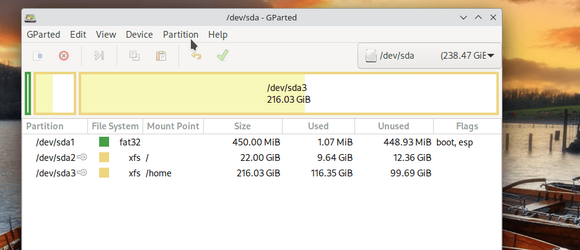
Boot up gparted, hit enter at "Dont touch keymap", select the country code for your keyboard from the screen, and then at the next prompt just press enter and the GUI comes up like this
Screenshot_20240102_084218.png


simple, free, effective, works on any file system including Windows ntfs partitions. Try it as a VM just to play with it for practice if you are unsure. On the VM create 2 "Virtual disks" and just mess around partitioning them for practice. Use the ISO as the boot device.

Get ISO from here :

create bootable USB with rufus etc.

After cloning / copying you can change the partition UUID's - it's in the drop down menu. This is useful if you want to boot from either device -- the boot manager needs to be able to pick the correct device -- otherwise you could get windows randomly deciding on what device to boot etc.

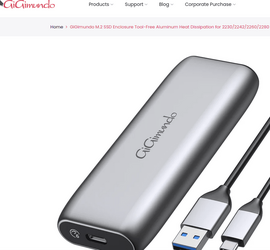
BTW I'm using several 2 TB nvme in small USB adapters not much bigger than a big "classic thumb drive. They work perfectly (both nvme and ssd formats are supported -- GiGmundo Dual Protocol M2 / SSD 10Gbps for NVMe 6 Gpps NGFF SATA UASP TRIM. Fits 2280/2260/2242/2230 sticks max capacity 8TB. Comes with adequate heat sink too -- and tool free -- simple to fit the card into.

@Berton -- these adapters shouldn't cost anything like £75 --- more like £19 I suspect. The sticks themselves too SSD (2 TB €49)


Cost at least when I bought the adapters from Amazon S.A.R.L (Luxembourg) € 19 I now have 4 of them.
Screenshot_20240102_090719.png


Well worth the money, I've used them for Windows to go systems, other VM's with quite robust usage etc etc - not a problem. I've retired most of my old classic 2.5 inch SSD's now.

Cheers
jimbo

 
Last edited:

My Computer My Computer

At a glance

Windows XP,11 Linux Fedora Rawhide pre-releas...2 X Intel i7
OS
Windows XP,11 Linux Fedora Rawhide pre-release 45
Computer type
PC/Desktop
CPU
2 X Intel i7
Screen Resolution
4KUHD X 2
Back
Top Bottom




