
Solved Compiling a truck load of registry tweaks


Thanks for your reply. And thanks for the Tutorial Index. I was not aware of its existence, which basically does what i was suggesting. Much appreciated.
I generally do an internet search (DuckDuckGo) on an issue or what i want to try and do, and look for results from elevenforum.com.
I have been using Brink's solutions for years and a number of windows versions and am extremely grateful for the solutions.

No problem.

There isn’t anything wrong with the search function here, but I like to search this site using Google

For instance:

Adding your query to a Google search bar in the following format

spotlight not working site:elevenforum.com

More often than not, results in Google will highlight or favour the threads that have a relevant tutorial in a post, or the tutorial page itself.
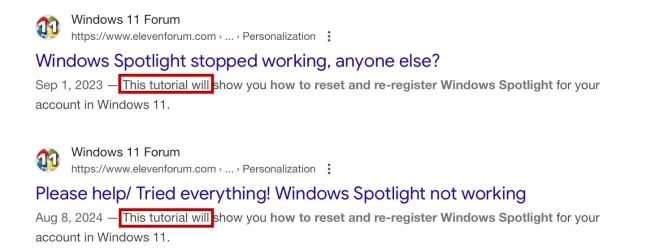
IMG_5599.webp


I can’t open terminal as admin site:elevenforum.com
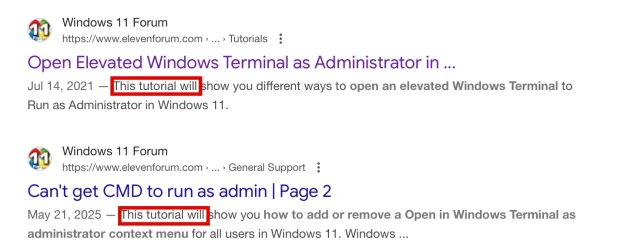
IMG_5600.webp

Query[space]site:elevenforum.com

So to make life easier, I added the following to the address bar in Google and hit Enter

site:elevenforum.com

I bookmarked the page, now I just open the bookmark and add my query to the begining as Google will preload site:elevenforum.com into the Google search bar. Just add your query before it.

IMG_5601.webp

Just remember, there needs to be a space between your query and site:elevenforum.com
 
Last edited:

My Computers My Computers

  • At a glance

    Windows 11 Pro 25H2 Build 26200.9168Intel(R) Core(TM) i7-4770K CPU @ 3.50GHz32.0 GB of I forget and the box is in storage.Gigabyte nVidia GeForce GTX 1660 Super OC 6GB
    OS
    Windows 11 Pro 25H2 Build 26200.9168
    Computer type
    PC/Desktop
    Manufacturer/Model
    Sin-built 2013
    CPU
    Intel(R) Core(TM) i7-4770K CPU @ 3.50GHz
    Motherboard
    ASUS ROG Maximus VI Formula
    Memory
    32.0 GB of I forget and the box is in storage.
    Graphics Card(s)
    Gigabyte nVidia GeForce GTX 1660 Super OC 6GB
    Sound Card
    ROG SupremeFX Formula 8-Channel High Definition Audio
    Monitor(s) Displays
    5 x LG 25MS500-B - 1 x 24MK430H-B - 1 x Wacom Pro 22" Touch Screen Tablet
    Screen Resolution
    All over the place
    Hard Drives
    Too many to list. OS on Samsung 1TB 870 QVO SATA
    PSU
    Silverstone 1500
    Case
    NZXT Phantom 820 Full-Tower Case
    Cooling
    Noctua NH-D15 Elite Class Dual Tower CPU Cooler / 6 x EziDIY 120mm / 2 x Corsair 140mm somethings / 1 x 140mm Thermaltake something / 2 x 200mm Corsair.
    Keyboard
    Corsair K95 / Logitech diNovo Edge Wireless
    Mouse
    Logitech: G402 / G502 / Mx Masters / Mx Air Cordless
    Internet Speed
    2000/500Mbps
    Browser
    All sorts
    Antivirus
    Kaspersky Premium
    Other Info
    ㅤㅤㅤㅤㅤㅤㅤㅤㅤㅤㅤㅤㅤㅤㅤㅤㅤㅤㅤㅤㅤㅤㅤㅤㅤㅤㅤㅤㅤㅤㅤㅤㅤㅤㅤㅤㅤㅤㅤㅤ⠀⠀⠀⠀⠀⠀⠀⠀⠀⠀
    TP-Link BE9300 WiFi 7 Bluetooth 5.4 (Archer TBE550E)
    TP-Link TX201 V1 2.5GB Lan

    Grandstream HT812 - VoIP
    ASUS DSL-AX82U - Mesh
    ASUS RT-AC68U - Mesh
    ASUS RT-BE88U Router

    Brother MFC-L2880DW Printer

    I’m on a horse.
  • At a glance

    Windows 11 Pro 25H2 Build 26200.9168 (Wifes)13th Generation Intel® Core™ i5-1340P Process...16GB LPDDR5-52001x Intel® Iris® Xe Graphics
    Operating System
    Windows 11 Pro 25H2 Build 26200.9168 (Wifes)
    Computer type
    Laptop
    Manufacturer/Model
    LENOVO Yoga 7 14IRL8 - Type 82YL
    CPU
    13th Generation Intel® Core™ i5-1340P Processor(Core™ i5-1340P)
    Memory
    16GB LPDDR5-5200
    Graphics card(s)
    1x Intel® Iris® Xe Graphics
    Sound Card
    Optimized with Dolby Atmos®
    Screen Resolution
    QHD 2880 x 1800 OLED
    Hard Drives
    M.2 512 GB SSD PCIe
    Mouse
    Logiteck MX Master 3S
    Internet Speed
    2000/500
    Antivirus
    Defender / Malwarebytes
    Other Info
    …still on a horse.


    Wireless Network: Wi-Fi 6E 2x2 AX; Bluetooth® 5.1 or above
    Ports: 1x 1 Novo button; 2 in 1 Audio Combo jack; Micro SD Card Reader; HDMI 1.4b; 2 x USB Type-C (TBT4)
    USB 3.2 Gen 2 DP 1.4a
    PD 3.0); 1 x USB 3.2 Gen1 Type A
    Camera
    1x 1080P FHD IR/RGB Hybrid with Privacy Shutter and Dual Array Microphone
    Graphics
    1x Intel® Iris® Xe Graphics
    Monitor
    14" WUXGA
    Form Factor
    Convertible Notebook
  • Windows 11 Pro 25H2 Build 26200.9168 (Wifes)

    Yoga 7 2-in-1 14IML9 - Type 83DJ

    Processor: Intel® Core™ Ultra 7 155H Processor(Core™ Ultra 7 155H)

    Memory: 32GB LPD5X-7467

    Hard Drive: 1 TB SSD PCIe

    Wireless Network: 1x Wi-Fi 6E 2x2 AX; Bluetooth® 5.1 or above

    Ports: 1 x HDMI 2.1 TMDS; 1 x Novo Button; 1 x Combo Audio Jack
    2 x USB-C (USB 4.0)
    1 x USB-A 3.2 Gen 1

    Camera: 1080P FHD IR Hybrid with Dual Microphone

    Graphics: Intel® Arc™ Graphics

    Monitor: 14" 2.8K

    ...Where's my horse?
I don’t know if that works in DuckDuck, I’ve never tried it.
 

My Computers My Computers

  • At a glance

    Windows 11 Pro 25H2 Build 26200.9168Intel(R) Core(TM) i7-4770K CPU @ 3.50GHz32.0 GB of I forget and the box is in storage.Gigabyte nVidia GeForce GTX 1660 Super OC 6GB
    OS
    Windows 11 Pro 25H2 Build 26200.9168
    Computer type
    PC/Desktop
    Manufacturer/Model
    Sin-built 2013
    CPU
    Intel(R) Core(TM) i7-4770K CPU @ 3.50GHz
    Motherboard
    ASUS ROG Maximus VI Formula
    Memory
    32.0 GB of I forget and the box is in storage.
    Graphics Card(s)
    Gigabyte nVidia GeForce GTX 1660 Super OC 6GB
    Sound Card
    ROG SupremeFX Formula 8-Channel High Definition Audio
    Monitor(s) Displays
    5 x LG 25MS500-B - 1 x 24MK430H-B - 1 x Wacom Pro 22" Touch Screen Tablet
    Screen Resolution
    All over the place
    Hard Drives
    Too many to list. OS on Samsung 1TB 870 QVO SATA
    PSU
    Silverstone 1500
    Case
    NZXT Phantom 820 Full-Tower Case
    Cooling
    Noctua NH-D15 Elite Class Dual Tower CPU Cooler / 6 x EziDIY 120mm / 2 x Corsair 140mm somethings / 1 x 140mm Thermaltake something / 2 x 200mm Corsair.
    Keyboard
    Corsair K95 / Logitech diNovo Edge Wireless
    Mouse
    Logitech: G402 / G502 / Mx Masters / Mx Air Cordless
    Internet Speed
    2000/500Mbps
    Browser
    All sorts
    Antivirus
    Kaspersky Premium
    Other Info
    ㅤㅤㅤㅤㅤㅤㅤㅤㅤㅤㅤㅤㅤㅤㅤㅤㅤㅤㅤㅤㅤㅤㅤㅤㅤㅤㅤㅤㅤㅤㅤㅤㅤㅤㅤㅤㅤㅤㅤㅤ⠀⠀⠀⠀⠀⠀⠀⠀⠀⠀
    TP-Link BE9300 WiFi 7 Bluetooth 5.4 (Archer TBE550E)
    TP-Link TX201 V1 2.5GB Lan

    Grandstream HT812 - VoIP
    ASUS DSL-AX82U - Mesh
    ASUS RT-AC68U - Mesh
    ASUS RT-BE88U Router

    Brother MFC-L2880DW Printer

    I’m on a horse.
  • At a glance

    Windows 11 Pro 25H2 Build 26200.9168 (Wifes)13th Generation Intel® Core™ i5-1340P Process...16GB LPDDR5-52001x Intel® Iris® Xe Graphics
    Operating System
    Windows 11 Pro 25H2 Build 26200.9168 (Wifes)
    Computer type
    Laptop
    Manufacturer/Model
    LENOVO Yoga 7 14IRL8 - Type 82YL
    CPU
    13th Generation Intel® Core™ i5-1340P Processor(Core™ i5-1340P)
    Memory
    16GB LPDDR5-5200
    Graphics card(s)
    1x Intel® Iris® Xe Graphics
    Sound Card
    Optimized with Dolby Atmos®
    Screen Resolution
    QHD 2880 x 1800 OLED
    Hard Drives
    M.2 512 GB SSD PCIe
    Mouse
    Logiteck MX Master 3S
    Internet Speed
    2000/500
    Antivirus
    Defender / Malwarebytes
    Other Info
    …still on a horse.


    Wireless Network: Wi-Fi 6E 2x2 AX; Bluetooth® 5.1 or above
    Ports: 1x 1 Novo button; 2 in 1 Audio Combo jack; Micro SD Card Reader; HDMI 1.4b; 2 x USB Type-C (TBT4)
    USB 3.2 Gen 2 DP 1.4a
    PD 3.0); 1 x USB 3.2 Gen1 Type A
    Camera
    1x 1080P FHD IR/RGB Hybrid with Privacy Shutter and Dual Array Microphone
    Graphics
    1x Intel® Iris® Xe Graphics
    Monitor
    14" WUXGA
    Form Factor
    Convertible Notebook
  • Windows 11 Pro 25H2 Build 26200.9168 (Wifes)

    Yoga 7 2-in-1 14IML9 - Type 83DJ

    Processor: Intel® Core™ Ultra 7 155H Processor(Core™ Ultra 7 155H)

    Memory: 32GB LPD5X-7467

    Hard Drive: 1 TB SSD PCIe

    Wireless Network: 1x Wi-Fi 6E 2x2 AX; Bluetooth® 5.1 or above

    Ports: 1 x HDMI 2.1 TMDS; 1 x Novo Button; 1 x Combo Audio Jack
    2 x USB-C (USB 4.0)
    1 x USB-A 3.2 Gen 1

    Camera: 1080P FHD IR Hybrid with Dual Microphone

    Graphics: Intel® Arc™ Graphics

    Monitor: 14" 2.8K

    ...Where's my horse?
I don’t know if that works in DuckDuck, I’ve never tried it.
Thanks Again.
Excellent 'service'.

I will give your method a try.
Though, some 12 months since installing W11, i have pretty much got W11 to where i want it so my tweaking may be over.
But, MS seem to have a bent on changing things seemingly for changes sake, requiring new tweaks or re-tweaking to put back what they undid.
Prior to moving to W11 from W10, i was not looking forward to it at all as i was aware of some really bad comments about W11 & how it worked.
But i found i liked W11 in spite of what i though needing changing. And i have mostly found ways of tailoring it to my liking. Hence my forum Name.

cheers
 

My Computer My Computer

At a glance

Windows 11Intel I5CorsairOnboard GPU
OS
Windows 11
Computer type
PC/Desktop
Manufacturer/Model
ASRock
CPU
Intel I5
Motherboard
ASRock
Memory
Corsair
Graphics Card(s)
Onboard GPU
Monitor(s) Displays
Dell
Screen Resolution
1440p
Hard Drives
SSD (OS) & HDD

My Computer My Computer

At a glance

Windows 11 Enterprise 25H2
OS
Windows 11 Enterprise 25H2

My Computer My Computer

At a glance

Windows 11Intel I5CorsairOnboard GPU
OS
Windows 11
Computer type
PC/Desktop
Manufacturer/Model
ASRock
CPU
Intel I5
Motherboard
ASRock
Memory
Corsair
Graphics Card(s)
Onboard GPU
Monitor(s) Displays
Dell
Screen Resolution
1440p
Hard Drives
SSD (OS) & HDD

My Computer My Computer

At a glance

Windows 11 2H25AMD 9900X64 GBAMD 9070 XT
OS
Windows 11 2H25
Computer type
PC/Desktop
Manufacturer/Model
DIY
CPU
AMD 9900X
Motherboard
MSI X870E Carbon
Memory
64 GB
Graphics Card(s)
AMD 9070 XT
Sound Card
built-in
Monitor(s) Displays
Dell 24"
Hard Drives
Sabrent 1 TB NVMe, 4 x SSD (need to check models), 4 x 3.5" HDD, 8-16 TB, all WD
PSU
Seasonic 850
Case
Fractal Design North XL (which I likw)
Cooling
Corsair AIO for CPU, fans for case
Keyboard
Das Keyboard 4
Mouse
Corsair M65 (white)
Internet Speed
1 TB download
Browser
Firefox
Antivirus
Bitdefender
Other Info
Also have Lenovo T14S laptop (me) and Lenovo Slim 71 (wife)
Here? No.


Just run through the Tutorial Index, have a read. Check out what’s of interest and if theres a reg file, download both the add & remove tweaks. Catalogue them on your HDD

Yes, but how to organize them, to avoid where program 1 sets a tweak, but then program 2 changes that tweak. Say you use Winaero and also Explorer.Patcher or Chris Titus's Windows Utility.
 
Last edited:

My Computer My Computer

At a glance

Windows 11 2H25AMD 9900X64 GBAMD 9070 XT
OS
Windows 11 2H25
Computer type
PC/Desktop
Manufacturer/Model
DIY
CPU
AMD 9900X
Motherboard
MSI X870E Carbon
Memory
64 GB
Graphics Card(s)
AMD 9070 XT
Sound Card
built-in
Monitor(s) Displays
Dell 24"
Hard Drives
Sabrent 1 TB NVMe, 4 x SSD (need to check models), 4 x 3.5" HDD, 8-16 TB, all WD
PSU
Seasonic 850
Case
Fractal Design North XL (which I likw)
Cooling
Corsair AIO for CPU, fans for case
Keyboard
Das Keyboard 4
Mouse
Corsair M65 (white)
Internet Speed
1 TB download
Browser
Firefox
Antivirus
Bitdefender
Other Info
Also have Lenovo T14S laptop (me) and Lenovo Slim 71 (wife)
Yes, but how to organize them, to avoid where program 1 sets a tweak, but then program 2 changes that tweak. Say you use Winaero and also Explorer.Patcher or Chris Titus's Windows Utility.
No comments on this question? I'm a bit surprised.
 

My Computer My Computer

At a glance

Windows 11 2H25AMD 9900X64 GBAMD 9070 XT
OS
Windows 11 2H25
Computer type
PC/Desktop
Manufacturer/Model
DIY
CPU
AMD 9900X
Motherboard
MSI X870E Carbon
Memory
64 GB
Graphics Card(s)
AMD 9070 XT
Sound Card
built-in
Monitor(s) Displays
Dell 24"
Hard Drives
Sabrent 1 TB NVMe, 4 x SSD (need to check models), 4 x 3.5" HDD, 8-16 TB, all WD
PSU
Seasonic 850
Case
Fractal Design North XL (which I likw)
Cooling
Corsair AIO for CPU, fans for case
Keyboard
Das Keyboard 4
Mouse
Corsair M65 (white)
Internet Speed
1 TB download
Browser
Firefox
Antivirus
Bitdefender
Other Info
Also have Lenovo T14S laptop (me) and Lenovo Slim 71 (wife)
No comments on this question? I'm a bit surprised.
Usually well-written programs such as those mentioned will read the registry and will report the value of the key.
There will not be multiple values set for the same key.
 

My Computers My Computers

  • At a glance

    All Branches but StableAMD Ryzen 7 7735HS 3200-4500 Mhz 8 cores x 232 GB DDR5Radeon Graphic / NVIDIA GeForce RTX 4060 8 GB...
    OS
    All Branches but Stable
    Computer type
    Laptop
    Manufacturer/Model
    Acer Nitro ANV15-51
    CPU
    AMD Ryzen 7 7735HS 3200-4500 Mhz 8 cores x 2
    Motherboard
    Sportage_RBH
    Memory
    32 GB DDR5
    Graphics Card(s)
    Radeon Graphic / NVIDIA GeForce RTX 4060 8 GB GDDR6
    Sound Card
    AMD/Realtek(R) Audio
    Monitor(s) Displays
    Integrated Monitor (15.3"vis)
    Screen Resolution
    FHD 1920X1080 16:9 144Hz
    Hard Drives
    KINGSTON OM8SEP4512Q-AA 1TB
    Western Digital 256GB
    PSU
    19V DC 6.32 A 120 W
    Cooling
    Dual Fans
    Mouse
    MS Bluetooth
    Internet Speed
    Fiber 1GB Cox -us & 1GB Orange-fr
    Browser
    Edge Canary- Firefox Nightly-Chrome Dev-Chrome Dev
    Antivirus
    Windows Defender
  • At a glance

    Windows 11 BetaAMD A9-94208 GB of DDR4AMD Radeon R5
    Operating System
    Windows 11 Beta
    Computer type
    Laptop
    Manufacturer/Model
    Asus X751BP
    CPU
    AMD A9-9420
    Memory
    8 GB of DDR4
    Graphics card(s)
    AMD Radeon R5
    Screen Resolution
    1600x900
    Hard Drives
    Seagate 1 TB
WinAero and CTT both add reg tweaks that run on the vanilla Explorer. Most tweak tools that run "ala carte" and allow users to choose, all basically perform the exact same function. The major differences is how they organize and present the tweaks.

ExplorerPatcher and StartAllBack hack Explorer or the desktop by DLL injection. Much like a virus, they re-route key UI functions to their own self-written functions that replace certain key parts of the original Windows code. This is why they're constantly broken by random Monthly Updates.

Because they're making a private function of their own design, they're under no obligation to have it obey a reg key that the original Window code would have done. Now they don't completely replace all of the Windows code, just selected parts. The untouched Windows functions would be expected to behave as before, and obey the normal reg tweaks.

Mixing and matching between "tweaks" and "DLL hijacking" leads to strange combinations. Modder beware.
 

My Computer My Computer

At a glance

Windows 7
OS
Windows 7
WinAero and CTT both add reg tweaks that run on the vanilla Explorer. Most tweak tools that run "ala carte" and allow users to choose, all basically perform the exact same function. The major differences is how they organize and present the tweaks.
I had the mistaken belief that all tools work this way. I guess I needed to be enlightened
ExplorerPatcher and StartAllBack hack Explorer or the desktop by DLL injection. Much like a virus, they re-route key UI functions to their own self-written functions that replace certain key parts of the original Windows code. This is why they're constantly broken by random Monthly Updates.

I had no idea about this. Thanks for this info. Makes me much less willing to use either of these tools, even at the expense of not getting some nifty tweaks done. This also tells me that it will be very hard to undo changes made by either of these tools. I'm going to guess that a Windows repair install would be needed.
Because they're making a private function of their own design, they're under no obligation to have it obey a reg key that the original Window code would have done. Now they don't completely replace all of the Windows code, just selected parts. The untouched Windows functions would be expected to behave as before, and obey the normal reg tweaks.

Mixing and matching between "tweaks" and "DLL hijacking" leads to strange combinations. Modder beware.
Well I don't like the idea of DLL hijacking, not one bit.

Again, thank you for contributing this info.

@OAT Thanks for your comment about well written programs.
 

My Computer My Computer

At a glance

Windows 11 2H25AMD 9900X64 GBAMD 9070 XT
OS
Windows 11 2H25
Computer type
PC/Desktop
Manufacturer/Model
DIY
CPU
AMD 9900X
Motherboard
MSI X870E Carbon
Memory
64 GB
Graphics Card(s)
AMD 9070 XT
Sound Card
built-in
Monitor(s) Displays
Dell 24"
Hard Drives
Sabrent 1 TB NVMe, 4 x SSD (need to check models), 4 x 3.5" HDD, 8-16 TB, all WD
PSU
Seasonic 850
Case
Fractal Design North XL (which I likw)
Cooling
Corsair AIO for CPU, fans for case
Keyboard
Das Keyboard 4
Mouse
Corsair M65 (white)
Internet Speed
1 TB download
Browser
Firefox
Antivirus
Bitdefender
Other Info
Also have Lenovo T14S laptop (me) and Lenovo Slim 71 (wife)
The whole point of ExplorerPatcher is Windows can completely change or remove UI functionality, that was formerly managed by a reg tweak. MS simply changes the code permanently. Some people are so fed up by UI changes, they're willing to allow EP to do its job and take the risk that a future update breaks it for a period of time.

EP is written by a talented and dependable dev, so it's not really a security threat. But whenever EP breaks, it might take him a while to reverse engineer some changes and get EP's functionality restored.

You don't need a repair install to remove EP. It does the DLL hijacking in a graceful manner, and it's upfront about what it's doing.
 

My Computer My Computer

At a glance

Windows 7
OS
Windows 7
Turns out that I can fix explorer.exe by using the System File Checker (sfc /scannow) and Deployment Image Servicing and Management (DISM /Online /Cleanup-Image /RestoreHealth) tools from an elevated Command Prompt
EP is written by a talented and dependable dev, so it's not really a security threat. But whenever EP breaks, it might take him a while to reverse engineer some changes and get EP's functionality restored.
Not an acceptable situationf for me. I consider myself pretty skilled in Windows compared with the "great unwashed masses" but the skill levels and expertise in the crowd in this forum makes me realize just how much I don't know.
You don't need a repair install to remove EP. It does the DLL hijacking in a graceful manner, and it's upfront about what it's doing.
Good, because a repair install is a pain in the buttski. How do I reverse the effects of DLL hijacking? Asking also for everyone else who reads this thread and goes "uh-oh" about DLL hijacking.
 

My Computer My Computer

At a glance

Windows 11 2H25AMD 9900X64 GBAMD 9070 XT
OS
Windows 11 2H25
Computer type
PC/Desktop
Manufacturer/Model
DIY
CPU
AMD 9900X
Motherboard
MSI X870E Carbon
Memory
64 GB
Graphics Card(s)
AMD 9070 XT
Sound Card
built-in
Monitor(s) Displays
Dell 24"
Hard Drives
Sabrent 1 TB NVMe, 4 x SSD (need to check models), 4 x 3.5" HDD, 8-16 TB, all WD
PSU
Seasonic 850
Case
Fractal Design North XL (which I likw)
Cooling
Corsair AIO for CPU, fans for case
Keyboard
Das Keyboard 4
Mouse
Corsair M65 (white)
Internet Speed
1 TB download
Browser
Firefox
Antivirus
Bitdefender
Other Info
Also have Lenovo T14S laptop (me) and Lenovo Slim 71 (wife)
You do realize EP can be uninstalled thru normal means? Including "ep_setup.exe /uninstall".

Installer How To
 

My Computer My Computer

At a glance

Windows 7
OS
Windows 7
If you’re that concerned about that methodology, there are a ton of tweak tools that you can’t use lol. SAB, EP and WH are the top 3 but there are plenty more…
 

My Computer My Computer

At a glance

Windows 11 Pro
OS
Windows 11 Pro
You do realize EP can be uninstalled thru normal means? Including "ep_setup.exe /uninstall".

Installer How To
Yes, and I already uninstalled it using Revo Pro. I guess I'm about to expose my limited understanding of DLL hijacking. So here goes. IfExplorer.Patcher has been uninstalled, does that remove the hijacked code in explorer.exe? My understanding is that Explorer.Patcher actually patches explorer.exe and deletes or comments out sections of code.
 

My Computer My Computer

At a glance

Windows 11 2H25AMD 9900X64 GBAMD 9070 XT
OS
Windows 11 2H25
Computer type
PC/Desktop
Manufacturer/Model
DIY
CPU
AMD 9900X
Motherboard
MSI X870E Carbon
Memory
64 GB
Graphics Card(s)
AMD 9070 XT
Sound Card
built-in
Monitor(s) Displays
Dell 24"
Hard Drives
Sabrent 1 TB NVMe, 4 x SSD (need to check models), 4 x 3.5" HDD, 8-16 TB, all WD
PSU
Seasonic 850
Case
Fractal Design North XL (which I likw)
Cooling
Corsair AIO for CPU, fans for case
Keyboard
Das Keyboard 4
Mouse
Corsair M65 (white)
Internet Speed
1 TB download
Browser
Firefox
Antivirus
Bitdefender
Other Info
Also have Lenovo T14S laptop (me) and Lenovo Slim 71 (wife)
No, that's not how DLL hijacking works. When an application calls a library function, there's an implicit search order thru the DLL's until the desired function is found. By changing the library search order, you can impersonate functions by placing your function ahead of the legitimate one.

EP inserts dxgi.dll into "C:\Windows\System32", to take advantage of a minor function that Explorer needs to take care of. That's it's entry point. By removing the same file, Explorer is no longer detoured from its original search order.

EP can choose which functions to pass thru to their original Windows functions, and which ones to override with its own code. It doesn't need to modify the DLL's and cause DISM errors.

Straight from the horse's mouth:
 

My Computer My Computer

At a glance

Windows 7
OS
Windows 7
EP can choose which functions to pass thru to their original Windows functions, and which ones to override with its own code.
StartAllBack works in a similar way...,
... that's how you can go from this...

0008074.webp

to this, and back, at the flick of a switch...
(Hooking the Shell I believe it's called)

0008075.webp
 

My Computers My Computers

  • At a glance

    Windows 11 Pro
    OS
    Windows 11 Pro
    Computer type
    PC/Desktop
    Manufacturer/Model
    ASUS ROG Strix
  • At a glance

    Windows 11 Pro
    Operating System
    Windows 11 Pro
    Computer type
    Laptop
    Manufacturer/Model
    ASUS VivoBook
  • ASUS VivoBook 'Lite' ~ Windows 11 Home
Halo 🙏

I can pretty much bend Windows exactly the way I wan’t it using a lot of registry changes found here and a couple elsewhere.
Edwin introduced me to an option in Winaero Tweaker a while back (thanks my man) that allowes you to compile multiple registry tweaks into one file.

My concern is; I probably have over 40 registry tweaks. Does anyone see a problem with performing that many tweaks in one nuclear swoop? I don’t believe there are any conflicts between the tweaks, they are carefully selected and categorised in my PC.

Individually I have no problem with them at all, in one batch, I am wondering…

Grazie a tutti

Hmmmm... This topic might be a bit old, but for future generations of curious kids, I’ll say:
As you know, I'm a newbie here trying to modify those keys too—and I almost lost an eye editing a Windows image 😄. Based on my experience, it's better to create separate .reg files rather than one large file. A single typo can cause an error, and you won’t know where the problem is. By keeping them separate, you can edit each file more easily and reuse them later. Once everything works fine, you can combine them into one. Just like this (First, I tested it on a virtual machine, then applied it to my main system. In the end, everything was ruined—and I lost my hair too! So, in a moment of wisdom, I published it on my GitHub.)

1762078703670.webp
 

My Computers My Computers

  • At a glance

    Windows 11 Pro 25H2Ryzen 5 3500U8GBVega 8
    OS
    Windows 11 Pro 25H2
    Computer type
    Laptop
    Manufacturer/Model
    Huawei MateBook D15
    CPU
    Ryzen 5 3500U
    Memory
    8GB
    Graphics Card(s)
    Vega 8
    Screen Resolution
    FHD
    Hard Drives
    256GB Samsung SSD + 1TB HDD
    Browser
    Microsoft Edge
    Antivirus
    ESET Smart Security Premium
  • At a glance

    Windows 10 Enterprise LTSC 21H2intel core i7 6700HQ16GBNvidia Geforce GTX1060 (6GB)
    Operating System
    Windows 10 Enterprise LTSC 21H2
    Computer type
    Laptop
    Manufacturer/Model
    MSI GS73 6RF Stealth Pro
    CPU
    intel core i7 6700HQ
    Memory
    16GB
    Graphics card(s)
    Nvidia Geforce GTX1060 (6GB)
    Screen Resolution
    FHD
    Hard Drives
    128GB SSD + 1TB HDD
    Browser
    Microsoft Edge
    Antivirus
    Windows Defender
Hmmmm... This topic might be a bit old, but for future generations of curious kids, I’ll say:
As you know, I'm a newbie here trying to modify those keys too—and I almost lost an eye editing a Windows image 😄. Based on my experience, it's better to create separate .reg files rather than one large file. A single typo can cause an error, and you won’t know where the problem is. By keeping them separate, you can edit each file more easily and reuse them later. Once everything works fine, you can combine them into one. Just like this (First, I tested it on a virtual machine, then applied it to my main system. In the end, everything was ruined—and I lost my hair too! So, in a moment of wisdom, I published it on my GitHub.)

View attachment 151322


You funny 😜

Not much room for typos. These are mainly Brink reg tweaks.
Winaero tweaker has a built in compiler. You point the compiler to your reg files and select them all. Add them to the compiler and let it join them.
 

My Computers My Computers

  • At a glance

    Windows 11 Pro 25H2 Build 26200.9168Intel(R) Core(TM) i7-4770K CPU @ 3.50GHz32.0 GB of I forget and the box is in storage.Gigabyte nVidia GeForce GTX 1660 Super OC 6GB
    OS
    Windows 11 Pro 25H2 Build 26200.9168
    Computer type
    PC/Desktop
    Manufacturer/Model
    Sin-built 2013
    CPU
    Intel(R) Core(TM) i7-4770K CPU @ 3.50GHz
    Motherboard
    ASUS ROG Maximus VI Formula
    Memory
    32.0 GB of I forget and the box is in storage.
    Graphics Card(s)
    Gigabyte nVidia GeForce GTX 1660 Super OC 6GB
    Sound Card
    ROG SupremeFX Formula 8-Channel High Definition Audio
    Monitor(s) Displays
    5 x LG 25MS500-B - 1 x 24MK430H-B - 1 x Wacom Pro 22" Touch Screen Tablet
    Screen Resolution
    All over the place
    Hard Drives
    Too many to list. OS on Samsung 1TB 870 QVO SATA
    PSU
    Silverstone 1500
    Case
    NZXT Phantom 820 Full-Tower Case
    Cooling
    Noctua NH-D15 Elite Class Dual Tower CPU Cooler / 6 x EziDIY 120mm / 2 x Corsair 140mm somethings / 1 x 140mm Thermaltake something / 2 x 200mm Corsair.
    Keyboard
    Corsair K95 / Logitech diNovo Edge Wireless
    Mouse
    Logitech: G402 / G502 / Mx Masters / Mx Air Cordless
    Internet Speed
    2000/500Mbps
    Browser
    All sorts
    Antivirus
    Kaspersky Premium
    Other Info
    ㅤㅤㅤㅤㅤㅤㅤㅤㅤㅤㅤㅤㅤㅤㅤㅤㅤㅤㅤㅤㅤㅤㅤㅤㅤㅤㅤㅤㅤㅤㅤㅤㅤㅤㅤㅤㅤㅤㅤㅤ⠀⠀⠀⠀⠀⠀⠀⠀⠀⠀
    TP-Link BE9300 WiFi 7 Bluetooth 5.4 (Archer TBE550E)
    TP-Link TX201 V1 2.5GB Lan

    Grandstream HT812 - VoIP
    ASUS DSL-AX82U - Mesh
    ASUS RT-AC68U - Mesh
    ASUS RT-BE88U Router

    Brother MFC-L2880DW Printer

    I’m on a horse.
  • At a glance

    Windows 11 Pro 25H2 Build 26200.9168 (Wifes)13th Generation Intel® Core™ i5-1340P Process...16GB LPDDR5-52001x Intel® Iris® Xe Graphics
    Operating System
    Windows 11 Pro 25H2 Build 26200.9168 (Wifes)
    Computer type
    Laptop
    Manufacturer/Model
    LENOVO Yoga 7 14IRL8 - Type 82YL
    CPU
    13th Generation Intel® Core™ i5-1340P Processor(Core™ i5-1340P)
    Memory
    16GB LPDDR5-5200
    Graphics card(s)
    1x Intel® Iris® Xe Graphics
    Sound Card
    Optimized with Dolby Atmos®
    Screen Resolution
    QHD 2880 x 1800 OLED
    Hard Drives
    M.2 512 GB SSD PCIe
    Mouse
    Logiteck MX Master 3S
    Internet Speed
    2000/500
    Antivirus
    Defender / Malwarebytes
    Other Info
    …still on a horse.


    Wireless Network: Wi-Fi 6E 2x2 AX; Bluetooth® 5.1 or above
    Ports: 1x 1 Novo button; 2 in 1 Audio Combo jack; Micro SD Card Reader; HDMI 1.4b; 2 x USB Type-C (TBT4)
    USB 3.2 Gen 2 DP 1.4a
    PD 3.0); 1 x USB 3.2 Gen1 Type A
    Camera
    1x 1080P FHD IR/RGB Hybrid with Privacy Shutter and Dual Array Microphone
    Graphics
    1x Intel® Iris® Xe Graphics
    Monitor
    14" WUXGA
    Form Factor
    Convertible Notebook
  • Windows 11 Pro 25H2 Build 26200.9168 (Wifes)

    Yoga 7 2-in-1 14IML9 - Type 83DJ

    Processor: Intel® Core™ Ultra 7 155H Processor(Core™ Ultra 7 155H)

    Memory: 32GB LPD5X-7467

    Hard Drive: 1 TB SSD PCIe

    Wireless Network: 1x Wi-Fi 6E 2x2 AX; Bluetooth® 5.1 or above

    Ports: 1 x HDMI 2.1 TMDS; 1 x Novo Button; 1 x Combo Audio Jack
    2 x USB-C (USB 4.0)
    1 x USB-A 3.2 Gen 1

    Camera: 1080P FHD IR Hybrid with Dual Microphone

    Graphics: Intel® Arc™ Graphics

    Monitor: 14" 2.8K

    ...Where's my horse?

Latest Support Threads

Back
Top Bottom




