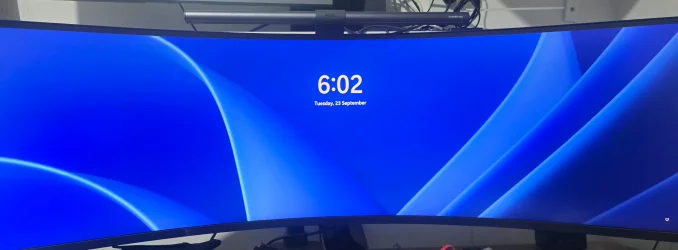
Complete unresponsive login screen


rhyswaight

New member
Local time
7:59 PM
Posts
1
OS
windows 11 pro
This problem just started and i dont actually know where to start!

I boot my PC everything loads normally until i reach the login screen then nothing. My keyboard and mouse both function but my pc doesnt do anything. I know my pass though i cant even put it in.

Things ive tried,
Boot to safe - no input
TroubleShoot with CDM - no inpukeyboard and mouse - i made a new ios on a different drive - works completely fine
Unable to run checks as i cant even type!

Im lost any help is greatly appreciated

Pc,
Windows 11 pro 24H2
MSI z690 ekwb
13th Gen Intel i9-13900KF
Samsung SSD 990 Pro 2TB
3090 waterforce

Not sure what else to include any help is appreciated!
 
Windows Build/Version
windows 11 Pro 24H2

Attachments

  • 20250923_180300.webp
    20250923_180300.webp
    192.3 KB · Views: 1

My Computer

System One

  • OS
    windows 11 pro
    Computer type
    PC/Desktop
    Manufacturer/Model
    complete custom water cooled system
If all else fails, a repair installation using a bootable USB FLASH drive with a windows image. That will retain your files and settings but replace the Windows files.
 

My Computers

System One System Two

  • OS
    Win 11 Pro 25H2, Build 26200.8524
    Computer type
    PC/Desktop
    Manufacturer/Model
    Home Brew
    CPU
    Intel Core i5 14500
    Motherboard
    Gigabyte B760M G P WIFI
    Memory
    64GB DDR4
    Graphics Card(s)
    GeForce RTX 4060
    Sound Card
    Chipset Realtek
    Monitor(s) Displays
    LG 45" Ultragear, Acer 24" 1080p
    Screen Resolution
    5120x1440, 1920x1080
    Hard Drives
    Crucial P310 2TB 2280 PCIe Gen4 3D NAND NVMe M.2 SSD (O/S)
    Silicon Power 2TB US75 NVMe PCIe Gen4 M.2 2280 SSD (backup)
    Crucial BX500 2TB 3D NAND (2nd backup)
    Seagate 4TB Ironwolf, rotating HDD archive files
    External off-line backup Drives: 2 NVMe 4TB drives in external enclosures
    PSU
    Thermaltake Toughpower GF3 750W
    Case
    LIAN LI LANCOOL 216 E-ATX PC Case
    Cooling
    Lots of fans!
    Keyboard
    Microsoft Comfort Curve 2000
    Mouse
    Logitech G305
    Internet Speed
    Verizon FiOS 1GB
    Browser
    Firefox
    Antivirus
    Malware Bytes & Windows Defender Security
  • Operating System
    Win 11 Pro 25H2, Build 26200.8524
    Computer type
    PC/Desktop
    Manufacturer/Model
    Home Brew
    CPU
    Intel Core i5 14400
    Motherboard
    Gigabyte B760M DS3H AX
    Memory
    32GB DDR5
    Graphics card(s)
    Intel 700 Embedded GPU
    Sound Card
    Realtek Embedded
    Monitor(s) Displays
    27" HP 1080p
    Screen Resolution
    1920x1080
    Hard Drives
    Crucial P310 2TB 2280 PCIe Gen4 eD NAND PCIe SSD
    Samsung EVO 990 2TB NVMe Gen4 SSD
    Samsung 2TB SATA SSD
    PSU
    Thermaltake Smart BM3 650W
    Case
    Okinos Micro ATX Case
    Cooling
    Fans
    Keyboard
    Microsoft Comfort Curve 2000
    Mouse
    Logitech G305
    Internet Speed
    Verizon FiOS 1GB
    Browser
    Firefox
    Antivirus
    Malware Bytes & Windows Defender Security
i made a new ios on a different drive - works completely fine


Welcome to the forum. You can't do a repair install if your input devices won't work.
Unplug any other device connected to PC except mouse and keyboard while troubleshooting.

First and foremost before you troubleshoot, You have to secure your data that is on the drive. Hopefully you have made a system image.
If you have not, are you using a MS account and backing up your personal folders to Onedrive? If the answer is NO to both those things you can boot from a LIVE Linux distro such as Mint or Ubuntu flash drive to recover your files to external media.

Here are things to try:

If you have an image, restore it.

Attempt a reset if you have input from the recovery environment. Turn off PC and turn it back on. Hold down (and keep held down) the shift key while booting up until you see the recovery screen. Select troubleshoot. From there you can reset your PC.. If your device has bitlocker enabled you will probably be asked for your bitlocker key if you choose to reset and keep your files.

If a reset doesn't work and you don't have an image, do a clean install with all other disks disconnected..
 

My Computers

System One System Two

  • OS
    Windows 11 Pro 25H2
    Computer type
    PC/Desktop
    Manufacturer/Model
    Dell Optiplex 7080
    CPU
    i9-10900 10 core 20 threads
    Motherboard
    DELL 0J37VM
    Memory
    32 gb
    Graphics Card(s)
    none-Intel UHD Graphics 630
    Sound Card
    Integrated Realtek
    Monitor(s) Displays
    Benq 27
    Screen Resolution
    2560x1440
    Hard Drives
    2x1tb Solidigm m.2 nvme /External drives 512gb Samsung m.2 sata+2tb Kingston m2.nvme
    PSU
    500w
    Case
    MT
    Cooling
    Dell Premium
    Keyboard
    Logitech wired
    Mouse
    Logitech wireless
    Internet Speed
    so slow I'm too embarrassed to tell
    Browser
    #1 Edge #2 Firefox
    Antivirus
    Defender+MWB Premium
  • Operating System
    Windows 11 Pro 24H2 26200.8457
    Computer type
    PC/Desktop
    Manufacturer/Model
    Beelink Mini PC SER5
    CPU
    AMD Ryzen 7 6800U
    Memory
    32 gb
    Graphics card(s)
    integrated
    Sound Card
    integrated
    Monitor(s) Displays
    Benq 27
    Screen Resolution
    2560x1440
    Hard Drives
    1TB Crucial nvme
    Keyboard
    Logitech wired
    Mouse
    Logitech wireless
    Internet Speed
    still too embarrassed to tell
    Browser
    Firefox
    Antivirus
    Defender
    Other Info
    System 3 is non compliant Dell 9020 i7-4770/24gb ram Win11 PRO 26200.8457
Back
Top Bottom