Solved Computer now unable to connect to network printer


112022

Well-known member
Member
Local time
2:37 PM
Posts
95
OS
Windows 11
A Windows 11 computer in our house, that used to be able to print on the household's one printer, no longer can.

The computer is an all-in-one, that suffered a damaged display. So we had the shop take everything - drive, CPU, wireless card, etc. - out of that unit, and swap into a new unit that had a good display.

Everything was fast and seamless; the browser's history and cookies and passwords are the same, no reconfiguration needed to connect to home wifi.

But a day after picking the computer up from the shop, I noticed there were no connected printers.

Went to add the printer - I've done it dozens of times with computers in the house - and it failed.

The printer - and, again, it worked with this computer before, and works with other Windows 11 computers we have - is USB connected to a Windows 10 computer.

From the Windows 11 computer, I go to the add a printer dialog and select a shared printer by name as shown in this image from the web:
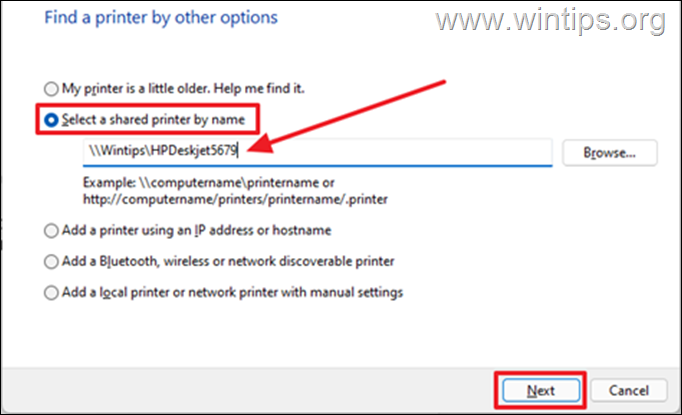
image_thumb-85.png.webp


Even when I select "Browse," it fails. Picking Browse, I can "see" the Windows 10 computer on the network. Clicking on that computer, I can "see" the printer, properly named. Clicking on that, it populates the correct name into the dialog.

But when I click "Next," I immediately get an error that "Windows couldn't connect to the printer."

From the Windows 11 computer, I have done all the "usual suspect" fix attempts:
  • Run the printer troubleshooter
  • Stopped and restarted the print spooler (which was running and on "automatic" start anyway)
  • Tried something with the registry, although the registry path I was supposed to look at didn't exist
  • The printer driver on the host Windows 10 computer is up to date (and, again, same printer and network and everything, worked with these computer components before)
  • Most - not all yet - of what's on https://thegeekpage.com/windows-couldnt-connect-to-the-printer/
Thoughts please?
 

My Computer My Computer

At a glance

Windows 11Intel® CoreTM i5-10400 Processor 12M Cache16GB - Kingston DDR4 SODIMM, 2666
OS
Windows 11
Computer type
PC/Desktop
Manufacturer/Model
LOOP AIO LP-270206
CPU
Intel® CoreTM i5-10400 Processor 12M Cache
Motherboard
Asus Pro H410T/CSM
Memory
16GB - Kingston DDR4 SODIMM, 2666
Screen Resolution
1920x1080
Hard Drives
Samsung MZ-V8V500B/AM 500 GB SSD (OS and apps)
WD 1TB SSD (data)
Antivirus
Defender
In 11 Make sure network discovery and file & printer sharing is ON. Settings>network & internet>advanced network settings>Under More Settings>advanced sharing settings.

Are you certain you typed the printer name correctly in the path? It must be typed exactly as it appears on the connected machine I went to HP site. I do not find a HPDeskjet5679. I do find an HPOfficejet5679. It is not on HP's list of approved printers for Windows 11. I know you said it worked before, but there's always a chance a recent update could have affected it.
 

My Computers My Computers

  • At a glance

    Windows 11 Pro 25H2 26200.8655i9-10900 10 core 20 threads32 gbnone-Intel UHD Graphics 630
    OS
    Windows 11 Pro 25H2 26200.8655
    Computer type
    PC/Desktop
    Manufacturer/Model
    Dell Optiplex 7080
    CPU
    i9-10900 10 core 20 threads
    Motherboard
    DELL 0J37VM
    Memory
    32 gb
    Graphics Card(s)
    none-Intel UHD Graphics 630
    Sound Card
    Integrated Realtek
    Monitor(s) Displays
    Benq 27
    Screen Resolution
    2560x1440
    Hard Drives
    2x1tb Solidigm m.2 nvme /External drives 512gb Samsung m.2 sata+2tb Kingston m2.nvme
    PSU
    500w
    Case
    MT
    Cooling
    Dell Premium
    Keyboard
    Logitech wired
    Mouse
    Logitech wireless
    Internet Speed
    so slow I'm too embarrassed to tell
    Browser
    #1 Edge #2 Firefox
    Antivirus
    Defender+MWB Premium
  • At a glance

    Windows 11 Pro 24H2 26200.8457AMD Ryzen 7 6800U32 gbintegrated
    Operating System
    Windows 11 Pro 24H2 26200.8457
    Computer type
    PC/Desktop
    Manufacturer/Model
    Beelink Mini PC SER5
    CPU
    AMD Ryzen 7 6800U
    Memory
    32 gb
    Graphics card(s)
    integrated
    Sound Card
    integrated
    Monitor(s) Displays
    Benq 27
    Screen Resolution
    2560x1440
    Hard Drives
    1TB Crucial nvme
    Keyboard
    Logitech wired
    Mouse
    Logitech wireless
    Internet Speed
    still too embarrassed to tell
    Browser
    Firefox
    Antivirus
    Defender
    Other Info
    System 3 is non compliant Dell 9020 i7-4770/24gb ram Win11 PRO 26200.8457
In 11 Make sure network discovery and file & printer sharing is ON. Settings>network & internet>advanced network settings>Under More Settings>advanced sharing settings.
Network discovery and file/printer sharing have been turned on all along.
Are you certain you typed the printer name correctly in the path? It must be typed exactly as it appears on the connected machine I went to HP site. I do not find a HPDeskjet5679. I do find an HPOfficejet5679. It is not on HP's list of approved printers for Windows 11. I know you said it worked before, but there's always a chance a recent update could have affected it.
I was using a dialog box image I pulled off the web. Printer name is correct, and anyway, I try connecting to it graphically - browse to it from the network from the add printer dialogs, or find it in File Explorer, right-click, and pick "connect."

The correct printer is graphically visible; I just can't complete the connection to it.

Perhaps it matters and perhaps not, but my printer - old but gets the job done - is a Canon ip4800.
 

My Computer My Computer

At a glance

Windows 11Intel® CoreTM i5-10400 Processor 12M Cache16GB - Kingston DDR4 SODIMM, 2666
OS
Windows 11
Computer type
PC/Desktop
Manufacturer/Model
LOOP AIO LP-270206
CPU
Intel® CoreTM i5-10400 Processor 12M Cache
Motherboard
Asus Pro H410T/CSM
Memory
16GB - Kingston DDR4 SODIMM, 2666
Screen Resolution
1920x1080
Hard Drives
Samsung MZ-V8V500B/AM 500 GB SSD (OS and apps)
WD 1TB SSD (data)
Antivirus
Defender
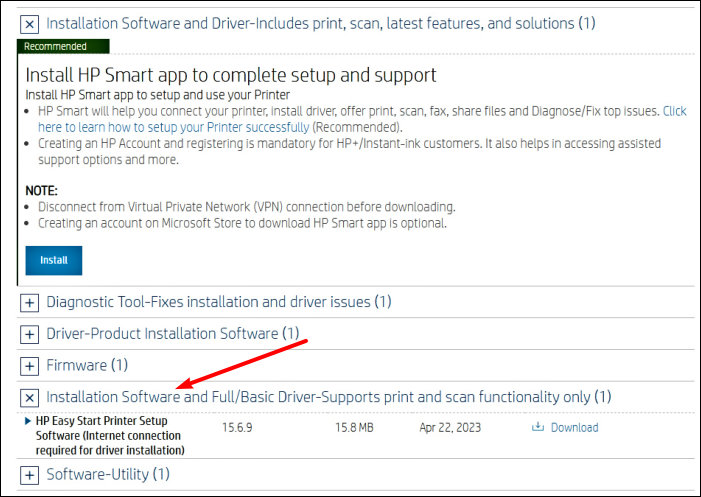
I have a new HP AIO computer that wouldn't connect to an HP 6200 series printer/scanner. I found the solution was to download the full software for the printer and install it. I know installing should be an automatic process but further steps were needed.
 

My Computer My Computer

At a glance

Windows11 Home12th Gen Intel i7-1.70 GHz16.0 GBIntel UHD Graphics - Nvidia GeForce MX450
OS
Windows11 Home
Computer type
PC/Desktop
Manufacturer/Model
HP QHD AiO
CPU
12th Gen Intel i7-1.70 GHz
Motherboard
89E9 0100
Memory
16.0 GB
Graphics Card(s)
Intel UHD Graphics - Nvidia GeForce MX450
Sound Card
Realtek Audio
Monitor(s) Displays
HP 27" QHD
Screen Resolution
2560 x 1440
Hard Drives
1TB SSD (OS and programs) - 1TB HDD (Storage)
Browser
Edge
I have a new HP AIO computer that wouldn't connect to an HP 6200 series printer/scanner. I found the solution was to download the full software for the printer and install it. I know installing should be an automatic process but further steps were needed.
Thanks! Can you say more? I presume you mean installing the driver(s) onto the computer on which the printer is to be added (in my case, the Windows 11) computer?
 

My Computer My Computer

At a glance

Windows 11Intel® CoreTM i5-10400 Processor 12M Cache16GB - Kingston DDR4 SODIMM, 2666
OS
Windows 11
Computer type
PC/Desktop
Manufacturer/Model
LOOP AIO LP-270206
CPU
Intel® CoreTM i5-10400 Processor 12M Cache
Motherboard
Asus Pro H410T/CSM
Memory
16GB - Kingston DDR4 SODIMM, 2666
Screen Resolution
1920x1080
Hard Drives
Samsung MZ-V8V500B/AM 500 GB SSD (OS and apps)
WD 1TB SSD (data)
Antivirus
Defender
I went to the HP support site, typed in the printer/scanner model and downloaded the most inclusive option as shown. Installed it and all worked well once done...

YLeTec8.jpg
 

My Computer My Computer

At a glance

Windows11 Home12th Gen Intel i7-1.70 GHz16.0 GBIntel UHD Graphics - Nvidia GeForce MX450
OS
Windows11 Home
Computer type
PC/Desktop
Manufacturer/Model
HP QHD AiO
CPU
12th Gen Intel i7-1.70 GHz
Motherboard
89E9 0100
Memory
16.0 GB
Graphics Card(s)
Intel UHD Graphics - Nvidia GeForce MX450
Sound Card
Realtek Audio
Monitor(s) Displays
HP 27" QHD
Screen Resolution
2560 x 1440
Hard Drives
1TB SSD (OS and programs) - 1TB HDD (Storage)
Browser
Edge
Thanks. No go. Downloaded the correct package from the Canon site, and still can't connect. "Running" the printer doesn't seem to be the issue. Issue is I can see it from the Windows 11 computer on the network, but I cannot connect to it.
 

My Computer My Computer

At a glance

Windows 11Intel® CoreTM i5-10400 Processor 12M Cache16GB - Kingston DDR4 SODIMM, 2666
OS
Windows 11
Computer type
PC/Desktop
Manufacturer/Model
LOOP AIO LP-270206
CPU
Intel® CoreTM i5-10400 Processor 12M Cache
Motherboard
Asus Pro H410T/CSM
Memory
16GB - Kingston DDR4 SODIMM, 2666
Screen Resolution
1920x1080
Hard Drives
Samsung MZ-V8V500B/AM 500 GB SSD (OS and apps)
WD 1TB SSD (data)
Antivirus
Defender
Thanks. No go. Downloaded the correct package from the Canon site, and still can't connect. "Running" the printer doesn't seem to be the issue. Issue is I can see it from the Windows 11 computer on the network, but I cannot connect to it.
Hi,

1-What happens when you try to map from the problem machine a network drive to the machine hosting the printer?

2-When you log in to the system on which the printer is physically connected,
are you able to see the system that is unable to connect to the printer in explorer?

3-On the Win 11 system, the problem child- On the Security panel, Firewall and Network Protection pane,
Check under 'Allow an app through Firewall' and try to add the printer there.
 
Last edited:

My Computers My Computers

  • At a glance

    All Branches but ReleaseAMD Ryzen 7 7735HS 3200-4500 Mhz 8 cores x 232 GB DDR5Radeon Graphic / NVIDIA GeForce RTX 4060 8 GB...
    OS
    All Branches but Release
    Computer type
    Laptop
    Manufacturer/Model
    Acer Nitro ANV15-51
    CPU
    AMD Ryzen 7 7735HS 3200-4500 Mhz 8 cores x 2
    Motherboard
    Sportage_RBH
    Memory
    32 GB DDR5
    Graphics Card(s)
    Radeon Graphic / NVIDIA GeForce RTX 4060 8 GB GDDR6
    Sound Card
    AMD/Realtek(R) Audio
    Monitor(s) Displays
    Integrated Monitor (15.3"vis)
    Screen Resolution
    FHD 1920X1080 16:9 144Hz
    Hard Drives
    KINGSTON OM8SEP4512Q-AA 1TB
    Western Digital 256GB
    PSU
    19V DC 6.32 A 120 W
    Cooling
    Dual Fans
    Mouse
    MS Bluetooth
    Internet Speed
    Fiber 1GB Cox -us & 1GB Orange-fr
    Browser
    Edge Canary- Firefox Nightly-Chrome Dev-Chrome Dev
    Antivirus
    Windows Defender
  • At a glance

    Windows 11 BetaAMD A9-94208 GB of DDR4AMD Radeon R5
    Operating System
    Windows 11 Beta
    Computer type
    Laptop
    Manufacturer/Model
    Asus X751BP
    CPU
    AMD A9-9420
    Memory
    8 GB of DDR4
    Graphics card(s)
    AMD Radeon R5
    Screen Resolution
    1600x900
    Hard Drives
    Seagate 1 TB
How to fix network printer connection issues in Windows 11 22H2 was the solution.

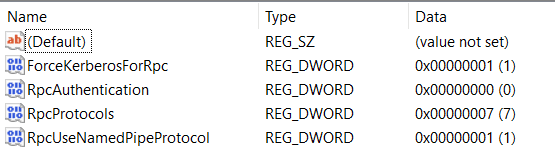
Computer in question is Home edition, so I had to use Regedit. The RPC registry key did not exist. So I had to create the key, then add the RpcOverTCP and RpcOverNamedPipes Dword keys, with values as shown below.

c_fix_printer_issue_win22H2-770x449.jpg


Doing this, then restarting the computer, I was able to connect to the USB printer on the Windows 10 machine, and print.
 

My Computer My Computer

At a glance

Windows 11Intel® CoreTM i5-10400 Processor 12M Cache16GB - Kingston DDR4 SODIMM, 2666
OS
Windows 11
Computer type
PC/Desktop
Manufacturer/Model
LOOP AIO LP-270206
CPU
Intel® CoreTM i5-10400 Processor 12M Cache
Motherboard
Asus Pro H410T/CSM
Memory
16GB - Kingston DDR4 SODIMM, 2666
Screen Resolution
1920x1080
Hard Drives
Samsung MZ-V8V500B/AM 500 GB SSD (OS and apps)
WD 1TB SSD (data)
Antivirus
Defender
  • Like
Reactions: OAT
How to fix network printer connection issues in Windows 11 22H2 was the solution.

Computer in question is Home edition, so I had to use Regedit. The RPC registry key did not exist. So I had to create the key, then add the RpcOverTCP and RpcOverNamedPipes Dword keys, with values as shown below.

c_fix_printer_issue_win22H2-770x449.jpg


Doing this, then restarting the computer, I was able to connect to the USB printer on the Windows 10 machine, and print.
I'm facing the same problem (my printer is HP LaserJet 2300L). Could you describe exactly where in the home edition registry you put the RPC key? The home edition registry is different from the picture above. I tried inserting the RPC key in several places, but none of it worked. Thanks in advance!
 

My Computer My Computer

At a glance

Windows 10
OS
Windows 10
Computer type
PC/Desktop
Hi All, found the solution

Windows 11 (Host PC)
1) Open gpedit.msc to enable Configure RPC connection settings
(Computer Configure > Administrative Templates > Printers > Configure RPC connection settings.)

select RPC over named pipes

2) Go to regedit (Registry Editor)
Add below command at the location below

Right Click > New > Select DWORD (32-bit) Value


1)HKEY_LOCAL_MACHINE\SOFTWARE\Policies\Microsoft\Windows NT\Printers\RPC
(Make sure you have add/have this all command in the folder And rename it same as the attachment below)
"RpcUseNamedPipeProtocol"=dword:00000001
"RpcProtocols"=dword:00000007
"ForceKerberosForRpc"=dword:00000001

1721789472543.png

2) HKEY_LOCAL_MACHINE\System\CurrentControlSet\Control\Print
"RpcAuthnLevelPrivacyEnabled"=dword:00000000


3)After add direct restart the PC!!!!!

Client PC ( Use this to method to add the printer)
1721789273612.png
May refer this video also
 
Last edited:

My Computer My Computer

At a glance

Windows 11
OS
Windows 11
Computer type
Laptop

Latest Support Threads

Back
Top Bottom