computer still running Version 23H2 (os build 22631.6199)


lnjr

Well-known member
Member
Local time
11:06 AM
Posts
46
OS
windows 11 Pro
I have a windows 11 Pro Geekom Mini PC that is still running version 23H2 (OS Build 22631.6199). I have not been online much recently and just started seeing information about a secure boot deadline of June 2026. I am not sure how to make sure if there is something that I need to do or how to check on this on my pc. I also have the feeling that my pc has not updated the version that is running on my pc and when I checked for updates the computer says that it is up to date.
As I said, I haven't been online much over the past year or so, but when I have turned it on, I do see that there are updates for Cumulative Update for Windows 11 Version 23H2 for x64-based Systems, Microsoft Defender updates. There was a Update for Windows Security platform - KB5007651 (Version 10.0.29510.1001) back in February of this year. Microsoft Office updates, 2025-11 Cumulative Update for Windows 11 Version 23H2 for x64-based Systems (KB5068865) that was installed 11/12/25.

Should I have gotten an update to a newer version or is there an update to the current version that I should have installed that Windows Update did not do?


Is this anything that I should be doing that windows update is not doing or be concerned with?

Thank You.
 
Windows Build/Version
Version 23H2 (OS Build 22631.6199)

My Computers

System One System Two

  • OS
    windows 11 Pro
    Computer type
    PC/Desktop
    Manufacturer/Model
    geekom mini IT11
    CPU
    11th Gen Intel Core i7-11390H (4 Cores, 8 Threads, 12M
    Memory
    32GB dual channel (DDR4)
    Graphics Card(s)
    Intel® Iris® Xe
    Monitor(s) Displays
    HP S2031
    Hard Drives
    1TB SSD
  • Operating System
    Windows 11 Pro
    Computer type
    PC/Desktop
    Manufacturer/Model
    Geekom Mini PC XT13 Pro
    CPU
    Intel Core i7-13620H
    Memory
    DDR4: SO-DIMM 32GB
    Monitor(s) Displays
    HPS2031
    Hard Drives
    M.2 1TB
What matters for Secure Boot is installing the latest Monthly Update (May or June 2026).

Check with Geekom support if a newer BIOS update is available which includes the CA 2023 certs. Some PC's may have BIOS'es with the dreaded OEM "Test Key", and those are considered mostly insecure. If you have one, there is a way to delete all factory keys and install a complete set of MS keys which gets you past the CA 2023 migration problem.

But find out if there's a BIOS update which makes the update process simpler.
 

My Computer

System One

  • OS
    Windows 7
Please perform the following steps:


1) Add WMIC:

DISM /Online /Add-Capability /CapabilityName:WMIC~~~~


2) Run Tuneup plus > post a share link


3) Run the V2 log collector > post a share link


4) Run administrative PS > post share links

Get-HotFix
UsoClient StartScan
dism /Online /Get-Packages
 

My Computer

System One

  • OS
    Windows 10
    Computer type
    Laptop
    Manufacturer/Model
    HP
    CPU
    Intel(R) Core(TM) i7-4800MQ CPU @ 2.70GHz
    Motherboard
    Product : 190A Version : KBC Version 94.56
    Memory
    16 GB Total: Manufacturer : Samsung MemoryType : DDR3 FormFactor : SODIMM Capacity : 8GB Speed : 1600
    Graphics Card(s)
    NVIDIA Quadro K3100M; Intel(R) HD Graphics 4600
    Sound Card
    IDT High Definition Audio CODEC; PNP Device ID HDAUDIO\FUNC_01&VEN_111D&DEV_76E0
    Hard Drives
    Model Hitachi HTS727575A9E364
    Antivirus
    Microsoft Defender
    Other Info
    Mobile Workstation
I'm still using version 23H2, and I've already updated my certificates without having to run any of the scripts posted on this forum.

The first thing you need to do is update your system's firmware. According to @KevTech, there's a recent update for your system, so I assume it already contains the necessary information to update the certicates.

Next, you need to update Windows. You have two options. The first one, if your system supports it, is to update to 24H2 or 25H2 via Windows Update.

The second option, which is the one I chose, is to block updates to version 23H2. Since version 23H2 is no longer supported for the Home and Pro editions, you will no longer receive updates through Windows Update. The last automatic update for 23H2 through Windows Update is KB5068865 from November 2025.

However, since the Enterprise and Education editions of 23H2 are still supported until November 2026, you can download all the necessary updates manually and install them on your system without any issues. Since December 2025, there has been a monthly update. Install all updates in chronological order. These manual updates work for any version of 23H2, whether Home, Pro, Enterprise, or Education. The most important manual update is the one from March or April (I don't remember), which includes an automatic script that officially checks and updates the 2023 certificates.

The latest version of Windows 11 23H2 is 22631.7079.
 

My Computer

System One

  • OS
    Win 11 Pro 23H2
    Computer type
    PC/Desktop
    CPU
    13700K
    Motherboard
    MAG Z790 TOMAHAWK WIFI (7D91vHH - 0x12F)
    Memory
    32GB DDR5 Kingston Fury Renegade @6400
    Graphics Card(s)
    MSI GeForce RTX 4070 Ti Gaming X Slim White 12G
    Sound Card
    Creative Sound Blaster Z SE
    Monitor(s) Displays
    ASUS VA24DQ
    Hard Drives
    WD Black SN850X 2TB (main)
    SAMSUNG SSD 990 Pro 2TB
    WD Blue 1TB 7200rpm
    PSU
    Corsair RM1000x SHIFT
    Case
    DeepCool CH560 WH
    Cooling
    Noctua NH-D15S
    Keyboard
    Ducky One 3 Pro Nazca Line
    Mouse
    Logitech G403 HERO
There is a second option. Install VM and run Windows 24H2/25H2 as a guest OS. Its not going to run natively but its a small tradeoff for extending an old PC's useful life. Hardware is an artificial limit.
 

My Computers

System One System Two

  • OS
    Windows 11 Education For 25H2
    Computer type
    Laptop
    Manufacturer/Model
    HP ZBook G2
    CPU
    Intel® Core i7 5500u
    Motherboard
    HP
    Memory
    8 GB
    Graphics Card(s)
    Intel HD Family Graphics 5500 AMD Firepro 4150M
    Sound Card
    Realtek High Audio
    Hard Drives
    1 TB SSD
    Mouse
    HP USB Mouse
    Antivirus
    Windows Defender
  • Operating System
    Windows 11 Pro For Workstations 25H2
    Computer type
    Laptop
    Manufacturer/Model
    HP Zbook G4
    CPU
    Xeon 1535m v6
    Motherboard
    HP
    Memory
    32 GB
    Graphics card(s)
    AMD Quadro Pro 4100
    Sound Card
    Bang and Olufson Audio
    Hard Drives
    1TB SSD
    Mouse
    HP USB Mouse
    Antivirus
    Windows Defender
The Secure Boot update task is present in all currently supported W10 22H2, W11 23H2, 24H2/25H2 and Windows Server releases. You don't need to upgrade Windows (stay on 23H2) to apply the Secure Boot updates.

But you should be on the latest Monthly Update after installing the BIOS update, because the boot manager's been changed several times for security reasons. Last being in April 2026.
 

My Computer

System One

  • OS
    Windows 7
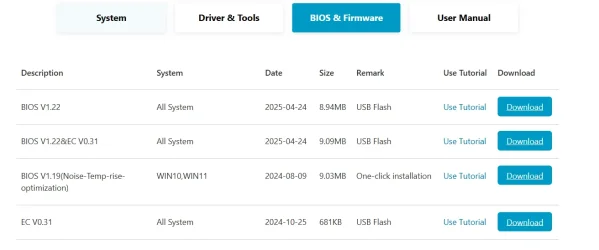
Thanks for all the suggestions. I did go to geekom and for the XT13 PRO series it states that there is a system update. 1780676145400.webp

Under BIOS & Firmware the are a few items
1780676218641.webp

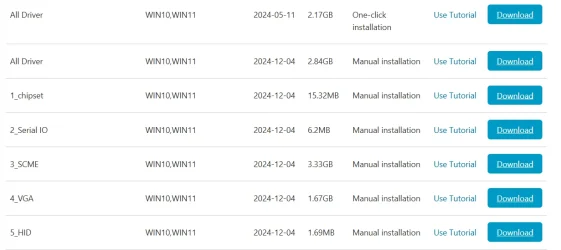
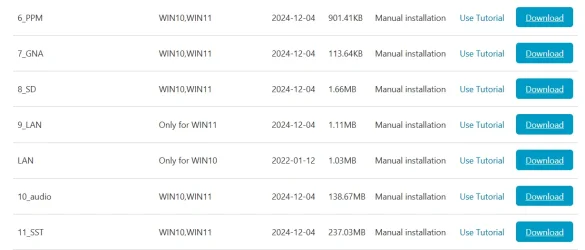
under drivers & Tools there are quite a few items
1780676298923.webp
1780676340708.webp
1780676367093.webp

Looks like I am going to need to find out which BIOS is in my computer right now and what I need to update regarding the BIOS and then the other stuff.

Then see if my system supports the update to 24H2 or 25H2 . If not then it looks like I may need to find out how to download all the necessary updates manually and install them on your system as win11Raider stated.

Thanks. I will let you know how everything goes.
 

My Computers

System One System Two

  • OS
    windows 11 Pro
    Computer type
    PC/Desktop
    Manufacturer/Model
    geekom mini IT11
    CPU
    11th Gen Intel Core i7-11390H (4 Cores, 8 Threads, 12M
    Memory
    32GB dual channel (DDR4)
    Graphics Card(s)
    Intel® Iris® Xe
    Monitor(s) Displays
    HP S2031
    Hard Drives
    1TB SSD
  • Operating System
    Windows 11 Pro
    Computer type
    PC/Desktop
    Manufacturer/Model
    Geekom Mini PC XT13 Pro
    CPU
    Intel Core i7-13620H
    Memory
    DDR4: SO-DIMM 32GB
    Monitor(s) Displays
    HPS2031
    Hard Drives
    M.2 1TB
I think you will have no problem upgrading to version 24H2 or 25H2.

However, if you prefer to stay with version 23H2, you will first need to block updates to 24H2 or 25H2 using the InControl app (which is free, secure, and very easy to use). Updates for version 23H2 can be found here (on the left panel, you can find the updates for every month. The go down and in "How to get this update", select "Catalog").
 

My Computer

System One

  • OS
    Win 11 Pro 23H2
    Computer type
    PC/Desktop
    CPU
    13700K
    Motherboard
    MAG Z790 TOMAHAWK WIFI (7D91vHH - 0x12F)
    Memory
    32GB DDR5 Kingston Fury Renegade @6400
    Graphics Card(s)
    MSI GeForce RTX 4070 Ti Gaming X Slim White 12G
    Sound Card
    Creative Sound Blaster Z SE
    Monitor(s) Displays
    ASUS VA24DQ
    Hard Drives
    WD Black SN850X 2TB (main)
    SAMSUNG SSD 990 Pro 2TB
    WD Blue 1TB 7200rpm
    PSU
    Corsair RM1000x SHIFT
    Case
    DeepCool CH560 WH
    Cooling
    Noctua NH-D15S
    Keyboard
    Ducky One 3 Pro Nazca Line
    Mouse
    Logitech G403 HERO
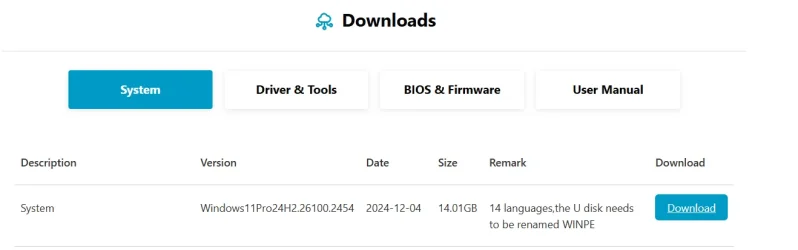
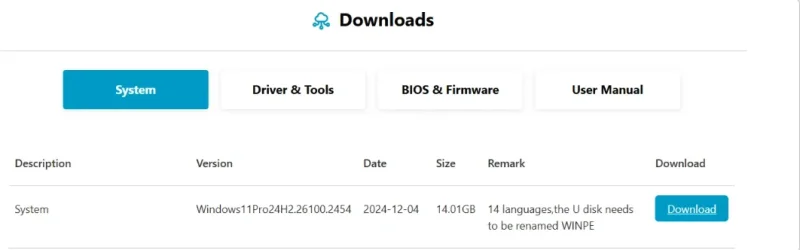
Thanks win11raider! I did contact geekom asking which of the bios firmware I should be selecting, but have not heard back from them yet. I did notice that there is a system update on their page statingWin11Pro24H2.26100.2454 and I asked about that as well, but not sure what to do.
I will look into that InControl app and then check out that page for the those updates. I greatly appreciate it.
 

My Computers

System One System Two

  • OS
    windows 11 Pro
    Computer type
    PC/Desktop
    Manufacturer/Model
    geekom mini IT11
    CPU
    11th Gen Intel Core i7-11390H (4 Cores, 8 Threads, 12M
    Memory
    32GB dual channel (DDR4)
    Graphics Card(s)
    Intel® Iris® Xe
    Monitor(s) Displays
    HP S2031
    Hard Drives
    1TB SSD
  • Operating System
    Windows 11 Pro
    Computer type
    PC/Desktop
    Manufacturer/Model
    Geekom Mini PC XT13 Pro
    CPU
    Intel Core i7-13620H
    Memory
    DDR4: SO-DIMM 32GB
    Monitor(s) Displays
    HPS2031
    Hard Drives
    M.2 1TB
Sorry about not replying sooner. I was away for a couple days. Anyway, I did hear back from Geekom and they were asking what version of Bios I currently have so I got back to them about that and will see which BIOS I should select to install on my pc.
Once I update the BIOS, will that allow my system to get updated to the current version of Windows 11Pro so I will be running the most current version rather than Version23H2 (OS Build 22631.6491) ?

In the meantime, I did install that InControl app that win11raider suggested and then did a backup and started to install the updates for version 23H2 using the link at May 12, 2026—KB5087420 (OS Build 22631.7079) - Microsoft Support and then selecting first update that was not on my computer, downloaded and installed that one. Did some stuff on my computer for a couple hours and when all was still running fine, I went back and selected the next update and downloaded that one. I did another backup of my system and then installed that update. Did the same thing yesterday and then when I went to download the next update which is January 17, 2026—KB5077797 (OS Build 22631.6494) Out-of-band - Microsoft Support I had some issues. I was getting an error - This website encountered and error - error number 8DDD0020. After trying a few different browsers it did finally download. I have not installed that download / .msu file yet but will do that after I have created another complete backup of my computer (just in case)


I also asked Geekom if I should be downloading and installed the download listed on their site for system. Image below which actually stated Windows11Pro24H2.26100.2454 dated 2024-12-041781111696871.webp
 

My Computers

System One System Two

  • OS
    windows 11 Pro
    Computer type
    PC/Desktop
    Manufacturer/Model
    geekom mini IT11
    CPU
    11th Gen Intel Core i7-11390H (4 Cores, 8 Threads, 12M
    Memory
    32GB dual channel (DDR4)
    Graphics Card(s)
    Intel® Iris® Xe
    Monitor(s) Displays
    HP S2031
    Hard Drives
    1TB SSD
  • Operating System
    Windows 11 Pro
    Computer type
    PC/Desktop
    Manufacturer/Model
    Geekom Mini PC XT13 Pro
    CPU
    Intel Core i7-13620H
    Memory
    DDR4: SO-DIMM 32GB
    Monitor(s) Displays
    HPS2031
    Hard Drives
    M.2 1TB
The BIOS version doesn't have anything to do with your Windows release. If you have a recent BIOS, it's more likely the Secure Boot certs are added as factory defaults and making the Secure Boot update painless.

Regardless of whether you stay on 23H2 or update to 25H2, your Windows should have the latest Monthly Update installed for that release. This guarantees you have a current version of the Windows boot manager for security reasons. The same boot files are pushed uniformly across all the supported Windows.
 

My Computer

System One

  • OS
    Windows 7
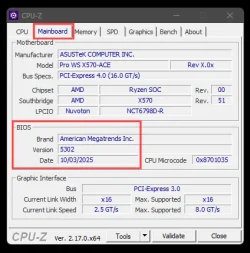
Looks like I am going to need to find out which BIOS is in my computer right now


CPU-Z on the "Mainboard" tab will show you what BIOS you're on right now.
For example... for my motherboard...

Image1.webp
 

My Computers

System One System Two

  • OS
    Win 11 Home ♦♦♦26200.8655 ♦♦♦♦♦♦♦25H2
    Computer type
    PC/Desktop
    Manufacturer/Model
    Built by Ghot® [May 2020]
    CPU
    AMD Ryzen 7 3700X
    Motherboard
    Asus Pro WS X570-ACE (BIOS 5302)
    Memory
    G.Skill (F4-3200C14D-16GTZKW)
    Graphics Card(s)
    EVGA RTX 2070 (08G-P4-2171-KR)
    Sound Card
    Realtek ALC1220P / ALC S1220A
    Monitor(s) Displays
    Dell U3011 30"
    Screen Resolution
    2560 x 1600
    Hard Drives
    2x Samsung 860 EVO 500GB,
    WD 4TB Black FZBX - SATA III,
    WD 8TB Black FZBX - SATA III,
    DRW-24B1ST CD/DVD Burner
    PSU
    PC Power & Cooling 750W Quad EPS12V
    Case
    Cooler Master ATCS 840 Tower
    Cooling
    CM Hyper 212 EVO (push/pull)
    Keyboard
    Ducky DK9008 Shine II Blue LED
    Mouse
    Logitech Optical M-100
    Internet Speed
    300/300
    Browser
    Firefox (latest)
    Antivirus
    Bitdefender Total Security
    Other Info
    Speakers: Klipsch Pro Media 2.1
  • Operating System
    Windows XP Pro 32bit w/SP3
    Computer type
    PC/Desktop
    Manufacturer/Model
    Built by Ghot® (not in use)
    CPU
    AMD Athlon 64 X2 5000+ (OC'd @ 3.2Ghz)
    Motherboard
    ASUS M2N32-SLI Deluxe Wireless Edition
    Memory
    TWIN2X2048-6400C4DHX (2 x 1GB, DDR2 800)
    Graphics card(s)
    EVGA 256-P2-N758-TR GeForce 8600GT SSC
    Sound Card
    Onboard
    Monitor(s) Displays
    ViewSonic G90FB Black 19" Professional (CRT)
    Screen Resolution
    up to 2048 x 1536
    Hard Drives
    WD 36GB 10,000rpm Raptor SATA
    Seagate 80GB 7200rpm SATA
    Lite-On LTR-52246S CD/RW
    Lite-On LH-18A1P CD/DVD Burner
    PSU
    PC Power & Cooling Silencer 750 Quad EPS12V
    Case
    Generic Beige case, 80mm fans
    Cooling
    ZALMAN 9500A 92mm CPU Cooler
    Keyboard
    Logitech Classic Keybooard 200
    Mouse
    Logitech Optical M-BT96a
    Internet Speed
    300/300
    Browser
    Firefox 3.x ??
    Antivirus
    Symantec (Norton)
    Other Info
    Still assembled, still runs. Haven't turned it on for 15 years?
There is a second option. Install VM and run Windows 24H2/25H2 as a guest OS. Its not going to run natively but its a small tradeoff for extending an old PC's useful life. Hardware is an artificial limit.
No, the requirement for SSE4.2 is not artificial and cannot be bypassed! Attempting to boot 24H2 or 25H2 Setup at a CPU without SSE4.2 will hang the system with a black screen. The same will happen to the virtual machine running in such CPU. You can check for SSE4.2 using CPU-Z utility.

If CPU-Z shows you CPU has SSE4.2, then all you need is to download the 25H2 ISO (yes, you can upgrade directly from 23H2 to 25H2), bypass compatibility check if needed, and upgrade. My main PC (2nd system specs) is a 3rd generation Intel Core-i7 running Windows 11 25H2 without issues.
 

My Computers

System One System Two

  • OS
    Windows 11 Pro 23H2 (5699), 25H2 (8655)
    Computer type
    Laptop
    Manufacturer/Model
    Acer Extensa 5630EZ
    CPU
    Mobile DualCore Intel Core 2 Duo T7250, 2000 MHz
    Motherboard
    Acer Extensa 5630
    Memory
    4GB
    Graphics Card(s)
    Mobile Intel(R) GMA 4500M (Mobile 4 series)
    Sound Card
    Realtek ALC268 @ Intel 82801IB ICH9 - High Definition Audio Controller
    Monitor(s) Displays
    1
    Screen Resolution
    1280x800
    Hard Drives
    Samsung SSD 850 EVO 250GB SATA Device (250 GB, SATA-III)
    Internet Speed
    VDSL 50 Mbps
    Browser
    MICROSOFT EDGE
    Antivirus
    WINDOWS DEFENDER
    Other Info
    Legacy MBR installation, no TPM, no Secure Boot, no WDDM 2.0 graphics drivers, no SSE4.2, cannot get more unsupported ;) This is only my test laptop. I had installed Windows 11 here before upgrading my main PC. For my main PC I use everyday see my 2nd system specs.
  • Operating System
    Windows 11 Pro v25H2 (build 26200.8655)
    Computer type
    PC/Desktop
    Manufacturer/Model
    Custom-built PC
    CPU
    Intel Core-i7 3770 3.40GHz s1155 (3rd generation)
    Motherboard
    Asus P8H61 s1155 ATX
    Memory
    2x Kingston Hyper-X Blu 8GB DDR3-1600
    Graphics card(s)
    GIGABYTE GeForce RTX 3050 WINDFORCE OC V2 6GB (GV-N3050WF2OCV2-6GD)
    Sound Card
    Realtek HD audio (ALC887)
    Monitor(s) Displays
    Sony Bravia KDL-19L4000 19" LCD TV via VGA
    Screen Resolution
    1440x900 32-bit 60Hz
    Hard Drives
    WD Blue SA510 2.5 1000GB SSD as system disk, Western Digital Caviar Purple 4TB SATA III (WD40PURZ) as second
    PSU
    Thermaltake Litepower RGB 550W Full Wired
    Case
    SUPERCASE MIDI-TOWER
    Cooling
    Deepcool Gamma Archer CPU cooler, 1x 8cm fan at the back
    Keyboard
    Mitsumi 101-key PS/2
    Mouse
    Sunnyline OptiEye PS/2
    Internet Speed
    100Mbps
    Browser
    Microsoft Edge, Mozilla Firefox
    Antivirus
    Microsoft Windows Defender
    Other Info
    Legacy BIOS (MBR) installation, no TPM, no Secure Boot, WDDM 3.0 graphics drivers, WEI score 7.4
No, the requirement for SSE4.2 is not artificial and cannot be bypassed! Attempting to boot 24H2 or 25H2 Setup at a CPU without SSE4.2 will hang the system with a black screen. The same will happen to the virtual machine running in such CPU. You can check for SSE4.2 using CPU-Z utility.

If CPU-Z shows you CPU has SSE4.2, then all you need is to download the 25H2 ISO (yes, you can upgrade directly from 23H2 to 25H2), bypass compatibility check if needed, and upgrade. My main PC (2nd system specs) is a 3rd generation Intel Core-i7 running Windows 11 25H2 without issues.

I was referring to a VM that can emulate SSE4.2. You cannot boot Windows 24H2/25H2 natively on a PC with a chip that doesn't support the instruction set.
 

My Computers

System One System Two

  • OS
    Windows 11 Education For 25H2
    Computer type
    Laptop
    Manufacturer/Model
    HP ZBook G2
    CPU
    Intel® Core i7 5500u
    Motherboard
    HP
    Memory
    8 GB
    Graphics Card(s)
    Intel HD Family Graphics 5500 AMD Firepro 4150M
    Sound Card
    Realtek High Audio
    Hard Drives
    1 TB SSD
    Mouse
    HP USB Mouse
    Antivirus
    Windows Defender
  • Operating System
    Windows 11 Pro For Workstations 25H2
    Computer type
    Laptop
    Manufacturer/Model
    HP Zbook G4
    CPU
    Xeon 1535m v6
    Motherboard
    HP
    Memory
    32 GB
    Graphics card(s)
    AMD Quadro Pro 4100
    Sound Card
    Bang and Olufson Audio
    Hard Drives
    1TB SSD
    Mouse
    HP USB Mouse
    Antivirus
    Windows Defender
Did the same thing yesterday and then when I went to download the next update which is January 17, 2026—KB5077797 (OS Build 22631.6494) Out-of-band - Microsoft Support I had some issues. I was getting an error

This could be the cause of the error. You must install the updates in chronological order. You have installed an older version (January 2026) over the newer one (May 2026).

Since your last update via Windows Update was November 2025, the first off-line update must be December 2025. After that, install January 2026, and so on. Finally, you can install the update June 2026.

There are monthly updates that do not require all previous updates (since some updates includes the previous fixes), but I recommend that you install them all.
 

My Computer

System One

  • OS
    Win 11 Pro 23H2
    Computer type
    PC/Desktop
    CPU
    13700K
    Motherboard
    MAG Z790 TOMAHAWK WIFI (7D91vHH - 0x12F)
    Memory
    32GB DDR5 Kingston Fury Renegade @6400
    Graphics Card(s)
    MSI GeForce RTX 4070 Ti Gaming X Slim White 12G
    Sound Card
    Creative Sound Blaster Z SE
    Monitor(s) Displays
    ASUS VA24DQ
    Hard Drives
    WD Black SN850X 2TB (main)
    SAMSUNG SSD 990 Pro 2TB
    WD Blue 1TB 7200rpm
    PSU
    Corsair RM1000x SHIFT
    Case
    DeepCool CH560 WH
    Cooling
    Noctua NH-D15S
    Keyboard
    Ducky One 3 Pro Nazca Line
    Mouse
    Logitech G403 HERO
At first I don't think you can run 24H2 and 25H2 on a CPU without SSE4.2 either natively or in a virtual machine that shares the same CPU. I tried that in VMWare Workstation. I even tried to fake the CPU ID using Intel SDE Tool, also didn't work. Which Virtual Machine allows you to successfully emulate SSE4.2 instructions on a CPU without them? Please give details step-by-step how to achieve it. I wouldn't mind if I run Windows 11 23H2 as host in my test laptop (see 1st system specs) and then run Windows 11 25H2 in a virtual machine. It is not very fast anyway so a small performance penalty would not make a huge difference.

Secondly, the issue is because newer updates make older updates obsolete. If you miss a cumulative update and you install a newer one, you are OK. You don't need or cannot install the missing update because it is no longer applicable to your system. If you download it from Microsoft Updates Catalog and try to install it manually you should see an error. This is normal. If you like me, are concerned you might miss some feature, it is better to download all updates and install them in chronological order than suggested. To have a reference, when I installed Windows XP to a friend back in the day, I didn't trust the Windows XP SP3 CD-ROM. I installed the original (aka RTM) version, Windows XP and then manually installed SP1, then SP2 and then SP3 to make sure I have everything and I am not missing any components or features. Similarly, I didn't install Microsoft dotNET 3 directly, I installed dotNET 1.1 first, then 2.0, then 3.0, then 3.5, then 3.5 SP1 and finally 4.0 (there wasn't any newer back then). This was because some rather old applications and games would require an older version of Microsoft dotNET and of course you cannot install it if you have a newer version installed. So I installed all versions in order to make 100% sure I am not missing anything and I am as much backwards compatible as possible.

Even today in Windows 11, I first installed Windows Core 1.0, then 1.1, 2.0, 2.1, 2.2, 3.0, 3.1 and then Microsoft dotNET 5, 6, 7, 8, 9, 10 and even 11 Preview to be 100% sure I can run everything. Also for the same reason I have installed both the x86 and x64 versions of VC Redist 2005, 2008, 2010, 2012, 2013, 2015 and 2017-2026. I hate it when I see an error that some component is missing, no matter how old or how new is the application or game I'm trying to run.
 
Last edited:

My Computers

System One System Two

  • OS
    Windows 11 Pro 23H2 (5699), 25H2 (8655)
    Computer type
    Laptop
    Manufacturer/Model
    Acer Extensa 5630EZ
    CPU
    Mobile DualCore Intel Core 2 Duo T7250, 2000 MHz
    Motherboard
    Acer Extensa 5630
    Memory
    4GB
    Graphics Card(s)
    Mobile Intel(R) GMA 4500M (Mobile 4 series)
    Sound Card
    Realtek ALC268 @ Intel 82801IB ICH9 - High Definition Audio Controller
    Monitor(s) Displays
    1
    Screen Resolution
    1280x800
    Hard Drives
    Samsung SSD 850 EVO 250GB SATA Device (250 GB, SATA-III)
    Internet Speed
    VDSL 50 Mbps
    Browser
    MICROSOFT EDGE
    Antivirus
    WINDOWS DEFENDER
    Other Info
    Legacy MBR installation, no TPM, no Secure Boot, no WDDM 2.0 graphics drivers, no SSE4.2, cannot get more unsupported ;) This is only my test laptop. I had installed Windows 11 here before upgrading my main PC. For my main PC I use everyday see my 2nd system specs.
  • Operating System
    Windows 11 Pro v25H2 (build 26200.8655)
    Computer type
    PC/Desktop
    Manufacturer/Model
    Custom-built PC
    CPU
    Intel Core-i7 3770 3.40GHz s1155 (3rd generation)
    Motherboard
    Asus P8H61 s1155 ATX
    Memory
    2x Kingston Hyper-X Blu 8GB DDR3-1600
    Graphics card(s)
    GIGABYTE GeForce RTX 3050 WINDFORCE OC V2 6GB (GV-N3050WF2OCV2-6GD)
    Sound Card
    Realtek HD audio (ALC887)
    Monitor(s) Displays
    Sony Bravia KDL-19L4000 19" LCD TV via VGA
    Screen Resolution
    1440x900 32-bit 60Hz
    Hard Drives
    WD Blue SA510 2.5 1000GB SSD as system disk, Western Digital Caviar Purple 4TB SATA III (WD40PURZ) as second
    PSU
    Thermaltake Litepower RGB 550W Full Wired
    Case
    SUPERCASE MIDI-TOWER
    Cooling
    Deepcool Gamma Archer CPU cooler, 1x 8cm fan at the back
    Keyboard
    Mitsumi 101-key PS/2
    Mouse
    Sunnyline OptiEye PS/2
    Internet Speed
    100Mbps
    Browser
    Microsoft Edge, Mozilla Firefox
    Antivirus
    Microsoft Windows Defender
    Other Info
    Legacy BIOS (MBR) installation, no TPM, no Secure Boot, WDDM 3.0 graphics drivers, WEI score 7.4
I am downloading those updates in the order as listed on the MS website. I started by checking my history and then finding the very next one and selecting that one to download and then install. I am not trying to just go to the most recent update. I was having an issue downloading the one update - I did eventually get that download and it installed with no issues at all this morning. I have now downloaded the next one that comes after the one that I installed today and I will install that tomorrow morning. I am not getting any errors when installing the actual .msu file / update.

My pc is about 18 months old. If the current version which is 23H2 then wouldn't the computer automatically update to the next stable version or at least give me that option with the downloads?

Thanks for the suggestion about CPU-Z - will definitely check it out!

Since there are a few different options on the Geekom website for my unit regarding BIOS I did contact them to make sure that I am downloading and installing the proper one. Waiting to hear back from them now.
 

My Computers

System One System Two

  • OS
    windows 11 Pro
    Computer type
    PC/Desktop
    Manufacturer/Model
    geekom mini IT11
    CPU
    11th Gen Intel Core i7-11390H (4 Cores, 8 Threads, 12M
    Memory
    32GB dual channel (DDR4)
    Graphics Card(s)
    Intel® Iris® Xe
    Monitor(s) Displays
    HP S2031
    Hard Drives
    1TB SSD
  • Operating System
    Windows 11 Pro
    Computer type
    PC/Desktop
    Manufacturer/Model
    Geekom Mini PC XT13 Pro
    CPU
    Intel Core i7-13620H
    Memory
    DDR4: SO-DIMM 32GB
    Monitor(s) Displays
    HPS2031
    Hard Drives
    M.2 1TB
My pc is about 18 months old. If the current version which is 23H2 then wouldn't the computer automatically update to the next stable version or at least give me that option with the downloads?

Given the computer you have, Windows Update should update your Windows to 24H2 or 25H2 without any issues, unless you've blocked updates and Windows remains on 23H2, as I have.
 

My Computer

System One

  • OS
    Win 11 Pro 23H2
    Computer type
    PC/Desktop
    CPU
    13700K
    Motherboard
    MAG Z790 TOMAHAWK WIFI (7D91vHH - 0x12F)
    Memory
    32GB DDR5 Kingston Fury Renegade @6400
    Graphics Card(s)
    MSI GeForce RTX 4070 Ti Gaming X Slim White 12G
    Sound Card
    Creative Sound Blaster Z SE
    Monitor(s) Displays
    ASUS VA24DQ
    Hard Drives
    WD Black SN850X 2TB (main)
    SAMSUNG SSD 990 Pro 2TB
    WD Blue 1TB 7200rpm
    PSU
    Corsair RM1000x SHIFT
    Case
    DeepCool CH560 WH
    Cooling
    Noctua NH-D15S
    Keyboard
    Ducky One 3 Pro Nazca Line
    Mouse
    Logitech G403 HERO
If you have a Windows 11 compliant installation (UEFI boot, TPM 2.0 and Secure Boot enabled), then you should be offered to upgrade to 25H2 via Windows Update. If for any reason compatibility breaks, then you must make it compliant or bypass compatibility check to manually upgrade using the ISO. There's a utility to confirm Windows 11 compliance. I am on my mobile now, I don't remember which one it is.
 

My Computers

System One System Two

  • OS
    Windows 11 Pro 23H2 (5699), 25H2 (8655)
    Computer type
    Laptop
    Manufacturer/Model
    Acer Extensa 5630EZ
    CPU
    Mobile DualCore Intel Core 2 Duo T7250, 2000 MHz
    Motherboard
    Acer Extensa 5630
    Memory
    4GB
    Graphics Card(s)
    Mobile Intel(R) GMA 4500M (Mobile 4 series)
    Sound Card
    Realtek ALC268 @ Intel 82801IB ICH9 - High Definition Audio Controller
    Monitor(s) Displays
    1
    Screen Resolution
    1280x800
    Hard Drives
    Samsung SSD 850 EVO 250GB SATA Device (250 GB, SATA-III)
    Internet Speed
    VDSL 50 Mbps
    Browser
    MICROSOFT EDGE
    Antivirus
    WINDOWS DEFENDER
    Other Info
    Legacy MBR installation, no TPM, no Secure Boot, no WDDM 2.0 graphics drivers, no SSE4.2, cannot get more unsupported ;) This is only my test laptop. I had installed Windows 11 here before upgrading my main PC. For my main PC I use everyday see my 2nd system specs.
  • Operating System
    Windows 11 Pro v25H2 (build 26200.8655)
    Computer type
    PC/Desktop
    Manufacturer/Model
    Custom-built PC
    CPU
    Intel Core-i7 3770 3.40GHz s1155 (3rd generation)
    Motherboard
    Asus P8H61 s1155 ATX
    Memory
    2x Kingston Hyper-X Blu 8GB DDR3-1600
    Graphics card(s)
    GIGABYTE GeForce RTX 3050 WINDFORCE OC V2 6GB (GV-N3050WF2OCV2-6GD)
    Sound Card
    Realtek HD audio (ALC887)
    Monitor(s) Displays
    Sony Bravia KDL-19L4000 19" LCD TV via VGA
    Screen Resolution
    1440x900 32-bit 60Hz
    Hard Drives
    WD Blue SA510 2.5 1000GB SSD as system disk, Western Digital Caviar Purple 4TB SATA III (WD40PURZ) as second
    PSU
    Thermaltake Litepower RGB 550W Full Wired
    Case
    SUPERCASE MIDI-TOWER
    Cooling
    Deepcool Gamma Archer CPU cooler, 1x 8cm fan at the back
    Keyboard
    Mitsumi 101-key PS/2
    Mouse
    Sunnyline OptiEye PS/2
    Internet Speed
    100Mbps
    Browser
    Microsoft Edge, Mozilla Firefox
    Antivirus
    Microsoft Windows Defender
    Other Info
    Legacy BIOS (MBR) installation, no TPM, no Secure Boot, WDDM 3.0 graphics drivers, WEI score 7.4

Latest Support Threads

Back
Top Bottom