Crashing right after bootup!


Tweakit

Member
Member
Local time
2:08 PM
Posts
44
OS
Windows 11 Pro, version 25H2 (OS Build 26200.7840)
My computer is crashing. This happened on December 19, January 16 and Feb 21. Three times, spaced about a month apart. Not very often but clearly a bug.

The problem happens right after booting up either at the login screen or after login at my desktop screen. The mouse is frozen or not seen and no user input is accepted, not even cntl-alt-del. Can’t do anything other than a hard-reset which results in a normal boot.

Here are some things I’ve done:
  • Ran SFC which found no integrity violations.
  • Ran CrystalDiskInfo and SSD and HDD are fine. I think this looks at SMART information.
  • After the 2nd occurrence, I updated to the latest bios ver 1825 and the latest chipset drivers.
  • Ran windows memory check with no problem seen.
  • Also, after the 2nd occurrence, I posted a thread entitled Catastrophic Problem wherein OAT recommended I post in this BSOD thread, although I’m not seeing a BSOD.
  • Right after the Feb 21 occurrence, I ran the V2 Log Collector.
This computer was built in April of 2023. The FSP PSU is about 10-years old but a solid unit. There is no overclocking.

The V2 Log Collector results can be Found Here. I hope this can be debugged even though it is a relatively infrequent occurrence. Thanks for reading!
 
Windows Build/Version
25H2 (OS Build 26200.7840)

My Computer

System One

  • OS
    Windows 11 Pro, version 25H2 (OS Build 26200.7840)
    Computer type
    PC/Desktop
    Manufacturer/Model
    ASUS user built
    CPU
    i5-13500
    Motherboard
    ASUS Prime B760M-A AX D4
    Memory
    G.SKILL F4-3200C16D-16GVKB
    Graphics Card(s)
    on board
    Sound Card
    on board
    Monitor(s) Displays
    two monitors
    Screen Resolution
    1080p
    Hard Drives
    SSD for OS: Samsung 980 PRO 1TB, NVMe
    PSU
    FSP AURUM S 400, 400W ATX 2.31
    Case
    Antec Sonata II
    Mouse
    ANKER A7852M
    Internet Speed
    200Mbps up/dn
    Browser
    Edge
    Antivirus
    OS Native
Some of the steps that you performed may need to be repeated.

Make sure that images or share links are posted into this thread.


Please perform the following steps:


1) Run administrative command prompt: > post share links

wevtutil epl Application %userprofile%\Desktop\application.evtx

wevtutil epl System %userprofile%\Desktop\system.evtx


In case the above commands produce error messages then comment into the thread and:

open event viewer:

a) system > post a share link

b) application > post a share link


2) Add WMIC:

DISM /Online /Add-Capability /CapabilityName:WMIC~~~~


3) Run tuneup_plus_log.bat > post a share link


4) Run gather_additional_dump_files.bat > post a share link


5) Enable regback:


6) Create a new restore point:


7) For any new BSOD > post a new V2 share link into the newest post


8) Run Memtest86+ for 8 or more passes > take pictures > post images or share links

Memtest86+ | The Open-Source Memory Testing Tool

Just 1 error is a test fail and testing can be aborted.

The more the passes the better the testing conditions.

It sometimes takes passes into the 20's to detect malfunctioning RAM.

The RAM can be tested all at one time or one at a time in the same DIMM.

Memtest86+ | The Open-Source Memory Testing Tool

MemTest86+ - Test RAM


9) Run Sea Tools Long generic test (all drives) > post images or share links


10) Choose one of the temperature monitoring software applications: Speed fan, HW monitor, Speecy:

SpeedFan - Access temperature sensor in your computer: SpeedFan - Access temperature sensor in your computer

Speccy - Free Download - Piriform: Speccy - System Information - Free

HWMONITOR | Softwares | CPUID: HWMONITOR | Softwares | CPUID


11) Run Prime95 - Stress Test Your CPU

Prime95 - Stress Test Your CPU Windows 10 Performance Maintenance Tutorials

a) Record the maximum temperature and post the maximum temperature into the thread

b) Record test duration and post the uninterrupted test duration into the thread

c) Aim for testing > 3 hrs and abort testing as needed for freezing, temperature changes (see link)

d) Post images or share links into this thread.


12) Run FurMark - GPU Stress Test Windows 10 Performance Maintenance Tutorials

Aim for 1 hour testing.
Please make note of the importance of temperature monitoring and aborting the test in the GPU link.

Abort testing as needed for temperature changes, freezing, display artifacts, etc.

FurMark - GPU Stress Test Windows 10 Performance Maintenance Tutorials:
FurMark - GPU Stress Test

Post images of each into the thread.


13) See the multiple active threads for upgrading secure boot:

Frequently asked questions about the Secure Boot update process - Microsoft Support
Secure Boot playbook for certificates expiring in 2026
Windows Secure Boot Key Creation and Management Guidance
Registry key updates for Secure Boot: Windows devices with IT-managed updates - Microsoft Support
Updating Microsoft Secure Boot keys before expiration in June 2026 | Windows 11 Forum
Secure boot update HowTo | Windows 11 Forum
 

My Computer

System One

  • OS
    Windows 10
    Computer type
    Laptop
    Manufacturer/Model
    HP
    CPU
    Intel(R) Core(TM) i7-4800MQ CPU @ 2.70GHz
    Motherboard
    Product : 190A Version : KBC Version 94.56
    Memory
    16 GB Total: Manufacturer : Samsung MemoryType : DDR3 FormFactor : SODIMM Capacity : 8GB Speed : 1600
    Graphics Card(s)
    NVIDIA Quadro K3100M; Intel(R) HD Graphics 4600
    Sound Card
    IDT High Definition Audio CODEC; PNP Device ID HDAUDIO\FUNC_01&VEN_111D&DEV_76E0
    Hard Drives
    Model Hitachi HTS727575A9E364
    Antivirus
    Microsoft Defender
    Other Info
    Mobile Workstation
It sounds as though it's freezing rather than crashing? That may well be down to a rogue third-party driver, so I suggest you try starting Windows in Safe Mode. In Safe Mode a stripped-down Windows system is loaded, with only critical services and drivers loaded. Typically no third-party drivers are loaded. This does mean that you won't be able to do any useful work in Safe Mode, or play games, and many of your devices may not work properly (or at all) because their drivers have not been loaded. Your display will be low resolution for example, because you'll be using only the Windows basic display driver.

Note: since you probably cant use any of the software tools to boot in Safe Mode, just power the PC off via the power button three times in a row during the boot process. The fourth time it will boot to the Recovery System from where you can reboot in Safe Mode.

If it freezes (or crashes) in Safe Mode then you are most likely looking at a hardware issue. But if it boots fine and is stable in Safe Mode then you likely have a rogue third-party driver or app. Let us know if it's OK in Safe Mode and we'll tell you how to locate the rogue driver or app.
 

My Computer

System One

  • OS
    Windows
I had a very similar problem in Dec, laptop would boot fine but during loading of programs in taskbar & notification area it froze, I tried safe mode which worked & began deleting programs which seemed to be the cause but nothing fixed it. I tried restoring a disk image to various months & finally back to July 25 & the problem remained. Turned out secure boot was the cause, once I turned this off everything worked so I had to reset the certificates back to default & set them up again.
If SB is enabled I’d turn it off to check it.
 

My Computer

System One

  • OS
    Windows 11 Pro 64bit
    Computer type
    Laptop
    Manufacturer/Model
    PC Specialist Optimus VII V17-960 Gaming Laptop.
    CPU
    6th Gen Intel Core i7-6700HQ Quad Core processor.
    Memory
    16GB HyperX IMPACT 1600MHz SODIMM DDR3 (2 x 8GB)
    Graphics Card(s)
    NVIDIA® GeForce® GTX 960M - 2.0GB DDR5 Video RAM - DirectX® 12
    Sound Card
    Intel 2 Channel High Def. Audio + SoundBlaster™ Cinema 2 & Realtek
    Monitor(s) Displays
    Optimus Series: 17.3" Matte Full HD IPS LED Widescreen (1920x1080)
    Screen Resolution
    Full HD IPS display (1920 x 1080).
    Hard Drives
    4TB SSD (internal).
    1x 1TB & 1x 5TB external HDDs.
    Cooling
    STANDARD THERMAL PASTE FOR SUFFICIENT COOLING
    Keyboard
    Logitech K800 wireless keyboard
    Mouse
    Logitech M705 wireless mouse
    Internet Speed
    Upto 100Mbps
    Browser
    Edge.
    Antivirus
    Windows Defender & MalwareBytes pro.
Thanks all for these good suggestions. Time is a bit short so I’m going to try to the quick tips that may shed some light on matters.
It sounds as though it's freezing rather than crashing? That may well be down to a rogue third-party driver, so I suggest you try starting Windows in Safe Mode. In Safe Mode a stripped-down Windows system is loaded, with only critical services and drivers loaded. Typically no third-party drivers are loaded...
Yes, you are correct it is freezing. I like the idea of trying safe mode to zero in on the wayward driver but since this problem doesn't happen very often, and safe mode would certainly slow down my work, I may need to come back to it later.
I had a very similar problem in Dec, laptop would boot fine but during loading of programs in taskbar & notification area it froze, I tried safe mode which worked & began deleting programs which seemed to be the cause but nothing fixed it. I tried restoring a disk image to various months & finally back to July 25 & the problem remained. Turned out secure boot was the cause, once I turned this off everything worked so I had to reset the certificates back to default & set them up again.
If SB is enabled I’d turn it off to check it.
Glad you brought this up. It is curious that you noticed this 1st in December which is the same for me also. Perhaps something happened with the secure boot certificates at that time? Perhaps the problem was more frequent in your case. For me, it's only happened four times since December with the most recent being this morning.
Some additional clues:
  • I'm pretty sure this freeze had only occurred on the first boot of the day. This is certainly the case for the last two of four total freezes, but I think it's true for all four. This seems to suggest that the problem is not due to high temperatures or stressed hardware.
  • This morning's freeze was the most recent of the freezes. This is only a few days after the prior freeze on Feb 21, but the others were spaced by about a month.
Here's what I've done for now:
  • I disabled fast boot. If I understand matters, this should not cause or prevent the problem but if the problem is hardware, then disabling fast boot may flag which hardware is at fault.
  • I turned off Secure Boot per Bastet's suggestion. It may take several weeks to see if this makes the problem go away but we'll see.
While I wait to see what happens, I'll see if I can get a start on the Memtest86+ test that zbook suggested.
 

My Computer

System One

  • OS
    Windows 11 Pro, version 25H2 (OS Build 26200.7840)
    Computer type
    PC/Desktop
    Manufacturer/Model
    ASUS user built
    CPU
    i5-13500
    Motherboard
    ASUS Prime B760M-A AX D4
    Memory
    G.SKILL F4-3200C16D-16GVKB
    Graphics Card(s)
    on board
    Sound Card
    on board
    Monitor(s) Displays
    two monitors
    Screen Resolution
    1080p
    Hard Drives
    SSD for OS: Samsung 980 PRO 1TB, NVMe
    PSU
    FSP AURUM S 400, 400W ATX 2.31
    Case
    Antec Sonata II
    Mouse
    ANKER A7852M
    Internet Speed
    200Mbps up/dn
    Browser
    Edge
    Antivirus
    OS Native
When available please update the progress with steps in post #2.


1) Run administrative command prompt: > post share links

wevtutil epl application "%userprofile%\Desktop\Application.evt"

wevtutil epl system "%userprofile%\Desktop\System.evt"

PowerShell Compress-Archive -Path "%userprofile%\Desktop\*.evt" -DestinationPath "%UserProfile%\Desktop\EventLogs.zip"
 

My Computer

System One

  • OS
    Windows 10
    Computer type
    Laptop
    Manufacturer/Model
    HP
    CPU
    Intel(R) Core(TM) i7-4800MQ CPU @ 2.70GHz
    Motherboard
    Product : 190A Version : KBC Version 94.56
    Memory
    16 GB Total: Manufacturer : Samsung MemoryType : DDR3 FormFactor : SODIMM Capacity : 8GB Speed : 1600
    Graphics Card(s)
    NVIDIA Quadro K3100M; Intel(R) HD Graphics 4600
    Sound Card
    IDT High Definition Audio CODEC; PNP Device ID HDAUDIO\FUNC_01&VEN_111D&DEV_76E0
    Hard Drives
    Model Hitachi HTS727575A9E364
    Antivirus
    Microsoft Defender
    Other Info
    Mobile Workstation
When available please update the progress with steps in post #2.


1) Run administrative command prompt: > post share links

wevtutil epl application "%userprofile%\Desktop\Application.evt"

wevtutil epl system "%userprofile%\Desktop\System.evt"

PowerShell Compress-Archive -Path "%userprofile%\Desktop\*.evt" -DestinationPath "%UserProfile%\Desktop\EventLogs.zip"
Thank you. The application and System .evt files are Found Here.
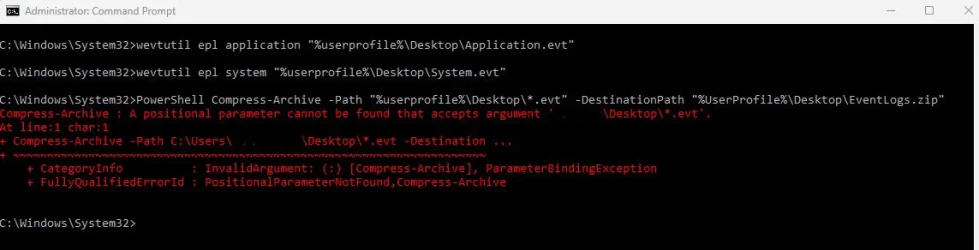
The third command you listed, the PowerShell one gave me an error seen below. Let me know if I can do it another way.
 

Attachments

  • Screenshot 2026-02-24 215823.webp
    Screenshot 2026-02-24 215823.webp
    36.4 KB · Views: 1

My Computer

System One

  • OS
    Windows 11 Pro, version 25H2 (OS Build 26200.7840)
    Computer type
    PC/Desktop
    Manufacturer/Model
    ASUS user built
    CPU
    i5-13500
    Motherboard
    ASUS Prime B760M-A AX D4
    Memory
    G.SKILL F4-3200C16D-16GVKB
    Graphics Card(s)
    on board
    Sound Card
    on board
    Monitor(s) Displays
    two monitors
    Screen Resolution
    1080p
    Hard Drives
    SSD for OS: Samsung 980 PRO 1TB, NVMe
    PSU
    FSP AURUM S 400, 400W ATX 2.31
    Case
    Antec Sonata II
    Mouse
    ANKER A7852M
    Internet Speed
    200Mbps up/dn
    Browser
    Edge
    Antivirus
    OS Native
Confirm that WMIC was added > post images or share links

Please make sure that the steps are performed in sequence.
 

My Computer

System One

  • OS
    Windows 10
    Computer type
    Laptop
    Manufacturer/Model
    HP
    CPU
    Intel(R) Core(TM) i7-4800MQ CPU @ 2.70GHz
    Motherboard
    Product : 190A Version : KBC Version 94.56
    Memory
    16 GB Total: Manufacturer : Samsung MemoryType : DDR3 FormFactor : SODIMM Capacity : 8GB Speed : 1600
    Graphics Card(s)
    NVIDIA Quadro K3100M; Intel(R) HD Graphics 4600
    Sound Card
    IDT High Definition Audio CODEC; PNP Device ID HDAUDIO\FUNC_01&VEN_111D&DEV_76E0
    Hard Drives
    Model Hitachi HTS727575A9E364
    Antivirus
    Microsoft Defender
    Other Info
    Mobile Workstation
The command error in post #7 can be skipped.

The event viewer scripts ran successfully.


Code:
Event[14777]
  Log Name: System
  Source: Microsoft-Windows-WHEA-Logger
  Date: 2026-02-21T21:50:45.7200000Z
  Event ID: 1
  Task: N/A
  Level: Error
  Opcode: Info
  Keyword: WHEA Error Event Logs,
  User: S-1-5-19
  User Name: NT AUTHORITY\LOCAL SERVICE
  Computer: FASTEDDIE-W11
  Description:
A fatal hardware error has occurred. A record describing the condition is contained in the data section of this event.


Code:
Event[14675]
  Log Name: System
  Source: EventLog
  Date: 2026-02-21T21:50:45.4220000Z
  Event ID: 6008
  Task: None
  Level: Error
  Opcode: N/A
  Keyword: Classic,
  User: N/A
  User Name: N/A
  Computer: FASTEDDIE-W11
  Description:
The previous system shutdown at 9:39:08 PM on ?2/?21/?2026 was unexpected.


Code:
Event[14701]
  Log Name: System
  Source: Microsoft-Windows-Kernel-Power
  Date: 2026-02-21T21:50:32.2930000Z
  Event ID: 41
  Task: N/A
  Level: Critical
  Opcode: Info
  Keyword: N/A
  User: S-1-5-18
  User Name: NT AUTHORITY\SYSTEM
  Computer: FASTEDDIE-W11
  Description:
The system has rebooted without cleanly shutting down first. This error could be caused if the system stopped responding, crashed, or lost power unexpectedly.


Code:
Log Name:      System
Source:        Microsoft-Windows-WHEA-Logger
Date:          2/24/2026 12:20:59 PM
Event ID:      1
Task Category: None
Level:         Error
Keywords:      WHEA Error Event Logs
User:          LOCAL SERVICE
Computer:      FASTEDDIE-W11
Description:
A fatal hardware error has occurred. A record describing the condition is contained in the data section of this event.


Code:
Log Name:      System
Source:        Microsoft-Windows-WHEA-Logger
Date:          1/16/2026 9:38:56 AM
Event ID:      1
Task Category: None
Level:         Error
Keywords:      WHEA Error Event Logs
User:          LOCAL SERVICE
Computer:      FASTEDDIE-W11
Description:
A fatal hardware error has occurred. A record describing the condition is contained in the data section of this event.


Code:
Log Name:      System
Source:        Microsoft-Windows-WHEA-Logger
Date:          12/19/2025 9:46:59 AM
Event ID:      1
Task Category: None
Level:         Error
Keywords:      WHEA Error Event Logs
User:          LOCAL SERVICE
Computer:      FASTEDDIE-W11
Description:
A fatal hardware error has occurred. A record describing the condition is contained in the data section of this event.


Code:
Log Name:      System
Source:        Microsoft-Windows-WHEA-Logger
Date:          2/21/2026 9:50:45 PM
Event ID:      1
Task Category: None
Level:         Error
Keywords:      WHEA Error Event Logs
User:          LOCAL SERVICE
Computer:      FASTEDDIE-W11
Description:
A fatal hardware error has occurred. A record describing the condition is contained in the data section of this event.
 
Last edited:

My Computer

System One

  • OS
    Windows 10
    Computer type
    Laptop
    Manufacturer/Model
    HP
    CPU
    Intel(R) Core(TM) i7-4800MQ CPU @ 2.70GHz
    Motherboard
    Product : 190A Version : KBC Version 94.56
    Memory
    16 GB Total: Manufacturer : Samsung MemoryType : DDR3 FormFactor : SODIMM Capacity : 8GB Speed : 1600
    Graphics Card(s)
    NVIDIA Quadro K3100M; Intel(R) HD Graphics 4600
    Sound Card
    IDT High Definition Audio CODEC; PNP Device ID HDAUDIO\FUNC_01&VEN_111D&DEV_76E0
    Hard Drives
    Model Hitachi HTS727575A9E364
    Antivirus
    Microsoft Defender
    Other Info
    Mobile Workstation
Confirm that WMIC was added > post images or share links

Please make sure that the steps are performed in sequence.
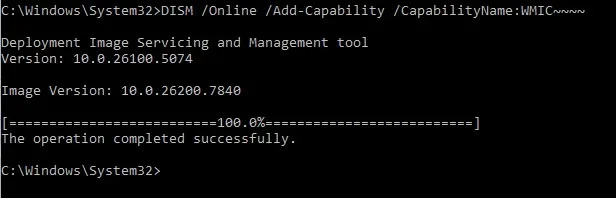
I just added WMIC. See screen shot below.
 

Attachments

  • Add WMIC.webp
    Add WMIC.webp
    13.2 KB · Views: 2

My Computer

System One

  • OS
    Windows 11 Pro, version 25H2 (OS Build 26200.7840)
    Computer type
    PC/Desktop
    Manufacturer/Model
    ASUS user built
    CPU
    i5-13500
    Motherboard
    ASUS Prime B760M-A AX D4
    Memory
    G.SKILL F4-3200C16D-16GVKB
    Graphics Card(s)
    on board
    Sound Card
    on board
    Monitor(s) Displays
    two monitors
    Screen Resolution
    1080p
    Hard Drives
    SSD for OS: Samsung 980 PRO 1TB, NVMe
    PSU
    FSP AURUM S 400, 400W ATX 2.31
    Case
    Antec Sonata II
    Mouse
    ANKER A7852M
    Internet Speed
    200Mbps up/dn
    Browser
    Edge
    Antivirus
    OS Native
Also, regarding the events seen in post #9: Event 14777, WHEA errror, is always seen once per Freeze. This pertains to all four Freezes seen to date. The other events seen in post #9 I suspect are due to the hard reset (pressing reset button to close and reboot).
 

My Computer

System One

  • OS
    Windows 11 Pro, version 25H2 (OS Build 26200.7840)
    Computer type
    PC/Desktop
    Manufacturer/Model
    ASUS user built
    CPU
    i5-13500
    Motherboard
    ASUS Prime B760M-A AX D4
    Memory
    G.SKILL F4-3200C16D-16GVKB
    Graphics Card(s)
    on board
    Sound Card
    on board
    Monitor(s) Displays
    two monitors
    Screen Resolution
    1080p
    Hard Drives
    SSD for OS: Samsung 980 PRO 1TB, NVMe
    PSU
    FSP AURUM S 400, 400W ATX 2.31
    Case
    Antec Sonata II
    Mouse
    ANKER A7852M
    Internet Speed
    200Mbps up/dn
    Browser
    Edge
    Antivirus
    OS Native
Please continue with #3 - #7.

#8 can run overnight and the next day on 16 GB RAM.


So far there were four: A fatal hardware error has occurred. A record describing the condition is contained in the data section of this event.
 

My Computer

System One

  • OS
    Windows 10
    Computer type
    Laptop
    Manufacturer/Model
    HP
    CPU
    Intel(R) Core(TM) i7-4800MQ CPU @ 2.70GHz
    Motherboard
    Product : 190A Version : KBC Version 94.56
    Memory
    16 GB Total: Manufacturer : Samsung MemoryType : DDR3 FormFactor : SODIMM Capacity : 8GB Speed : 1600
    Graphics Card(s)
    NVIDIA Quadro K3100M; Intel(R) HD Graphics 4600
    Sound Card
    IDT High Definition Audio CODEC; PNP Device ID HDAUDIO\FUNC_01&VEN_111D&DEV_76E0
    Hard Drives
    Model Hitachi HTS727575A9E364
    Antivirus
    Microsoft Defender
    Other Info
    Mobile Workstation
Yes, you are correct it is freezing. I like the idea of trying safe mode to zero in on the wayward driver but since this problem doesn't happen very often, and safe mode would certainly slow down my work, I may need to come back to it later.
Fair enough. You might try enabling Driver Verifier, that subjects selected drivers (typically all third-party drivers) to extra tests and checks every time they are called. These extra checks are designed to uncover drivers that are misbehaving. If any selected driver fails any of the Driver Verifier tests/checks then Driver Verifier will BSOD. The resulting minidump should contain enough information for us to identify the flaky driver. It's thus essential to keep all minidumps created whilst Driver Verifier is enabled. There is a small performance hit with Driver Verifier enabled, because of the extra tests and checks, but it should be bearable. Since your issue seems top happen at intervals of about a month, enable Driver Verifier a day or so before you would expect a freeze and disable it once you've had one (that's because the issue may be a driver that's only loaded infrequently)..

Here's how to enable Driver Verifier so that it runs all the appropriate checks...

1. Take a System Restore point and/or take a disk image of your system drive (with Acronis, Macrium Reflect, or similar). It is possible that Driver Verifier may BSOD a driver during the boot process (some drivers are loaded during boot). If that happens you'll be stuck in a boot-BSOD loop.

If you should end up in a boot-BSOD loop, boot the Windows installation media and use that to run system restore and restore to the restore point you took, to remove Driver Verifier and get you booting again. Alternatively you can use the Acronis, Macrium Reflect, or similar, boot media to restore the disk image you took.

Please don't skip this step. it's the only way out of a Driver Verifier boot-BSOD loop.

2. Start the Driver Verifier setup dialog by entering the command verifier in either the Run command box or in a command prompt.

3. On that initial dialog, click the radio button for 'Create custom settings (for code developers)' - the second option - and click the Next button.

4. On the second dialog check (click) the checkboxes for the following tests...
  • Special Pool
  • Force IRQL checking
  • Pool Tracking
  • Deadlock Detection
  • Security Checks
  • Miscellaneous Checks
  • Power framework delay fuzzing
  • DDI compliance checking
Then click the Next button.

5. On the next dialog click the radio button for 'Select driver names from a list' - the last option - and click the Next button.

6. On the next dialog click on the 'Provider' heading, this will sort the drivers on this column (it makes it easier to isolate Microsoft drivers).

7. Now check (click) ALL drivers that DO NOT have Microsoft as the provider (ie. check all third-party drivers).

8. Then, on the same dialog, check the following Microsoft drivers (and ONLY these Microsoft drivers)...
  • Wdf01000.sys
  • ndis.sys
  • fltMgr.sys
  • Storport.sys
These are high-level Microsoft drivers that manage lower-level third-party drivers that we otherwise wouldn't be able to trap. That's why they're included.

9. Now click Finish and then reboot. Driver Verifiier will be enabled.

Be aware that Driver Verifier will remain enabled across all reboots and shutdowns. It can only be disabled manually.

Also be aware that we expect BSODs. Indeed, we want BSODs, to be able to identify the flaky driver(s). You MUST keep all minidumps created whilst Driver Verifier is running, so disable any disk cleanup tools you may have.

10. Leave Driver Verifier running for 48 hours, use your PC as normal during this time, but do try and make it BSOD. Use every game or app that you normally use, and especially those where you have seen it BSOD in the past. If Windows doesn't automatically reboot after each BSOD then just reboot as normal and continue testing. The Driver Verifier generated BSODs are these...
  • 0xC1: SPECIAL_POOL_DETECTED_MEMORY_CORRUPTION
  • 0xC4: DRIVER_VERIFIER_DETECTED_VIOLATION
  • 0xC6: DRIVER_CAUGHT_MODIFYING_FREED_POOL
  • 0xC9: DRIVER_VERIFIER_IOMANAGER_VIOLATION
  • 0xD6: DRIVER_PAGE_FAULT_BEYOND_END_OF_ALLOCATION
  • 0xE6: DRIVER_VERIFIER_DMA_VIOLATION
If you see any of these BSOD types then you can disable Driver Verifier early because you'll have caught a misbehaving driver.

Note: Driver Verifier can only test drivers as they are loaded, so you need to ensure that every third-party driver gets loaded at some point by using all apps, features and devices.

11. To turn Driver Verifier off enter the command verifier /reset in either Run command box or a command prompt and reboot.

Should you wish to check whether Driver Verifier is enabled or not, open a command prompt and enter the command verifier /query. If drivers are listed then it's enabled, if no drivers are listed then it's not.

12. When Driver Verifier has been disabled, navigate to the folder C:\Windows\Minidump and locate all .dmp files in there that are related to the period when Driver Verifier was running (check the timestamps) and upload them.
 

My Computer

System One

  • OS
    Windows
Fair enough. You might try enabling Driver Verifier, that subjects selected drivers (typically all third-party drivers) to extra tests and checks every time they are called. These extra checks are designed to uncover drivers that are misbehaving....
Thanks for this suggestion ubuysa. I had never heard of Driver Verifier and it sounds like a powerful tool. The threat of the boot-BSOD loop is a little scary, but as you’ve described it, can be recovered from. I will keep Driver Verifier and your instructions in my tool kit.
Please continue with #3 - #7.
#8 can run overnight and the next day on 16 GB RAM.....
Thanks, zbook for this information and instructions.
Rather than investing time at this point and possible risk, my plan for the moment is to set aside further efforts until I find out if disabling the secure boot (in post #5 at bottom of post) has or hasn’t solved the problem. This can take a while. Possibly more then 5-6 weeks to know if the problem has gone away with the disabling of secure boot. I may do the memory check while I wait however, since it can be run overnight and is of minimal risk. I will follow up later once I determine if the problem is fixed, or to resume debug should another Freeze occur. Thanks again to all for the help with this.
 

My Computer

System One

  • OS
    Windows 11 Pro, version 25H2 (OS Build 26200.7840)
    Computer type
    PC/Desktop
    Manufacturer/Model
    ASUS user built
    CPU
    i5-13500
    Motherboard
    ASUS Prime B760M-A AX D4
    Memory
    G.SKILL F4-3200C16D-16GVKB
    Graphics Card(s)
    on board
    Sound Card
    on board
    Monitor(s) Displays
    two monitors
    Screen Resolution
    1080p
    Hard Drives
    SSD for OS: Samsung 980 PRO 1TB, NVMe
    PSU
    FSP AURUM S 400, 400W ATX 2.31
    Case
    Antec Sonata II
    Mouse
    ANKER A7852M
    Internet Speed
    200Mbps up/dn
    Browser
    Edge
    Antivirus
    OS Native
Step #3 will modify the default low profile windows settings to settings that are more useful when troubleshooting computer instability.
(less likely to miss BSODs)
(if BSODs produce dump files the file type may be more useful)
It will also check for problems related to the operating system, component store, and drive file system.


Step #4 will collect some of the live kernel events already produced (WHEA).


The results so far:
a) No BSODs
b) Four fatal hardware errors
c) Multiple non-fatal hardware errors


Code:
LastWriteTime         Size (MB) FullName                                            
-------------         --------- --------                                            
12/19/2025 9:46:55 AM      0.25 C:\WINDOWS\LiveKernelReports\WHEA\WHEA-20251219-0946.dmp
1/16/2026 9:38:53 AM       0.25 C:\WINDOWS\LiveKernelReports\WHEA\WHEA-20260116-0938.dmp
2/21/2026 9:50:43 PM       0.25 C:\WINDOWS\LiveKernelReports\WHEA\WHEA-20260221-2150.dmp
 
Last edited:

My Computer

System One

  • OS
    Windows 10
    Computer type
    Laptop
    Manufacturer/Model
    HP
    CPU
    Intel(R) Core(TM) i7-4800MQ CPU @ 2.70GHz
    Motherboard
    Product : 190A Version : KBC Version 94.56
    Memory
    16 GB Total: Manufacturer : Samsung MemoryType : DDR3 FormFactor : SODIMM Capacity : 8GB Speed : 1600
    Graphics Card(s)
    NVIDIA Quadro K3100M; Intel(R) HD Graphics 4600
    Sound Card
    IDT High Definition Audio CODEC; PNP Device ID HDAUDIO\FUNC_01&VEN_111D&DEV_76E0
    Hard Drives
    Model Hitachi HTS727575A9E364
    Antivirus
    Microsoft Defender
    Other Info
    Mobile Workstation

My Computer

System One

  • OS
    Windows 10
    Computer type
    Laptop
    Manufacturer/Model
    HP
    CPU
    Intel(R) Core(TM) i7-4800MQ CPU @ 2.70GHz
    Motherboard
    Product : 190A Version : KBC Version 94.56
    Memory
    16 GB Total: Manufacturer : Samsung MemoryType : DDR3 FormFactor : SODIMM Capacity : 8GB Speed : 1600
    Graphics Card(s)
    NVIDIA Quadro K3100M; Intel(R) HD Graphics 4600
    Sound Card
    IDT High Definition Audio CODEC; PNP Device ID HDAUDIO\FUNC_01&VEN_111D&DEV_76E0
    Hard Drives
    Model Hitachi HTS727575A9E364
    Antivirus
    Microsoft Defender
    Other Info
    Mobile Workstation

From Microsoft Copilot:​

🧩 What Your Event Means​

You’ve captured the exact text Windows uses for a fatal hardware error:

A fatal hardware error has occurred. A record describing the condition is contained in the data section of this event.
This message is generated by WHEA — the Windows Hardware Error Architecture.When Windows logs Event ID 1, it is telling you:

✔️ A hardware component reported an error​

✔️ The error was​

✔️ Windows could not recover​

✔️ The system either froze or rebooted​

✔️ The detailed error record is stored in the binary data section​


This is not a driver crash.

This is not a software bug.


This is a hardware‑level fault.
 

My Computer

System One

  • OS
    Windows 10
    Computer type
    Laptop
    Manufacturer/Model
    HP
    CPU
    Intel(R) Core(TM) i7-4800MQ CPU @ 2.70GHz
    Motherboard
    Product : 190A Version : KBC Version 94.56
    Memory
    16 GB Total: Manufacturer : Samsung MemoryType : DDR3 FormFactor : SODIMM Capacity : 8GB Speed : 1600
    Graphics Card(s)
    NVIDIA Quadro K3100M; Intel(R) HD Graphics 4600
    Sound Card
    IDT High Definition Audio CODEC; PNP Device ID HDAUDIO\FUNC_01&VEN_111D&DEV_76E0
    Hard Drives
    Model Hitachi HTS727575A9E364
    Antivirus
    Microsoft Defender
    Other Info
    Mobile Workstation
Thanks for this suggestion ubuysa. I had never heard of Driver Verifier and it sounds like a powerful tool. The threat of the boot-BSOD loop is a little scary, but as you’ve described it, can be recovered from. I will keep Driver Verifier and your instructions in my tool kit.
It is a powerful tool, but you need to be able to analyse the resulting dumps to get any use from it. All Driver Verifier does is BSOD (and write a dump) when a driver fails one of the checks. It's the subsequent dump analysis that allows the flaky driver to be identified.
 

My Computer

System One

  • OS
    Windows
The scripts are protected at TF.
Were you able or not able to logon?
The scripts were designed to prompt AV software and require manual override.
And the scripts run in the background.
The debugging results may be useful in seeing if the dump files offer information about the underlying problem(s).
 

My Computer

System One

  • OS
    Windows 10
    Computer type
    Laptop
    Manufacturer/Model
    HP
    CPU
    Intel(R) Core(TM) i7-4800MQ CPU @ 2.70GHz
    Motherboard
    Product : 190A Version : KBC Version 94.56
    Memory
    16 GB Total: Manufacturer : Samsung MemoryType : DDR3 FormFactor : SODIMM Capacity : 8GB Speed : 1600
    Graphics Card(s)
    NVIDIA Quadro K3100M; Intel(R) HD Graphics 4600
    Sound Card
    IDT High Definition Audio CODEC; PNP Device ID HDAUDIO\FUNC_01&VEN_111D&DEV_76E0
    Hard Drives
    Model Hitachi HTS727575A9E364
    Antivirus
    Microsoft Defender
    Other Info
    Mobile Workstation
...This message is generated by WHEA — the Windows Hardware Error Architecture.When Windows logs Event ID 1, it is telling you:
✔️ A hardware component reported an error
✔️ The error was​

✔️ Windows could not recover​

✔️ The system either froze or rebooted​

✔️ The detailed error record is stored in the binary data section​

This is not a driver crash.
This is not a software bug.

This is a hardware‑level fault.
Thank you for your continued interest in my issue. I had thought that a “hardware-level fault” included driver related problems, driver conflicts etc. as well as tangible hardware (connections, circuit boards, chips, circuit components, excessive temperatures, etc.). Do you have reason to believe that this problem is not related to driver issues but necessarily a tangible hardware issue? If so, may I ask for some explanation on this?
Step #3 will modify the default low profile windows settings to settings that are more useful when troubleshooting computer instability.
(less likely to miss BSODs)
(if BSODs produce dump files the file type may be more useful)
It will also check for problems related to the operating system, component store, and drive file system.
Step #4 will collect some of the live kernel events already produced (WHEA).....
I am a little hesitant about steps #3,4 because there is mention of changing settings. I have limited to no knowledge on this and don't know what it takes to get back to original settings or the impact of not doing so.
The scripts are protected at TF.
Were you able or not able to logon?
The scripts were designed to prompt AV software and require manual override.
And the scripts run in the background.
The debugging results may be useful in seeing if the dump files offer information about the underlying problem(s).
I was able to login for three of the four freezes. No user input was accepted after login. For the Jan 16 freeze, the freeze occurred at the login screen before logging in. At the login screen, I was able to move the mouse cursor about a half inch when the system froze up.

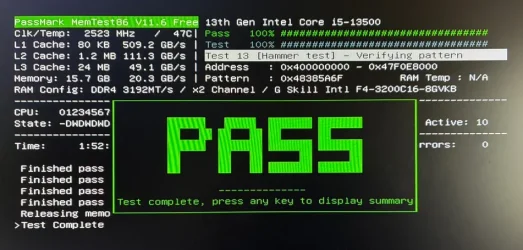
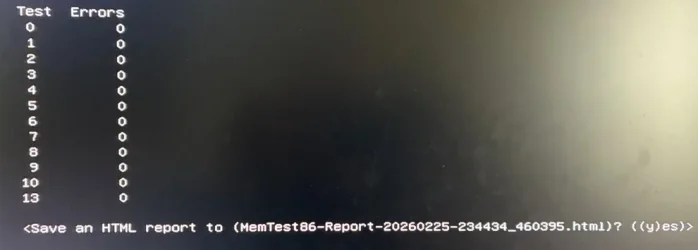
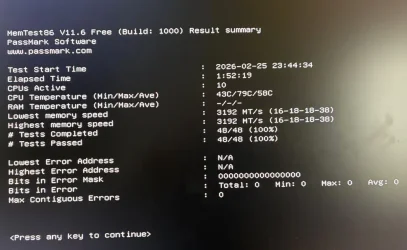
I ran MemTest86 overnight. It passed. See below.
 

Attachments

  • mem0.webp
    mem0.webp
    67.6 KB · Views: 1
  • mem1.webp
    mem1.webp
    55.4 KB · Views: 1
  • mem2.webp
    mem2.webp
    16.5 KB · Views: 1

My Computer

System One

  • OS
    Windows 11 Pro, version 25H2 (OS Build 26200.7840)
    Computer type
    PC/Desktop
    Manufacturer/Model
    ASUS user built
    CPU
    i5-13500
    Motherboard
    ASUS Prime B760M-A AX D4
    Memory
    G.SKILL F4-3200C16D-16GVKB
    Graphics Card(s)
    on board
    Sound Card
    on board
    Monitor(s) Displays
    two monitors
    Screen Resolution
    1080p
    Hard Drives
    SSD for OS: Samsung 980 PRO 1TB, NVMe
    PSU
    FSP AURUM S 400, 400W ATX 2.31
    Case
    Antec Sonata II
    Mouse
    ANKER A7852M
    Internet Speed
    200Mbps up/dn
    Browser
    Edge
    Antivirus
    OS Native

Latest Support Threads

Back
Top Bottom