Crazy Bug - 26220.7752 Beta build


Awalt

Well-known member
Member
VIP
Local time
10:44 PM
Posts
209
Location
Maryland
OS
Windows 11
I had the same thing that happened after I installed this beta earlier this week - I first noticed Quicken closed down a piece at a time in the UI - very weird. So knowing this happened before, I tried running command in admin and I got this:
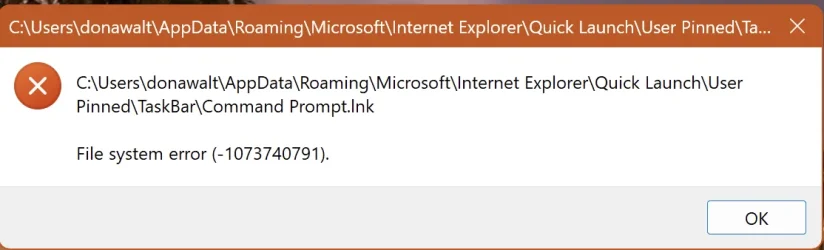

Screenshot 2026-02-05 at 8.59.30 AM.webp

So then I tried using the Run app to do a shutdown /s - got this:
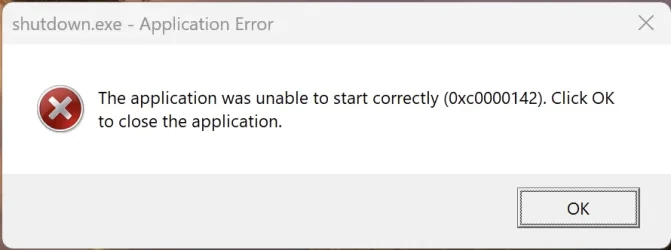
Screenshot 2026-02-05 at 9.00.30 AM.webp

As this is a VM under Parallels, I was able to restart under Parallels, without shutting it down or restarting, and things were normal again. Something definitely is broken in this beta build.

Any ideas what to try or look for when it happens again?
 

My Computer My Computer

At a glance

Windows 11Apple M1 Max 10 core/4 CPU assigned to Parall...64GB/24GB assigned to Parallels 17 VMApple 32 core GPU
OS
Windows 11
Computer type
Laptop
Manufacturer/Model
Apple MacBook Pro 16" 2021
CPU
Apple M1 Max 10 core/4 CPU assigned to Parallels 17 VM
Motherboard
Apple Silicon M1 Max
Memory
64GB/24GB assigned to Parallels 17 VM
Graphics Card(s)
Apple 32 core GPU
Sound Card
Apple
Monitor(s) Displays
16.2" Liquid Retina XDR
Screen Resolution
3456-by-2234 native resolution at 254 psi
Hard Drives
4TB SSD
PSU
Apple
Case
Apple
Cooling
Apple
Keyboard
Apple
Mouse
N/A; Apple Trackpad
Internet Speed
1.2Gb/42Gb
Browser
Parallels 17 VM: MS Edge
Antivirus
Parallels 17 VM: MS Defender

I had the same thing that happened after I installed this beta earlier this week - I first noticed Quicken closed down a piece at a time in the UI - very weird. So knowing this happened before, I tried running command in admin and I got this:


View attachment 162313

So then I tried using the Run app to do a shutdown /s - got this:

View attachment 162314

As this is a VM under Parallels, I was able to restart under Parallels, without shutting it down or restarting, and things were normal again. Something definitely is broken in this beta build.

Any ideas what to try or look for when it happens again?
Well it is an Insider build. You have to expect issues.

Just how many bugs do you think there is? I bet there are lots of bugs!

If problem is with a 3rd party app, first port of call is to uninstall it and reinstall it.

Of course, report it on hub feedback. Ok it might seem nothing gets done but one thing is sure - if you do not feedback issue with app vendor and MS, it will never get fixed.
 

My Computer My Computer

At a glance

Windows 11 Pro + Win11 Canary VM.I9 13th gen i9-13900H 2.60 GHZ16 GB solderedIntegrated Intel Iris XE
OS
Windows 11 Pro + Win11 Canary VM.
Computer type
Laptop
Manufacturer/Model
ASUS Zenbook 14
CPU
I9 13th gen i9-13900H 2.60 GHZ
Motherboard
Yep, Laptop has one.
Memory
16 GB soldered
Graphics Card(s)
Integrated Intel Iris XE
Sound Card
Realtek built in
Monitor(s) Displays
laptop OLED screen
Screen Resolution
2880x1800 touchscreen
Hard Drives
1 TB NVME SSD (only weakness is only one slot)
PSU
Internal + 65W thunderbolt USB4 charger
Case
Yep, got one
Cooling
Stella Artois (UK pint cans - 568 ml) - extra cost.
Keyboard
Built in UK keybd
Mouse
Bluetooth , wireless dongled, wired
Internet Speed
900 mbs (ethernet), wifi 6 typical 350-450 mb/s both up and down
Browser
Edge
Antivirus
Defender
Other Info
TPM 2.0, 2xUSB4 thunderbolt, 1xUsb3 (usb a), 1xUsb-c, hdmi out, 3.5 mm audio out/in combo, ASUS backlit trackpad (inc. switchable number pad)

Macrium Reflect Home V8
Office 365 Family (6 users each 1TB onedrive space)
Hyper-V (a vm runs almost as fast as my older laptop)
Back
Top Bottom