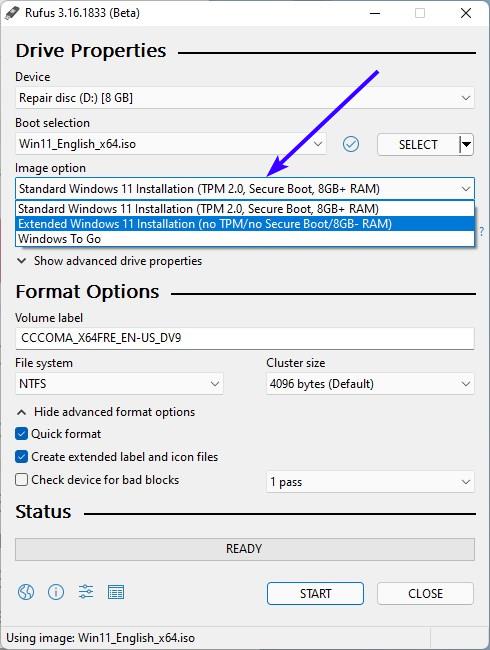
Create bootable Windows 11 ISO without TPM, Secure Boot and RAM requirements.


Hi,
Yes I did both third originally but used the second MCT for the iso last.

Have you tried a 8gb flash drive ?
 

My Computer My Computer

At a glance

Win-7-10-11Pro's10900k & 9940x & 5930kTrident-Z Royal 4000c16 2x16gb & Trident-Z 36...Titan Xp & 1080ti FTW3 & evga 980ti gaming
OS
Win-7-10-11Pro's
Computer type
PC/Desktop
Manufacturer/Model
Acer 17" Nitro 7840sn/ 2x16gb 5600c40/ 4060/ stock 1tb-os/ 4tb sn850x
CPU
10900k & 9940x & 5930k
Motherboard
z490-Apex & x299-Apex & x99-Sabertooth
Memory
Trident-Z Royal 4000c16 2x16gb & Trident-Z 3600c16 4x8gb & 3200c14 4x8gb
Graphics Card(s)
Titan Xp & 1080ti FTW3 & evga 980ti gaming
Sound Card
Onboard Realtek x3
Monitor(s) Displays
1-AOC G2460PG 24"G-Sync 144Hz/ 2nd 1-ASUS VG248QE 24"/ 3rd LG 43" series
Screen Resolution
1920-1080 not sure what the t.v is besides 43" class scales from 1920-1080 perfectly
Hard Drives
2-WD-sn850x 4tb/ 970evo+500gb/ 980 pro 2tb.
PSU
1000p2 & 1200p2 & 850p2
Case
D450 x2 & 1 Test bench in cherry Entertainment center
Cooling
Custom water loops x3 with 2x mora 360mm rads only 980ti gaming air cooled
Keyboard
G710+x3
Mouse
Redragon x3
Internet Speed
xfinity gigabyte
Browser
Firefox
Antivirus
mbam pro
Both the downloaded win11 iso and an iso created by the mct work fine for me, using the release (i.e. not the beta) rufus 3.16. No problem installing in a not-supported vm running on a not-supported host with either usb.
 

My Computer My Computer

At a glance

Windows 7/10/11i7-3720QM @ 2.60Ghz32GBIntel HD Graphics 4000, NVIDIA Quadro K2000M
OS
Windows 7/10/11
Computer type
Laptop
Manufacturer/Model
Lenovo W530
CPU
i7-3720QM @ 2.60Ghz
Memory
32GB
Graphics Card(s)
Intel HD Graphics 4000, NVIDIA Quadro K2000M
Hard Drives
Samsung SSD 860 EVO 1TB
Hi,
Yes I did both third originally but used the second MCT for the iso last.

Have you tried a 8gb flash drive ?


I only have a 16GB and a 256GB. The 16GB has Macrium Rescue Media on it, so I don't play with that one.
 

My Computers My Computers

  • At a glance

    Win 11 Home ♦♦♦26300.9278 ♦♦♦♦♦♦♦26H2AMD Ryzen 7 3700XG.Skill (F4-3200C14D-16GTZKW)EVGA RTX 2070 (08G-P4-2171-KR)
    OS
    Win 11 Home ♦♦♦26300.9278 ♦♦♦♦♦♦♦26H2
    Computer type
    PC/Desktop
    Manufacturer/Model
    Built by Ghot® [May 2020]
    CPU
    AMD Ryzen 7 3700X
    Motherboard
    Asus Pro WS X570-ACE (BIOS 5302)
    Memory
    G.Skill (F4-3200C14D-16GTZKW)
    Graphics Card(s)
    EVGA RTX 2070 (08G-P4-2171-KR)
    Sound Card
    Realtek ALC1220P / ALC S1220A
    Monitor(s) Displays
    Dell U3011 30"
    Screen Resolution
    2560 x 1600
    Hard Drives
    2x Samsung 860 EVO 500GB,
    WD 4TB Black FZBX - SATA III,
    WD 8TB Black FZBX - SATA III,
    DRW-24B1ST CD/DVD Burner
    PSU
    PC Power & Cooling 750W Quad EPS12V
    Case
    Cooler Master ATCS 840 Tower
    Cooling
    CM Hyper 212 EVO (push/pull)
    Keyboard
    Ducky DK9008 Shine II Blue LED
    Mouse
    Logitech Optical M-100
    Internet Speed
    300/300
    Browser
    Firefox (latest)
    Antivirus
    Bitdefender Total Security
    Other Info
    Speakers: Klipsch Pro Media 2.1
  • At a glance

    Windows XP Pro 32bit w/SP3AMD Athlon 64 X2 5000+ (OC'd @ 3.2Ghz)TWIN2X2048-6400C4DHX (2 x 1GB, DDR2 800)EVGA 256-P2-N758-TR GeForce 8600GT SSC
    Operating System
    Windows XP Pro 32bit w/SP3
    Computer type
    PC/Desktop
    Manufacturer/Model
    Built by Ghot® (not in use)
    CPU
    AMD Athlon 64 X2 5000+ (OC'd @ 3.2Ghz)
    Motherboard
    ASUS M2N32-SLI Deluxe Wireless Edition
    Memory
    TWIN2X2048-6400C4DHX (2 x 1GB, DDR2 800)
    Graphics card(s)
    EVGA 256-P2-N758-TR GeForce 8600GT SSC
    Sound Card
    Onboard
    Monitor(s) Displays
    ViewSonic G90FB Black 19" Professional (CRT)
    Screen Resolution
    up to 2048 x 1536
    Hard Drives
    WD 36GB 10,000rpm Raptor SATA
    Seagate 80GB 7200rpm SATA
    Lite-On LTR-52246S CD/RW
    Lite-On LH-18A1P CD/DVD Burner
    PSU
    PC Power & Cooling Silencer 750 Quad EPS12V
    Case
    Generic Beige case, 80mm fans
    Cooling
    ZALMAN 9500A 92mm CPU Cooler
    Keyboard
    Logitech Classic Keybooard 200
    Mouse
    Logitech Optical M-BT96a
    Internet Speed
    300/300
    Browser
    Firefox 3.x ??
    Antivirus
    Symantec (Norton)
    Other Info
    Still assembled, still runs. Haven't turned it on for 15 years?
Both the downloaded win11 iso and an iso created by the mct work fine for me, using the release (i.e. not the beta) rufus 3.16. No problem installing in a not-supported vm running on a not-supported host with either usb.


In the beginning of this topic I used the beta version and it worked. This time I tried the regular version and it worked also.
 

My Computers My Computers

  • At a glance

    Win 11 Home ♦♦♦26300.9278 ♦♦♦♦♦♦♦26H2AMD Ryzen 7 3700XG.Skill (F4-3200C14D-16GTZKW)EVGA RTX 2070 (08G-P4-2171-KR)
    OS
    Win 11 Home ♦♦♦26300.9278 ♦♦♦♦♦♦♦26H2
    Computer type
    PC/Desktop
    Manufacturer/Model
    Built by Ghot® [May 2020]
    CPU
    AMD Ryzen 7 3700X
    Motherboard
    Asus Pro WS X570-ACE (BIOS 5302)
    Memory
    G.Skill (F4-3200C14D-16GTZKW)
    Graphics Card(s)
    EVGA RTX 2070 (08G-P4-2171-KR)
    Sound Card
    Realtek ALC1220P / ALC S1220A
    Monitor(s) Displays
    Dell U3011 30"
    Screen Resolution
    2560 x 1600
    Hard Drives
    2x Samsung 860 EVO 500GB,
    WD 4TB Black FZBX - SATA III,
    WD 8TB Black FZBX - SATA III,
    DRW-24B1ST CD/DVD Burner
    PSU
    PC Power & Cooling 750W Quad EPS12V
    Case
    Cooler Master ATCS 840 Tower
    Cooling
    CM Hyper 212 EVO (push/pull)
    Keyboard
    Ducky DK9008 Shine II Blue LED
    Mouse
    Logitech Optical M-100
    Internet Speed
    300/300
    Browser
    Firefox (latest)
    Antivirus
    Bitdefender Total Security
    Other Info
    Speakers: Klipsch Pro Media 2.1
  • At a glance

    Windows XP Pro 32bit w/SP3AMD Athlon 64 X2 5000+ (OC'd @ 3.2Ghz)TWIN2X2048-6400C4DHX (2 x 1GB, DDR2 800)EVGA 256-P2-N758-TR GeForce 8600GT SSC
    Operating System
    Windows XP Pro 32bit w/SP3
    Computer type
    PC/Desktop
    Manufacturer/Model
    Built by Ghot® (not in use)
    CPU
    AMD Athlon 64 X2 5000+ (OC'd @ 3.2Ghz)
    Motherboard
    ASUS M2N32-SLI Deluxe Wireless Edition
    Memory
    TWIN2X2048-6400C4DHX (2 x 1GB, DDR2 800)
    Graphics card(s)
    EVGA 256-P2-N758-TR GeForce 8600GT SSC
    Sound Card
    Onboard
    Monitor(s) Displays
    ViewSonic G90FB Black 19" Professional (CRT)
    Screen Resolution
    up to 2048 x 1536
    Hard Drives
    WD 36GB 10,000rpm Raptor SATA
    Seagate 80GB 7200rpm SATA
    Lite-On LTR-52246S CD/RW
    Lite-On LH-18A1P CD/DVD Burner
    PSU
    PC Power & Cooling Silencer 750 Quad EPS12V
    Case
    Generic Beige case, 80mm fans
    Cooling
    ZALMAN 9500A 92mm CPU Cooler
    Keyboard
    Logitech Classic Keybooard 200
    Mouse
    Logitech Optical M-BT96a
    Internet Speed
    300/300
    Browser
    Firefox 3.x ??
    Antivirus
    Symantec (Norton)
    Other Info
    Still assembled, still runs. Haven't turned it on for 15 years?
I only have a 16GB and a 256GB. The 16GB has Macrium Rescue Media on it, so I don't play with that one.
Hi,
Yep all my small 8gb flash drives are doing the same thing winpe recovery so can't test one.
Would be odd if rufus limited flash drive size.
 

My Computer My Computer

At a glance

Win-7-10-11Pro's10900k & 9940x & 5930kTrident-Z Royal 4000c16 2x16gb & Trident-Z 36...Titan Xp & 1080ti FTW3 & evga 980ti gaming
OS
Win-7-10-11Pro's
Computer type
PC/Desktop
Manufacturer/Model
Acer 17" Nitro 7840sn/ 2x16gb 5600c40/ 4060/ stock 1tb-os/ 4tb sn850x
CPU
10900k & 9940x & 5930k
Motherboard
z490-Apex & x299-Apex & x99-Sabertooth
Memory
Trident-Z Royal 4000c16 2x16gb & Trident-Z 3600c16 4x8gb & 3200c14 4x8gb
Graphics Card(s)
Titan Xp & 1080ti FTW3 & evga 980ti gaming
Sound Card
Onboard Realtek x3
Monitor(s) Displays
1-AOC G2460PG 24"G-Sync 144Hz/ 2nd 1-ASUS VG248QE 24"/ 3rd LG 43" series
Screen Resolution
1920-1080 not sure what the t.v is besides 43" class scales from 1920-1080 perfectly
Hard Drives
2-WD-sn850x 4tb/ 970evo+500gb/ 980 pro 2tb.
PSU
1000p2 & 1200p2 & 850p2
Case
D450 x2 & 1 Test bench in cherry Entertainment center
Cooling
Custom water loops x3 with 2x mora 360mm rads only 980ti gaming air cooled
Keyboard
G710+x3
Mouse
Redragon x3
Internet Speed
xfinity gigabyte
Browser
Firefox
Antivirus
mbam pro
Hi,
Yep all my small 8gb flash drives are doing the same thing winpe recovery so can't test one.
Would be odd if rufus limited flash drive size.


The article said no smaller than 8GB USB stick.
 

My Computers My Computers

  • At a glance

    Win 11 Home ♦♦♦26300.9278 ♦♦♦♦♦♦♦26H2AMD Ryzen 7 3700XG.Skill (F4-3200C14D-16GTZKW)EVGA RTX 2070 (08G-P4-2171-KR)
    OS
    Win 11 Home ♦♦♦26300.9278 ♦♦♦♦♦♦♦26H2
    Computer type
    PC/Desktop
    Manufacturer/Model
    Built by Ghot® [May 2020]
    CPU
    AMD Ryzen 7 3700X
    Motherboard
    Asus Pro WS X570-ACE (BIOS 5302)
    Memory
    G.Skill (F4-3200C14D-16GTZKW)
    Graphics Card(s)
    EVGA RTX 2070 (08G-P4-2171-KR)
    Sound Card
    Realtek ALC1220P / ALC S1220A
    Monitor(s) Displays
    Dell U3011 30"
    Screen Resolution
    2560 x 1600
    Hard Drives
    2x Samsung 860 EVO 500GB,
    WD 4TB Black FZBX - SATA III,
    WD 8TB Black FZBX - SATA III,
    DRW-24B1ST CD/DVD Burner
    PSU
    PC Power & Cooling 750W Quad EPS12V
    Case
    Cooler Master ATCS 840 Tower
    Cooling
    CM Hyper 212 EVO (push/pull)
    Keyboard
    Ducky DK9008 Shine II Blue LED
    Mouse
    Logitech Optical M-100
    Internet Speed
    300/300
    Browser
    Firefox (latest)
    Antivirus
    Bitdefender Total Security
    Other Info
    Speakers: Klipsch Pro Media 2.1
  • At a glance

    Windows XP Pro 32bit w/SP3AMD Athlon 64 X2 5000+ (OC'd @ 3.2Ghz)TWIN2X2048-6400C4DHX (2 x 1GB, DDR2 800)EVGA 256-P2-N758-TR GeForce 8600GT SSC
    Operating System
    Windows XP Pro 32bit w/SP3
    Computer type
    PC/Desktop
    Manufacturer/Model
    Built by Ghot® (not in use)
    CPU
    AMD Athlon 64 X2 5000+ (OC'd @ 3.2Ghz)
    Motherboard
    ASUS M2N32-SLI Deluxe Wireless Edition
    Memory
    TWIN2X2048-6400C4DHX (2 x 1GB, DDR2 800)
    Graphics card(s)
    EVGA 256-P2-N758-TR GeForce 8600GT SSC
    Sound Card
    Onboard
    Monitor(s) Displays
    ViewSonic G90FB Black 19" Professional (CRT)
    Screen Resolution
    up to 2048 x 1536
    Hard Drives
    WD 36GB 10,000rpm Raptor SATA
    Seagate 80GB 7200rpm SATA
    Lite-On LTR-52246S CD/RW
    Lite-On LH-18A1P CD/DVD Burner
    PSU
    PC Power & Cooling Silencer 750 Quad EPS12V
    Case
    Generic Beige case, 80mm fans
    Cooling
    ZALMAN 9500A 92mm CPU Cooler
    Keyboard
    Logitech Classic Keybooard 200
    Mouse
    Logitech Optical M-BT96a
    Internet Speed
    300/300
    Browser
    Firefox 3.x ??
    Antivirus
    Symantec (Norton)
    Other Info
    Still assembled, still runs. Haven't turned it on for 15 years?


I have no way to test this as my computer has all the requirements. But it sounds rather interesting, to say the least.
Full instructions at the link, and RUFUS does all the work, for you.

All that's needed is...

1. Windows 11 ISO
2. USB Flash Drive 8GB or more.
3. Rufus 3.16 or 3.16 beta

4. Must have the USB stick inserted, and must browse to the ISO image.
5. Then the option [no TPM/no Secure boot/8GB RAM] will appear.


View attachment 10176


If someone has a computer that doesn't meet the Windows 11 requirements, and has the time to test, please see if Windows 11 created as above, will actually install. Post your results for others.

I did this using Rufus - it was beta 2. Worked very well. Created one uefi boot usb and one legacy bios (MBR) usb and installed both - both running really well. Posted elsewhere about it. Used the uefi one on a 5th Generation, touchscreen HP Spectre X360. Install was tricky at first because it wouldn't recognise my wifi - but did recognise mobile wifi so used my phone as wifi hotspot to install. After install it found the wifi ok. Also no graphics driver at time of install but it found that after updates done. Runs great - no issues.

The other stick I did and selected MBR from the drop down menu (legacy bios) and installed that on a 10" atom netbook with 2gb ram. The install was different - different options and graphics etc - until later in the install. More like the Windows 10 one. But no problems finding wifi and all installed fine. Everything fine except it didn't find a graphics driver, but I found one to install. Runs really well! Better than Windows 10 on the same machine.

Sorry for adding the info again - I put that info on the "unsupported hardware" section, but as this specifically asked about the rufus option,.....
 

My Computers My Computers

  • At a glance

    Windows 11 Home 25H2Core i5-1035G132gb
    OS
    Windows 11 Home 25H2
    Computer type
    Laptop
    Manufacturer/Model
    HP Pavilion 14-ce3606sa
    CPU
    Core i5-1035G1
    Memory
    32gb
    Hard Drives
    Samsung 870 evo sata ssd
    Cooling
    Could be better
    Internet Speed
    50 mbps Starlink
    Browser
    Firefox
    Other Info
    Originally came installed with a 500gb H10 Optane ssd
  • At a glance

    Windows 11 HomeIntel Core i5-1035G116gb
    Operating System
    Windows 11 Home
    Computer type
    Laptop
    Manufacturer/Model
    HP Pavilion ce3606sa
    CPU
    Intel Core i5-1035G1
    Memory
    16gb
    Hard Drives
    Hynix Gold P31 2TB
    Internet Speed
    200mbps Starlink
    Browser
    Firefox
    Antivirus
    Defender
the stable release is out (rufus 3.16) and I can see the option. However, when I was trying to boot from it on my unsupported PC, it is stuck on a black screen forever. no text and no visual graphics.
The PC is missing TPM and Secure Boot. Also the CPU is not supported (i5-7400). Anyone know how to fix this?
Did you select MBR bios from the drop down menu (top entry says GPT)? To make the windows 11 bootable on legacy bios? If you made it for uefi bios (GPT) and your machine doesn't have uefi, that might be the issue.

Edit - sorry - just noticed your core i5 is 7th generation so will have uefi :) . In that case, did you leave it on GPT when making the usb stick?! Maybe try burning it again.
 

My Computers My Computers

  • At a glance

    Windows 11 Home 25H2Core i5-1035G132gb
    OS
    Windows 11 Home 25H2
    Computer type
    Laptop
    Manufacturer/Model
    HP Pavilion 14-ce3606sa
    CPU
    Core i5-1035G1
    Memory
    32gb
    Hard Drives
    Samsung 870 evo sata ssd
    Cooling
    Could be better
    Internet Speed
    50 mbps Starlink
    Browser
    Firefox
    Other Info
    Originally came installed with a 500gb H10 Optane ssd
  • At a glance

    Windows 11 HomeIntel Core i5-1035G116gb
    Operating System
    Windows 11 Home
    Computer type
    Laptop
    Manufacturer/Model
    HP Pavilion ce3606sa
    CPU
    Intel Core i5-1035G1
    Memory
    16gb
    Hard Drives
    Hynix Gold P31 2TB
    Internet Speed
    200mbps Starlink
    Browser
    Firefox
    Antivirus
    Defender
I did this using Rufus - it was beta 2. Worked very well. Created one uefi boot usb and one legacy bios (MBR) usb and installed both - both running really well. Posted elsewhere about it. Used the uefi one on a 5th Generation, touchscreen HP Spectre X360. Install was tricky at first because it wouldn't recognise my wifi - but did recognise mobile wifi so used my phone as wifi hotspot to install. After install it found the wifi ok. Also no graphics driver at time of install but it found that after updates done. Runs great - no issues.

The other stick I did and selected MBR from the drop down menu (legacy bios) and installed that on a 10" atom netbook with 2gb ram. The install was different - different options and graphics etc - until later in the install. More like the Windows 10 one. But no problems finding wifi and all installed fine. Everything fine except it didn't find a graphics driver, but I found one to install. Runs really well! Better than Windows 10 on the same machine.

Sorry for adding the info again - I put that info on the "unsupported hardware" section, but as this specifically asked about the rufus option,.....


Now that's what I call: "Testing the install media". To test it any harder, you'd have to try it on a... dishwasher.
Good work! :-)
 

My Computers My Computers

  • At a glance

    Win 11 Home ♦♦♦26300.9278 ♦♦♦♦♦♦♦26H2AMD Ryzen 7 3700XG.Skill (F4-3200C14D-16GTZKW)EVGA RTX 2070 (08G-P4-2171-KR)
    OS
    Win 11 Home ♦♦♦26300.9278 ♦♦♦♦♦♦♦26H2
    Computer type
    PC/Desktop
    Manufacturer/Model
    Built by Ghot® [May 2020]
    CPU
    AMD Ryzen 7 3700X
    Motherboard
    Asus Pro WS X570-ACE (BIOS 5302)
    Memory
    G.Skill (F4-3200C14D-16GTZKW)
    Graphics Card(s)
    EVGA RTX 2070 (08G-P4-2171-KR)
    Sound Card
    Realtek ALC1220P / ALC S1220A
    Monitor(s) Displays
    Dell U3011 30"
    Screen Resolution
    2560 x 1600
    Hard Drives
    2x Samsung 860 EVO 500GB,
    WD 4TB Black FZBX - SATA III,
    WD 8TB Black FZBX - SATA III,
    DRW-24B1ST CD/DVD Burner
    PSU
    PC Power & Cooling 750W Quad EPS12V
    Case
    Cooler Master ATCS 840 Tower
    Cooling
    CM Hyper 212 EVO (push/pull)
    Keyboard
    Ducky DK9008 Shine II Blue LED
    Mouse
    Logitech Optical M-100
    Internet Speed
    300/300
    Browser
    Firefox (latest)
    Antivirus
    Bitdefender Total Security
    Other Info
    Speakers: Klipsch Pro Media 2.1
  • At a glance

    Windows XP Pro 32bit w/SP3AMD Athlon 64 X2 5000+ (OC'd @ 3.2Ghz)TWIN2X2048-6400C4DHX (2 x 1GB, DDR2 800)EVGA 256-P2-N758-TR GeForce 8600GT SSC
    Operating System
    Windows XP Pro 32bit w/SP3
    Computer type
    PC/Desktop
    Manufacturer/Model
    Built by Ghot® (not in use)
    CPU
    AMD Athlon 64 X2 5000+ (OC'd @ 3.2Ghz)
    Motherboard
    ASUS M2N32-SLI Deluxe Wireless Edition
    Memory
    TWIN2X2048-6400C4DHX (2 x 1GB, DDR2 800)
    Graphics card(s)
    EVGA 256-P2-N758-TR GeForce 8600GT SSC
    Sound Card
    Onboard
    Monitor(s) Displays
    ViewSonic G90FB Black 19" Professional (CRT)
    Screen Resolution
    up to 2048 x 1536
    Hard Drives
    WD 36GB 10,000rpm Raptor SATA
    Seagate 80GB 7200rpm SATA
    Lite-On LTR-52246S CD/RW
    Lite-On LH-18A1P CD/DVD Burner
    PSU
    PC Power & Cooling Silencer 750 Quad EPS12V
    Case
    Generic Beige case, 80mm fans
    Cooling
    ZALMAN 9500A 92mm CPU Cooler
    Keyboard
    Logitech Classic Keybooard 200
    Mouse
    Logitech Optical M-BT96a
    Internet Speed
    300/300
    Browser
    Firefox 3.x ??
    Antivirus
    Symantec (Norton)
    Other Info
    Still assembled, still runs. Haven't turned it on for 15 years?
Did you select MBR bios from the drop down menu (top entry says GPT)? To make the windows 11 bootable on legacy bios? If you made it for uefi bios (GPT) and your machine doesn't have uefi, that might be the issue.

Edit - sorry - just noticed your core i5 is 7th generation so will have uefi :) . In that case, did you leave it on GPT when making the usb stick?! Maybe try burning it again.
The USB drive is Rufus NTFS but the boot drive is MBR. I created a Windows 11 USB drive with another tool formatted with FAT32 and it loads Windows 11 setup with no problem. However, the installation won't continue due to lack of TPM and unsupported CPU.
 

My Computer My Computer

At a glance

Windows 11Intel i5 7500Kingston 8 GB DDR4Intel Graphics HD 630
OS
Windows 11
Computer type
PC/Desktop
Manufacturer/Model
DIY
CPU
Intel i5 7500
Motherboard
ASRock B250M
Memory
Kingston 8 GB DDR4
Graphics Card(s)
Intel Graphics HD 630
Monitor(s) Displays
HKC M242
Hard Drives
SanDisk SSD PLus 240
Browser
Chrome
Now that's what I call: "Testing the install media". To test it any harder, you'd have to try it on a... dishwasher.
Good work! :)
Bree also installed on a netbook :-)(first mentioned on the “let’s run W11 on unsupported hardware” thread :-).

Dishwasher - lol.
 

My Computers My Computers

  • At a glance

    Windows 11 Home 25H2Core i5-1035G132gb
    OS
    Windows 11 Home 25H2
    Computer type
    Laptop
    Manufacturer/Model
    HP Pavilion 14-ce3606sa
    CPU
    Core i5-1035G1
    Memory
    32gb
    Hard Drives
    Samsung 870 evo sata ssd
    Cooling
    Could be better
    Internet Speed
    50 mbps Starlink
    Browser
    Firefox
    Other Info
    Originally came installed with a 500gb H10 Optane ssd
  • At a glance

    Windows 11 HomeIntel Core i5-1035G116gb
    Operating System
    Windows 11 Home
    Computer type
    Laptop
    Manufacturer/Model
    HP Pavilion ce3606sa
    CPU
    Intel Core i5-1035G1
    Memory
    16gb
    Hard Drives
    Hynix Gold P31 2TB
    Internet Speed
    200mbps Starlink
    Browser
    Firefox
    Antivirus
    Defender
This method may have already been posted here. From the Asrock reddit forum. I personally have not tested it. It was posted by reddit forum member wyxchari.

Windows 11 without UEFI, without GPT, without SecureBoot, without TPM, without Microsoft account, without WDDM 2.0, without DirectX 12, without ...

No hack programs, no appraiserres.dll change, no registry changes, no manual instructions to create deployment images, no internal rufus 3.16 hack.

Method: install.wim

Windows 11 requirements are set by the installer. They are actually the same as those of Windows 10 (x64 and little else). What you have to do is use the Windows 10 installer to install Windows 11. Anyone who already has Windows 10 installed on their computer can also have Windows 11 installed on the same computer.

Before installing Windows 11, it is not necessary to activate UEFI, nor Secure Boot, nor partition in GPT, nor activate TPM.

1.- Open Rufus, load the Windows 10 ISO (yes 10) for example the last 21H1 and save it to a USB flash memory.

2.- Mount the Windows 11 21H2 ISO and copy the \Sources\install.wim file.

3.- Go to the Windows 10 USB stick, \Sources and paste and replace the Windows 11 install.win .

4.- Boot from the USB and install as if it were Windows 10. You have to choose the custom installation (it is not worth updating) because it was started from USB. To update you have to start by giving setup.exe with the W10 loaded. After the first reboot of the many it will do, it will start to appear that Windows 11 is being installed.

5.- When you ask for the Microsoft account, if you want to jump, go to Other start options.

When finished, the partitions are still in MBR if they were. Windows Update updates are perfectly downloadable. In fact there are already many. For the missing drives in the device manager you can install the W10 ones. I installed some of Windows 8.1 even since there was no W10 because it is an old computer.

This method appears to be similar, or the same, as Method 2 here: https://allthings.how/how-to-install-windows-11-on-legacy-bios-without-secure-boot-or-tpm-2-0/
 
Last edited:

My Computer My Computer

At a glance

Windows 11 ProAMD Ryzen 5 5600XCorsair 32GB Vengeance DDR4 3600Mhz ramNvidia GTX Geforce 1660 Ti
OS
Windows 11 Pro
Computer type
PC/Desktop
Manufacturer/Model
My Build
CPU
AMD Ryzen 5 5600X
Motherboard
Asrock B550 Phantom Gaming 4
Memory
Corsair 32GB Vengeance DDR4 3600Mhz ram
Graphics Card(s)
Nvidia GTX Geforce 1660 Ti
Monitor(s) Displays
MSI 27" Optix G27C4
I have another method

How to modify the installation (ISO) of Windows 11 so that it can be installed on any PC.

Load ISO windows 10 and all files (but not "install.esd"!) In the sources folder (files, not folders!), Copy them to the sources folder on USB with Windows 11 and have them overwritten.
Done, install where you want.
 

My Computers My Computers

  • At a glance

    Windows 10/11AMD Ryzen 5 2600 Six32 GB DDR4AMD Radeon RX 5500 XT
    OS
    Windows 10/11
    Computer type
    Laptop
    CPU
    AMD Ryzen 5 2600 Six
    Motherboard
    GIGABYTE B450 GAMING X / Seasonic Focus GX 550 Gold
    Memory
    32 GB DDR4
    Graphics Card(s)
    AMD Radeon RX 5500 XT
    Sound Card
    BMW
    Monitor(s) Displays
    Acer EK240YAbi - LED monitor 23,8"
  • At a glance

    BMW
    Computer type
    Tablet
    Graphics card(s)
    BMW
    Sound Card
    BMW
I tested this and it works really well and easily.
I downloaded the official Windows 11 ISO and made a stick with rufus and started the installation.

Tested with Acer aspire 5535
 

My Computer My Computer

At a glance

Windows 11 Pro 23H2 (22631.3155)AMD Ryzen 5 5600XKingston 16GB (2 x 8GB) DDR4 3200MHzGigabyte Radeon RX 580 AORUS 8GB GDDR5
OS
Windows 11 Pro 23H2 (22631.3155)
Computer type
PC/Desktop
CPU
AMD Ryzen 5 5600X
Motherboard
Asus TUF Gaming B550-Plus
Memory
Kingston 16GB (2 x 8GB) DDR4 3200MHz
Graphics Card(s)
Gigabyte Radeon RX 580 AORUS 8GB GDDR5
Monitor(s) Displays
Samsung
Screen Resolution
1920X11080
Hard Drives
Samsung 970 EVO Plus NVMe M.2 500GB (OS)
Samsung 980 NVMe 1TB (Games)
Samsung 860 EVO 250GB
Samsung 850 EVO 250GB (Music)
PSU
Super Flower / Leadex 750W 80Plus Titanium
Cooling
SilentiumPC Fortis 3 HE1425 v2
Keyboard
Logitech K520
Mouse
Logitech G700S
Internet Speed
50mbps/10mbps
Browser
Firefox, Chrome, Edge, Opera
Antivirus
Windows Defender
Rufus 3.17 released 10/23 with some crucial bug fixes

use the 3.17 version instead of 3.16 & older to create Win11 install media
 

My Computer My Computer

At a glance

windows 10 ltsc
OS
windows 10 ltsc
I tried Rufus multiple times and no success. The weird thing is that no error popped up. It goes as normal but when trying to boot from the USB, my Gigabyte PC was stuck on a black screen forever. I checked the USB and it has two NTFS partitions. I am not sure if it was the problem. The old computer has only legacy boot.

Later, I turned to another ISO burning tool (uubyte iso editor), which loads Windows 11 setup without any issue. I can see the USB is formatted with MBR (FAT32).
 

My Computer My Computer

At a glance

Windows 11Intel i5 7500Kingston 8 GB DDR4Intel Graphics HD 630
OS
Windows 11
Computer type
PC/Desktop
Manufacturer/Model
DIY
CPU
Intel i5 7500
Motherboard
ASRock B250M
Memory
Kingston 8 GB DDR4
Graphics Card(s)
Intel Graphics HD 630
Monitor(s) Displays
HKC M242
Hard Drives
SanDisk SSD PLus 240
Browser
Chrome
Sorry if this is a silly question but did you select the legacy version of rufus? There are two downloads. One for GPT one for MBR. I have both. Used the MBR version for older hardware, If you try and use the GPT one on older hardware it comes up with a warning message at boot up telling you it's the wrong version for that computer.

When burning the usb also you need to select the right things in the drop down menus. Two drop down menus I seem to remember - one to select MBR and the other to select Windows Extended. Maybe try burning the usb again and check it's the right download.
 

My Computers My Computers

  • At a glance

    Windows 11 Home 25H2Core i5-1035G132gb
    OS
    Windows 11 Home 25H2
    Computer type
    Laptop
    Manufacturer/Model
    HP Pavilion 14-ce3606sa
    CPU
    Core i5-1035G1
    Memory
    32gb
    Hard Drives
    Samsung 870 evo sata ssd
    Cooling
    Could be better
    Internet Speed
    50 mbps Starlink
    Browser
    Firefox
    Other Info
    Originally came installed with a 500gb H10 Optane ssd
  • At a glance

    Windows 11 HomeIntel Core i5-1035G116gb
    Operating System
    Windows 11 Home
    Computer type
    Laptop
    Manufacturer/Model
    HP Pavilion ce3606sa
    CPU
    Intel Core i5-1035G1
    Memory
    16gb
    Hard Drives
    Hynix Gold P31 2TB
    Internet Speed
    200mbps Starlink
    Browser
    Firefox
    Antivirus
    Defender
@Hazel123 thanks for pointing this out. I will check it later. I didn't change anything and leave it as default after importing Windows 11 ISO.

BTW, I am sure I chose the extended installation.
 

My Computer My Computer

At a glance

Windows 11Intel i5 7500Kingston 8 GB DDR4Intel Graphics HD 630
OS
Windows 11
Computer type
PC/Desktop
Manufacturer/Model
DIY
CPU
Intel i5 7500
Motherboard
ASRock B250M
Memory
Kingston 8 GB DDR4
Graphics Card(s)
Intel Graphics HD 630
Monitor(s) Displays
HKC M242
Hard Drives
SanDisk SSD PLus 240
Browser
Chrome
@Hazel123 thanks for pointing this out. I will check it later. I didn't change anything and leave it as default after importing Windows 11 ISO.

BTW, I am sure I chose the extended installation.


The "official" RUFUS download link is in the 1st post in this topic. :-)
 

My Computers My Computers

  • At a glance

    Win 11 Home ♦♦♦26300.9278 ♦♦♦♦♦♦♦26H2AMD Ryzen 7 3700XG.Skill (F4-3200C14D-16GTZKW)EVGA RTX 2070 (08G-P4-2171-KR)
    OS
    Win 11 Home ♦♦♦26300.9278 ♦♦♦♦♦♦♦26H2
    Computer type
    PC/Desktop
    Manufacturer/Model
    Built by Ghot® [May 2020]
    CPU
    AMD Ryzen 7 3700X
    Motherboard
    Asus Pro WS X570-ACE (BIOS 5302)
    Memory
    G.Skill (F4-3200C14D-16GTZKW)
    Graphics Card(s)
    EVGA RTX 2070 (08G-P4-2171-KR)
    Sound Card
    Realtek ALC1220P / ALC S1220A
    Monitor(s) Displays
    Dell U3011 30"
    Screen Resolution
    2560 x 1600
    Hard Drives
    2x Samsung 860 EVO 500GB,
    WD 4TB Black FZBX - SATA III,
    WD 8TB Black FZBX - SATA III,
    DRW-24B1ST CD/DVD Burner
    PSU
    PC Power & Cooling 750W Quad EPS12V
    Case
    Cooler Master ATCS 840 Tower
    Cooling
    CM Hyper 212 EVO (push/pull)
    Keyboard
    Ducky DK9008 Shine II Blue LED
    Mouse
    Logitech Optical M-100
    Internet Speed
    300/300
    Browser
    Firefox (latest)
    Antivirus
    Bitdefender Total Security
    Other Info
    Speakers: Klipsch Pro Media 2.1
  • At a glance

    Windows XP Pro 32bit w/SP3AMD Athlon 64 X2 5000+ (OC'd @ 3.2Ghz)TWIN2X2048-6400C4DHX (2 x 1GB, DDR2 800)EVGA 256-P2-N758-TR GeForce 8600GT SSC
    Operating System
    Windows XP Pro 32bit w/SP3
    Computer type
    PC/Desktop
    Manufacturer/Model
    Built by Ghot® (not in use)
    CPU
    AMD Athlon 64 X2 5000+ (OC'd @ 3.2Ghz)
    Motherboard
    ASUS M2N32-SLI Deluxe Wireless Edition
    Memory
    TWIN2X2048-6400C4DHX (2 x 1GB, DDR2 800)
    Graphics card(s)
    EVGA 256-P2-N758-TR GeForce 8600GT SSC
    Sound Card
    Onboard
    Monitor(s) Displays
    ViewSonic G90FB Black 19" Professional (CRT)
    Screen Resolution
    up to 2048 x 1536
    Hard Drives
    WD 36GB 10,000rpm Raptor SATA
    Seagate 80GB 7200rpm SATA
    Lite-On LTR-52246S CD/RW
    Lite-On LH-18A1P CD/DVD Burner
    PSU
    PC Power & Cooling Silencer 750 Quad EPS12V
    Case
    Generic Beige case, 80mm fans
    Cooling
    ZALMAN 9500A 92mm CPU Cooler
    Keyboard
    Logitech Classic Keybooard 200
    Mouse
    Logitech Optical M-BT96a
    Internet Speed
    300/300
    Browser
    Firefox 3.x ??
    Antivirus
    Symantec (Norton)
    Other Info
    Still assembled, still runs. Haven't turned it on for 15 years?


Full instructions at the link, and RUFUS does all the work, for you.

All that's needed is...

1. Windows 11 ISO
2. USB Flash Drive 8GB or more.
3. Rufus (latest version)

4. Must have the USB stick inserted, and must browse to the ISO image.
5. Then the option [no TPM/no Secure boot/8GB RAM] will appear.


View attachment 10176


You can get the Windows 11 ISO, here...


Use the bottom option on that web page. Like so....


View attachment 10727


Ofc, make a full OS image backup of Windows 10 for two reasons...

1. So you can go back to Windows 10 if you want.
2. So you can restore Windows 10 if Windows 11 still won't install.
I downloaded exactly same Rufus version. IT'S doesn't show option, like on pics
 

My Computer My Computer

At a glance

Windows 11
OS
Windows 11
Back
Top Bottom