Crucial X10 SSD drive disconnects


Pentris

New member
Local time
9:34 AM
Posts
11
Location
Bristol
OS
Windows 11 Home X64
I have just purchased a new Crucial X10 2Tb SSD portable drive. It initially connects to my almost new, fully patched Windows 11 PC, but shortly afterwards it disconnects with the message 'set address failed error code 43'.

Looking across the web, this seems to be a very common error for SSD external drives. I have turned off fast startup as suggested, but that has not solved the problem. My PC only has one 20Gb USB3.2 port, and when it works it is great, but it only lasts a few minutes. The PC is fully patched and up to date.

Any suggestions, please?
 
Windows Build/Version
Windows 11 Version 25H2 OS Build 26200.9445

My Computer My Computer

At a glance

Windows 11 Home X643.00 gigahertz Intel Core Ultra 7 155H31.52 Gigabytes Usable Installed Memory
OS
Windows 11 Home X64
Computer type
PC/Desktop
Manufacturer/Model
HP OmniStudio X All-in-One Desktop 27-cs0000na
CPU
3.00 gigahertz Intel Core Ultra 7 155H
Motherboard
HP 8CF9 35.23
Memory
31.52 Gigabytes Usable Installed Memory
Monitor(s) Displays
All in One HP All-in-One [Monitor] 27"
Hard Drives
2Tb
Keyboard
Logitech K800
Mouse
Logitech MX Master 3
Internet Speed
140Mb
Browser
Brave
Antivirus
Malwarebytes
Try a different cable

Try a different port (even if slower) If the drive becomes stable at 10 Gbps, the issue is the controller on the 20 Gbps port, not the SSD.

Disable USB selective suspend.
  • Control Panel → Power Options
  • Change plan settings
  • Advanced power settings
  • USB settings → USB selective suspend → Disabled
Update chipset + USB controller drivers

Test on another PC. If it works there the problem is with your usb controller, not the ssb.

Check for overheating, Since it connects but soon disconnects, the drive may be overheating. CrystalDiskMark or Crucials's own app.

This is usually related to power in some way so if none of that works, I suggest you try a powerd usb hub
 

My Computers My Computers

  • At a glance

    Windows 11 Pro 25H2 26200.9457i9-10900 10 core 20 threads32 gbnone-Intel UHD Graphics 630
    OS
    Windows 11 Pro 25H2 26200.9457
    Computer type
    PC/Desktop
    Manufacturer/Model
    Dell Optiplex 7080
    CPU
    i9-10900 10 core 20 threads
    Motherboard
    DELL 0J37VM
    Memory
    32 gb
    Graphics Card(s)
    none-Intel UHD Graphics 630
    Sound Card
    Integrated Realtek
    Monitor(s) Displays
    Benq 27
    Screen Resolution
    2560x1440
    Hard Drives
    2x1tb Solidigm m.2 nvme /External drives 512gb Samsung m.2 sata+2tb Kingston m2.nvme
    PSU
    500w
    Case
    MT
    Cooling
    Dell Premium
    Keyboard
    Logitech wired
    Mouse
    Logitech wireless
    Internet Speed
    so slow I'm too embarrassed to tell
    Browser
    #1 Edge #2 Firefox
    Antivirus
    Defender+MWB Premium
  • At a glance

    Windows 11 Pro 24H2 26200.9457AMD Ryzen 7 6800U32 gbintegrated
    Operating System
    Windows 11 Pro 24H2 26200.9457
    Computer type
    PC/Desktop
    Manufacturer/Model
    Beelink Mini PC SER5
    CPU
    AMD Ryzen 7 6800U
    Memory
    32 gb
    Graphics card(s)
    integrated
    Sound Card
    integrated
    Monitor(s) Displays
    Benq 27
    Screen Resolution
    2560x1440
    Hard Drives
    1TB Crucial nvme
    Keyboard
    Logitech wired
    Mouse
    Logitech wireless
    Internet Speed
    still too embarrassed to tell
    Browser
    Firefox
    Antivirus
    Defender
  • System 3 is non compliant Dell 9020 i7-4770/24gb ram Win11 PRO 26200.9457
Does the Crucial drive have its own power supply ?
 

My Computer My Computer

At a glance

win 10amd ryzen 5-2600ng skill sniper x 16gbnvidea gtx 1050
OS
win 10
Computer type
PC/Desktop
Manufacturer/Model
home built
CPU
amd ryzen 5-2600
Motherboard
gigabyte b450m-ds3h
Memory
ng skill sniper x 16gb
Graphics Card(s)
nvidea gtx 1050
Monitor(s) Displays
benq fp 92
Hard Drives
samsung 860 evo 500gb m2 ssd
PSU
antec ea550g
Case
nzxt noctis 450
Browser
edge
I have switched off suspend operation on all USB items in device manager as I could not get to it via control panel options. Still switches itself off after 10 minutes or so. Moved to a standard 10Gb port, still switched itself off after a several minutes. I have a new cable on order as a short one is not available in local shops.
My HDD drives work perfectly in both the USB C ports with no issues.
The USB 3.2 (2+2) port also has display port power capabilities so should be well above anything the Crucial disk needs.
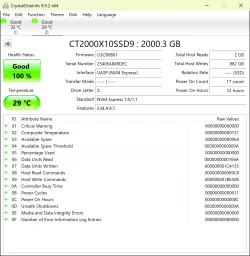
Checked with Crystal Mark and temperature sits at 29deg C, everything shows as green tick working perfectly.

When I could keep it active it happily transferred over 500Gb of data.
 

Attachments

  • CrystalDiskInfo_20260915082702.webp
    CrystalDiskInfo_20260915082702.webp
    141.3 KB · Views: 1

My Computer My Computer

At a glance

Windows 11 Home X643.00 gigahertz Intel Core Ultra 7 155H31.52 Gigabytes Usable Installed Memory
OS
Windows 11 Home X64
Computer type
PC/Desktop
Manufacturer/Model
HP OmniStudio X All-in-One Desktop 27-cs0000na
CPU
3.00 gigahertz Intel Core Ultra 7 155H
Motherboard
HP 8CF9 35.23
Memory
31.52 Gigabytes Usable Installed Memory
Monitor(s) Displays
All in One HP All-in-One [Monitor] 27"
Hard Drives
2Tb
Keyboard
Logitech K800
Mouse
Logitech MX Master 3
Internet Speed
140Mb
Browser
Brave
Antivirus
Malwarebytes
Have you considered it being a bad drive. If it does the same thing on another computer I would return it.
 

My Computers My Computers

  • At a glance

    Windows 11 Pro 25H2 26200.9457i9-10900 10 core 20 threads32 gbnone-Intel UHD Graphics 630
    OS
    Windows 11 Pro 25H2 26200.9457
    Computer type
    PC/Desktop
    Manufacturer/Model
    Dell Optiplex 7080
    CPU
    i9-10900 10 core 20 threads
    Motherboard
    DELL 0J37VM
    Memory
    32 gb
    Graphics Card(s)
    none-Intel UHD Graphics 630
    Sound Card
    Integrated Realtek
    Monitor(s) Displays
    Benq 27
    Screen Resolution
    2560x1440
    Hard Drives
    2x1tb Solidigm m.2 nvme /External drives 512gb Samsung m.2 sata+2tb Kingston m2.nvme
    PSU
    500w
    Case
    MT
    Cooling
    Dell Premium
    Keyboard
    Logitech wired
    Mouse
    Logitech wireless
    Internet Speed
    so slow I'm too embarrassed to tell
    Browser
    #1 Edge #2 Firefox
    Antivirus
    Defender+MWB Premium
  • At a glance

    Windows 11 Pro 24H2 26200.9457AMD Ryzen 7 6800U32 gbintegrated
    Operating System
    Windows 11 Pro 24H2 26200.9457
    Computer type
    PC/Desktop
    Manufacturer/Model
    Beelink Mini PC SER5
    CPU
    AMD Ryzen 7 6800U
    Memory
    32 gb
    Graphics card(s)
    integrated
    Sound Card
    integrated
    Monitor(s) Displays
    Benq 27
    Screen Resolution
    2560x1440
    Hard Drives
    1TB Crucial nvme
    Keyboard
    Logitech wired
    Mouse
    Logitech wireless
    Internet Speed
    still too embarrassed to tell
    Browser
    Firefox
    Antivirus
    Defender
  • System 3 is non compliant Dell 9020 i7-4770/24gb ram Win11 PRO 26200.9457
I have tried a new cable, same issue when idle. Have tried on Surface Pro laptop, all works ok. Further internet research seems to suggest that PCi express link power management is specifically designed to reduce power to NMe devices, SSD drives, when idle, along with other power/battery energy saving ideas. However easy user access to this has been removed by Microsoft, along with Advanced Power Options, from new PCs like mine without delving into command line sequences. I will now go to HP support to assist me with switching off this futile power saving option in my desktop PC and hopefully resolve the issue. Thank you all for your ideas to try and solve this issue.
Incidentally it seems that there are no powered hubs to cope with USB 3.2 (2x2) 20Gb data ports as they would be prohibitively expensive and these ports are not too common on PCs apparently.
 

My Computer My Computer

At a glance

Windows 11 Home X643.00 gigahertz Intel Core Ultra 7 155H31.52 Gigabytes Usable Installed Memory
OS
Windows 11 Home X64
Computer type
PC/Desktop
Manufacturer/Model
HP OmniStudio X All-in-One Desktop 27-cs0000na
CPU
3.00 gigahertz Intel Core Ultra 7 155H
Motherboard
HP 8CF9 35.23
Memory
31.52 Gigabytes Usable Installed Memory
Monitor(s) Displays
All in One HP All-in-One [Monitor] 27"
Hard Drives
2Tb
Keyboard
Logitech K800
Mouse
Logitech MX Master 3
Internet Speed
140Mb
Browser
Brave
Antivirus
Malwarebytes
I have switched off suspend operation on all USB items in device manager as I could not get to it via control panel options.

Have to use the old control panel.

Put this in admin command prompt.

powercfg.cpl

Click on change plan setting for whatever plan you are using.

Then click on change advanced power plan setting

Screenshot 2026-09-15 081859.webp
 

My Computer My Computer

At a glance

Windows 11 Pro
OS
Windows 11 Pro
Many thanks, will do this.
 

My Computer My Computer

At a glance

Windows 11 Home X643.00 gigahertz Intel Core Ultra 7 155H31.52 Gigabytes Usable Installed Memory
OS
Windows 11 Home X64
Computer type
PC/Desktop
Manufacturer/Model
HP OmniStudio X All-in-One Desktop 27-cs0000na
CPU
3.00 gigahertz Intel Core Ultra 7 155H
Motherboard
HP 8CF9 35.23
Memory
31.52 Gigabytes Usable Installed Memory
Monitor(s) Displays
All in One HP All-in-One [Monitor] 27"
Hard Drives
2Tb
Keyboard
Logitech K800
Mouse
Logitech MX Master 3
Internet Speed
140Mb
Browser
Brave
Antivirus
Malwarebytes
KevTech
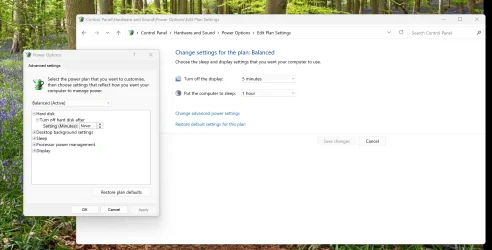
I tried this but no success, it opened the new classic control panel. Tried a shell command online that went via old control panel but that still did not give access to USB or PCi Express options, see attached screen-print.
 

Attachments

  • 2026-09-16 08_42_25-.webp
    2026-09-16 08_42_25-.webp
    202.8 KB · Views: 1

My Computer My Computer

At a glance

Windows 11 Home X643.00 gigahertz Intel Core Ultra 7 155H31.52 Gigabytes Usable Installed Memory
OS
Windows 11 Home X64
Computer type
PC/Desktop
Manufacturer/Model
HP OmniStudio X All-in-One Desktop 27-cs0000na
CPU
3.00 gigahertz Intel Core Ultra 7 155H
Motherboard
HP 8CF9 35.23
Memory
31.52 Gigabytes Usable Installed Memory
Monitor(s) Displays
All in One HP All-in-One [Monitor] 27"
Hard Drives
2Tb
Keyboard
Logitech K800
Mouse
Logitech MX Master 3
Internet Speed
140Mb
Browser
Brave
Antivirus
Malwarebytes

Latest Support Threads

Back
Top Bottom