DCOM within the required timeout


clfmoher

Well-known member
Local time
11:29 AM
Posts
28
OS
win11
I know that dcom timeouts are minor problems, but I'm just curious as to how and why it is happening.
event 10010

{38e441fb-3d16-422f-8750-b2dacec5cefc} checking the registry it leads me to ComponentPackageSupportServer (CompPkgSrv.exe } can I disable it ?
[ ActivityID] {16d319a6-1170-000b-2a6d-97177011d901}
param1 {38E441FB-3D16-422F-8750-B2DACEC5CEFC}
it only happens when I logout. and seems to happen when I log onto steam, I think. when I am on youtube or edge, etc no problem.
Help is appreciated thank you.
 

My Computer My Computer

At a glance

win11Processor 12th Gen Intel(R) Core(TM) i9-12900...
OS
win11
Computer type
PC/Desktop
Manufacturer/Model
asustek computer
CPU
Processor 12th Gen Intel(R) Core(TM) i9-12900KF, 3201 M
Motherboard
Processor 12th Gen Intel(R) Core(TM) i9-12900KF, 3187 Mhz, 16 Core(s), 24 Logical Processor(s)
In this video, i will guide you on how to fix DistributedCOM Event ID 10016 error in Windows 10 and Windows 11.


My Computer My Computer

At a glance

Windows 11AMD Ryzen 7 5700GMicron Technology DDR4-3200 16GBNVIDIA GeForce RTX 3060
OS
Windows 11
Computer type
PC/Desktop
Manufacturer/Model
HP Pavilion
CPU
AMD Ryzen 7 5700G
Motherboard
Erica6
Memory
Micron Technology DDR4-3200 16GB
Graphics Card(s)
NVIDIA GeForce RTX 3060
Sound Card
Realtek ALC671
Monitor(s) Displays
Samsung SyncMaster U28E590
Screen Resolution
3840 x 2160
Hard Drives
SAMSUNG MZVLQ1T0HALB-000H1
That's an old-style-error! I've been seeing error messages like that since XP! Has existed at least since later on in the NT 5 days.

This one is just like XP: (IIRC) (on my Windows 11 22H2)

"The server {8CFC164F-4BE5-4FDD-94E9-E2AF73ED4A19} did not register with DCOM within the required timeout.".

"The server X did not register with DCOM within the required timeout.", is an XP meme, pretty much.
 

My Computers My Computers

  • At a glance

    Windows 11 Pro x64 24H2Ryzen 9 5900X64 GB G.Skill RipJaws V F4-3200C16D-64GVKASRock Steel Legend Arc B580 12 GB
    OS
    Windows 11 Pro x64 24H2
    Computer type
    PC/Desktop
    CPU
    Ryzen 9 5900X
    Motherboard
    ASRock B550 PG Velocita (UEFI-BIOS 3.90)
    Memory
    64 GB G.Skill RipJaws V F4-3200C16D-64GVK
    Graphics Card(s)
    ASRock Steel Legend Arc B580 12 GB
    Monitor(s) Displays
    Alienware AW3423DWF OLED ultrawide
    Hard Drives
    Samsung 990 Pro 1 TB NVMe SSD
    PSU
    eVGA Supernova 750 G3
    Case
    Corsair 275R
    Internet Speed
    VTel FTTH 1 Gb down and 1 Gb up
  • At a glance

    Windows 11 Home x64 25H2Ryzen 7 5800X3D32 GB (2x16 GB G.Skill TridentZ Neo)Sapphire Nitro+ Radeon RX 6750 XT
    Operating System
    Windows 11 Home x64 25H2
    Computer type
    PC/Desktop
    CPU
    Ryzen 7 5800X3D
    Motherboard
    Asus ROG Strix B550-F Gaming (UEFI-BIOS version 3636)
    Memory
    32 GB (2x16 GB G.Skill TridentZ Neo)
    Graphics card(s)
    Sapphire Nitro+ Radeon RX 6750 XT
    Hard Drives
    Samsung 970 Pro 512 GB NVMe SSD
    PSU
    Corsair RM850x
    Case
    Fractal Focus G
That's an old-style-error! I've been seeing error messages like that since XP! Has existed at least since later on in the NT 5 days.

This one is just like XP: (IIRC) (on my Windows 11 22H2)

"The server {8CFC164F-4BE5-4FDD-94E9-E2AF73ED4A19} did not register with DCOM within the required timeout.".

"The server X did not register with DCOM within the required timeout.", is an XP meme, pretty much.
What is old style error, yours or the one shown in my video?
 

My Computer My Computer

At a glance

Windows 11AMD Ryzen 7 5700GMicron Technology DDR4-3200 16GBNVIDIA GeForce RTX 3060
OS
Windows 11
Computer type
PC/Desktop
Manufacturer/Model
HP Pavilion
CPU
AMD Ryzen 7 5700G
Motherboard
Erica6
Memory
Micron Technology DDR4-3200 16GB
Graphics Card(s)
NVIDIA GeForce RTX 3060
Sound Card
Realtek ALC671
Monitor(s) Displays
Samsung SyncMaster U28E590
Screen Resolution
3840 x 2160
Hard Drives
SAMSUNG MZVLQ1T0HALB-000H1

My Computers My Computers

  • At a glance

    Windows 11 Pro x64 24H2Ryzen 9 5900X64 GB G.Skill RipJaws V F4-3200C16D-64GVKASRock Steel Legend Arc B580 12 GB
    OS
    Windows 11 Pro x64 24H2
    Computer type
    PC/Desktop
    CPU
    Ryzen 9 5900X
    Motherboard
    ASRock B550 PG Velocita (UEFI-BIOS 3.90)
    Memory
    64 GB G.Skill RipJaws V F4-3200C16D-64GVK
    Graphics Card(s)
    ASRock Steel Legend Arc B580 12 GB
    Monitor(s) Displays
    Alienware AW3423DWF OLED ultrawide
    Hard Drives
    Samsung 990 Pro 1 TB NVMe SSD
    PSU
    eVGA Supernova 750 G3
    Case
    Corsair 275R
    Internet Speed
    VTel FTTH 1 Gb down and 1 Gb up
  • At a glance

    Windows 11 Home x64 25H2Ryzen 7 5800X3D32 GB (2x16 GB G.Skill TridentZ Neo)Sapphire Nitro+ Radeon RX 6750 XT
    Operating System
    Windows 11 Home x64 25H2
    Computer type
    PC/Desktop
    CPU
    Ryzen 7 5800X3D
    Motherboard
    Asus ROG Strix B550-F Gaming (UEFI-BIOS version 3636)
    Memory
    32 GB (2x16 GB G.Skill TridentZ Neo)
    Graphics card(s)
    Sapphire Nitro+ Radeon RX 6750 XT
    Hard Drives
    Samsung 970 Pro 512 GB NVMe SSD
    PSU
    Corsair RM850x
    Case
    Fractal Focus G
Did you see if you can resolve the error same way i have shown in the video?
 

My Computer My Computer

At a glance

Windows 11AMD Ryzen 7 5700GMicron Technology DDR4-3200 16GBNVIDIA GeForce RTX 3060
OS
Windows 11
Computer type
PC/Desktop
Manufacturer/Model
HP Pavilion
CPU
AMD Ryzen 7 5700G
Motherboard
Erica6
Memory
Micron Technology DDR4-3200 16GB
Graphics Card(s)
NVIDIA GeForce RTX 3060
Sound Card
Realtek ALC671
Monitor(s) Displays
Samsung SyncMaster U28E590
Screen Resolution
3840 x 2160
Hard Drives
SAMSUNG MZVLQ1T0HALB-000H1
Did you see if you can resolve the error same way i have shown in the video?
No, I haven't yet and back in the XP-days, I of course couldn't figure out what was causing what.
 

My Computers My Computers

  • At a glance

    Windows 11 Pro x64 24H2Ryzen 9 5900X64 GB G.Skill RipJaws V F4-3200C16D-64GVKASRock Steel Legend Arc B580 12 GB
    OS
    Windows 11 Pro x64 24H2
    Computer type
    PC/Desktop
    CPU
    Ryzen 9 5900X
    Motherboard
    ASRock B550 PG Velocita (UEFI-BIOS 3.90)
    Memory
    64 GB G.Skill RipJaws V F4-3200C16D-64GVK
    Graphics Card(s)
    ASRock Steel Legend Arc B580 12 GB
    Monitor(s) Displays
    Alienware AW3423DWF OLED ultrawide
    Hard Drives
    Samsung 990 Pro 1 TB NVMe SSD
    PSU
    eVGA Supernova 750 G3
    Case
    Corsair 275R
    Internet Speed
    VTel FTTH 1 Gb down and 1 Gb up
  • At a glance

    Windows 11 Home x64 25H2Ryzen 7 5800X3D32 GB (2x16 GB G.Skill TridentZ Neo)Sapphire Nitro+ Radeon RX 6750 XT
    Operating System
    Windows 11 Home x64 25H2
    Computer type
    PC/Desktop
    CPU
    Ryzen 7 5800X3D
    Motherboard
    Asus ROG Strix B550-F Gaming (UEFI-BIOS version 3636)
    Memory
    32 GB (2x16 GB G.Skill TridentZ Neo)
    Graphics card(s)
    Sapphire Nitro+ Radeon RX 6750 XT
    Hard Drives
    Samsung 970 Pro 512 GB NVMe SSD
    PSU
    Corsair RM850x
    Case
    Fractal Focus G
No, I haven't yet and back in the XP-days, I of course couldn't figure out what was causing what.
I think XP did not have Component Services app for you to manage services.
 

My Computer My Computer

At a glance

Windows 11AMD Ryzen 7 5700GMicron Technology DDR4-3200 16GBNVIDIA GeForce RTX 3060
OS
Windows 11
Computer type
PC/Desktop
Manufacturer/Model
HP Pavilion
CPU
AMD Ryzen 7 5700G
Motherboard
Erica6
Memory
Micron Technology DDR4-3200 16GB
Graphics Card(s)
NVIDIA GeForce RTX 3060
Sound Card
Realtek ALC671
Monitor(s) Displays
Samsung SyncMaster U28E590
Screen Resolution
3840 x 2160
Hard Drives
SAMSUNG MZVLQ1T0HALB-000H1
I think XP did not have Component Services app for you to manage services.
Even now, if I could dig a mega-ton deeper with a tool related to DCOM, It still would seem almost impossible to know the exact trigger.

Windows 10 and Windows 11 has a lot of new errors that are not related and never appeared with XP, IIRC, and those have a lot of unknown causes.
(other than one of them seeming to error out, even with a clean shutdown/restart!)
 

My Computers My Computers

  • At a glance

    Windows 11 Pro x64 24H2Ryzen 9 5900X64 GB G.Skill RipJaws V F4-3200C16D-64GVKASRock Steel Legend Arc B580 12 GB
    OS
    Windows 11 Pro x64 24H2
    Computer type
    PC/Desktop
    CPU
    Ryzen 9 5900X
    Motherboard
    ASRock B550 PG Velocita (UEFI-BIOS 3.90)
    Memory
    64 GB G.Skill RipJaws V F4-3200C16D-64GVK
    Graphics Card(s)
    ASRock Steel Legend Arc B580 12 GB
    Monitor(s) Displays
    Alienware AW3423DWF OLED ultrawide
    Hard Drives
    Samsung 990 Pro 1 TB NVMe SSD
    PSU
    eVGA Supernova 750 G3
    Case
    Corsair 275R
    Internet Speed
    VTel FTTH 1 Gb down and 1 Gb up
  • At a glance

    Windows 11 Home x64 25H2Ryzen 7 5800X3D32 GB (2x16 GB G.Skill TridentZ Neo)Sapphire Nitro+ Radeon RX 6750 XT
    Operating System
    Windows 11 Home x64 25H2
    Computer type
    PC/Desktop
    CPU
    Ryzen 7 5800X3D
    Motherboard
    Asus ROG Strix B550-F Gaming (UEFI-BIOS version 3636)
    Memory
    32 GB (2x16 GB G.Skill TridentZ Neo)
    Graphics card(s)
    Sapphire Nitro+ Radeon RX 6750 XT
    Hard Drives
    Samsung 970 Pro 512 GB NVMe SSD
    PSU
    Corsair RM850x
    Case
    Fractal Focus G
Even now, if I could dig a mega-ton deeper with a tool related to DCOM, It still would seem almost impossible to know the exact trigger.
It's always related to permission on component service.
 

My Computer My Computer

At a glance

Windows 11AMD Ryzen 7 5700GMicron Technology DDR4-3200 16GBNVIDIA GeForce RTX 3060
OS
Windows 11
Computer type
PC/Desktop
Manufacturer/Model
HP Pavilion
CPU
AMD Ryzen 7 5700G
Motherboard
Erica6
Memory
Micron Technology DDR4-3200 16GB
Graphics Card(s)
NVIDIA GeForce RTX 3060
Sound Card
Realtek ALC671
Monitor(s) Displays
Samsung SyncMaster U28E590
Screen Resolution
3840 x 2160
Hard Drives
SAMSUNG MZVLQ1T0HALB-000H1
It's always related to permission on component service.
I know that on XP x64 Edition, there were always errors related to a permission issue. That x32 didn't have. It would be at level "Error" on XP x64 Edition and "Warning" on 10 and later, if not also on 7 and later. XP x64 Edition seemed to have more elaborate error reporting than Windows 2000 and 32-bit XP version 2002. Version 2002 is the regular XP, it was still called that, even with all the revamps to the "normal" XP.
 

My Computers My Computers

  • At a glance

    Windows 11 Pro x64 24H2Ryzen 9 5900X64 GB G.Skill RipJaws V F4-3200C16D-64GVKASRock Steel Legend Arc B580 12 GB
    OS
    Windows 11 Pro x64 24H2
    Computer type
    PC/Desktop
    CPU
    Ryzen 9 5900X
    Motherboard
    ASRock B550 PG Velocita (UEFI-BIOS 3.90)
    Memory
    64 GB G.Skill RipJaws V F4-3200C16D-64GVK
    Graphics Card(s)
    ASRock Steel Legend Arc B580 12 GB
    Monitor(s) Displays
    Alienware AW3423DWF OLED ultrawide
    Hard Drives
    Samsung 990 Pro 1 TB NVMe SSD
    PSU
    eVGA Supernova 750 G3
    Case
    Corsair 275R
    Internet Speed
    VTel FTTH 1 Gb down and 1 Gb up
  • At a glance

    Windows 11 Home x64 25H2Ryzen 7 5800X3D32 GB (2x16 GB G.Skill TridentZ Neo)Sapphire Nitro+ Radeon RX 6750 XT
    Operating System
    Windows 11 Home x64 25H2
    Computer type
    PC/Desktop
    CPU
    Ryzen 7 5800X3D
    Motherboard
    Asus ROG Strix B550-F Gaming (UEFI-BIOS version 3636)
    Memory
    32 GB (2x16 GB G.Skill TridentZ Neo)
    Graphics card(s)
    Sapphire Nitro+ Radeon RX 6750 XT
    Hard Drives
    Samsung 970 Pro 512 GB NVMe SSD
    PSU
    Corsair RM850x
    Case
    Fractal Focus G
I know that on XP x64 Edition, there were always errors related to a permission issue. That x32 didn't have. It would be at level "Error" on XP x64 Edition and "Warning" on 10 and later, if not also on 7 and later.
Not much changed.
 

My Computer My Computer

At a glance

Windows 11AMD Ryzen 7 5700GMicron Technology DDR4-3200 16GBNVIDIA GeForce RTX 3060
OS
Windows 11
Computer type
PC/Desktop
Manufacturer/Model
HP Pavilion
CPU
AMD Ryzen 7 5700G
Motherboard
Erica6
Memory
Micron Technology DDR4-3200 16GB
Graphics Card(s)
NVIDIA GeForce RTX 3060
Sound Card
Realtek ALC671
Monitor(s) Displays
Samsung SyncMaster U28E590
Screen Resolution
3840 x 2160
Hard Drives
SAMSUNG MZVLQ1T0HALB-000H1
I appreciate the video ,but it did not work for me.
The server {8CFC164F-4BE5-4FDD-94E9-E2AF73ED4A19} did not register with DCOM within the required timeout.
part of microsoftwindows.client.webexperience what ever that is .
 

My Computer My Computer

At a glance

win11Processor 12th Gen Intel(R) Core(TM) i9-12900...
OS
win11
Computer type
PC/Desktop
Manufacturer/Model
asustek computer
CPU
Processor 12th Gen Intel(R) Core(TM) i9-12900KF, 3201 M
Motherboard
Processor 12th Gen Intel(R) Core(TM) i9-12900KF, 3187 Mhz, 16 Core(s), 24 Logical Processor(s)
I appreciate the video ,but it did not work for me.
The server {8CFC164F-4BE5-4FDD-94E9-E2AF73ED4A19} did not register with DCOM within the required timeout.
part of microsoftwindows.client.webexperience what ever that is .

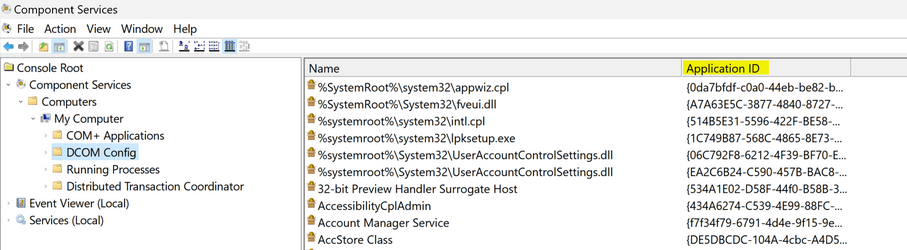
I cannot find the entry under DCOM component service to change permissions. Is it have a specific name? the number ID is not in the list at all.
 

My Computer My Computer

At a glance

win11
OS
win11
I cannot find the entry under DCOM component service to change permissions. Is it have a specific name? the number ID is not in the list at all.
Right Click DCOM Config - > View - > Detail. Don't check the Name for that given entry but - "Application ID" As in...

op.png
 

My Computer My Computer

At a glance

WinDOS 25H2Intel & AMDSO-DIMM SK Hynix 15.8 GB Dual-Channel DDR4-26...nVidia RTX 2060 6GB Mobile GPU (TU106M)
OS
WinDOS 25H2
Computer type
Laptop
CPU
Intel & AMD
Memory
SO-DIMM SK Hynix 15.8 GB Dual-Channel DDR4-2666 (2 x 8 GB) 1329MHz (19-19-19-43)
Graphics Card(s)
nVidia RTX 2060 6GB Mobile GPU (TU106M)
Sound Card
Onbord Realtek ALC1220
Screen Resolution
1920 x 1080
Hard Drives
1x Samsung PM981 NVMe PCIe M.2 512GB / 1x Seagate Expansion ST1000LM035 1TB
This id is in your dcom list? "{8CFC164F-4BE5-4FDD-94E9-E2AF73ED4A19}"
Can't find it at all. Maybe WebExperience did not register at all. Can you add a dcom entry manually or force webexperience to register??
 

My Computer My Computer

At a glance

win11
OS
win11
8CFC164F-4BE5-4FDD-94E9-E2AF73ED4A19 is not in dcom configuration.(comp services).
can i add it ? how ?
 

My Computer My Computer

At a glance

win11Processor 12th Gen Intel(R) Core(TM) i9-12900...
OS
win11
Computer type
PC/Desktop
Manufacturer/Model
asustek computer
CPU
Processor 12th Gen Intel(R) Core(TM) i9-12900KF, 3201 M
Motherboard
Processor 12th Gen Intel(R) Core(TM) i9-12900KF, 3187 Mhz, 16 Core(s), 24 Logical Processor(s)
what I did was :
1. Press the Win + R keys and type GPEDIT.msc.

2. Navigate to Computer Configuration > Administrative Templates > Windows Components > Widgets

3. Click on the Allow Widgets option and set it to Disabled.

I found it in a google search by 如何在 Windows 11 中卸载小部件

thank for the respones. I appreciate it.
 

My Computer My Computer

At a glance

win11Processor 12th Gen Intel(R) Core(TM) i9-12900...
OS
win11
Computer type
PC/Desktop
Manufacturer/Model
asustek computer
CPU
Processor 12th Gen Intel(R) Core(TM) i9-12900KF, 3201 M
Motherboard
Processor 12th Gen Intel(R) Core(TM) i9-12900KF, 3187 Mhz, 16 Core(s), 24 Logical Processor(s)
does it break any widgets? Or what does disabling widgets do?
 

My Computer My Computer

At a glance

win11
OS
win11
Back
Top Bottom