Default browser setting keeps reverting to Edge


I use Vivaldi as my primary browser, and have had it set as the default browser on my Win11 Pro 25H2 system. Starting about a week ago (maybe a bit longer?) every day, Windows changes the default browser back to Edge. Any ideas what is causing that and, more importantly, how to stop it reverting to Edge as the default?

If it matters, it seems to do it around 800am or 900am EST (US Eastern time). Never caught exactly when, but this morning at 905am I noticed the Edge icon on my desktop for URL shortcuts.

View attachment 158053
My current winver info

If worse comes to worse, you may have to do what @Edwin did in post #9.

But only as a last resort, imo...
 

My Computers

System One System Two

  • OS
    Windows 11 Pro 25H2 build: (26200.7623)
    Computer type
    Laptop
    Manufacturer/Model
    Microsoft Surface Pro
    Memory
    32GB
  • Operating System
    Microsoft 25H2 Pro
    Computer type
    Laptop
    Manufacturer/Model
    Dell Pro 14 - PC14250
    CPU
    Intel Core Ultra 7
    Memory
    64GB
    Graphics card(s)
    Intel Integrated Graphics
    Hard Drives
    Micron 1TB SSD

If worse comes to worse, you may have to do what @Edwin did in post #9.

But only as a last resort, imo...
If I do uninstall Edge, which I would consider almost as a last resort before wiping my hard drive and re-installing Windows, is it easy to re-install Edge later if I need to?

Also, another update on behavior: The computer was turned off between 100am and 500am. Between 500am and 530am Edge was again set as default browser (I'm 90% sure it wasn't the default at boot-up.) The only apps used during that time period were Vivaldi and Quatro Pro (yeah, I'm a dinosaur, but I grew up on WordPerfect & Quattro Pro.)

Looks like the common denominator might be use of Vivaldi? I had originally started on a Vivaldi discussion group, but they told me to troubleshoot Windows...
 

My Computers

System One System Two

  • OS
    Windows 11 Pro 25H2 (OS Build 26200.7462)
    Computer type
    Laptop
    Manufacturer/Model
    ASUS - ProArt PX13
    CPU
    AMD Ryzen AI 9 HX 370 w/Radeon 890M
    Motherboard
    AMI HN7306WU
    Memory
    32GB
    Graphics Card(s)
    NVIDIA GeForce RTX 4050 (and IGP Radeon 890M)
    Monitor(s) Displays
    external 24" Dell P2415Q
    Screen Resolution
    3840 x 2160 on external Dell, 2880 x 1800 on laptop screen
    Hard Drives
    1TB WD SSD
    Browser
    Vivaldi, Brave, Edge
    Antivirus
    Avast (free version)
  • Operating System
    Windows 11 Pro, 21H2 (Build 22000.376)
    Computer type
    Tablet
    Manufacturer/Model
    Surface Pro 6
    CPU
    i7-8650U
    Memory
    16 GB
    Graphics card(s)
    iGPU (Intel® UHD Graphics 620)
    Monitor(s) Displays
    Dell P2415Q
    Screen Resolution
    3840 x 2160 on external Dell, 2736 x 1824 on SP6 screen
    Hard Drives
    512GB PCIe Gen 3 x2 SSD
    Browser
    Vivaldi, Comodo Dragon, Edge
    Antivirus
    Avast (free edition)
If I do uninstall Edge, which I would consider almost as a last resort before wiping my hard drive and re-installing Windows, is it easy to re-install Edge later if I need to?
On my Windows 10 Edge is reinstalled on every update. I found a setting in WinAero Tweaker to Disable Edge reinstallation.
 

My Computer

System One

  • OS
    Win 10 Pro 19045.6937 Win 11 25H2 VM
    Computer type
    Laptop
    Manufacturer/Model
    Dell Precicion 15 Workstation
    CPU
    Xeon W-10885M
    Motherboard
    Dell
    Memory
    64GB ECC DDR4 128GB max
    Graphics Card(s)
    Intel 1080p + Quadro RTX 5000 Max-Q 16GB 4K
    Sound Card
    onboard Realtec
    Monitor(s) Displays
    NA
    Screen Resolution
    1080p to 4k
    Hard Drives
    1 TB Samsung 9100 M2 SSD main
    2 TB Samsung 9100 M2 SSD storage
    500 GB Corsair T500 storage M2 SSD (6 TB max)
    PSU
    NA
    Case
    NA
    Cooling
    NA
    Keyboard
    backlit
    Mouse
    Logitec M720 Bluetooth Free scroll
    Internet Speed
    slow
    Browser
    Pale Moon 33.9.x.x - x64 AVX2 build
    Antivirus
    Windows Defender
This may be drifting away from my original issue, but...

When I go to System > Recovery > Fix problems using Windows Update and click Reinstall now, nothing happens. I went to Services to restart BITS & Windows Update and neither of then were running. I started them and returned to Fix problems using Windows Update but nothing still happens when I click Reinstall now.

Tried to run Windows Update troubleshooter, but it opens a "Get Help" window with "This service is currently unavailable. Please visit this link to contact Microsoft Support." The link provided just leads to a generic Windows Help page at microsoft.com.

Ran:

- SFC /scannow,
- DISM /Online /Cleanup-Image /CheckHealth,
- DISM /Online /Cleanup-Image /RestoreHealth, and
- DISM /Online /Cleanup-Image /RestoreHealth with no errors/corruption found.
- Restarted BITS & Windows Update Services.

Still can't run Fix problems using Windows Update

By any chance does this ring a bell with anything that might relate to my original problem of the default browser being reset to Edge?

PS: Windows Update itself does work.

[edited to add:] Just now, just after posting the above, I tried once again to Fix problems using Windows Update and the default browser reverted to Edge before my eyes. Up until now I never saw it actually happen, but the icons on the desktop for URL shortcuts changed as I looked at them (at ~700am) while Vivaldi was open.
 
Last edited:

My Computers

System One System Two

  • OS
    Windows 11 Pro 25H2 (OS Build 26200.7462)
    Computer type
    Laptop
    Manufacturer/Model
    ASUS - ProArt PX13
    CPU
    AMD Ryzen AI 9 HX 370 w/Radeon 890M
    Motherboard
    AMI HN7306WU
    Memory
    32GB
    Graphics Card(s)
    NVIDIA GeForce RTX 4050 (and IGP Radeon 890M)
    Monitor(s) Displays
    external 24" Dell P2415Q
    Screen Resolution
    3840 x 2160 on external Dell, 2880 x 1800 on laptop screen
    Hard Drives
    1TB WD SSD
    Browser
    Vivaldi, Brave, Edge
    Antivirus
    Avast (free version)
  • Operating System
    Windows 11 Pro, 21H2 (Build 22000.376)
    Computer type
    Tablet
    Manufacturer/Model
    Surface Pro 6
    CPU
    i7-8650U
    Memory
    16 GB
    Graphics card(s)
    iGPU (Intel® UHD Graphics 620)
    Monitor(s) Displays
    Dell P2415Q
    Screen Resolution
    3840 x 2160 on external Dell, 2736 x 1824 on SP6 screen
    Hard Drives
    512GB PCIe Gen 3 x2 SSD
    Browser
    Vivaldi, Comodo Dragon, Edge
    Antivirus
    Avast (free edition)
Try this but I can’t guarantee it will work.

1. Control Panel | Administrative Tools | Services
On this list, disable Microsoft Edge Elevation Service, Microsoft Edge Update Service (edge update) and Microsoft Edge Update Service (edgeupdatem) | Reboot

2. Regedit | HKEY_LOCAL_MACHINE | Software | Policies | Right-click - New | Key - Name it ‘Microsoft Edge’ - Enter
Right-click on the right pane | DWORD (32-bit) value | Name it ‘PreventAcessToMicrosoftEdge’ | Value Data - 1 | Reboot

3. Regedit | HKEY_LOCAL_MACHINE | Software | Policies | Microsoft | Right-click - New | Key - Name it ‘MicrosoftEdge’ - Enter
Right-click on the right pane | DWORD (32-bit) value | Name it ‘PreventLaunchEdge’ | Value Data - 1 | Reboot

4. Regedit | HKEY_LOCAL_MACHINE | Software | Wow6432Node | Microsoft | Windows | Current Version | Uninstall | Microsoft Edge | Right-hand side | No Remove | Right-click to modify | Value data - 0

(Do the same thing as above for Microsoft Edge Update and Microsoft WebView)

5. HKEY_ LOCAL_MACHINE | Software | Microsoft | New | Key - Name it ‘EdgeUpdate’ - Enter
Right-click on the right pane | DWORD (32bit) value | Name it ‘DoNotUpdateToEdgeWithChromium’ - Enter | Value data - 1 | Reboot

6. Control Panel | Administrative Tools | Task Scheduler | Disable MicrosoftUpdateTaskMachineCore and MicrosoftUpdateTaskMachineUA | Reboot

7. Winkey + R | gpedit.msc | User Configuration | Administrative Templates | Windows Components | Microsoft Edge

Disable the following:
7.1 Allow Microsoft Edge to pre-launch at Windows startup, when the system is idle and each time Microsoft Edge is closed
7.2 Allow Microsoft Edge to start and load the Stsrt and New Tab page at Windows startup and each time Microsoft Edge is closed
7.3 Reboot

8. Right-click Winkey | Settings | Apps | Default apps | Choose default apps by file type

Choose Vivaldi as default for the following:
8.1 .htm
8.2 .html
8.3 .shtml
8.4 .xht
8.5 .xhtml

You need to check Services from time to time to disable anything Microsoft Edge, especially after a fresh Microsoft update.

And finally check Task Scheduler from time time to disable anything Microsoft Edge. If it is running in the background, disable it and reboot at once.
 
Last edited:

My Computer

System One

  • OS
    Win 7,8.1,10,11, Mint, Kde Plasma, Debian
    Computer type
    Laptop
    Manufacturer/Model
    Dell
    CPU
    Intel(R) Core(TM) i7-6500U CPU @ 2.50GHz
    Memory
    16 GB
    Graphics Card(s)
    Intel(R) HD Graphics 520/Nvidia GeForce 930M
    Sound Card
    Intel(R) Display Audio/RealtekAudio
    Monitor(s) Displays
    Generic Pnp Monitor
    Screen Resolution
    1366 X 768
    Hard Drives
    ST2000LM024-1EJ164
    Keyboard
    Eng (US)
    Mouse
    Sanwa Supply
    Browser
    Firefox
    Antivirus
    Avast One
    Other Info
    Too many laptops with different system specifications.
@pewa : I'm going to go through what you suggested when I have more time and not so busy, but I wanted to post an update to my issue:

Today I didn't catch that the icons for my URL shortcuts on the desktop had reverted to Edge, but clicked on a link else where and it opened Edge with this:


1767301802540.webp

Huh? So it's removing Vivaldi as the default browser but it's not specifically setting Edge as the default browser, either. Does that trigger something in someone's brain?
 

My Computers

System One System Two

  • OS
    Windows 11 Pro 25H2 (OS Build 26200.7462)
    Computer type
    Laptop
    Manufacturer/Model
    ASUS - ProArt PX13
    CPU
    AMD Ryzen AI 9 HX 370 w/Radeon 890M
    Motherboard
    AMI HN7306WU
    Memory
    32GB
    Graphics Card(s)
    NVIDIA GeForce RTX 4050 (and IGP Radeon 890M)
    Monitor(s) Displays
    external 24" Dell P2415Q
    Screen Resolution
    3840 x 2160 on external Dell, 2880 x 1800 on laptop screen
    Hard Drives
    1TB WD SSD
    Browser
    Vivaldi, Brave, Edge
    Antivirus
    Avast (free version)
  • Operating System
    Windows 11 Pro, 21H2 (Build 22000.376)
    Computer type
    Tablet
    Manufacturer/Model
    Surface Pro 6
    CPU
    i7-8650U
    Memory
    16 GB
    Graphics card(s)
    iGPU (Intel® UHD Graphics 620)
    Monitor(s) Displays
    Dell P2415Q
    Screen Resolution
    3840 x 2160 on external Dell, 2736 x 1824 on SP6 screen
    Hard Drives
    512GB PCIe Gen 3 x2 SSD
    Browser
    Vivaldi, Comodo Dragon, Edge
    Antivirus
    Avast (free edition)
clicked on a link else where and it opened Edge with this
Then I suggest these entries as well.

Regedit | HKEY_CURRENT_USER | Software | Policies | Microsoft | Windows
1. Right-click on the empty space on the right pane | DWORD (32-bit) Value | Name it ‘DisableSearchBoxSuggestions’ | Value Data - 1 | OK | Reboot

2. HKEY_CURRENT_USER | Software | Policies | Microsoft | Windows | New | Key - Name it ‘Explorer’ - Enter
Right-click on the right pane | DWORD (32-bit) Value | Name it ‘DisableSearchBoxSuggestions’ - Enter | Value Data - 1 | Reboot

FYI, 1 denotes Enabled and 0 denotes Disabled.

Just in case, check the Startup.

Ctrl +Shift+Esc
Task Manager | Startup

If you see Edge on the list, disable it. If Vivaldi is disabled, enable it and then reboot to save the changes.
 
Last edited:

My Computer

System One

  • OS
    Win 7,8.1,10,11, Mint, Kde Plasma, Debian
    Computer type
    Laptop
    Manufacturer/Model
    Dell
    CPU
    Intel(R) Core(TM) i7-6500U CPU @ 2.50GHz
    Memory
    16 GB
    Graphics Card(s)
    Intel(R) HD Graphics 520/Nvidia GeForce 930M
    Sound Card
    Intel(R) Display Audio/RealtekAudio
    Monitor(s) Displays
    Generic Pnp Monitor
    Screen Resolution
    1366 X 768
    Hard Drives
    ST2000LM024-1EJ164
    Keyboard
    Eng (US)
    Mouse
    Sanwa Supply
    Browser
    Firefox
    Antivirus
    Avast One
    Other Info
    Too many laptops with different system specifications.
Try this but I can’t guarantee it will work.

1. Control Panel | Administrative Tools | Services
On this list, disable Microsoft Edge Elevation Service, Microsoft Edge Update Service (edge update) and Microsoft Edge Update Service (edgeupdatem) | Reboot
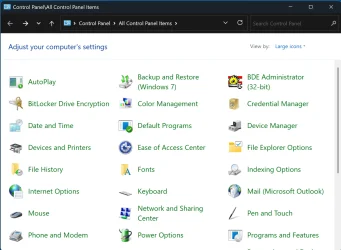
What happened to the "new" Control Panel that used to be on <Win-key + x>? All I find now is the "Windows 7-looking" Control Panel and it does not have an "Administrative tools" icon:

1767363848596.webp


My Computers

System One System Two

  • OS
    Windows 11 Pro 25H2 (OS Build 26200.7462)
    Computer type
    Laptop
    Manufacturer/Model
    ASUS - ProArt PX13
    CPU
    AMD Ryzen AI 9 HX 370 w/Radeon 890M
    Motherboard
    AMI HN7306WU
    Memory
    32GB
    Graphics Card(s)
    NVIDIA GeForce RTX 4050 (and IGP Radeon 890M)
    Monitor(s) Displays
    external 24" Dell P2415Q
    Screen Resolution
    3840 x 2160 on external Dell, 2880 x 1800 on laptop screen
    Hard Drives
    1TB WD SSD
    Browser
    Vivaldi, Brave, Edge
    Antivirus
    Avast (free version)
  • Operating System
    Windows 11 Pro, 21H2 (Build 22000.376)
    Computer type
    Tablet
    Manufacturer/Model
    Surface Pro 6
    CPU
    i7-8650U
    Memory
    16 GB
    Graphics card(s)
    iGPU (Intel® UHD Graphics 620)
    Monitor(s) Displays
    Dell P2415Q
    Screen Resolution
    3840 x 2160 on external Dell, 2736 x 1824 on SP6 screen
    Hard Drives
    512GB PCIe Gen 3 x2 SSD
    Browser
    Vivaldi, Comodo Dragon, Edge
    Antivirus
    Avast (free edition)
6. Control Panel | Administrative Tools | Task Scheduler | Disable MicrosoftUpdateTaskMachineCore and MicrosoftUpdateTaskMachineUA | Reboot
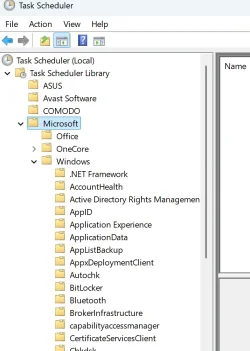
Where are MicrosoftUpdateTaskMachineCore and MicrosoftUpdateTaskMachineUA? For "Microsoft" the right-hand pane is empty, and under "Windows" I don't see those entries.

1767366487056.webp

Also, what would disabling those tasks do?
 

My Computers

System One System Two

  • OS
    Windows 11 Pro 25H2 (OS Build 26200.7462)
    Computer type
    Laptop
    Manufacturer/Model
    ASUS - ProArt PX13
    CPU
    AMD Ryzen AI 9 HX 370 w/Radeon 890M
    Motherboard
    AMI HN7306WU
    Memory
    32GB
    Graphics Card(s)
    NVIDIA GeForce RTX 4050 (and IGP Radeon 890M)
    Monitor(s) Displays
    external 24" Dell P2415Q
    Screen Resolution
    3840 x 2160 on external Dell, 2880 x 1800 on laptop screen
    Hard Drives
    1TB WD SSD
    Browser
    Vivaldi, Brave, Edge
    Antivirus
    Avast (free version)
  • Operating System
    Windows 11 Pro, 21H2 (Build 22000.376)
    Computer type
    Tablet
    Manufacturer/Model
    Surface Pro 6
    CPU
    i7-8650U
    Memory
    16 GB
    Graphics card(s)
    iGPU (Intel® UHD Graphics 620)
    Monitor(s) Displays
    Dell P2415Q
    Screen Resolution
    3840 x 2160 on external Dell, 2736 x 1824 on SP6 screen
    Hard Drives
    512GB PCIe Gen 3 x2 SSD
    Browser
    Vivaldi, Comodo Dragon, Edge
    Antivirus
    Avast (free edition)
4. Regedit | HKEY_LOCAL_MACHINE | Software | Wow6432Node | Microsoft | Windows | Current Version | Uninstall | Microsoft Edge | Right-hand side | No Remove | Right-click to modify | Value data - 0

(Do the same thing as above for Microsoft Edge Update and Microsoft WebView)
I assume you meant Computer\HKEY_LOCAL_MACHINE\SOFTWARE\WOW6432Node\Microsoft\Windows\CurrentVersion\Uninstall\Microsoft EdgeWebView (MicrosoftEdgeWebView vs Microsoft WebView)?

7. Winkey + R | gpedit.msc | User Configuration | Administrative Templates | Windows Components | Microsoft Edge

Disable the following:
7.1 Allow Microsoft Edge to pre-launch at Windows startup, when the system is idle and each time Microsoft Edge is closed
7.2 Allow Microsoft Edge to start and load the Stsrt and New Tab page at Windows startup and each time Microsoft Edge is closed
7.3 Reboot
Could be a coincidence, but after doing 7.1 & 7.2, before rebooting, the default browser reverted to Microsoft Edge.
 

My Computers

System One System Two

  • OS
    Windows 11 Pro 25H2 (OS Build 26200.7462)
    Computer type
    Laptop
    Manufacturer/Model
    ASUS - ProArt PX13
    CPU
    AMD Ryzen AI 9 HX 370 w/Radeon 890M
    Motherboard
    AMI HN7306WU
    Memory
    32GB
    Graphics Card(s)
    NVIDIA GeForce RTX 4050 (and IGP Radeon 890M)
    Monitor(s) Displays
    external 24" Dell P2415Q
    Screen Resolution
    3840 x 2160 on external Dell, 2880 x 1800 on laptop screen
    Hard Drives
    1TB WD SSD
    Browser
    Vivaldi, Brave, Edge
    Antivirus
    Avast (free version)
  • Operating System
    Windows 11 Pro, 21H2 (Build 22000.376)
    Computer type
    Tablet
    Manufacturer/Model
    Surface Pro 6
    CPU
    i7-8650U
    Memory
    16 GB
    Graphics card(s)
    iGPU (Intel® UHD Graphics 620)
    Monitor(s) Displays
    Dell P2415Q
    Screen Resolution
    3840 x 2160 on external Dell, 2736 x 1824 on SP6 screen
    Hard Drives
    512GB PCIe Gen 3 x2 SSD
    Browser
    Vivaldi, Comodo Dragon, Edge
    Antivirus
    Avast (free edition)
Then I suggest these entries as well.

Regedit | HKEY_CURRENT_USER | Software | Policies | Microsoft | Windows
1. Right-click on the empty space on the right pane | DWORD (32-bit) Value | Name it ‘DisableSearchBoxSuggestions’ | Value Data - 1 | OK | Reboot

2. HKEY_CURRENT_USER | Software | Policies | Microsoft | Windows | New | Key - Name it ‘Explorer’ - Enter
Right-click on the right pane | DWORD (32-bit) Value | Name it ‘DisableSearchBoxSuggestions’ - Enter | Value Data - 1 | Reboot

I rebooted after each of those steps, and both times Windows booted up to a solid black desktop background.

Now that I've done all the tweaks you suggested in your two posts, I'll sit back and see if the default browser changes. I exported a copy of the entire Registry before I made any edits and if the browser default still changes, I think I'll revert to the way it was before I made those changes. The inner workings of Windows is so complex , that doing such granular tweaks can have unintended consequences. Changing the desktop background being one such example. An easy-to-remedy one, but who knows what other things might show up?

Thanks for the suggestions. 👍🏻

[edited to add:] And, just like that, within ten minutes the browser default reverted to Edge. <sigh.....>

Oh, well. It was worth a shot.
 
Last edited:

My Computers

System One System Two

  • OS
    Windows 11 Pro 25H2 (OS Build 26200.7462)
    Computer type
    Laptop
    Manufacturer/Model
    ASUS - ProArt PX13
    CPU
    AMD Ryzen AI 9 HX 370 w/Radeon 890M
    Motherboard
    AMI HN7306WU
    Memory
    32GB
    Graphics Card(s)
    NVIDIA GeForce RTX 4050 (and IGP Radeon 890M)
    Monitor(s) Displays
    external 24" Dell P2415Q
    Screen Resolution
    3840 x 2160 on external Dell, 2880 x 1800 on laptop screen
    Hard Drives
    1TB WD SSD
    Browser
    Vivaldi, Brave, Edge
    Antivirus
    Avast (free version)
  • Operating System
    Windows 11 Pro, 21H2 (Build 22000.376)
    Computer type
    Tablet
    Manufacturer/Model
    Surface Pro 6
    CPU
    i7-8650U
    Memory
    16 GB
    Graphics card(s)
    iGPU (Intel® UHD Graphics 620)
    Monitor(s) Displays
    Dell P2415Q
    Screen Resolution
    3840 x 2160 on external Dell, 2736 x 1824 on SP6 screen
    Hard Drives
    512GB PCIe Gen 3 x2 SSD
    Browser
    Vivaldi, Comodo Dragon, Edge
    Antivirus
    Avast (free edition)
I am on Windows 10 Pro and those are the settings on Windows 10. If you aren't sure where the control panel is for Windows 11, just use the 'Search' bar. You can also use it to look for the location of other settings.

I assume you meant Computer\HKEY_LOCAL_MACHINE\SOFTWARE\WOW6432Node\Microsoft\Windows\CurrentVersion\Uninstall\Microsoft EdgeWebView (MicrosoftEdgeWebView vs Microsoft WebView)?
Yes, sorry about that. My old brain doesn't work as well as twenty years ago. I also noticed some typo but it was too late to edit them.

I used Windows 11 Pro for two months before reverting back to Windows 10. So I don't remember exactly where the settings are. On Windows 11, Edge is much more ingrained in the OS and it isn't that easy to get rid of it. I absolutely hated it!

You mentioned you are using Winaero Tweaker. Doesn't it allow you to disable Microsoft Edge?

I think you may be successful in making Vivaldi your default browser. It worked for me on Windows 10. My default browser is Firefox. If it doesn't, then I am sorry.

Please refer to My Project: Debloating Windows 10 21H2


It is not just Edge but Bing, Copilot and OneDrive. I have managed to disable all of them on Windows 10 Pro. I don't uninstall but only disable them. I have made some changes to my project since and will send you some new screenshots. in my next post. My system drive is now really sleek and fast and has a smaller footprint.

My next project will be to de-bloat Windows 10 22H2.


If you keep getting re-directed to Edge, perhaps you should give Windows X Lite a try.


They uninstall those key features of Windows and you can choose any browser you like to be your default.
 
Last edited:

My Computer

System One

  • OS
    Win 7,8.1,10,11, Mint, Kde Plasma, Debian
    Computer type
    Laptop
    Manufacturer/Model
    Dell
    CPU
    Intel(R) Core(TM) i7-6500U CPU @ 2.50GHz
    Memory
    16 GB
    Graphics Card(s)
    Intel(R) HD Graphics 520/Nvidia GeForce 930M
    Sound Card
    Intel(R) Display Audio/RealtekAudio
    Monitor(s) Displays
    Generic Pnp Monitor
    Screen Resolution
    1366 X 768
    Hard Drives
    ST2000LM024-1EJ164
    Keyboard
    Eng (US)
    Mouse
    Sanwa Supply
    Browser
    Firefox
    Antivirus
    Avast One
    Other Info
    Too many laptops with different system specifications.
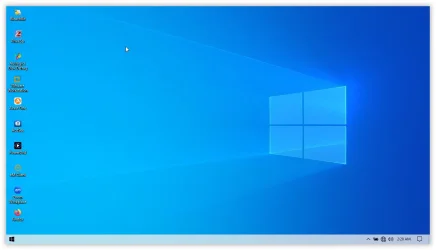
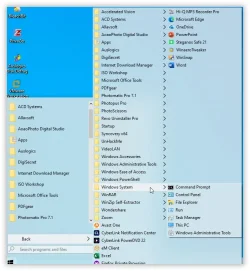
Here are some screenshots of my debloated Windows 10 Pro.

My Desktop
1767376310191.webp
My Start Menu
1767376365684.webp
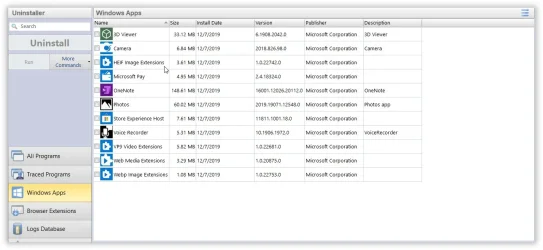
I uninstalled features that I don't need using Revo Uninstaller
1767376475620.webp
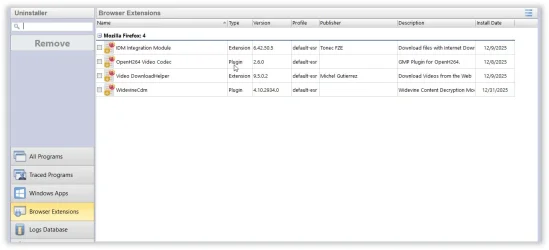
My browser extensions
1767376523987.webp
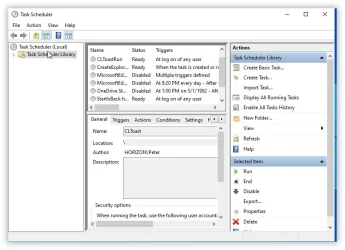
Task Scheduler
1767376559409.webp
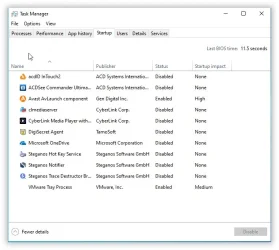
Task Manager
1767376598806.webp
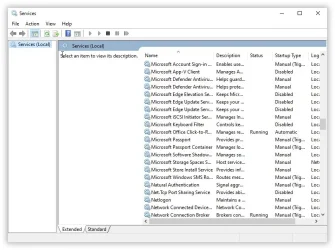
Services
1767376643298.webp
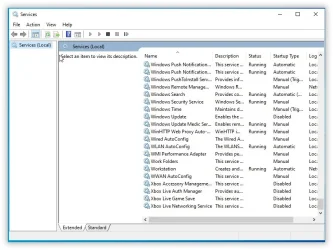
Services
1767376675184.webp
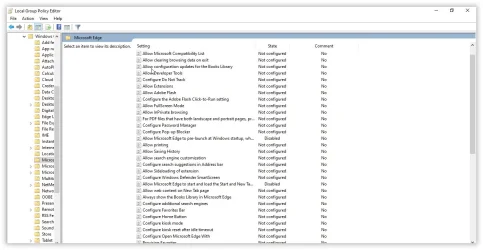
Local Group Policy Editor (To disable Edge)
1767376759581.webp

The only OS better than this one which I have created is my Windows 8.1 Pro (modified by me) on my Asus Gaming machine. But that's another story for another time.
 

My Computer

System One

  • OS
    Win 7,8.1,10,11, Mint, Kde Plasma, Debian
    Computer type
    Laptop
    Manufacturer/Model
    Dell
    CPU
    Intel(R) Core(TM) i7-6500U CPU @ 2.50GHz
    Memory
    16 GB
    Graphics Card(s)
    Intel(R) HD Graphics 520/Nvidia GeForce 930M
    Sound Card
    Intel(R) Display Audio/RealtekAudio
    Monitor(s) Displays
    Generic Pnp Monitor
    Screen Resolution
    1366 X 768
    Hard Drives
    ST2000LM024-1EJ164
    Keyboard
    Eng (US)
    Mouse
    Sanwa Supply
    Browser
    Firefox
    Antivirus
    Avast One
    Other Info
    Too many laptops with different system specifications.
I am on Windows 10 Pro and those are the settings on Windows 10. If you aren't sure where the control panel is for Windows 11, just use the 'Search' bar. You can also use it to look for the location of other settings.
I could have sworn Win11 had two versions of Control Panel, one the classic one I call "Window 7-like" and a newer slick Windows 11, but like you my brain doesn't work as well these days, either.
You mentioned you are using Winaero Tweaker. Doesn't it allow you to disable Microsoft Edge?
No, I don't use it.
I think you may be successful in making Vivaldi your default browser. It worked for me on Windows 10. My default browser is Firefox. If it doesn't, then I am sorry.
I don't doubt it, but somehow what is probably a simple fix has been alluding me.

Thanks again for your help. I'm going to revert the Registry to its previous settings soon (RSN).
 

My Computers

System One System Two

  • OS
    Windows 11 Pro 25H2 (OS Build 26200.7462)
    Computer type
    Laptop
    Manufacturer/Model
    ASUS - ProArt PX13
    CPU
    AMD Ryzen AI 9 HX 370 w/Radeon 890M
    Motherboard
    AMI HN7306WU
    Memory
    32GB
    Graphics Card(s)
    NVIDIA GeForce RTX 4050 (and IGP Radeon 890M)
    Monitor(s) Displays
    external 24" Dell P2415Q
    Screen Resolution
    3840 x 2160 on external Dell, 2880 x 1800 on laptop screen
    Hard Drives
    1TB WD SSD
    Browser
    Vivaldi, Brave, Edge
    Antivirus
    Avast (free version)
  • Operating System
    Windows 11 Pro, 21H2 (Build 22000.376)
    Computer type
    Tablet
    Manufacturer/Model
    Surface Pro 6
    CPU
    i7-8650U
    Memory
    16 GB
    Graphics card(s)
    iGPU (Intel® UHD Graphics 620)
    Monitor(s) Displays
    Dell P2415Q
    Screen Resolution
    3840 x 2160 on external Dell, 2736 x 1824 on SP6 screen
    Hard Drives
    512GB PCIe Gen 3 x2 SSD
    Browser
    Vivaldi, Comodo Dragon, Edge
    Antivirus
    Avast (free edition)
If you don't feel like using Win X Lite, you can give this method a try for Windows 11 Pro. But it depends on your skill set.
Heads up, this is the one I am going to try when I try to de-bloat Windows 11 Pro some time this year. That means getting rid of Edge for good.


My Computer

System One

  • OS
    Win 7,8.1,10,11, Mint, Kde Plasma, Debian
    Computer type
    Laptop
    Manufacturer/Model
    Dell
    CPU
    Intel(R) Core(TM) i7-6500U CPU @ 2.50GHz
    Memory
    16 GB
    Graphics Card(s)
    Intel(R) HD Graphics 520/Nvidia GeForce 930M
    Sound Card
    Intel(R) Display Audio/RealtekAudio
    Monitor(s) Displays
    Generic Pnp Monitor
    Screen Resolution
    1366 X 768
    Hard Drives
    ST2000LM024-1EJ164
    Keyboard
    Eng (US)
    Mouse
    Sanwa Supply
    Browser
    Firefox
    Antivirus
    Avast One
    Other Info
    Too many laptops with different system specifications.
Thanks again for your help. I'm going to revert the Registry to its previous settings soon (RSN).
A better way is just do a system backup using a backup software. That way, you can get your original setup back and running in no time.
 

My Computer

System One

  • OS
    Win 7,8.1,10,11, Mint, Kde Plasma, Debian
    Computer type
    Laptop
    Manufacturer/Model
    Dell
    CPU
    Intel(R) Core(TM) i7-6500U CPU @ 2.50GHz
    Memory
    16 GB
    Graphics Card(s)
    Intel(R) HD Graphics 520/Nvidia GeForce 930M
    Sound Card
    Intel(R) Display Audio/RealtekAudio
    Monitor(s) Displays
    Generic Pnp Monitor
    Screen Resolution
    1366 X 768
    Hard Drives
    ST2000LM024-1EJ164
    Keyboard
    Eng (US)
    Mouse
    Sanwa Supply
    Browser
    Firefox
    Antivirus
    Avast One
    Other Info
    Too many laptops with different system specifications.
A better way is just do a system backup using a backup software. That way, you can get your original setup back and running in no time.
Yeah, but I haven't done a system backup on this computer yet. I know, I know. It's less than two months old and I was wanting to get it totally configured before I did a backup. Oh, well.

I'm increasingly experiencing some other oddities with my system and I'm going to post about it in a new thread. SFC & DISM report no problems, but...

And, thanks again for all your advice. Greatly appreciated! 👍🏻
 

My Computers

System One System Two

  • OS
    Windows 11 Pro 25H2 (OS Build 26200.7462)
    Computer type
    Laptop
    Manufacturer/Model
    ASUS - ProArt PX13
    CPU
    AMD Ryzen AI 9 HX 370 w/Radeon 890M
    Motherboard
    AMI HN7306WU
    Memory
    32GB
    Graphics Card(s)
    NVIDIA GeForce RTX 4050 (and IGP Radeon 890M)
    Monitor(s) Displays
    external 24" Dell P2415Q
    Screen Resolution
    3840 x 2160 on external Dell, 2880 x 1800 on laptop screen
    Hard Drives
    1TB WD SSD
    Browser
    Vivaldi, Brave, Edge
    Antivirus
    Avast (free version)
  • Operating System
    Windows 11 Pro, 21H2 (Build 22000.376)
    Computer type
    Tablet
    Manufacturer/Model
    Surface Pro 6
    CPU
    i7-8650U
    Memory
    16 GB
    Graphics card(s)
    iGPU (Intel® UHD Graphics 620)
    Monitor(s) Displays
    Dell P2415Q
    Screen Resolution
    3840 x 2160 on external Dell, 2736 x 1824 on SP6 screen
    Hard Drives
    512GB PCIe Gen 3 x2 SSD
    Browser
    Vivaldi, Comodo Dragon, Edge
    Antivirus
    Avast (free edition)
SFC & DISM report no problems
SFC and DISM are unreliable.

If you uninstall the main Microsoft features such as Edge, Bing, Copilot and OneDrive, an SFC check will report a corrupted system that is beyond repair.
Not true of course!

If you install Win X Lite Optimum for instance , your SFC will invariably report a corrupted system. Microsoft knows people hate them but it doesn’t bother them one bit. The truth of the matter these features are money spinners for Microsoft and they want customers to continue to use them.

As for DISM, it tells you without fail that the restoration is successful and your system is reparable.
 
Last edited:

My Computer

System One

  • OS
    Win 7,8.1,10,11, Mint, Kde Plasma, Debian
    Computer type
    Laptop
    Manufacturer/Model
    Dell
    CPU
    Intel(R) Core(TM) i7-6500U CPU @ 2.50GHz
    Memory
    16 GB
    Graphics Card(s)
    Intel(R) HD Graphics 520/Nvidia GeForce 930M
    Sound Card
    Intel(R) Display Audio/RealtekAudio
    Monitor(s) Displays
    Generic Pnp Monitor
    Screen Resolution
    1366 X 768
    Hard Drives
    ST2000LM024-1EJ164
    Keyboard
    Eng (US)
    Mouse
    Sanwa Supply
    Browser
    Firefox
    Antivirus
    Avast One
    Other Info
    Too many laptops with different system specifications.
Okay, I'm baaack. I thought I would solve the problem by wiping the hard drive and reinstalling Windows. No such luck. Within an hour or two of reinstalling Vivaldi, the default browser reverted to Edge. <sigh...>


Vivaldi folks think it's a Windows issue since no other Vivaldi users seem to be having this problem. Windows folks seem to not be having this problem, either, so I'm open to it either being a Vivaldi or a Windows issues, or something else:

I had a Photoshop crash today and it required a hard shutdown of the computer. After that some other Windows settings reverted to defaults, like File Explorer: I have most directories set to "List" mode, and they all had reverted to "Details." That made me wonder if there is some hardware issue.

Back in the day, my go-to RAM tester was MemTest86, so I downloaded the current version, made a bootable USB drive, and let it run the default 4x for all tests. It came back clean.

Next thought is to stress test the CPU. Back in the day I used to use Microsoft's Burn Test. Is that still a good option to stress test the CPU? If not, what is?

For that matter, was my use of MemTest86 a good choice, or is there a better RAM tester to use?


PS: For the suggestions that I remove Edge, or block it via firewall, I don't want to do that. I do use Edge for some web sites that don't load properly on Vivaldi or Brave. They are few and far between, but they exist. I also use it to test how my own web site renders in Edge. I don't think Edge itself is the problem, though at this point, who knows...?
 

My Computers

System One System Two

  • OS
    Windows 11 Pro 25H2 (OS Build 26200.7462)
    Computer type
    Laptop
    Manufacturer/Model
    ASUS - ProArt PX13
    CPU
    AMD Ryzen AI 9 HX 370 w/Radeon 890M
    Motherboard
    AMI HN7306WU
    Memory
    32GB
    Graphics Card(s)
    NVIDIA GeForce RTX 4050 (and IGP Radeon 890M)
    Monitor(s) Displays
    external 24" Dell P2415Q
    Screen Resolution
    3840 x 2160 on external Dell, 2880 x 1800 on laptop screen
    Hard Drives
    1TB WD SSD
    Browser
    Vivaldi, Brave, Edge
    Antivirus
    Avast (free version)
  • Operating System
    Windows 11 Pro, 21H2 (Build 22000.376)
    Computer type
    Tablet
    Manufacturer/Model
    Surface Pro 6
    CPU
    i7-8650U
    Memory
    16 GB
    Graphics card(s)
    iGPU (Intel® UHD Graphics 620)
    Monitor(s) Displays
    Dell P2415Q
    Screen Resolution
    3840 x 2160 on external Dell, 2736 x 1824 on SP6 screen
    Hard Drives
    512GB PCIe Gen 3 x2 SSD
    Browser
    Vivaldi, Comodo Dragon, Edge
    Antivirus
    Avast (free edition)
May I suggest you first back up your drivers. Then do a fresh install of Windows 11 offline.

Without going online, back up whatever drivers that your system allows you to back up. Having done that, go online for a second so that you can activate Windows. Once it is activated, disconnect the internet connection immediately.

Now back up your system drive (C:/Drive) to an external hard disk.

With Windows safely backed up, you can go ahead and experiment as you can always restore from your backup image if things do not go your way. Does that make sense?

That’s how I get to learn stuff. I have a backup image for each and everyone of my 7 laptops.
 
Last edited:

My Computer

System One

  • OS
    Win 7,8.1,10,11, Mint, Kde Plasma, Debian
    Computer type
    Laptop
    Manufacturer/Model
    Dell
    CPU
    Intel(R) Core(TM) i7-6500U CPU @ 2.50GHz
    Memory
    16 GB
    Graphics Card(s)
    Intel(R) HD Graphics 520/Nvidia GeForce 930M
    Sound Card
    Intel(R) Display Audio/RealtekAudio
    Monitor(s) Displays
    Generic Pnp Monitor
    Screen Resolution
    1366 X 768
    Hard Drives
    ST2000LM024-1EJ164
    Keyboard
    Eng (US)
    Mouse
    Sanwa Supply
    Browser
    Firefox
    Antivirus
    Avast One
    Other Info
    Too many laptops with different system specifications.

Latest Support Threads

Back
Top Bottom