Default folder size


Steven

Well-known member
Member
VIP
Local time
6:09 AM
Posts
144
OS
Windows 11
Hi, I am trying to match the default folder's size for my folders. Attaching the PNG and ICO. It would be nice if you can try and give some feedback.

Please select the ICO as an icon and then compare. Comparing them in the file manager might not give a perfect result. Thanks

yellow 6 256px.png
 

Attachments

My Computer My Computer

At a glance

Windows 11
OS
Windows 11
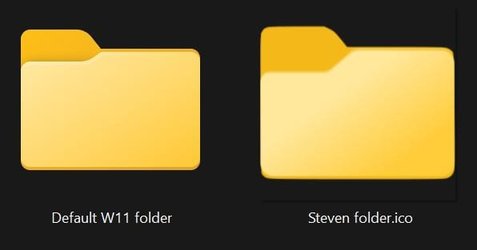
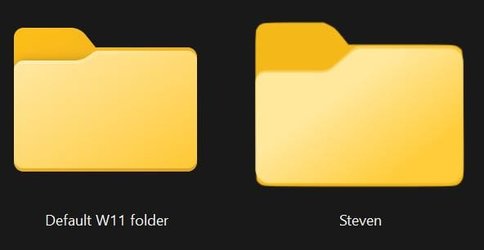
Here's my result, but just so you know, you can easily compare this on your own, just create a blank folder. Create a second blank folder and set your custom icon on it, then look at them side-by-side (it's even easier if you set the folder view to "extra large icons". Regardless, best of luck to you to match the W11 folder icons design :

comparison.jpg
comparison2.jpg
 

My Computer My Computer

At a glance

Windows 11 Pro 64-bit (v23H2)AMD Ryzen 7 5800X3D (8-core / 16-thread) @ 4....Corsair Vengeance LPX 32GB (4x8GB) DDR4-3600 ...AMD Radeon RX 7800 XT 16GB GDDR6
OS
Windows 11 Pro 64-bit (v23H2)
Computer type
PC/Desktop
Manufacturer/Model
Custom DIY PC
CPU
AMD Ryzen 7 5800X3D (8-core / 16-thread) @ 4.5 GHz
Motherboard
ASUS ROG Strix X570-E Gaming (BIOS 5003)
Memory
Corsair Vengeance LPX 32GB (4x8GB) DDR4-3600 CL16
Graphics Card(s)
AMD Radeon RX 7800 XT 16GB GDDR6
Sound Card
SupremeFX S1220A
Monitor(s) Displays
LG 32UK550 32" 4K UHD (2160p) HDR 60hz
Hard Drives
SSD: Samsung 980 PRO 500GB (Operating System)
SSD: Samsung 860 EVO 500GB (Documents)
HDD: Seagate FireCuda 2TB (Games)
HDD: Seagate FireCuda 2TB (Videos)
PSU
Corsair AX850 Titanium Certified (Fully Modular)
Case
Phanteks Enthoo Evolv ATX PH-ES515ETG_AG
Cooling
Noctua NH-D15 chromax.black
Keyboard
Microsoft Sidewinder X4
Mouse
ROCCAT Kone Pure Ultra
Internet Speed
Download : 1 Gbps | Upload : 1 Gbps
Browser
Google Chrome
Other Info
CPU Fan: Noctua NF-A15 chromax.black (x2)
Case Fan: Noctua NF-S12A chromax.black (x6)
Case Fan: Noctua NF-A14 chromax.black (x1)
I think I got it fixed this time. It has to do something with the export size

yellow 3.png
 

Attachments

My Computer My Computer

At a glance

Windows 11
OS
Windows 11
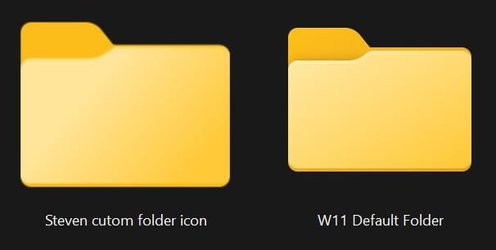
Unfortunatly, your icon still look bigger and i'm pretty certain this has to do with the software you use to export your PNG to ICO format messing things up :
comparison3.jpg
 

My Computer My Computer

At a glance

Windows 11 Pro 64-bit (v23H2)AMD Ryzen 7 5800X3D (8-core / 16-thread) @ 4....Corsair Vengeance LPX 32GB (4x8GB) DDR4-3600 ...AMD Radeon RX 7800 XT 16GB GDDR6
OS
Windows 11 Pro 64-bit (v23H2)
Computer type
PC/Desktop
Manufacturer/Model
Custom DIY PC
CPU
AMD Ryzen 7 5800X3D (8-core / 16-thread) @ 4.5 GHz
Motherboard
ASUS ROG Strix X570-E Gaming (BIOS 5003)
Memory
Corsair Vengeance LPX 32GB (4x8GB) DDR4-3600 CL16
Graphics Card(s)
AMD Radeon RX 7800 XT 16GB GDDR6
Sound Card
SupremeFX S1220A
Monitor(s) Displays
LG 32UK550 32" 4K UHD (2160p) HDR 60hz
Hard Drives
SSD: Samsung 980 PRO 500GB (Operating System)
SSD: Samsung 860 EVO 500GB (Documents)
HDD: Seagate FireCuda 2TB (Games)
HDD: Seagate FireCuda 2TB (Videos)
PSU
Corsair AX850 Titanium Certified (Fully Modular)
Case
Phanteks Enthoo Evolv ATX PH-ES515ETG_AG
Cooling
Noctua NH-D15 chromax.black
Keyboard
Microsoft Sidewinder X4
Mouse
ROCCAT Kone Pure Ultra
Internet Speed
Download : 1 Gbps | Upload : 1 Gbps
Browser
Google Chrome
Other Info
CPU Fan: Noctua NF-A15 chromax.black (x2)
Case Fan: Noctua NF-S12A chromax.black (x6)
Case Fan: Noctua NF-A14 chromax.black (x1)
May I know the icon size for the default folder ?
 

My Computer My Computer

At a glance

Windows 11
OS
Windows 11
May I know the icon size for the default folder ?

I have to idea. I do not make icons nor do I make anything really. I believe it's 256px x 256px but i'm not sure. Tho, you can check this by yourself, default W11 icons are available here :

%SystemRoot%\System32\SHELL32.dll
%SystemRoot%\System32\imageres.dll

You should ask either Lucas North nor spettojim for this, they might be better suited to help you out.
 
Last edited:

My Computer My Computer

At a glance

Windows 11 Pro 64-bit (v23H2)AMD Ryzen 7 5800X3D (8-core / 16-thread) @ 4....Corsair Vengeance LPX 32GB (4x8GB) DDR4-3600 ...AMD Radeon RX 7800 XT 16GB GDDR6
OS
Windows 11 Pro 64-bit (v23H2)
Computer type
PC/Desktop
Manufacturer/Model
Custom DIY PC
CPU
AMD Ryzen 7 5800X3D (8-core / 16-thread) @ 4.5 GHz
Motherboard
ASUS ROG Strix X570-E Gaming (BIOS 5003)
Memory
Corsair Vengeance LPX 32GB (4x8GB) DDR4-3600 CL16
Graphics Card(s)
AMD Radeon RX 7800 XT 16GB GDDR6
Sound Card
SupremeFX S1220A
Monitor(s) Displays
LG 32UK550 32" 4K UHD (2160p) HDR 60hz
Hard Drives
SSD: Samsung 980 PRO 500GB (Operating System)
SSD: Samsung 860 EVO 500GB (Documents)
HDD: Seagate FireCuda 2TB (Games)
HDD: Seagate FireCuda 2TB (Videos)
PSU
Corsair AX850 Titanium Certified (Fully Modular)
Case
Phanteks Enthoo Evolv ATX PH-ES515ETG_AG
Cooling
Noctua NH-D15 chromax.black
Keyboard
Microsoft Sidewinder X4
Mouse
ROCCAT Kone Pure Ultra
Internet Speed
Download : 1 Gbps | Upload : 1 Gbps
Browser
Google Chrome
Other Info
CPU Fan: Noctua NF-A15 chromax.black (x2)
Case Fan: Noctua NF-S12A chromax.black (x6)
Case Fan: Noctua NF-A14 chromax.black (x1)
Steven, size is still not quite right (too big) :

comparison4.png

Quote from Lucas North if that can help you resolving the icon size issue :
"I'm using Photoshop & Illustrator to create and then they are put through 'Axialis' Icon Workshop to turn them into icons."
 
Last edited:

My Computer My Computer

At a glance

Windows 11 Pro 64-bit (v23H2)AMD Ryzen 7 5800X3D (8-core / 16-thread) @ 4....Corsair Vengeance LPX 32GB (4x8GB) DDR4-3600 ...AMD Radeon RX 7800 XT 16GB GDDR6
OS
Windows 11 Pro 64-bit (v23H2)
Computer type
PC/Desktop
Manufacturer/Model
Custom DIY PC
CPU
AMD Ryzen 7 5800X3D (8-core / 16-thread) @ 4.5 GHz
Motherboard
ASUS ROG Strix X570-E Gaming (BIOS 5003)
Memory
Corsair Vengeance LPX 32GB (4x8GB) DDR4-3600 CL16
Graphics Card(s)
AMD Radeon RX 7800 XT 16GB GDDR6
Sound Card
SupremeFX S1220A
Monitor(s) Displays
LG 32UK550 32" 4K UHD (2160p) HDR 60hz
Hard Drives
SSD: Samsung 980 PRO 500GB (Operating System)
SSD: Samsung 860 EVO 500GB (Documents)
HDD: Seagate FireCuda 2TB (Games)
HDD: Seagate FireCuda 2TB (Videos)
PSU
Corsair AX850 Titanium Certified (Fully Modular)
Case
Phanteks Enthoo Evolv ATX PH-ES515ETG_AG
Cooling
Noctua NH-D15 chromax.black
Keyboard
Microsoft Sidewinder X4
Mouse
ROCCAT Kone Pure Ultra
Internet Speed
Download : 1 Gbps | Upload : 1 Gbps
Browser
Google Chrome
Other Info
CPU Fan: Noctua NF-A15 chromax.black (x2)
Case Fan: Noctua NF-S12A chromax.black (x6)
Case Fan: Noctua NF-A14 chromax.black (x1)
I used the Axialis software to check. But there is no luck. I need to find the default folder size which need to be fed for ICO conversion.

What I did was draw over the icon your provided. The shape is almost the same now, but the size is not exactly.

Personally, I am not worried. Because I wouldn't mind since they are custom folders.
 

My Computer My Computer

At a glance

Windows 11
OS
Windows 11
I used Axialis Icon Workshop this time to export ICO. It looks like working for most sizes except List and Details

Attached the ICO. Would be nice to have some feedback.
 

Attachments

My Computer My Computer

At a glance

Windows 11
OS
Windows 11
I think I cracked it finally. When I use Axialis and tick all options, I get a perfect ICO.
 

Attachments

My Computer My Computer

At a glance

Windows 11
OS
Windows 11
can someone give me the folder templates

The small image is the exact size and position of the folder and where you line up your folder within the guides.

256.png_2.jpg

The large image is just a zoomed in version so you can see it better.

Zoomed in.png_2.jpg

To achieve better quality, here it is in 2048 x 2048px

Folder Icon.png_2.jpg
 
Last edited:

My Computer My Computer

At a glance

Windows 11 Pro 64-bit (v23H2)AMD Ryzen 7 5800X3D (8-core / 16-thread) @ 4....Corsair Vengeance LPX 32GB (4x8GB) DDR4-3600 ...AMD Radeon RX 7800 XT 16GB GDDR6
OS
Windows 11 Pro 64-bit (v23H2)
Computer type
PC/Desktop
Manufacturer/Model
Custom DIY PC
CPU
AMD Ryzen 7 5800X3D (8-core / 16-thread) @ 4.5 GHz
Motherboard
ASUS ROG Strix X570-E Gaming (BIOS 5003)
Memory
Corsair Vengeance LPX 32GB (4x8GB) DDR4-3600 CL16
Graphics Card(s)
AMD Radeon RX 7800 XT 16GB GDDR6
Sound Card
SupremeFX S1220A
Monitor(s) Displays
LG 32UK550 32" 4K UHD (2160p) HDR 60hz
Hard Drives
SSD: Samsung 980 PRO 500GB (Operating System)
SSD: Samsung 860 EVO 500GB (Documents)
HDD: Seagate FireCuda 2TB (Games)
HDD: Seagate FireCuda 2TB (Videos)
PSU
Corsair AX850 Titanium Certified (Fully Modular)
Case
Phanteks Enthoo Evolv ATX PH-ES515ETG_AG
Cooling
Noctua NH-D15 chromax.black
Keyboard
Microsoft Sidewinder X4
Mouse
ROCCAT Kone Pure Ultra
Internet Speed
Download : 1 Gbps | Upload : 1 Gbps
Browser
Google Chrome
Other Info
CPU Fan: Noctua NF-A15 chromax.black (x2)
Case Fan: Noctua NF-S12A chromax.black (x6)
Case Fan: Noctua NF-A14 chromax.black (x1)
Back
Top Bottom