Desktop icons


qim

Member
Local time
7:21 PM
Posts
62
OS
Windows11
Hi

In Win10 when I added something to the Desktop it went to the end of whatever was already there. In Win11 it goes to the beginning (topleft of the screen) and displaces whatever is there already

I would like to revert to Win10 arrangemente. What doi I have to do?

Thank you

Qim
 

My Computer My Computer

At a glance

Windows11in motherboard
OS
Windows11
Computer type
Laptop
Manufacturer/Model
HP Envy
Graphics Card(s)
in motherboard
Hi

In Win10 when I added something to the Desktop it went to the end of whatever was already there. In Win11 it goes to the beginning (topleft of the screen) and displaces whatever is there already

I would like to revert to Win10 arrangemente. What doi I have to do?

Thank you

Qim


Just "move" the new icon to where you want it.
It will stay there from then on.

I think MS thinks it's a good idea to put the new icon at top left. More noticeable or something. :/


I've noticed that this only happens for "some" new icons.
For example, when I save an edited image to the desktop, it appears at the end (bottom) of my other icons.
Same for Zip files, files I move from another drive to the desktop... etc.


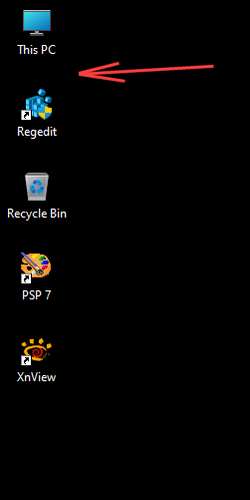
When I install a new program though... the new icon gets placed just below ThisPC...
But this pic I just made was placed after the XnView shortcut.

Image1.png Image1.png


Just another one of Microsoft's inexplicable... ideas.
 
Last edited:

My Computers My Computers

  • At a glance

    Win 11 Home ♦♦♦26200.8655 ♦♦♦♦♦♦♦25H2AMD Ryzen 7 3700XG.Skill (F4-3200C14D-16GTZKW)EVGA RTX 2070 (08G-P4-2171-KR)
    OS
    Win 11 Home ♦♦♦26200.8655 ♦♦♦♦♦♦♦25H2
    Computer type
    PC/Desktop
    Manufacturer/Model
    Built by Ghot® [May 2020]
    CPU
    AMD Ryzen 7 3700X
    Motherboard
    Asus Pro WS X570-ACE (BIOS 5302)
    Memory
    G.Skill (F4-3200C14D-16GTZKW)
    Graphics Card(s)
    EVGA RTX 2070 (08G-P4-2171-KR)
    Sound Card
    Realtek ALC1220P / ALC S1220A
    Monitor(s) Displays
    Dell U3011 30"
    Screen Resolution
    2560 x 1600
    Hard Drives
    2x Samsung 860 EVO 500GB,
    WD 4TB Black FZBX - SATA III,
    WD 8TB Black FZBX - SATA III,
    DRW-24B1ST CD/DVD Burner
    PSU
    PC Power & Cooling 750W Quad EPS12V
    Case
    Cooler Master ATCS 840 Tower
    Cooling
    CM Hyper 212 EVO (push/pull)
    Keyboard
    Ducky DK9008 Shine II Blue LED
    Mouse
    Logitech Optical M-100
    Internet Speed
    300/300
    Browser
    Firefox (latest)
    Antivirus
    Bitdefender Total Security
    Other Info
    Speakers: Klipsch Pro Media 2.1
  • At a glance

    Windows XP Pro 32bit w/SP3AMD Athlon 64 X2 5000+ (OC'd @ 3.2Ghz)TWIN2X2048-6400C4DHX (2 x 1GB, DDR2 800)EVGA 256-P2-N758-TR GeForce 8600GT SSC
    Operating System
    Windows XP Pro 32bit w/SP3
    Computer type
    PC/Desktop
    Manufacturer/Model
    Built by Ghot® (not in use)
    CPU
    AMD Athlon 64 X2 5000+ (OC'd @ 3.2Ghz)
    Motherboard
    ASUS M2N32-SLI Deluxe Wireless Edition
    Memory
    TWIN2X2048-6400C4DHX (2 x 1GB, DDR2 800)
    Graphics card(s)
    EVGA 256-P2-N758-TR GeForce 8600GT SSC
    Sound Card
    Onboard
    Monitor(s) Displays
    ViewSonic G90FB Black 19" Professional (CRT)
    Screen Resolution
    up to 2048 x 1536
    Hard Drives
    WD 36GB 10,000rpm Raptor SATA
    Seagate 80GB 7200rpm SATA
    Lite-On LTR-52246S CD/RW
    Lite-On LH-18A1P CD/DVD Burner
    PSU
    PC Power & Cooling Silencer 750 Quad EPS12V
    Case
    Generic Beige case, 80mm fans
    Cooling
    ZALMAN 9500A 92mm CPU Cooler
    Keyboard
    Logitech Classic Keybooard 200
    Mouse
    Logitech Optical M-BT96a
    Internet Speed
    300/300
    Browser
    Firefox 3.x ??
    Antivirus
    Symantec (Norton)
    Other Info
    Still assembled, still runs. Haven't turned it on for 15 years?
"Just "move" the new icon to where you want it."

That's the problem: it doesn't!

I thought it could be controlled from the "Taskbar Settings" but I cannot see how
 

My Computer My Computer

At a glance

Windows11in motherboard
OS
Windows11
Computer type
Laptop
Manufacturer/Model
HP Envy
Graphics Card(s)
in motherboard
just right click on desktop and sort it by type. Then try again. That may fix your problem.
 

My Computer My Computer

At a glance

Windows 11
OS
Windows 11
Computer type
Laptop
Right click desktop, view and unselect auto arrange icons.
 

My Computers My Computers

  • At a glance

    Win 11 ProAMD Ryzen™ 7 7730U24GB Dual-Channel DDR4 @ 1596MHz (22-22-22-52)512MB ATI AMD Radeon Graphics (ASUStek Comput...
    OS
    Win 11 Pro
    Computer type
    Laptop
    Manufacturer/Model
    ASUS Vivobook
    CPU
    AMD Ryzen™ 7 7730U
    Motherboard
    M1605YA
    Memory
    24GB Dual-Channel DDR4 @ 1596MHz (22-22-22-52)
    Graphics Card(s)
    512MB ATI AMD Radeon Graphics (ASUStek Computer Inc)
    Monitor(s) Displays
    Generic PnP Monitor (1920x1200@60Hz) - P1 PLUS (1920x1080@59Hz)
    Screen Resolution
    1920 X 1200
    Hard Drives
    953GB Western Digital WD
    PSU
    45 Watts
    Mouse
    Lenovo Bluetooth.
    Internet Speed
    500 Mbps
    Browser
    Edge
    Antivirus
    Defender
  • At a glance

    Windows 11AMD Ryzen 7 5800H / 3.2 GHz32 GB DDR4 SDRAM 3200 MHzNVIDIA GeForce RTX 3060 6 GB GDDR6 SDRAM
    Operating System
    Windows 11
    Computer type
    Laptop
    Manufacturer/Model
    ACER NITRO
    CPU
    AMD Ryzen 7 5800H / 3.2 GHz
    Motherboard
    CZ Scala_CAS (FP6)
    Memory
    32 GB DDR4 SDRAM 3200 MHz
    Graphics card(s)
    NVIDIA GeForce RTX 3060 6 GB GDDR6 SDRAM
    Sound Card
    Realtek Audio. NVIDIA High Definition Audio
    Monitor(s) Displays
    15.6" LED backlight 1920 x 1080 (Full HD) 144 Hz
    Screen Resolution
    1920 x 1080 (Full HD)
    Hard Drives
    Samsung 970 Evo Plus 2TB NVMe M.2
    PSU
    180 Watt, 19.5 V
    Mouse
    Lenovo Bluetooth
    Internet Speed
    500 Mbps
    Browser
    Edge
    Antivirus
    Defender
"Just "move" the new icon to where you want it."

That's the problem: it doesn't!

I thought it could be controlled from the "Taskbar Settings" but I cannot see how


This is how I have mine set. And for "Sort by"... I have nothing selected.

Image1.png


I also used the top (very first), tweak, in the link below... to get the Windows 10 context menus...
I don't know if that makes a difference or not. It might. ^^


The only tweaking program I use is Winaero Tweaker, and I have nothing in there set... concerning the desktop icons.
 
Last edited:

My Computers My Computers

  • At a glance

    Win 11 Home ♦♦♦26200.8655 ♦♦♦♦♦♦♦25H2AMD Ryzen 7 3700XG.Skill (F4-3200C14D-16GTZKW)EVGA RTX 2070 (08G-P4-2171-KR)
    OS
    Win 11 Home ♦♦♦26200.8655 ♦♦♦♦♦♦♦25H2
    Computer type
    PC/Desktop
    Manufacturer/Model
    Built by Ghot® [May 2020]
    CPU
    AMD Ryzen 7 3700X
    Motherboard
    Asus Pro WS X570-ACE (BIOS 5302)
    Memory
    G.Skill (F4-3200C14D-16GTZKW)
    Graphics Card(s)
    EVGA RTX 2070 (08G-P4-2171-KR)
    Sound Card
    Realtek ALC1220P / ALC S1220A
    Monitor(s) Displays
    Dell U3011 30"
    Screen Resolution
    2560 x 1600
    Hard Drives
    2x Samsung 860 EVO 500GB,
    WD 4TB Black FZBX - SATA III,
    WD 8TB Black FZBX - SATA III,
    DRW-24B1ST CD/DVD Burner
    PSU
    PC Power & Cooling 750W Quad EPS12V
    Case
    Cooler Master ATCS 840 Tower
    Cooling
    CM Hyper 212 EVO (push/pull)
    Keyboard
    Ducky DK9008 Shine II Blue LED
    Mouse
    Logitech Optical M-100
    Internet Speed
    300/300
    Browser
    Firefox (latest)
    Antivirus
    Bitdefender Total Security
    Other Info
    Speakers: Klipsch Pro Media 2.1
  • At a glance

    Windows XP Pro 32bit w/SP3AMD Athlon 64 X2 5000+ (OC'd @ 3.2Ghz)TWIN2X2048-6400C4DHX (2 x 1GB, DDR2 800)EVGA 256-P2-N758-TR GeForce 8600GT SSC
    Operating System
    Windows XP Pro 32bit w/SP3
    Computer type
    PC/Desktop
    Manufacturer/Model
    Built by Ghot® (not in use)
    CPU
    AMD Athlon 64 X2 5000+ (OC'd @ 3.2Ghz)
    Motherboard
    ASUS M2N32-SLI Deluxe Wireless Edition
    Memory
    TWIN2X2048-6400C4DHX (2 x 1GB, DDR2 800)
    Graphics card(s)
    EVGA 256-P2-N758-TR GeForce 8600GT SSC
    Sound Card
    Onboard
    Monitor(s) Displays
    ViewSonic G90FB Black 19" Professional (CRT)
    Screen Resolution
    up to 2048 x 1536
    Hard Drives
    WD 36GB 10,000rpm Raptor SATA
    Seagate 80GB 7200rpm SATA
    Lite-On LTR-52246S CD/RW
    Lite-On LH-18A1P CD/DVD Burner
    PSU
    PC Power & Cooling Silencer 750 Quad EPS12V
    Case
    Generic Beige case, 80mm fans
    Cooling
    ZALMAN 9500A 92mm CPU Cooler
    Keyboard
    Logitech Classic Keybooard 200
    Mouse
    Logitech Optical M-BT96a
    Internet Speed
    300/300
    Browser
    Firefox 3.x ??
    Antivirus
    Symantec (Norton)
    Other Info
    Still assembled, still runs. Haven't turned it on for 15 years?
It put's them at the bottom for me and I've never messed with it. Pretty sure this is the default just like Windows 7
 

My Computers My Computers

  • At a glance

    Windows 11 (up to date)Intel i5 12400Corsair Vengeance LPX 16GBOn Board the Z690
    OS
    Windows 11 (up to date)
    Computer type
    PC/Desktop
    Manufacturer/Model
    Custom
    CPU
    Intel i5 12400
    Motherboard
    Gigabyte Z690 UA
    Memory
    Corsair Vengeance LPX 16GB
    Graphics Card(s)
    On Board the Z690
    Sound Card
    On Board
    Monitor(s) Displays
    43" Samsung tu7000
    Screen Resolution
    2560 x 1440
    Hard Drives
    SAMSUNG SSD 1TB NVMe M.2
    PSU
    Thermaltake smart 500w 80+
    Case
    LIAN LANCOOL_205M
    Cooling
    Bunch of fans . . . :o) (lights dont work)
    Keyboard
    Unicomp: Ultra Classic White Buckling Spring USB
    Mouse
    M510
    Internet Speed
    50mbps on Ethernet
    Browser
    Fire Fox
    Antivirus
    Windows
    Other Info
    Love this computer but I still prefer Win-7 like I love my old Lazy Boy Recliner . . . it just feels better.
  • At a glance

    WIN-7-64BIT and Win-11 pro for testing on uns...i5-3570K CPU @ 3.40GHz, 3801 Mhz, 4 Core(s), ...16 GB - Crucial Ballistick 4GB PC3-14900 DDR3...NVIDIA GeForce GTX 1050
    Operating System
    WIN-7-64BIT and Win-11 pro for testing on unsupported hardware
    Computer type
    PC/Desktop
    Manufacturer/Model
    Home built
    CPU
    i5-3570K CPU @ 3.40GHz, 3801 Mhz, 4 Core(s), 4 Logical Processor(s)
    Motherboard
    GA-Z77-HD3
    Memory
    16 GB - Crucial Ballistick 4GB PC3-14900 DDR3-1333 MHz
    Graphics card(s)
    NVIDIA GeForce GTX 1050
    Sound Card
    On Board
    Monitor(s) Displays
    ASUS VP278
    Screen Resolution
    1920 x 1080
    Hard Drives
    4 - internal Samsung 2.5" SSD, 1 WD HDD 7200 and some external drives
    PSU
    EVGA 550w
    Case
    Old Gygabyte Tower
    Cooling
    Yes
    Keyboard
    Unicomp - UNIOP4A USB (like the old IBM Model H that I started with)
    Mouse
    M510
    Internet Speed
    50mbps
    Browser
    Firefox
    Antivirus
    Windows
    Other Info
    The only thing it lack is USB-3.2 on the front face but it has 3.0 on the back
Just "move" the new icon to where you want it.
It will stay there from then on.

I think MS thinks it's a good idea to put the new icon at top left. More noticeable or something. :/


I've noticed that this only happens for "some" new icons.
For example, when I save an edited image to the desktop, it appears at the end (bottom) of my other icons.
Same for Zip files, files I move from another drive to the desktop... etc.


When I install a new program though... the new icon gets placed just below ThisPC...
But this pic I just made was placed after the XnView shortcut.

View attachment 60230 View attachment 60231


Just another one of Microsoft's inexplicable... ideas.
Frequently, files moved or copied onto my desktop get put right below "This PC" displacing everything else. I then have to move it somewhere else. It's quite annoying.
 

My Computer My Computer

At a glance

Windows 11
OS
Windows 11
Computer type
PC/Desktop
Hi

In Win10 when I added something to the Desktop it went to the end of whatever was already there. In Win11 it goes to the beginning (topleft of the screen) and displaces whatever is there already

I would like to revert to Win10 arrangemente. What doi I have to do?
Sometimes that happens to me as well. I don't know why and it doesn't happed all the time but every once in a while an icon will move my trash bin icon down and be placed above it. May be a Windows 11 quirk, but nothing bothersome to me.

"Just "move" the new icon to where you want it."

That's the problem: it doesn't!

I thought it could be controlled from the "Taskbar Settings" but I cannot see how
You can have them auto arranged as I do. Simply right click the desktop, select View, than click "Align icons to grid"

Icons-auto-arranged..jpg

Now whenever a new icon is created is should fall behind the last icon in a grid like manner. For "Sort by", I go by "Item type"

Hope this helps.
 

My Computers My Computers

  • At a glance

    Windows 11 Pro 24H2 (Build 26100.4770)Intel Core 9 Ultra 285K64G (4x16) DDR5 Corsair RGB Dominator Platinu...Radeon (XFX Mercury) RX 9070XT OC (with Magne...
    OS
    Windows 11 Pro 24H2 (Build 26100.4770)
    Computer type
    PC/Desktop
    Manufacturer/Model
    Custom built
    CPU
    Intel Core 9 Ultra 285K
    Motherboard
    Gigabyte Aorus Z890 Xtreme AI Top
    Memory
    64G (4x16) DDR5 Corsair RGB Dominator Platinum (6400Mhz)
    Graphics Card(s)
    Radeon (XFX Mercury) RX 9070XT OC (with Magnetic Fans)
    Sound Card
    Onboard (DTS:X® Ultra Audio: ESS ES9280A DAC)
    Monitor(s) Displays
    27-inch Eizo Color Edge - CG2700X
    Screen Resolution
    3840 x 2160
    Hard Drives
    4 Samsung NVM 990 Pro drives: 1TB (OS), 2TB, 2 X 4TB.
    PSU
    Seasonic TX-1300 (1300 Watts)
    Case
    Cooler Master H500M
    Cooling
    Corsair Link Titan 280 RX RGB
    Keyboard
    Logitech Craft
    Mouse
    Logitech MX Master 3S
    Internet Speed
    1TB Download. 512mb Upload
    Browser
    Microsoft Edge Chromium
    Antivirus
    Windows Security
    Other Info
    System used for gaming, photography, music, school.
  • At a glance

    Windows 11 Pro 24H2 (Build 26100.4061)Intel Core i9-9900K32gig (4 x 8) Corsair Dominator Platinum DDR4...Radeon XFX Merc 7900XT (20gig)
    Operating System
    Windows 11 Pro 24H2 (Build 26100.4061)
    Computer type
    PC/Desktop
    Manufacturer/Model
    Custom built
    CPU
    Intel Core i9-9900K
    Motherboard
    Gigabyte Z390 Aorus Xtreme
    Memory
    32gig (4 x 8) Corsair Dominator Platinum DDR4 3600Mhz (B-Die)
    Graphics card(s)
    Radeon XFX Merc 7900XT (20gig)
    Sound Card
    Onboard
    Monitor(s) Displays
    24-Inch NEC PA242W
    Screen Resolution
    2880 x 1800
    Hard Drives
    2 X NVME, 1 X SATA SSD
    PSU
    EVGA Super Nova 1000 P2 (1000 Watt)
    Case
    Phantek Enthoo Luxe
    Cooling
    Corsair H115i Elite AIO Cooler
    Keyboard
    Logitech Keys
    Mouse
    Logitech MX Master 3
    Internet Speed
    1TB Download. 512mb Upload
    Browser
    Microsoft Edge Chromium
    Antivirus
    Windows Security
    Other Info
    Backup System
Hi

In Win10 when I added something to the Desktop it went to the end of whatever was already there. In Win11 it goes to the beginning (topleft of the screen) and displaces whatever is there already

I would like to revert to Win10 arrangemente. What doi I have to do?

Thank you

Qim
Windows has two desktop folders as follows:
  1. C:\Users\Public\Desktop
  2. C:\Users\UserName\Desktop
The contents of the public desktop folder are always displayed first on the left side of the screen. The contents of the User's Desktop folder follows.

I haven't figured out how Windows decides to store stuff in the Public Desktop folder. But to to have ALL icons on my desktop sorted properly, I created a batch file that moves the contents of the Public Desktop folder into the User's Desktop folder. The result is that all icons on my desktop are sorted properly. I have a shortcut on my desktop that I click to run the batch file when I see icons on the left side of the screen that are out of position.

Here's my batch file:
@echo off
move "C:\Users\Public\Desktop\." "C:\Users\z270\Desktop"
(z270 is my user's name. Yours will be different.)
 

My Computer My Computer

At a glance

Windows 11Intel Core Ultra 7, 265K32GBUsing integrated graphics
OS
Windows 11
Computer type
PC/Desktop
Manufacturer/Model
Self Built
CPU
Intel Core Ultra 7, 265K
Motherboard
MSI Pro Z890-P WiFi
Memory
32GB
Graphics Card(s)
Using integrated graphics
Monitor(s) Displays
LG
Screen Resolution
4K
Hard Drives
512 GB SSD, 2TB M.2 SSD and 2TB SATA SSD
PSU
Seasonic Modular 550 watt Focus Plus
Case
Corsair 4000D
Cooling
ThermalRight Phantom Sprit
Windows has two desktop folders as follows:
  1. C:\Users\Public\Desktop
  2. C:\Users\UserName\Desktop
The contents of the public desktop folder are always displayed first on the left side of the screen. The contents of the User's Desktop folder follows.

I haven't figured out how Windows decides to store stuff in the Public Desktop folder. But to to have ALL icons on my desktop sorted properly, I created a batch file that moves the contents of the Public Desktop folder into the User's Desktop folder. The result is that all icons on my desktop are sorted properly. I have a shortcut on my desktop that I click to run the batch file when I see icons on the left side of the screen that are out of position.

Here's my batch file:
@echo off
move "C:\Users\Public\Desktop\." "C:\Users\z270\Desktop"
(z270 is my user's name. Yours will be different.)
The next time this happens, I'll see which folder the item copied to.
 

My Computer My Computer

At a glance

Windows 11
OS
Windows 11
Computer type
PC/Desktop
Thank you all

I guess I have to get used to this nonsensical Win11. I like to place whatever I am working on on the desktop and noit have it moved around without my knowledge. I HATE this Windows!

Is there an easy way to revert to Windows10?
 

My Computer My Computer

At a glance

Windows11in motherboard
OS
Windows11
Computer type
Laptop
Manufacturer/Model
HP Envy
Graphics Card(s)
in motherboard
The next time this happens, I'll see which folder the item copied to.
Just an FYI update, this happened again to me yesterday. I verified that the folder the file was copied to was my user folder, not the public folder.
 

My Computer My Computer

At a glance

Windows 11
OS
Windows 11
Computer type
PC/Desktop
Not sure if it's the same exact problem, but I sometimes notice this the second I change the name of a desktop file (or it's extension), it pops to the upper left. If I then move the file back to about where it was, and change the name or extension again- same thing. Seems to happen repeatedly with the same files but not with others... doesn't matter if they're new or old. Auto arrange if OFF. Align to grid is ON. "Sort by" NONE. My C:\Users\Public\Desktop is empty.

Also, if I may add, if I change the extension of a file and click off of the icon to make the change, and then click (not Enter) "Yes" to confirm, the "selection rectangle" appears even though no mouse buttons are held! I need to click the desktop again to dis-engage it. Crazy.
 
Last edited:

My Computer My Computer

At a glance

Win11Pro - 22H2-2621.1555i7-1270032 GB DDR5RTX 3060
OS
Win11Pro - 22H2-2621.1555
Computer type
PC/Desktop
Manufacturer/Model
Lenovo Legion T5 26IAB7
CPU
i7-12700
Memory
32 GB DDR5
Graphics Card(s)
RTX 3060
Back
Top Bottom