Solved Desktop Icons?


HowdyDo

Well-known member
Member
Local time
9:53 AM
Posts
177
Location
Ontario Canada
OS
Win 11 Pro 25H2 O/S Build 22631.2861
Hi Folks:
I have a strange issue here. Very often when I click on a desktop shortcut (Icon), the whole screen turns blue (highlighted), the Icons are fine, but wallpaper is gone because the background is completely blue. Any advice? 😊

System Info:
OS Version: Microsoft Windows 11 Pro, 64 bit 23H2 fully updated.
Processor: 12th Gen Intel(R) Core(TM) i5-12400, Intel64 Family 6 Model 151 Stepping 5
Processor Count: 12
RAM: 16152 Mb
Graphics Card: Intel(R) UHD Graphics 730, 2047 Mb
Hard Drives: C: 222 GB (111 GB Free); D: 232 GB (221 GB Free);
Motherboard: Gigabyte Technology Co., Ltd., H610M S2H V2 DDR4
Antivirus: Windows Defender, Enabled and Updated
 

My Computer

System One

  • OS
    Win 11 Pro 25H2 O/S Build 22631.2861
    Computer type
    PC/Desktop
    Manufacturer/Model
    Clone
    CPU
    12th Gen Intel Core i5-12400 2.5 GHZ
    Memory
    16.0 GB
    Monitor(s) Displays
    1 Asus 24"
    Screen Resolution
    1920x1080
    Hard Drives
    2x SSD
    PSU
    600 Watt
    Internet Speed
    300 mb/sec Download
    Browser
    Chrome
At the fist sign of any issues i head to the usual DISM and SFC checks.
 

My Computers

System One System Two

  • OS
    Windows 11 Enterprise 25H2 26200 7462
    Computer type
    PC/Desktop
    Manufacturer/Model
    Custom Build
    CPU
    Intel XEON E5-2699 v3
    Motherboard
    ASUS X99-A
    Memory
    64GB Teamgroup UD4-3600
    Graphics Card(s)
    NVIDIA GeForce GTX 1080 Ti
    Sound Card
    Integrated
    Monitor(s) Displays
    ACER X34 Predator
    Screen Resolution
    3440 x 1440
    Hard Drives
    Crucial CT1000P 3P SSD8 1TB
    Crucial CT1000 BX500 SSD 1TB
    PSU
    GameMax Pro
    Case
    Fractal Design
    Cooling
    Corsair H110iGT + 6 140mm Fans
    Keyboard
    Corsair K4
    Mouse
    G-Skill G502
    Internet Speed
    300MBs
    Browser
    Chrome
    Antivirus
    OEM
    Other Info
    ASUS RT-AC87U Router
  • Operating System
    25H2 26200.5074
    Computer type
    Laptop
    Manufacturer/Model
    ASUS X555LA
    Memory
    8GB
    Browser
    Chrome
    Antivirus
    OEM
What He Said!.webp
 

My Computers

System One System Two

  • OS
    Win 11 Pro 25H2, Build 26200.8655
    Computer type
    PC/Desktop
    Manufacturer/Model
    Home Brew
    CPU
    Intel Core i5 14500
    Motherboard
    Gigabyte B760M G P WIFI
    Memory
    64GB DDR4
    Graphics Card(s)
    GeForce RTX 4060
    Sound Card
    Chipset Realtek
    Monitor(s) Displays
    LG 45" Ultragear, Acer 24" 1080p
    Screen Resolution
    5120x1440, 1920x1080
    Hard Drives
    Crucial P310 2TB 2280 PCIe Gen4 3D NAND NVMe M.2 SSD (O/S)
    Silicon Power 2TB US75 NVMe PCIe Gen4 M.2 2280 SSD (backup)
    Crucial BX500 2TB 3D NAND (2nd backup)
    Seagate 4TB Ironwolf, rotating HDD archive files
    External off-line backup Drives: 2 NVMe 4TB drives in external enclosures
    PSU
    Thermaltake Toughpower GF3 750W
    Case
    LIAN LI LANCOOL 216 E-ATX PC Case
    Cooling
    Lots of fans!
    Keyboard
    Microsoft Comfort Curve 2000
    Mouse
    Logitech G305
    Internet Speed
    Verizon FiOS 1GB
    Browser
    Firefox
    Antivirus
    Malware Bytes & Windows Defender Security
  • Operating System
    Win 11 Pro 25H2, Build 26200.8524
    Computer type
    PC/Desktop
    Manufacturer/Model
    Home Brew
    CPU
    Intel Core i5 14400
    Motherboard
    Gigabyte B760M DS3H AX
    Memory
    32GB DDR5
    Graphics card(s)
    Intel 700 Embedded GPU
    Sound Card
    Realtek Embedded
    Monitor(s) Displays
    27" HP 1080p
    Screen Resolution
    1920x1080
    Hard Drives
    Crucial P310 2TB 2280 PCIe Gen4 eD NAND PCIe SSD
    Samsung EVO 990 2TB NVMe Gen4 SSD
    Samsung 2TB SATA SSD
    PSU
    Thermaltake Smart BM3 650W
    Case
    Okinos Micro ATX Case
    Cooling
    Fans
    Keyboard
    Microsoft Comfort Curve 2000
    Mouse
    Logitech G305
    Internet Speed
    Verizon FiOS 1GB
    Browser
    Firefox
    Antivirus
    Malware Bytes & Windows Defender Security
At the fist sign of any issues i head to the usual DISM and SFC checks.
Details please on DISM & SFC checks, is this a cmd prompt?
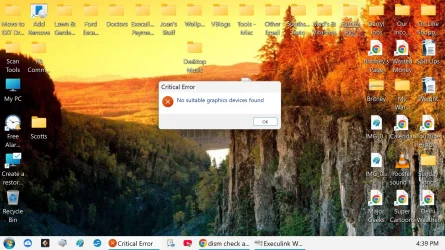
I think my problem is related to this critical error? See screen shot. I've run a stress test on my Intel UHD 730 Graphics card, seems OK.
 

Attachments

  • Screen Shot.webp
    Screen Shot.webp
    353 KB · Views: 2

My Computer

System One

  • OS
    Win 11 Pro 25H2 O/S Build 22631.2861
    Computer type
    PC/Desktop
    Manufacturer/Model
    Clone
    CPU
    12th Gen Intel Core i5-12400 2.5 GHZ
    Memory
    16.0 GB
    Monitor(s) Displays
    1 Asus 24"
    Screen Resolution
    1920x1080
    Hard Drives
    2x SSD
    PSU
    600 Watt
    Internet Speed
    300 mb/sec Download
    Browser
    Chrome
Open an admin terminal, WinKey-X, then A

Run the following command.

DISM /Online /Cleanup-Image /ScanHealth: Scans the image for specific file corruption and identifies potential problems.

If the scan finds problems, run this command next.

DISM /Online /Cleanup-Image /RestoreHealth: This command scans and repairs corrupted system files by downloading and replacing them from the Windows Update servers.

After DISM completes normally, it's time to check the running files against the image you just repaired.

SFC /SCANNOW

Restart your computer: After the process is finished, reboot your computer to apply the changes.
 

My Computers

System One System Two

  • OS
    Win 11 Pro 25H2, Build 26200.8655
    Computer type
    PC/Desktop
    Manufacturer/Model
    Home Brew
    CPU
    Intel Core i5 14500
    Motherboard
    Gigabyte B760M G P WIFI
    Memory
    64GB DDR4
    Graphics Card(s)
    GeForce RTX 4060
    Sound Card
    Chipset Realtek
    Monitor(s) Displays
    LG 45" Ultragear, Acer 24" 1080p
    Screen Resolution
    5120x1440, 1920x1080
    Hard Drives
    Crucial P310 2TB 2280 PCIe Gen4 3D NAND NVMe M.2 SSD (O/S)
    Silicon Power 2TB US75 NVMe PCIe Gen4 M.2 2280 SSD (backup)
    Crucial BX500 2TB 3D NAND (2nd backup)
    Seagate 4TB Ironwolf, rotating HDD archive files
    External off-line backup Drives: 2 NVMe 4TB drives in external enclosures
    PSU
    Thermaltake Toughpower GF3 750W
    Case
    LIAN LI LANCOOL 216 E-ATX PC Case
    Cooling
    Lots of fans!
    Keyboard
    Microsoft Comfort Curve 2000
    Mouse
    Logitech G305
    Internet Speed
    Verizon FiOS 1GB
    Browser
    Firefox
    Antivirus
    Malware Bytes & Windows Defender Security
  • Operating System
    Win 11 Pro 25H2, Build 26200.8524
    Computer type
    PC/Desktop
    Manufacturer/Model
    Home Brew
    CPU
    Intel Core i5 14400
    Motherboard
    Gigabyte B760M DS3H AX
    Memory
    32GB DDR5
    Graphics card(s)
    Intel 700 Embedded GPU
    Sound Card
    Realtek Embedded
    Monitor(s) Displays
    27" HP 1080p
    Screen Resolution
    1920x1080
    Hard Drives
    Crucial P310 2TB 2280 PCIe Gen4 eD NAND PCIe SSD
    Samsung EVO 990 2TB NVMe Gen4 SSD
    Samsung 2TB SATA SSD
    PSU
    Thermaltake Smart BM3 650W
    Case
    Okinos Micro ATX Case
    Cooling
    Fans
    Keyboard
    Microsoft Comfort Curve 2000
    Mouse
    Logitech G305
    Internet Speed
    Verizon FiOS 1GB
    Browser
    Firefox
    Antivirus
    Malware Bytes & Windows Defender Security
I ran the first test, results were "component store" repairable.
I ran the second test and the results were "repaired corrupted" files.
I ran the 3rd test which confirmed that everything was OK now
Rebooted and time will tell.
Thank you very much for those test procedures, you can bet I'll be keeping them for future use. 😊👍👌
 

My Computer

System One

  • OS
    Win 11 Pro 25H2 O/S Build 22631.2861
    Computer type
    PC/Desktop
    Manufacturer/Model
    Clone
    CPU
    12th Gen Intel Core i5-12400 2.5 GHZ
    Memory
    16.0 GB
    Monitor(s) Displays
    1 Asus 24"
    Screen Resolution
    1920x1080
    Hard Drives
    2x SSD
    PSU
    600 Watt
    Internet Speed
    300 mb/sec Download
    Browser
    Chrome
Thank you very much for those test procedures, you can bet I'll be keeping them for future use.
I keep them in a note on my desktops, any sign of freaky behaviour get's them dusted off and actioned.


DISM /Online /Cleanup-Image /AnalyzeComponentStore ; Analyse component store integrity

DISM /online /Cleanup-Image /StartComponentCleanup ; Clean Component store

DISM /online /Cleanup-Image /StartComponentCleanup /ResetBase ; Reset Component Store

DISM /Online /Cleanup-Image /CheckHealth

DISM /Online /Cleanup-Image /ScanHealth

DISM /Online /Cleanup-Image /RestoreHealth

SFC /verifyonly

SFC /Scannow
 

My Computers

System One System Two

  • OS
    Windows 11 Enterprise 25H2 26200 7462
    Computer type
    PC/Desktop
    Manufacturer/Model
    Custom Build
    CPU
    Intel XEON E5-2699 v3
    Motherboard
    ASUS X99-A
    Memory
    64GB Teamgroup UD4-3600
    Graphics Card(s)
    NVIDIA GeForce GTX 1080 Ti
    Sound Card
    Integrated
    Monitor(s) Displays
    ACER X34 Predator
    Screen Resolution
    3440 x 1440
    Hard Drives
    Crucial CT1000P 3P SSD8 1TB
    Crucial CT1000 BX500 SSD 1TB
    PSU
    GameMax Pro
    Case
    Fractal Design
    Cooling
    Corsair H110iGT + 6 140mm Fans
    Keyboard
    Corsair K4
    Mouse
    G-Skill G502
    Internet Speed
    300MBs
    Browser
    Chrome
    Antivirus
    OEM
    Other Info
    ASUS RT-AC87U Router
  • Operating System
    25H2 26200.5074
    Computer type
    Laptop
    Manufacturer/Model
    ASUS X555LA
    Memory
    8GB
    Browser
    Chrome
    Antivirus
    OEM
They will be kept here as well. Again, thank you very much. As this problem was intermittent, I hope it's resolved now? 😊
 

My Computer

System One

  • OS
    Win 11 Pro 25H2 O/S Build 22631.2861
    Computer type
    PC/Desktop
    Manufacturer/Model
    Clone
    CPU
    12th Gen Intel Core i5-12400 2.5 GHZ
    Memory
    16.0 GB
    Monitor(s) Displays
    1 Asus 24"
    Screen Resolution
    1920x1080
    Hard Drives
    2x SSD
    PSU
    600 Watt
    Internet Speed
    300 mb/sec Download
    Browser
    Chrome
They will be kept here as well. Again, thank you very much. As this problem was intermittent, I hope it's resolved now? 😊
The DISM command is actually a wide ranging Windows Image servicing and checking tool that has a lot of functions. I just posted the typical commands you'd use to insure your Windows image is good and the command to insure that your running Windows system files are not compromised.

There's lots more to DISM, read all about it. 😊

DISM Overview


My Computers

System One System Two

  • OS
    Win 11 Pro 25H2, Build 26200.8655
    Computer type
    PC/Desktop
    Manufacturer/Model
    Home Brew
    CPU
    Intel Core i5 14500
    Motherboard
    Gigabyte B760M G P WIFI
    Memory
    64GB DDR4
    Graphics Card(s)
    GeForce RTX 4060
    Sound Card
    Chipset Realtek
    Monitor(s) Displays
    LG 45" Ultragear, Acer 24" 1080p
    Screen Resolution
    5120x1440, 1920x1080
    Hard Drives
    Crucial P310 2TB 2280 PCIe Gen4 3D NAND NVMe M.2 SSD (O/S)
    Silicon Power 2TB US75 NVMe PCIe Gen4 M.2 2280 SSD (backup)
    Crucial BX500 2TB 3D NAND (2nd backup)
    Seagate 4TB Ironwolf, rotating HDD archive files
    External off-line backup Drives: 2 NVMe 4TB drives in external enclosures
    PSU
    Thermaltake Toughpower GF3 750W
    Case
    LIAN LI LANCOOL 216 E-ATX PC Case
    Cooling
    Lots of fans!
    Keyboard
    Microsoft Comfort Curve 2000
    Mouse
    Logitech G305
    Internet Speed
    Verizon FiOS 1GB
    Browser
    Firefox
    Antivirus
    Malware Bytes & Windows Defender Security
  • Operating System
    Win 11 Pro 25H2, Build 26200.8524
    Computer type
    PC/Desktop
    Manufacturer/Model
    Home Brew
    CPU
    Intel Core i5 14400
    Motherboard
    Gigabyte B760M DS3H AX
    Memory
    32GB DDR5
    Graphics card(s)
    Intel 700 Embedded GPU
    Sound Card
    Realtek Embedded
    Monitor(s) Displays
    27" HP 1080p
    Screen Resolution
    1920x1080
    Hard Drives
    Crucial P310 2TB 2280 PCIe Gen4 eD NAND PCIe SSD
    Samsung EVO 990 2TB NVMe Gen4 SSD
    Samsung 2TB SATA SSD
    PSU
    Thermaltake Smart BM3 650W
    Case
    Okinos Micro ATX Case
    Cooling
    Fans
    Keyboard
    Microsoft Comfort Curve 2000
    Mouse
    Logitech G305
    Internet Speed
    Verizon FiOS 1GB
    Browser
    Firefox
    Antivirus
    Malware Bytes & Windows Defender Security
Back
Top Bottom