Did Microsoft mess up my Security? Strange story!


BrianInEngland

Well-known member
Pro User
VIP
Local time
10:47 PM
Posts
3,177
OS
Windows 11 Pro 25H2 (RP channel)
Running Windows 11 22621.607 Release Preview.

I've made a couple of posts here recently regarding issues with the Security app, here's what I've discovered/done to resolve:

Clean install of Windows 11 22621 in June - C:\Windows\System32\SecurityHealth folder is empty. Smart App control (new feature for 22H2) is available in Security settings/App and Browser control. Everything is working.

Platform update to 4.18.2207.7 - all seems ok but can't remember exactly.

Last week Windows Update installed a security update. Two folders in SecurityHealth - 1.0.2207.20002-0 and 1.0.2208.(something). I noticed then that the Smart App control setting was gone completely.

ANOTHER update installed on Friday Sept 23rd - this time creating another folder 1.0.2209. App and Browser control still not working, but also the Security app would keep crashing and showed UNKNOWN for the status. The little green taskbar icon would never change from a tick to a red X, even if I disabled realtime protection. Very strange.

Booted into Recovery and deleted all the folders in SecurityHealth. PC restarted, Smart App control is back - for about a minute when the 1.0.2209 folder reappeared (without me checking for updates). Security app starts crashing again.

Turned off ALL protections, and did MpCmdRun.exe -resetplatform.

Rebooted into recovery, deleted the folders in SecurityHealth again.

Restarted PC, checked for updates. Platform update 4.18.2207-7 re-installed, nothing appeared in the SecurityHealth folder.
Smart App control working, and the Security UI no longer crashes. The tick turns red if I disabled anything. Rebooted a few times, nothing has appeared in the folder. Definition updates are installing with no problems.

Another PC in the house has the 'extra' folders in SecurityHealth, Smart App control isn't working on there either but the Security UI doesn't crash.
I noticed that the 1.0.2209 folders both appeared on the same day.

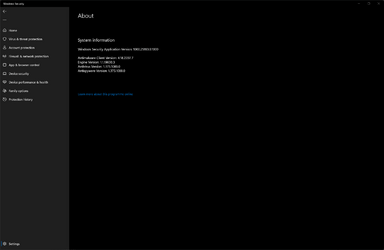
I'm wondering - did MS send an update which caused problems? It seems to have settled now. My About box is shown in the pic.
Windows Security Application Version: 1000.25183.0.1000 appears to me to be a Dev channel version? Which would be totally wrong for RP channel!

My Beta VM doesn't show this line at all in the About box, everything works on there.

Totally at a loss what happened here!

UPDATE: Windows Update just successfully installed Platform update 1.2209.22001-0. Smart App control is gone again, and the Security app is crashing again. I've now reset the platform again, and deleted the folder. I've also blocked this update from installing for a third time (hopefully).
 
Windows Build/Version
Windows 11 22621.607 Release Preview

Attachments
  • Screenshot 2022-09-27 160055.png
    Screenshot 2022-09-27 160055.png
    24.5 KB · Views: 17
Last edited:

My Computer My Computer

At a glance

Windows 11 Pro 25H2 (RP channel)AMD Ryzen 7 9800X3D 8-core64GB Corsair Titanium 6000/CL30MSI Suprim 5080 SOC
OS
Windows 11 Pro 25H2 (RP channel)
Computer type
PC/Desktop
Manufacturer/Model
MSI
CPU
AMD Ryzen 7 9800X3D 8-core
Motherboard
MEG X870E Godlike
Memory
64GB Corsair Titanium 6000/CL30
Graphics Card(s)
MSI Suprim 5080 SOC
Sound Card
Soundblaster AE-9
Monitor(s) Displays
ASUS TUF Gaming VG289Q
Screen Resolution
3840x2160
Hard Drives
Samsung 9100 Pro 4TB (gen 5 x4, system drive/games)
Samsung 990 Pro 2TB
Samsung 980 Pro 2TB
Samsung 870 Evo 4TB
Samsung 870 Evo 2TB
Samsung T9 4TB
PSU
Seasonic PX-2200
Case
Bequiet! Dark Base Pro 901
Cooling
Noctua NH-D15S Chromax black
Keyboard
Logitech G915 X (wired)
Mouse
Logitech G903 with PowerPlay charger
Internet Speed
900Mb/sec
Browser
Microsoft Edge
Antivirus
Windows Defender
  • Like
Reactions: x_1
If you got to start and search on "smart app control" you get to the settings page for that. On all 3 of my PCs it's disabled. The wife's PC, which did do a clean install a couple of months ago, did show for a while as being in evaluation mode but now that's off too.

I suspect that if your PC can't meet the requirements, and is hence this control is disabled, the screen no longer displays in "app and browser control".
 

My Computers My Computers

  • At a glance

    Windows 11 Home 24H2 RPIntel I3-1010016 GBNvidia GT 1030
    OS
    Windows 11 Home 24H2 RP
    Computer type
    PC/Desktop
    Manufacturer/Model
    Self-build
    CPU
    Intel I3-10100
    Motherboard
    MSI H410M-PRO
    Memory
    16 GB
    Graphics Card(s)
    Nvidia GT 1030
    Sound Card
    Motherboard default
    Monitor(s) Displays
    Philips 27 inch
    Screen Resolution
    1920x1080
    Hard Drives
    Samsung EVO 970 NVMe SSD 256 Gb
    Samsung QVO 870 SATA SSD 2 Tb
    PSU
    ATX 450W
    Keyboard
    Logitech
    Mouse
    Logitech Wireless
    Internet Speed
    930 Mb down / 120 Mb up
    Browser
    Edge
    Antivirus
    Windows Defender
    Other Info
    Microsoft Office 2021 Plus
  • At a glance

    Windows 11 HomeIntel i3-810016 GbNvidia GT 720
    Operating System
    Windows 11 Home
    Computer type
    PC/Desktop
    Manufacturer/Model
    Self-build
    CPU
    Intel i3-8100
    Motherboard
    Gigabyte Z370 D3
    Memory
    16 Gb
    Graphics card(s)
    Nvidia GT 720
    Sound Card
    Motherboard default
    Monitor(s) Displays
    Philips 27-inch
    Screen Resolution
    1920x1080
    Hard Drives
    Samsung 960 NVMe SSD 256 Gb
    Seagate 2 Tb HDD
    PSU
    ATX 450W
    Keyboard
    Microsoft
    Mouse
    Logitech Wireless
    Internet Speed
    930 Mb down / 120 Mb up
    Browser
    Edge
    Antivirus
    Windows Defender
If you got to start and search on "smart app control" you get to the settings page for that. On all 3 of my PCs it's disabled. The wife's PC, which did do a clean install a couple of months ago, did show for a while as being in evaluation mode but now that's off too.

I suspect that if your PC can't meet the requirements, and is hence this control is disabled, the screen no longer displays in "app and browser control".
It was working until the security update I mentioned, I've also made another thread just now. Smart App control is currently available in the settings (it's in Evaluation mode, but it's there). The problem is that KB5007651 is installing when it shouldn't be, and that's corrupting the Security app.
 

My Computer My Computer

At a glance

Windows 11 Pro 25H2 (RP channel)AMD Ryzen 7 9800X3D 8-core64GB Corsair Titanium 6000/CL30MSI Suprim 5080 SOC
OS
Windows 11 Pro 25H2 (RP channel)
Computer type
PC/Desktop
Manufacturer/Model
MSI
CPU
AMD Ryzen 7 9800X3D 8-core
Motherboard
MEG X870E Godlike
Memory
64GB Corsair Titanium 6000/CL30
Graphics Card(s)
MSI Suprim 5080 SOC
Sound Card
Soundblaster AE-9
Monitor(s) Displays
ASUS TUF Gaming VG289Q
Screen Resolution
3840x2160
Hard Drives
Samsung 9100 Pro 4TB (gen 5 x4, system drive/games)
Samsung 990 Pro 2TB
Samsung 980 Pro 2TB
Samsung 870 Evo 4TB
Samsung 870 Evo 2TB
Samsung T9 4TB
PSU
Seasonic PX-2200
Case
Bequiet! Dark Base Pro 901
Cooling
Noctua NH-D15S Chromax black
Keyboard
Logitech G915 X (wired)
Mouse
Logitech G903 with PowerPlay charger
Internet Speed
900Mb/sec
Browser
Microsoft Edge
Antivirus
Windows Defender
UPDATE: Windows Update just successfully installed Platform update 1.2209.22001-0. Smart App control is gone again, and the Security app is crashing again.
+1 :ffs:: SecurityHealthService.exe crashes often and Smart app control is vanished.
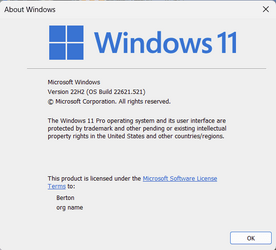
22621.521
Platform update 1.2209.22001-0 (Sept 23rd) + extra folders (more ancient)
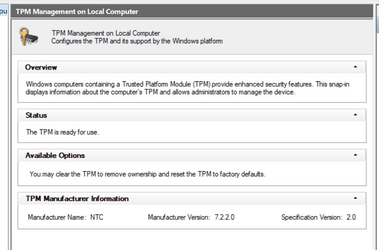
HVCi/TPM on
 

My Computer My Computer

At a glance

11 25H2
OS
11 25H2
+1 :ffs:: SecurityHealthService.exe crashes often and Smart app control is vanished.

22621.521
Platform update 1.2209.22001-0 (Sept 23rd) + extra folders (more ancient)
HVCi/TPM on
I'll send feedback and share the link here. For now I've used wushowhide to stop the update from downloading.

Feedback link: Windows Insider
 

My Computer My Computer

At a glance

Windows 11 Pro 25H2 (RP channel)AMD Ryzen 7 9800X3D 8-core64GB Corsair Titanium 6000/CL30MSI Suprim 5080 SOC
OS
Windows 11 Pro 25H2 (RP channel)
Computer type
PC/Desktop
Manufacturer/Model
MSI
CPU
AMD Ryzen 7 9800X3D 8-core
Motherboard
MEG X870E Godlike
Memory
64GB Corsair Titanium 6000/CL30
Graphics Card(s)
MSI Suprim 5080 SOC
Sound Card
Soundblaster AE-9
Monitor(s) Displays
ASUS TUF Gaming VG289Q
Screen Resolution
3840x2160
Hard Drives
Samsung 9100 Pro 4TB (gen 5 x4, system drive/games)
Samsung 990 Pro 2TB
Samsung 980 Pro 2TB
Samsung 870 Evo 4TB
Samsung 870 Evo 2TB
Samsung T9 4TB
PSU
Seasonic PX-2200
Case
Bequiet! Dark Base Pro 901
Cooling
Noctua NH-D15S Chromax black
Keyboard
Logitech G915 X (wired)
Mouse
Logitech G903 with PowerPlay charger
Internet Speed
900Mb/sec
Browser
Microsoft Edge
Antivirus
Windows Defender
  • Like
Reactions: x_1
good job!
@3L11 Just an update: I did a repair install using Windows 11 ISO, the problem is still there.
Then I restored from an image backup. Restarted, entered the BIOS settings. I DISABLED the TPM in BIOS, now the Security never crashes, but Smart App control is still gone.
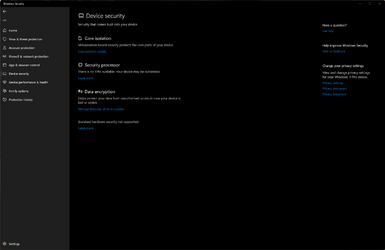
With TPM enabled this screen is completely blank, I think the security update is incompatible with the TPM. Give that a try and see if it makes a difference.
 

Attachments

  • Screenshot 2022-09-28 141219.png
    Screenshot 2022-09-28 141219.png
    48.9 KB · Views: 6

My Computer My Computer

At a glance

Windows 11 Pro 25H2 (RP channel)AMD Ryzen 7 9800X3D 8-core64GB Corsair Titanium 6000/CL30MSI Suprim 5080 SOC
OS
Windows 11 Pro 25H2 (RP channel)
Computer type
PC/Desktop
Manufacturer/Model
MSI
CPU
AMD Ryzen 7 9800X3D 8-core
Motherboard
MEG X870E Godlike
Memory
64GB Corsair Titanium 6000/CL30
Graphics Card(s)
MSI Suprim 5080 SOC
Sound Card
Soundblaster AE-9
Monitor(s) Displays
ASUS TUF Gaming VG289Q
Screen Resolution
3840x2160
Hard Drives
Samsung 9100 Pro 4TB (gen 5 x4, system drive/games)
Samsung 990 Pro 2TB
Samsung 980 Pro 2TB
Samsung 870 Evo 4TB
Samsung 870 Evo 2TB
Samsung T9 4TB
PSU
Seasonic PX-2200
Case
Bequiet! Dark Base Pro 901
Cooling
Noctua NH-D15S Chromax black
Keyboard
Logitech G915 X (wired)
Mouse
Logitech G903 with PowerPlay charger
Internet Speed
900Mb/sec
Browser
Microsoft Edge
Antivirus
Windows Defender
txs for the tip and sorry for my poor english (it's not my native language and, moreover, i didn't study it well when i had to :shush:), anyway:
the important thing is that others find it too, a sign that we are facing a bug that has some diffusion and is not specific to the single PC.
Therefore, following this logic, going to relax certain parameters is not the solution that is instead in the hands of Microsoft as long as they become aware of it.
 

My Computer My Computer

At a glance

11 25H2
OS
11 25H2
I make a Post in Microsoft Feedback Hub, but there are not so many Users that have this Issue. I don´t think its a Major Problem but for me it´s more than enough.
 

My Computer My Computer

At a glance

Windows 11Ryzen 7 5700X3D32GB DDR4 3600 Kingston RenegadePowercolor 7800XT
OS
Windows 11
Computer type
PC/Desktop
CPU
Ryzen 7 5700X3D
Motherboard
ASUS B550-A Gaming
Memory
32GB DDR4 3600 Kingston Renegade
Graphics Card(s)
Powercolor 7800XT
Sound Card
Onboard ALC1220 Realtek
Monitor(s) Displays
Dell S3220DGF
Screen Resolution
1440p
Hard Drives
Samsung 1TB 980Pro - NVME
Samsung 500GB 970 Evo - NVME
PSU
Corsair RM750
Case
Bequiet Pure Base
Cooling
Arctic Cooling Case Fans 140 x5 / Arctic Freezer 34 for CPU
Keyboard
Roccat Magma
Mouse
Roccat Burst Pro
Internet Speed
1gbit
Browser
Edge
Antivirus
Defender
Other Info
Windows 11 24H2 - 26100.2894
I make a Post in Microsoft Feedback Hub, but there are not so many Users that have this Issue. I don´t think its a Major Problem but for me it´s more than enough.
I think it's quite a widespread problem but not many are aware of it - how many users ever actually check their security settings? They usually set it up on first use, then forget about it. If the green tick is showing there's no need to look at anything so won't see the Security crashing problem.

Smart App control is missing on three PCs I've seen, only mine had the TPM so was having app crashes. Since disabling TPM the app no longer crashes. We just have to hope for a MS fix

Do you have Feedback link so I can upvote?
 

My Computer My Computer

At a glance

Windows 11 Pro 25H2 (RP channel)AMD Ryzen 7 9800X3D 8-core64GB Corsair Titanium 6000/CL30MSI Suprim 5080 SOC
OS
Windows 11 Pro 25H2 (RP channel)
Computer type
PC/Desktop
Manufacturer/Model
MSI
CPU
AMD Ryzen 7 9800X3D 8-core
Motherboard
MEG X870E Godlike
Memory
64GB Corsair Titanium 6000/CL30
Graphics Card(s)
MSI Suprim 5080 SOC
Sound Card
Soundblaster AE-9
Monitor(s) Displays
ASUS TUF Gaming VG289Q
Screen Resolution
3840x2160
Hard Drives
Samsung 9100 Pro 4TB (gen 5 x4, system drive/games)
Samsung 990 Pro 2TB
Samsung 980 Pro 2TB
Samsung 870 Evo 4TB
Samsung 870 Evo 2TB
Samsung T9 4TB
PSU
Seasonic PX-2200
Case
Bequiet! Dark Base Pro 901
Cooling
Noctua NH-D15S Chromax black
Keyboard
Logitech G915 X (wired)
Mouse
Logitech G903 with PowerPlay charger
Internet Speed
900Mb/sec
Browser
Microsoft Edge
Antivirus
Windows Defender
Disabling TPM works but than you don´t receive Updates anymore.
Smart App Control is only there when i search for it in the Settings. None of the three Possibilitys is checked-
 

My Computer My Computer

At a glance

Windows 11Ryzen 7 5700X3D32GB DDR4 3600 Kingston RenegadePowercolor 7800XT
OS
Windows 11
Computer type
PC/Desktop
CPU
Ryzen 7 5700X3D
Motherboard
ASUS B550-A Gaming
Memory
32GB DDR4 3600 Kingston Renegade
Graphics Card(s)
Powercolor 7800XT
Sound Card
Onboard ALC1220 Realtek
Monitor(s) Displays
Dell S3220DGF
Screen Resolution
1440p
Hard Drives
Samsung 1TB 980Pro - NVME
Samsung 500GB 970 Evo - NVME
PSU
Corsair RM750
Case
Bequiet Pure Base
Cooling
Arctic Cooling Case Fans 140 x5 / Arctic Freezer 34 for CPU
Keyboard
Roccat Magma
Mouse
Roccat Burst Pro
Internet Speed
1gbit
Browser
Edge
Antivirus
Defender
Other Info
Windows 11 24H2 - 26100.2894
Disabling TPM works but than you don´t receive Updates anymore.
Smart App Control is only there when i search for it in the Settings. None of the three Possibilitys is checked-
You still get Cumulative updates and Defender definitions. Yes Smart App control is completely broken with this Security update
 

My Computer My Computer

At a glance

Windows 11 Pro 25H2 (RP channel)AMD Ryzen 7 9800X3D 8-core64GB Corsair Titanium 6000/CL30MSI Suprim 5080 SOC
OS
Windows 11 Pro 25H2 (RP channel)
Computer type
PC/Desktop
Manufacturer/Model
MSI
CPU
AMD Ryzen 7 9800X3D 8-core
Motherboard
MEG X870E Godlike
Memory
64GB Corsair Titanium 6000/CL30
Graphics Card(s)
MSI Suprim 5080 SOC
Sound Card
Soundblaster AE-9
Monitor(s) Displays
ASUS TUF Gaming VG289Q
Screen Resolution
3840x2160
Hard Drives
Samsung 9100 Pro 4TB (gen 5 x4, system drive/games)
Samsung 990 Pro 2TB
Samsung 980 Pro 2TB
Samsung 870 Evo 4TB
Samsung 870 Evo 2TB
Samsung T9 4TB
PSU
Seasonic PX-2200
Case
Bequiet! Dark Base Pro 901
Cooling
Noctua NH-D15S Chromax black
Keyboard
Logitech G915 X (wired)
Mouse
Logitech G903 with PowerPlay charger
Internet Speed
900Mb/sec
Browser
Microsoft Edge
Antivirus
Windows Defender
Quick update: I today borrowed a Windows 11 tablet, it has a working TPM.
Opened the Security app a few times, after a while it crashed, showing status Unknown, just like mine did with the TPM active.
Checked C:\windows\system32\securityhealth and sure enough there's a folder 1.0.2209.22001-0 in there. Oh and Smart app control is broken too.

So definitely not an issue specific to my PC/TPM
 

My Computer My Computer

At a glance

Windows 11 Pro 25H2 (RP channel)AMD Ryzen 7 9800X3D 8-core64GB Corsair Titanium 6000/CL30MSI Suprim 5080 SOC
OS
Windows 11 Pro 25H2 (RP channel)
Computer type
PC/Desktop
Manufacturer/Model
MSI
CPU
AMD Ryzen 7 9800X3D 8-core
Motherboard
MEG X870E Godlike
Memory
64GB Corsair Titanium 6000/CL30
Graphics Card(s)
MSI Suprim 5080 SOC
Sound Card
Soundblaster AE-9
Monitor(s) Displays
ASUS TUF Gaming VG289Q
Screen Resolution
3840x2160
Hard Drives
Samsung 9100 Pro 4TB (gen 5 x4, system drive/games)
Samsung 990 Pro 2TB
Samsung 980 Pro 2TB
Samsung 870 Evo 4TB
Samsung 870 Evo 2TB
Samsung T9 4TB
PSU
Seasonic PX-2200
Case
Bequiet! Dark Base Pro 901
Cooling
Noctua NH-D15S Chromax black
Keyboard
Logitech G915 X (wired)
Mouse
Logitech G903 with PowerPlay charger
Internet Speed
900Mb/sec
Browser
Microsoft Edge
Antivirus
Windows Defender
Dell Vostro 3400 Win11 Pro RTM. Opened and closed Windows Security half-dozen times, no issue. Have not been offered 22H2 yet.

1664754124282.png


1664754533519.png
 

My Computers My Computers

  • At a glance

    Win11 Pro RTM Version 24H2 Build 26100.4202Intel Core i5 11th Gen. 2.40GHz12GB
    OS
    Win11 Pro RTM Version 24H2 Build 26100.4202
    Computer type
    Laptop
    Manufacturer/Model
    Dell Vostro 3400
    CPU
    Intel Core i5 11th Gen. 2.40GHz
    Memory
    12GB
    Hard Drives
    256GB SSD NVMe M.2
  • At a glance

    Win11 Pro RTM Version 24H2 Build 26100.4202Intel Core i5 10th Gen. 2.90GHz16GBOnboard, no VGA, using a DisplayPort-to-VGA a...
    Operating System
    Win11 Pro RTM Version 24H2 Build 26100.4202
    Computer type
    PC/Desktop
    Manufacturer/Model
    Dell Vostro 5890
    CPU
    Intel Core i5 10th Gen. 2.90GHz
    Memory
    16GB
    Graphics card(s)
    Onboard, no VGA, using a DisplayPort-to-VGA adapter
    Monitor(s) Displays
    24" Dell
    Hard Drives
    512GB SSD NVMe, 4TB Seagate HDD
    Browser
    Firefox, Edge
    Antivirus
    Windows Defender/Microsoft Security
Disabling TPM works but than you don´t receive Updates anymore.
Smart App Control is only there when i search for it in the Settings. None of the three Possibilitys is checked-
wait what you mean you dont get updates?
 

My Computer My Computer

At a glance

Windows 114770k16 gb Kingston2070 super
OS
Windows 11
Computer type
PC/Desktop
Manufacturer/Model
-
CPU
4770k
Motherboard
Asus Maximus Formula VI
Memory
16 gb Kingston
Graphics Card(s)
2070 super
In this guide, i will show how to fix typical issues if you cannot open the Windows Security in Windows 10 and Windows 11.


My Computer My Computer

At a glance

Windows 11AMD Ryzen 7 5700GMicron Technology DDR4-3200 16GBNVIDIA GeForce RTX 3060
OS
Windows 11
Computer type
PC/Desktop
Manufacturer/Model
HP Pavilion
CPU
AMD Ryzen 7 5700G
Motherboard
Erica6
Memory
Micron Technology DDR4-3200 16GB
Graphics Card(s)
NVIDIA GeForce RTX 3060
Sound Card
Realtek ALC671
Monitor(s) Displays
Samsung SyncMaster U28E590
Screen Resolution
3840 x 2160
Hard Drives
SAMSUNG MZVLQ1T0HALB-000H1
Dell Vostro 3400 Win11 Pro RTM. Opened and closed Windows Security half-dozen times, no issue. Have not been offered 22H2 yet.

View attachment 41312


View attachment 41313
All the issues seem to be on 22H2 machines. Smart App control is broken with the latest Antimalware platform update, which isn't a 21H2 feature.
Do you have anything in the folder c:\windows\system32\securityhealth ?
 
Last edited:

My Computer My Computer

At a glance

Windows 11 Pro 25H2 (RP channel)AMD Ryzen 7 9800X3D 8-core64GB Corsair Titanium 6000/CL30MSI Suprim 5080 SOC
OS
Windows 11 Pro 25H2 (RP channel)
Computer type
PC/Desktop
Manufacturer/Model
MSI
CPU
AMD Ryzen 7 9800X3D 8-core
Motherboard
MEG X870E Godlike
Memory
64GB Corsair Titanium 6000/CL30
Graphics Card(s)
MSI Suprim 5080 SOC
Sound Card
Soundblaster AE-9
Monitor(s) Displays
ASUS TUF Gaming VG289Q
Screen Resolution
3840x2160
Hard Drives
Samsung 9100 Pro 4TB (gen 5 x4, system drive/games)
Samsung 990 Pro 2TB
Samsung 980 Pro 2TB
Samsung 870 Evo 4TB
Samsung 870 Evo 2TB
Samsung T9 4TB
PSU
Seasonic PX-2200
Case
Bequiet! Dark Base Pro 901
Cooling
Noctua NH-D15S Chromax black
Keyboard
Logitech G915 X (wired)
Mouse
Logitech G903 with PowerPlay charger
Internet Speed
900Mb/sec
Browser
Microsoft Edge
Antivirus
Windows Defender
Sorry, just noticed your first post shows an Insider Preview edition, I'm on an RTM. My newest Desktop from April, no issue with 6 open and close:

1664769777759.png
 

My Computers My Computers

  • At a glance

    Win11 Pro RTM Version 24H2 Build 26100.4202Intel Core i5 11th Gen. 2.40GHz12GB
    OS
    Win11 Pro RTM Version 24H2 Build 26100.4202
    Computer type
    Laptop
    Manufacturer/Model
    Dell Vostro 3400
    CPU
    Intel Core i5 11th Gen. 2.40GHz
    Memory
    12GB
    Hard Drives
    256GB SSD NVMe M.2
  • At a glance

    Win11 Pro RTM Version 24H2 Build 26100.4202Intel Core i5 10th Gen. 2.90GHz16GBOnboard, no VGA, using a DisplayPort-to-VGA a...
    Operating System
    Win11 Pro RTM Version 24H2 Build 26100.4202
    Computer type
    PC/Desktop
    Manufacturer/Model
    Dell Vostro 5890
    CPU
    Intel Core i5 10th Gen. 2.90GHz
    Memory
    16GB
    Graphics card(s)
    Onboard, no VGA, using a DisplayPort-to-VGA adapter
    Monitor(s) Displays
    24" Dell
    Hard Drives
    512GB SSD NVMe, 4TB Seagate HDD
    Browser
    Firefox, Edge
    Antivirus
    Windows Defender/Microsoft Security

My Computer My Computer

At a glance

Windows 11 Pro 25H2 (RP channel)AMD Ryzen 7 9800X3D 8-core64GB Corsair Titanium 6000/CL30MSI Suprim 5080 SOC
OS
Windows 11 Pro 25H2 (RP channel)
Computer type
PC/Desktop
Manufacturer/Model
MSI
CPU
AMD Ryzen 7 9800X3D 8-core
Motherboard
MEG X870E Godlike
Memory
64GB Corsair Titanium 6000/CL30
Graphics Card(s)
MSI Suprim 5080 SOC
Sound Card
Soundblaster AE-9
Monitor(s) Displays
ASUS TUF Gaming VG289Q
Screen Resolution
3840x2160
Hard Drives
Samsung 9100 Pro 4TB (gen 5 x4, system drive/games)
Samsung 990 Pro 2TB
Samsung 980 Pro 2TB
Samsung 870 Evo 4TB
Samsung 870 Evo 2TB
Samsung T9 4TB
PSU
Seasonic PX-2200
Case
Bequiet! Dark Base Pro 901
Cooling
Noctua NH-D15S Chromax black
Keyboard
Logitech G915 X (wired)
Mouse
Logitech G903 with PowerPlay charger
Internet Speed
900Mb/sec
Browser
Microsoft Edge
Antivirus
Windows Defender

My Computers My Computers

  • At a glance

    Win11 Pro RTM Version 24H2 Build 26100.4202Intel Core i5 11th Gen. 2.40GHz12GB
    OS
    Win11 Pro RTM Version 24H2 Build 26100.4202
    Computer type
    Laptop
    Manufacturer/Model
    Dell Vostro 3400
    CPU
    Intel Core i5 11th Gen. 2.40GHz
    Memory
    12GB
    Hard Drives
    256GB SSD NVMe M.2
  • At a glance

    Win11 Pro RTM Version 24H2 Build 26100.4202Intel Core i5 10th Gen. 2.90GHz16GBOnboard, no VGA, using a DisplayPort-to-VGA a...
    Operating System
    Win11 Pro RTM Version 24H2 Build 26100.4202
    Computer type
    PC/Desktop
    Manufacturer/Model
    Dell Vostro 5890
    CPU
    Intel Core i5 10th Gen. 2.90GHz
    Memory
    16GB
    Graphics card(s)
    Onboard, no VGA, using a DisplayPort-to-VGA adapter
    Monitor(s) Displays
    24" Dell
    Hard Drives
    512GB SSD NVMe, 4TB Seagate HDD
    Browser
    Firefox, Edge
    Antivirus
    Windows Defender/Microsoft Security

Latest Support Threads

Back
Top Bottom