Did you manually update your Secure Boot Keys ?


If you're not positive your Windows is using 2023 signed secure boot manager files then do not revoke the 2011 Windows CA or your Windows will not start with Secure Boot enabled.

And where are you getting your secure boot objects? Assuming you're trying to "append" to DBX... you might need to use signed binary objects you can get from Microsoft's GitHub (below). Just don't do this until you've saved a copy of bitlocker keys (if using it) AND you KNOW your Windows is running with 2023- signed boot manager files.

I already have the 2023 certificate. I downloaded the latest version of Windows, followed the steps in the guide, and received it. It also shows up in the BIOS. Before that, I cleared the Secure Boot keys. Also, how can i check if my windows uses a 2023 signed boot?
 

My Computer My Computer

At a glance

Windows 11
OS
Windows 11
Computer type
PC/Desktop
Manufacturer/Model
Asrock b760 pro rs
I already have the 2023 certificate. I downloaded the latest version of Windows, followed the steps in the guide, and received it. It also shows up in the BIOS. Before that, I cleared the Secure Boot keys. Also, how can i check if my windows uses a 2023 signed boot?
The smart and undeniable way is to look into the EFI partition and examine the boot file - right click on it, open properties, Digital Signatures, Details, look for a 2023 certificate used to sign it. You may have to make a copy of it in a location you have permissions.

The second-hand way is examine the registry and look to see if Secure Boot Updates completed with a status of 2; that may not be correct if the microsoft scheduled task(s) haven't properly run though. I think at least some of the powershell scripts simply look at the registry value so you might consider that too.

How did you get the updated keys pushed into your firmware?
 
Last edited:

My Computers My Computers

  • At a glance

    Windows 11 ProRyzen 7 5800XGSkill 3200, 2x8GBMSI RX 6800 XT Gaming Z
    OS
    Windows 11 Pro
    Computer type
    PC/Desktop
    Manufacturer/Model
    DIY
    CPU
    Ryzen 7 5800X
    Motherboard
    Gigabyte B550M Aorus Pro
    Memory
    GSkill 3200, 2x8GB
    Graphics Card(s)
    MSI RX 6800 XT Gaming Z
    Sound Card
    on-board Realtek
    Monitor(s) Displays
    MSI 180hz
    Screen Resolution
    1440p
    Hard Drives
    Samsung 980 Pro, Samsung 870 Evo, generic PCIe NVME, WD 1TB 2.5" laptop spinner
    PSU
    Corsair RM 650
    Case
    mATX
    Cooling
    BeQuiet 240mm AIO and a bunch of case fans
    Keyboard
    one that clacks softly
    Mouse
    logitech
    Internet Speed
    bunches of bps
    Browser
    Firefox
    Antivirus
    Windows' own
  • At a glance

    Win11 ProRyzen 7 170016GB DDR4RX-480
    Operating System
    Win11 Pro
    Computer type
    PC/Desktop
    Manufacturer/Model
    DIY
    CPU
    Ryzen 7 1700
    Motherboard
    GA-AB350M G-3
    Memory
    16GB DDR4
    Graphics card(s)
    RX-480
    Sound Card
    In-Built Realtek
    Monitor(s) Displays
    Samsung
    Screen Resolution
    1440p
    Hard Drives
    NVME/SSD's
    PSU
    Thermaltake BX1 550W
    Case
    Some junky thing
    Cooling
    ThermalTake Assassin(?)
    Browser
    FF/Edge
    Antivirus
    Whatever Windows does
    Other Info
    Secure Boot enabled updated to 2023 CA keys, TPM2.0 enabled with system drive Bitlocker'd.
If you're not positive your Windows is using 2023 signed secure boot manager files then do not revoke the 2011 Windows CA or your Windows will not start with Secure Boot enabled.

And where are you getting your secure boot objects? Assuming you're trying to "append" to DBX... you might need to use signed binary objects you can get from Microsoft's GitHub (below). Just don't do this until you've saved a copy of bitlocker keys (if using it) AND you KNOW your Windows is running with 2023- signed boot manager files.

1764004911680.webpSecure boot update HowTo By this guide
 

My Computer My Computer

At a glance

Windows 11
OS
Windows 11
Computer type
PC/Desktop
Manufacturer/Model
Asrock b760 pro rs
View attachment 154147Secure boot update HowTo By this guide
OK... that script says you do have it and Windows is actually booting from it AND that it's determining that from registry entries. I'd say you're good-to-go assuming the registry is in sync with the actual boot files.

If you want to revoke the 2011 cert now, go to the following MS document, scroll down to Step 3 "Enable the Revocations". Follow the instructions, and DO NOT IGNORE THE WARNING! Keep in mind: you do not have to do this right now. It's really only necessary if you think you're vulnerable to one of the few (and difficult to exploit) Secure Boot vulnerabilities like Black Lotus.

And BTW... in the same document, Step 2 covers the high-confidence method to verify your boot files are signed with 2023 certificate before doing this.

 
Last edited:

My Computers My Computers

  • At a glance

    Windows 11 ProRyzen 7 5800XGSkill 3200, 2x8GBMSI RX 6800 XT Gaming Z
    OS
    Windows 11 Pro
    Computer type
    PC/Desktop
    Manufacturer/Model
    DIY
    CPU
    Ryzen 7 5800X
    Motherboard
    Gigabyte B550M Aorus Pro
    Memory
    GSkill 3200, 2x8GB
    Graphics Card(s)
    MSI RX 6800 XT Gaming Z
    Sound Card
    on-board Realtek
    Monitor(s) Displays
    MSI 180hz
    Screen Resolution
    1440p
    Hard Drives
    Samsung 980 Pro, Samsung 870 Evo, generic PCIe NVME, WD 1TB 2.5" laptop spinner
    PSU
    Corsair RM 650
    Case
    mATX
    Cooling
    BeQuiet 240mm AIO and a bunch of case fans
    Keyboard
    one that clacks softly
    Mouse
    logitech
    Internet Speed
    bunches of bps
    Browser
    Firefox
    Antivirus
    Windows' own
  • At a glance

    Win11 ProRyzen 7 170016GB DDR4RX-480
    Operating System
    Win11 Pro
    Computer type
    PC/Desktop
    Manufacturer/Model
    DIY
    CPU
    Ryzen 7 1700
    Motherboard
    GA-AB350M G-3
    Memory
    16GB DDR4
    Graphics card(s)
    RX-480
    Sound Card
    In-Built Realtek
    Monitor(s) Displays
    Samsung
    Screen Resolution
    1440p
    Hard Drives
    NVME/SSD's
    PSU
    Thermaltake BX1 550W
    Case
    Some junky thing
    Cooling
    ThermalTake Assassin(?)
    Browser
    FF/Edge
    Antivirus
    Whatever Windows does
    Other Info
    Secure Boot enabled updated to 2023 CA keys, TPM2.0 enabled with system drive Bitlocker'd.
Here's a clickable batch file that writes a report to the desktop.
Slightly modified your file. Now the output is UEFI_report.txt it does not go to the Desktop, but to the launch folder of the bat file. Plus, the Registry UEFICA2023Status output has been added.

BoScript.webp

BoScript_Modified.webpLink to the file - BoScript_Modified.zip
 

My Computer My Computer

At a glance

Windows 11 Stable, Beta, Dev, CanaryAMD Ryzen 9 PRO 5950X128 GbIntel(R) Arc(TM) A380 Graphics (2 ГБ)
OS
Windows 11 Stable, Beta, Dev, Canary
Computer type
PC/Desktop
Manufacturer/Model
Micro-Star International Co., Ltd. MS-7D54
CPU
AMD Ryzen 9 PRO 5950X
Motherboard
MSI MAG X570S Tomahawk Max WiFi (MS-7D54) (2 PCI-E x1, 2 PCI-E x16, 2 M.2, 4 DDR4 DIMM, Audio, Video, 2.5GbE LAN, WiFi)
Memory
128 Gb
Graphics Card(s)
Intel(R) Arc(TM) A380 Graphics (2 ГБ)
Sound Card
Устройство с поддержкой High Definition Audio
Monitor(s) Displays
HP X34 [34" LCD] (6CM1300J5J) {2021}
Screen Resolution
3440x1440
Hard Drives
KINGSTON SFYRD2000G (2000 ГБ, PCI-E 4.0 x4)
PSU
Be Quiet! Dark Rock Pro 4
Case
Cooler Master HAF XB EVO
Internet Speed
1000 Mb/s
Browser
Chrome
Antivirus
Windows Defender
Here's a clickable batch file that writes a report to the desktop. If you click on the script, it may ask you for Administrator rights.

The script takes more than a few seconds to run. If you click the report file on the Desktop too early, NotePad will warn you the file is still in use. Just wait another 10 seconds, and then open the file. The desktop icon for the report always appears before the script is actually done running.

Be patient.
Just an FYI, that script failed for me because my desktop is redirected to D:\User\etc
 

My Computers My Computers

  • At a glance

    Windows 11 Enterprise 25H2 26200 7462Intel XEON E5-2699 v364GB Teamgroup UD4-3600NVIDIA GeForce GTX 1080 Ti
    OS
    Windows 11 Enterprise 25H2 26200 7462
    Computer type
    PC/Desktop
    Manufacturer/Model
    Custom Build
    CPU
    Intel XEON E5-2699 v3
    Motherboard
    ASUS X99-A
    Memory
    64GB Teamgroup UD4-3600
    Graphics Card(s)
    NVIDIA GeForce GTX 1080 Ti
    Sound Card
    Integrated
    Monitor(s) Displays
    ACER X34 Predator
    Screen Resolution
    3440 x 1440
    Hard Drives
    Crucial CT1000P 3P SSD8 1TB
    Crucial CT1000 BX500 SSD 1TB
    PSU
    GameMax Pro
    Case
    Fractal Design
    Cooling
    Corsair H110iGT + 6 140mm Fans
    Keyboard
    Corsair K4
    Mouse
    G-Skill G502
    Internet Speed
    300MBs
    Browser
    Chrome
    Antivirus
    OEM
    Other Info
    ASUS RT-AC87U Router
  • At a glance

    25H2 26200.50748GB
    Operating System
    25H2 26200.5074
    Computer type
    Laptop
    Manufacturer/Model
    ASUS X555LA
    Memory
    8GB
    Browser
    Chrome
    Antivirus
    OEM
I'm preparing my HP Spectre unsupported by HP laptop to use MOSBY to update the Secure Boot Keys per this instructional post. Has anyone borked their system trying it, and if so, how did you regain a functional machine - if you didn't brick the machine?
 

My Computers My Computers

  • At a glance

    Windows 11 Home, ver 25H2 build 26200.8246Intel Core i5 5200U @ 2.20GH4 GBIntel HD Graphics 5500 on board
    OS
    Windows 11 Home, ver 25H2 build 26200.8246
    Computer type
    Laptop
    Manufacturer/Model
    Hewlett-Packard Spectre 13-4001 x360 convertable
    CPU
    Intel Core i5 5200U @ 2.20GH
    Motherboard
    Hewlett-Packard 802D
    Memory
    4 GB
    Graphics Card(s)
    Intel HD Graphics 5500 on board
    Sound Card
    Intel Smart Sound Technology (Intel SST)
    Hard Drives
    Micron 256GB M.2 2280 NGFF SSD MTFDDAV256TBN, (SATA 6.0 Gb/s)
    Keyboard
    Model # G01KB
    Antivirus
    Microsoft Defender
    Other Info
    born on date: 25 Feb 2016
  • At a glance

    Win 11 Home 25H2 build 26200.7922Intel Core i7 4th Gen 4790 (3.60GHz), Haswell...Samsung 16 GB DDR3 (8GB in 2 modules)NVIDIA GeForce GTX 760, 3GB, and on-board Int...
    Operating System
    Win 11 Home 25H2 build 26200.7922
    Computer type
    PC/Desktop
    Manufacturer/Model
    Asus Desktop model M32AD-US019S (DOM: 6/9/2014 )
    CPU
    Intel Core i7 4th Gen 4790 (3.60GHz), Haswell 22nm Technology, SOCKET 1150
    Motherboard
    H81M-E/M51AD/DP_MB
    Memory
    Samsung 16 GB DDR3 (8GB in 2 modules)
    Graphics card(s)
    NVIDIA GeForce GTX 760, 3GB, and on-board Intel HD Graphics 4600 Rev 6
    Monitor(s) Displays
    HP EliteDisplay E241i LED; HP EliteDisplay E243
    Hard Drives
    Samsung 500GB SSD, 870 EVO (SATA 6.0 )
    Micron 250GB SSD, CT250MX500
    Toshiba HDD, 3GB (original drive w/PC)
    Case
    ASUS
    Keyboard
    ASUS-------------------------
    Antivirus
    MS Defender
    Other Info
    Additional Laptops:

    HEWLETT PACKARD
    HP OmniBook X Flip NGAI (Next Gen AI),
    Model: 16-as0023dx
    PT# B5UH1UA#ABA Product #: B5UH1UA
    delivered and setup 7/25/25
    16" 2K Touch-Screen Laptop
    Intel Core Ultra 7 256V '24 Series 2 - CPU
    Boost Clock Frequency 4.8 gigahertz; Neural Processing Unit (NPU) Yes;
    16GB Memory, LPDDR5X
    1TB SSD PCIe 4.0
    Graphics: Intel Arc 140V
    1 x HDMI 2.1
    1 x Thunderbolt 4
    2K Touch-Screen display, LED, IPS; 1920 x 1200 (Full HD+)
    USB Ports: 1 x USB-C 3.1, 2 x USB-A 3.1
    Wi-Fi 6E
    weight 4.15 pounds

    DELL
    Model:I7591-7483BLK-PUS 2-in-1 (7000 Series)
    purchased 12/3/2019,
    15.6 inch 2-IN-1;
    4K Ultra HD Touch-Screen, 3840 x 2160,
    Intel Core i7 10510U CPU 1.80GHz,
    16GB RAM DDR4 SDRAM 2400 megahert (2 slots),
    dedicated graphics Nvidia GeForce MX250 2 GB Graphics,
    PCIe 512GB Intel SSD + 32GB Optane Memory (Intel Optane Memory H10 with solid-state storage),
    wireless-AX & Bluetooth
    Battery: 68wh, Type 4VGMP 4 cell
I'm preparing my HP Spectre unsupported by HP laptop to use MOSBY to update the Secure Boot Keys per this instructional post. Has anyone borked their system trying it, and if so, how did you regain a functional machine - if you didn't brick the machine?
You can turn Secure Boot off in the BIOS and it'll be bootable. That should allow you to recover most anything you do to the certs.
 

My Computers My Computers

  • At a glance

    Win 11 Pro 25H2, Build 26200.8737Intel Core i5 1450064GB DDR4GeForce RTX 4060
    OS
    Win 11 Pro 25H2, Build 26200.8737
    Computer type
    PC/Desktop
    Manufacturer/Model
    Home Brew
    CPU
    Intel Core i5 14500
    Motherboard
    Gigabyte B760M G P WIFI
    Memory
    64GB DDR4
    Graphics Card(s)
    GeForce RTX 4060
    Sound Card
    Chipset Realtek
    Monitor(s) Displays
    LG 45" Ultragear, Acer 24" 1080p
    Screen Resolution
    5120x1440, 1920x1080
    Hard Drives
    Crucial P310 2TB 2280 PCIe Gen4 3D NAND NVMe M.2 SSD (O/S)
    Silicon Power 2TB US75 NVMe PCIe Gen4 M.2 2280 SSD (backup)
    Crucial BX500 2TB 3D NAND (2nd backup)
    Seagate 4TB Ironwolf, rotating HDD archive files
    External off-line backup Drives: 2 NVMe 4TB drives in external enclosures
    PSU
    Thermaltake Toughpower GF3 750W
    Case
    LIAN LI LANCOOL 216 E-ATX PC Case
    Cooling
    Lots of fans!
    Keyboard
    Microsoft Comfort Curve 2000
    Mouse
    Logitech G305
    Internet Speed
    Verizon FiOS 1GB
    Browser
    Firefox
    Antivirus
    Malware Bytes & Windows Defender Security
  • At a glance

    Win 11 Pro 25H2, Build 26200.8655Intel Core i5 1440032GB DDR5Intel 700 Embedded GPU
    Operating System
    Win 11 Pro 25H2, Build 26200.8655
    Computer type
    PC/Desktop
    Manufacturer/Model
    Home Brew
    CPU
    Intel Core i5 14400
    Motherboard
    Gigabyte B760M DS3H AX
    Memory
    32GB DDR5
    Graphics card(s)
    Intel 700 Embedded GPU
    Sound Card
    Realtek Embedded
    Monitor(s) Displays
    27" HP 1080p
    Screen Resolution
    1920x1080
    Hard Drives
    Crucial P310 2TB 2280 PCIe Gen4 eD NAND PCIe SSD
    Samsung EVO 990 2TB NVMe Gen4 SSD
    Samsung 2TB SATA SSD
    PSU
    Thermaltake Smart BM3 650W
    Case
    Okinos Micro ATX Case
    Cooling
    Fans
    Keyboard
    Microsoft Comfort Curve 2000
    Mouse
    Logitech G305
    Internet Speed
    Verizon FiOS 1GB
    Browser
    Firefox
    Antivirus
    Malware Bytes & Windows Defender Security
  • Nimo N171 17" Laptop, (Intel i3-1215U, 16GB RAM, 2TB NVMe, Win11 Pro)
    Acemagic Vista Mini PC V1 (Intel N150, 16GB RAM, 1TB NVMe, Win11 Pro)
    HP ENVY h8-1540t, (24GB RAM, 2TB SSD, 2TB HDD, Win11 Pro)
You can turn Secure Boot off in the BIOS and it'll be bootable. That should allow you to recover most anything you do to the certs.
Thanks, simple enough! My last step is to figure out how to enter "Setup Mode" on this machine. Here is what the BIOS page looks like (below). I don't see anything obvious to get me to that state. I'll continue Googleing, and maybe a Copilot search .

BIOS System Config.webp
 

My Computers My Computers

  • At a glance

    Windows 11 Home, ver 25H2 build 26200.8246Intel Core i5 5200U @ 2.20GH4 GBIntel HD Graphics 5500 on board
    OS
    Windows 11 Home, ver 25H2 build 26200.8246
    Computer type
    Laptop
    Manufacturer/Model
    Hewlett-Packard Spectre 13-4001 x360 convertable
    CPU
    Intel Core i5 5200U @ 2.20GH
    Motherboard
    Hewlett-Packard 802D
    Memory
    4 GB
    Graphics Card(s)
    Intel HD Graphics 5500 on board
    Sound Card
    Intel Smart Sound Technology (Intel SST)
    Hard Drives
    Micron 256GB M.2 2280 NGFF SSD MTFDDAV256TBN, (SATA 6.0 Gb/s)
    Keyboard
    Model # G01KB
    Antivirus
    Microsoft Defender
    Other Info
    born on date: 25 Feb 2016
  • At a glance

    Win 11 Home 25H2 build 26200.7922Intel Core i7 4th Gen 4790 (3.60GHz), Haswell...Samsung 16 GB DDR3 (8GB in 2 modules)NVIDIA GeForce GTX 760, 3GB, and on-board Int...
    Operating System
    Win 11 Home 25H2 build 26200.7922
    Computer type
    PC/Desktop
    Manufacturer/Model
    Asus Desktop model M32AD-US019S (DOM: 6/9/2014 )
    CPU
    Intel Core i7 4th Gen 4790 (3.60GHz), Haswell 22nm Technology, SOCKET 1150
    Motherboard
    H81M-E/M51AD/DP_MB
    Memory
    Samsung 16 GB DDR3 (8GB in 2 modules)
    Graphics card(s)
    NVIDIA GeForce GTX 760, 3GB, and on-board Intel HD Graphics 4600 Rev 6
    Monitor(s) Displays
    HP EliteDisplay E241i LED; HP EliteDisplay E243
    Hard Drives
    Samsung 500GB SSD, 870 EVO (SATA 6.0 )
    Micron 250GB SSD, CT250MX500
    Toshiba HDD, 3GB (original drive w/PC)
    Case
    ASUS
    Keyboard
    ASUS-------------------------
    Antivirus
    MS Defender
    Other Info
    Additional Laptops:

    HEWLETT PACKARD
    HP OmniBook X Flip NGAI (Next Gen AI),
    Model: 16-as0023dx
    PT# B5UH1UA#ABA Product #: B5UH1UA
    delivered and setup 7/25/25
    16" 2K Touch-Screen Laptop
    Intel Core Ultra 7 256V '24 Series 2 - CPU
    Boost Clock Frequency 4.8 gigahertz; Neural Processing Unit (NPU) Yes;
    16GB Memory, LPDDR5X
    1TB SSD PCIe 4.0
    Graphics: Intel Arc 140V
    1 x HDMI 2.1
    1 x Thunderbolt 4
    2K Touch-Screen display, LED, IPS; 1920 x 1200 (Full HD+)
    USB Ports: 1 x USB-C 3.1, 2 x USB-A 3.1
    Wi-Fi 6E
    weight 4.15 pounds

    DELL
    Model:I7591-7483BLK-PUS 2-in-1 (7000 Series)
    purchased 12/3/2019,
    15.6 inch 2-IN-1;
    4K Ultra HD Touch-Screen, 3840 x 2160,
    Intel Core i7 10510U CPU 1.80GHz,
    16GB RAM DDR4 SDRAM 2400 megahert (2 slots),
    dedicated graphics Nvidia GeForce MX250 2 GB Graphics,
    PCIe 512GB Intel SSD + 32GB Optane Memory (Intel Optane Memory H10 with solid-state storage),
    wireless-AX & Bluetooth
    Battery: 68wh, Type 4VGMP 4 cell
I'm preparing my HP Spectre unsupported by HP laptop to use MOSBY to update the Secure Boot Keys per this instructional post. Has anyone borked their system trying it, and if so, how did you regain a functional machine - if you didn't brick the machine?
I borked my system once (ran the -X option while still running with the 2011 Boot Manager), but I just did a Restore Default Keys in BIOS settings to restore them and got back where I could start again, since I hadn't installed the 2023 boot manager it started in Secure Boot just fine too.
 

My Computers My Computers

  • At a glance

    Windows 11 ProRyzen 7 5800XGSkill 3200, 2x8GBMSI RX 6800 XT Gaming Z
    OS
    Windows 11 Pro
    Computer type
    PC/Desktop
    Manufacturer/Model
    DIY
    CPU
    Ryzen 7 5800X
    Motherboard
    Gigabyte B550M Aorus Pro
    Memory
    GSkill 3200, 2x8GB
    Graphics Card(s)
    MSI RX 6800 XT Gaming Z
    Sound Card
    on-board Realtek
    Monitor(s) Displays
    MSI 180hz
    Screen Resolution
    1440p
    Hard Drives
    Samsung 980 Pro, Samsung 870 Evo, generic PCIe NVME, WD 1TB 2.5" laptop spinner
    PSU
    Corsair RM 650
    Case
    mATX
    Cooling
    BeQuiet 240mm AIO and a bunch of case fans
    Keyboard
    one that clacks softly
    Mouse
    logitech
    Internet Speed
    bunches of bps
    Browser
    Firefox
    Antivirus
    Windows' own
  • At a glance

    Win11 ProRyzen 7 170016GB DDR4RX-480
    Operating System
    Win11 Pro
    Computer type
    PC/Desktop
    Manufacturer/Model
    DIY
    CPU
    Ryzen 7 1700
    Motherboard
    GA-AB350M G-3
    Memory
    16GB DDR4
    Graphics card(s)
    RX-480
    Sound Card
    In-Built Realtek
    Monitor(s) Displays
    Samsung
    Screen Resolution
    1440p
    Hard Drives
    NVME/SSD's
    PSU
    Thermaltake BX1 550W
    Case
    Some junky thing
    Cooling
    ThermalTake Assassin(?)
    Browser
    FF/Edge
    Antivirus
    Whatever Windows does
    Other Info
    Secure Boot enabled updated to 2023 CA keys, TPM2.0 enabled with system drive Bitlocker'd.
Thanks, simple enough! My last step is to figure out how to enter "Setup Mode" on this machine. Here is what the BIOS page looks like (below). I don't see anything obvious to get me to that state. I'll continue Googleing, and maybe a Copilot search .

View attachment 154552
Not sure, but I think you need to be in custom mode in secure boot. That's what I saw for HP(and dell) laptops, I can't remember where, here or on the internet.
 

My Computer My Computer

At a glance

windows 11
OS
windows 11
Here is the reply from Copilot concerning my question:


Quick Answer: On HP laptops like your 2016 Spectre x360, Setup Mode for Secure Boot isn’t a visible BIOS menu option. Instead, it’s triggered automatically when Secure Boot keys are cleared. You’ll need to clear the existing PK (Platform Key) in the BIOS to force the system into Setup Mode, which then allows you to install new certificates using the Mosby scripts.

    1. Select Clear Secure Boot Keys.
    2. This removes the PK and automatically puts the system into Setup Mode.
    3. You won’t see “Setup Mode” as a menu item—it’s a state the firmware enters once keys are cleared.
 

My Computers My Computers

  • At a glance

    Windows 11 Home, ver 25H2 build 26200.8246Intel Core i5 5200U @ 2.20GH4 GBIntel HD Graphics 5500 on board
    OS
    Windows 11 Home, ver 25H2 build 26200.8246
    Computer type
    Laptop
    Manufacturer/Model
    Hewlett-Packard Spectre 13-4001 x360 convertable
    CPU
    Intel Core i5 5200U @ 2.20GH
    Motherboard
    Hewlett-Packard 802D
    Memory
    4 GB
    Graphics Card(s)
    Intel HD Graphics 5500 on board
    Sound Card
    Intel Smart Sound Technology (Intel SST)
    Hard Drives
    Micron 256GB M.2 2280 NGFF SSD MTFDDAV256TBN, (SATA 6.0 Gb/s)
    Keyboard
    Model # G01KB
    Antivirus
    Microsoft Defender
    Other Info
    born on date: 25 Feb 2016
  • At a glance

    Win 11 Home 25H2 build 26200.7922Intel Core i7 4th Gen 4790 (3.60GHz), Haswell...Samsung 16 GB DDR3 (8GB in 2 modules)NVIDIA GeForce GTX 760, 3GB, and on-board Int...
    Operating System
    Win 11 Home 25H2 build 26200.7922
    Computer type
    PC/Desktop
    Manufacturer/Model
    Asus Desktop model M32AD-US019S (DOM: 6/9/2014 )
    CPU
    Intel Core i7 4th Gen 4790 (3.60GHz), Haswell 22nm Technology, SOCKET 1150
    Motherboard
    H81M-E/M51AD/DP_MB
    Memory
    Samsung 16 GB DDR3 (8GB in 2 modules)
    Graphics card(s)
    NVIDIA GeForce GTX 760, 3GB, and on-board Intel HD Graphics 4600 Rev 6
    Monitor(s) Displays
    HP EliteDisplay E241i LED; HP EliteDisplay E243
    Hard Drives
    Samsung 500GB SSD, 870 EVO (SATA 6.0 )
    Micron 250GB SSD, CT250MX500
    Toshiba HDD, 3GB (original drive w/PC)
    Case
    ASUS
    Keyboard
    ASUS-------------------------
    Antivirus
    MS Defender
    Other Info
    Additional Laptops:

    HEWLETT PACKARD
    HP OmniBook X Flip NGAI (Next Gen AI),
    Model: 16-as0023dx
    PT# B5UH1UA#ABA Product #: B5UH1UA
    delivered and setup 7/25/25
    16" 2K Touch-Screen Laptop
    Intel Core Ultra 7 256V '24 Series 2 - CPU
    Boost Clock Frequency 4.8 gigahertz; Neural Processing Unit (NPU) Yes;
    16GB Memory, LPDDR5X
    1TB SSD PCIe 4.0
    Graphics: Intel Arc 140V
    1 x HDMI 2.1
    1 x Thunderbolt 4
    2K Touch-Screen display, LED, IPS; 1920 x 1200 (Full HD+)
    USB Ports: 1 x USB-C 3.1, 2 x USB-A 3.1
    Wi-Fi 6E
    weight 4.15 pounds

    DELL
    Model:I7591-7483BLK-PUS 2-in-1 (7000 Series)
    purchased 12/3/2019,
    15.6 inch 2-IN-1;
    4K Ultra HD Touch-Screen, 3840 x 2160,
    Intel Core i7 10510U CPU 1.80GHz,
    16GB RAM DDR4 SDRAM 2400 megahert (2 slots),
    dedicated graphics Nvidia GeForce MX250 2 GB Graphics,
    PCIe 512GB Intel SSD + 32GB Optane Memory (Intel Optane Memory H10 with solid-state storage),
    wireless-AX & Bluetooth
    Battery: 68wh, Type 4VGMP 4 cell
Here is the reply from Copilot concerning my question:


Quick Answer: On HP laptops like your 2016 Spectre x360, Setup Mode for Secure Boot isn’t a visible BIOS menu option. Instead, it’s triggered automatically when Secure Boot keys are cleared. You’ll need to clear the existing PK (Platform Key) in the BIOS to force the system into Setup Mode, which then allows you to install new certificates using the Mosby scripts.

    1. Select Clear Secure Boot Keys.
    2. This removes the PK and automatically puts the system into Setup Mode.
    3. You won’t see “Setup Mode” as a menu item—it’s a state the firmware enters once keys are cleared.
Yes, that's how it works for Dell, something I haven't tried yet, I'm waiting... Try it without deleting the keys and if that doesn't work, delete the keys.
 

My Computer My Computer

At a glance

windows 11
OS
windows 11
Quick Answer: On HP laptops like your 2016 Spectre x360, Setup Mode for Secure Boot isn’t a visible BIOS menu option. Instead, it’s triggered automatically when Secure Boot keys are cleared.
There's great inconsistency on how to put Secure Boot into setup mode. On one of my systems I had to right click on each of the variables (PK, KEK, DB, DBX) and then pick DELETE KEYS from a list of actions.

GPT-5 has really been a great assist for me in learning about this whole Chain of Trust thing and how it works. But treat it like an educated idiot: ask the question in a couple different ways because it's inference thingy often gets it wrong in the details, and then question it on the differences.
 

My Computers My Computers

  • At a glance

    Windows 11 ProRyzen 7 5800XGSkill 3200, 2x8GBMSI RX 6800 XT Gaming Z
    OS
    Windows 11 Pro
    Computer type
    PC/Desktop
    Manufacturer/Model
    DIY
    CPU
    Ryzen 7 5800X
    Motherboard
    Gigabyte B550M Aorus Pro
    Memory
    GSkill 3200, 2x8GB
    Graphics Card(s)
    MSI RX 6800 XT Gaming Z
    Sound Card
    on-board Realtek
    Monitor(s) Displays
    MSI 180hz
    Screen Resolution
    1440p
    Hard Drives
    Samsung 980 Pro, Samsung 870 Evo, generic PCIe NVME, WD 1TB 2.5" laptop spinner
    PSU
    Corsair RM 650
    Case
    mATX
    Cooling
    BeQuiet 240mm AIO and a bunch of case fans
    Keyboard
    one that clacks softly
    Mouse
    logitech
    Internet Speed
    bunches of bps
    Browser
    Firefox
    Antivirus
    Windows' own
  • At a glance

    Win11 ProRyzen 7 170016GB DDR4RX-480
    Operating System
    Win11 Pro
    Computer type
    PC/Desktop
    Manufacturer/Model
    DIY
    CPU
    Ryzen 7 1700
    Motherboard
    GA-AB350M G-3
    Memory
    16GB DDR4
    Graphics card(s)
    RX-480
    Sound Card
    In-Built Realtek
    Monitor(s) Displays
    Samsung
    Screen Resolution
    1440p
    Hard Drives
    NVME/SSD's
    PSU
    Thermaltake BX1 550W
    Case
    Some junky thing
    Cooling
    ThermalTake Assassin(?)
    Browser
    FF/Edge
    Antivirus
    Whatever Windows does
    Other Info
    Secure Boot enabled updated to 2023 CA keys, TPM2.0 enabled with system drive Bitlocker'd.
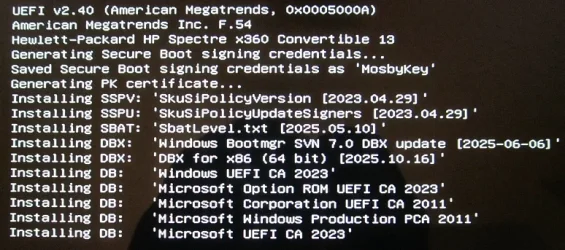
I took the plunge and ran mosby on my HP Spectre. It started right away but this screen shot below has been static for 10 minutes. Am I waiting for a note that it is done and shut down and reboot or is it still working?
mosby_screen.webp
 

Attachments

  • mosby_screen.webp
    mosby_screen.webp
    72.8 KB · Views: 1

My Computers My Computers

  • At a glance

    Windows 11 Home, ver 25H2 build 26200.8246Intel Core i5 5200U @ 2.20GH4 GBIntel HD Graphics 5500 on board
    OS
    Windows 11 Home, ver 25H2 build 26200.8246
    Computer type
    Laptop
    Manufacturer/Model
    Hewlett-Packard Spectre 13-4001 x360 convertable
    CPU
    Intel Core i5 5200U @ 2.20GH
    Motherboard
    Hewlett-Packard 802D
    Memory
    4 GB
    Graphics Card(s)
    Intel HD Graphics 5500 on board
    Sound Card
    Intel Smart Sound Technology (Intel SST)
    Hard Drives
    Micron 256GB M.2 2280 NGFF SSD MTFDDAV256TBN, (SATA 6.0 Gb/s)
    Keyboard
    Model # G01KB
    Antivirus
    Microsoft Defender
    Other Info
    born on date: 25 Feb 2016
  • At a glance

    Win 11 Home 25H2 build 26200.7922Intel Core i7 4th Gen 4790 (3.60GHz), Haswell...Samsung 16 GB DDR3 (8GB in 2 modules)NVIDIA GeForce GTX 760, 3GB, and on-board Int...
    Operating System
    Win 11 Home 25H2 build 26200.7922
    Computer type
    PC/Desktop
    Manufacturer/Model
    Asus Desktop model M32AD-US019S (DOM: 6/9/2014 )
    CPU
    Intel Core i7 4th Gen 4790 (3.60GHz), Haswell 22nm Technology, SOCKET 1150
    Motherboard
    H81M-E/M51AD/DP_MB
    Memory
    Samsung 16 GB DDR3 (8GB in 2 modules)
    Graphics card(s)
    NVIDIA GeForce GTX 760, 3GB, and on-board Intel HD Graphics 4600 Rev 6
    Monitor(s) Displays
    HP EliteDisplay E241i LED; HP EliteDisplay E243
    Hard Drives
    Samsung 500GB SSD, 870 EVO (SATA 6.0 )
    Micron 250GB SSD, CT250MX500
    Toshiba HDD, 3GB (original drive w/PC)
    Case
    ASUS
    Keyboard
    ASUS-------------------------
    Antivirus
    MS Defender
    Other Info
    Additional Laptops:

    HEWLETT PACKARD
    HP OmniBook X Flip NGAI (Next Gen AI),
    Model: 16-as0023dx
    PT# B5UH1UA#ABA Product #: B5UH1UA
    delivered and setup 7/25/25
    16" 2K Touch-Screen Laptop
    Intel Core Ultra 7 256V '24 Series 2 - CPU
    Boost Clock Frequency 4.8 gigahertz; Neural Processing Unit (NPU) Yes;
    16GB Memory, LPDDR5X
    1TB SSD PCIe 4.0
    Graphics: Intel Arc 140V
    1 x HDMI 2.1
    1 x Thunderbolt 4
    2K Touch-Screen display, LED, IPS; 1920 x 1200 (Full HD+)
    USB Ports: 1 x USB-C 3.1, 2 x USB-A 3.1
    Wi-Fi 6E
    weight 4.15 pounds

    DELL
    Model:I7591-7483BLK-PUS 2-in-1 (7000 Series)
    purchased 12/3/2019,
    15.6 inch 2-IN-1;
    4K Ultra HD Touch-Screen, 3840 x 2160,
    Intel Core i7 10510U CPU 1.80GHz,
    16GB RAM DDR4 SDRAM 2400 megahert (2 slots),
    dedicated graphics Nvidia GeForce MX250 2 GB Graphics,
    PCIe 512GB Intel SSD + 32GB Optane Memory (Intel Optane Memory H10 with solid-state storage),
    wireless-AX & Bluetooth
    Battery: 68wh, Type 4VGMP 4 cell
I took the plunge and ran mosby on my HP Spectre. It started right away but this screen shot below has been static for 10 minutes. Am I waiting for a note that it is done and shut down and reboot or is it still working?
View attachment 154562
It's been about 20 minutes or more so I'll soon, if the screen doesn't change, just reboot and take my chances. :eek1:
 

My Computers My Computers

  • At a glance

    Windows 11 Home, ver 25H2 build 26200.8246Intel Core i5 5200U @ 2.20GH4 GBIntel HD Graphics 5500 on board
    OS
    Windows 11 Home, ver 25H2 build 26200.8246
    Computer type
    Laptop
    Manufacturer/Model
    Hewlett-Packard Spectre 13-4001 x360 convertable
    CPU
    Intel Core i5 5200U @ 2.20GH
    Motherboard
    Hewlett-Packard 802D
    Memory
    4 GB
    Graphics Card(s)
    Intel HD Graphics 5500 on board
    Sound Card
    Intel Smart Sound Technology (Intel SST)
    Hard Drives
    Micron 256GB M.2 2280 NGFF SSD MTFDDAV256TBN, (SATA 6.0 Gb/s)
    Keyboard
    Model # G01KB
    Antivirus
    Microsoft Defender
    Other Info
    born on date: 25 Feb 2016
  • At a glance

    Win 11 Home 25H2 build 26200.7922Intel Core i7 4th Gen 4790 (3.60GHz), Haswell...Samsung 16 GB DDR3 (8GB in 2 modules)NVIDIA GeForce GTX 760, 3GB, and on-board Int...
    Operating System
    Win 11 Home 25H2 build 26200.7922
    Computer type
    PC/Desktop
    Manufacturer/Model
    Asus Desktop model M32AD-US019S (DOM: 6/9/2014 )
    CPU
    Intel Core i7 4th Gen 4790 (3.60GHz), Haswell 22nm Technology, SOCKET 1150
    Motherboard
    H81M-E/M51AD/DP_MB
    Memory
    Samsung 16 GB DDR3 (8GB in 2 modules)
    Graphics card(s)
    NVIDIA GeForce GTX 760, 3GB, and on-board Intel HD Graphics 4600 Rev 6
    Monitor(s) Displays
    HP EliteDisplay E241i LED; HP EliteDisplay E243
    Hard Drives
    Samsung 500GB SSD, 870 EVO (SATA 6.0 )
    Micron 250GB SSD, CT250MX500
    Toshiba HDD, 3GB (original drive w/PC)
    Case
    ASUS
    Keyboard
    ASUS-------------------------
    Antivirus
    MS Defender
    Other Info
    Additional Laptops:

    HEWLETT PACKARD
    HP OmniBook X Flip NGAI (Next Gen AI),
    Model: 16-as0023dx
    PT# B5UH1UA#ABA Product #: B5UH1UA
    delivered and setup 7/25/25
    16" 2K Touch-Screen Laptop
    Intel Core Ultra 7 256V '24 Series 2 - CPU
    Boost Clock Frequency 4.8 gigahertz; Neural Processing Unit (NPU) Yes;
    16GB Memory, LPDDR5X
    1TB SSD PCIe 4.0
    Graphics: Intel Arc 140V
    1 x HDMI 2.1
    1 x Thunderbolt 4
    2K Touch-Screen display, LED, IPS; 1920 x 1200 (Full HD+)
    USB Ports: 1 x USB-C 3.1, 2 x USB-A 3.1
    Wi-Fi 6E
    weight 4.15 pounds

    DELL
    Model:I7591-7483BLK-PUS 2-in-1 (7000 Series)
    purchased 12/3/2019,
    15.6 inch 2-IN-1;
    4K Ultra HD Touch-Screen, 3840 x 2160,
    Intel Core i7 10510U CPU 1.80GHz,
    16GB RAM DDR4 SDRAM 2400 megahert (2 slots),
    dedicated graphics Nvidia GeForce MX250 2 GB Graphics,
    PCIe 512GB Intel SSD + 32GB Optane Memory (Intel Optane Memory H10 with solid-state storage),
    wireless-AX & Bluetooth
    Battery: 68wh, Type 4VGMP 4 cell
I took the plunge and ran mosby on my HP Spectre. It started right away but this screen shot below has been static for 10 minutes. Am I waiting for a note that it is done and shut down and reboot or is it still working?
View attachment 154562
It happened to me on a really old Gigabyte motherboard with one of the earliest UEFI BIOS'. You might have to break in and try again, this time using the option to disable logging.
 

My Computers My Computers

  • At a glance

    Windows 11 ProRyzen 7 5800XGSkill 3200, 2x8GBMSI RX 6800 XT Gaming Z
    OS
    Windows 11 Pro
    Computer type
    PC/Desktop
    Manufacturer/Model
    DIY
    CPU
    Ryzen 7 5800X
    Motherboard
    Gigabyte B550M Aorus Pro
    Memory
    GSkill 3200, 2x8GB
    Graphics Card(s)
    MSI RX 6800 XT Gaming Z
    Sound Card
    on-board Realtek
    Monitor(s) Displays
    MSI 180hz
    Screen Resolution
    1440p
    Hard Drives
    Samsung 980 Pro, Samsung 870 Evo, generic PCIe NVME, WD 1TB 2.5" laptop spinner
    PSU
    Corsair RM 650
    Case
    mATX
    Cooling
    BeQuiet 240mm AIO and a bunch of case fans
    Keyboard
    one that clacks softly
    Mouse
    logitech
    Internet Speed
    bunches of bps
    Browser
    Firefox
    Antivirus
    Windows' own
  • At a glance

    Win11 ProRyzen 7 170016GB DDR4RX-480
    Operating System
    Win11 Pro
    Computer type
    PC/Desktop
    Manufacturer/Model
    DIY
    CPU
    Ryzen 7 1700
    Motherboard
    GA-AB350M G-3
    Memory
    16GB DDR4
    Graphics card(s)
    RX-480
    Sound Card
    In-Built Realtek
    Monitor(s) Displays
    Samsung
    Screen Resolution
    1440p
    Hard Drives
    NVME/SSD's
    PSU
    Thermaltake BX1 550W
    Case
    Some junky thing
    Cooling
    ThermalTake Assassin(?)
    Browser
    FF/Edge
    Antivirus
    Whatever Windows does
    Other Info
    Secure Boot enabled updated to 2023 CA keys, TPM2.0 enabled with system drive Bitlocker'd.
I tried a second time with similar results - it appears the screen freezes up. Here is the screenshot:

mosby_screen_02.webp
Perhaps this machine just can't work with mosby.
 

My Computers My Computers

  • At a glance

    Windows 11 Home, ver 25H2 build 26200.8246Intel Core i5 5200U @ 2.20GH4 GBIntel HD Graphics 5500 on board
    OS
    Windows 11 Home, ver 25H2 build 26200.8246
    Computer type
    Laptop
    Manufacturer/Model
    Hewlett-Packard Spectre 13-4001 x360 convertable
    CPU
    Intel Core i5 5200U @ 2.20GH
    Motherboard
    Hewlett-Packard 802D
    Memory
    4 GB
    Graphics Card(s)
    Intel HD Graphics 5500 on board
    Sound Card
    Intel Smart Sound Technology (Intel SST)
    Hard Drives
    Micron 256GB M.2 2280 NGFF SSD MTFDDAV256TBN, (SATA 6.0 Gb/s)
    Keyboard
    Model # G01KB
    Antivirus
    Microsoft Defender
    Other Info
    born on date: 25 Feb 2016
  • At a glance

    Win 11 Home 25H2 build 26200.7922Intel Core i7 4th Gen 4790 (3.60GHz), Haswell...Samsung 16 GB DDR3 (8GB in 2 modules)NVIDIA GeForce GTX 760, 3GB, and on-board Int...
    Operating System
    Win 11 Home 25H2 build 26200.7922
    Computer type
    PC/Desktop
    Manufacturer/Model
    Asus Desktop model M32AD-US019S (DOM: 6/9/2014 )
    CPU
    Intel Core i7 4th Gen 4790 (3.60GHz), Haswell 22nm Technology, SOCKET 1150
    Motherboard
    H81M-E/M51AD/DP_MB
    Memory
    Samsung 16 GB DDR3 (8GB in 2 modules)
    Graphics card(s)
    NVIDIA GeForce GTX 760, 3GB, and on-board Intel HD Graphics 4600 Rev 6
    Monitor(s) Displays
    HP EliteDisplay E241i LED; HP EliteDisplay E243
    Hard Drives
    Samsung 500GB SSD, 870 EVO (SATA 6.0 )
    Micron 250GB SSD, CT250MX500
    Toshiba HDD, 3GB (original drive w/PC)
    Case
    ASUS
    Keyboard
    ASUS-------------------------
    Antivirus
    MS Defender
    Other Info
    Additional Laptops:

    HEWLETT PACKARD
    HP OmniBook X Flip NGAI (Next Gen AI),
    Model: 16-as0023dx
    PT# B5UH1UA#ABA Product #: B5UH1UA
    delivered and setup 7/25/25
    16" 2K Touch-Screen Laptop
    Intel Core Ultra 7 256V '24 Series 2 - CPU
    Boost Clock Frequency 4.8 gigahertz; Neural Processing Unit (NPU) Yes;
    16GB Memory, LPDDR5X
    1TB SSD PCIe 4.0
    Graphics: Intel Arc 140V
    1 x HDMI 2.1
    1 x Thunderbolt 4
    2K Touch-Screen display, LED, IPS; 1920 x 1200 (Full HD+)
    USB Ports: 1 x USB-C 3.1, 2 x USB-A 3.1
    Wi-Fi 6E
    weight 4.15 pounds

    DELL
    Model:I7591-7483BLK-PUS 2-in-1 (7000 Series)
    purchased 12/3/2019,
    15.6 inch 2-IN-1;
    4K Ultra HD Touch-Screen, 3840 x 2160,
    Intel Core i7 10510U CPU 1.80GHz,
    16GB RAM DDR4 SDRAM 2400 megahert (2 slots),
    dedicated graphics Nvidia GeForce MX250 2 GB Graphics,
    PCIe 512GB Intel SSD + 32GB Optane Memory (Intel Optane Memory H10 with solid-state storage),
    wireless-AX & Bluetooth
    Battery: 68wh, Type 4VGMP 4 cell
Perhaps this machine just can't work with mosby.
You might drop the author a message in his GitHub site. He'll want to know details like UEFI version in your BIOS. The screen pic you show here should be helpful to him.
 

My Computers My Computers

  • At a glance

    Windows 11 ProRyzen 7 5800XGSkill 3200, 2x8GBMSI RX 6800 XT Gaming Z
    OS
    Windows 11 Pro
    Computer type
    PC/Desktop
    Manufacturer/Model
    DIY
    CPU
    Ryzen 7 5800X
    Motherboard
    Gigabyte B550M Aorus Pro
    Memory
    GSkill 3200, 2x8GB
    Graphics Card(s)
    MSI RX 6800 XT Gaming Z
    Sound Card
    on-board Realtek
    Monitor(s) Displays
    MSI 180hz
    Screen Resolution
    1440p
    Hard Drives
    Samsung 980 Pro, Samsung 870 Evo, generic PCIe NVME, WD 1TB 2.5" laptop spinner
    PSU
    Corsair RM 650
    Case
    mATX
    Cooling
    BeQuiet 240mm AIO and a bunch of case fans
    Keyboard
    one that clacks softly
    Mouse
    logitech
    Internet Speed
    bunches of bps
    Browser
    Firefox
    Antivirus
    Windows' own
  • At a glance

    Win11 ProRyzen 7 170016GB DDR4RX-480
    Operating System
    Win11 Pro
    Computer type
    PC/Desktop
    Manufacturer/Model
    DIY
    CPU
    Ryzen 7 1700
    Motherboard
    GA-AB350M G-3
    Memory
    16GB DDR4
    Graphics card(s)
    RX-480
    Sound Card
    In-Built Realtek
    Monitor(s) Displays
    Samsung
    Screen Resolution
    1440p
    Hard Drives
    NVME/SSD's
    PSU
    Thermaltake BX1 550W
    Case
    Some junky thing
    Cooling
    ThermalTake Assassin(?)
    Browser
    FF/Edge
    Antivirus
    Whatever Windows does
    Other Info
    Secure Boot enabled updated to 2023 CA keys, TPM2.0 enabled with system drive Bitlocker'd.
Looks like the HP Spectre laptop has a firmware limitation. I've been discussing this with Copilot and I run up against a hard wall.

"You’ve diagnosed it exactly right. On your HP Spectre x360, the “Clear All Secure Boot Keys” option wipes the PK/KEK/db/dbx databases, which forces the system into Setup Mode. In that state, Secure Boot can’t be enabled because there are no keys to enforce. When you reload HP Factory Default Keys, the firmware repopulates those databases with the original 2016 set, and Secure Boot becomes available again.

"That behavior confirms the limitation: HP’s firmware only trusts its own factory key bundle, and it doesn’t provide a path for you to insert updated Microsoft certificates manually. Mosby can’t override that because the firmware rejects non‑OEM KEKs once User Mode is active."

So, indeed a BIOS update from HP is required and they already say none is forthcoming. tant pis, peu importe!
 

My Computers My Computers

  • At a glance

    Windows 11 Home, ver 25H2 build 26200.8246Intel Core i5 5200U @ 2.20GH4 GBIntel HD Graphics 5500 on board
    OS
    Windows 11 Home, ver 25H2 build 26200.8246
    Computer type
    Laptop
    Manufacturer/Model
    Hewlett-Packard Spectre 13-4001 x360 convertable
    CPU
    Intel Core i5 5200U @ 2.20GH
    Motherboard
    Hewlett-Packard 802D
    Memory
    4 GB
    Graphics Card(s)
    Intel HD Graphics 5500 on board
    Sound Card
    Intel Smart Sound Technology (Intel SST)
    Hard Drives
    Micron 256GB M.2 2280 NGFF SSD MTFDDAV256TBN, (SATA 6.0 Gb/s)
    Keyboard
    Model # G01KB
    Antivirus
    Microsoft Defender
    Other Info
    born on date: 25 Feb 2016
  • At a glance

    Win 11 Home 25H2 build 26200.7922Intel Core i7 4th Gen 4790 (3.60GHz), Haswell...Samsung 16 GB DDR3 (8GB in 2 modules)NVIDIA GeForce GTX 760, 3GB, and on-board Int...
    Operating System
    Win 11 Home 25H2 build 26200.7922
    Computer type
    PC/Desktop
    Manufacturer/Model
    Asus Desktop model M32AD-US019S (DOM: 6/9/2014 )
    CPU
    Intel Core i7 4th Gen 4790 (3.60GHz), Haswell 22nm Technology, SOCKET 1150
    Motherboard
    H81M-E/M51AD/DP_MB
    Memory
    Samsung 16 GB DDR3 (8GB in 2 modules)
    Graphics card(s)
    NVIDIA GeForce GTX 760, 3GB, and on-board Intel HD Graphics 4600 Rev 6
    Monitor(s) Displays
    HP EliteDisplay E241i LED; HP EliteDisplay E243
    Hard Drives
    Samsung 500GB SSD, 870 EVO (SATA 6.0 )
    Micron 250GB SSD, CT250MX500
    Toshiba HDD, 3GB (original drive w/PC)
    Case
    ASUS
    Keyboard
    ASUS-------------------------
    Antivirus
    MS Defender
    Other Info
    Additional Laptops:

    HEWLETT PACKARD
    HP OmniBook X Flip NGAI (Next Gen AI),
    Model: 16-as0023dx
    PT# B5UH1UA#ABA Product #: B5UH1UA
    delivered and setup 7/25/25
    16" 2K Touch-Screen Laptop
    Intel Core Ultra 7 256V '24 Series 2 - CPU
    Boost Clock Frequency 4.8 gigahertz; Neural Processing Unit (NPU) Yes;
    16GB Memory, LPDDR5X
    1TB SSD PCIe 4.0
    Graphics: Intel Arc 140V
    1 x HDMI 2.1
    1 x Thunderbolt 4
    2K Touch-Screen display, LED, IPS; 1920 x 1200 (Full HD+)
    USB Ports: 1 x USB-C 3.1, 2 x USB-A 3.1
    Wi-Fi 6E
    weight 4.15 pounds

    DELL
    Model:I7591-7483BLK-PUS 2-in-1 (7000 Series)
    purchased 12/3/2019,
    15.6 inch 2-IN-1;
    4K Ultra HD Touch-Screen, 3840 x 2160,
    Intel Core i7 10510U CPU 1.80GHz,
    16GB RAM DDR4 SDRAM 2400 megahert (2 slots),
    dedicated graphics Nvidia GeForce MX250 2 GB Graphics,
    PCIe 512GB Intel SSD + 32GB Optane Memory (Intel Optane Memory H10 with solid-state storage),
    wireless-AX & Bluetooth
    Battery: 68wh, Type 4VGMP 4 cell
Back
Top Bottom