DISM error, repair content could not be found


Morph000

Well-known member
Member
VIP
Local time
5:04 AM
Posts
250
Location
Australia (best bit)
OS
Windows 11 Pro 24H2
The joys of W11 never let up.

I *may* have fixed my crashing issues, but will see. Been fine for days now.
4 days without a crash! A W11 record! /sarc
However, I suspect said crashes have caused my Windows update and DISM store issues.

Got an install error for KB5068861 (Install error - 0x80070306), but it seems a lot of others are having grief with that KB too.
So, I ran chkdsk - no issues.
Ran SFC /scannow - no issues.
Ran DISM Checkhealth - component store is repairable notice
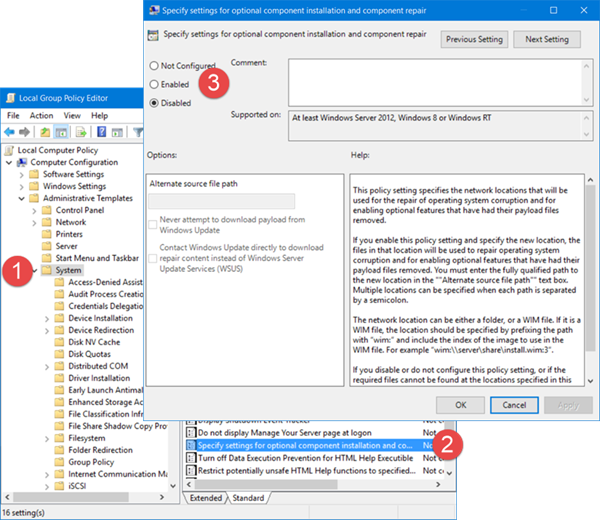
Ran DISM Repairhealth online AND with WindowsUpdate source switch - no fix
Ran DISM using mounted WIM from recent ISO download - no fix
Still have the repair content not found error , but never told what exactly is missing.
Renamed SoftwareDistribution folder, ran DISM and Win update again - no fix.
Checked DISM logs - no clues there either.

Any ideas on how to locate the specific problem DISM has supposedly found?

Maybe an inplace upgrade is coming...
 

My Computer

System One

  • OS
    Windows 11 Pro 24H2
    Computer type
    Laptop
    Manufacturer/Model
    LG
    CPU
    i7 Ultra
    Memory
    16GB
    Graphics Card(s)
    Intel
    Sound Card
    Intel Realtek
    Monitor(s) Displays
    Laptop 17" & TB4 Dell 27" QHD Ultrasharp w/integral TB4 hub
    Screen Resolution
    2560x1600
    Hard Drives
    1TB SSD, 5 external WDs
    Mouse
    Logitech Master MX 3S
    Browser
    Vivaldi
    Antivirus
    Kaspersky Premium Suite

There is a new method in settings to repair windows using windows update. Try that…
 

My Computers

System One System Two

  • OS
    Windows 11 Pro 25H2
    Computer type
    Laptop
    Manufacturer/Model
    Huawei MateBook D15
    CPU
    Ryzen 5 3500U
    Memory
    8GB
    Graphics Card(s)
    Vega 8
    Screen Resolution
    FHD
    Hard Drives
    256GB Samsung SSD + 1TB HDD
    Browser
    Microsoft Edge
    Antivirus
    ESET Smart Security Premium
  • Operating System
    Windows 10 Enterprise LTSC 21H2
    Computer type
    Laptop
    Manufacturer/Model
    MSI GS73 6RF Stealth Pro
    CPU
    intel core i7 6700HQ
    Memory
    16GB
    Graphics card(s)
    Nvidia Geforce GTX1060 (6GB)
    Screen Resolution
    FHD
    Hard Drives
    128GB SSD + 1TB HDD
    Browser
    Microsoft Edge
    Antivirus
    Windows Defender
Ok, digging deeper I seem to have found the culprit:
"Could not find component missing payload:amd64_microsoft-windows-smbserver_31bf3856ad364e35_10.0.26100.7019_none_94e2468f9ac1ba5a\srvsvc.dll"

The Windows\WinSxS has that folder but it's empty.
I have that folder and contents on an recentish Macrium image though.
How to I tell DISM to use this folder as a source to fix the problem?
 

My Computer

System One

  • OS
    Windows 11 Pro 24H2
    Computer type
    Laptop
    Manufacturer/Model
    LG
    CPU
    i7 Ultra
    Memory
    16GB
    Graphics Card(s)
    Intel
    Sound Card
    Intel Realtek
    Monitor(s) Displays
    Laptop 17" & TB4 Dell 27" QHD Ultrasharp w/integral TB4 hub
    Screen Resolution
    2560x1600
    Hard Drives
    1TB SSD, 5 external WDs
    Mouse
    Logitech Master MX 3S
    Browser
    Vivaldi
    Antivirus
    Kaspersky Premium Suite

please have a look at this link about half way down.

Run the DISM Command Using a Bootable Windows Disk


best of luck Steve ..
 

My Computers

System One System Two

  • OS
    Windows 11 Home
    Computer type
    PC/Desktop
    Manufacturer/Model
    HP 24" AiO
    CPU
    Ryzen 7 5825u
    Motherboard
    HP
    Memory
    64GB DDR4 3200
    Graphics Card(s)
    Ryzen 7 5825u
    Sound Card
    RealTek
    Monitor(s) Displays
    24" HP AiO
    Screen Resolution
    1920 x 1080 @60 Hz
    Hard Drives
    1TB WD Blue SN580 M2 SSD Partitioned.
    2x 1TB USB HDD External Backup/Storage.
    PSU
    90W external power brick
    Case
    24" All in One
    Cooling
    Default Air Cooling
    Keyboard
    HP WiFi UK extended
    Mouse
    HP WiFi 3 Button
    Internet Speed
    1GB full fibre
    Browser
    Edge & Firefox
    Antivirus
    AVG Internet Security/Windows Defender
    Other Info
    Mainly Open Source Software
  • Operating System
    Ubuntu 22.04.5 LTS
    Computer type
    Laptop
    Manufacturer/Model
    Dell 13" Latitude 2017
    CPU
    i5 7200u
    Motherboard
    Dell
    Memory
    16GB DDR4
    Graphics card(s)
    Intel
    Sound Card
    Intel
    Monitor(s) Displays
    13" Dell Laptop
    Hard Drives
    250GB Crucial 2.5" SSD
    Mouse
    Generic WiFi 3 button
    Internet Speed
    WiFi only
    Browser
    Firefox
    Antivirus
    ClamAV TK
    Other Info
    Mainly Open Source Software
Ah, the Macrium image one was slightly different...

What I need is for someone with W11 ver 10.0.26100.7019 to have a look in WinSxs and see if they have amd64_microsoft-windows-smbserver_31bf3856ad364e35_10.0.26100.7019_none_94e2468f9ac1ba5a\srvsvc.dll

Anyone???
 
Last edited:

My Computer

System One

  • OS
    Windows 11 Pro 24H2
    Computer type
    Laptop
    Manufacturer/Model
    LG
    CPU
    i7 Ultra
    Memory
    16GB
    Graphics Card(s)
    Intel
    Sound Card
    Intel Realtek
    Monitor(s) Displays
    Laptop 17" & TB4 Dell 27" QHD Ultrasharp w/integral TB4 hub
    Screen Resolution
    2560x1600
    Hard Drives
    1TB SSD, 5 external WDs
    Mouse
    Logitech Master MX 3S
    Browser
    Vivaldi
    Antivirus
    Kaspersky Premium Suite

Well...went in for eye surgery last Thursday so took until now to recuperate.
Looked forward to seeing at least one person offering to help, but no-one...:unsure:
Had to do it the hard way with a WIM. Took hours, but now fixed and a clean bill of health from SFC and DISM.
 

My Computer

System One

  • OS
    Windows 11 Pro 24H2
    Computer type
    Laptop
    Manufacturer/Model
    LG
    CPU
    i7 Ultra
    Memory
    16GB
    Graphics Card(s)
    Intel
    Sound Card
    Intel Realtek
    Monitor(s) Displays
    Laptop 17" & TB4 Dell 27" QHD Ultrasharp w/integral TB4 hub
    Screen Resolution
    2560x1600
    Hard Drives
    1TB SSD, 5 external WDs
    Mouse
    Logitech Master MX 3S
    Browser
    Vivaldi
    Antivirus
    Kaspersky Premium Suite

My Computer

System One

  • OS
    Windows 11 Pro Insider 64 bit 25H2 26200.5742
    Computer type
    PC/Desktop
    Manufacturer/Model
    Gigabyte Z390 UD
    CPU
    Intel Core i7 9700K 3.60
    Motherboard
    Gigabyte Z390 UD
    Memory
    16 GB
    Graphics Card(s)
    nVidia GEForce RTX 2060 Super
    Sound Card
    onboard
    Monitor(s) Displays
    Two 27" Dell 4K monitors
    Screen Resolution
    3840 x 2160
    Hard Drives
    M.2 NVME SSD, 500 GB; Two 2TB Mechanical HDD's
    PSU
    850w PSU
    Case
    Cyberpower PC
    Cooling
    Water cooled
    Keyboard
    Backlit Cyberpower gaming keyboard
    Mouse
    Backlit Cyberpower gaming mouse
    Internet Speed
    1 GB mbps
    Browser
    Brave
    Antivirus
    Windows Security
Ended up getting the ISO and doing that, but on a slow connection I had hoped to avoid that...
 

My Computer

System One

  • OS
    Windows 11 Pro 24H2
    Computer type
    Laptop
    Manufacturer/Model
    LG
    CPU
    i7 Ultra
    Memory
    16GB
    Graphics Card(s)
    Intel
    Sound Card
    Intel Realtek
    Monitor(s) Displays
    Laptop 17" & TB4 Dell 27" QHD Ultrasharp w/integral TB4 hub
    Screen Resolution
    2560x1600
    Hard Drives
    1TB SSD, 5 external WDs
    Mouse
    Logitech Master MX 3S
    Browser
    Vivaldi
    Antivirus
    Kaspersky Premium Suite

Latest Support Threads

Back
Top Bottom