
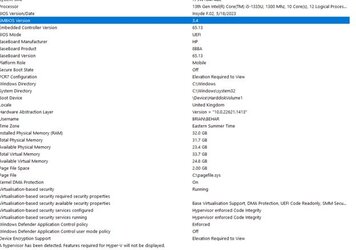
I have just installed VMWare Workstation Player V17.02 onto a new laptop - HP, running Windows Home V11, 64 bit, 32K memory and 2 TB ssd hard drive.
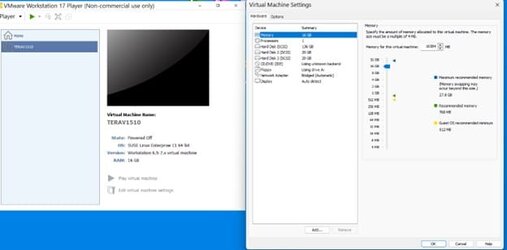
The VM machine is Teradata V15.10 on Windows.
I am having 2 primary issues,,
1. VMware is running very, very slowly.. I have a version (VMWare Workstation Player V15.5) on an older laptop (Windows 10 Pro) with
less memory and slower processor speed and the response time to boot the same Teradata VM machine is much less then half of what
I'm seeing on the new laptop. I don't don't understand this at all...and I do need some help...
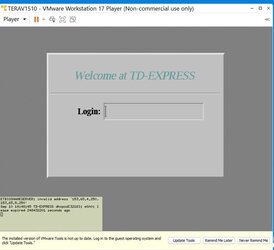
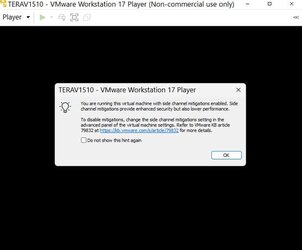
2. During the boot up of the VM machine I do not see the boot sequence steps displayed on the screen. All I see is
the initial popup screen with the boot options and then basically a black screen. I don't see the boot progression
steps and the errors. I need help with this as well...
So, I'm not sure where the issue lies.. VMWare and settings, TDExpress and settings or Windows 11 and settings.
I've attached some screen shots, not sure if they'll help.
thanks
The VM machine is Teradata V15.10 on Windows.
I am having 2 primary issues,,
1. VMware is running very, very slowly.. I have a version (VMWare Workstation Player V15.5) on an older laptop (Windows 10 Pro) with
less memory and slower processor speed and the response time to boot the same Teradata VM machine is much less then half of what
I'm seeing on the new laptop. I don't don't understand this at all...and I do need some help...
2. During the boot up of the VM machine I do not see the boot sequence steps displayed on the screen. All I see is
the initial popup screen with the boot options and then basically a black screen. I don't see the boot progression
steps and the errors. I need help with this as well...
So, I'm not sure where the issue lies.. VMWare and settings, TDExpress and settings or Windows 11 and settings.
I've attached some screen shots, not sure if they'll help.
thanks
- Windows Build/Version
- v11 - v22h2 Build 22621.2134
Attachments
My Computer
At a glance
Windows 11 HOME13th Gen Intel(R) Core(TM) i5-1335U 1.30 GHz32.0 GB (31.7 GB usable)
- OS
- Windows 11 HOME
- Computer type
- Laptop
- Manufacturer/Model
- HP LAPTOP 17 - cn3xxx
- CPU
- 13th Gen Intel(R) Core(TM) i5-1335U 1.30 GHz
- Memory
- 32.0 GB (31.7 GB usable)
- Hard Drives
- 2 TB






