Display Settings Won't Open


Do you have any data or apps you cannot reinstall? If not, I would recommend to download all drivers in advance, backup your data and then format and clean install Windows 11. They will activate automatically again since you have a digital license. Also if you install all the official drivers (forget Windows Update) starting from chipset you shouldn't have any incompatibilities like that and you should also have much better performance than you have now. When I first clean installed Windows on my Fujitsu Stylistic Q702 hybrid tablet/laptop I was amazed how much faster it was after installing all the official drivers. I had bought it as second hand and the Shop that had installed Windows just left Windows Update to do all the work impairing performance.
 

My Computers

System One System Two

  • OS
    Windows 11 Pro 23H2 (5699), 25H2 (8655)
    Computer type
    Laptop
    Manufacturer/Model
    Acer Extensa 5630EZ
    CPU
    Mobile DualCore Intel Core 2 Duo T7250, 2000 MHz
    Motherboard
    Acer Extensa 5630
    Memory
    4GB
    Graphics Card(s)
    Mobile Intel(R) GMA 4500M (Mobile 4 series)
    Sound Card
    Realtek ALC268 @ Intel 82801IB ICH9 - High Definition Audio Controller
    Monitor(s) Displays
    1
    Screen Resolution
    1280x800
    Hard Drives
    Samsung SSD 850 EVO 250GB SATA Device (250 GB, SATA-III)
    Internet Speed
    VDSL 50 Mbps
    Browser
    MICROSOFT EDGE
    Antivirus
    WINDOWS DEFENDER
    Other Info
    Legacy MBR installation, no TPM, no Secure Boot, no WDDM 2.0 graphics drivers, no SSE4.2, cannot get more unsupported ;) This is only my test laptop. I had installed Windows 11 here before upgrading my main PC. For my main PC I use everyday see my 2nd system specs.
  • Operating System
    Windows 11 Pro v25H2 (build 26200.8655)
    Computer type
    PC/Desktop
    Manufacturer/Model
    Custom-built PC
    CPU
    Intel Core-i7 3770 3.40GHz s1155 (3rd generation)
    Motherboard
    Asus P8H61 s1155 ATX
    Memory
    2x Kingston Hyper-X Blu 8GB DDR3-1600
    Graphics card(s)
    GIGABYTE GeForce RTX 3050 WINDFORCE OC V2 6GB (GV-N3050WF2OCV2-6GD)
    Sound Card
    Realtek HD audio (ALC887)
    Monitor(s) Displays
    Sony Bravia KDL-19L4000 19" LCD TV via VGA
    Screen Resolution
    1440x900 32-bit 60Hz
    Hard Drives
    WD Blue SA510 2.5 1000GB SSD as system disk, Western Digital Caviar Purple 4TB SATA III (WD40PURZ) as second
    PSU
    Thermaltake Litepower RGB 550W Full Wired
    Case
    SUPERCASE MIDI-TOWER
    Cooling
    Deepcool Gamma Archer CPU cooler, 1x 8cm fan at the back
    Keyboard
    Mitsumi 101-key PS/2
    Mouse
    Sunnyline OptiEye PS/2
    Internet Speed
    100Mbps
    Browser
    Microsoft Edge, Mozilla Firefox
    Antivirus
    Microsoft Windows Defender
    Other Info
    Legacy BIOS (MBR) installation, no TPM, no Secure Boot, WDDM 3.0 graphics drivers, WEI score 7.4
Make sure the Connected Devices Platform Service is enabled and running in services.msc.
Hi all,

Ever since I replaced my monitor, I cannot open the Display Settings. I have tried all the suggestions I could find.

- Restart
- Shutdown and wait a few minutes
- Repair and Reset of the Settings app
- SFC
- DISM
- Group Policy change
- Registry edits/additions
- dxdiag
- In-place repair
 

My Computer

System One

  • OS
    Win11Pro
Make sure the Connected Devices Platform Service is enabled and running in services.msc.
This worked for me. Thanks!

Disabled some services that were touted as bloat and were listed as safe to disable.
Seems the people putting these lists out there are probably not testing the rubbish they're putting on these lists as it didn't mention it hindering display access.

Whoops.
 

My Computer

System One

  • OS
    Windows 11
    Computer type
    PC/Desktop
We started having this problem (opening Settings/Display) after the Windows 11 August update for Enterprise. Every model of Dell that we have is having the issue. Tried BIOS updates, graphics driver updates and nothing seems to work. You open it up and a blue circle just spins. You can click within the blank page and items do show up but its a crap shot what will come up. Been working on this most of the week and its stopping our Windows 11 migration until we get this figured out.

Note: Installing the September update didn't fix the problem. I think a lot of other users are having this problems but it hasn't been reported enough to rise to the top of the Microsoft empire to give a crap!!!!
 

My Computer

System One

  • OS
    Windows 11 Enterprise 2H42
    Manufacturer/Model
    Dell
We started having this problem (opening Settings/Display) after the Windows 11 August update for Enterprise. Every model of Dell that we have is having the issue. Tried BIOS updates, graphics driver updates and nothing seems to work. You open it up and a blue circle just spins. You can click within the blank page and items do show up but its a crap shot what will come up. Been working on this most of the week and its stopping our Windows 11 migration until we get this figured out.

Note: Installing the September update didn't fix the problem. I think a lot of other users are having this problems but it hasn't been reported enough to rise to the top of the Microsoft empire to give a crap!!!!
which link in particular are you trying to open on that page?
 

My Computer

System One

  • OS
    Windows 11 Pro
I would like to see the monitors graphic. I'm migrating users with Dell docking stations and updating the firmware on them as well. In order to update the dock you have to take everything out of it first. If a user has (3) monitors then it becomes impossible to move them around or set one as the main display.

Note: Our "Connected Devices Platform Service" is running. We can't seem to get the "Connected Devices Platform User Service_xxxxx" to Start. Everything is greyed out and won't let you change anything. Even tried to start it with an elevated command prompt using "net start" and it errors out.
 

My Computer

System One

  • OS
    Windows 11 Enterprise 2H42
    Manufacturer/Model
    Dell
I would like to see the monitors graphic. I'm migrating users with Dell docking stations and updating the firmware on them as well. In order to update the dock you have to take everything out of it first. If a user has (3) monitors then it becomes impossible to move them around or set one as the main display.

Note: Our "Connected Devices Platform Service" is running. We can't seem to get the "Connected Devices Platform User Service_xxxxx" to Start. Everything is greyed out and won't let you change anything. Even tried to start it with an elevated command prompt using "net start" and it errors out.
do the pages load if you access any of these directly from the RUN box?

ms-settings:display
ms-settings:display-hdr
ms-settings:nightlight
ms-settings:display-advanced
ms-settings:advanceddisplay
ms-settings:display-advancedgraphics
ms-settings:display-advancedgraphics-default
 

My Computer

System One

  • OS
    Windows 11 Pro
ms-settings:display No
ms-settings:display-hdr Yes
ms-settings:nightlight Yes
ms-settings:display-advanced No
ms-settings:advanceddisplay Yes
ms-settings:display-advancedgraphics Yes
ms-settings:display-advancedgraphics-default Yes
 

My Computer

System One

  • OS
    Windows 11 Enterprise 2H42
    Manufacturer/Model
    Dell
I get the same results booting up into safe mode.
 

My Computer

System One

  • OS
    Windows 11 Enterprise 2H42
    Manufacturer/Model
    Dell
You have to repair Windows. If the usual commands sfc and dism don't work, you must download the ISO and run Setup to do an in-place upgrade/repair. It must be the same version or higher. 25H2 is coming in October l, so you can wait and also upgrade to 25H2 using the new ISO.
 

My Computers

System One System Two

  • OS
    Windows 11 Pro 23H2 (5699), 25H2 (8655)
    Computer type
    Laptop
    Manufacturer/Model
    Acer Extensa 5630EZ
    CPU
    Mobile DualCore Intel Core 2 Duo T7250, 2000 MHz
    Motherboard
    Acer Extensa 5630
    Memory
    4GB
    Graphics Card(s)
    Mobile Intel(R) GMA 4500M (Mobile 4 series)
    Sound Card
    Realtek ALC268 @ Intel 82801IB ICH9 - High Definition Audio Controller
    Monitor(s) Displays
    1
    Screen Resolution
    1280x800
    Hard Drives
    Samsung SSD 850 EVO 250GB SATA Device (250 GB, SATA-III)
    Internet Speed
    VDSL 50 Mbps
    Browser
    MICROSOFT EDGE
    Antivirus
    WINDOWS DEFENDER
    Other Info
    Legacy MBR installation, no TPM, no Secure Boot, no WDDM 2.0 graphics drivers, no SSE4.2, cannot get more unsupported ;) This is only my test laptop. I had installed Windows 11 here before upgrading my main PC. For my main PC I use everyday see my 2nd system specs.
  • Operating System
    Windows 11 Pro v25H2 (build 26200.8655)
    Computer type
    PC/Desktop
    Manufacturer/Model
    Custom-built PC
    CPU
    Intel Core-i7 3770 3.40GHz s1155 (3rd generation)
    Motherboard
    Asus P8H61 s1155 ATX
    Memory
    2x Kingston Hyper-X Blu 8GB DDR3-1600
    Graphics card(s)
    GIGABYTE GeForce RTX 3050 WINDFORCE OC V2 6GB (GV-N3050WF2OCV2-6GD)
    Sound Card
    Realtek HD audio (ALC887)
    Monitor(s) Displays
    Sony Bravia KDL-19L4000 19" LCD TV via VGA
    Screen Resolution
    1440x900 32-bit 60Hz
    Hard Drives
    WD Blue SA510 2.5 1000GB SSD as system disk, Western Digital Caviar Purple 4TB SATA III (WD40PURZ) as second
    PSU
    Thermaltake Litepower RGB 550W Full Wired
    Case
    SUPERCASE MIDI-TOWER
    Cooling
    Deepcool Gamma Archer CPU cooler, 1x 8cm fan at the back
    Keyboard
    Mitsumi 101-key PS/2
    Mouse
    Sunnyline OptiEye PS/2
    Internet Speed
    100Mbps
    Browser
    Microsoft Edge, Mozilla Firefox
    Antivirus
    Microsoft Windows Defender
    Other Info
    Legacy BIOS (MBR) installation, no TPM, no Secure Boot, WDDM 3.0 graphics drivers, WEI score 7.4
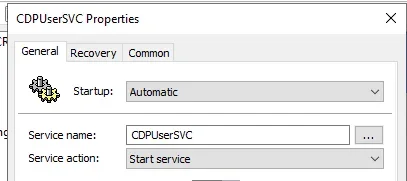
We fixed this. If you go into Services and notice that "Connected Devices Platform User Service_xxxxx" isn't running then you'll have the issue. To test, open up an admin command prompt and type in "sc config cdpusersvc start=auto" and reboot your machine, you'll be able to access the Display settings now.

Note: If you try to run "sc start cdpusersvc" after the above command, it will error out.

We updated our group policy to:

1758309445905.webp

We then ran the September Windows 11 updates (via WSUS) to a machine that had the July updates on it (we decided to skip the August updates due to the many problems with it such as this) and the Settings/Display is working fine now.

What a weird problem....Thanks Microsoft!!!!
 

My Computer

System One

  • OS
    Windows 11 Enterprise 2H42
    Manufacturer/Model
    Dell
Have the same issum on my Asus ExpertBook.
Opening display settings only gives spinning orb :-(
The Intel Control panel works.
But you can't set all the settings from there
(like scaling, resolution etc).
Hope anyone can find a solutoipn for this.
I will NOT do another in-place upgrade
(seems like that is all I do these days).
 

My Computers

System One System Two

  • OS
    Windows 10
    Computer type
    PC/Desktop
    Manufacturer/Model
    Asus
    CPU
    Intel Core i5-6600 3.30Ghz
    Motherboard
    Asus B150M
    Memory
    16 GB
    Graphics Card(s)
    Asus Nvidia GeForce GTX 960
    Sound Card
    Onboard
    Monitor(s) Displays
    Samsung
    Hard Drives
    Samsung SSD 850 EBO 128 GB
    WDC WD1003FZEX-00MK2A0
  • Operating System
    Windows 11
    Computer type
    Laptop
    Manufacturer/Model
    Asus ExpertBook
    CPU
    11the Gen Intel Core i5-1135G7 2.40 GHz
    Memory
    8 GB
    Graphics card(s)
    Intel Xe
    Sound Card
    Onboard
    Hard Drives
    NVMe WDC PC SN530 SDBPNPZ 256 GB

Latest Support Threads

Back
Top Bottom