Do I require a new Activation Key


What version of Windows 7 did you have? If it was Ultimate it was higher than Professional and could be eligible for upgrade to Windows 10 Pro for Workstations or in your case Windows 10 Enterprise. This could explain how did you end with Enterprise. Or you accidentally upgraded from Windows 7 Professional to Windows 10 Enterprise which is higher than Pro and doable but then would not activate. However I don't think Microsoft would let you activate Enterprise with a Professional key, so most likely it was Ultimate.
Ah I'm pretty sure it was Ultimate I purchased, wish I could find the damn disk, if for my own satisfaction.

I know it was a legit purchase because of where I bought it from.
 

My Computer My Computer

At a glance

Win10 ProRyzen5 4600g16Integrated
OS
Win10 Pro
Computer type
PC/Desktop
Manufacturer/Model
Custom
CPU
Ryzen5 4600g
Motherboard
Asus Tuf B550-Plus WiFi ll
Memory
16
Graphics Card(s)
Integrated
Sound Card
Integrated
Monitor(s) Displays
1
Hard Drives
2
PSU
Corsair 400w
Case
Cooler Master
I don't see why you should have any problems as long as your OS is activated. As I mentioned a few post back, the MS Store upgraded my one computer from Windows 11 home to Windows 11 Enterprise. Not wanting to have trouble later and lose the money I spent, I called MS. The tech gave me the generic Pro key and told me to use that. And if if anyone wants to know, Yes the Enterprise version was activated.
 

My Computers My Computers

  • At a glance

    Windows 11 Pro 25H2Intel Core i7-10700K16GB (8GB PC4-19200 DDR4 SDRAM x2)NVIDIA GeForce GTX 1050 TI
    OS
    Windows 11 Pro 25H2
    Computer type
    PC/Desktop
    Manufacturer/Model
    PowerSpec B746
    CPU
    Intel Core i7-10700K
    Motherboard
    ASRock Z490 Phantom Gaming 4/ax
    Memory
    16GB (8GB PC4-19200 DDR4 SDRAM x2)
    Graphics Card(s)
    NVIDIA GeForce GTX 1050 TI
    Sound Card
    Realtek Audio
    Monitor(s) Displays
    #1. LG ULTRAWIDE 34" #2. AOC Q32G2WG3 32"
    Screen Resolution
    #1. 3440 X 1440 #2. 1920 x 1080
    Hard Drives
    NVMe WDC WDS100T2B0C-00PXH0 1TB
    Samsung SSD 860 EVO 1TB
    PSU
    750 Watts (62.5A)
    Case
    PowerSpec/Lian Li ATX 205
    Keyboard
    Logitech K270
    Mouse
    Logitech M185
    Browser
    Microsoft Edge and Firefox
    Antivirus
    Webroot SecureAnywhere CE 26.1
  • At a glance

    Windows 11 Canary ChannelIntel Core i5-8400 CPU @ 2.80GHz16 MB DDR 4-2666
    Operating System
    Windows 11 Canary Channel
    Computer type
    PC/Desktop
    Manufacturer/Model
    PowerSpec G156
    CPU
    Intel Core i5-8400 CPU @ 2.80GHz
    Motherboard
    AsusTeK Prime B360M-A
    Memory
    16 MB DDR 4-2666
    Monitor(s) Displays
    23" Speptre HDMI 75Hz
    Screen Resolution
    1920x1080
    Hard Drives
    Samsung 970 EVO 500GB NVMe
    Keyboard
    Logitek K270
    Mouse
    Logitek M185
    Browser
    Firefox, Edge and Edge Canary
    Antivirus
    Windows Defender
I don't see why you should have any problems as long as your OS is activated. As I mentioned a few post back, the MS Store upgraded my one computer from Windows 11 home to Windows 11 Enterprise. Not wanting to have trouble later and lose the money I spent, I called MS. The tech gave me the generic Pro key and told me to use that. And if if anyone wants to know, Yes the Enterprise version was activated.
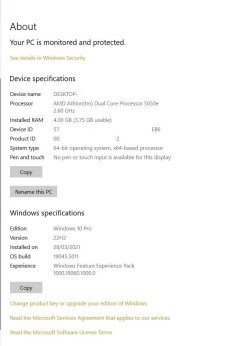
Please see images, Jelly states Enterprise, my PC System states Win 10 pro??
 

Attachments

  • Activation.jpg
    Activation.jpg
    20.6 KB · Views: 2
  • System.jpg
    System.jpg
    41.1 KB · Views: 2

My Computer My Computer

At a glance

Win10 ProRyzen5 4600g16Integrated
OS
Win10 Pro
Computer type
PC/Desktop
Manufacturer/Model
Custom
CPU
Ryzen5 4600g
Motherboard
Asus Tuf B550-Plus WiFi ll
Memory
16
Graphics Card(s)
Integrated
Sound Card
Integrated
Monitor(s) Displays
1
Hard Drives
2
PSU
Corsair 400w
Case
Cooler Master
Forget Jellybean, check the key with ShowKeyPlus


My Computers My Computers

  • At a glance

    Windows 11 WorkstationRyzen 9 5950XCorsair Vengeance RGB PRO Black 64GB (4x16GB)...ASUS AMD Radeon RX 6900 XT 16GB ROG Strix LC OC
    OS
    Windows 11 Workstation
    Computer type
    PC/Desktop
    Manufacturer/Model
    doofenshmirtz evil incorporated
    CPU
    Ryzen 9 5950X
    Motherboard
    Asus ROG Crosshair VIII Formula
    Memory
    Corsair Vengeance RGB PRO Black 64GB (4x16GB) 3600MHz AMD Ryzen Tuned DDR4
    Graphics Card(s)
    ASUS AMD Radeon RX 6900 XT 16GB ROG Strix LC OC
    Sound Card
    Sound BlasterX Katana
    Monitor(s) Displays
    3 x27" Dell U2724D & 1 x 34" Dell U3415W
    Hard Drives
    Samsung 980 Pro 1TB M.2 2280 PCI-e 4.0 x4 NVMe Solid State
    Drive
    PSU
    ASUS ROG THOR 850W 80 Plus Platinum
    Case
    ASUS ROG Strix Helios Midi-Tower ARGB Gaming Case
    Cooling
    ASUS ROG Strix LC Performance RGB AIO CPU Liquid Cooler - 360mm
    Keyboard
    Logi Ergo
    Mouse
    Logitech MX Vertical
    Internet Speed
    1000/200 Mbps
    Browser
    Chrome
    Antivirus
    Windows Defender, Malwarebytes Pro
    Other Info
    HP M281 Printer
    Logitech Brio Stream webcam
    Logitech G Yeti orb mic
  • At a glance

    Windows 11 ProSnapdragon X2 Plus64GB
    Operating System
    Windows 11 Pro
    Computer type
    Laptop
    Manufacturer/Model
    Surface Laptop
    CPU
    Snapdragon X2 Plus
    Memory
    64GB
    Monitor(s) Displays
    15"
  • Nothing to see here.
I don't see why you should have any problems as long as your OS is activated. As I mentioned a few post back, the MS Store upgraded my one computer from Windows 11 home to Windows 11 Enterprise. Not wanting to have trouble later and lose the money I spent, I called MS. The tech gave me the generic Pro key and told me to use that. And if if anyone wants to know, Yes the Enterprise version was activated.
Changing only the CPU or the RAM with the same motherboard would not require activation. But changing all three is essentially another computer, nothing remains the same apart from the disk,vso activation will be required. I would take a full backup before the upgrade, then do the upgrade and see what happens. I would then downgrade to Pro or Home and buy the respective key to activate.
 

My Computers My Computers

  • At a glance

    Windows 11 Pro 23H2 (5699), 25H2 (8875)Mobile DualCore Intel Core 2 Duo T7250, 2000 MHz4GBMobile Intel(R) GMA 4500M (Mobile 4 series)
    OS
    Windows 11 Pro 23H2 (5699), 25H2 (8875)
    Computer type
    Laptop
    Manufacturer/Model
    Acer Extensa 5630EZ
    CPU
    Mobile DualCore Intel Core 2 Duo T7250, 2000 MHz
    Motherboard
    Acer Extensa 5630
    Memory
    4GB
    Graphics Card(s)
    Mobile Intel(R) GMA 4500M (Mobile 4 series)
    Sound Card
    Realtek ALC268 @ Intel 82801IB ICH9 - High Definition Audio Controller
    Monitor(s) Displays
    1
    Screen Resolution
    1280x800
    Hard Drives
    Samsung SSD 850 EVO 250GB SATA Device (250 GB, SATA-III)
    Internet Speed
    VDSL 50 Mbps
    Browser
    MICROSOFT EDGE
    Antivirus
    WINDOWS DEFENDER
    Other Info
    Legacy MBR installation, no TPM, no Secure Boot, no WDDM 2.0 graphics drivers, no SSE4.2, cannot get more unsupported ;) This is only my test laptop. I had installed Windows 11 here before upgrading my main PC. For my main PC I use everyday see my 2nd system specs.
  • At a glance

    Windows 11 Pro v25H2 (build 26200.8875)Intel Core-i7 3770 3.40GHz s1155 (3rd generat...2x Kingston Hyper-X Blu 8GB DDR3-1600GIGABYTE GeForce RTX 3050 WINDFORCE OC V2 6GB...
    Operating System
    Windows 11 Pro v25H2 (build 26200.8875)
    Computer type
    PC/Desktop
    Manufacturer/Model
    Custom-built PC
    CPU
    Intel Core-i7 3770 3.40GHz s1155 (3rd generation)
    Motherboard
    Asus P8H61 s1155 ATX
    Memory
    2x Kingston Hyper-X Blu 8GB DDR3-1600
    Graphics card(s)
    GIGABYTE GeForce RTX 3050 WINDFORCE OC V2 6GB (GV-N3050WF2OCV2-6GD)
    Sound Card
    Realtek HD audio (ALC887)
    Monitor(s) Displays
    Sony Bravia KDL-19L4000 19" LCD TV via VGA
    Screen Resolution
    1440x900 32-bit 60Hz
    Hard Drives
    WD Blue SA510 2.5 1000GB SSD as system disk, Western Digital Caviar Purple 4TB SATA III (WD40PURZ) as second
    PSU
    Thermaltake Litepower RGB 550W Full Wired
    Case
    SUPERCASE MIDI-TOWER
    Cooling
    Deepcool Gamma Archer CPU cooler, 1x 8cm fan at the back
    Keyboard
    Mitsumi 101-key PS/2
    Mouse
    Sunnyline OptiEye PS/2
    Internet Speed
    100Mbps
    Browser
    Microsoft Edge, Mozilla Firefox
    Antivirus
    Microsoft Windows Defender
    Other Info
    Legacy BIOS (MBR) installation, no TPM, no Secure Boot, WDDM 3.0 graphics drivers, WEI score 7.4

My Computer My Computer

At a glance

Win10 ProRyzen5 4600g16Integrated
OS
Win10 Pro
Computer type
PC/Desktop
Manufacturer/Model
Custom
CPU
Ryzen5 4600g
Motherboard
Asus Tuf B550-Plus WiFi ll
Memory
16
Graphics Card(s)
Integrated
Sound Card
Integrated
Monitor(s) Displays
1
Hard Drives
2
PSU
Corsair 400w
Case
Cooler Master
Changing only the CPU or the RAM with the same motherboard would not require activation. But changing all three is essentially another computer, nothing remains the same apart from the disk,vso activation will be required. I would take a full backup before the upgrade, then do the upgrade and see what happens. I would then downgrade to Pro or Home and buy the respective key to activate.
Yes I agree, its a new/another PC for all purposes, so yes will take a system image then take it from there.

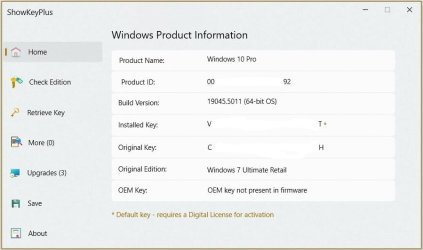
Just used the above app, see image and the two above, note the little gold asterisk next to installed key and then what it means, what does it mean? my Win OS operates ok I'm assuming it is activated after all this time.
 

Attachments

  • System Spec 2.jpg
    System Spec 2.jpg
    34 KB · Views: 9

My Computer My Computer

At a glance

Win10 ProRyzen5 4600g16Integrated
OS
Win10 Pro
Computer type
PC/Desktop
Manufacturer/Model
Custom
CPU
Ryzen5 4600g
Motherboard
Asus Tuf B550-Plus WiFi ll
Memory
16
Graphics Card(s)
Integrated
Sound Card
Integrated
Monitor(s) Displays
1
Hard Drives
2
PSU
Corsair 400w
Case
Cooler Master
To make sure, Settings, System, Activation
 

My Computers My Computers

  • At a glance

    Windows 11 Pro 23H2 (5699), 25H2 (8875)Mobile DualCore Intel Core 2 Duo T7250, 2000 MHz4GBMobile Intel(R) GMA 4500M (Mobile 4 series)
    OS
    Windows 11 Pro 23H2 (5699), 25H2 (8875)
    Computer type
    Laptop
    Manufacturer/Model
    Acer Extensa 5630EZ
    CPU
    Mobile DualCore Intel Core 2 Duo T7250, 2000 MHz
    Motherboard
    Acer Extensa 5630
    Memory
    4GB
    Graphics Card(s)
    Mobile Intel(R) GMA 4500M (Mobile 4 series)
    Sound Card
    Realtek ALC268 @ Intel 82801IB ICH9 - High Definition Audio Controller
    Monitor(s) Displays
    1
    Screen Resolution
    1280x800
    Hard Drives
    Samsung SSD 850 EVO 250GB SATA Device (250 GB, SATA-III)
    Internet Speed
    VDSL 50 Mbps
    Browser
    MICROSOFT EDGE
    Antivirus
    WINDOWS DEFENDER
    Other Info
    Legacy MBR installation, no TPM, no Secure Boot, no WDDM 2.0 graphics drivers, no SSE4.2, cannot get more unsupported ;) This is only my test laptop. I had installed Windows 11 here before upgrading my main PC. For my main PC I use everyday see my 2nd system specs.
  • At a glance

    Windows 11 Pro v25H2 (build 26200.8875)Intel Core-i7 3770 3.40GHz s1155 (3rd generat...2x Kingston Hyper-X Blu 8GB DDR3-1600GIGABYTE GeForce RTX 3050 WINDFORCE OC V2 6GB...
    Operating System
    Windows 11 Pro v25H2 (build 26200.8875)
    Computer type
    PC/Desktop
    Manufacturer/Model
    Custom-built PC
    CPU
    Intel Core-i7 3770 3.40GHz s1155 (3rd generation)
    Motherboard
    Asus P8H61 s1155 ATX
    Memory
    2x Kingston Hyper-X Blu 8GB DDR3-1600
    Graphics card(s)
    GIGABYTE GeForce RTX 3050 WINDFORCE OC V2 6GB (GV-N3050WF2OCV2-6GD)
    Sound Card
    Realtek HD audio (ALC887)
    Monitor(s) Displays
    Sony Bravia KDL-19L4000 19" LCD TV via VGA
    Screen Resolution
    1440x900 32-bit 60Hz
    Hard Drives
    WD Blue SA510 2.5 1000GB SSD as system disk, Western Digital Caviar Purple 4TB SATA III (WD40PURZ) as second
    PSU
    Thermaltake Litepower RGB 550W Full Wired
    Case
    SUPERCASE MIDI-TOWER
    Cooling
    Deepcool Gamma Archer CPU cooler, 1x 8cm fan at the back
    Keyboard
    Mitsumi 101-key PS/2
    Mouse
    Sunnyline OptiEye PS/2
    Internet Speed
    100Mbps
    Browser
    Microsoft Edge, Mozilla Firefox
    Antivirus
    Microsoft Windows Defender
    Other Info
    Legacy BIOS (MBR) installation, no TPM, no Secure Boot, WDDM 3.0 graphics drivers, WEI score 7.4
To make sure, Settings, System, Activation
So Window 10 Pro is installed and activated, so should I need to reactivate after I rebuild, ( and and I won't know until I re-install my SSD with the existing OS ), but if I have to-- do I use the Win 10 key I have or the original Win 7 Ultimate key?
 

Attachments

  • System 3.jpg
    System 3.jpg
    46.2 KB · Views: 3

My Computer My Computer

At a glance

Win10 ProRyzen5 4600g16Integrated
OS
Win10 Pro
Computer type
PC/Desktop
Manufacturer/Model
Custom
CPU
Ryzen5 4600g
Motherboard
Asus Tuf B550-Plus WiFi ll
Memory
16
Graphics Card(s)
Integrated
Sound Card
Integrated
Monitor(s) Displays
1
Hard Drives
2
PSU
Corsair 400w
Case
Cooler Master
What you need is the installed key. The original key is just shown as info.
 

My Computers My Computers

  • At a glance

    Windows 11 Pro 23H2 (5699), 25H2 (8875)Mobile DualCore Intel Core 2 Duo T7250, 2000 MHz4GBMobile Intel(R) GMA 4500M (Mobile 4 series)
    OS
    Windows 11 Pro 23H2 (5699), 25H2 (8875)
    Computer type
    Laptop
    Manufacturer/Model
    Acer Extensa 5630EZ
    CPU
    Mobile DualCore Intel Core 2 Duo T7250, 2000 MHz
    Motherboard
    Acer Extensa 5630
    Memory
    4GB
    Graphics Card(s)
    Mobile Intel(R) GMA 4500M (Mobile 4 series)
    Sound Card
    Realtek ALC268 @ Intel 82801IB ICH9 - High Definition Audio Controller
    Monitor(s) Displays
    1
    Screen Resolution
    1280x800
    Hard Drives
    Samsung SSD 850 EVO 250GB SATA Device (250 GB, SATA-III)
    Internet Speed
    VDSL 50 Mbps
    Browser
    MICROSOFT EDGE
    Antivirus
    WINDOWS DEFENDER
    Other Info
    Legacy MBR installation, no TPM, no Secure Boot, no WDDM 2.0 graphics drivers, no SSE4.2, cannot get more unsupported ;) This is only my test laptop. I had installed Windows 11 here before upgrading my main PC. For my main PC I use everyday see my 2nd system specs.
  • At a glance

    Windows 11 Pro v25H2 (build 26200.8875)Intel Core-i7 3770 3.40GHz s1155 (3rd generat...2x Kingston Hyper-X Blu 8GB DDR3-1600GIGABYTE GeForce RTX 3050 WINDFORCE OC V2 6GB...
    Operating System
    Windows 11 Pro v25H2 (build 26200.8875)
    Computer type
    PC/Desktop
    Manufacturer/Model
    Custom-built PC
    CPU
    Intel Core-i7 3770 3.40GHz s1155 (3rd generation)
    Motherboard
    Asus P8H61 s1155 ATX
    Memory
    2x Kingston Hyper-X Blu 8GB DDR3-1600
    Graphics card(s)
    GIGABYTE GeForce RTX 3050 WINDFORCE OC V2 6GB (GV-N3050WF2OCV2-6GD)
    Sound Card
    Realtek HD audio (ALC887)
    Monitor(s) Displays
    Sony Bravia KDL-19L4000 19" LCD TV via VGA
    Screen Resolution
    1440x900 32-bit 60Hz
    Hard Drives
    WD Blue SA510 2.5 1000GB SSD as system disk, Western Digital Caviar Purple 4TB SATA III (WD40PURZ) as second
    PSU
    Thermaltake Litepower RGB 550W Full Wired
    Case
    SUPERCASE MIDI-TOWER
    Cooling
    Deepcool Gamma Archer CPU cooler, 1x 8cm fan at the back
    Keyboard
    Mitsumi 101-key PS/2
    Mouse
    Sunnyline OptiEye PS/2
    Internet Speed
    100Mbps
    Browser
    Microsoft Edge, Mozilla Firefox
    Antivirus
    Microsoft Windows Defender
    Other Info
    Legacy BIOS (MBR) installation, no TPM, no Secure Boot, WDDM 3.0 graphics drivers, WEI score 7.4
As the current Win 10 Pro came from a Win 7 Ultimate free upgrade, I don't think it will be possible to transfer the activation to the new computer. There are some sites that sell Win 10 pro very cheap.

PS.: As you bought a new MB it should have a M.2 slot for NVMe SSD. I don't know what you're planing to transfer from the old computer but a NVMe SSD can be 10 times faster than a 2.5"SSD
 

My Computers My Computers

  • At a glance

    Windows 11 Pro - Windows 7 HP 64 - Lubuntui5 6600K - 800MHz to 4400MHz4+4G GSkill DDR4 3000IG - Intel 530
    OS
    Windows 11 Pro - Windows 7 HP 64 - Lubuntu
    Computer type
    PC/Desktop
    Manufacturer/Model
    custom build
    CPU
    i5 6600K - 800MHz to 4400MHz
    Motherboard
    GA-Z170-HD3P
    Memory
    4+4G GSkill DDR4 3000
    Graphics Card(s)
    IG - Intel 530
    Monitor(s) Displays
    Samsung 226BW
    Screen Resolution
    1680x1050
    Hard Drives
    (1) -1 SM951 – 128GB M.2 AHCI PCIe SSD drive for Win 11
    (2) -1 WD SATA 3 - 1T for Data
    (3) -1 WD SATA 3 - 1T for backup
    (4) -1 BX500 SSD - 256G for Windows 7 and Lubuntu
    PSU
    Thermaltake 450W TR2 gold
    Keyboard
    Old and good Chicony mechanical keyboard
    Mouse
    Logitech mX performance - 9 buttons (had to disable some)
    Internet Speed
    500 Mb/s
    Browser
    Firefox 64
  • At a glance

    Windows 11 Proi7-4500U 800- 3000MHz(4+4)G DDR3 1600IG intel 4400 + NVIDIA GeForce GT 745M
    Operating System
    Windows 11 Pro
    Computer type
    Laptop
    Manufacturer/Model
    Asus Q550LF
    CPU
    i7-4500U 800- 3000MHz
    Motherboard
    Asus Q550LF
    Memory
    (4+4)G DDR3 1600
    Graphics card(s)
    IG intel 4400 + NVIDIA GeForce GT 745M
    Sound Card
    Realtek
    Monitor(s) Displays
    LG Display LP156WF4-SPH1
    Screen Resolution
    1920 x 1080
    Hard Drives
    BX500 120G SSD for Windows and programs
    & 1T HDD for data
    Internet Speed
    500 Mb/s
    Browser
    Firefox 64
As the current Win 10 Pro came from a Win 7 Ultimate free upgrade, I don't think it will be possible to transfer the activation to the new computer. There are some sites that sell Win 10 pro very cheap.

PS.: As you bought a new MB it should have a M.2 slot for NVMe SSD. I don't know what you're planing to transfer from the old computer but a NVMe SSD can be 10 times faster than a 2.5"SSD
Thanks, Win 7 Ultimate wasn't a free upgrade I purchased a legit retail copy with its activation key, I upgraded from it to Win 10 Pro.

I don't know a lot about M.2 and NVMe accept it's fast/er but I was on a budget, I have my SSDs so to keep costs down I utilised as much as I could from my existing PC which admittedly isn't much, ( case/psu/fans/SSDs, ), my existing PC build is that old.

My PC was always intended to be a home/office affair and has served me well but was compelled to upgrade PC hardware if I wanted to upgrade to Win 11 and hopefully Win 12 if it arrives.
 

My Computer My Computer

At a glance

Win10 ProRyzen5 4600g16Integrated
OS
Win10 Pro
Computer type
PC/Desktop
Manufacturer/Model
Custom
CPU
Ryzen5 4600g
Motherboard
Asus Tuf B550-Plus WiFi ll
Memory
16
Graphics Card(s)
Integrated
Sound Card
Integrated
Monitor(s) Displays
1
Hard Drives
2
PSU
Corsair 400w
Case
Cooler Master
For simple office use you won't notice any difference from SATA to NVMe. That said, if your old motherboard had SATA II and your new has SATA III you will see a difference anyway. One step at a time. First from SATA II to SATA III and later to NVMe.
 

My Computers My Computers

  • At a glance

    Windows 11 Pro 23H2 (5699), 25H2 (8875)Mobile DualCore Intel Core 2 Duo T7250, 2000 MHz4GBMobile Intel(R) GMA 4500M (Mobile 4 series)
    OS
    Windows 11 Pro 23H2 (5699), 25H2 (8875)
    Computer type
    Laptop
    Manufacturer/Model
    Acer Extensa 5630EZ
    CPU
    Mobile DualCore Intel Core 2 Duo T7250, 2000 MHz
    Motherboard
    Acer Extensa 5630
    Memory
    4GB
    Graphics Card(s)
    Mobile Intel(R) GMA 4500M (Mobile 4 series)
    Sound Card
    Realtek ALC268 @ Intel 82801IB ICH9 - High Definition Audio Controller
    Monitor(s) Displays
    1
    Screen Resolution
    1280x800
    Hard Drives
    Samsung SSD 850 EVO 250GB SATA Device (250 GB, SATA-III)
    Internet Speed
    VDSL 50 Mbps
    Browser
    MICROSOFT EDGE
    Antivirus
    WINDOWS DEFENDER
    Other Info
    Legacy MBR installation, no TPM, no Secure Boot, no WDDM 2.0 graphics drivers, no SSE4.2, cannot get more unsupported ;) This is only my test laptop. I had installed Windows 11 here before upgrading my main PC. For my main PC I use everyday see my 2nd system specs.
  • At a glance

    Windows 11 Pro v25H2 (build 26200.8875)Intel Core-i7 3770 3.40GHz s1155 (3rd generat...2x Kingston Hyper-X Blu 8GB DDR3-1600GIGABYTE GeForce RTX 3050 WINDFORCE OC V2 6GB...
    Operating System
    Windows 11 Pro v25H2 (build 26200.8875)
    Computer type
    PC/Desktop
    Manufacturer/Model
    Custom-built PC
    CPU
    Intel Core-i7 3770 3.40GHz s1155 (3rd generation)
    Motherboard
    Asus P8H61 s1155 ATX
    Memory
    2x Kingston Hyper-X Blu 8GB DDR3-1600
    Graphics card(s)
    GIGABYTE GeForce RTX 3050 WINDFORCE OC V2 6GB (GV-N3050WF2OCV2-6GD)
    Sound Card
    Realtek HD audio (ALC887)
    Monitor(s) Displays
    Sony Bravia KDL-19L4000 19" LCD TV via VGA
    Screen Resolution
    1440x900 32-bit 60Hz
    Hard Drives
    WD Blue SA510 2.5 1000GB SSD as system disk, Western Digital Caviar Purple 4TB SATA III (WD40PURZ) as second
    PSU
    Thermaltake Litepower RGB 550W Full Wired
    Case
    SUPERCASE MIDI-TOWER
    Cooling
    Deepcool Gamma Archer CPU cooler, 1x 8cm fan at the back
    Keyboard
    Mitsumi 101-key PS/2
    Mouse
    Sunnyline OptiEye PS/2
    Internet Speed
    100Mbps
    Browser
    Microsoft Edge, Mozilla Firefox
    Antivirus
    Microsoft Windows Defender
    Other Info
    Legacy BIOS (MBR) installation, no TPM, no Secure Boot, WDDM 3.0 graphics drivers, WEI score 7.4
Thanks, Win 7 Ultimate wasn't a free upgrade I purchased a legit retail copy with its activation key, I upgraded from it to Win 10 Pro.
What I meant is that you upgrade from Win 7 Ultimate to Win 10 (free upgrade).
I don't know a lot about M.2 and NVMe accept it's fast/er but I was on a budget, I have my SSDs so to keep costs down I utilised as much as I could from my existing PC which admittedly isn't much, ( case/psu/fans/SSDs, ), my existing PC build is that old.

My PC was always intended to be a home/office affair and has served me well but was compelled to upgrade PC hardware if I wanted to upgrade to Win 11 and hopefully Win 12 if it arrives.
What are the specs of the computer you're upgrading?
Is the Ryzen5 4600g + Asus Tuf B550-Plus WiFi ll?
As you intended to be a home/office computer, why don't you upgrade the current to Win 11.
My computer is 8 years old (Intel 6th gen) and my wife's is 13 years old (Intel 2nd gen) and both are running Win 11 very well.
 

My Computers My Computers

  • At a glance

    Windows 11 Pro - Windows 7 HP 64 - Lubuntui5 6600K - 800MHz to 4400MHz4+4G GSkill DDR4 3000IG - Intel 530
    OS
    Windows 11 Pro - Windows 7 HP 64 - Lubuntu
    Computer type
    PC/Desktop
    Manufacturer/Model
    custom build
    CPU
    i5 6600K - 800MHz to 4400MHz
    Motherboard
    GA-Z170-HD3P
    Memory
    4+4G GSkill DDR4 3000
    Graphics Card(s)
    IG - Intel 530
    Monitor(s) Displays
    Samsung 226BW
    Screen Resolution
    1680x1050
    Hard Drives
    (1) -1 SM951 – 128GB M.2 AHCI PCIe SSD drive for Win 11
    (2) -1 WD SATA 3 - 1T for Data
    (3) -1 WD SATA 3 - 1T for backup
    (4) -1 BX500 SSD - 256G for Windows 7 and Lubuntu
    PSU
    Thermaltake 450W TR2 gold
    Keyboard
    Old and good Chicony mechanical keyboard
    Mouse
    Logitech mX performance - 9 buttons (had to disable some)
    Internet Speed
    500 Mb/s
    Browser
    Firefox 64
  • At a glance

    Windows 11 Proi7-4500U 800- 3000MHz(4+4)G DDR3 1600IG intel 4400 + NVIDIA GeForce GT 745M
    Operating System
    Windows 11 Pro
    Computer type
    Laptop
    Manufacturer/Model
    Asus Q550LF
    CPU
    i7-4500U 800- 3000MHz
    Motherboard
    Asus Q550LF
    Memory
    (4+4)G DDR3 1600
    Graphics card(s)
    IG intel 4400 + NVIDIA GeForce GT 745M
    Sound Card
    Realtek
    Monitor(s) Displays
    LG Display LP156WF4-SPH1
    Screen Resolution
    1920 x 1080
    Hard Drives
    BX500 120G SSD for Windows and programs
    & 1T HDD for data
    Internet Speed
    500 Mb/s
    Browser
    Firefox 64
For simple office use you won't notice any difference from SATA to NVMe. That said, if your old motherboard had SATA II and your new has SATA III you will see a difference anyway. One step at a time. First from SATA II to SATA III and later to NVMe.
The existing board is an Asus M3A78-EM, said it was old with a5050e Athlon CPU.

I just checked the specs on line and it has 5 x SATA 3 slots, two of which are used by both my SSDs.

As I said in an earlier post I was astounded to find it only had 4gb of DDR 3 ram on board for all those years and the PC ran ok for me and did what I wanted.

My new MB will have Ryzen 4600g cpu and 16gb of DDR 4, anything purchased will be faster then my existing setup but it's a home/office PC, speed is not my uppermost requirement, reliable components are.
 
Last edited:

My Computer My Computer

At a glance

Win10 ProRyzen5 4600g16Integrated
OS
Win10 Pro
Computer type
PC/Desktop
Manufacturer/Model
Custom
CPU
Ryzen5 4600g
Motherboard
Asus Tuf B550-Plus WiFi ll
Memory
16
Graphics Card(s)
Integrated
Sound Card
Integrated
Monitor(s) Displays
1
Hard Drives
2
PSU
Corsair 400w
Case
Cooler Master
What I meant is that you upgrade from Win 7 Ultimate to Win 10 (free upgrade).

What are the specs of the computer you're upgrading?
Is the Ryzen5 4600g + Asus Tuf B550-Plus WiFi ll
?
As you intended to be a home/office computer, why don't you upgrade the current to Win 11.
My computer is 8 years old (Intel 6th gen) and my wife's is 13 years old (Intel 2nd gen) and both are running Win 11 very well.
Hieroglyphs, it's that old.

Yes it is, I have everything but the Motherboard which will arrive tomorrow.

I will be upgrading to Win 11 soon hence the rebuild. :-)
 

My Computer My Computer

At a glance

Win10 ProRyzen5 4600g16Integrated
OS
Win10 Pro
Computer type
PC/Desktop
Manufacturer/Model
Custom
CPU
Ryzen5 4600g
Motherboard
Asus Tuf B550-Plus WiFi ll
Memory
16
Graphics Card(s)
Integrated
Sound Card
Integrated
Monitor(s) Displays
1
Hard Drives
2
PSU
Corsair 400w
Case
Cooler Master
Changing only the CPU or the RAM with the same motherboard would not require activation. But changing all three is essentially another computer,
When it comes to the OS being moved to a new computer, Windows is way more forgiving then it use too be. I have swapped drives from my old computers to my new computers and I kept everything including the activation.
I would take a full backup before the upgrade, then do the upgrade and see what happens.
Always a good idea to make backups before making any major changes.
I would then downgrade to Pro or Home and buy the respective key to activate.
I would make the backup then try using the generic key to see if it will switch to an activated Pro build before doing anything else. If it doesn't work then a new Pro key will be needed.
 

My Computers My Computers

  • At a glance

    Windows 11 Pro 25H2Intel Core i7-10700K16GB (8GB PC4-19200 DDR4 SDRAM x2)NVIDIA GeForce GTX 1050 TI
    OS
    Windows 11 Pro 25H2
    Computer type
    PC/Desktop
    Manufacturer/Model
    PowerSpec B746
    CPU
    Intel Core i7-10700K
    Motherboard
    ASRock Z490 Phantom Gaming 4/ax
    Memory
    16GB (8GB PC4-19200 DDR4 SDRAM x2)
    Graphics Card(s)
    NVIDIA GeForce GTX 1050 TI
    Sound Card
    Realtek Audio
    Monitor(s) Displays
    #1. LG ULTRAWIDE 34" #2. AOC Q32G2WG3 32"
    Screen Resolution
    #1. 3440 X 1440 #2. 1920 x 1080
    Hard Drives
    NVMe WDC WDS100T2B0C-00PXH0 1TB
    Samsung SSD 860 EVO 1TB
    PSU
    750 Watts (62.5A)
    Case
    PowerSpec/Lian Li ATX 205
    Keyboard
    Logitech K270
    Mouse
    Logitech M185
    Browser
    Microsoft Edge and Firefox
    Antivirus
    Webroot SecureAnywhere CE 26.1
  • At a glance

    Windows 11 Canary ChannelIntel Core i5-8400 CPU @ 2.80GHz16 MB DDR 4-2666
    Operating System
    Windows 11 Canary Channel
    Computer type
    PC/Desktop
    Manufacturer/Model
    PowerSpec G156
    CPU
    Intel Core i5-8400 CPU @ 2.80GHz
    Motherboard
    AsusTeK Prime B360M-A
    Memory
    16 MB DDR 4-2666
    Monitor(s) Displays
    23" Speptre HDMI 75Hz
    Screen Resolution
    1920x1080
    Hard Drives
    Samsung 970 EVO 500GB NVMe
    Keyboard
    Logitek K270
    Mouse
    Logitek M185
    Browser
    Firefox, Edge and Edge Canary
    Antivirus
    Windows Defender
Just used the above app, see image and the two above, note the little gold asterisk next to installed key and then what it means, what does it mean? my Win OS operates ok I'm assuming it is activated after all this time.
From the way I'm reading it is that your OS is not activated and you do need a legit Pro key to activate it.
It looks to me like your two screen shots are contradicting each other.
 
Last edited:

My Computers My Computers

  • At a glance

    Windows 11 Pro 25H2Intel Core i7-10700K16GB (8GB PC4-19200 DDR4 SDRAM x2)NVIDIA GeForce GTX 1050 TI
    OS
    Windows 11 Pro 25H2
    Computer type
    PC/Desktop
    Manufacturer/Model
    PowerSpec B746
    CPU
    Intel Core i7-10700K
    Motherboard
    ASRock Z490 Phantom Gaming 4/ax
    Memory
    16GB (8GB PC4-19200 DDR4 SDRAM x2)
    Graphics Card(s)
    NVIDIA GeForce GTX 1050 TI
    Sound Card
    Realtek Audio
    Monitor(s) Displays
    #1. LG ULTRAWIDE 34" #2. AOC Q32G2WG3 32"
    Screen Resolution
    #1. 3440 X 1440 #2. 1920 x 1080
    Hard Drives
    NVMe WDC WDS100T2B0C-00PXH0 1TB
    Samsung SSD 860 EVO 1TB
    PSU
    750 Watts (62.5A)
    Case
    PowerSpec/Lian Li ATX 205
    Keyboard
    Logitech K270
    Mouse
    Logitech M185
    Browser
    Microsoft Edge and Firefox
    Antivirus
    Webroot SecureAnywhere CE 26.1
  • At a glance

    Windows 11 Canary ChannelIntel Core i5-8400 CPU @ 2.80GHz16 MB DDR 4-2666
    Operating System
    Windows 11 Canary Channel
    Computer type
    PC/Desktop
    Manufacturer/Model
    PowerSpec G156
    CPU
    Intel Core i5-8400 CPU @ 2.80GHz
    Motherboard
    AsusTeK Prime B360M-A
    Memory
    16 MB DDR 4-2666
    Monitor(s) Displays
    23" Speptre HDMI 75Hz
    Screen Resolution
    1920x1080
    Hard Drives
    Samsung 970 EVO 500GB NVMe
    Keyboard
    Logitek K270
    Mouse
    Logitek M185
    Browser
    Firefox, Edge and Edge Canary
    Antivirus
    Windows Defender
Just used the above app, see image and the two above, note the little gold asterisk next to installed key and then what it means, what does it mean? my Win OS operates ok I'm assuming it is activated after all this time.
system-spec-2-jpg.113694


You didn't need to mask the key with the asterisk, it's the generic Pro key VK7JG-NPHTM-C97JM-9MPGT-3V66T. All my Win10 Pro and Win11 Pro machines have that one. Generic keys cannot activate Windows on their own, your PC will only activate if it has an existing digital licence linked to its hardware ID and stored on the Microsoft activation servers.

Your screenshot in post #29 shows that your PC is activated with a digital licence. Changing the motherboard will change the hardware ID and loose that activation. To transfer you digital licence from the old machine to the new build, first switch to signing in with your Microsoft account on the old machine (if you do not already do so). If you are lucky, when you first sign in with your MS account on the new build it may activate. If not, run the Activation Troubleshooter, click on 'I recently changed hardware on this device', then it will ask you to sign into your MS account and tell it which of the PCs listed in your account was the one with the old hardware.

can-reactivate-windows-servers-available-png.83912

My PC is activated with my ms account, but it has disappeared from the list on line management of devices - post #20
 

My Computers My Computers

  • At a glance

    Windows 11 HomeAMD Athlon Silver 3050U8GBRadeon Graphics
    OS
    Windows 11 Home
    Computer type
    Laptop
    Manufacturer/Model
    Acer Aspire 3 A315-23-R9VY
    CPU
    AMD Athlon Silver 3050U
    Memory
    8GB
    Graphics Card(s)
    Radeon Graphics
    Monitor(s) Displays
    laptop screen
    Screen Resolution
    1366x768 native resolution, up to 2560x1440 with Radeon Virtual Super Resolution
    Hard Drives
    1TB Samsung EVO 870 SSD (from April 2026: 250GB EVO 850)
    Internet Speed
    150 Mbps
    Browser
    Edge, Firefox
    Antivirus
    Defender
    Other Info
    UPDATE - 11 April 2026: due to lid hinges starting to break up this laptop has been retired from active duty. The OS with all software and files has been migrated to my System Seven in 'Other systems' to carry on as my general purpose 'main machine'.

    I've now clean installed 25H2 and used Garlin's scripts to update Secure Boot to CA 2023 and revoke the PCA 2011 certificates. It's new role is to test secure boot issues.

    Info for 2021-2026:
    fully 'Windows 11 ready' laptop. Windows 10 C: partition migrated from my old unsupported 'main machine' then upgraded to 11. A test migration ran Insider builds for 2 months. When 11 was released on 5th October 2021 it was re-imaged back to 10 and was offered the upgrade in Windows Update on 20th October. Windows Update offered the 22H2 Feature Update on 20th September 2022. It got the 23H2 Feature Update on 4th November 2023 through Windows Update, 24H2 on 3rd October 2024 through Windows Update by setting the Target Release Version for 24H2, and 25H2 on 30th September 2025 through Windows Update by setting the Target Release Version for 25H2.
  • At a glance

    Windows 11 ProIntel® Core™ i5-520M8GB(integrated graphics) Intel HD Graphics
    Operating System
    Windows 11 Pro
    Computer type
    Laptop
    Manufacturer/Model
    Dell Latitude E4310
    CPU
    Intel® Core™ i5-520M
    Motherboard
    0T6M8G
    Memory
    8GB
    Graphics card(s)
    (integrated graphics) Intel HD Graphics
    Screen Resolution
    1366x768
    Hard Drives
    500GB Crucial MX500 SSD
    Browser
    Firefox, Edge
    Antivirus
    Defender
    Other Info
    unsupported machine: Legacy bios, MBR, TPM 1.2, upgraded from W10 to W11 using W10/W11 hybrid install media workaround.

    In-place upgrade to 22H2 using ISO and a workaround.
    Feature Update to 23H2 by manually installing the Enablement Package.
    In-place upgrade to 24H2 using hybrid 23H2/24H2 install media.
    Upgraded to 25H2 by Enablement Package.

    Also running Insider Dev, and Canary builds and Windows 10 as native boot .vhdx.
  • My SYSTEM THREE is a Dell Latitude 5410, i7-10610U, 32GB RAM, 512GB NVMe ssd, supported device running Windows 11 Pro.

    My SYSTEM FOUR was a 2-in-1 convertible Lenovo Yoga 11e (1st gen) type 20DA, Celeron N2930, 8GB RAM, 256GB ssd. Unsupported device. This has now been sold. It has been replaced by my System Eight.

    My SYSTEM FIVE is a Dell Latitude 3190 2-in-1, Pentium Silver N5030, 8GB RAM, 1TB NVMe ssd, supported device running Windows 11 Pro, plus Insider Beta, Dev, and Canary builds (and a few others) as a native boot .vhdx.

    My SYSTEM SIX is a Dell Latitude 5550, Core Ultra 7 165H, 64GB RAM, 1TB NVMe SSD, supported device, Windows 11 Pro 24H2, Hyper-V host machine. Updated to 25H2 on 30th September 2025.

    My SYSTEM SEVEN is a Lenovo Thinkpad T580, Intel Core i7-8650U, 16GB RAM, 512GB NVMe SSD + 2nd 512GB NVMe SSD, a supported device for Windows 11. This is my current general purpose 'main machine'. The installed Windows 11 Home from my System One has been migrated to this machine.

    My SYSTEM EIGHT is a 2-in-1 convertible Lenovo Yoga 11e (5th gen) type 20LN, Celeron N4120, 8GB RAM, 512GB NVMe ssd, a supported device for Windows 11. Currently running Windows 11 Pro, plus Insider Dev, Beta, and Canary builds as native boot vhdx.
You didn't need to mask the key with the asterisk, it's the generic Pro key VK7JG-NPHTM-C97JM-9MPGT-3V66T. All my Win10 Pro and Win11 Pro machines have that one. Generic keys cannot activate Windows on their own, your PC will only activate if it has an existing digital licence linked to its hardware ID and stored on the Microsoft activation servers.

Your screenshot in post #29 shows that your PC is activated with a digital licence. Changing the motherboard will change the hardware ID and loose that activation. To transfer you digital licence from the old machine to the new build, first switch to signing in with your Microsoft account on the old machine (if you do not already do so). If you are lucky, when you first sign in with your MS account on the new build it may activate. If not, run the Activation Troubleshooter, click on 'I recently changed hardware on this device', then it will ask you to sign into your MS account and tell it which of the PCs listed in your account was the one with the old hardware.
I was being unnecessarily cautious then.

Can I check what will be my old hardware is listed in my MS account?

Thanks for the advise. :-)
 
Last edited:

My Computer My Computer

At a glance

Win10 ProRyzen5 4600g16Integrated
OS
Win10 Pro
Computer type
PC/Desktop
Manufacturer/Model
Custom
CPU
Ryzen5 4600g
Motherboard
Asus Tuf B550-Plus WiFi ll
Memory
16
Graphics Card(s)
Integrated
Sound Card
Integrated
Monitor(s) Displays
1
Hard Drives
2
PSU
Corsair 400w
Case
Cooler Master
Back
Top Bottom